Webinars: A complete guide with examples

Gathering online is a popular way to connect with a wider community that defies geography.

That’s true whether you’re chatting in Slack with coworkers, tuning in for a live stream, or attending an online event or webinar.

The pandemic accelerated the shift to online events. They’re still going strong and are more common now than ever.

One of these online events is especially relevant to brands and marketers – the webinar.

What is a webinar? How do you set one up and host it? What are some successful examples of webinars? It’s all in this guide.

What is a webinar?

A webinar is a seminar that occurs online. (Web + seminar = webinar.)

When you think of an in-person seminar or conference, you probably picture many speakers presenting industry news, innovations, and education in front of a live audience.

A webinar is pretty much the same, but it all plays out online, synchronously.

  • The audience watches live speakers and presentations on a particular theme or topic from the comfort of their own homes. 
  • During and after the presentations, the audience can participate in ways unique to webinars, such as asking the presenter questions, chatting with other viewers worldwide, or even collaborating with the presenter through interactive elements like surveys or polls.
  • Some brands record their webinars and repurpose the content, including offering replays for people who couldn’t attend live. 

What are the benefits of hosting a webinar?

There are a lot of reasons to add webinars to your brand repertoire. When done well, they can help you reap all of these benefits:

  • Build audience trust: Webinars represent a big opportunity to demonstrate your expertise and build trust through direct interactions with your audience.
  • Attract new leads: Online events are a draw for lots of people, and with a little promotion, new leads will find your webinar and sign up.
  • Create buzz around your brand: Online events like webinars are great for generating talk and buzz around the host: your brand.
  • Demonstrate your products/services: Webinars represent a chance to demonstrate how your relevant products/services work to an engaged audience.
  • Increase conversions: Demonstrating your expertise and knowledge and building trust through webinars can convert more leads to customers.

Ultimately, a well-crafted, well-produced webinar can bring ideal buyers straight to your virtual doorstep.

  • Webinars are the most popular type of content for B2B professionals, according to DemandGen’s Content Preferences Study. 
  • 91% said they prefer webinars over articles, whitepapers, and blog posts, according to a BrightTALK survey.
  • Webinars are a great idea for brands in most verticals, especially those in financial services, consulting, SaaS, and pharmaceuticals (the industry with the highest attendance rate).
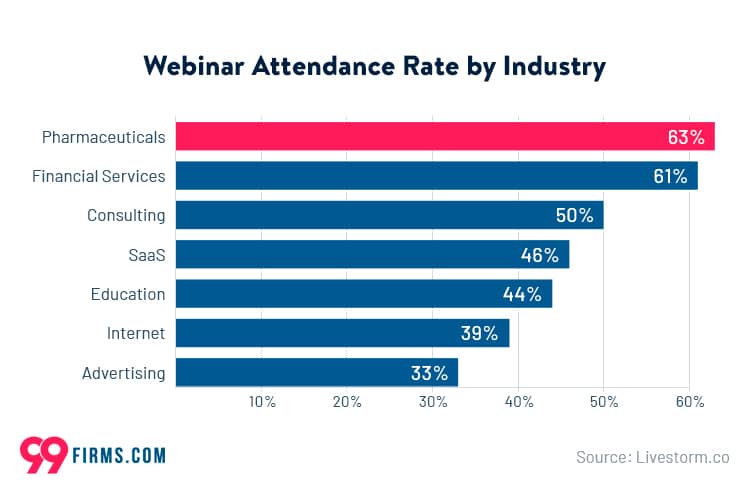
Webinar attendance rate by industry
Source: 99firms

Get the daily newsletter search marketers rely on.

<input type="hidden" name="utmMedium" value="“>
<input type="hidden" name="utmCampaign" value="“>
<input type="hidden" name="utmSource" value="“>
<input type="hidden" name="utmContent" value="“>
<input type="hidden" name="pageLink" value="“>
<input type="hidden" name="ipAddress" value="“>

Processing…Please wait.

function getCookie(cname) {
let name = cname + “=”;
let decodedCookie = decodeURIComponent(document.cookie);
let ca = decodedCookie.split(‘;’);
for(let i = 0; i <ca.length; i++) {
let c = ca[i];
while (c.charAt(0) == ' ') {
c = c.substring(1);
}
if (c.indexOf(name) == 0) {
return c.substring(name.length, c.length);
}
}
return "";
}
document.getElementById('munchkinCookieInline').value = getCookie('_mkto_trk');


Best practices for putting together and hosting a webinar

If you’re interested in hosting a webinar or adding a weekly or monthly webinar series to your content lineup, consider these best practices.

1. Use the right webinar technology

You can’t run a smooth webinar without software.

Thankfully, there are many good webinar platforms with the right features for your needs at almost every price point. 

Generally, you’ll want to consider your budget, how many attendees you want to have the capacity for, recording options (for repurposing webinar content later), and interactive options (like live surveys and polls during presentations).

Here are a few webinar software options to start:

  • Zoom: Everyone’s favorite (or not) meeting software can also host your larger webinars. It includes tracking and reporting, CRM integration, and interactive features like chatting and reactions.
  • GoToWebinar: This option has a robust set of features for planning, promoting, designing, presenting, and analyzing your webinar.
  • eWebinar: If you’d rather host an evergreen webinar (one that plays on-demand but still has some live/interactive elements), this option is your best bet.

2. Choose a topic

Choosing one major, overarching topic for your webinar is a good idea. This keeps your event focused and its value clear to attendees.

If your webinar is in a single-speaker format, try to choose a narrower topic than something too broad like “personal finance planning” or “search engine optimization.”

Those topics are vast and can’t be fully covered in an hour. Instead, choose a deeper topic like “financial planning for new parents” or “SEO and your site content.”

If you plan to have multiple speakers, presentations, or sessions within your event, consider choosing a broader main topic, with each session exploring facets of that topic.

Always consider the value of your topic for your target audience. What would interest them? What information would help them? 

Topic research can help you answer these questions, such as polling your audience on social media, checking out what topics your competitors are addressing in their content, or even doing keyword research on a topic to see how many people are looking it up.

Whatever topic you choose, consider how to make it interactive and engaging. Ultimately, people who attend webinars want to learn but don’t want to feel like they’re sitting in a boring lecture.

what professionals want from webinars - brightalk

3. Choose a presenter and/or a speaker (or a panel of speakers)

Choosing the right presenter for your webinar will significantly impact its success. 

The right presenter will be a credible authority on your topic and comfortable speaking in front of people. You can choose someone from within the company – or not.

For example, you could invite a guest presenter, such as an industry influencer or well-known expert, to host and speak about the topic.

Sometimes inviting multiple expert speakers makes more sense for a webinar. Perhaps a team inside the company could present together, or different experts from various brands could gather virtually for a panel discussion.

4. Pick a format that makes sense 

There are multiple formats your webinar can take. Consider what would work best for presenting your topic, including the number of speakers you plan to have.

Here are some of the most common formats:

  • Product demo: Show the audience how a product works or demonstrate how to complete a specific task with a product.
  • Q&A: Host a question and answer session where the audience can ask an expert (or a group of experts) their questions on a specific topic.
  • Single presenter: A single expert presents information, research, insights, or tips on a specific topic. This could be a tutorial or a “how-to” topic.
  • Multiple presenters: This is the same concept as the single presenter webinar, but two or more experts share the “stage” and present information.
  • Interview: A host interviews a guest expert on a specific topic. An audience Q&A with the expert might follow.
  • Panel: A group of experts has a conversation about a topic.
  • Case study: This is a conglomeration of the interview and the single presenter webinars. Present a case study of one of your client’s success with your brand, then interview that client.

5. Create an engaging presentation

The visual format of webinars gives you a huge opportunity to get creative with presenting and displaying information to your viewers.

  • Slides: Preparing a slide deck to show alongside presenters talking is the most common way to keep viewers engaged because it’s effective. That’s especially true if the slides are visually creative, fun, or helpful for understanding the topic. Some brands offer the slide deck for download after the webinar, too.
  • Video: Short video clips or animations are an interesting way to illustrate key points. Look beyond your industry and relate your topic to pop culture, music, TV shows, characters, etc.
  • Screenshare: Demoing some software? Teaching attendees how to complete a task on a computer? Share your screen in real-time.
  • Demo: For product demos, point the camera at the product and show it off in action.

6. Give yourself time to prepare

There are lots of moving parts involved when it comes to webinars. You’ll need to think about software and tech, budget, presenters, branding, slide decks, promotion efforts, and more.

There will likely be many different hands involved, so you’ll need to give everyone enough time to do their part, as well.

Organizers of small webinar events report needing 3-6 weeks to promote the event. Large webinar organizers report needing more than six weeks.

Keep in mind these different timelines, especially as you plan and set a date for the webinar. Give yourself and your team enough padding to get it done right.

7. Market your webinar

Nobody will know about your webinar without some promotion behind it. You’ll need to spread the word through social media and your website. You can also email your subscriber list announcing the event and inviting them to register.

In all of these promotions, tell your audience about the value they’ll receive from attending your webinar and how it will help them with a particular question or problem.

  • Social media: Create a post on all channels announcing your webinar, including the topic, presenters, date, time, and where to register/how to attend. Reshare this post regularly in the weeks leading up to the webinar.
  • Website: Create a registration landing page on your site where attendees can register, and create a blog post that shares details about the webinar. Link to the landing page in your blog post and social media posts.
  • Emails: Send emails to your subscribers telling them about the webinar and, close to the date, reminding them to sign up. Include a link to your registration landing page.

8. Practice your presentation and test your equipment/tech

According to a Markletic survey, most virtual event attendees report bad connections and bad audio as the biggest annoyances (followed closely by bad cameras and messy backgrounds).

virtual annoyance

Annoyances like these make it less likely that your attendees will stick around or get any value from your webinar.

The best way to plan for equipment failures and flubs? Practice.

Days before your webinar, do a practice run-through with everyone involved. Test equipment. Test audio. Test connections. Check backgrounds. 

This is also a good chance to practice presentations and work out any kinks. You’ll ensure your speakers are prepared, all the slides are error-free, and everyone will know what to do when the webinar goes live.

5 examples of brands doing webinars the right way

The following brands have used webinars successfully to build brand awareness, nurture their audiences, increase conversions, or attract new customers.

Notion

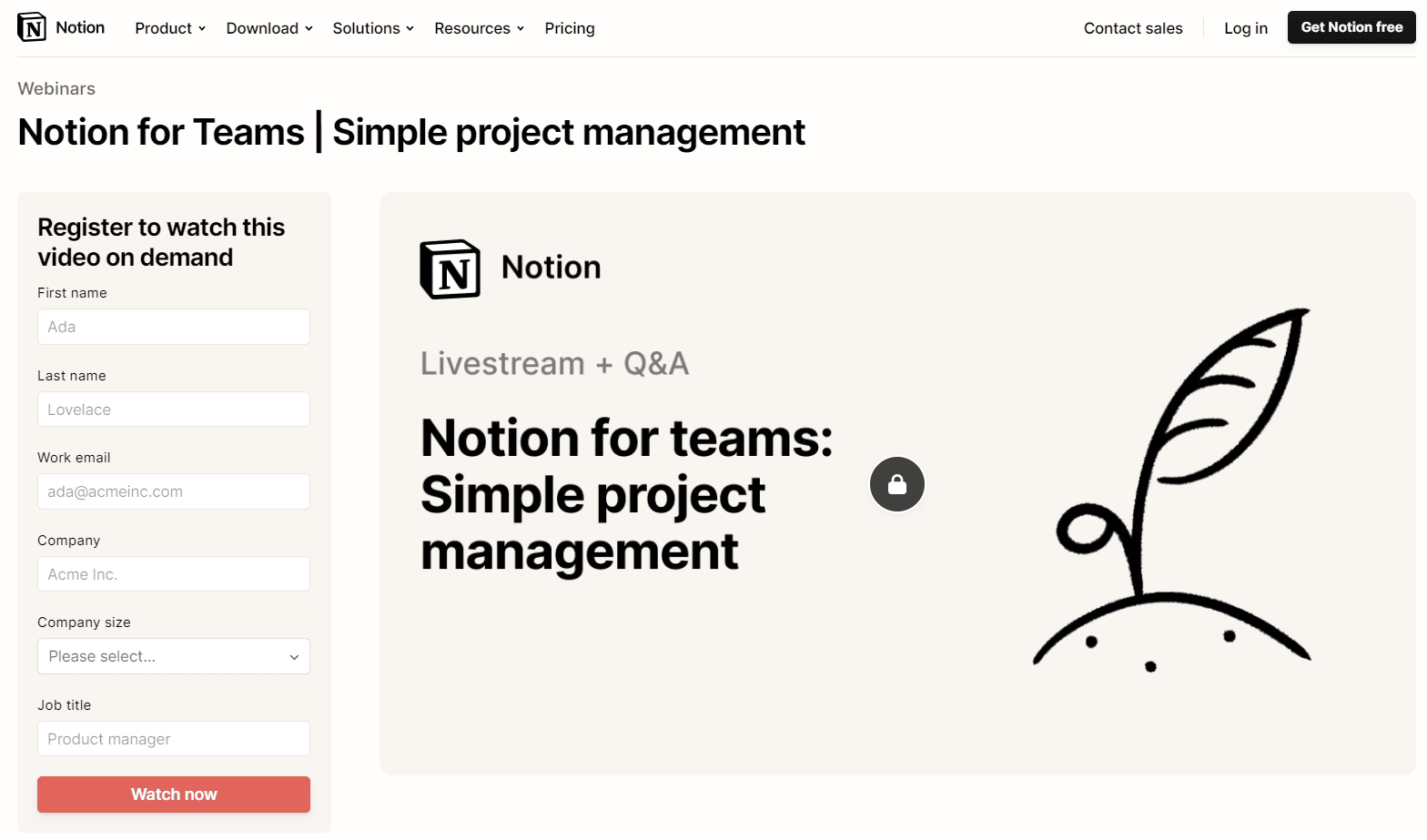
Notion, a SaaS company, hosts weekly webinars centered around their product – a workspace/docs/spreadsheet/page-builder hybrid for teams, businesses, and individuals. 

Each webinar explores Notion’s capabilities and updates from its developers. Many of them share tutorials or demos on using Notion for different use cases.
webinar example - SaaS - notion

Additionally, all of Notion’s past webinars are available on-demand after the live presentation with a simple sign-up. All of them can be found on a dedicated page on their website.

webinar example - SaaS - notion

ELB Learning

ELB learning creates tools to facilitate online learning for people who design courses and instructional materials.

Their webinars focus on career and skills development for learning designers and are hosted by experts on their team.

webinar example - education - elb learning

U.S. Bank

U.S. Bank has an entire library of webinars under the umbrella of personal finance management.

Webinar topics include “Protect yourself or your loved ones from elder fraud,” “Insider tips for student debt,” and “Should you buy now, pay later?”

webinar example - finance - us bank

Reed Words

Reed Words, a U.K. copywriting agency, ran weekly webinars exploring topics to help brands find their voice and express it well.

A panel of four experts from their team discussed building a brand voice in this session, followed by an audience Q&A.

webinar example - marketing - better words

Sephora

Sephora, the reigning makeup chain in malls everywhere, hosts regular live webinars with influencers and brand ambassadors whose products are sold in-store.

For example, the regional director of the NARS makeup brand recently guest-hosted a webinar that showed customers how to apply NARS products to achieve different makeup looks.

webinar example - beauty - sephora

These events aren’t free – instead, Sephora customers spend their loyalty points (earned by making purchases) to register for webinars. However, attendees also get free gifts mailed to them, such as deluxe samples and automatic giveaway entries.

This way, Sephora’s webinars feel like exclusive events, and registration fills up soon after the events are posted.

Webinars are a dynamic content type loaded with potential

Technology has improved to a degree where online webinars and virtual events can be just as engaging and worthwhile as attending them in person.

If you plan it right, create it with care, and promote it effectively, your webinar could be your best investment in content this year.

And, once you get the knack for producing and hosting webinars, you can create them regularly to engage with customers, increase conversions, and build your brand authority and visibility online.

Finally, don’t forget to record your live webinar so you can repurpose that content later. Webinar replays are just as valuable for nurturing leads. You can get even more mileage out of that content if you strategize right.

By now, you should have enough basics to create and host your first webinar. Don’t panic. Enlist your team to help you, and plan, plan, plan. You’ve got this.

The post Webinars: A complete guide with examples appeared first on Search Engine Land.

Original source: https://searchengineland.com/webinars-guide-examples-393499

This day in search marketing history: February 25

SEOs upset over Google dropping attribution in featured snippets

In 2019, SEOs were not happy about a Google featured snippet format that didn’t immediately show the source of the content.

For the Found on the web card, searchers had to click to expand the featured snippet and then scroll through various sources to see the publisher.

Danny Sullivan, Google’s Search Liaison said Google’s support of the overall ecosystem (searchers, advertisers and publishers) is important. “We don’t thrive & users don’t thrive unless the ecosystem thrives.”

The future of Google search, indeed! Amazingly, you could write a very similar tweet in 2023.

Google’s recent preview of its generative AI search results featured answers to complex questions that were made possible after being trained on content created by third-party publishers, with a grand total of zero links to publishers. Déjà vu!

Read all about it in Controversy over Google Featured Snippets stealing publisher traffic reignites.


Also on this day


IndexNow integrations grow as Bing says ‘millions’ of sites are using it

2022: Duda, All in One WordPress SEO plugin and Rank Math SEO plugin gained IndexNow support.


LinkedIn launches podcast network aimed at professional audiences

2022: The pilot program included shows about topics such as technology, recruiting and mental health, from external experts as well as its own in-house news team.


Google Images to replace dimensions overlay on image thumbnails

2020: Google would instead show product, recipe, video, and soon, licensable labels in place of that dimensions information.


How to use the AMP status report to identify page errors, validate fixes

2020: Google posted an explainer for its AMP (accelerated mobile pages) status report.


‘Made in USA’ ad extensions spotted on Bing

2020: A “Made in USA” label accompanied by a flag icon appeared to be the latest automated ad extension test by Microsoft Advertising.


Google revamps Test My Site mobile site speed tool

2019: Test My Site (which launched in 2016) was rebuilt with more features details on a site’s mobile site speed.


Nearly half of users have a bad reaction to ‘not secure’ browser warning, survey finds

2019: Survey found the flag affected user behavior and brand perceptions.


Google Assistant everywhere: more dedicated buttons, expansion on lower-end phones

2019: The company also was adding local search suggestions in Messages.


Google Explains How Search Console Reports Work

2016: Google Webmaster Trends Analyst John Mueller explained how the Search Console reporting works and why it may seem delayed for some of the reports.


Google Testing A Red “Slow” Label In The Search Results For Slower Sites

2015: The slow label would indicate if a particular webpage was slow and warn the user before clicking over to the site that it may load slowly.


Yes, Google Is Testing Green Star Reviews In The Search Results

2015: Google said expect more experiments with the colors of the stars in the search results over the next few months.


Study: Google Now Displays Rich Answers For 19.45% Of Queries

2015: 19.45% of the 850,000 search queries looked at in the study triggered rich answers.


Yahoo Gains Share And Query Volume In Latest comScore Search Report

2015: Firefox deal powered the second straight month of growth for Yahoo search.


Ray Kurzweil’s Job At Google: Beat IBM’s Watson At Natural Language Search

2014: His sole job at Google was to make the company’s computers as smart as humans – smarter, actually – when it came to natural language understanding.


The Marquee HTML Google Easter Egg

2014: When you searched for [marquee html], the results count would scroll from right to left on the page.


Bing Improves Tax Related Search Results Before April 15th

2014: Bing showed smarter results when you searched for [tax forms], [IRS forms], or even specific forms like [irs form 1040].


Quixey Offering Deeper Search Results Inside Mobile Apps

2014: Quixey, which described itself as a search engine for apps rather than an alternative app store, announced deeper “functional search” within apps.


Google Panda Two Years Later: The Real Impact Beyond Rankings & SEO Visibility

2013: A look at what happened to some Panda’s losers.


Google: PageRank Dilution Through A 301 Redirect Is A Myth

2013: There was no more dilution of PageRank with a 301 redirect when compared to using a normal link.


Europeans Taking Sweet Time In Resolving Antitrust Case With Google

2013: Any possibility of swift action in Europe appeared to be fading.


YP: Our Mobile Ad Network Second Only To Google

2013: YP said it had “over $350 million in advertising revenue [in 2012] attributable to mobile, making it the number two company in the US mobile advertising industry.” 


WSJ Pulls Back On What Google Searchers Can Read For Free

2012: The Wall Street Journal has been keeping some stories out of First Click Free for over half-a-year.


Demand: Google Changes Have Produced “No Material Impact” Yet

2011: Demand Media said its properties were not negatively impacted by the newest Google algorithm change (which would eventually become known as the Panda Update).


Google’s Mobile Search Adds “Open Now” Filter

2011: After doing a Google search, the “Show only businesses open now” filter appeared above the search results.


Report: Google Negotiating With DOJ To Prevent Suit To Block ITA Deal

2011: Negotiations intensified in the waning days of the Justice Department’s investigation into the antitrust implications of Google’s potential acquisition of travel software company ITA.


OneRiot Brings Social Targeting to Mobile Devices

2011: Social ad network OneRiot introded the ability to target mobile audiences by interests, demographics and influence on its ad network of Twitter clients.


Google Caffeine May Be Months Away & You Can’t See It

2010: Google said Caffeine wasn’t live on Google.com, was only at one data center and you couldn’t easily see it for yourself. 


Google Advertises Chrome … On Bing!

2010: Google confirmed that they placed these ads and that they were always looking for ways to promote their products. 


Companies Ask Courts, Regulators To Restrain Google To Compensate For Own Competitive Failures

2010: A Foundem complaint/brief with the FCC argued that Google favored its own products and thus “search neutrality” was required to prevent Google from harming competitors.


Losing Google? Chinese Scientists Say It’s Like Going Blind, Life Without Electricity

2010: 84% of Chinese scientists surveyed said that losing Google would “somewhat or significantly” hamper their research; 78% said that international collaborations would be impacted in the same way.


Opera Says Google Dominating Search On Mobile Web

2010: Google had a lead comparable, almost exactly, to its market share on the PC in the U.S.


Yahoo Answers Gets A New Look

2010: Yahoo announced a fairly substantial overhaul of how Yahoo Answers looked and worked.


Google Toolbar 6 For IE Adds Search To Windows Task Bar

2009: This toolbar, when installed, added the Google Quick Search Box to the task bar of Windows computers.


Google Joins EU Anti-Trust Case Against Microsoft Browser

2009: Google’s move to some degree reflected how important it considered Chrome and its adoption to be in the long term for the company.


Microsoft’s TechFest 2009 Is A Search Playground
2009: Hundreds of Microsoft researchers from around the world gathered at company headquarters to share ideas and show off their latest creations.


Yahoo Mobile Head Boerries To Leave, How Will It Affect Yahoo Mobile?

2009: Yahoo had seen the mobile space as strategic and made a massive global business development effort with carriers and device makers to embed Yahoo services and search on millions of handsets.


Penn State Study: Paid + Organic Listing = 15% Clickthrough Rate

2009: Study also found that 35% of queries did not result in any ad clicks ad all.


SEOs Want The NOINDEX Tag To Not Show A Page In The Index

2008: When asked “How should Google treat the NOINDEX meta tag?” 240 chose “Don’t show a page at all.”


Survey Says: Google Top Brand In UK

2008: Microsoft was second in this survey.


Hackers Launch Goolag: A Google Vulnerability Scanner

2008: A group of hackers launched a search tool powered by Google to help see if your sites were vulnerable to a hacking attempt.


Pakistan YouTube Ban Propagates Worldwide, Causing Major YouTube Outage

2008: The Pakistan ban of YouTube not only caused Pakistan ISPs to block YouTube, but also spread worldwide and stopped users even in the U.S. from accessing YouTube.


Yahoo, You’re Not Off The Hook Over The Chinese Dissidents Case Says New Lawsuit

2008: Yahoo was being sued again for allegedly leaking personal information and aiding the Chinese Communist Party in Internet censorship and the persecution of dissidents.


Ask.com Adds More Sponsored Ads, Pushing Organic Results Below Fold

2008: Ask.com was displaying five sponsored results for many keyword searches.


Andy Beal Launches Trackur For Monitoring Online Reputation

2008: You coud set up monitoring across a variety of sites on a set of keywords at a much lower price than reputation management firms generally charged.


From Search Marketing Expo (SMX)


Past contributions from Search Engine Land’s Subject Matter Experts (SMEs)

These columns are a snapshot in time and have not been updated since publishing, unless noted. Opinions expressed in these articles are those of the author and not necessarily Search Engine Land.


< February 24 | Search Marketing History | February 26 >

The post This day in search marketing history: February 25 appeared first on Search Engine Land.

Original source: https://searchengineland.com/search-marketing-history-february-25-393578

Strategy Features of Cost Segregation (Cost Seg)

Home Business Magazine Online

Tax planning is the process of minimizing the amount of tax that an individual or business pays by taking advantage of all deductions, credits, and other tax strategies available. It involves making financial decisions based on how to structure income, expenses, investments, and other transactions in order to reduce taxes owed. Tax planning should be done each year as laws may change and new strategies may become available. It’s important to consult a qualified tax or financial advisor for accurate advice, as every situation is different. Additionally, individuals should stay up-to-date on any changes to the tax code that might affect their individual or business taxes. For example, the Tax Cuts and Jobs Act of 2018 (TCJA) includes several provisions that could affect the amount of taxes an individual or business pays.

Tax planning can be beneficial for both individuals and businesses. For individuals, it may involve taking steps to lower taxable income and maximize deductions in order to reduce the amount of taxes owed. This might include contributing to a retirement account such as a traditional IRA or Roth IRA, maximizing deductions for charitable contributions, or adjusting the filing status.

For businesses, it can involve maximizing deductions and taking advantage of tax credits and other incentives available to businesses, such as research and development credits or investment tax credits. Additionally, businesses may be able to take advantage of certain tax strategies, such as asset depreciation or restructuring entities, in order to reduce taxes owed.

Tax planning should be done each year as laws are constantly changing and new strategies become available. Additionally, it’s important to consult with a qualified tax or financial advisor for accurate advice, as every situation is different. By taking advantage of all available deductions, credits, and other strategies, individuals and businesses can save money by reducing the amount of taxes owed.

Cost Segregation Strategy

Cost seg is a tax strategy used by businesses to reduce the amount of taxes owed by reclassifying assets. It involves breaking down assets into multiple categories, each with its own depreciation schedule, in order to take advantage of different tax rates and timeframes. By segregating an asset’s components and depreciating them over shorter periods of time, more deductions can be taken in the earlier years of ownership. This strategy can be beneficial for businesses that purchase new equipment or buildings as the cost seg study will help identify which components should be depreciated over a shorter period of time. Additionally, it can also result in a reduced overall tax bill due to the increased deductions taken in earlier years.

Cost seg is an effective tax planning strategy that can be used to reduce the amount of taxes owed by businesses. It should be considered when purchasing new equipment or buildings, and a qualified tax professional should be consulted for accurate advice.

Features and Methodologies of Cost Seg

1. Detailed Engineering Approach from Actual Cost Records

Detailed Engineering Approach from Actual Cost Records is a methodology used by businesses to analyze the cost of assets and equipment, as well as identify how best to reclassify them for tax purposes. This approach takes into account the exact costs associated with acquiring an asset, such as purchasing price, installation fees, delivery charges, taxes, and other costs. It then breaks down the cost into its component parts, such as land improvements, building components, and personal property, in order to determine how each part can be reclassified.

2. Detailed Engineering Cost Estimate Approach

The Detailed Engineering Cost Estimate Approach is a methodology used to estimate the cost of assets and equipment for tax purposes. This approach uses a combination of engineering principles, industry standards, and cost-estimating techniques to calculate the cost of an asset or equipment without relying on actual cost records. It takes into account the cost of labor, materials, overhead costs, taxes, and other costs associated with acquiring an asset. It then breaks down the cost into its component parts in order to identify how each part can be reclassified for tax purposes.

3. Survey or Letter Approach

The Survey or Letter Approach is a tax planning strategy used to estimate the cost of assets and equipment for tax purposes. This approach uses surveys and letters from vendors, suppliers, contractors, etc., to obtain information about the costs associated with acquiring an asset. It can also be used to obtain information about the types of materials used in constructing an asset. The information gathered can then be used to estimate the cost of an asset for tax purposes.

4. Residual Estimation Approach

The Residual Estimation Approach is a tax planning strategy used to estimate the cost of assets and equipment for tax purposes. This approach uses the residual value of an asset or equipment, which is the estimated value at the end of its useful life, to calculate its cost for tax purposes. The residual value is determined by subtracting the total depreciation taken over the life of the asset from its original cost. This method is often used by businesses that have depreciated their assets over a period of time and are looking to reclassify them for tax purposes.

5. Sampling or Modeling Approach

The Sampling or Modeling Approach is a tax planning strategy used to estimate the cost of assets and equipment for tax purposes. This approach uses statistical sampling and modeling techniques to determine the cost of an asset without relying on actual cost records. By taking a representative sample of similar assets, businesses are able to identify the typical costs associated with acquiring such assets and estimate the cost of an asset for tax purposes.

6. “Rule of Thumb” Approach

The “Rule of Thumb” Approach is a tax planning strategy used to estimate the cost of assets and equipment for tax purposes. This method uses general industry knowledge, such as a rule of thumb or benchmarking technique, to estimate the cost of an asset without relying on actual cost records. The rule of thumb approach seeks to identify typical costs associated with acquiring an asset and can be used to determine the cost of an asset for tax purposes.

The post Strategy Features of Cost Segregation (Cost Seg) appeared first on Home Business Magazine.

Original source: https://homebusinessmag.com/money/taxing-times/strategy-features-cost-segregation-cost-seg/

The Importance of Translating Your HR Documents

Home Business Magazine Online

As an employer, you have plenty of responsibilities beyond hiring and managing employees. You also must ensure that your company complies with various laws and regulations. One area where this is especially important is human resources (HR).

Translating your HR documents is essential to doing business in any country. For example, employee handbook translation is critical to ensure that your employees know the rules, regulations, and benefits that apply to them. You must translate your HR documents into the local language to ensure that everyone on your team understands it.

The Overview: Translating HR Documents

HR documents are written materials related to rules and regulations for personnel. This can include employee handbooks, staff manuals, policies, and other documents that convey information about your company’s HR practices. You may have different types of HR documents depending on the size of your company, but most organizations have at least one such document.

HR documents are often the first point of contact between your company and new employees. That’s why it’s so crucial for them to be clear, easy to understand, and error-free. A poor translation can lead to confusion, misunderstandings, and even legal issues — which means you will have a lot more on your plate than just hiring suitable people.

An experienced translation agency can help ensure that your employees receive accurate translations of all your HR documents. So, you can rest assured that your company’s HR documents will be translated into a language that both you and your employees understand.

Here are some of the most pertinent HR documents you must translate:

1. Employee Handbooks

Employee handbooks are often written in English and must be translated into other languages for your employees. The guide is an important document that outlines the company’s policies, benefits, vacation time, pay rates, and expectations of its employees. This can be extremely helpful for new hires to understand their rights and responsibilities and get acclimated to your company’s culture.

2. Code of Conduct

The code of conduct is another document that needs to be translated into other languages. This document outlines the company’s policies regarding harassment, discrimination, conflict resolution, and other ethical issues. The code of conduct can also help employees understand what behaviors are not tolerated by your organization and how they should handle those situations if they occur.

3. Training Documents

Training documents are also essential for the local employees to understand the company’s culture and values. This can include training manuals, new hire orientations, video presentations, and other forms of media. You must translate these into the local languages so everyone in your organization is on the same page regarding their responsibilities.

4. Health and Safety Documents

Health and safety documents are also essential to understand. These include fire evacuation plans, first aid procedures, and emergency contact information. If an employee is unfamiliar with the layout of your building or what to do in case of an emergency, they will need help to assist others around them properly.

5. Contracts, Terms, and Conditions

You must translate the terms and conditions of your contracts. Everyone must know what they agree to when working with a global audience. By translating these documents into the native languages of your customers, suppliers, and partners, you can build a mutually agreed-upon framework that will make it easier to work together.

Business Person Translating HR Documents
Depositphotos

Why Translating Your HR Documents Is Important

Translating your HR document is crucial because it gives you the following benefits:

1. It Helps Attract More Workforce

A translated HR document is an easy way to attract more talent. If you’ve ever tried to hire someone from a different country, it can be difficult if their English needs improvement. By translating your HR documents into the native languages of your employees and hiring managers, you can make it easier for them to understand what they need to do at every step.

2. It Helps Improve Employee Retention

Translating your HR documents can also help improve employee retention. This is because employees will better understand what’s required of them from the moment they begin working with you. Not only that, employees who aren’t native speakers will appreciate your effort in translating the necessary HR documents.

3. It Helps You Stay Compliant with Local Laws

Translating your HR documents can also help you stay compliant with local laws. If you are operating in a country with strict labor laws, it’s essential to ensure that your HR policies comply with those regulations. By translating your policies into different languages, you can ensure that everyone who works for your company understands their roles and responsibilities and how they should behave toward one another.

4. It Helps Maintain a Strong Team

Translating your HR documents can help maintain a strong team. When you have employees from different countries working together, it’s crucial to ensure they are all on the same page. By translating your policies into other languages, you can ensure that everyone has access to the same information and understands everyone’s role in the company.

5. It Helps Avoid Confusion and Misunderstandings

When you have an international workforce, it can be easy for misunderstandings to arise. These misunderstandings may sometimes lead to confusion or arguments between employees. By translating your HR documents into different languages, you can help avoid these situations from happening in the first place.

Conclusion

In today’s global economy, ensuring that your company clearly understands what constitutes proper employee conduct is paramount. By translating your HR documents into different languages, you can ensure everyone has access to the same information and understands their roles and responsibilities. This will help your company run more smoothly and ensure that employees can perform their jobs safely and legally.

The post The Importance of Translating Your HR Documents appeared first on Home Business Magazine.

Original source: https://homebusinessmag.com/management/employees/importance-translating-your-hr-documents/

Empowering Entrepreneurship: How Rayobyte Is Driving Success for Home Businesses Everywhere

Home Business Magazine Online

By Elizabeth Galewski

Rayobyte, the award-winning ethical proxy provider, helps home business owners overcome common challenges and achieve greater success with web scraping technology. Web scrapers are computer programs that can automatically collect information from websites and save it in a database, such as on an Excel spreadsheet.

This technology is valuable because it collects data very quickly from many websites at once. Popular public-facing websites that use this capability include travel aggregators like Expedia and Kayak or the used-book marketplace Bookfinder.com.

Home businesses can benefit from Rayobyte’s web scraping services for many reasons.

Web Scraping Explained

Web scraping, which is also known as screen-scraping or data mining, is the process of extracting data from websites. When search engines like Google crawl the internet for new content, they often use web scrapers.

One of the most important things to remember when trying to collect data from websites is that each will have its own set of rules about how much information it allows users to access. Some websites don’t allow any sort of scraping at all, while others allow limited scraping but require that users provide credit by linking back or citing the source material in some way. Still more allow full access, but only under certain conditions — for example, only after registering for an account.

In order for your web scraping efforts not to get shut down by these restrictions — or worse yet, blocked completely — you’ll need some way around them. That’s where proxies come into play.

Proxies allow businesses to pretend like they are located somewhere else while accessing those protected sites. They hide your IP address so that your activity can’t be traced back to you or anyone else in your company. Acting as middlemen between a user’s computer and a website, they allow businesses to web scrape without fear of being discovered.

Proxies allow for web scraping of any site on the internet, even if it has an “anti-scraping” policy in place. With their assistance, you can gather all sorts of useful information without getting blocked or banned.

How Home Businesses Can Use Web Scraping

Businesses, marketers, and entrepreneurs often use web scraping to save time when collecting information that would otherwise be time-consuming or expensive to obtain. Organizations can use it for both customer-facing and internal functions.

Many e-commerce businesses use web scraping to identify trends in customer purchasing behavior, enabling them to leverage customer preferences to increase sales. For instance, let’s say you have an online store that sells handmade soap. Web scraping can tell you which products sell better than others at different times of the year. With web scraping, this process is automated, so you won’t have to check each product over and over again yourself.

Home businesses also employ web scraping to track competitors’ prices. As a post on Rayobyte’s blog explains: “Many people who run online stores scrape the web for product prices so they can come up with their own prices. This allows you to undersell the competition. For instance, if you scrape the data and find out that the lowest price on the web is $9.99, you can mark your prices at a few cents less and overtake the competition.”

Web scraping also helps businesses analyze how competitors’ prices fluctuate over time. If you sell products on Amazon Marketplace or eBay, then web scraping helps keep those listings up-to-date. According to Neil Emeigh, CEO of Rayobyte, “Amazon even encourages its vendors and sellers to conduct web scraping, since this boosts competitiveness, which keeps the entire ecosystem healthy.”

Web scrapers can also harvest online reviews, which enables businesses to gauge consumer sentiment. Other applications include evaluating competitors’ marketing efforts or verifying that your own advertising campaigns are running.

The best thing about web scrapers, however, is that you don’t need a computer science background or know how to code to use them. All you need to know is what kind of data you would like to harvest.

The Rayobyte Advantage

Not all web scrapers are the same, and Rayobyte’s innovative technology stands above the rest for many reasons.

First and foremost, Rayobyte provides a dependable hosted solution for your web scraper that can easily be scaled up as your business grows. While it’s possible to buy software that would enable you to web scrape right from your own computer, this approach would limit your projects to the amount that software can handle. When the time comes for your business to expand, you will need to buy a new app, which is time-consuming and expensive. With Rayobyte, you simply upgrade to a different package.

In addition, if you use a desktop app, simple technical issues can bring your scraping to a halt. This problem doesn’t occur with Rayobyte, which has vast computing resources to keep your web scraping running smoothly.

Additionally, many organizations that web scrape from their desktops fail to use proxies. Their single IP address acts like a red flag to competitors’ websites, which quickly blocks access. Conversely, Rayobyte offers access to thousands of IP addresses throughout the world. Moreover, Rayobyte can offer proxies of the highest quality — residential proxies sourced from ordinary people’s electronic devices.

Unlike other proxy providers, Rayobyte follows the highest ethical standards when acquiring these proxies. The owners of the IP addresses that Rayobyte uses are fully informed and have chosen to serve as proxies for monetary reward. Rayobyte only uses their devices as proxies when they are more than 50 percent charged and are not otherwise in service at the time. Participants in the program can leave at will.

A Fast, Efficient Path to Success

Web scraping is a powerful tool for home businesses to find customers, increase sales, and make more money. The main advantage of web scraping over other data collection methods is that it’s faster and requires less effort. No manual inputting of information into spreadsheets or databases is required before analysis can take place.

With the help of Rayobyte’s large network of ethical proxies and web scraping tools, a wide variety of home businesses can build valuable analytics that help make strategic decisions.

About the Author:

As featured on the Price of Business radio show, PR News, Communications Intelligence Magazine, and SheVentures, Elizabeth Galewski is a professional writer and media relations expert. In her previous career, she taught English composition at the college level for more than twelve years. She earned her B.A. from Wellesley and her M.A. from the Annenberg School for Communication at the University of Pennsylvania, as well as completed doctoral coursework in Rhetoric at the University of Wisconsin – Madison.

The post Empowering Entrepreneurship: How Rayobyte Is Driving Success for Home Businesses Everywhere appeared first on Home Business Magazine.

Original source: https://homebusinessmag.com/businesses/success-tips/empowering-entrepreneurship-rayobyte-driving-success-home-businesses-everywhere/

Allen & Atherton Shares Smart Financial Strategies and Insights on Growing Income

Home Business Magazine Online

Regardless of where you are located, do meticulous audits so that you understand your financial situation. You must apply knowledge and devise ways for your company to reach colossal growth.

For any company, getting on track financially is essential. If you want to crush the financing growth goals, check into taxation, budgets, banking, and online personal protection, among others. Reach greater success this year. Apply these tips to help kick your business finance into gear.

It is possible to save up a considerable amount of money in a year by implementing healthy financial strategies in your business.

Set financial growth goals

Before you come up with a budget or learn to manage your finances well, you will need to set financial goals. What do you truly want with your finances? Is it a house, retirement investment, or children’s college fund? You can create your ideal financial growth goals from these factors. Working with financial firms like Allen and Atherton Accountant may help in this task. Allen and Atherton Accountants have various offices around the world and over 200 employees. Develop a financial snapshot that outlines your objectives. Write them in a notebook, on your smartphone, or even on your computer. Add all your short-term, mid-term, and long-term goals.

Ensure that these goals are depicted clearly so that you work hard to achieve them. If you intend to buy a car, be specific, and so on. Write down how you want to buy a car in three years and explain how you will make payments. Have clear steps and an action plan.

Create a budget

Draft a budget to follow up on your set goals. Determine your incomes and expenses so you know what to save and what to invest. Creation of a budget will help you to be careful with finances. Here’s what to do:

  • Write your budgeting plan;
  • Figure out after-tax income;
  • Track progress;
  • Automate savings; and
  • Revisit your budget regularly.

You can also focus on the 50/30/20 budget rule. This means you allocate about 50 percent of your after-tax income for essentials, leaving 30 percent for your wants and 20 percent for savings. Your business will be able to save money for new projects and future endeavors.

Protect personal information

Nowadays, many people are making money online, which draws in security threats. Safeguard your wealth and business overall by protecting personal and professional data. Only use safe websites when associating with online stores and business vendors. Protect your information at all costs by integrating smart cyber practices and security measures.

Increase income

The best way to ensure your financial growth is by increasing your income. This can be achieved in many ways, including getting side gigs and inquiring about raises, etc. Learn new skills or get a better side job to supplement your business capital. To increase savings, stick to the above guidelines.

The post Allen & Atherton Shares Smart Financial Strategies and Insights on Growing Income appeared first on Home Business Magazine.

Original source: https://homebusinessmag.com/money/personal-finance/allen-atherton-smart-financial-strategies-insights-growing-income/

Make money from your old shampoo bottles

Reading Time: 4 mins

Can you really make money from your old shampoo bottles? If you love a hair and beauty binge then you are not alone.

It is estimated that over  552 million shampoo bottles end up in our landfills yearly  and 83% of women wear makeup daily.
But shelling out for new products, particularly with the cost of living crisis, can frequently leave your bank account feeling a little empty.

That is why beauty recycling schemes are a great incentive to help the planet and your purse.

88% of UK households consider recycling an established norm and 12m tonnes are recycled annually. But when it comes to beauty products and shampoo empties things can get more complicated.

Many products are made up of multiple plastics, which often have different recycling practices for their different components.

This means it’s not just a simple process of throwing everything into your normal recycling bin and hoping for the best, as unfortunately they won’t always be accepted at the other end.

But fear not, there is a better solution… that can even bring a little extra cash back to you.

Enter the beauty recycling scheme that many big brands and household names are signed up for.

You simply take your washed empties back to the company you brought them from and in return, they give you money, a voucher or discount to spend in-store.

What can you get?

By returning your empties to retailers across the U.K you could receive cash incentives and discounts galore. If you already use the product regularly anyway it’s a win-win and you will be helping the environment, one bottle at a time.

Supermarket and chain store recycling

Boots

If you always shop at Boots then their recycling scheme will be great for getting extra Boots points on your card to spend in-store.

The Boots scheme  allows  you to bring your empty beauty, health, wellness and dental products, from any brand, into all Boots retailers.

When you bring five empty products into one of the in-store recycle bins, Boots will generously give you a total of 600 Boots Advantage Card points when you spend £10 or more – that’s worth £6.


John Lewis


Recycling just got easier with John Lewis’  Beauty Cycle. If you’re a My John Lewis member, you’ll instantly get £5 off when you spend £20 or more on Beauty when you bring in five or more clean, empty beauty product containers to any of their beauty counters.

Individual beauty stores recycling

Lush

Lush has a popular  Bring it back scheme which gives 50p back per bottle, no matter what product you are recycling. You can even return your 10ml sample pots for an additional 5p off your shopping per item!

Mac

shampoo bottles
MAC lipsticks are always a good idea and are designed to be accessible to all. Mac was originally created for photoshoots and live shows, so the lipsticks are  typically more  pigmented than other lipsticks and also have a creamy texture that is created to last on the lips.

With their  Back to Mac  scheme, you can now return six empties and get a lippie of your choice and colour.

Kiehls

shampoo bottles
Most Kiehl’s stores now have  recycling hubs  where once you bring in ten empties you can receive a  free £9.75 voucher to spend on any product you like.

Even if you bring in just 1 empty, you can still receive points in their Family Loyalty Rewards Programme.

The Perfume Shop

The Perfume Shop has always set out to host luxury perfumes at affordable prices but now you can get a further discount when you recycle your old bottles.

Bring back any of your old perfume bottles to  The Perfume shop and you can get a 10% discount off any product.

The future of recycling

shampoo bottle

Set to launch in 2025, the government is producing a  Deposit Return Scheme  to be rolled out across the country.

The scheme aims to give everyone the opportunity to recycle with an extended monetary incentive included.

The scheme would include unique machines, known as reverse vending machines, and designated sites where people can visit to return their bottles. The aim is they will receive cash back, similar to schemes in America which are already in place.
In most cases, it would be the retailers who sell drinks or products covered by the scheme who would host a return point. What to do with your empties if you have product left

When it comes to leftover products that are past their use-by date, it may seem simple to wash them down the sink, but this should be avoided.

Most beauty and skincare products contain chemicals, microbeads or even microplastics which can get washed down the drain and can pollute the ocean.

If a product is still within its expiration period but you know you won’t use it,  Toiletries Amnesty  charity accepts used beauty and hair products to help others in need.

Don’t forget you can also recycle clothes, with most high street shops offering similar offers when you take unwanted clothes into the store they were from. Read more about that here. 

The post Make money from your old shampoo bottles appeared first on MoneyMagpie.

Original source: https://www.moneymagpie.com/make-money/make-money-from-your-old-shampoo-bottles

An SEO’s guide to ChatGPT prompts

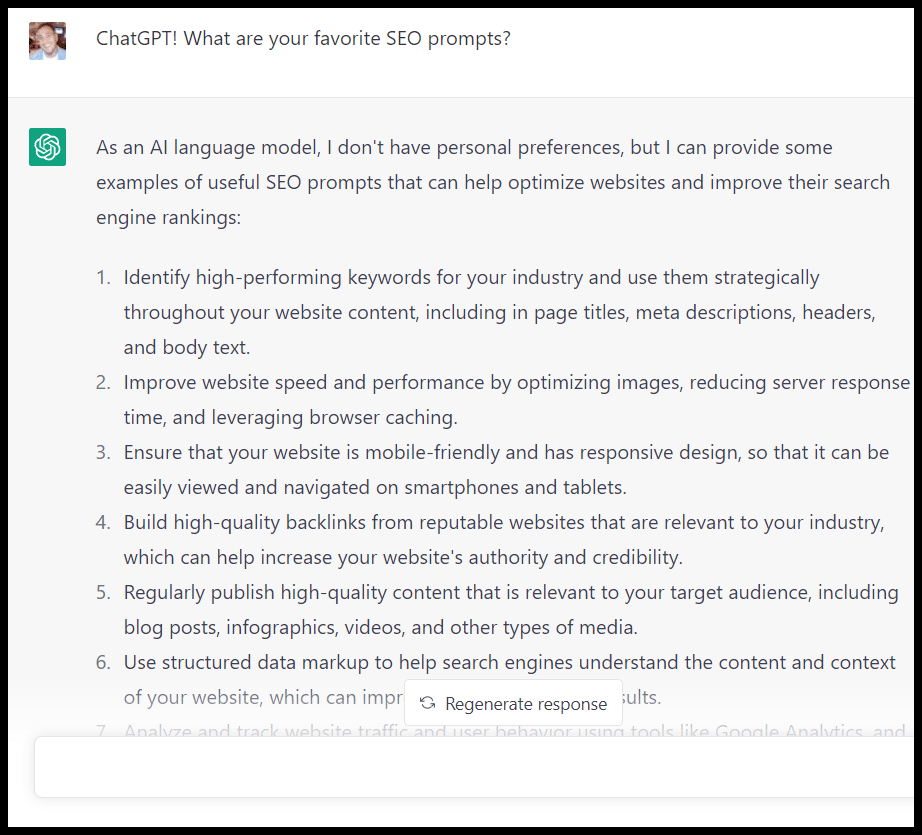
For weeks, marketers have been hearing about ChatGPT and its applications for content and SEO

Prompt engineer is even now a job:

I won’t pretend to know which SEO and digital marketing functions ChatGPT and AI software will and won’t replace. But becoming an expert at creating prompts for these tools can already be a valuable skill (and will likely increase in value over time as the tools improve).

This article will discuss what to keep in mind when creating ChatGPT prompts for SEO and share an extensive list of SEO-focused prompts to use in your day-to-day work.

ChatGPT favorite SEO prompts

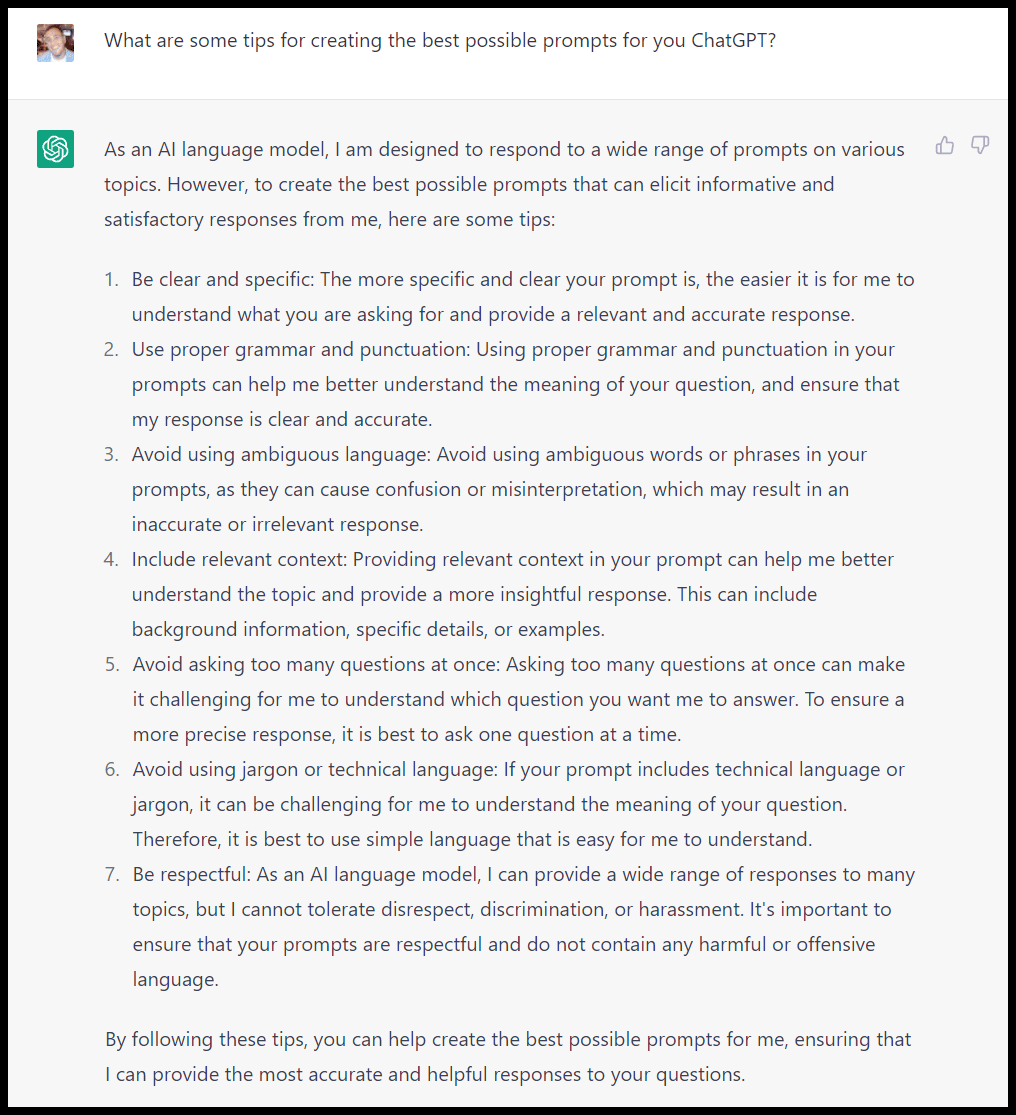
ChatGPT prompt engineering strategy

Before getting into specifics, it is helpful to have a general approach to ChatGPT prompts (and AI chat / writing prompts) so that you can create prompts for your specific applications and be aware of great SEO prompts other folks have come up with.

ChatGPT prompt engineering strategy

First, it’s vital to understand ChatGPT’s limitations:

  • ChatGPT is trained on a large data set and finished training in early 2022, meaning not all of the information is up to date and – as you likely know as a user of the internet – not everything it’s trained on will be correct.
  • ChatGPT does not crawl the web! It has access to information about the web from when it was trained, but it will not go to a page and crawl it (but often, it’s responses will lead you to believe it did or does!)
  • There are a variety of things ChatGPT can get flatly wrong: facts, math problems, code.
  • While it has access to a lot of data and can organize that data in interesting ways, it’s unlikely to have an expert-level of “taste” or knowledge about any individual subject (yet, anyway).
  • ChatGPT wasn’t designed to be an SEO tool, so while you can create prompts for things like keyword research, clustering, link building, etc. keep in mind that it’s responses and suggestions frequently won’t be using the same types of data sets (driven by search popularity and competition) as your favorite SEO tools.

So if you ask ChatGPT for a list, don’t expect it to be curated at an elite level. If you ask it to write code, don’t just assume it will work.

If you ask it to write an article, don’t assume everything it generates will be accurate or well-written (particularly on topics that would require up-to-date information). 

QA is your friend!

I like to think of prompts kind of like I think of tasks like creating a content brief, or using a search operator, or creating an SOW. 

Based on that approach, here are specific tips for crafting a good prompt:

  • Be as clear and thorough with your prompt as possible.
  • Make sure ChatGPT is capable of doing what you’re asking it to.
  • Refine your prompt as you see output, and use your experiences with ChatGPT to inform future prompts.
  • Try to anticipate and address the areas where it may get tripped up as much as possible with the prompt itself.

The best (and worst) ChatGPT SEO prompts

As with most topics, many people are sharing great information about ChatGPT prompts you can use for SEO. And then there are some sharing prompts which are somewhere between mediocre and downright harmful.

Below, I listed examples of what I think are largely “good” (or helpful, to steal a term from Google) prompts and what I think are “bad” (unhelpful to harmful) prompts.

These examples offer specific ideas for prompts that can help make you more efficient, and also some prompts that can get you into trouble (or waste your time).

The good

We’ll start with some useful prompts. Again, I can’t emphasize this enough: QA the output of everything you get from ChatGPT

Information can be (dangerously) wrong or misleading and code can break in the worst ways (more on that later in the article).

While Google has stated AI-generated content isn’t explicitly in violation of their search guidelines, it’s certainly possible to get your site into trouble with it.

Keyword and topic brainstorms

Due to the possible downside above, I like to think of ChatGPT as a helpful brainstorming tool for various tasks, including keyword research.

It is particularly useful as an early starting point for getting ideas for keywords and topics.

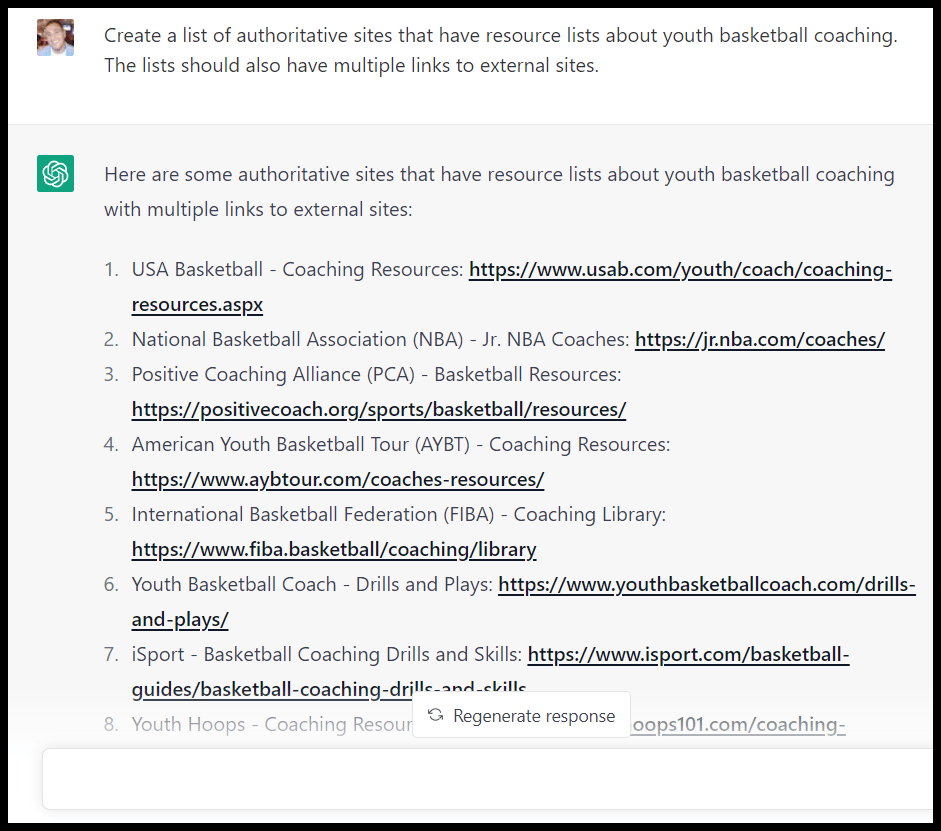
Let’s assume I’m creating a site aimed at delivering information about coaching for youth basketball coaches:

chatgpt topic idea brainstorm

As someone who is frequently looking for specific youth basketball drills I can tell you that this is a pretty good starting point.

Adding the note about popular websites and not just asking for ideas got me an extra layer of both topics and some examples of suitable sites in the niche. (Again, remember, these are from early 2022 or before!)

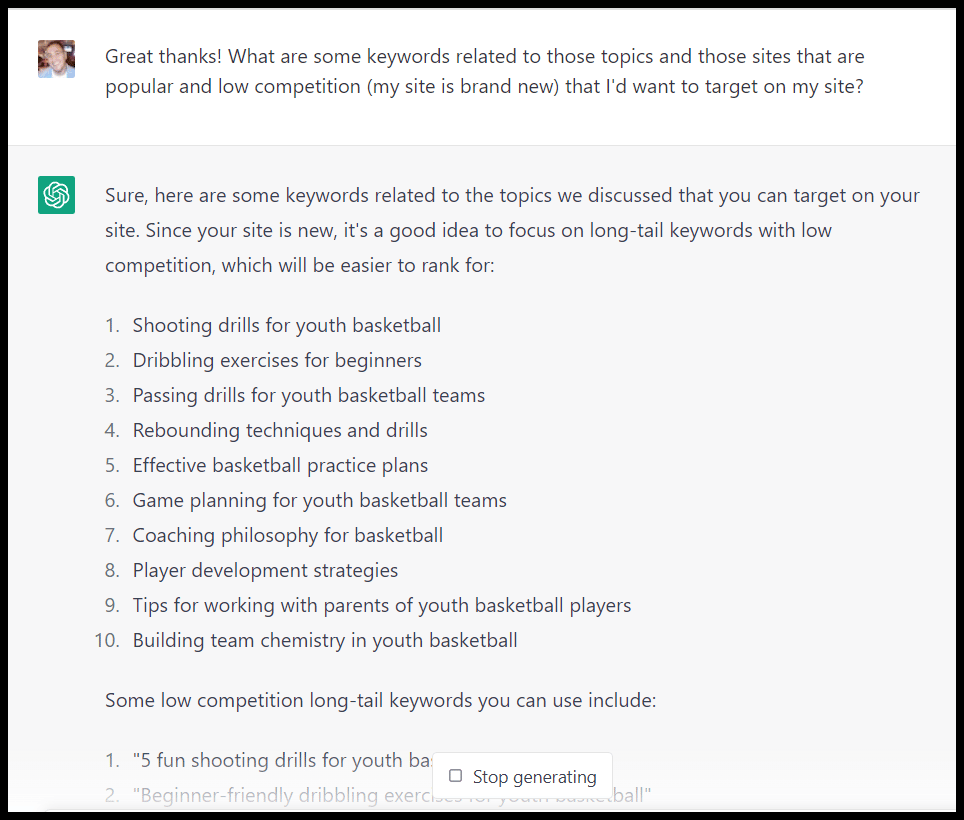
Let’s dig a little deeper into keywords:

chatgpt topics and keywords brainstorm

OK, interesting. I wonder how ChatGPT is determining that these are “popular and low competition.”

ChatGPT data sources and keywords

Wow, ChatGPT uses Ahrefs, Moz and Keyword Planner to generate keyword ideas? It only took a few seconds too! 

I felt like my LinkedIn and Twitter timelines would have been flooded with information about this, so I decided to ask a follow up:

ChatGPT wrong answer

So this is not what I asked. I’m getting a “Did you eat these cookies ChatGPT? Well you know the thing about cookies is…” vibe here, but let’s clarify:

ChatGPT clarifies wrong answer

Ah! (Much quicker to apologize than my kids, anyway).

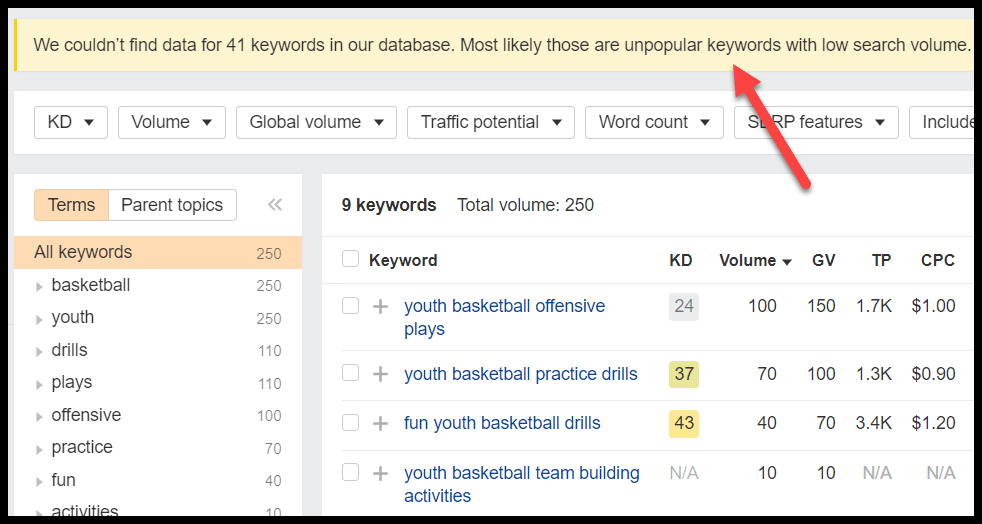
Let’s take a quick look at whether these terms are actually low competition according to Ahrefs, one of the tools ChatGPT initially claimed to have used (tough break for Semrush and other tools here, incidentally):

ChatGPT suggestions - Ahrefs

Yeesh. Well, not much search volume here, but let’s check competition, particularly against this initial claim:

  • “SERP Analysis: I also did a manual search on Google for each keyword to see what kinds of results show up. If the top results are from high-authority websites with strong backlink profiles, it’s a good indication that the keyword is highly competitive. Conversely, if the top results are from low-authority websites with weaker backlink profiles, it’s a good indication that the keyword is less competitive.”
Ahrefs competition ChatGPT suggestions

This isn’t an impossible term competition-wise, though it is likely not feasible for my brand new site any time soon. I can see with the volume for other terms these pages are ranking for that there’s likely search volume in this area generally. 

A popular prompt framework is to get ChatGPT to answer a prompt “as an X” with X being a person with a specific job, level of experience or expertise, etc. 

Let’s see how that impacts things here:

persona prompt

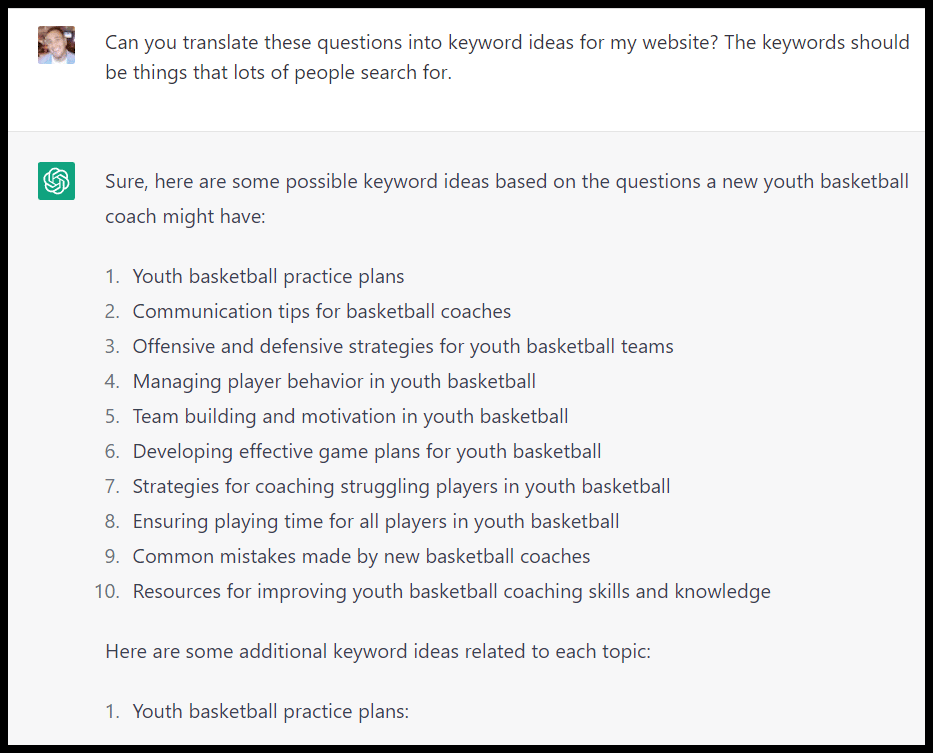
These seem pretty good again! Let’s dig deeper – the combination of volume and competition maybe tripped the tool up. I’ll ask for terms with volume this time:

ChatGPT translate

And let’s see the data on that round via Ahrefs:

Ahrefs unpopular kewyords

Not much better! Keep in mind here that ChatGPT takes my “prompt history” into account for a specific chat, so if I’d opened a new chat and focused more on volume, I may have done a bit better.

Generally, it’s often the case that if you feel like you’re down a rabbit hole with ChatGPT and aren’t getting the data or responses you want, you may want to consider starting fresh and better orienting the tool to what you want.

These prompts and responses are a perfect encapsulation of ChatGPT for a lot of functions:

  • The initial set of results gave a pretty good framework for sites to check out and general topic areas
  • As I niched down and needed to develop specific, actionable plans with search-specific data things got murkier. 
  • Those terms don’t look great in terms of volume, my site can’t rank for those terms, and ChatGPT flat out told me something that wasn’t true about how it generated the suggestions! It also states everything very emphatically.

If I were looking for general topic ideas here, this might have been a useful exercise. 

If I had just started writing (or paying writers) to create content to target these phrases without checking ChatGPT’s suggestions, I might have wasted a ton of time and resources.

Title ideas

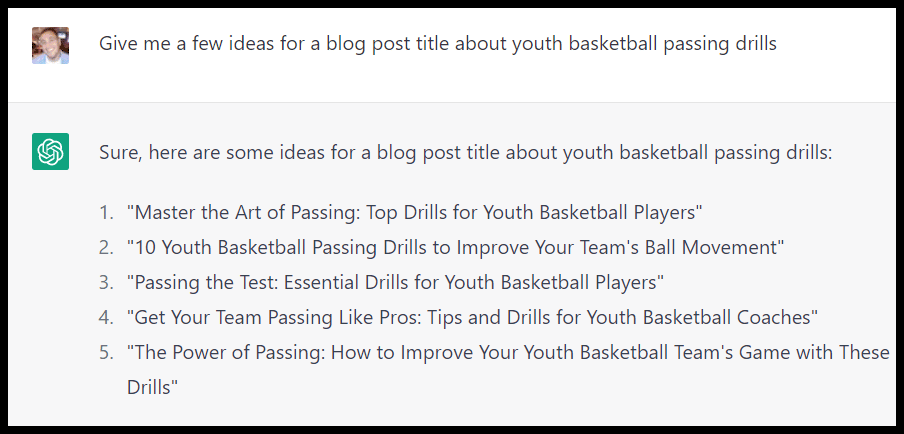
You should probably have your own ideas about creating titles and title tags for blog posts, but again ChatGPT can be a good place to generate some ideas:

ChatGPT

List ideas

Similarly list types like X examples, tips, quotes, etc. require some digging to come up with ideas – while you want to curate your own list you can quickly get ideas from ChatGPT:

ChatGPT list ideas

FAQ ideas

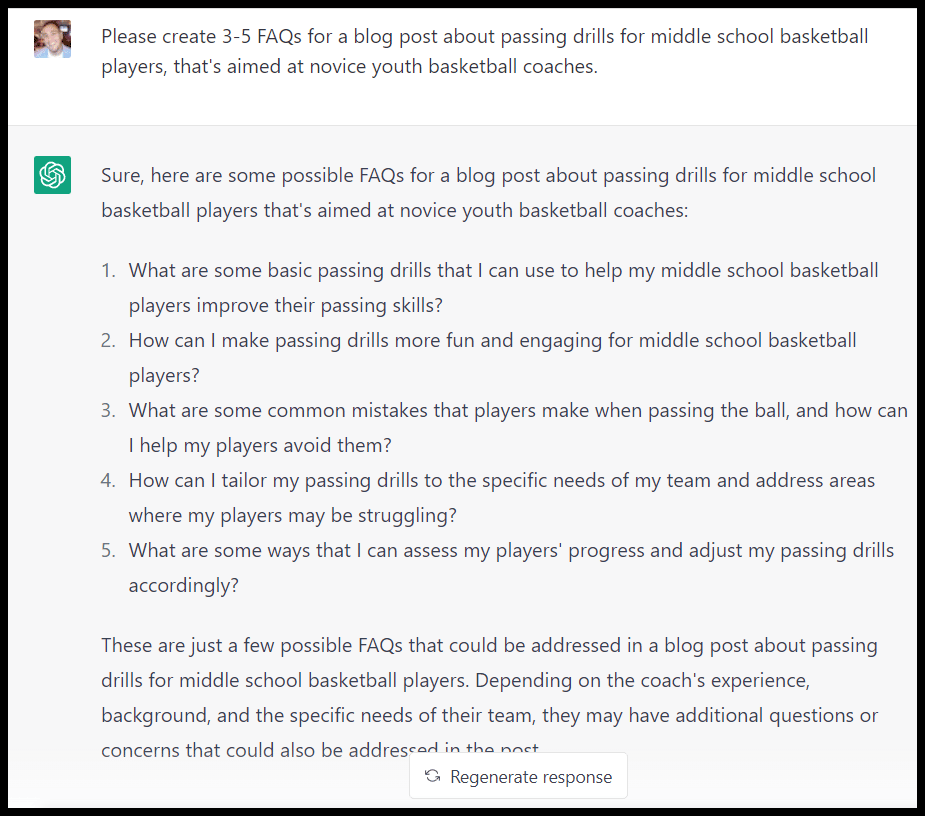
To quickly get FAQ ideas for an article the tool can be useful as well – again layering in specific instructions and a persona can help:

ChatGPT FAQ ideas

Content outlines

This is also true for content outlines. Again, keep in mind that tools like Clearscope, Content Harmony, Market Muse, Frase and Surfer SEO are creating briefs and outlines based specifically on what’s ranking in search results, while ChatGPT isn’t.

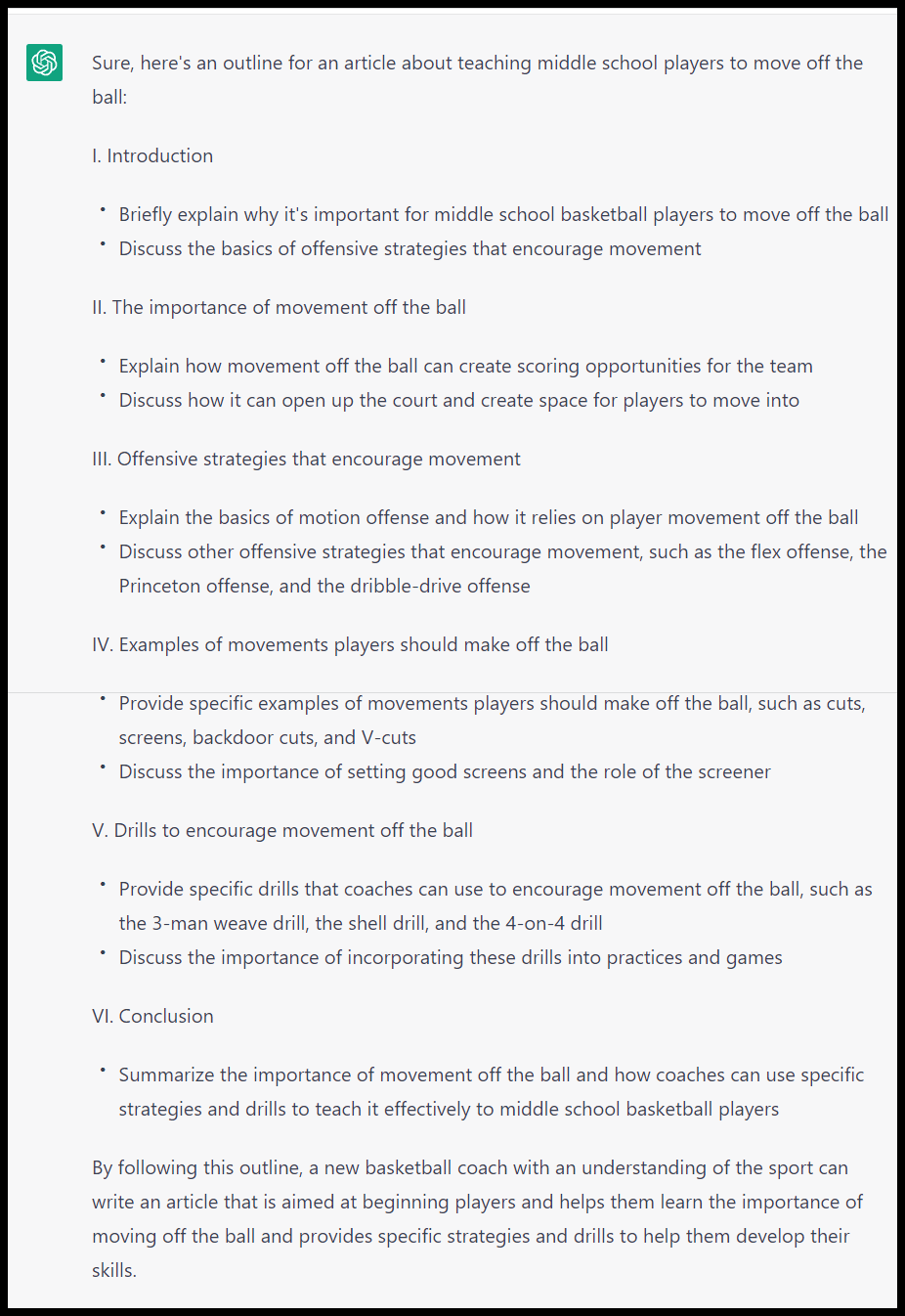
Here is the prompt I used:

  • “Create an outline for an article about teaching middle school players to move off the ball. The article should be for someone new to coaching basketball but with an understanding of the sport, and is aimed at beginning players. It should include things like: the types of offenses that encourage movement, specific examples of movements players should be making off the ball (cuts, picks, etc.) as well as some specific drills coaches can run to encourage movement.”

And here is the output:

ChatGPT content outlines

Again, not perfect, but a pretty decent framework! 

Keyword clustering

Standard caveats: Clustering is not going to be search-specific like tools like Keyword Insights or similar. It won’t necessarily be driven off of volume and competition, but you can create clusters either semantically or by things like levels of intent:

internet marketing

And/or just add things like search intent as an additional column. 

Summarizing

Be careful with how you use these summaries (as they may get “flagged” as anything from low quality to AI over time). But if you have something like a study or a lengthy article that you want to feature in your own content, (and also let folks know you’ve featured in outreach) in something like a tips list, you can get help there:

ChatGPT summarizing

You can also ask for an outline of an article if you want to understand it quickly.

Technical SEO: Code snippets (schema, hreflang, etc.), robots, .htacess and more

Among the most dangerous ChatGPT prompts of all: code snippets! These can be great time-savers, but again: give as much detail as possible and QA, QA, QA!

A simple prompt along the lines of “Wrap FAQ schema around these questions and answers” will get you the code to copy:

ChatGPT code snippets

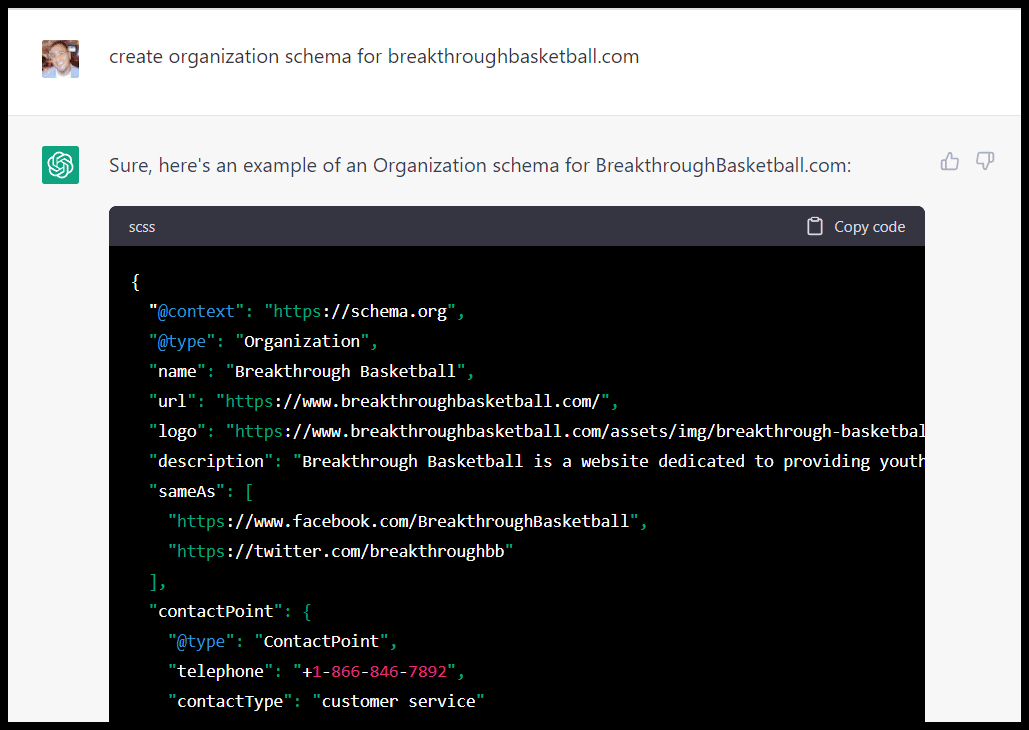
Same for different types of schema like organization schema:

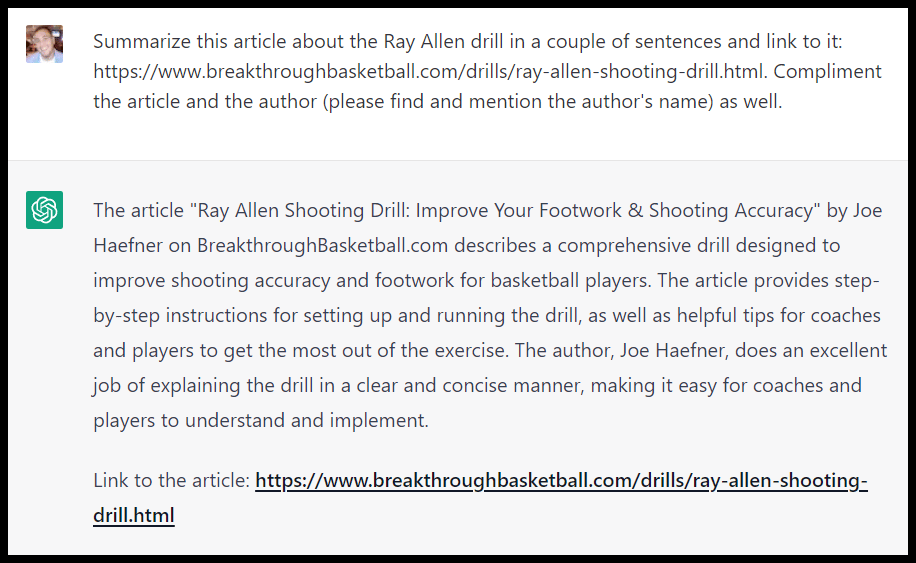
ChatGPT organization schema

I have had various schema come back from ChatGPT that didn’t work when rendered on a live page, so again, be sure to check everything.

You can also have a robots file created:

ChatGPT robots file

And create rewrite rules. Be careful, though! (More on this later)

ChatGPT rewrite rule

Meta descriptions

A lot of SEOs or people responsible for maintaining lots of pages hate creating meta descriptions. This is really a perfect function for ChatGPT:

ChatGPT metadescription

Google Tag Manager, Google Analytics 4, Google Search Console and Looker Studio

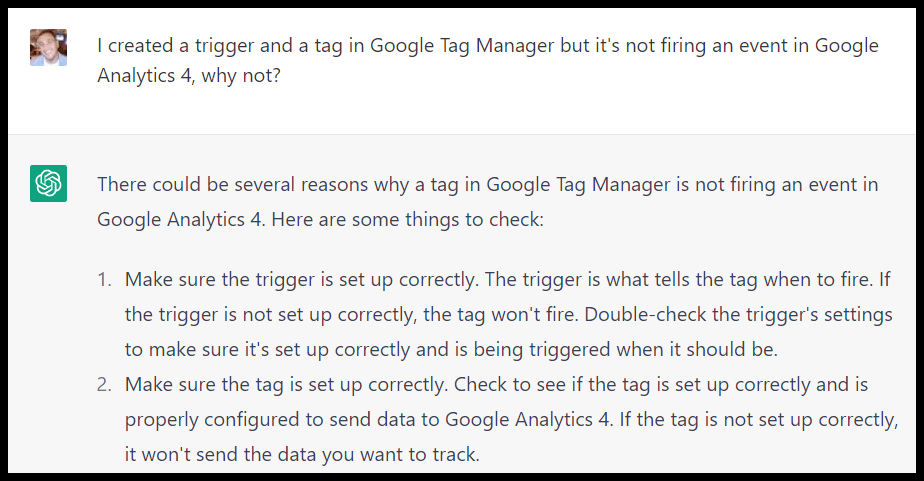
You can get troubleshooting ideas for these platforms:

ChatGPT platform troubleshooting

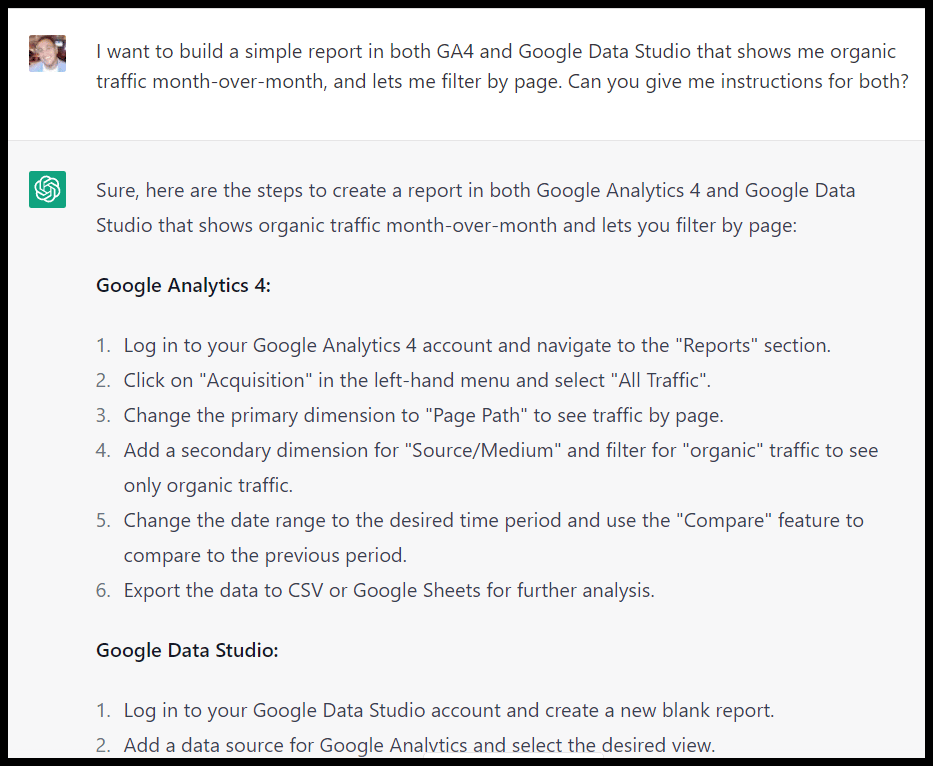
Get instructions for building specific reports:

ChatGPT GA4 and Data Studio reports

Or even get code to use to interface with their APIs:

ChatGPT GSC API code

Translation

You can translate text to create country-specific pages:

ChatGPT translation

Formatting 

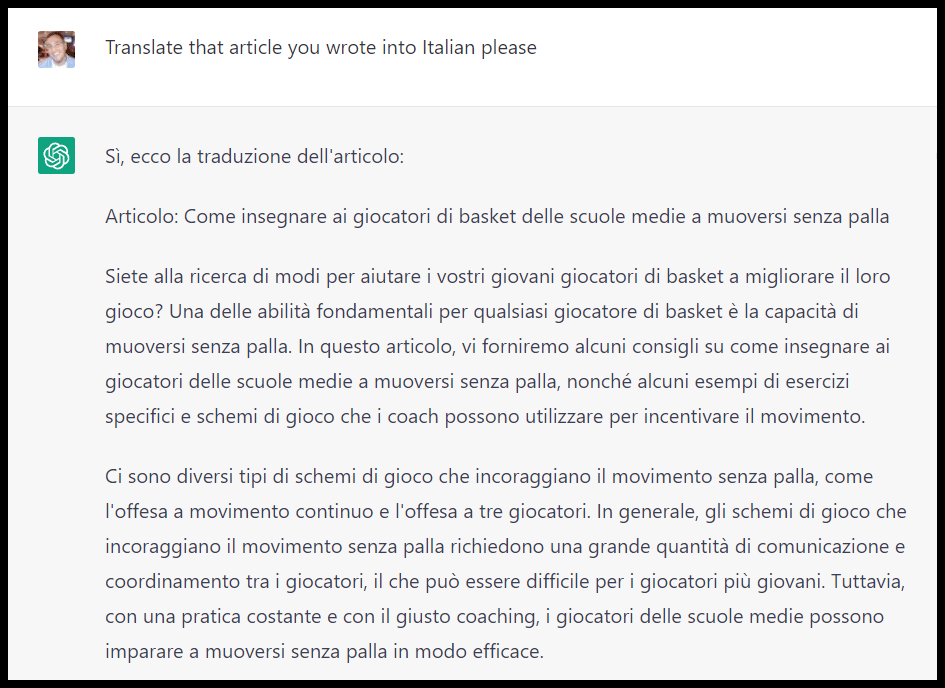
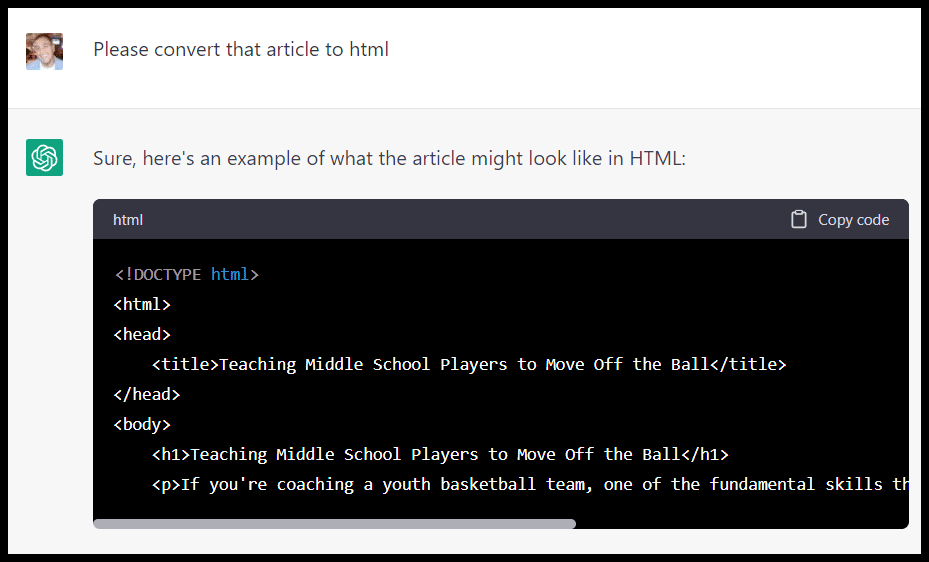
As an SEO, many quick and simple formatting tasks come up where ChatGPT can be very helpful. Things like converting a page to (or from) HTML:

ChatGPT HTML formatting

Extract links from a page:

ChatGPT extract links

(It missed the distinction between internal and external links here, obviously.)

You can also take a list of URLs and extract just the domains from them or convert a list of sites into HTML links (or vice versa).

Additionally, you can perform some functions you might typically perform in spreadsheets (which may or may not be more helpful than just performing them in spreadsheets, depending on your proficiency with spreadsheets and workflow).

Instead of concatenate or having to find a list of cities / copy and pasting a list of states:

ChatGPT spreadsheet functions

In place of VLOOKUP / IF types of functions, you can create a prompt like:

  • “Create lists of basketball drills from site A and site B, then show me A) the drills they both cover and B) the drills that are missing from each list that the other covers.”

Code for simple tools and widgets

As I walked through in this article, you can use ChatGPT to help you build simple tools like calculators that can enhance content, give you a chance to rank for specific terms (like {subject} calculator), and give you something to promote via outreach.

Rewrite content

If you give ChatGPT specific instructions on things like tone and what to include, it can help you rewrite or flesh out content:

ChatGPT rewrite content

Outreach assistant

While ChatGPT can’t find contact information for you (at least for now), there are some specific outreach tasks it can perform.

Like getting a list of ideas of places to guest post:

ChatGPT outreach assistant

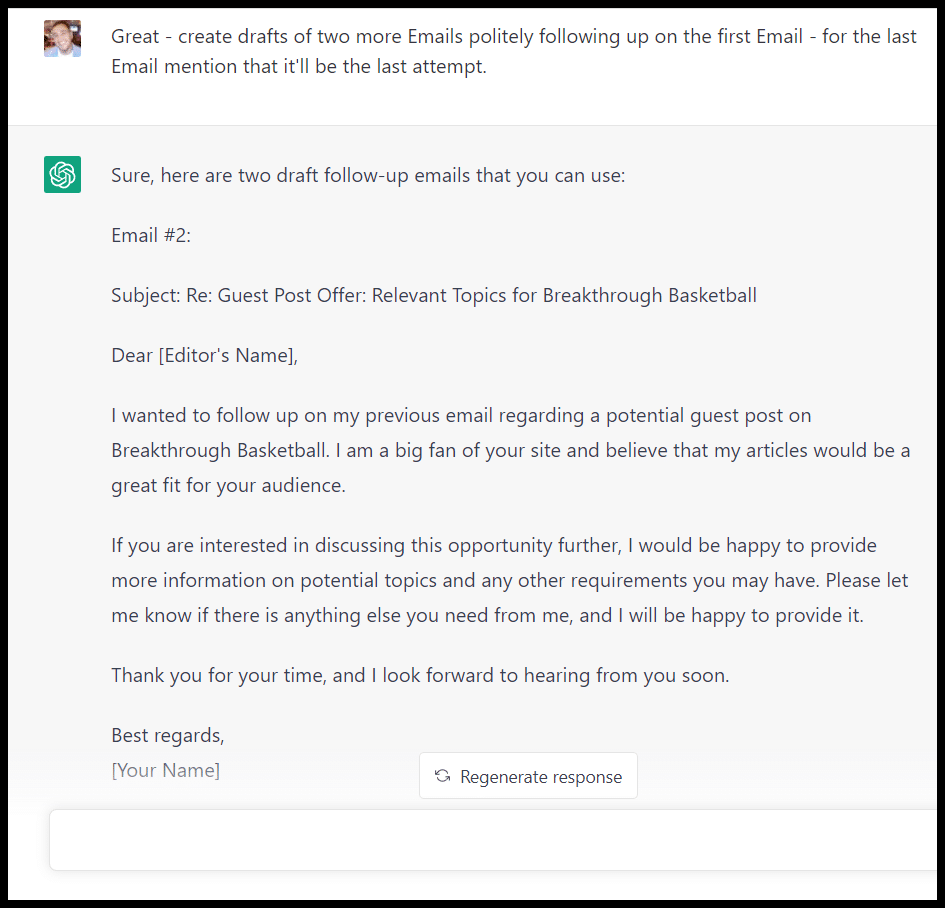
Or drafting a template for an outreach email. This is potentially particularly valuable if English isn’t your first language:

ChatGPT outreach assistant template

Infuse your prompts here with your own tone and content preferences to make sure the template you get is closer to being consistent with your typical outreach emails.

You can even craft an entire auto-responder sequence:

Home Business

Or you could create different types of outreach lists:

ChatGPT outreach lists

And as you work through the outreach process, you can likely find even more opportunities to leverage ChatGPT.


Get the daily newsletter search marketers rely on.

<input type="hidden" name="utmMedium" value="“>
<input type="hidden" name="utmCampaign" value="“>
<input type="hidden" name="utmSource" value="“>
<input type="hidden" name="utmContent" value="“>
<input type="hidden" name="pageLink" value="“>
<input type="hidden" name="ipAddress" value="“>

Processing…Please wait.

function getCookie(cname) {
let name = cname + “=”;
let decodedCookie = decodeURIComponent(document.cookie);
let ca = decodedCookie.split(‘;’);
for(let i = 0; i <ca.length; i++) {
let c = ca[i];
while (c.charAt(0) == ' ') {
c = c.substring(1);
}
if (c.indexOf(name) == 0) {
return c.substring(name.length, c.length);
}
}
return "";
}
document.getElementById('munchkinCookieInline').value = getCookie('_mkto_trk');


The bad

In my experience, most of the trouble you’ll run into with ChatGPT will be:

  • Asking the tool to complete a process whole-cloth for you (rather than particular functions).
  • Not providing enough oversight.

Publications have already been accused of publishing AI-generated content with errors and plagiarized content. 

If we’d unleashed ChatGPT to do all of our keyword research for us, we likely wouldn’t have gotten a lot of traction.

When you try to assign it tasks like strategy, you’ll often get the same kind of boilerplate advice you’d get from a beginner-level X tips article on Google:

ChatGPT marketing plan

And without a lot of human input (specific prompts, editing, and likely a mix of human and AI content weaved together), you’ll likely get warmed-over content.

Depending on your purpose (and your risk threshold), that may be fine.

You may not need your meta descriptions, FAQs or certain articles or pages to be “10x”. But make sure you understand what you’re getting.

The ugly

Of course, some areas, like health-related content or critical tasks, on your site can go sideways:

Be particularly mindful of ChatGPT’s limitations 

When it comes to ChatGPT prompts and SEO, you want to proceed with caution.

Get good at creating your own prompts and sourcing inspiration (or productivity enhancements) from prompts other people share.

Here are a few great articles with additional SEO prompts for ChatGPT:

The post An SEO’s guide to ChatGPT prompts appeared first on Search Engine Land.

Original source: https://searchengineland.com/chatgpt-prompts-seo-393523

The GA4 migration deadline is right around the corner

Home Business

Google is sunsetting Universal Analytics (UA) on July 1st. Starting in March, Google will automatically create Google Analytics 4 (GA4) properties for any customer who does not set up a GA4 property with basic settings.

If you do not opt-out of auto migration by February 28, 2023, Google will transition your UA account to GA4 without any custom strategy. To ensure accurate tracking and analysis, you should make the switch to GA4 now and customize the setup as needed.

GA4 is much more than just a new “version” of Google Analytics. It’s a completely new platform – built from the ground up to collect, process, and report on data differently than before. Migrating to GA4 is a complex and integral process that requires strategic planning and expert implementation.

Need help? This 5-minute GA4 preparation guide from MoreVisibility will provide the insight and assistance you need to get started. Visit Digital Marketing Depot to download the GA4 Preparation Guide.

The post The GA4 migration deadline is right around the corner appeared first on Search Engine Land.

Original source: https://searchengineland.com/the-ga4-migration-deadline-is-right-around-the-corner-393606

5G Airwave defender – How to reduce radiation in your home!

Airwave Defender is a new and innovative device designed to protect individuals from the harmful effects of electromagnetic radiation.

With the increasing use of technology in our daily lives, we are constantly exposed to high levels of electromagnetic radiation from various devices such as cell phones, laptops, Wi-Fi routers, and other electronic gadgets.

This constant exposure to electromagnetic radiation can have a negative impact on our health, leading to fatigue, headaches, and even more serious illnesses such as cancer.

Get Now The Airwave Defender is a small, portable device that works by emitting a unique combination of frequencies that neutralize the harmful effects of electromagnetic radiation.

The device is designed to be worn on the body or placed near electronic devices to protect the individual from the harmful effects of electromagnetic radiation.

The Airwave Defender works by emitting a field of frequencies that create a barrier between the individual and the electromagnetic radiation emitted by electronic devices.

The device is powered by a small battery and can be worn as a pendant or placed on a desk near electronic devices.

The device does not interfere with the performance of electronic devices, but rather works to neutralize the harmful effects of the electromagnetic radiation emitted by these devices.

The Airwave Defender is designed to be used by anyone who uses electronic devices on a regular basis, such as office workers, students, and anyone who is concerned about the harmful effects of electromagnetic radiation. The device is also safe for use by children and pets, making it a versatile and effective tool for protecting the entire family. One of the key benefits of the Airwave Defender is its portability.

The device is small and lightweight, making it easy to carry around and use wherever you go.

This means that you can take the device with you when you travel, ensuring that you are protected from electromagnetic radiation wherever you go.

Get Now Another key benefit of the Airwave Defender is its effectiveness.

The device has been tested and proven to be highly effective at neutralizing the harmful effects of electromagnetic radiation.

This means that you can use the device with confidence, knowing that you are fully protected from the harmful effects of electromagnetic radiation.