Did you know you can make cash from lost luggage? Hundreds of thousands of suitcases get lost every year around the world, but they don’t just disappear into a black hole – in fact, they open up an opportunity for you to make money.
Even the ones that never find their owners again end up somewhere. In fact, that somewhere is usually some form of auction house that sells unclaimed baggage to people like you and me. In America, the Unclaimed Baggage Centre in Alabama receives 800,000 visitors per year and is, incredibly, the state’s biggest tourist attraction.
If you can’t get to Alabama then no fear, the British version of lost luggage auctions is also the place to bag a good bargain and even sell it on at a profit.
When British Airways has a surplus of unclaimed baggage in storage, it sells the cases at auction (of course, BA – and we hope all airlines – do their absolute best to reunite baggage that has gone astray with its owner before attempting to sell it off.)
All those looking to bag a bargain on the lucky dip of lost luggage need to do is head down to the auction house, and bid on cases that go under the hammer.
If you’re lucky, you could pick up items worth hundreds or thousands of pounds, for very little – most suitcases sell for between £10 and £75. The savvy amongst you could sell items on for more than you paid, making a tidy profit.
Sometimes, auction houses will have opened up the suitcases and separated the goods. Other times, there may be a generic description of what’s inside – “men’s clothes”, for example.
There are plenty of bargains up for grabs, and it can be fun – many people describe it as being like a treasure hunt.
Where to look
London’s lost luggage hotspot is Greasby’s in Tooting, south west London. It’s here that British Airways (one of the world’s biggest baggage losers) sells its lost luggage. Greasby’s also deals with the lost luggage from Heathrow Airport.
Auctions take place every Tuesday, with views the Monday before. The most recent Monday viewing took place between 11am and 4.45pm. The viewings give you a chance to suss out which bags you want to buy.
Other notable auction houses that deal in lost luggage include:
As most of the above auction houses don’t have allotted airport auctions, it’s probably best to check with their website as to the next scheduled date for baggage bounty. You should sign up to their mailing lists, which will let you know when they’re going to happen, or follow individual houses on social media.
Step 2: Evaluate
After viewing the auction collection, go home and think about the prices of likely individual items to see how much of a profit you can make up to a certain bid. It’s hard to tell if cases are sold closed, but the posher the case, the more likely it is to contain items of value.
A good way to get an idea of how much the cases themselves will sell for is to search for similar items that are already listed on eBay. You can also check out the recommended retail price of the cases by looking online.
Once you know how much the case itself is worth, you can set your bidding limit. The only gamble is on how much over the worth of the case you’re willing to bid. If the case contains lots of goodies then it could be worth exceeding your limit. Of course, it could be full of junk.
If you’ve found an auction house that lets you see into the cases before you bid on them, you’ve got a better chance of grabbing a bargain.The same goes if the auction house gives you a description of what’s inside the case, even if it’s brief.
Step 3: Valuable items or cases?
There are two paths you can take at the auction. The auctioneers are likely to take very valuable items out of the suitcases first and sell them separately. This might include electronics, shoes and jewellery. You can bid on these and then sell them, ideally for more, elsewhere.
Alternatively, you can bid for suitcases and hope there are some good clothes, shoes, books, etc. in them that you could flog. This is a bit of a lottery. Auctioneers only give the vaguest details about what is in each suitcase, so you won’t know exactly what you are buying.
The auctioneers do tell you whether the clothes are clean or not though. It’s up to you whether or not you’re happy dealing with someone else’s nasty knickers. Of course you can also sell the suitcase itself and make some cash on that too.
Step 4: Bag a bargain and sell it on
Once you’ve successfully bid and paid for unclaimed luggage bargains, take them home and begin your online selling to make money. Take some photos, write some good ad copy, and then post it on eBay and wait for the bidding to begin.
How much can I make?
Lots. Valuable items can sell very cheaply at auction. A £500 snowboard recently sold for £75, for example. Suitcases might sell between £5 to £50. Even if the case is just full of clothes you should be able to sell it all for more than the price you paid for it.
It is hard to not notice the impact artificial intelligence has had on pretty much everything around us, especially on all things digital. The genius of artificial intelligence combined with powerful machine learning algorithms are redefining several processes around us, web development solutions included!
Using AI for web development has been a total game-changer because of how it has completely transformed the way developers approach their craft. Leveraging its capabilities, developers are utilizing AI to build innovative solutions in almost half the time it would have taken to execute the same task using the traditional approach. Not just that, these solutions also reduce the chances of human error.
The number one reason to use AI in web development is how seamlessly it automates repetitive tasks. Be it debugging or even code generation for that matter, there are now a number of tools that can handle routine work, and allow developers to focus more on other creative and complex endeavors. One of the prime examples can be AI-driven content management systems that update websites with relevant content automatically. With these CMSs, you never have to worry about the relevance of the content on your website.
Artificial intelligence enhances your web development services by revamping the user experience through sophisticated design tools. The technology can predict user interactions and even suggest design improvements, which will contribute to responsive and intuitive interfaces. The predictive capabilities of artificial intelligence are specifically beneficial in creating adaptive designs that ensure a seamless experience across different devices and screen sizes.
How else to use AI in web development?
While not directly a part of web development, SEO is another area where artificial intelligence is making a noteworthy impact. AI powered SEO tools in web development can analyze vast amounts of data to identify keywords and trends, and thus, help websites in achieving higher rankings on search engine results pages. These AI tools can also be used to monitor and adapt to any changes in search engine algorithms to ensure that the websites remain optimized at all times.
Among its lesser-known benefits is the impact of artificial intelligence on security. Web development teams are integrating AI-driven security systems to their development projects to detect and respond to cyber threats in real-time for protection against malicious threats. Generally, these AI systems use machine learning to identify anomalies and patterns that help in providing robust defense mechanisms that can even evolve with emerging threats.
To sum it up, AI is reshaping almost every single aspect of the web development industry from code to content. From automating tasks, enhancing user experience, and personalizing content to optimizing SEO and bolstering security, artificial intelligence is empowering developers worldwide to create more user-centric, sophisticated, and efficient websites.
As technology continues to advance at an unparalleled pace, the influence of artificial intelligence on web development will grow further to bring about a brand-new era of innovation and excellence in the digital world.
It is hard to not notice the impact artificial intelligence has had on pretty much everything around us, especially on all things digital. The genius of artificial intelligence combined with powerful machine learning algorithms are redefining several processes around us, web development solutions included!
Using AI for web development has been a total game-changer because of how it has completely transformed the way developers approach their craft. Leveraging its capabilities, developers are utilizing AI to build innovative solutions in almost half the time it would have taken to execute the same task using the traditional approach. Not just that, these solutions also reduce the chances of human error.
The number one reason to use AI in web development is how seamlessly it automates repetitive tasks. Be it debugging or even code generation for that matter, there are now a number of tools that can handle routine work, and allow developers to focus more on other creative and complex endeavors. One of the prime examples can be AI-driven content management systems that update websites with relevant content automatically. With these CMSs, you never have to worry about the relevance of the content on your website.
Artificial intelligence enhances your web development services by revamping the user experience through sophisticated design tools. The technology can predict user interactions and even suggest design improvements, which will contribute to responsive and intuitive interfaces. The predictive capabilities of artificial intelligence are specifically beneficial in creating adaptive designs that ensure a seamless experience across different devices and screen sizes.
How else to use AI in web development?
While not directly a part of web development, SEO is another area where artificial intelligence is making a noteworthy impact. AI powered SEO tools in web development can analyze vast amounts of data to identify keywords and trends, and thus, help websites in achieving higher rankings on search engine results pages. These AI tools can also be used to monitor and adapt to any changes in search engine algorithms to ensure that the websites remain optimized at all times.
Among its lesser-known benefits is the impact of artificial intelligence on security. Web development teams are integrating AI-driven security systems to their development projects to detect and respond to cyber threats in real-time for protection against malicious threats. Generally, these AI systems use machine learning to identify anomalies and patterns that help in providing robust defense mechanisms that can even evolve with emerging threats.
To sum it up, AI is reshaping almost every single aspect of the web development industry from code to content. From automating tasks, enhancing user experience, and personalizing content to optimizing SEO and bolstering security, artificial intelligence is empowering developers worldwide to create more user-centric, sophisticated, and efficient websites.
As technology continues to advance at an unparalleled pace, the influence of artificial intelligence on web development will grow further to bring about a brand-new era of innovation and excellence in the digital world.
There’s a new search strategy in town! Generative engine optimization (GEO), the younger sibling of search engine optimization (SEO), has arrived at the station.
There’s a good chance you’re already familiar – if you head to Google and ask it a question, you’ll likely see an AI-generated blurb at the top of your search results.
If you own a business and have spent time and resources vying for that top search position with SEO, this shift might be frustrating. Do you need to start all over again to optimize your content for this new type of search?
Good news: There’s no need to reinvent the wheel, but it is time to adjust strategy slightly.
Your existing SEO best practices will handle most of the heavy lifting, but there are a few clever shifts to make to stay visible, relevant and competitive.
Understanding generative engine optimization
Acronyms abound in the digital marketing world. What does this new one mean and why is it important going forward? Here’s what you need to know.
What is generative search?
Generative search relies on artificial intelligence (AI) to pull together information from multiple sources and compile unique, coherent responses to user queries.
With generative search, users receive AI summaries with direct answers at the top of their search results page instead of a traditional list of links.
When generative search results are accurate, they can save time and increase helpfulness for the end user.
For people creating internet content, however, this signals a slight shift. To get your content featured in that top-result AI summary, your content needs to be AI-ready.
The rise of generative engine optimization
Generative engine optimization is how you get AI-ready content.
GEO combines traditional SEO practices with an understanding of how AI models process and prioritize content. If you apply GEO principles well, your content will be poised for visibility in generative search engines such as Google’s AI Overviews and Microsoft Copilot.
Fortunately, best GEO practices don’t exclude human readers. You can (and should) write for both human and AI audiences – but more on that in a moment.
First: Why is it critical to focus on this now?
GEO is a brand-new concept and an area of AI use that’s getting understood and structured right now. That means there’s a lot of uncertainty surrounding the adoption of these strategies.
And there are a lot of opportunities for those who do adopt these strategies to stand out.
The upcoming shift in SEO practices
In a nutshell, traditional SEO relies heavily on keyword and backlink placement, good content structure and back-end technical site optimization.
Although these elements are and will remain important, it’s time to shine a spotlight on creative, authoritative and relevant content to succeed with GEO.
Your mission is to write content that is clearly helpful and well-structured so that both AI and human readers instantly understand the value you’re bringing to the table. That’s a big ask, but I have some practical tips to share.
Strategies for navigating generative search
Are you interested in being an early adopter of GEO best practices and taking advantage of this paradigm shift?
Start weaving these practices into your content creation routine.
1. Focus on content fluency and structure
Here’s a term to keep in mind: Fluency optimization. This trendy phrase boils down to keeping your content easy to read for robots and humans alike.
Here’s a quick checklist for accomplishing this:
Make sure your content flows smoothly. Get rid of jargon and long sentences. (Reading your content out loud is an easy way to identify these!)
Use clear headings and subheadings – often. Make these headings descriptive and down to earth.
Use bullet points and lists. These break information down into easily digestible formats to improve readability.
Keeping your content organized and skimmable makes your information accessible for all readers, AI and otherwise. A clear, strategic content structure also makes it easier for you to stay on track.
As you learn more about GEO, E-E-A-T is an acronym you’ll see often.
It stands for experience, expertise, authoritativeness and trustworthiness.
The more you sound like a trustworthy, authoritative, experienced expert in your content, the more humans and AI want to read, remember and rank your pieces.
To do this, consider:
Experience: Share personal anecdotes and case studies to demonstrate hands-on knowledge.
Expertise: Cite reliable sources and include detailed, accurate information.
Authoritativeness: Highlight credentials, awards or recognitions related to your field.
Trustworthiness: Use clear language, avoid clickbait and ensure your content is free of errors.
Get the daily newsletter search marketers rely on.
The Venn diagram of content that’s written well for both machine and human writers may be a circle. Keep your language structured and clear, with personable asides to delight human readers and crisp, to-the-point headers so robots can hone in on shareable information.
Your goal is to make it very, very easy for AI to extract key points for use in generative search and keep your content fun and valuable for humans to read.
This may seem like a tall order, but with consistency, structure and clarity, you’ll be well on your way.
4. Consider using AI tools for content creation – at first
The thought may have already crossed your mind that if you’re writing for AI, at least in part, then using AI to write may be a strategic choice.
This depends on your familiarity with AI and your comfort as a writer. Relying on AI as an assistant for initial content outlining, brainstorming and even content analysis can be valuable. (It certainly helps with the hardest part of any project – getting started!)
One word of caution: Although AI can help you generate initial drafts or iterate engaging headers, you should still plan on editing, fact-checking and refining the content before publishing. For one thing, AI can make things up (or “hallucinate” information) and you wouldn’t want to put your readers or your own reputation at risk with false content.
In addition, it will become increasingly important to differentiate what you say from the growing mass of purely AI-generated content out there. (E-E-A-T, remember?)
The two things you need to remember for successful GEO
As you expand your experience with generative search techniques and tweak your content with GEO, two factors will help you succeed:
Education.
Consistency.
Why?
Education will help you use AI better. Investing in AI training, staying up to date about generative search and keeping an eye out for the latest AI tips and tricks will help you (and your team!) get the most out of AI tools.
Learning more about GEO will keep you ahead of the curve. This is brand-new tech and the best practices will likely shift over the coming months. Knowing about those shifts will help you take advantage of every single one.
Regular training will reduce fear and boost adoption. If anyone on your team is leery of AI or GEO, that makes sense! These are big concepts to take in. Educate your team on the benefits of AI in content strategy, reinforce the idea that AI is a tool to enhance human talent (not replace it) and start with small, manageable AI integrations.
Play the long game. Applying GEO techniques requires upfront labor in exchange for a delayed payoff. Remind yourself and your team that, even if progress seems incremental, it’s a critical strategy that will benefit your company with time.
Balance your SEO and GEO efforts. GEO is not the end of traditional SEO! Continue to invest in technical SEO, keyword research and a backlink strategy. Your efforts will build off each other if you’re consistent, so make each a part of your ongoing content strategy.
Generative search is giving savvy business owners an opportunity to rethink online visibility. By investing in both GEO and SEO techniques, you can boost the relevancy and competitiveness of your content.
The main thing to remember is that your content needs to be high-quality, authoritative and relevant.
Write to your strengths and prioritize clear content structure, and you’ll be well on your way to winning the game with generative engine optimization.
Thanks to current technological advancements, it has never been simpler to start an online business from home. However, just because it is easier, doesn’t mean that it is a straightforward path. So, if you’re someone who has grandiose plans of starting an online business and needs some help — this one is for you.
Understanding the Online Business Landscape
Before we properly get into the basic steps you need to follow to start a digital company, you should learn more about the current online business landscape. The best way to start this off is by assessing other companies that are thriving in the virtual space. For instance, now take a look at the successful online casino sector.
Nowadays, users can play online slots from the comfort of their homes. This allows for an unprecedented level of convenience, along with variety as there are no space limitations that brick-and-mortar locales face. As such, people can select from hundreds of different slots, from fruit machine-esque games like 7 Gold Fruits to themed ones like Anubis Rising Jackpot King.
Of course, this is just one example, but which sector/company you choose to analyze will heavily depend on the niche you’re planning to enter. However, every business that is doing well in the digital world shares one thing in common: innovation. This is a necessity, as the current landscape is evolving at break-neck speed, following the growing needs of modern consumers.
Starting Out with Your Online Business
Now that you understand learning more about the current landscape and what to expect, it’s time to get a simple blueprint you can follow to create and start your own company. Most likely, you’ve already figured out your niche and have a business idea by this point, so the next part is understanding who your target audience is. If you’re not sure how to do this, there are several guides, such as the one from Adobe, that will help.
Following this, you should do some market research when starting an online business. This should cover everything from potential competitors to current trends and possible customer pain points. Once that’s done and dusted, you will need to actually start working on creating your products/services. If you’re doing this on a lower budget, we’d recommend finding investors to assist. If that’s not feasible, then start small and work your way up.
Finally, it’s time to let the world know about your existence by building an online presence. For entrepreneurs who don’t have a knack for website creation and design, we’d suggest utilizing a website builder service like Wix. Alternatively, you can use an e-commerce platform in the beginning, until you grow your business.
Since you’re just beginning the journey of starting an online business, you might want to keep your expenses as low as possible when it comes to marketing. Social media platforms will quickly become your best friend when it comes to this, giving you a chance to reach millions of users for a relatively small fee. While having a business account on every kind of platform will yield you the most success, it might be best to focus on the ones that your target audience typically uses the most.
Photo by Igor Miske on Unsplash
The online world is vast, with plenty of competition for each niche, making it daunting for new entrepreneurs. However, the effort and patience you put in may get you the financial freedom you desire.
TikTok implemented new restrictions on ads targeting teens and introduced AI disclosure requirements for advertisers.
Why we care. These changes aim to protect younger users and increase overall ad transparency, potentially impacting how advertisers reach and engage with TikTok’s audience.
Key changes.
U.S. advertisers can now only target teens using broad options like location, language and device info.
Users gain more control over ad interests and off-TikTok data sharing.
New AI-generated content labels for ads.
The big picture. TikTok is aligning with industry trends to protect user privacy and increase transparency, following similar moves by platforms like Meta.
By the numbers. With about 25% of TikTok’s audience under 20, these changes could significantly impact advertising strategies.
Between the lines. The restrictions on teen targeting could challenge any brands that rely heavily on this demographic, forcing them to adapt their strategies.
What to watch. How these changes impact your advertising and whether they influence user trust and engagement on the platform.
What’s next. Brands will need to reassess their TikTok marketing strategies, especially those targeting younger audiences or using AI-generated content.
Thanks to current technological advancements, it has never been simpler to start an online business from home. However, just because it is easier, doesn’t mean that it is a straightforward path. So, if you’re someone who has grandiose plans of starting an online business and needs some help — this one is for you.
Understanding the Online Business Landscape
Before we properly get into the basic steps you need to follow to start a digital company, you should learn more about the current online business landscape. The best way to start this off is by assessing other companies that are thriving in the virtual space. For instance, now take a look at the successful online casino sector.
Nowadays, users can play online slots from the comfort of their homes. This allows for an unprecedented level of convenience, along with variety as there are no space limitations that brick-and-mortar locales face. As such, people can select from hundreds of different slots, from fruit machine-esque games like 7 Gold Fruits to themed ones like Anubis Rising Jackpot King.
Of course, this is just one example, but which sector/company you choose to analyze will heavily depend on the niche you’re planning to enter. However, every business that is doing well in the digital world shares one thing in common: innovation. This is a necessity, as the current landscape is evolving at break-neck speed, following the growing needs of modern consumers.
Starting Out with Your Online Business
Now that you understand learning more about the current landscape and what to expect, it’s time to get a simple blueprint you can follow to create and start your own company. Most likely, you’ve already figured out your niche and have a business idea by this point, so the next part is understanding who your target audience is. If you’re not sure how to do this, there are several guides, such as the one from Adobe, that will help.
Following this, you should do some market research when starting an online business. This should cover everything from potential competitors to current trends and possible customer pain points. Once that’s done and dusted, you will need to actually start working on creating your products/services. If you’re doing this on a lower budget, we’d recommend finding investors to assist. If that’s not feasible, then start small and work your way up.
Finally, it’s time to let the world know about your existence by building an online presence. For entrepreneurs who don’t have a knack for website creation and design, we’d suggest utilizing a website builder service like Wix. Alternatively, you can use an e-commerce platform in the beginning, until you grow your business.
Since you’re just beginning the journey of starting an online business, you might want to keep your expenses as low as possible when it comes to marketing. Social media platforms will quickly become your best friend when it comes to this, giving you a chance to reach millions of users for a relatively small fee. While having a business account on every kind of platform will yield you the most success, it might be best to focus on the ones that your target audience typically uses the most.
Photo by Igor Miske on Unsplash
The online world is vast, with plenty of competition for each niche, making it daunting for new entrepreneurs. However, the effort and patience you put in may get you the financial freedom you desire.
TikTok implemented new restrictions on ads targeting teens and introduced AI disclosure requirements for advertisers.
Why we care. These changes aim to protect younger users and increase overall ad transparency, potentially impacting how advertisers reach and engage with TikTok’s audience.
Key changes.
U.S. advertisers can now only target teens using broad options like location, language and device info.
Users gain more control over ad interests and off-TikTok data sharing.
New AI-generated content labels for ads.
The big picture. TikTok is aligning with industry trends to protect user privacy and increase transparency, following similar moves by platforms like Meta.
By the numbers. With about 25% of TikTok’s audience under 20, these changes could significantly impact advertising strategies.
Between the lines. The restrictions on teen targeting could challenge any brands that rely heavily on this demographic, forcing them to adapt their strategies.
What to watch. How these changes impact your advertising and whether they influence user trust and engagement on the platform.
What’s next. Brands will need to reassess their TikTok marketing strategies, especially those targeting younger audiences or using AI-generated content.
Thanks to current technological advancements, it has never been simpler to start an online business from home. However, just because it is easier, doesn’t mean that it is a straightforward path. So, if you’re someone who has grandiose plans of starting an online business and needs some help — this one is for you.
Understanding the Online Business Landscape
Before we properly get into the basic steps you need to follow to start a digital company, you should learn more about the current online business landscape. The best way to start this off is by assessing other companies that are thriving in the virtual space. For instance, now take a look at the successful online casino sector.
Nowadays, users can play online slots from the comfort of their homes. This allows for an unprecedented level of convenience, along with variety as there are no space limitations that brick-and-mortar locales face. As such, people can select from hundreds of different slots, from fruit machine-esque games like 7 Gold Fruits to themed ones like Anubis Rising Jackpot King.
Of course, this is just one example, but which sector/company you choose to analyze will heavily depend on the niche you’re planning to enter. However, every business that is doing well in the digital world shares one thing in common: innovation. This is a necessity, as the current landscape is evolving at break-neck speed, following the growing needs of modern consumers.
Starting Out with Your Online Business
Now that you understand learning more about the current landscape and what to expect, it’s time to get a simple blueprint you can follow to create and start your own company. Most likely, you’ve already figured out your niche and have a business idea by this point, so the next part is understanding who your target audience is. If you’re not sure how to do this, there are several guides, such as the one from Adobe, that will help.
Following this, you should do some market research when starting an online business. This should cover everything from potential competitors to current trends and possible customer pain points. Once that’s done and dusted, you will need to actually start working on creating your products/services. If you’re doing this on a lower budget, we’d recommend finding investors to assist. If that’s not feasible, then start small and work your way up.
Finally, it’s time to let the world know about your existence by building an online presence. For entrepreneurs who don’t have a knack for website creation and design, we’d suggest utilizing a website builder service like Wix. Alternatively, you can use an e-commerce platform in the beginning, until you grow your business.
Since you’re just beginning the journey of starting an online business, you might want to keep your expenses as low as possible when it comes to marketing. Social media platforms will quickly become your best friend when it comes to this, giving you a chance to reach millions of users for a relatively small fee. While having a business account on every kind of platform will yield you the most success, it might be best to focus on the ones that your target audience typically uses the most.
Photo by Igor Miske on Unsplash
The online world is vast, with plenty of competition for each niche, making it daunting for new entrepreneurs. However, the effort and patience you put in may get you the financial freedom you desire.
Google Search Console (GSC) is a free gift from Google to SEO professionals that tells you how your website is performing.
With data-packed amenities, SEOs can scavenge through GSC to locate stashes of hidden nuggets like clicks and impressions from search queries, Core Web Vitals and whatever other surprises lay within your website.
Custom regex filters take you around your million-page website.
For starters, keep reading this guide below to Google Search Console. It’s engineered to withstand zombie pages, panda claws and even penguin attacks, so it’s exactly what you need when the SEO industry gets dicey.
What does Google Search Console do? And how does it help SEO?
Google Search Console is a free website analytics tool Google provides. Google Search Console tracks your website’s performance in search results on Google.
As an SEO director, I use Google Search Console daily. I check website performance for content updates and troubleshoot any technical changes. It helps me make informed business decisions about where to dedicate my team.
How do I set up Google Search Console?
Getting set up on Google Search Console is quick and easy but may require technical support.
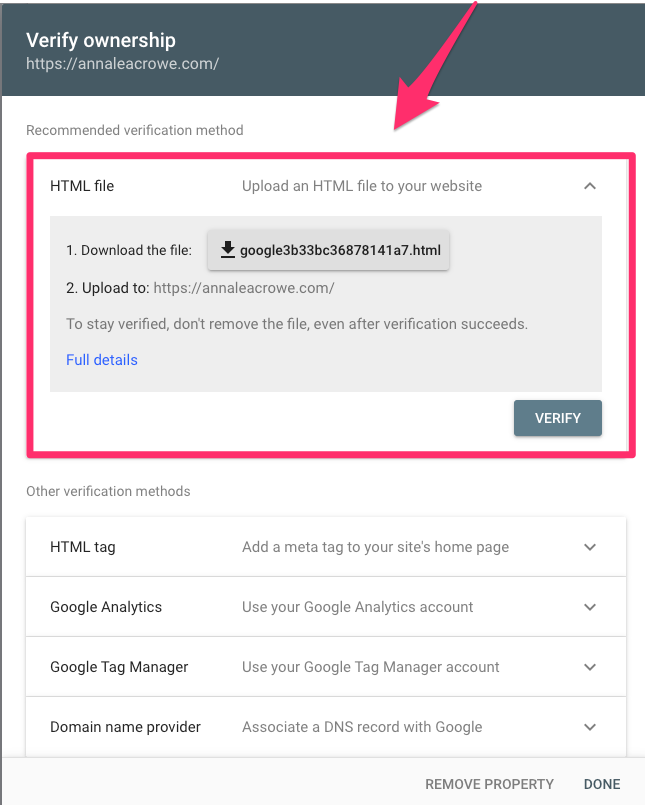
If you don’t see any profiles listed, you’ll need to choose a domain or prefix URL and verify your website ownership.
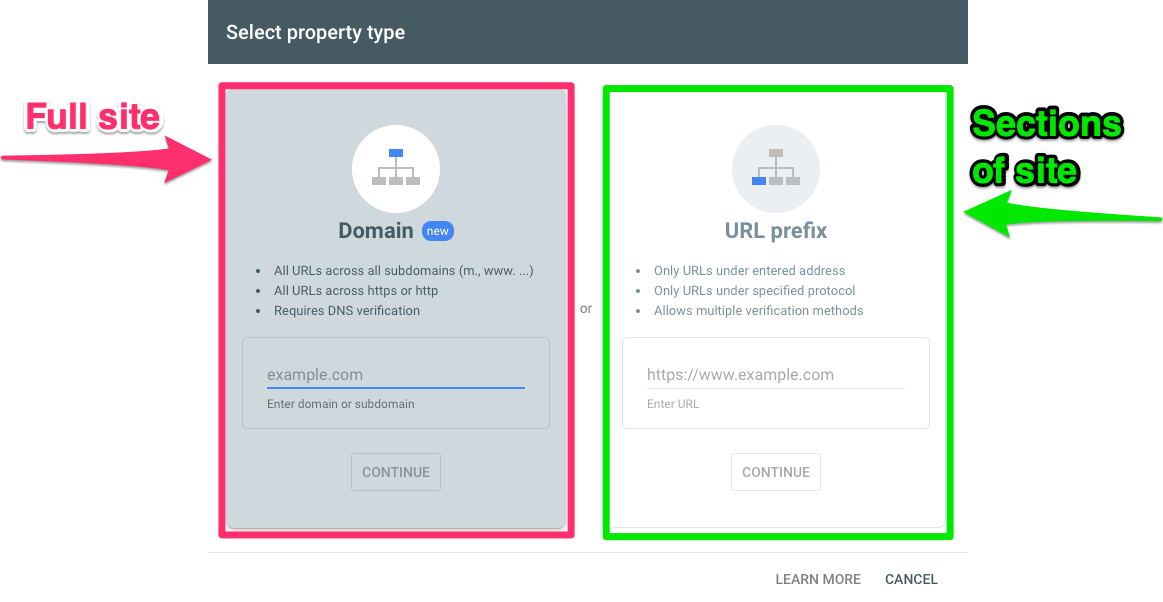
How do you choose between domain vs. prefix URL? Let me walk you through the differences.
Domain property paints the full picture of your website
A domain property includes all subdomains but no protocols (HTTP:// or HTTPS://) and no path strings (/sub/folder/).
A domain property provides a holistic view of how your website is performing Google search results.
I recommend setting up domain properties first.
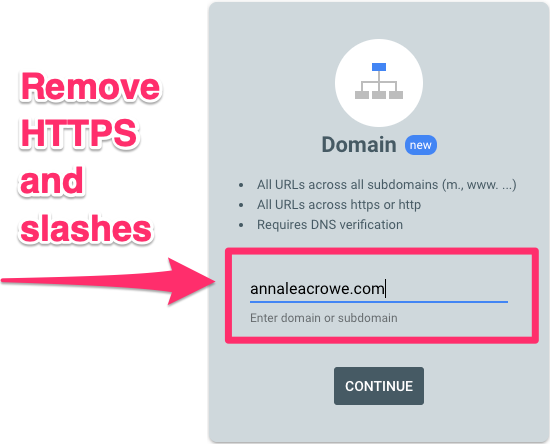
To set up a domain property in Google Search Console, remove the HTTPS and trailing slashes.
GSC website domain
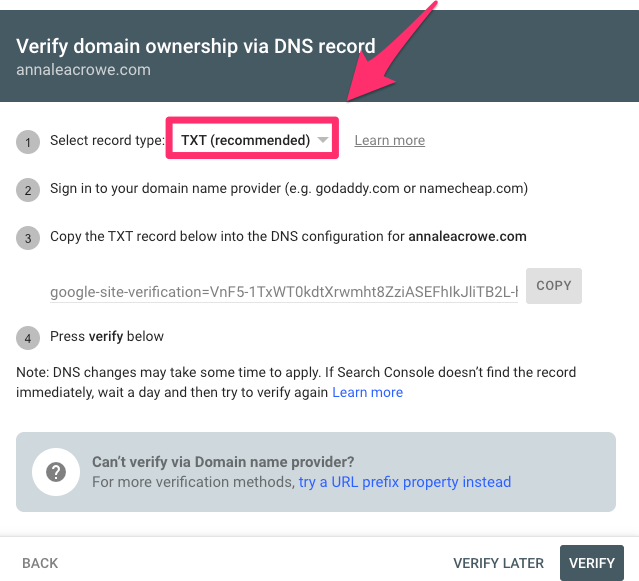
After you hit continue, you can verify your ownership via DNS record through TXT files.
I recommend going this route as it is the easiest.
You’ll need to log into your hosting provider to submit the TXT file.
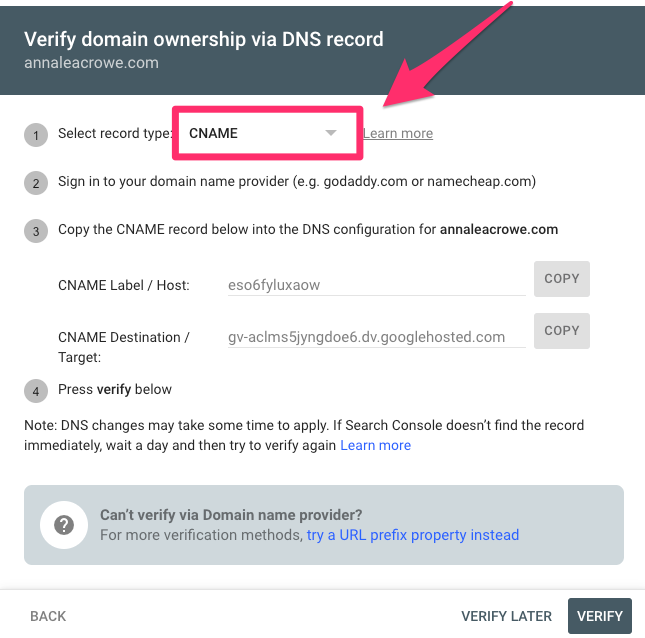
Another option is to verify through the CNAME. If you have technical support, this could be an easy alternative.
URL prefix property allows you to dissect sections of a site
A URL prefix property includes the HTTPS or HTTP protocol and path string. This means that if you want to really dive into a section of your website like /blog/ subfolder or a blog.website.com subdomain, you can do this.
After I set up my domain property, I set up individual URL prefix properties for each subdomain, HTTP versions and /blog/ subfolders.
By having multiple URL prefix properties, I can dig deeper into sections of the website to help troubleshoot.
I can also create reporting specific to the website’s sections that may be more relevant to my co-workers.
For example, I work with customer support team members looking for data on how their Help Center content is performing.
Key moments in history for Google Search Console
Some really crazy stuff has happened with Google Search Console over time. Google Search Console is notorious as a delicacy for many SEO professionals, an incessant phantom of manual actions and the culprit behind better understanding our website health.
I’ve compiled a short history of my SEO bromance with Google Search Console over the years to give you a glimmer of how we got here.
June 2005: Google Webmaster Tools (now called Google Search Console) was launched.
Sept. 8, 2018: Google Search Console released Manual Actions report, “Test Live,” and request indexing features added for the URL inspection tool and upgraded to 16 months of historical data.
The future: New Google AIO reports will be coming soon!
Breakdown of Google Search Console for SEOs
While some SEO professionals may be waiting in the tunnels for Skynet and AIO to take over, there’s one thing we can all still depend on: Google Search Console.
So before you join your freelance mission with SEAL Team 6, walk through the anatomy of Google Search Console.
Overview
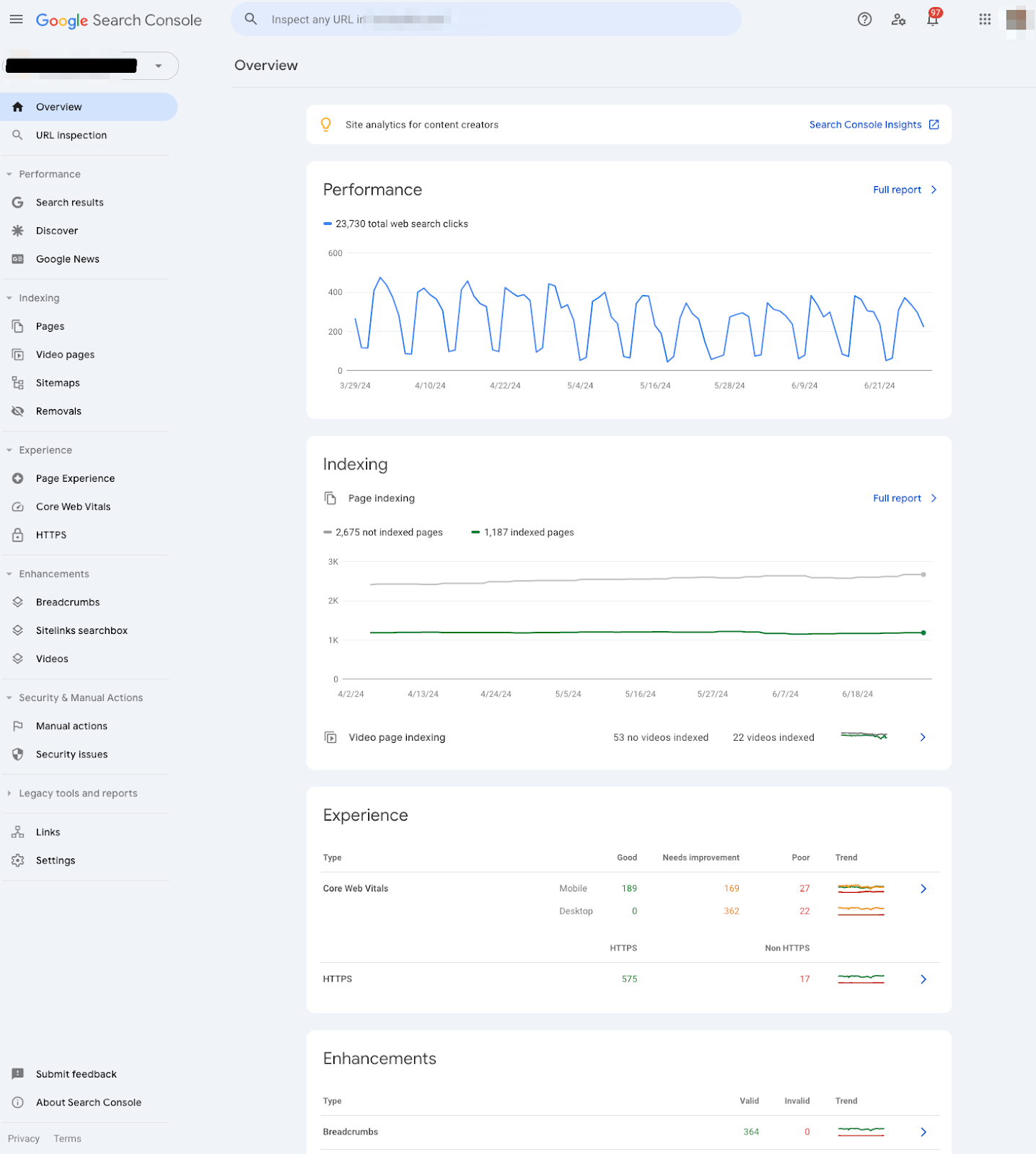
The Overview section in Google Search Console provides a bird’s eye view of all data sets users can uncover in Google Search Console.
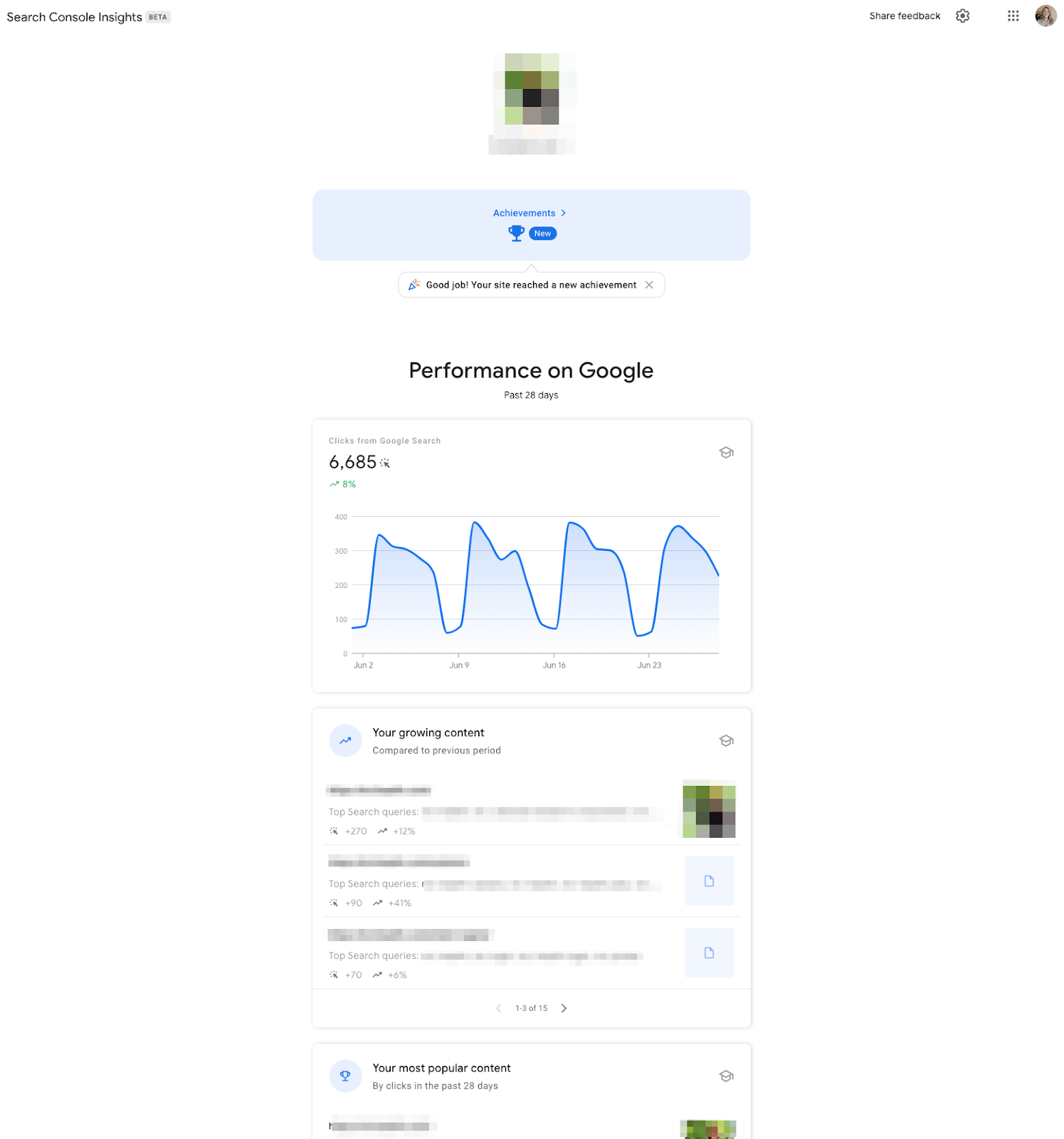
Search Console Insights
If you click the top section under “Search Console Insights,” you’ll see a snapshot of the past 28 days.
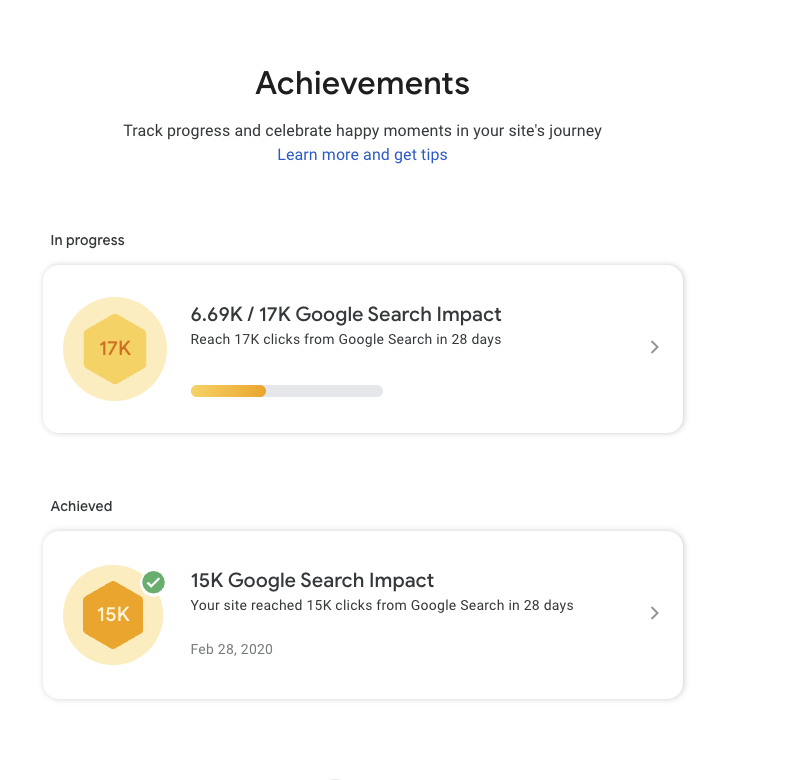
It gives you a high-level overview of achievements you can share with your client or team.
Performance
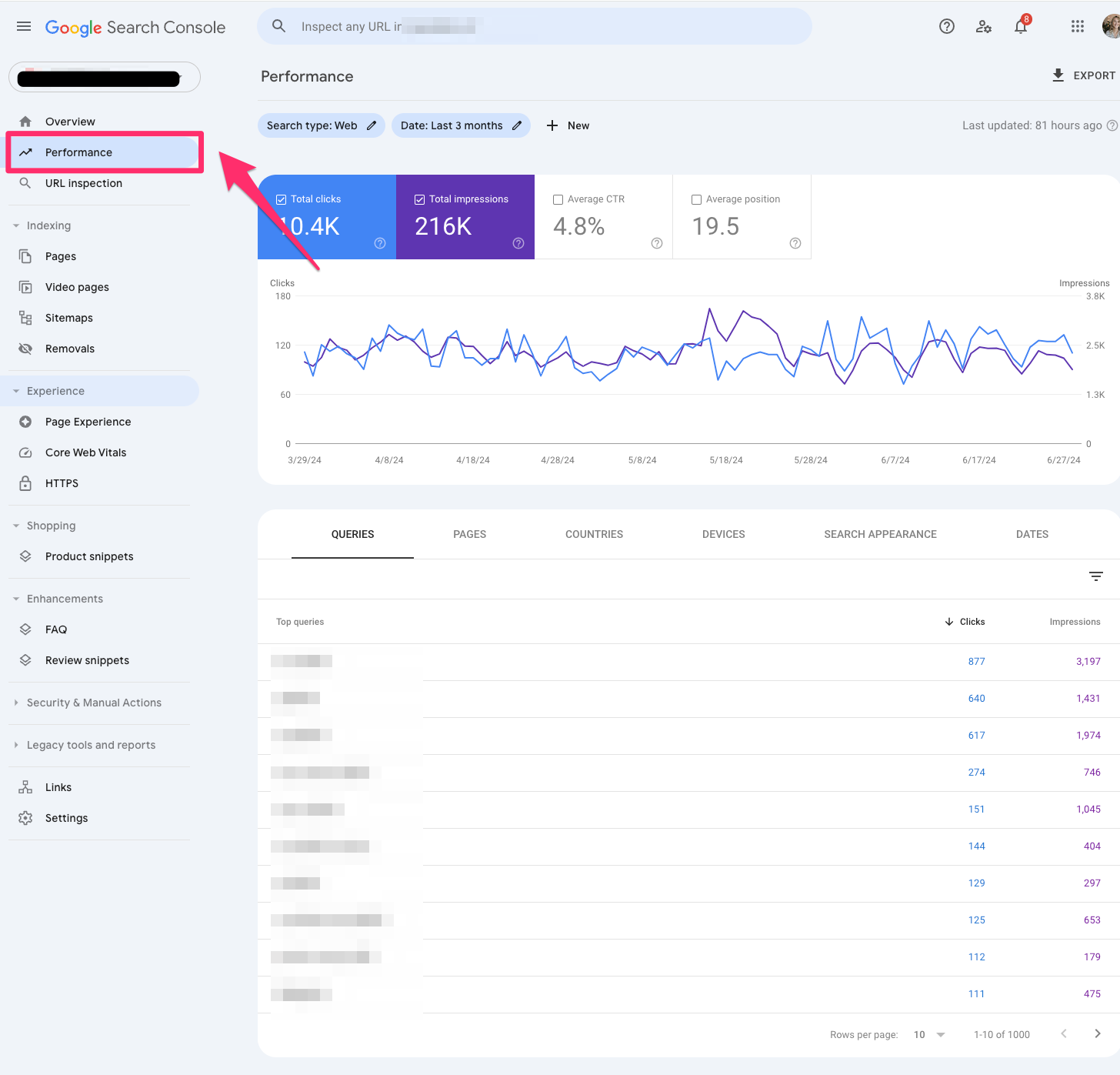
The performance section is also called the “search results” section.
On my end, I only see this called “Performance” under some of my international sites, specifically in China.
Similar to the “search results” section found below, the “Performance” section showcases metrics like search traffic over time, search queries, search queries based on mobile devices and page performance.
URL inspection
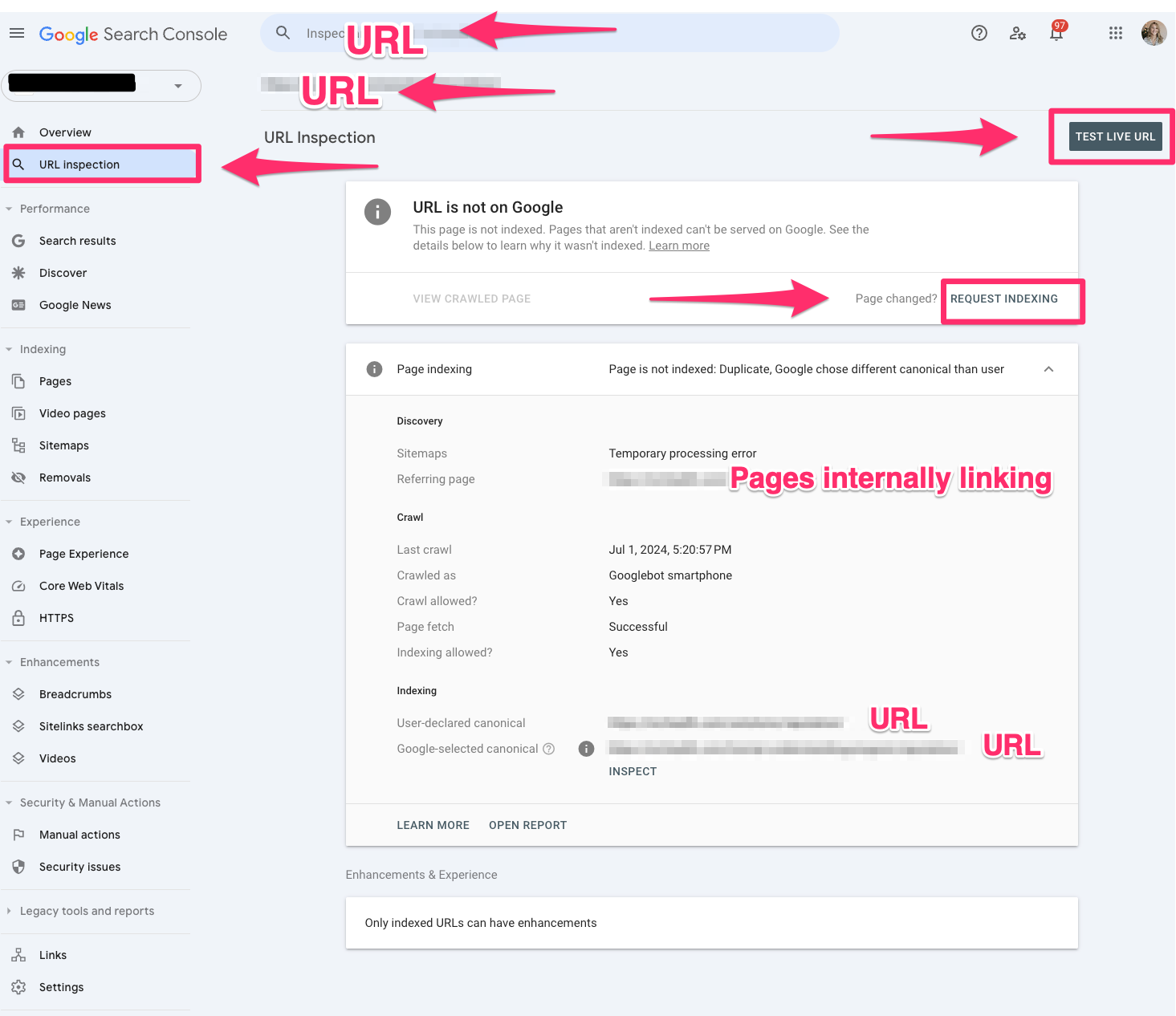
The URL inspection tool lets you see what Google sees per URL.
The URL inspection tool is one of my favorite SEO tools.
The test will show if the URL is indexable and explain why it may or may not be indexed.
You can also request a URL be indexed.
Search results
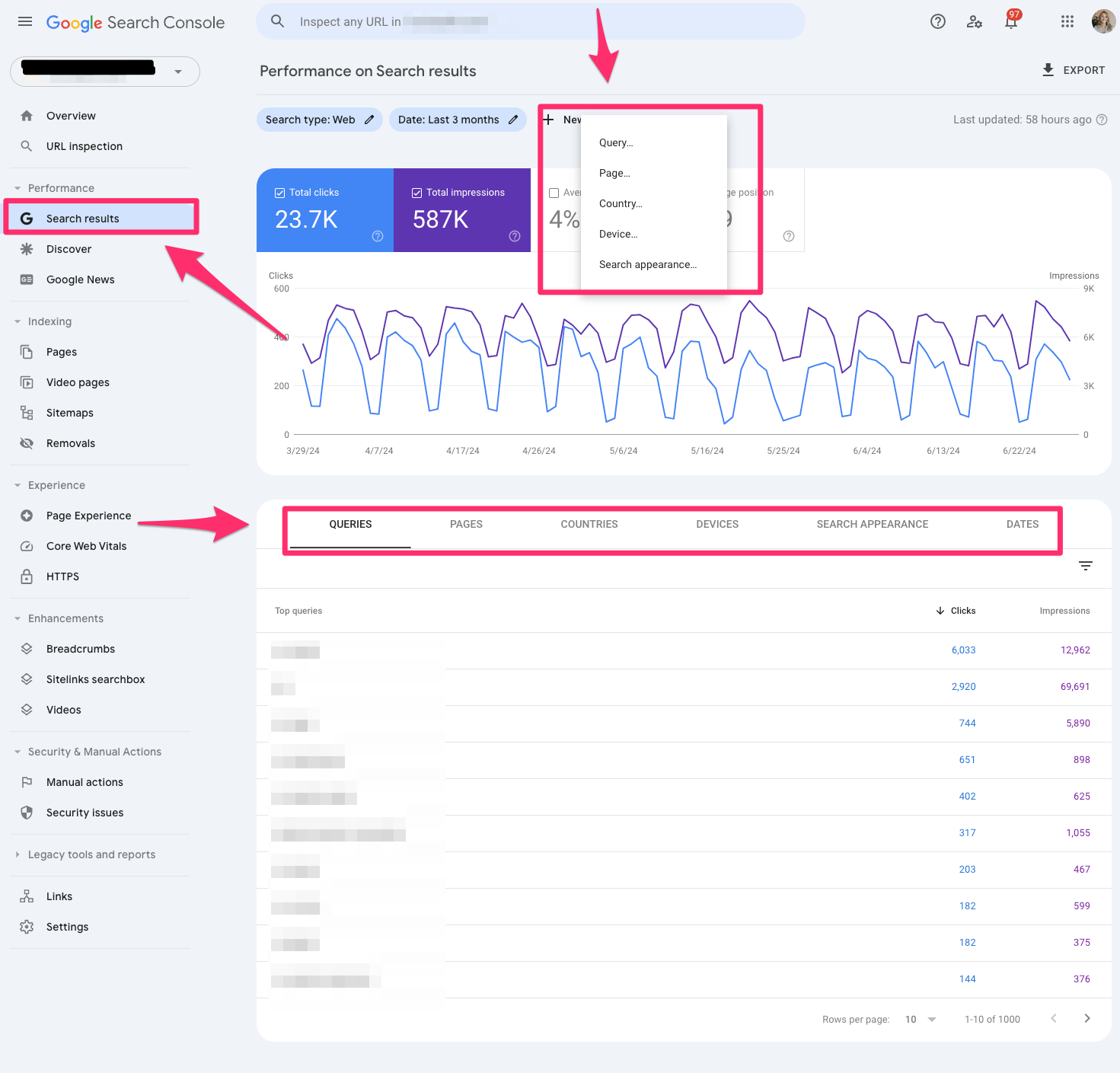
Search results are every content marketer’s favorite report in Google Search Console. It shows search traffic over the past 16 months (with comparisons) and search queries, devices, counties and search appearances.
It will also show you which pages are ranking for certain queries.
I leverage this report to show which pages are performing best vs. worst. It also helps troubleshoot if there are any major drops or spikes in traffic.
You can segment this report based on clicks, impressions and CTR.
Discover
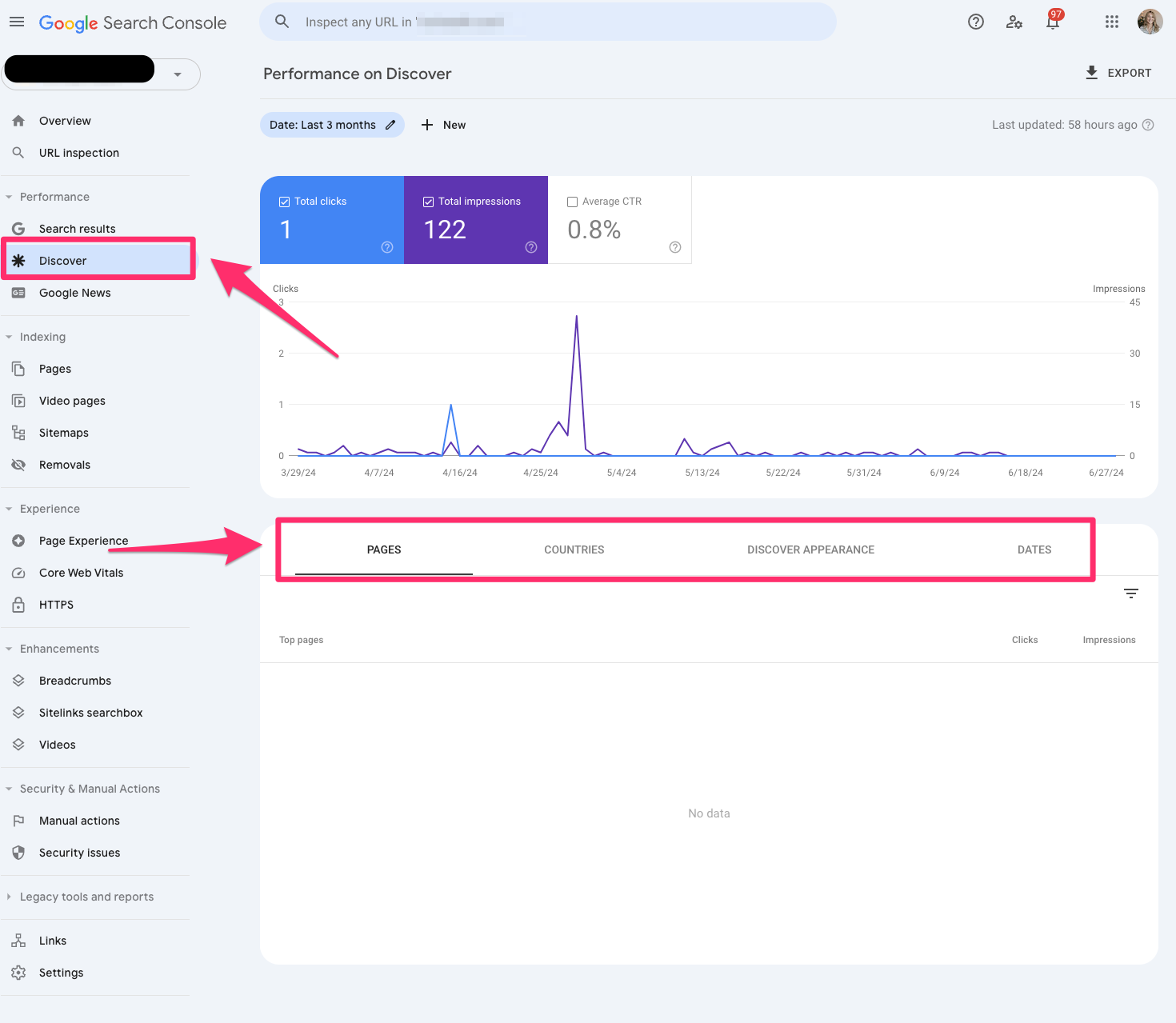
The Discover report in Google Search Console showcases your content’s performance in Google’s Discover feed.
You can filter by pages, countries, search appearances and devices like the search results report.
Google News
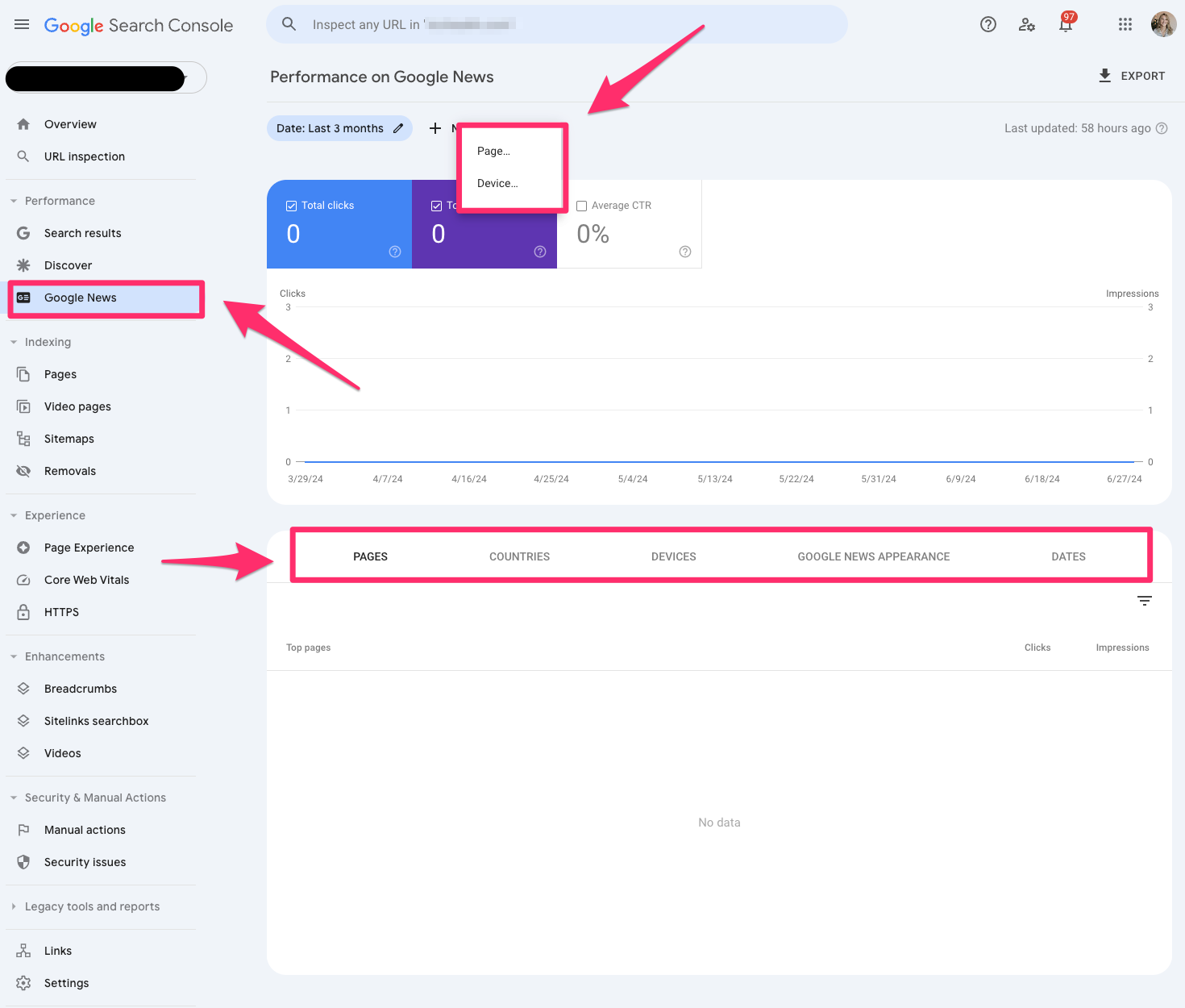
The Google News report in Google Search Console tells you how your content performs under Google News in Google search results.
You can filter the report by page and device.
Pages
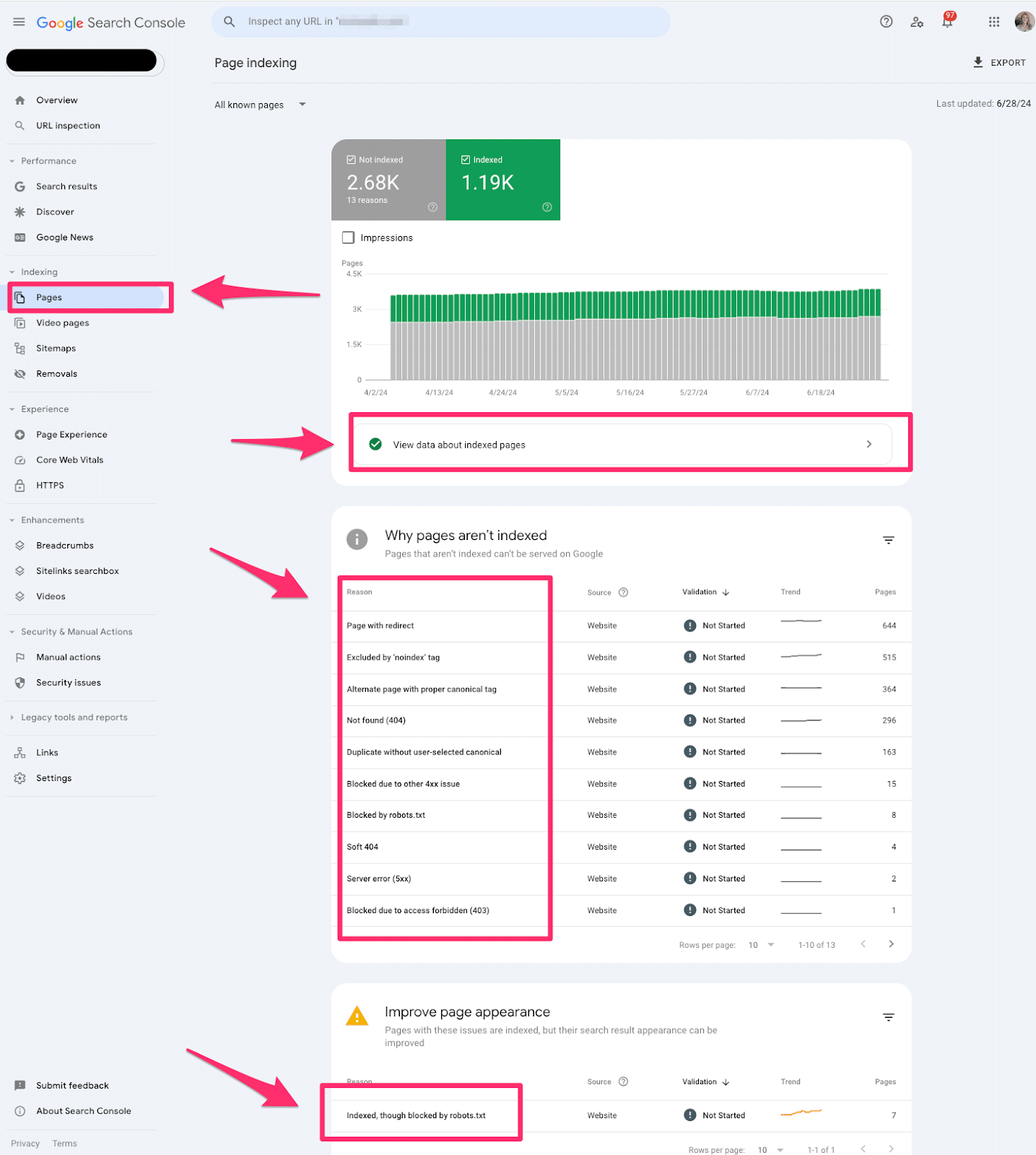
Pages indexing report in Google Search Console shares which pages in Google can find (or not find) on your website.
The Pages report is valuable for every technical SEO. This report offers tons of quick wins for technical SEO. I always like to start with this section when I’m auditing a website.
If you see an increase in pages indexed or not indexed, you’ll want to investigate why it’s happening.
Video pages
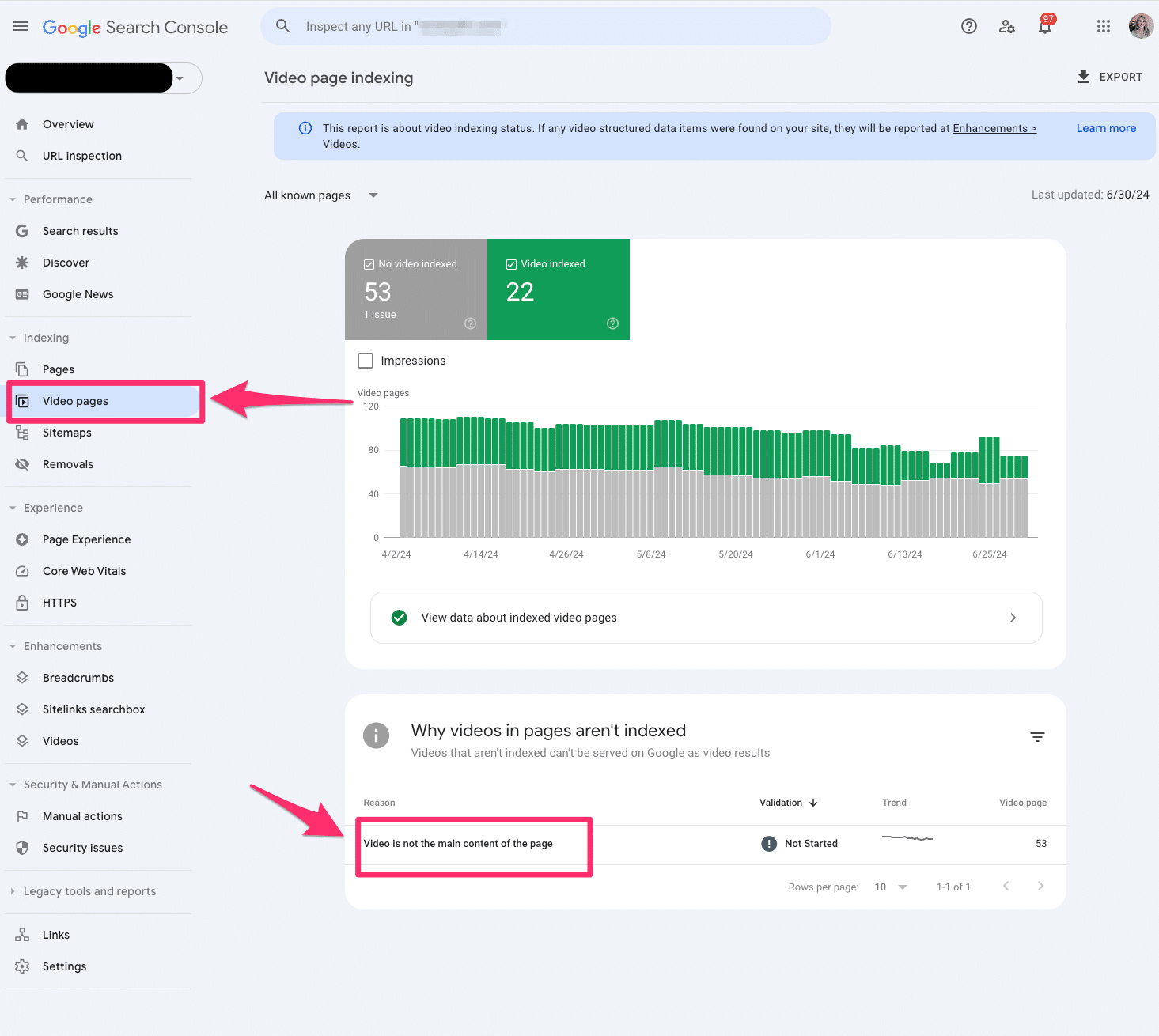
The video indexing report displays how many pages on your website are indexed with video content somewhere on the page.
Sitemaps
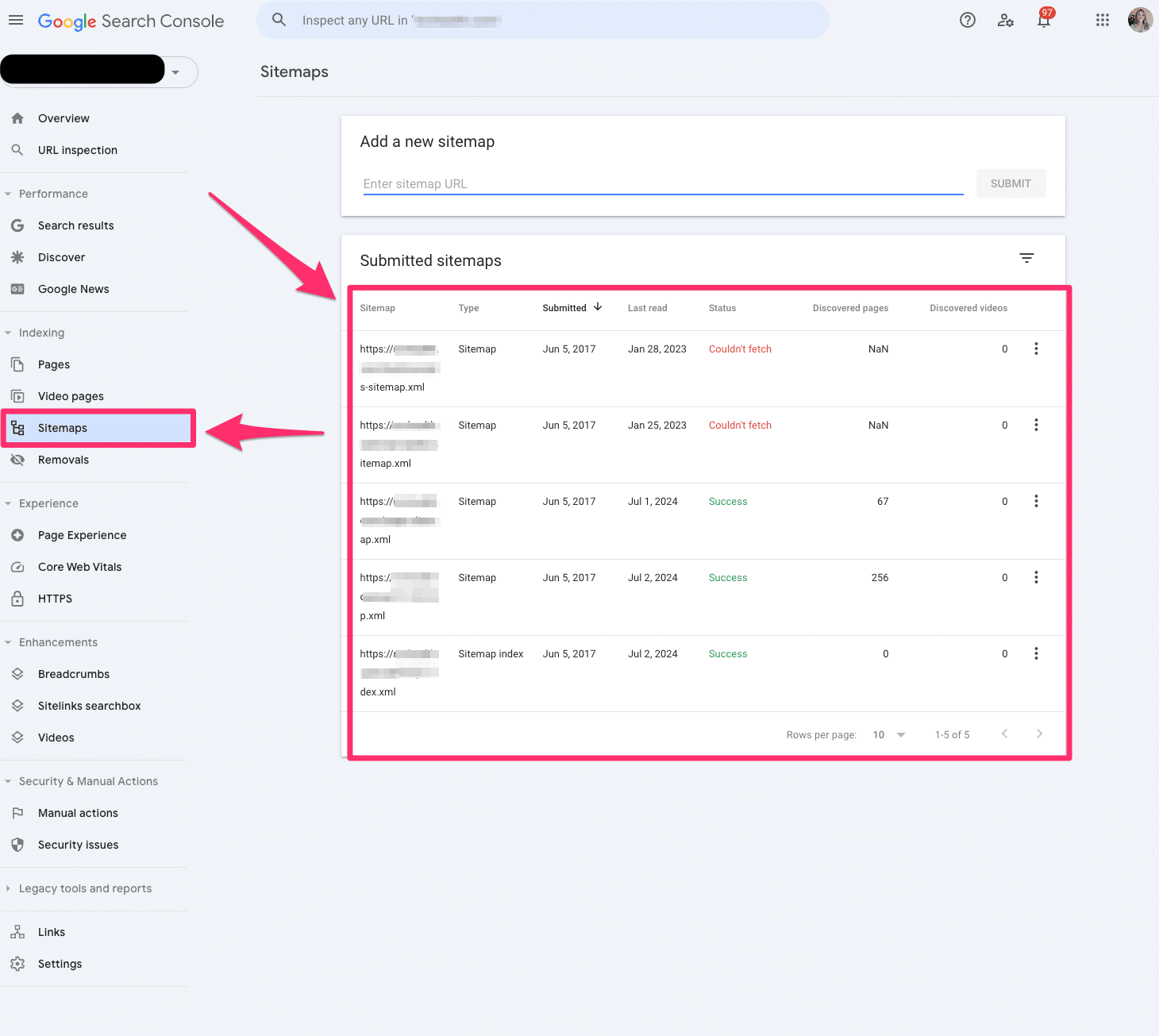
The sitemap report allows you to submit all your XML sitemaps to Google Search Console. Ideally, you have at least one XML sitemap to submit.
You’ll have to submit all your XML sitemaps if you have video, image, or language-specific XML sitemaps.
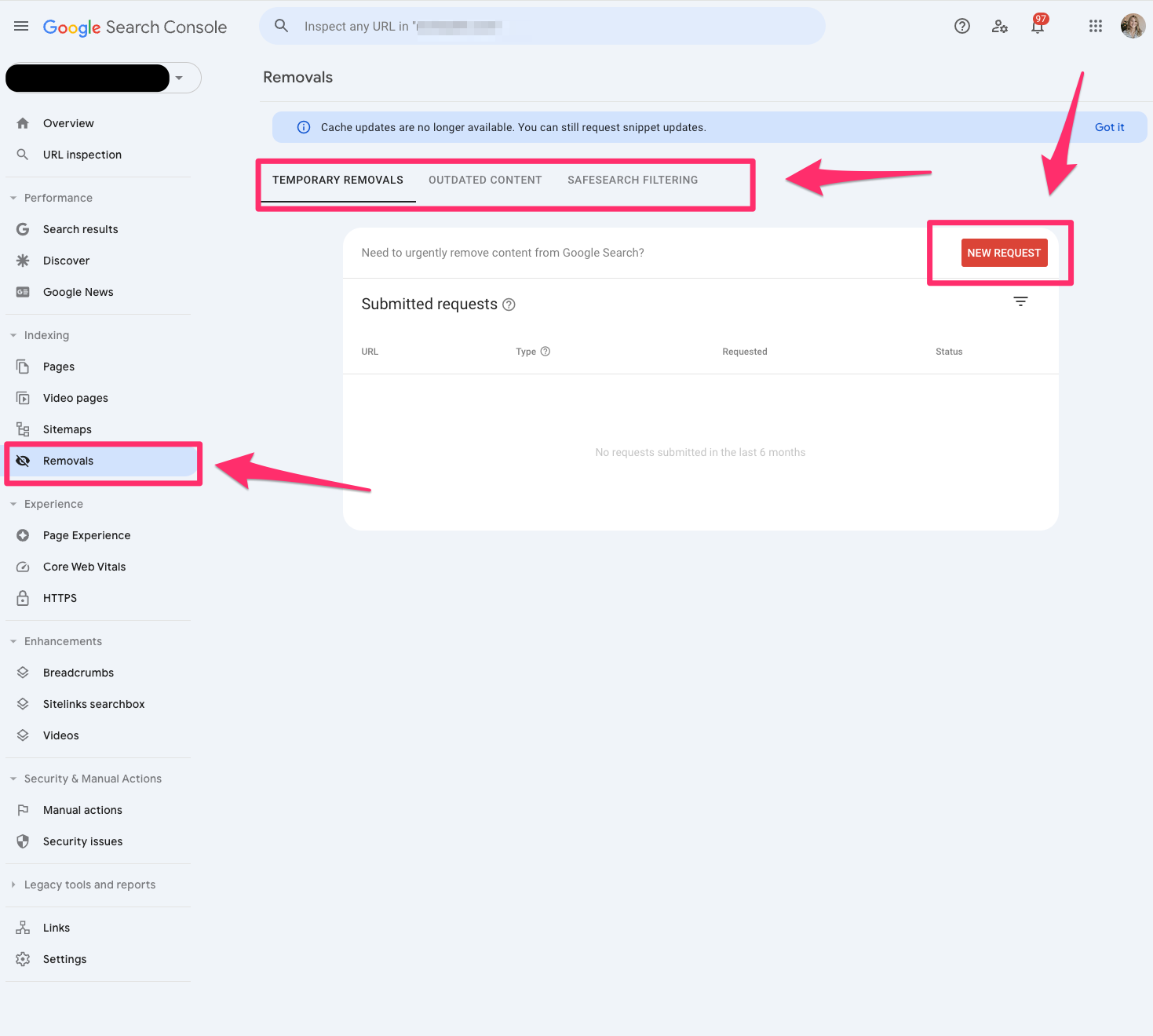
Removals
The removals tool in Google Search Console allows you to block pages from Google temporarily.
Remember, these must be pages that you own on your website. You cannot submit pages you do not own.
This is the fastest way to remove a page from your website. However, I recommend working on a long-term solution if you want this web page permanently removed.
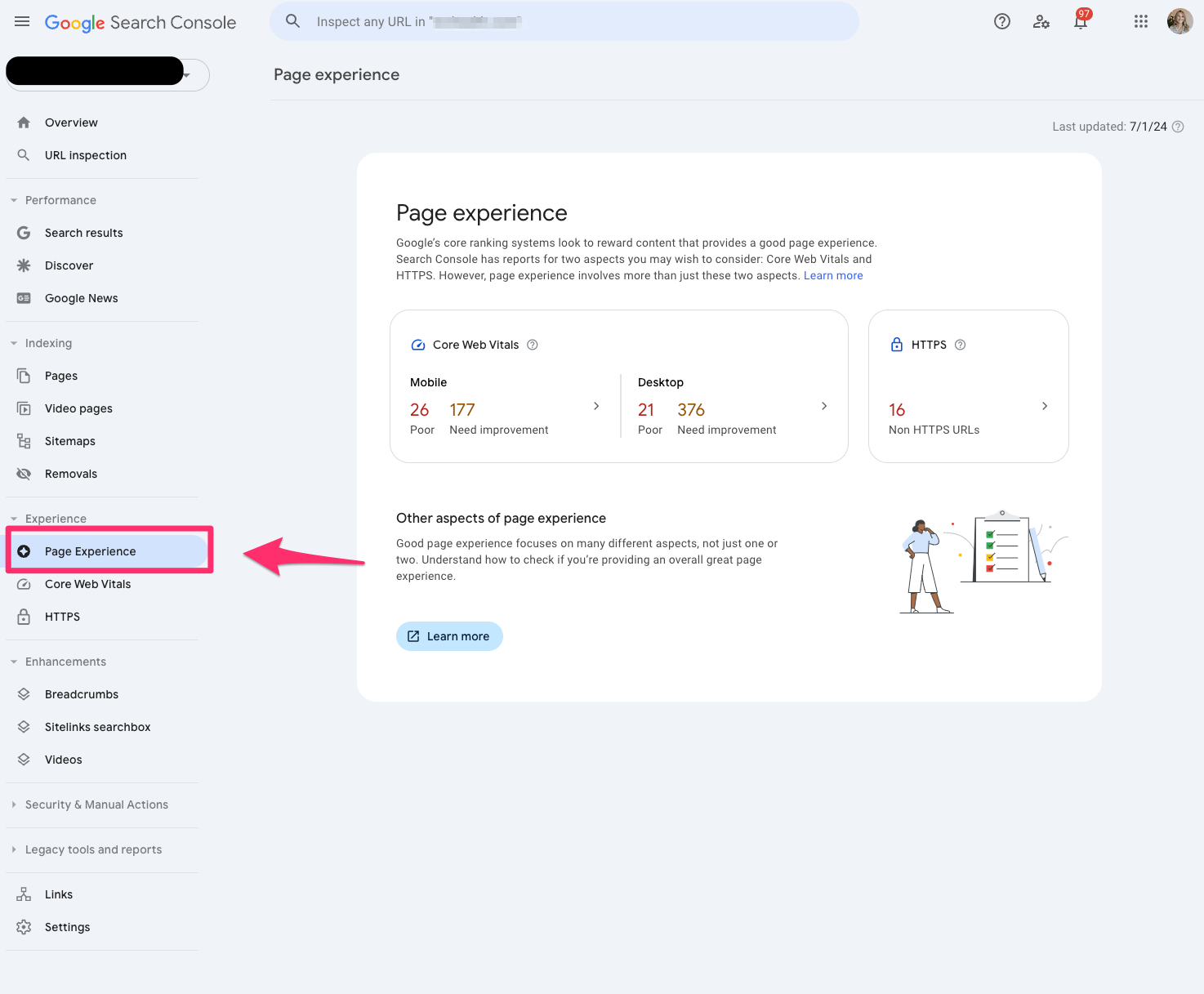
Page Experience
The Page Experience report in Google Search Console provides a glimpse of how user experience is on your website.
It’s important to remember this is based on URL level.
The page experience report includes Core Web Vitals and HTTPS usage.
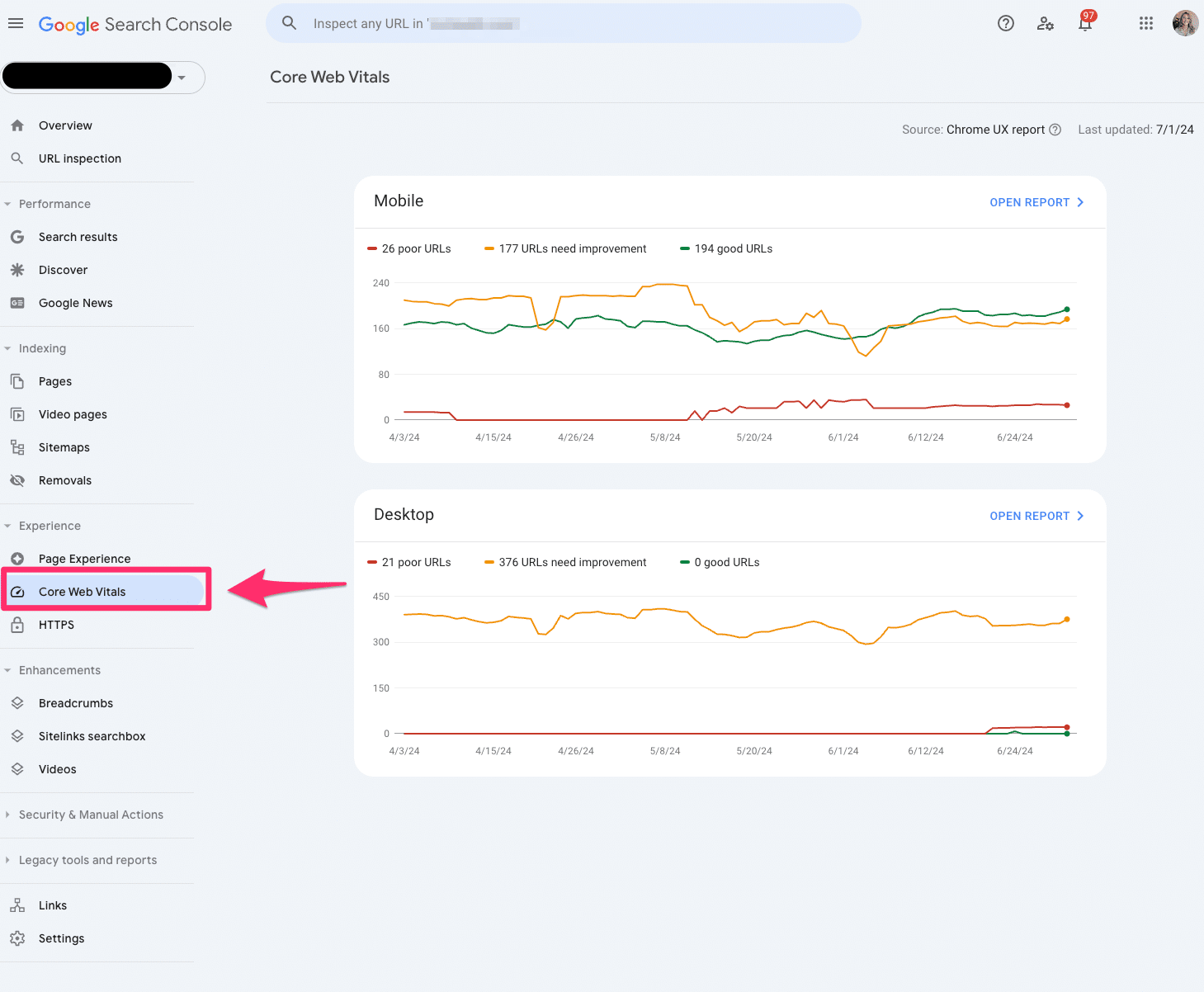
Core Web Vitals
The Core Web Vitals report uses real-world data to tell you how your pages perform.
Again, this is based on a URL level.
The report is grouped into mobile and desktop with segments of poor, needs improvement and good.
The report is based on LCP, INP and CLS user data.
Only indexed pages will be included in the Core Web Vitals report.
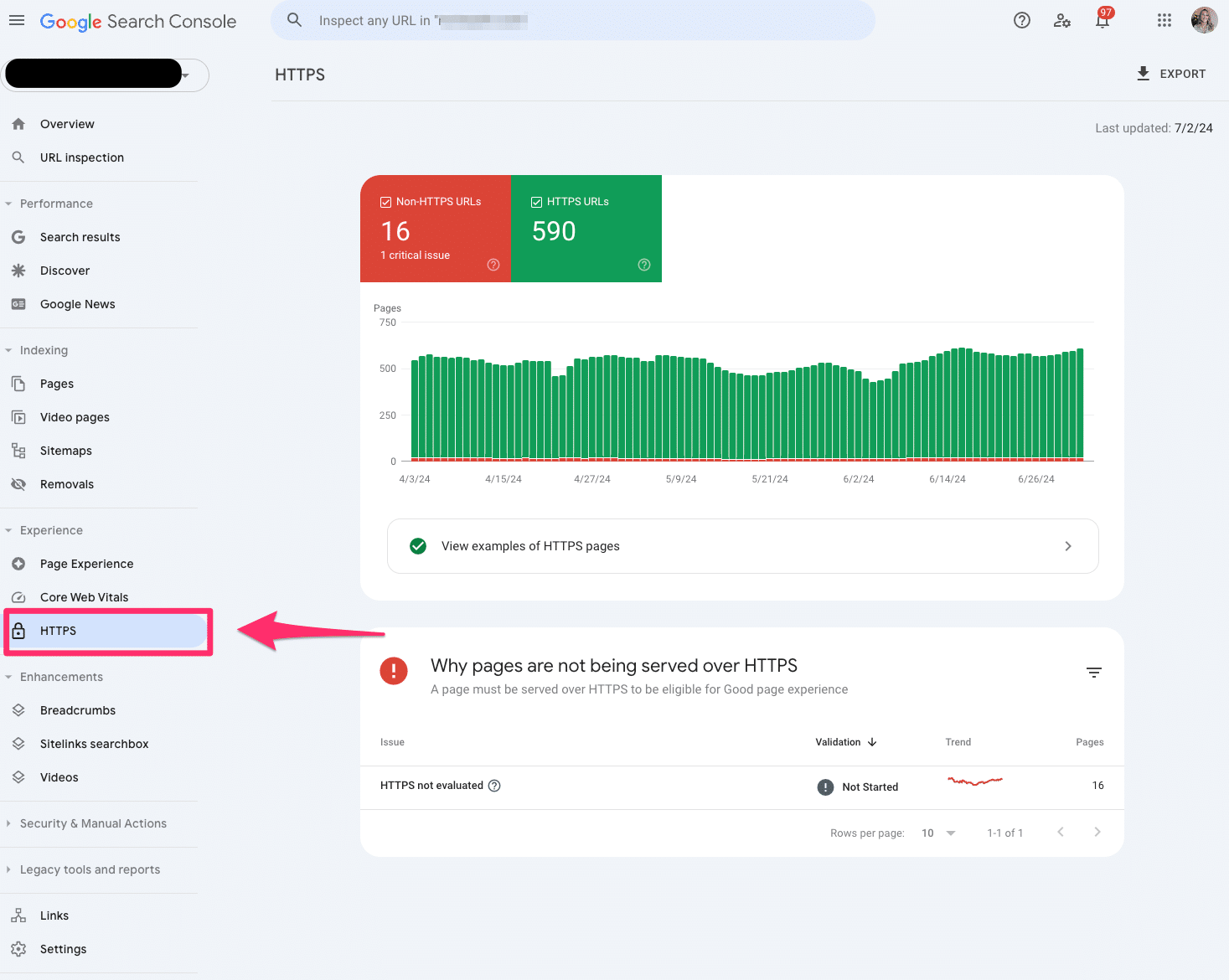
HTTPS
The HTTPS report tells you how many indexed pages on your website are HTTP or HTTPS.
If you notice any HTTP pages on your website, you should convert them to HTTPS. Google indexes the HTTPS version to protect searchers’ security and privacy.
Product snippets
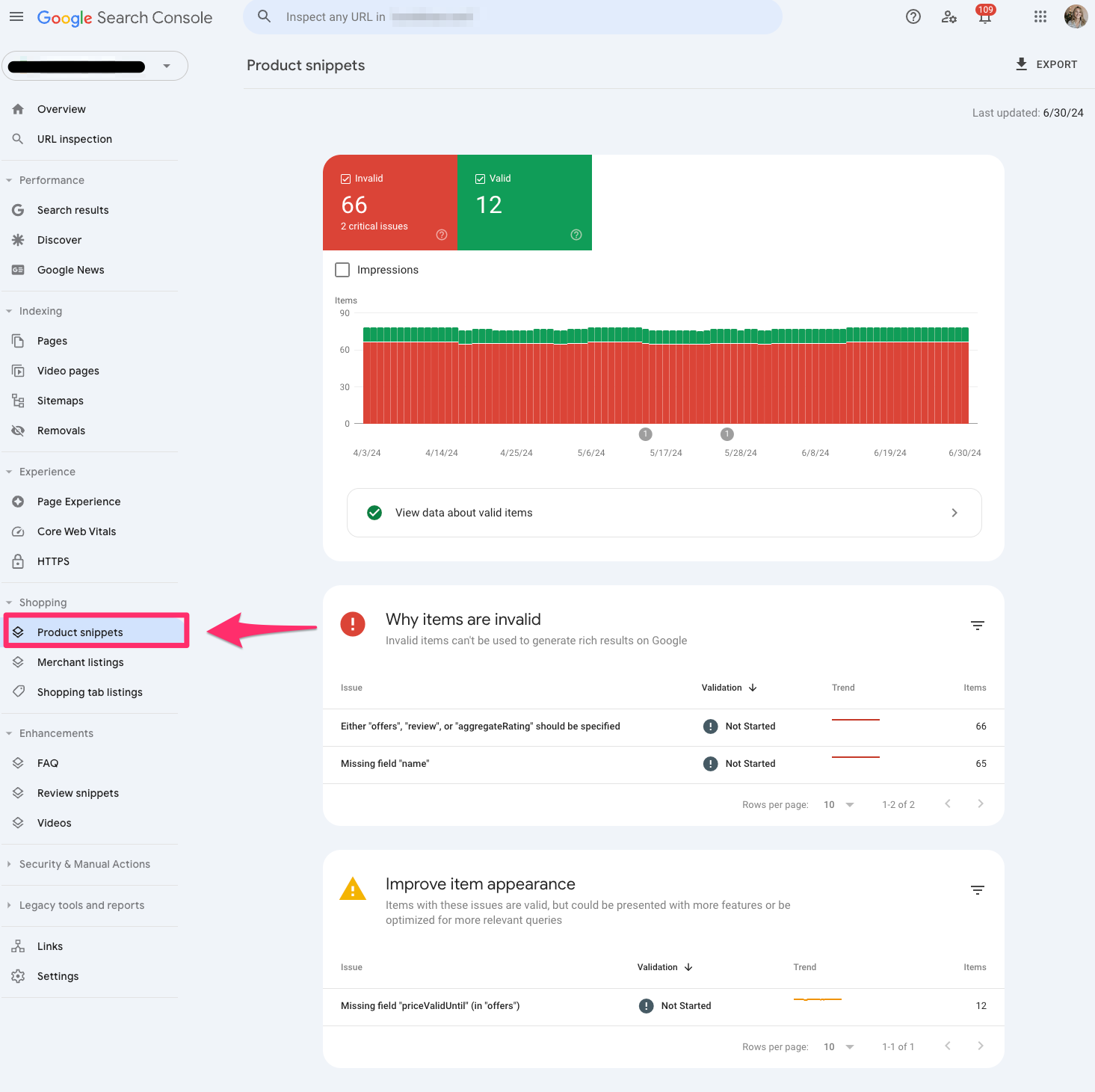
Product snippets are part of the structured data reporting in Google Search Console that showcases which products have product markup on the page.
Currently, Google only supports product snippets for pages with one product.
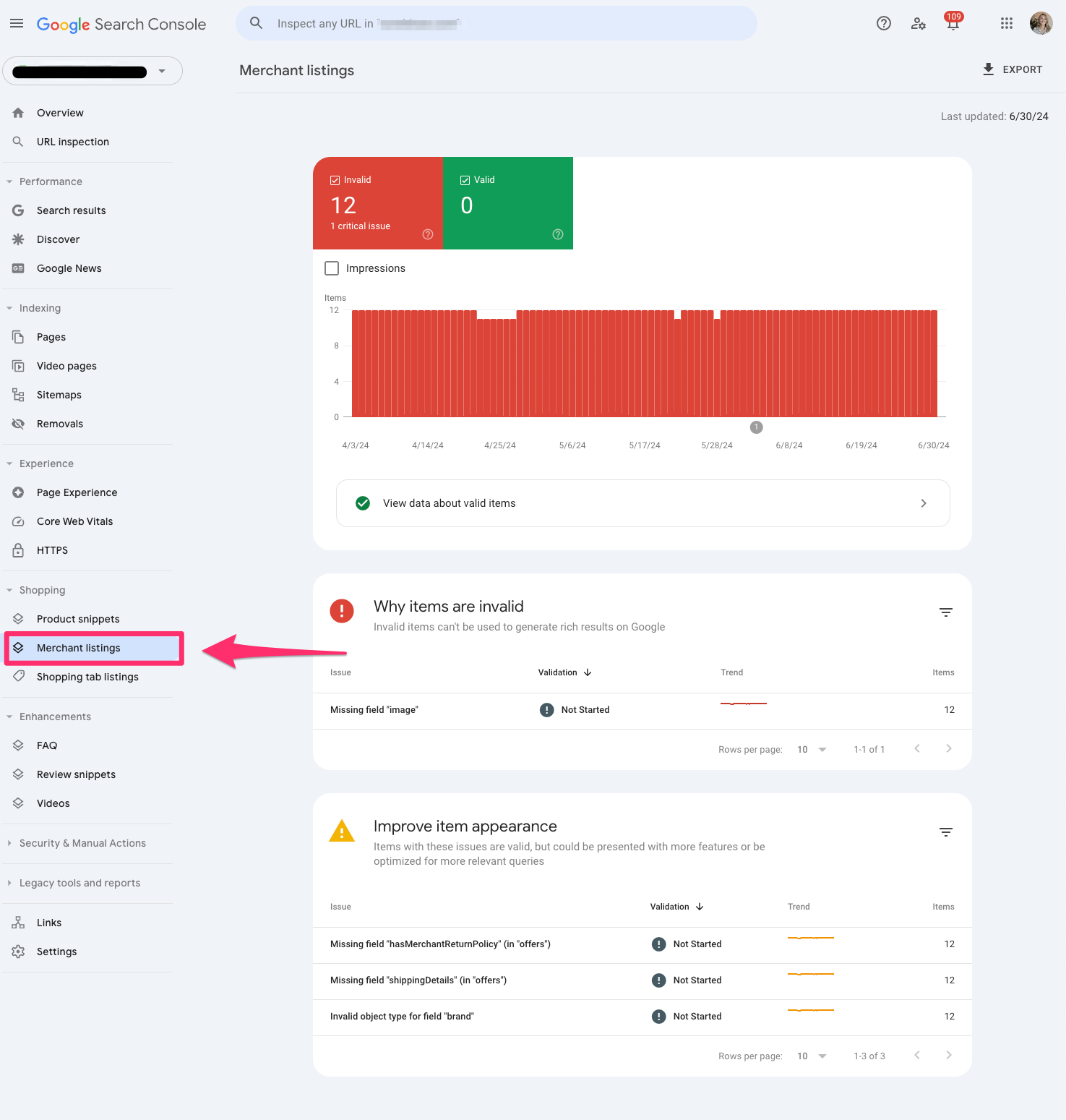
Merchant snippets are also part of the rich result report in Google Search Console and serve as extensions of your Product snippet.
Merchant snippets are like getting a golden ticket. It provides more enhanced features in the SERPs like carousels or knowledge panels.
Shopping tab listings
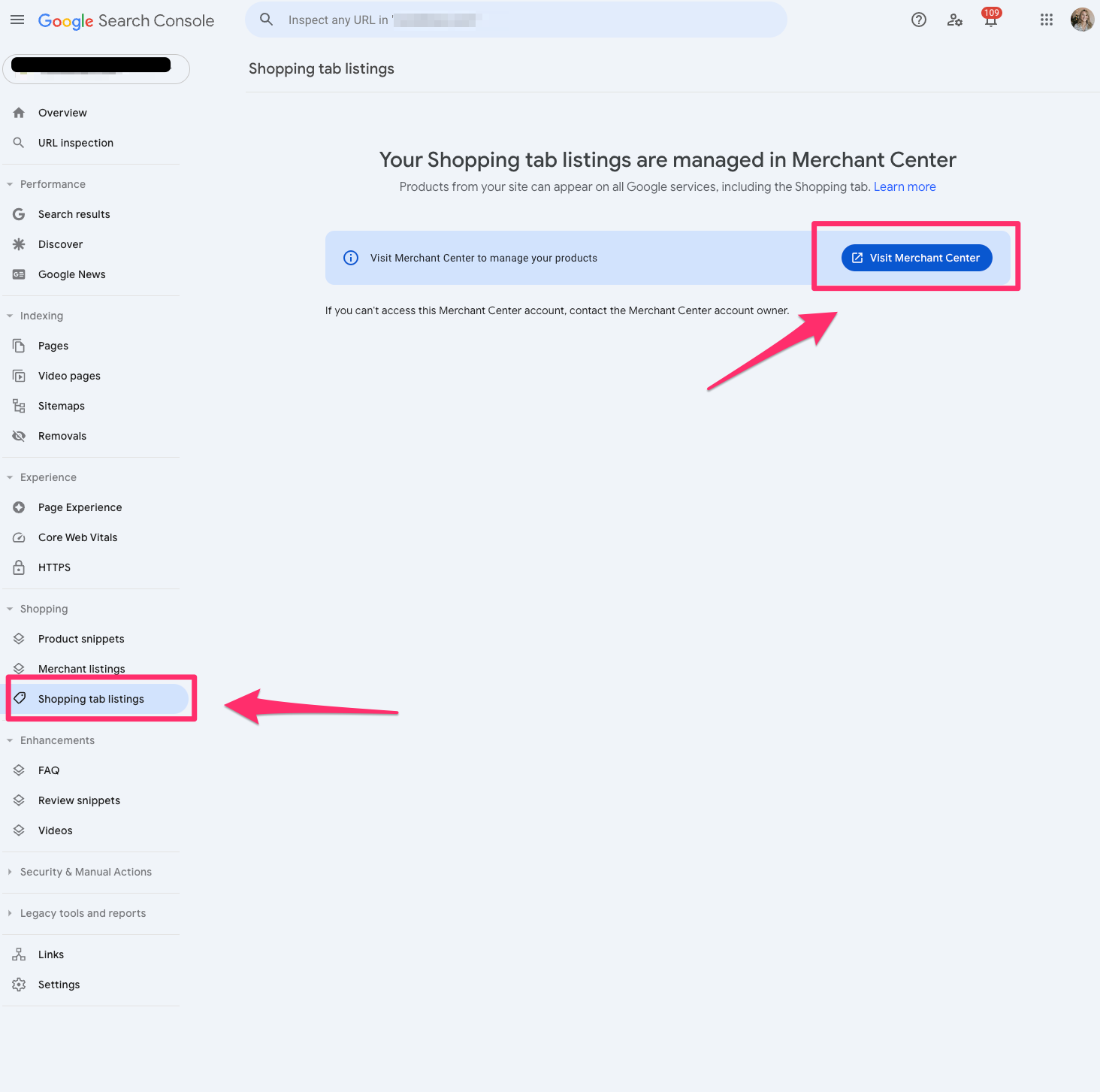
Shopping tab listings are also part of the rish result reports in Google Search Console and showcase the pages listed in the Shopping tab in Google search results.
If you’re an ecommerce marketer, you’ll want to live inside this report.
Pro tip: If you don’t see this information in Google Search Console, make sure your website’s structured data fits within the Merchant listing structured data requests.
AMP
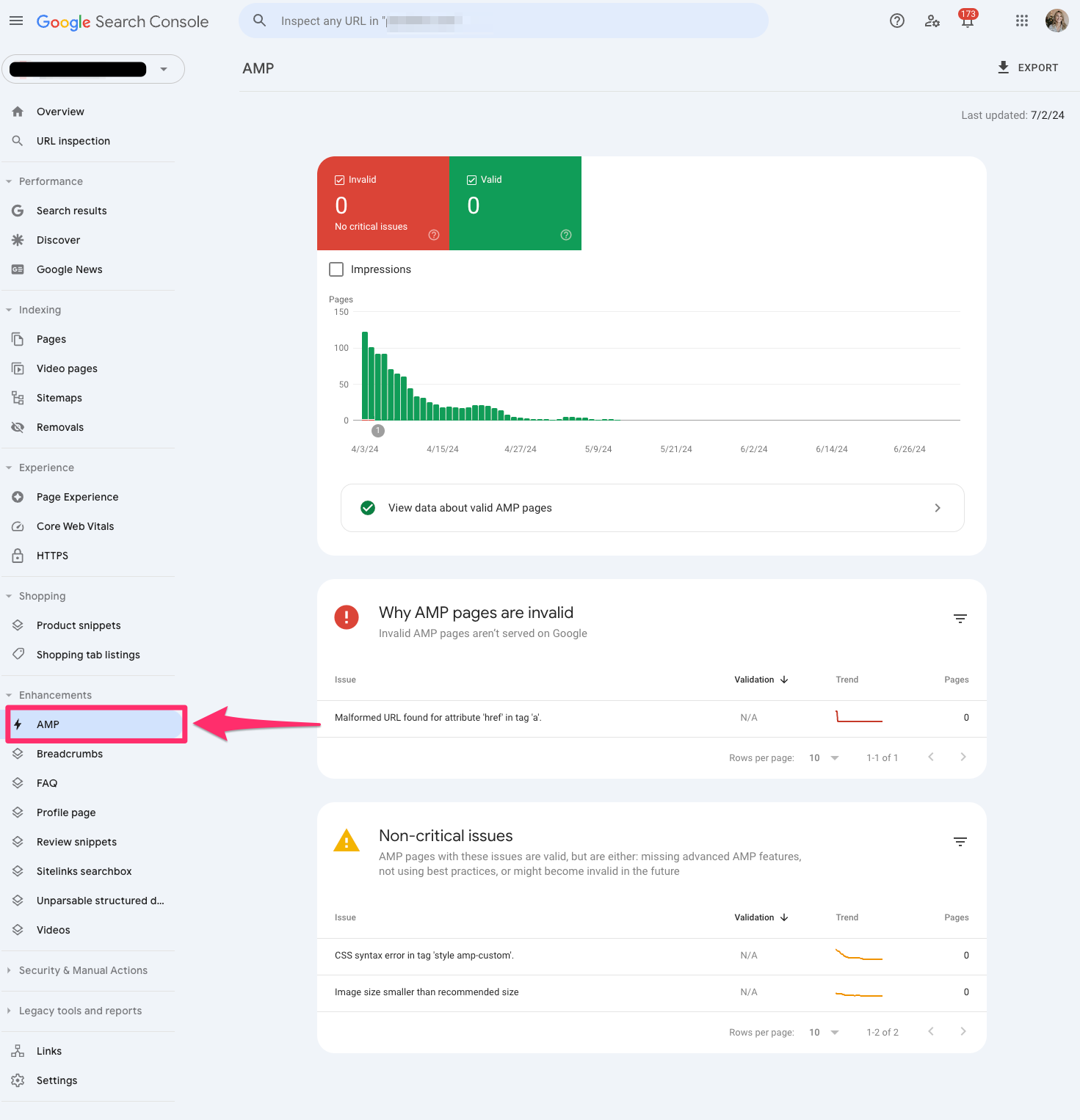
The AMP report in Google Search Console shows all the AMP pages on your website and potential issues you may need to troubleshoot.
If AMP is a big part of your SEO strategy, you’ll want to ensure you reach zero in the critical errors section of the report so Google can detect your AMP pages.
Breadcrumbs
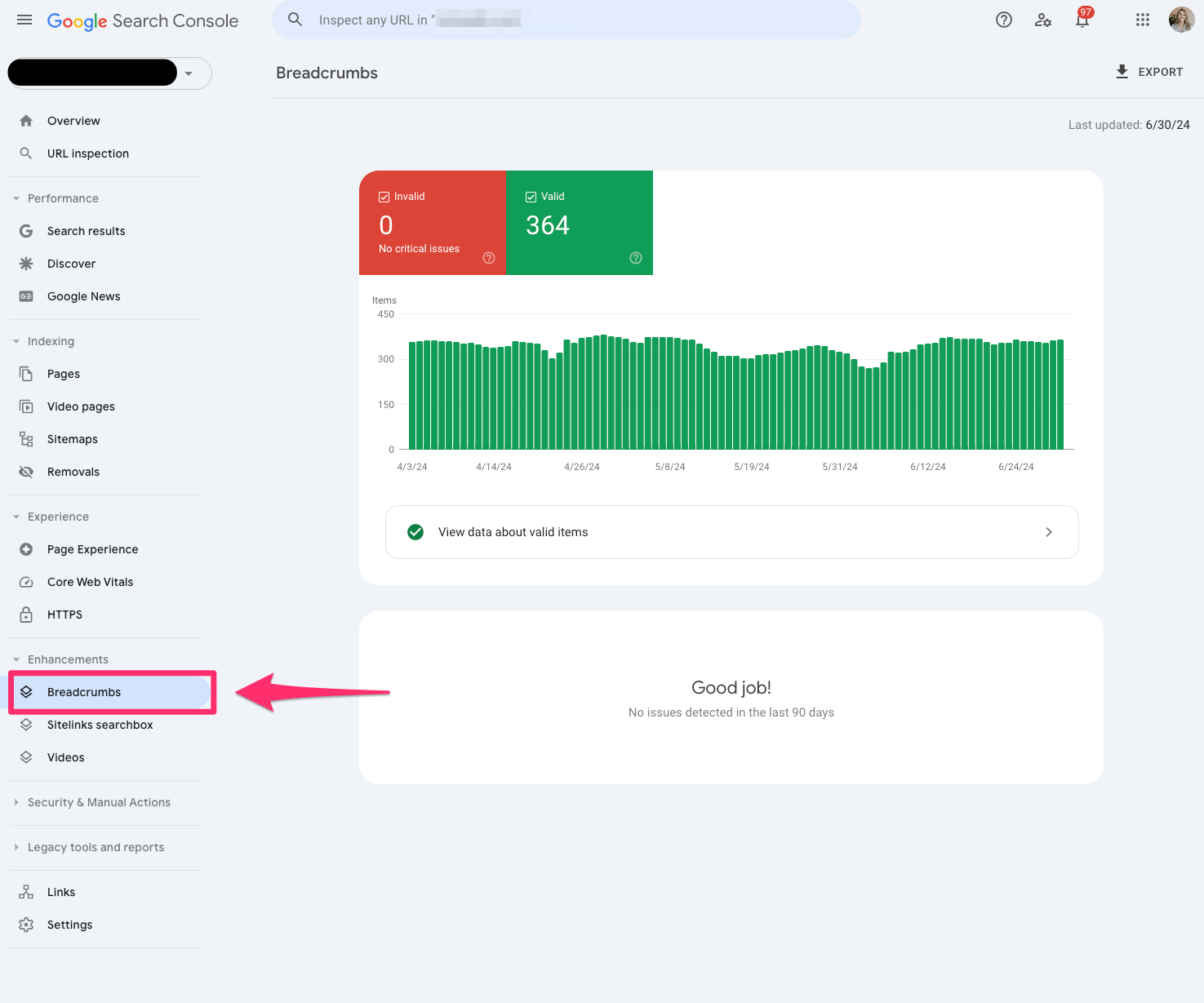
The breadcrumbs report is also part of the rich result report in Google Search Console, which tells you if your breadcrumb structured data is correct and readable by Google.
Breadcrumbs are essential to maintain a healthy site architecture and user experience. If you see any errors in the breadcrumbs, I recommend prioritizing this quickly.
FAQ
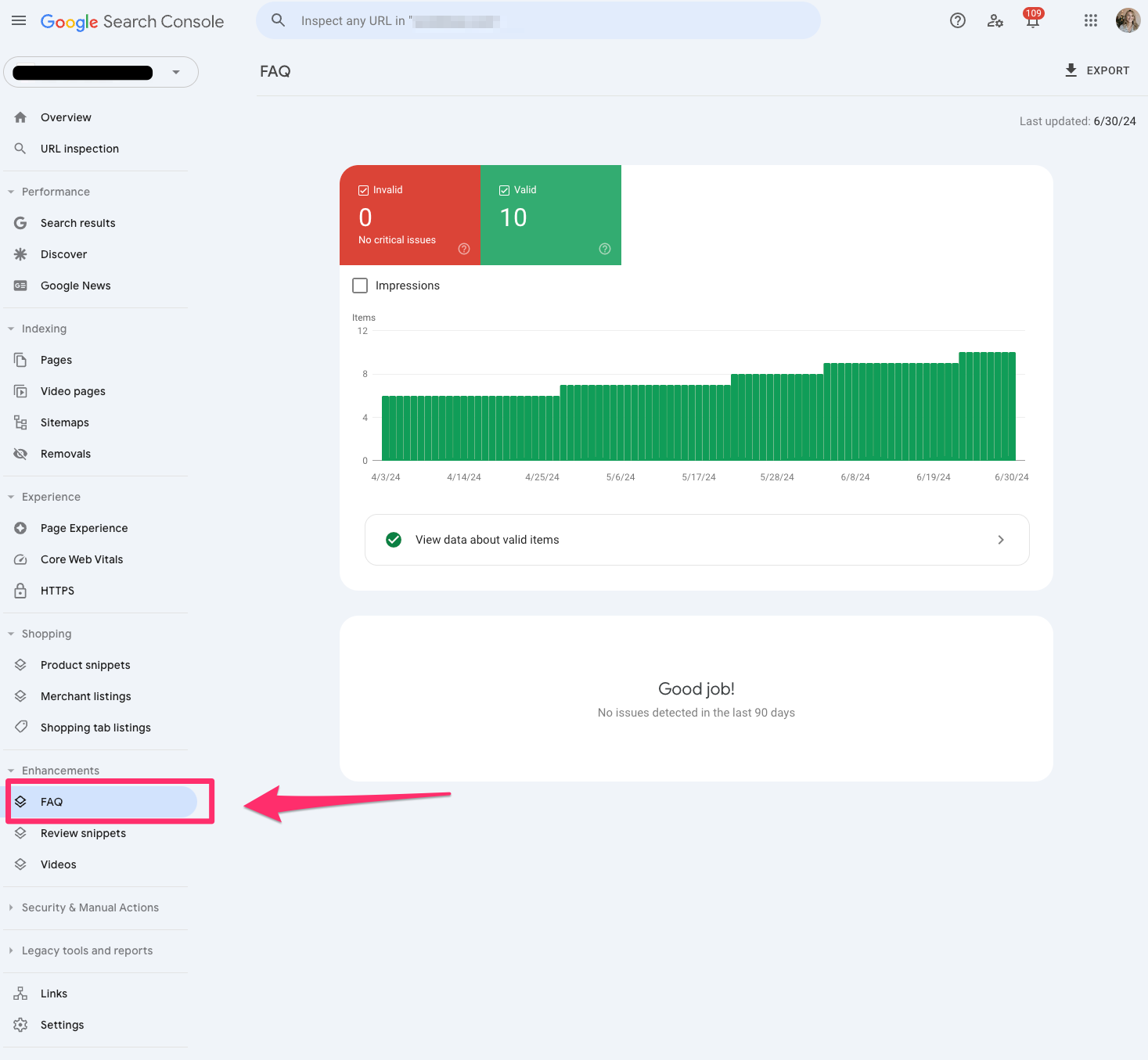
The FAQ report is also part of Google Search Console’s rich results report, which shares insights into which pages received the FAQ snippet.
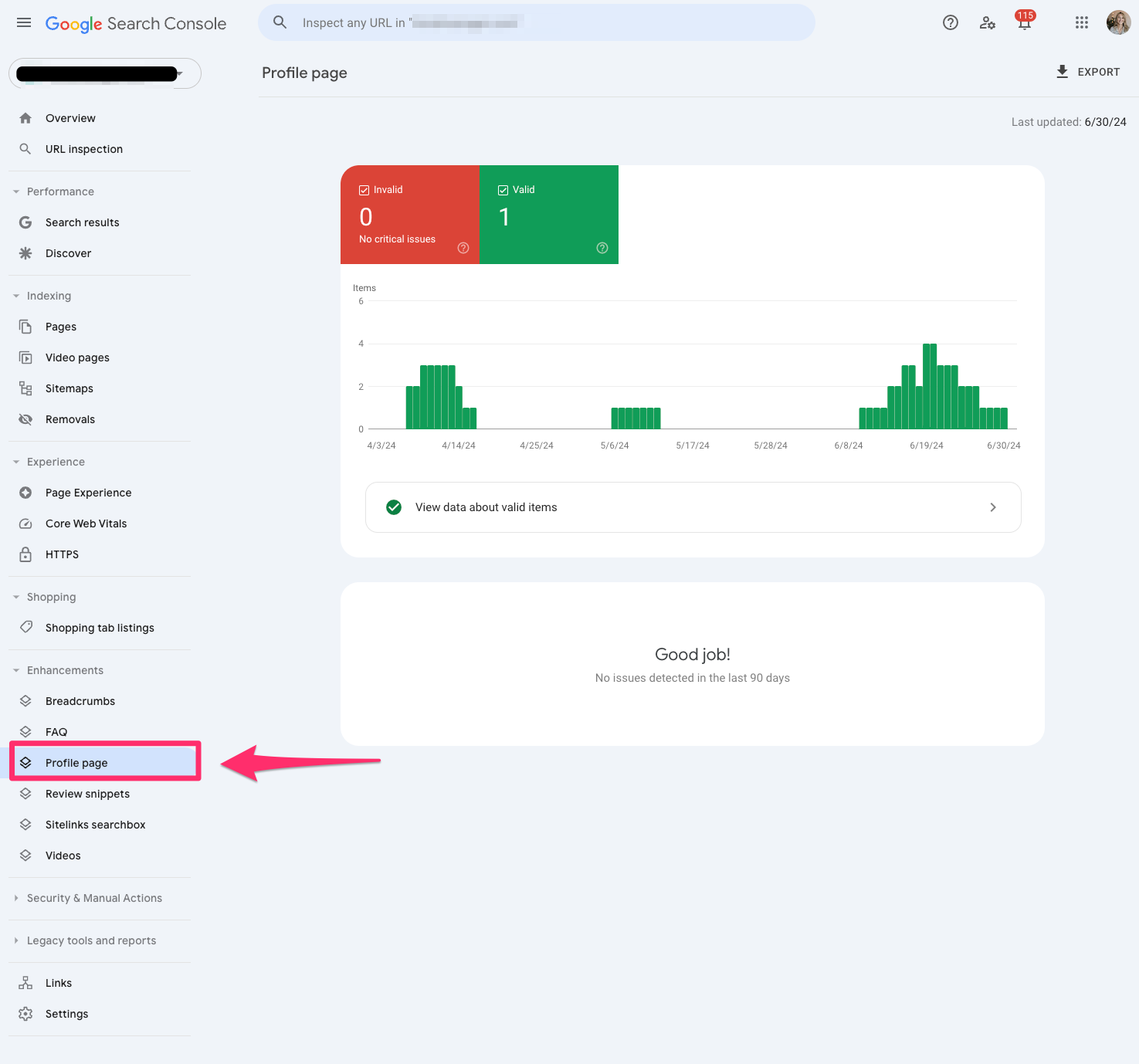
The Profile page report reflects which pages are getting the profile page markup. You’ll want to validate and clean up any makeup you may be missing because these offer interesting SERP features.
It’s almost like a card functionality similar to the recipes.
Review snippets
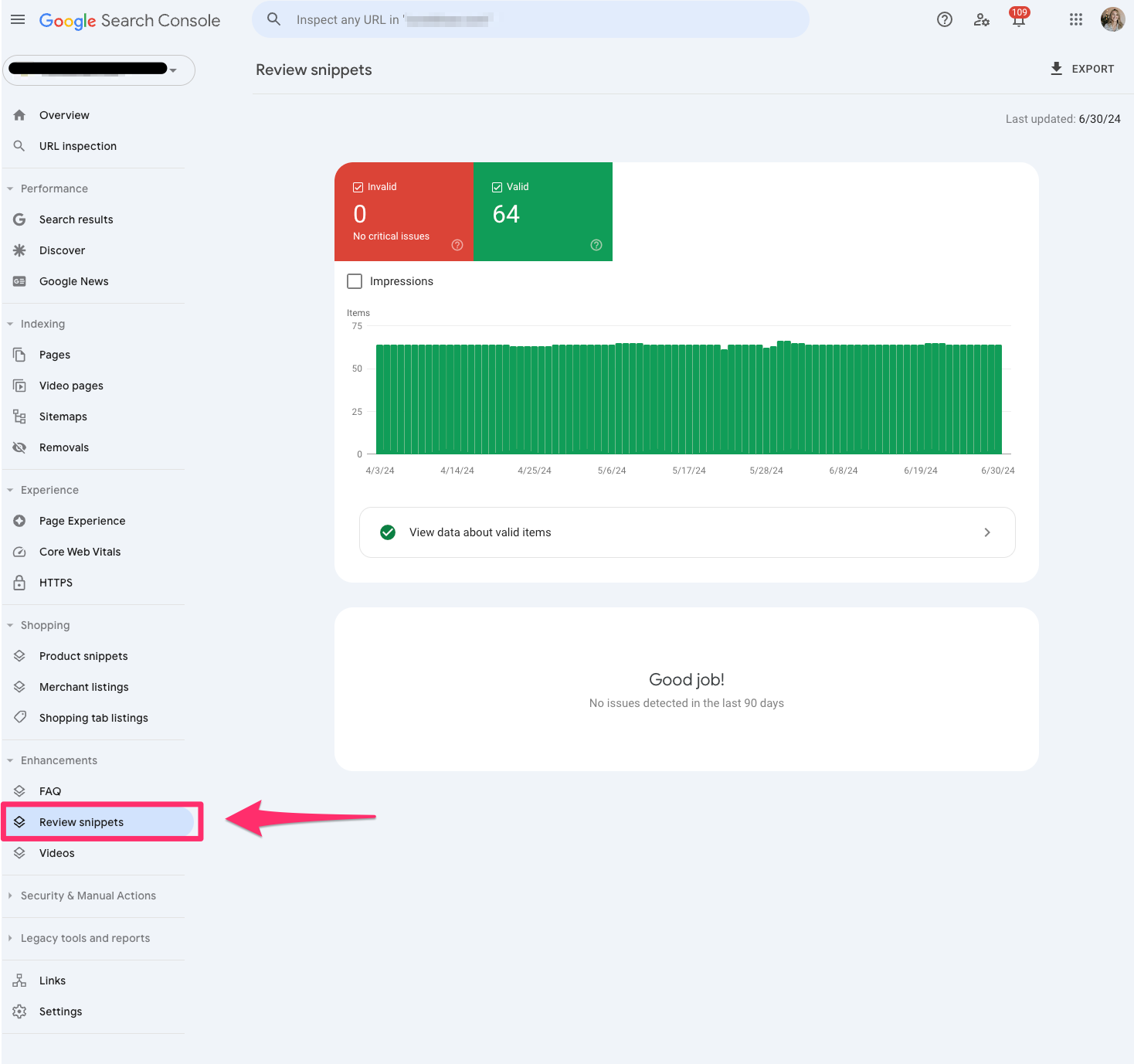
Review snippets showcase your validation of review markup on pages.
You should check that all your markup is valid. If you notice any errors, work on updating those specific pages.
With Google’s algorithm updates, I’ve seen significant fluctuations in review snippets. Always double-check if it’s a bug, algorithm update or a true markup error.
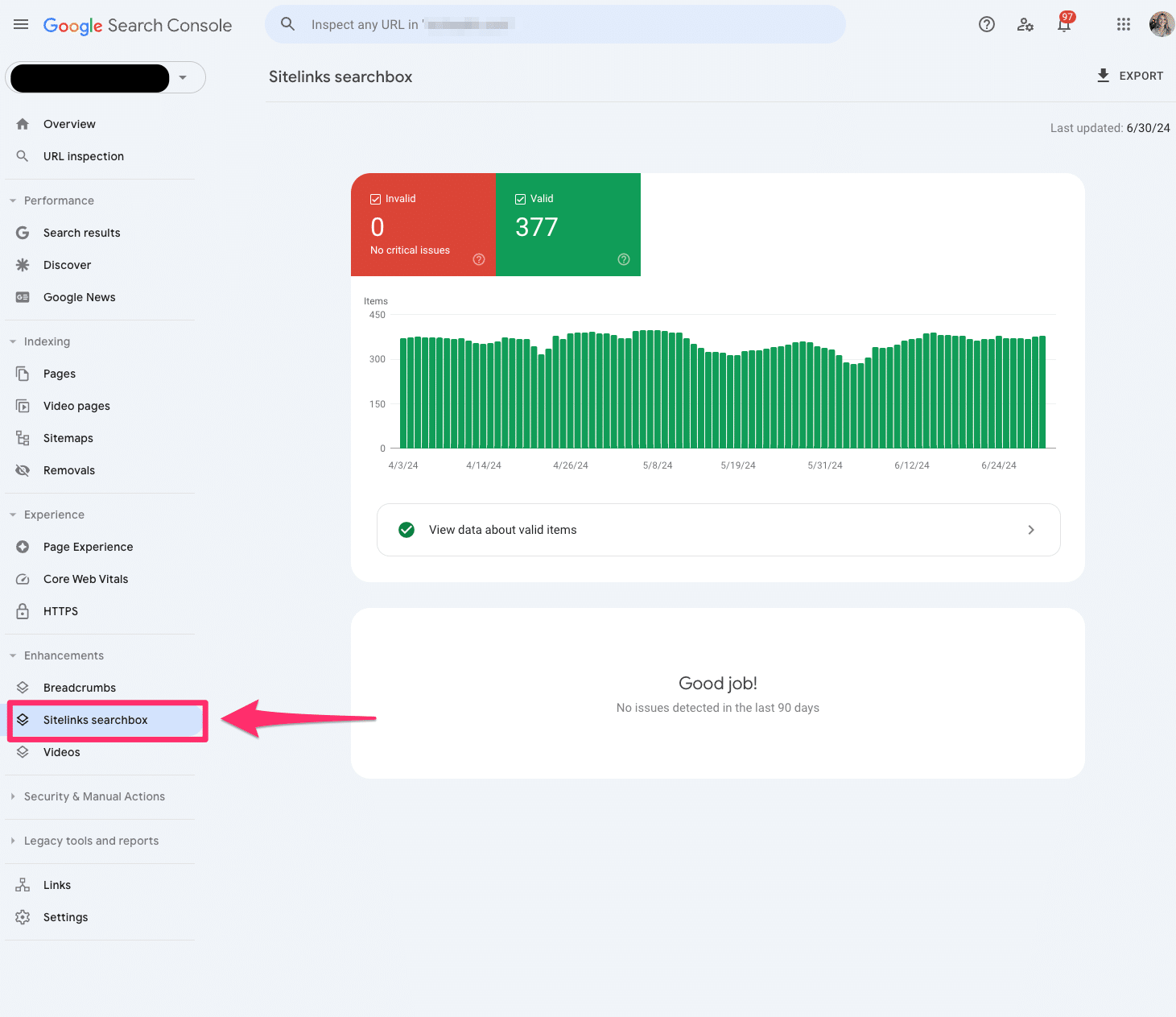
Sitelinks searchbox
The sitelinks searchbox is a feature of the rich result report in Google Search Console that tells us in more detail any errors you may have to your Sitelinks Searchbox markup.
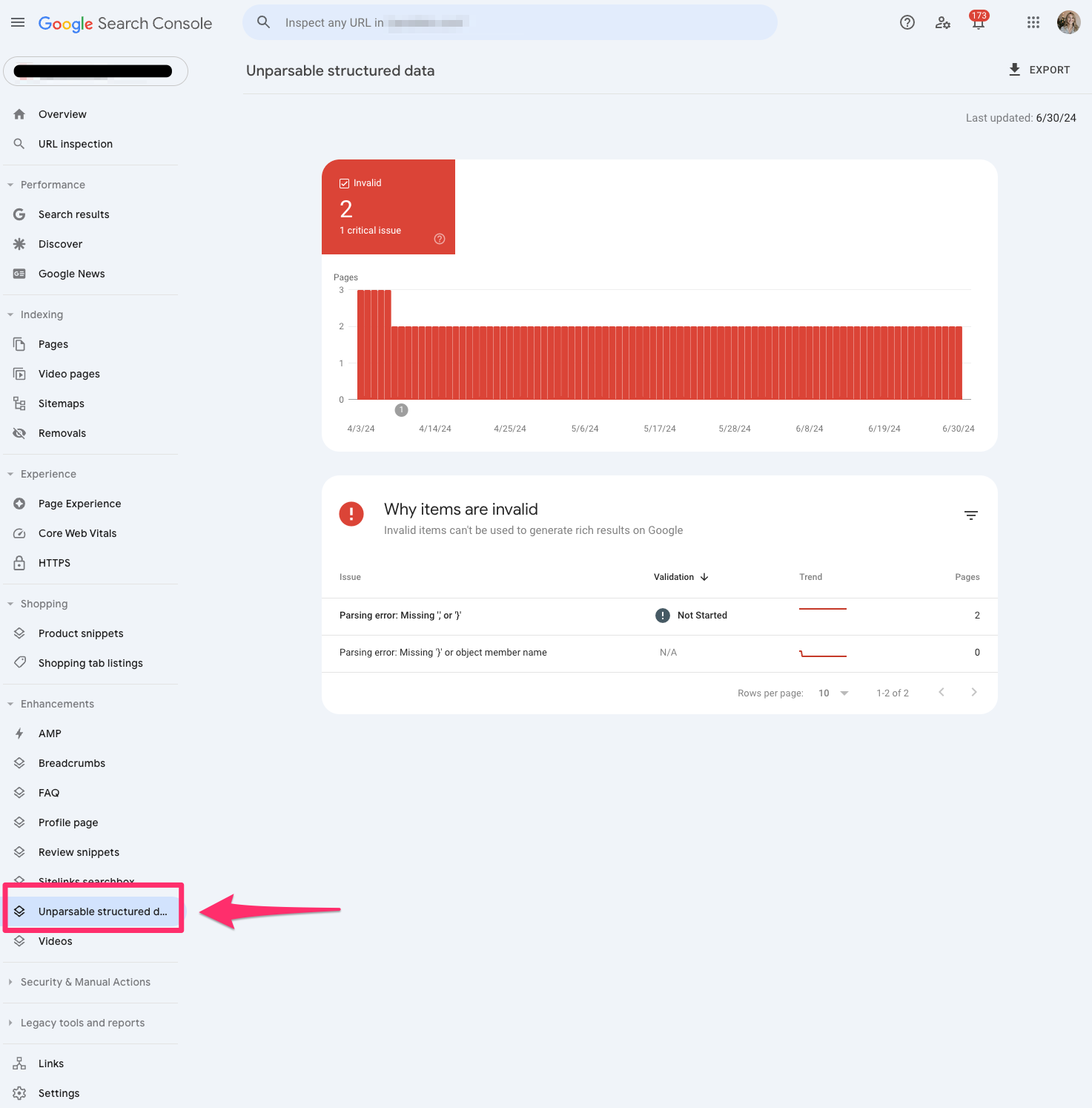
Unparsable structured data
The unparsable structured data report in Google Search Console aggregates structured data syntax errors that prevent Google from identifying the specific structured data type.
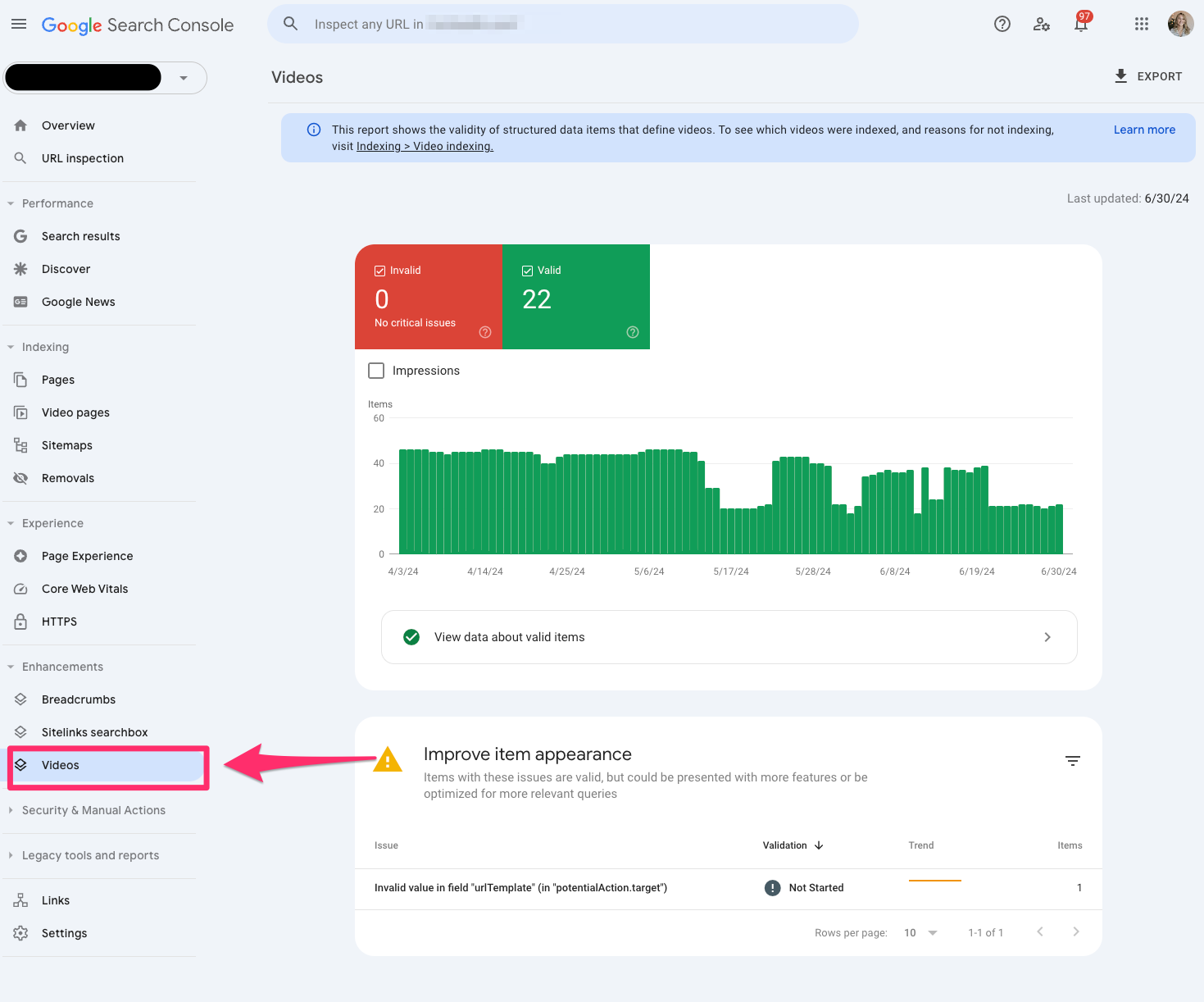
You can dissect whether the video is outside the viewport, too small or too tall. If you’re building a video content strategy, it really helps to elevate your game with your UX team.
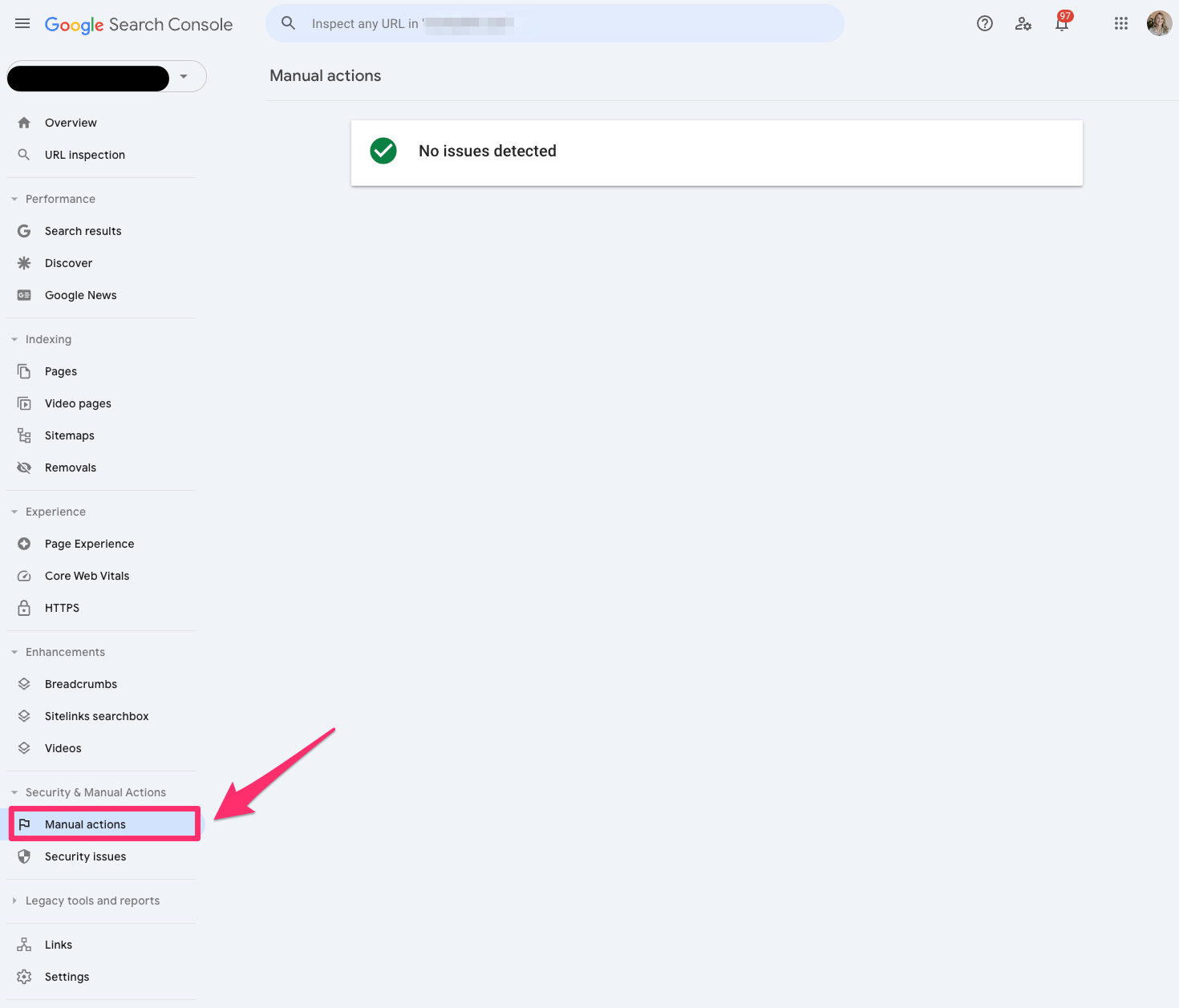
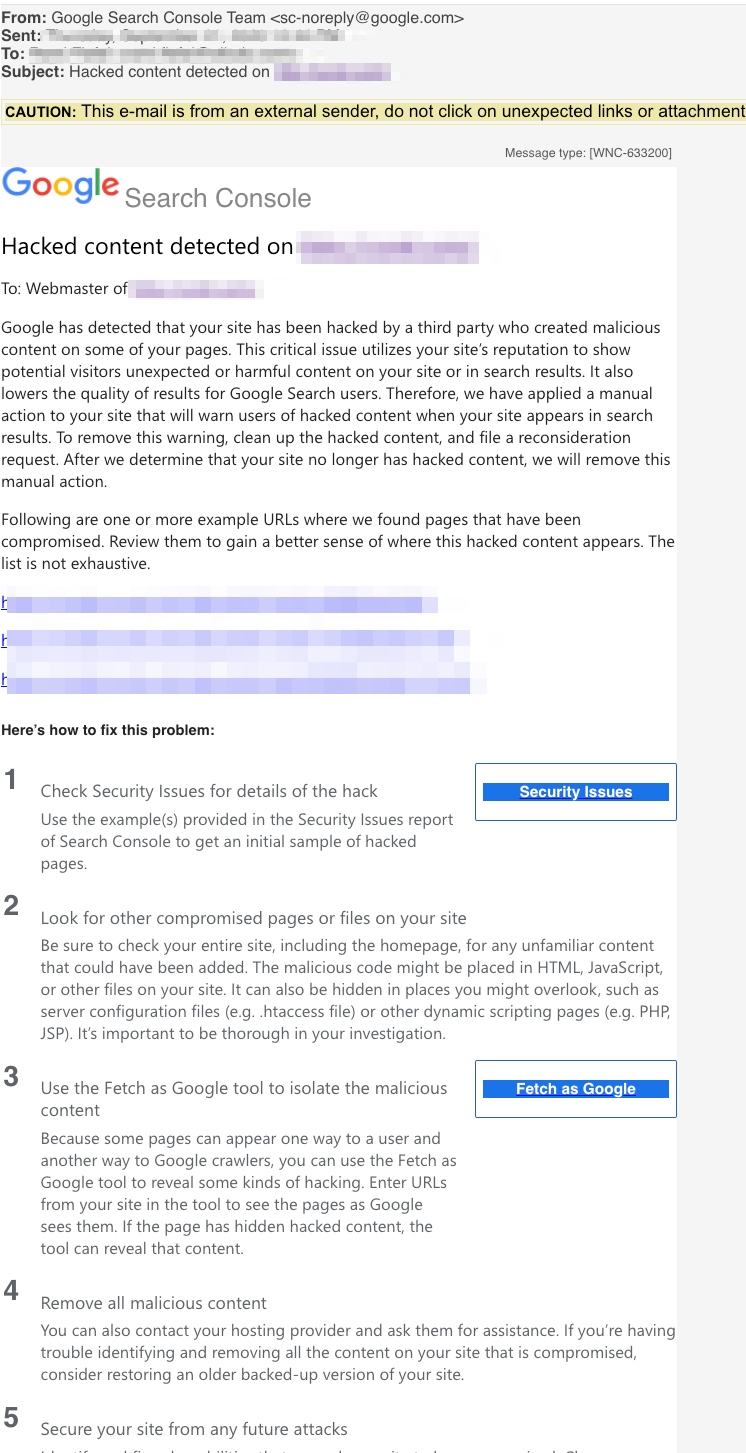
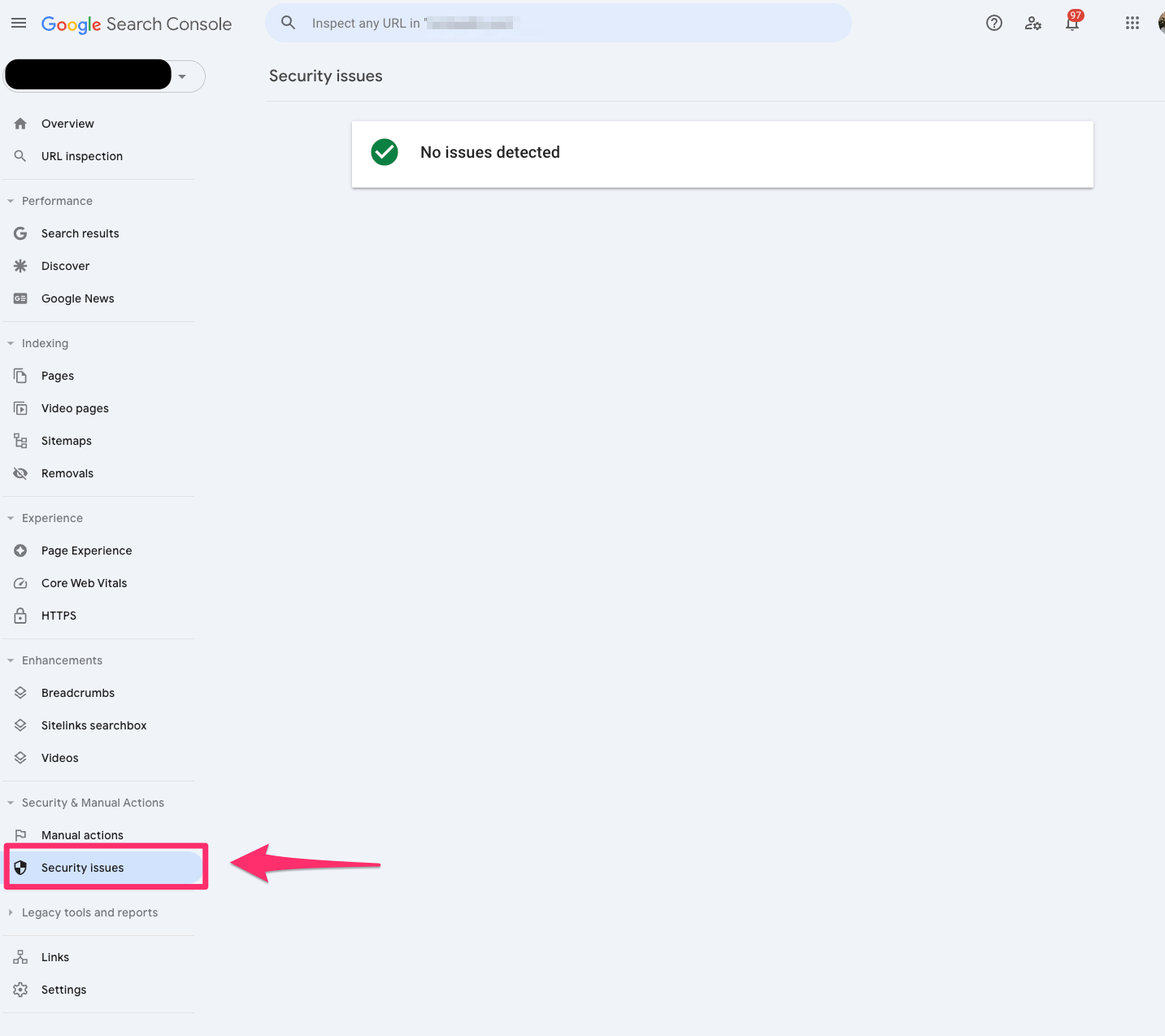
Google now emails you to notify you when you receive a security issue.
Check out this beauty I received within the first week of starting to work on a new site.
Links
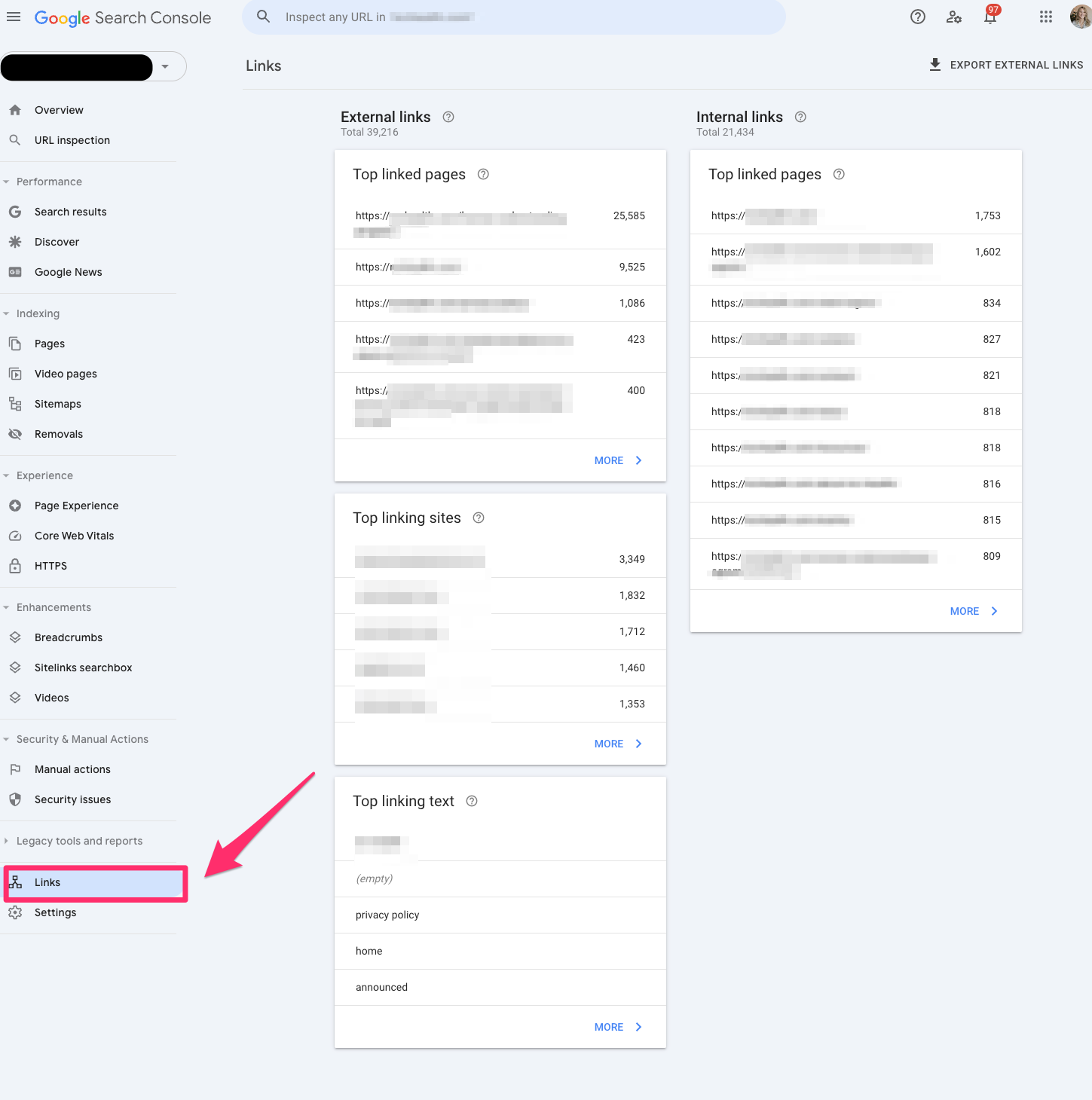
The Links report in Google Search Console allows you to view all your site’s internal and external links. You can view the top link pages, top linking sites and top linking text.
This is a legacy report, so I’d be cautious about relying on it in case Google decides to depreciate it.
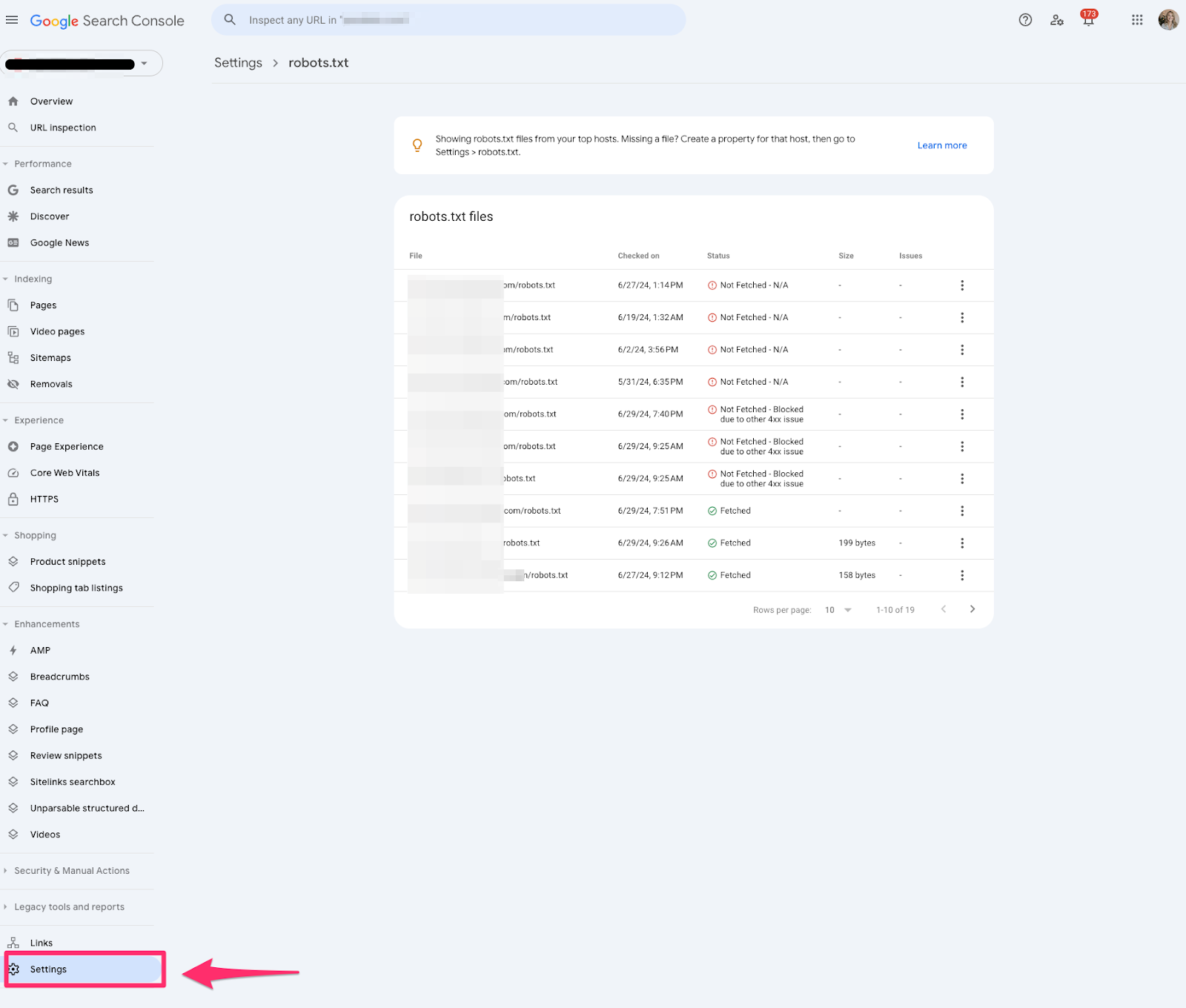
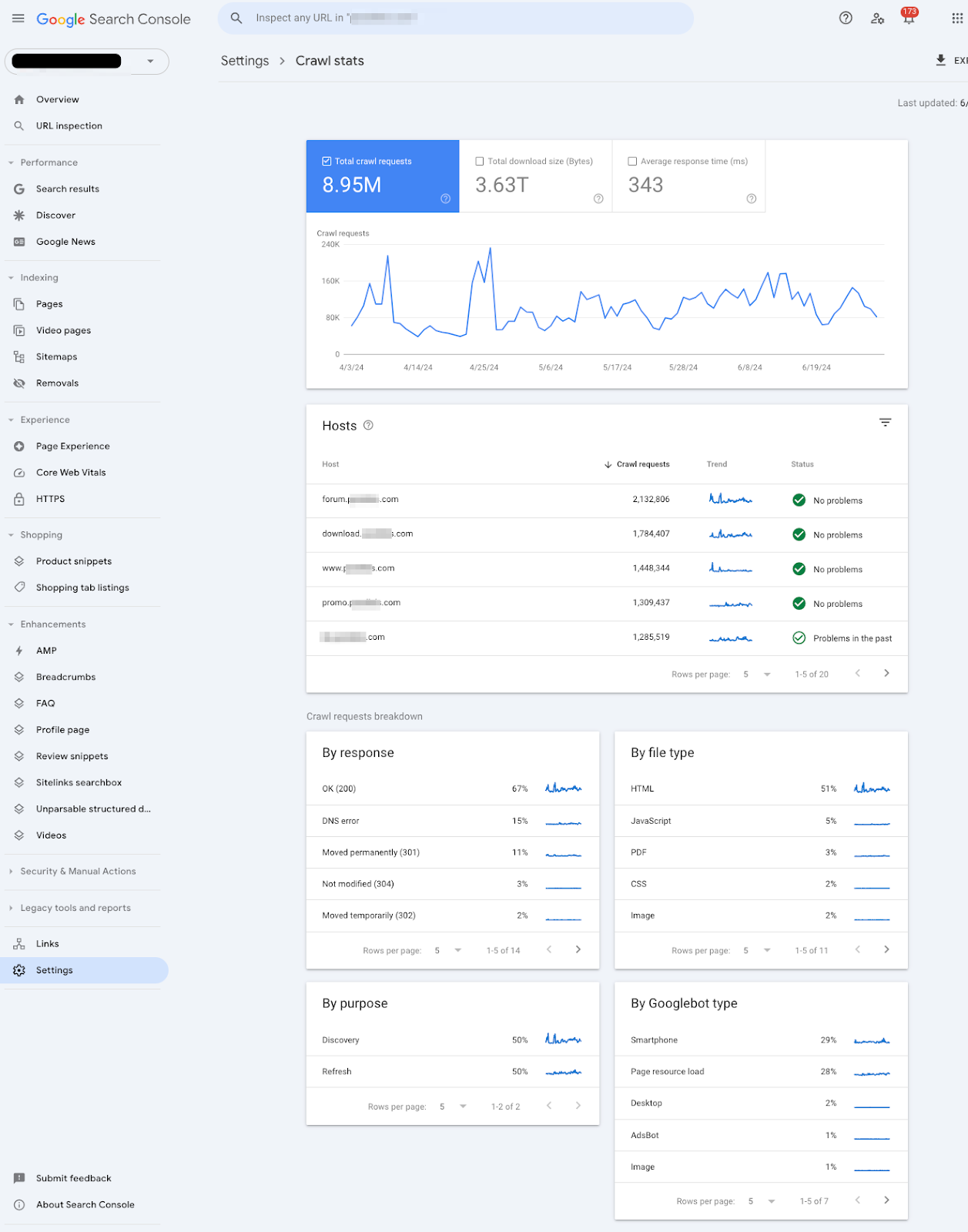
Settings
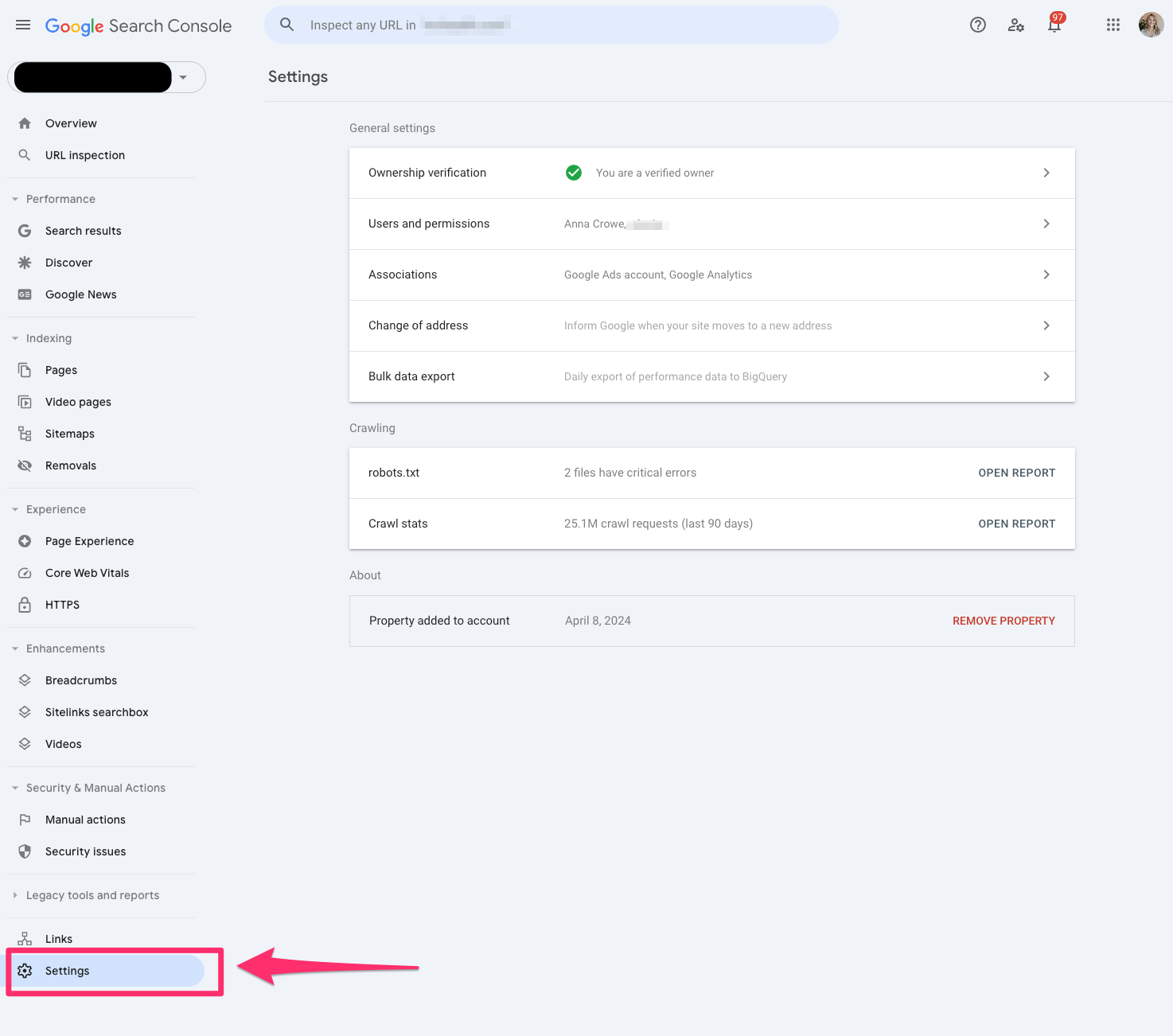
If you need to verify ownership or add a new user, you should check the settings in Google Search Console.
Two cool reports under Settings in Google Search Console go undiscovered, but these are two of my favorite reports.
Robots.txt
The robots.txt report tells us which pages Google can crawl or any potential issues preventing Google from crawling your site.
One of the challenges I run into when working with developers is that they often choose to disallow it in the robots.txt file instead of adding a noindex, nofollow tag.
This report will help audit any technical updates with your dev team.
The robots.txt report is only available if you set up a domain property.
Crawl stats
The crawl stats report shows Google’s crawling history on your website. It can be sorted by how many requests were made and when, server response and availability issues.
It tells SEO professionals if Google is encountering problems when crawling your website.
This report is only available if you have a domain property or a URL prefix at a root level.
Unlocking the power of Google Search Console for better SEO
That’s a lot to unpack. But the gist is that Google Search Console is a place that helps you better understand how your website is performing.
All of the above is just part of the early phases of Google Search Console’s transformation. Google also hopes to add Google’s AI Overviews data in the future. That seems like a worthwhile endeavor, seeing as no tool supports AIO data today.
And I know you all must be hoping Google’s AI Overviews don’t overtake your jobs.
But in the insane event it does, at least you’re covered on how Google Search Console got here today.
Until then, you’ll have to make do with luxe URL inspections, regex filters and manual action surprises.