GA4 path exploration report: 3 ways to uncover website roadblocks

Navigating the unexpected deadends and misleading turns of a poorly organized website is never fun. Your website must provide visitors with what they expect to find, whether that’s content, products, or whatever means to whatever end. 

And yet, I continue to see websites that seem to be designed to keep users ensnared in an annoying virtual corn maze, complete with dead ends and false trails. One way to make sure your users don’t want to come back to your website is to frustrate them. (Unless that’s the point of your site.) 

The fixes are usually fairly simple to employ once you can identify the sticking points. To do so, you must know how to interpret Google Analytics 4 (GA4) data for informed insights.

This article explores how you can use GA4’s path exploration report to help remove website roadblocks for your users. 

1. How are new visitors from a specific channel navigating my website paths in a specific browser?

If you’re directing too many people down the same, wrong paths, you will have some unhappy and claustrophobic visitors.

Let’s walk through the steps in GA4 to see how visitors navigate your site and how you can see the ways different segments of people navigate (or fail to navigate) your twists and turns. 

  • Sign in to Google Analytics.
  • On the left, click Explore.
  • At the top of the screen, select the Path exploration template
  • To try to help you see what’s possible, Analytics will automatically fill the template with a sample implementation. Click Start Over in the upper right to clear the sample.
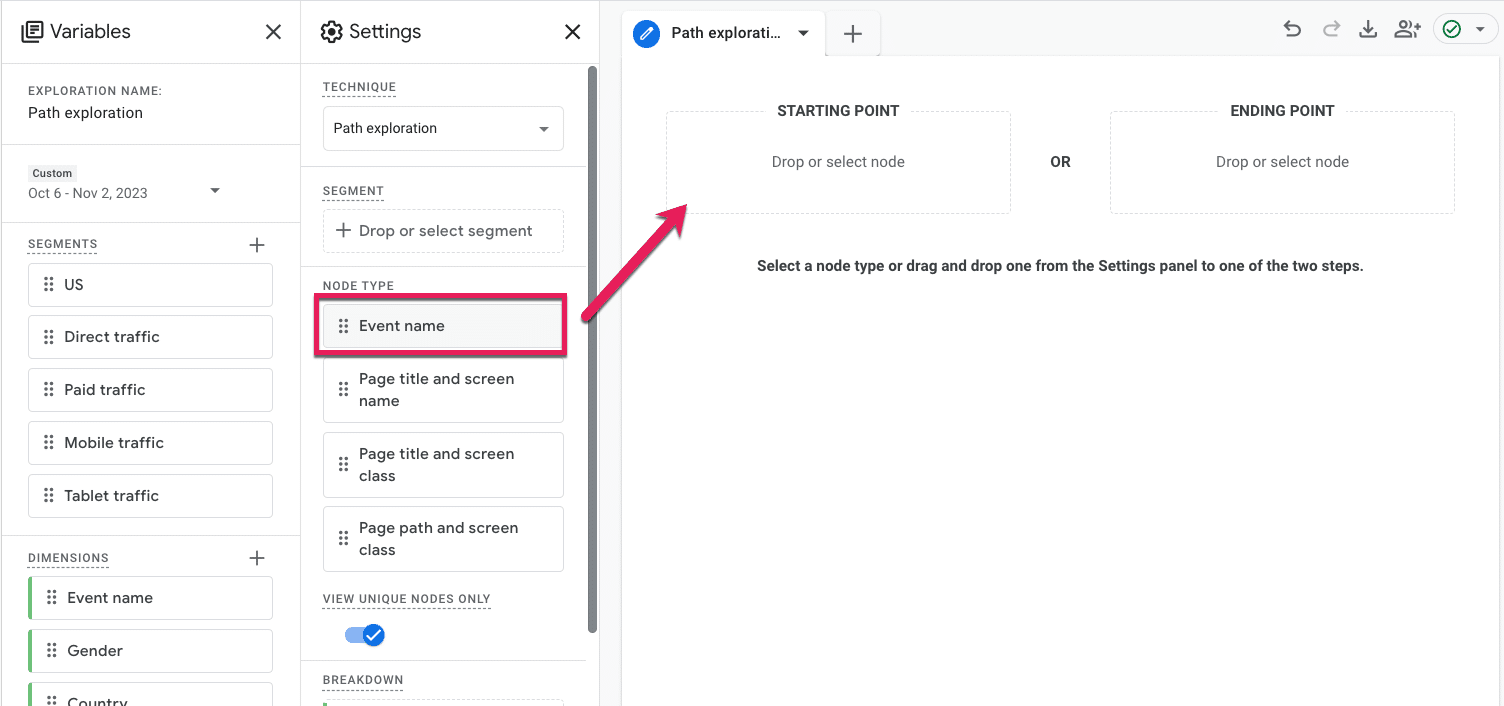
  • Drag and drop the Event button from Node Type to the Starting Point.
Ga4 - Path exploration
  • At this point, a menu will pop up for you to select what Event you want to dive into. Since we’re focused on first-timers, we will select the default Event, first_visit
internet marketing
  • The report will automatically populate step 1 with the same node type; in this case, the Event. But we’re interested in seeing where first-timers go on our site, so click the drop-down under Step +1 that says Event Name, and select Page title and screen name
GA4 - Path exploration 03
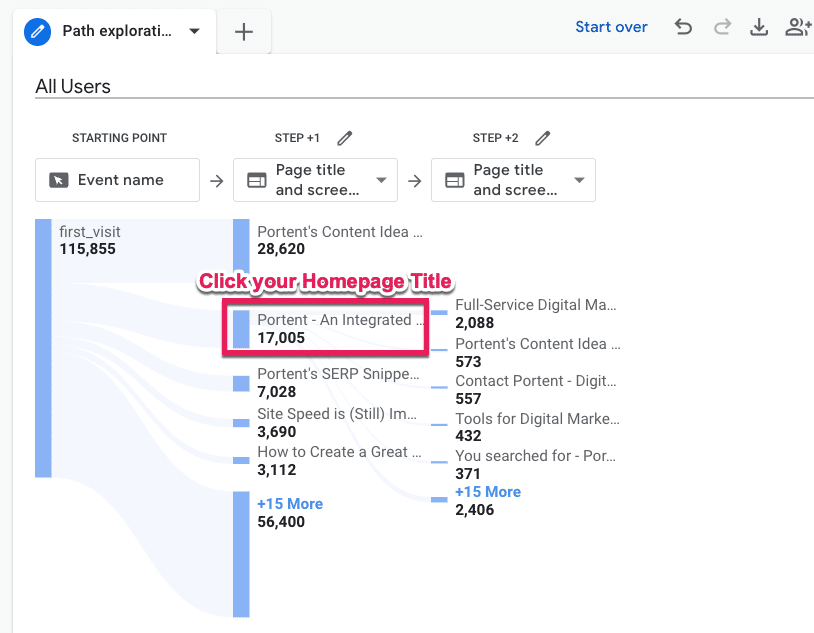
  • Now, we can see what pages on our site first-time visitors land on. I’m willing to bet your homepage is pretty high up there, so click that page title to open up Step +2 (a.k.a., what page first-time users to your homepage navigate to). 
GA4 - Path exploration 04
  • Measure your feelings. No, really. Are you surprised by what you see? Did you expect first-time visitors to your homepage to make it to a specific product or pricing page that isn’t even in the top five listed in “Step +2?”
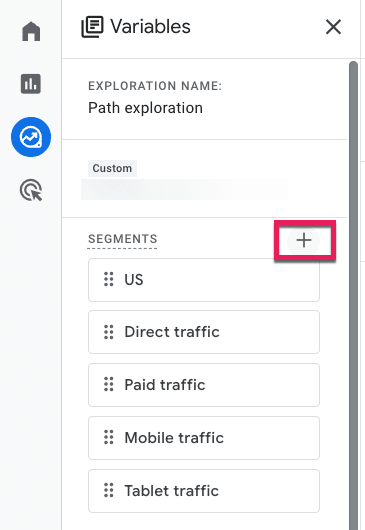
  • To see specifically Organic Search users subset, we will apply a Segment. Go to the Segments menu under Variables and click the plus (+) icon.
GA4 - Path exploration 05

GA4 has a ton of pre-built segments for you to peruse at your leisure, but we will select Templates and then Acquisition.

GA4 - Path exploration 06
  • From there, those without RegEx experience can collectively release the breath you’ve been holding because now we can select the First user default channel and add a filter that contains a drop-down of default channels. Then click the big blue Save and Apply button in the top right corner.
GA4 - Path exploration 07

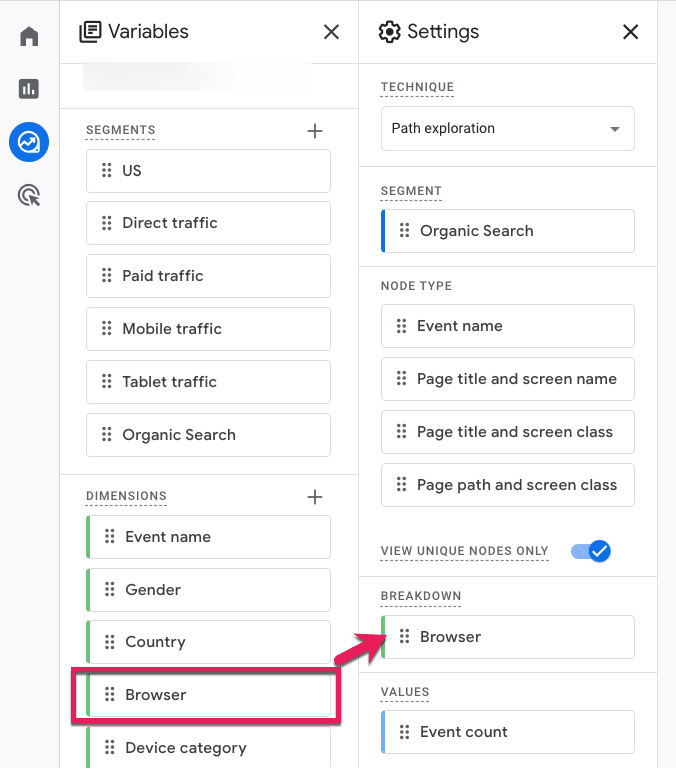
To see our segment broken down by Browser (or analyzed by any other attribute), follow the last three steps, only this time select the Dimensions variable.

GA4 - Path exploration 08
  • Check the Browser option from the pre-defined Platform / Device Dimensions GA4 provides, click Import, and then drag and drop that Dimension into Breakdown.
GA4 - Path exploration 09
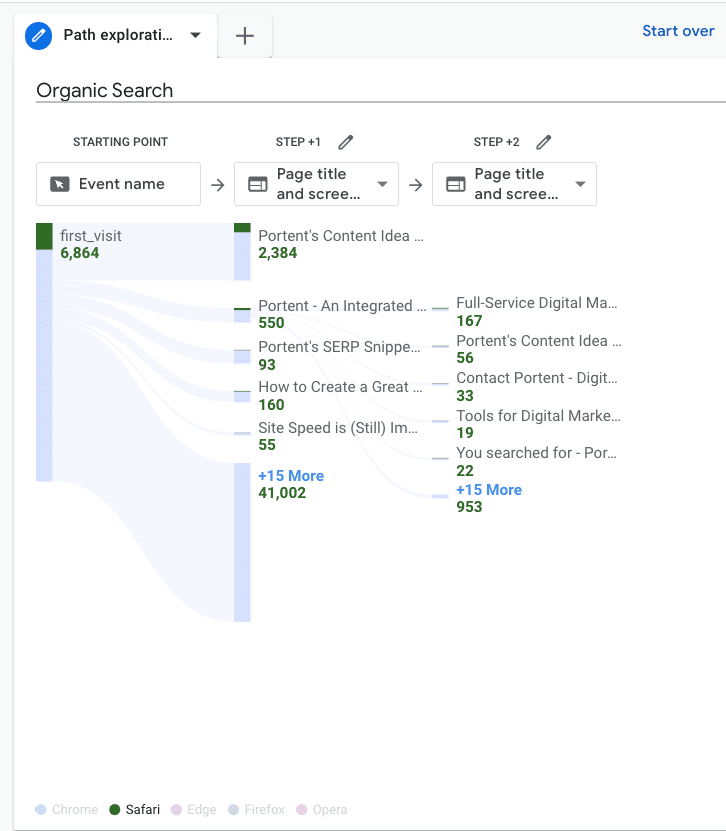
  • From there, we can hover over the metrics at the bottom to see how this user path compares by different browsers.
GA4 - Path exploration 10

Get the daily newsletter search marketers rely on.

<input type="hidden" name="utmMedium" value="“>
<input type="hidden" name="utmCampaign" value="“>
<input type="hidden" name="utmSource" value="“>
<input type="hidden" name="utmContent" value="“>
<input type="hidden" name="pageLink" value="“>
<input type="hidden" name="ipAddress" value="“>

Processing…Please wait.

function getCookie(cname) {
let name = cname + “=”;
let decodedCookie = decodeURIComponent(document.cookie);
let ca = decodedCookie.split(‘;’);
for(let i = 0; i <ca.length; i++) {
let c = ca[i];
while (c.charAt(0) == ' ') {
c = c.substring(1);
}
if (c.indexOf(name) == 0) {
return c.substring(name.length, c.length);
}
}
return "";
}
document.getElementById('munchkinCookieInline').value = getCookie('_mkto_trk');


2. What are my non-converting visitors expecting other than what they’re getting? 

Is there anything your visitors want that they’re not getting? 

Let’s walk through the steps in GA4 to see what users are searching for and how you can prioritize new additions or make existing things easier to find. 

  • Sign in to Google Analytics.
  • On the left, click Explore.
  • Choose a blank exploration.
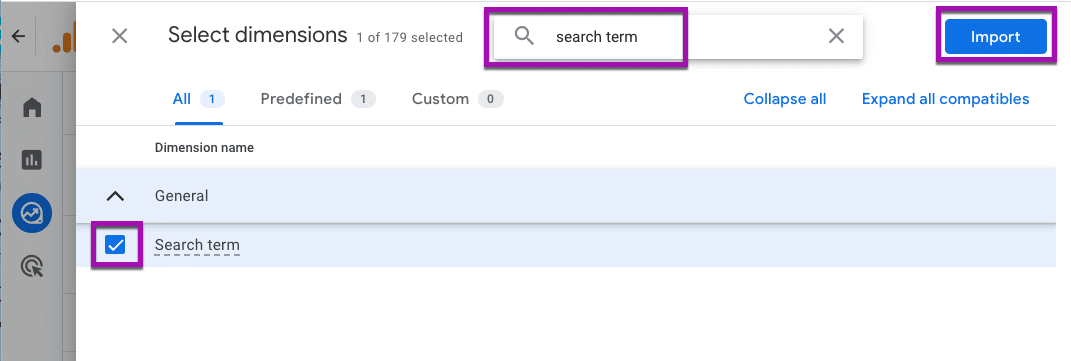
  • We’ll need to add “Search term” data to our exploration, so click the + next to Dimensions
  • You can explore the Dimensions here, or you can simply type search term into the search bar at the top, click the check box, and add that data by clicking the big blue Import button in the top right corner. 
GA4 - Path exploration 11
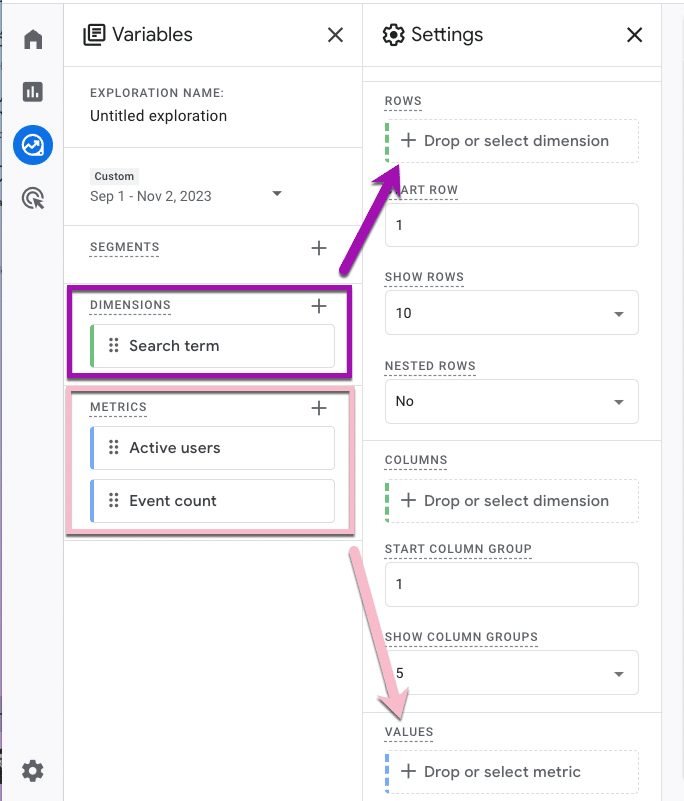
  • Now that we know what we want to analyze, we need to specify the specific numbers we’re interested in. Click the plus (+) icon next to Metrics. To see how many users searched for a given term, choose “Active users.” To see how many times those users searched for it, select “Event count.” Then, click Import.
  • To populate your report, drag the Dimension Search Term into the row and the Metrics into the values.
GA4 - Path exploration 12
  • Your free-form exploration now has data in it. Specifically, Search term data from your on-site search, including how many users searched for it and how many times they searched for it. It’s time to search your feelings again. Is the data what you would expect to see?
  • To break out our data by non-converters, add a Segment by clicking the plus (+) icon.
  • No need to create a custom segment for this. Google already has prebuilt audience suggestions for us. Go ahead and select the Non-Purchasers audience under the General menu.
GA4 - Path exploration 13
  • You can see on the next page how that audience was defined, but there’s no need for you to change anything unless you want to. Click the Save and Apply button in the top right, then do the same step for the Purchasers audience.
GA4 - Path exploration 14
  • Sit with your data for a moment.
    • Row 2 is the most searched term for your site. Is it an easy page to navigate to? Based on the data, I would guess “no.”
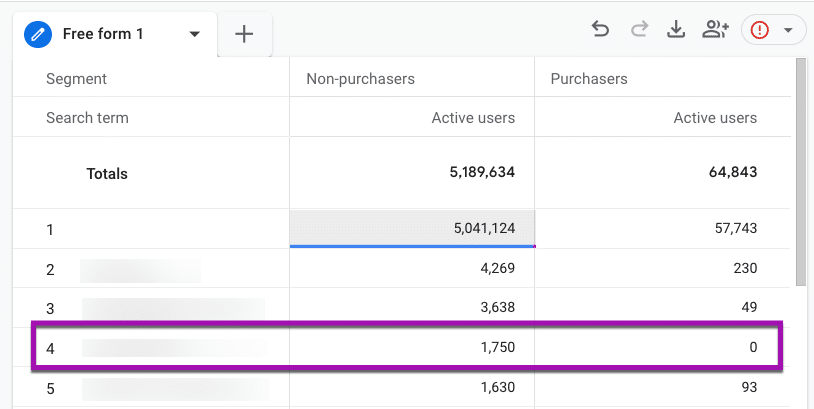
      • Or are you seeing an urgent opportunity to optimize website experiences, like in row 4, where the Purchasers column is 0?
GA4 - Path exploration 15

This data tells you that no one searching for the row 4 term is purchasing from your site.

Is that what you expected? Or do you have some content you need to spin up or a Purchasing department to notify? 

3. What is the top exited page, and where are those users coming from? 

Ideally, everyone who enters should also exit your website, but are they leaving in the right direction?

Let’s walk through the steps in GA4 to see the last pages people visit and what channel those users came from. 

  • Sign in to Google Analytics.
  • On the left, click Explore.
  • Choose a Blank exploration.
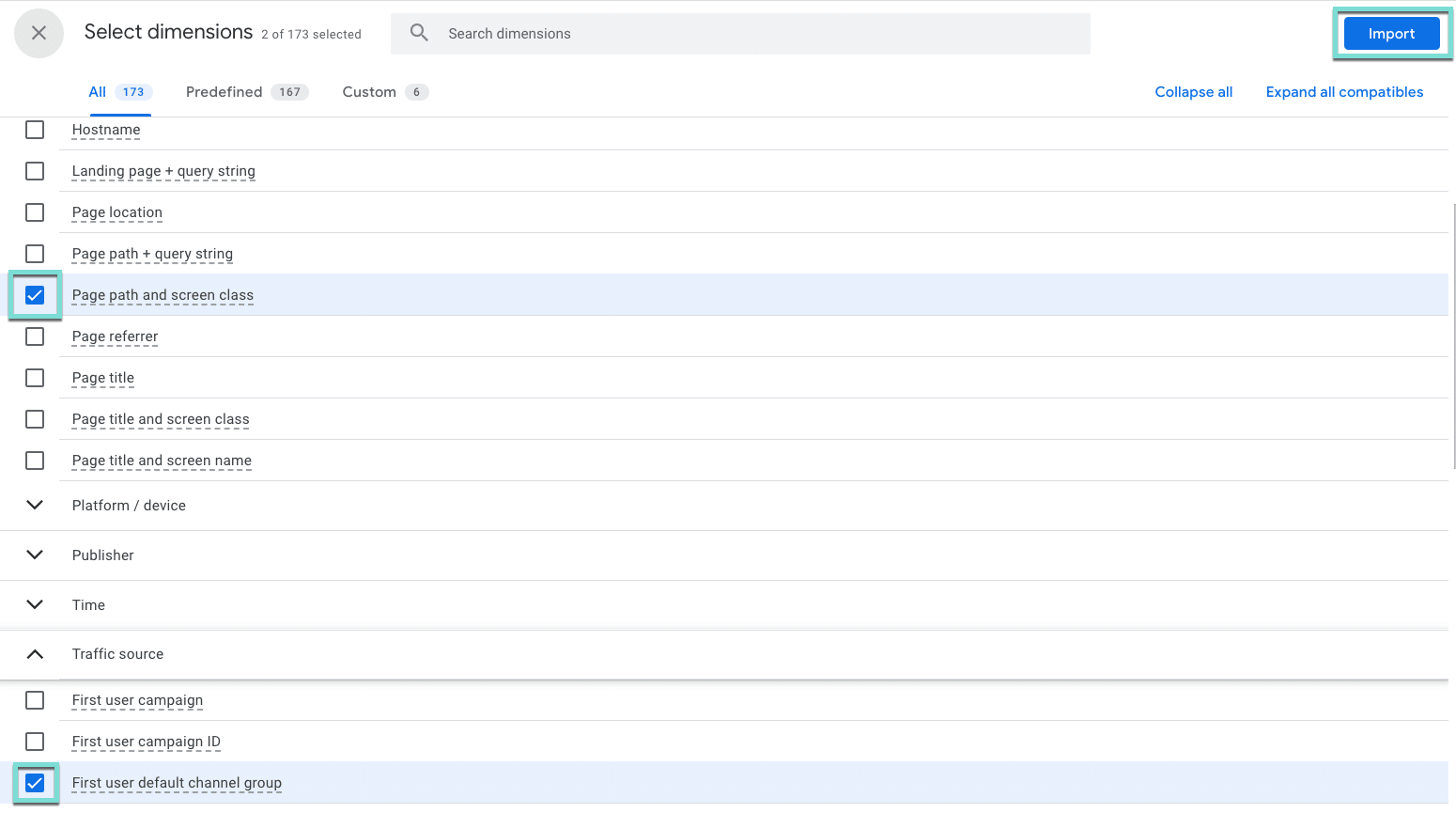
  • We need to select the thing we want to analyze. In this case, we want to know the Page title, and we also want to know the Channel these users used to get there. Click the + next to Dimension, 
  • Select Page path and screen class (under Page/screen), and First user default channel group (under Traffic source), and click the big blue Import button in the top right corner.
GA4 - Path exploration 16
  • Now, we need to define the numbers we want to look at. Click the + next to Metrics.
  • Using the search bar or by expanding the menus, select Exits, Views, and Bounce Rate, and click the Import button.

GA4 - Path exploration 17
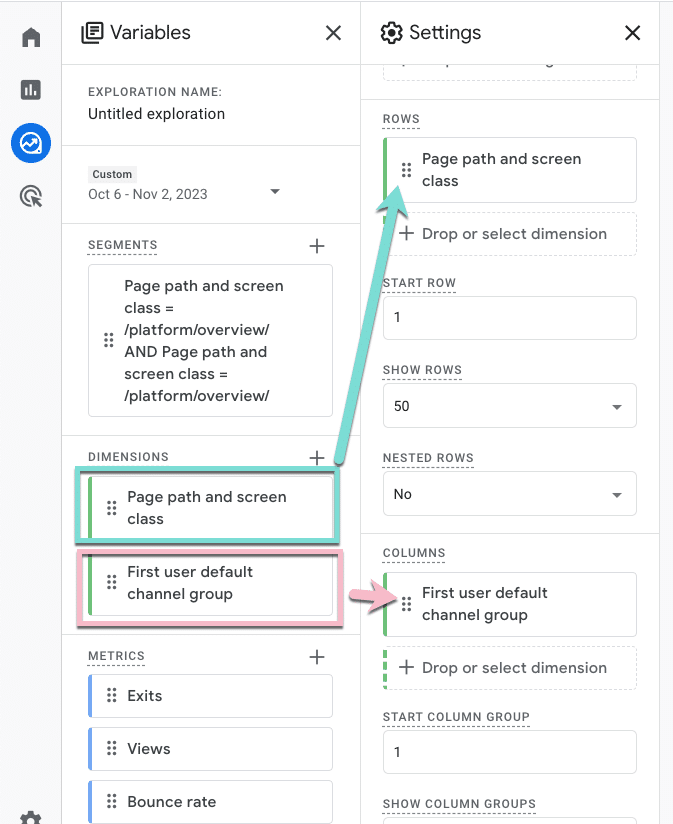
  • Drag Page path and screen class into the rows area, and First user default channel group to the columns.
GA4 - Path exploration 18
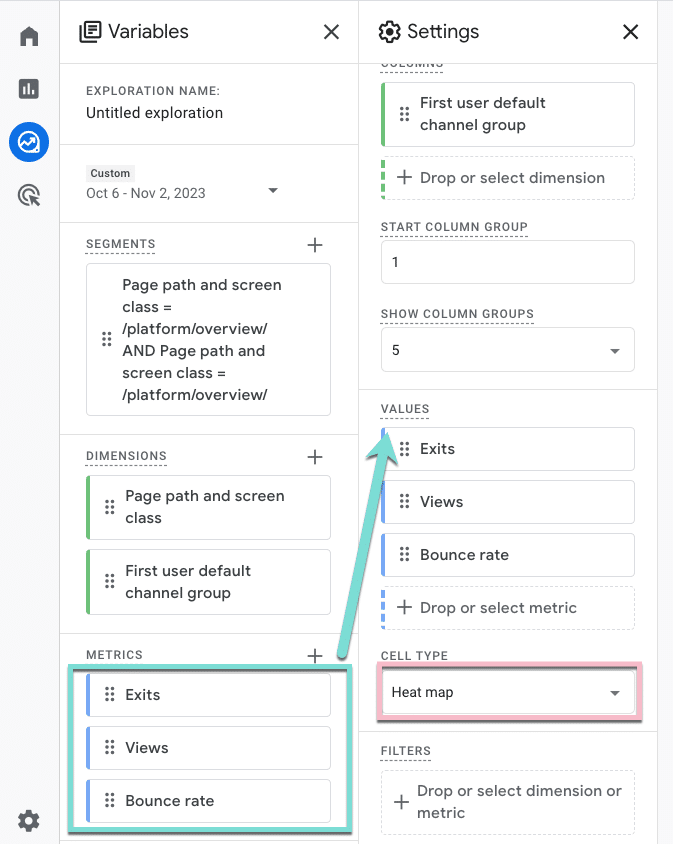
  • Then, drag your metrics into the values area. To help us focus on the right things, we will also change the cell type to Heat Map.
GA4 - Path exploration 19
  • Now, go ahead and close out Variables and Settings to minimize those menus and see the full report. 
GA4 - Path exploration 20
  • Examine the heat map and scroll over and down to find the darkest cells that indicate the highest numbers.
    • Are you seeing differences by traffic source, like row 25? 
    • What channels need more attention to improve or optimize event metrics like bounce rate? And why those channels? 
    • Is the meta description on the Organic Search result setting a different expectation than the one Direct users have when they visit that page?
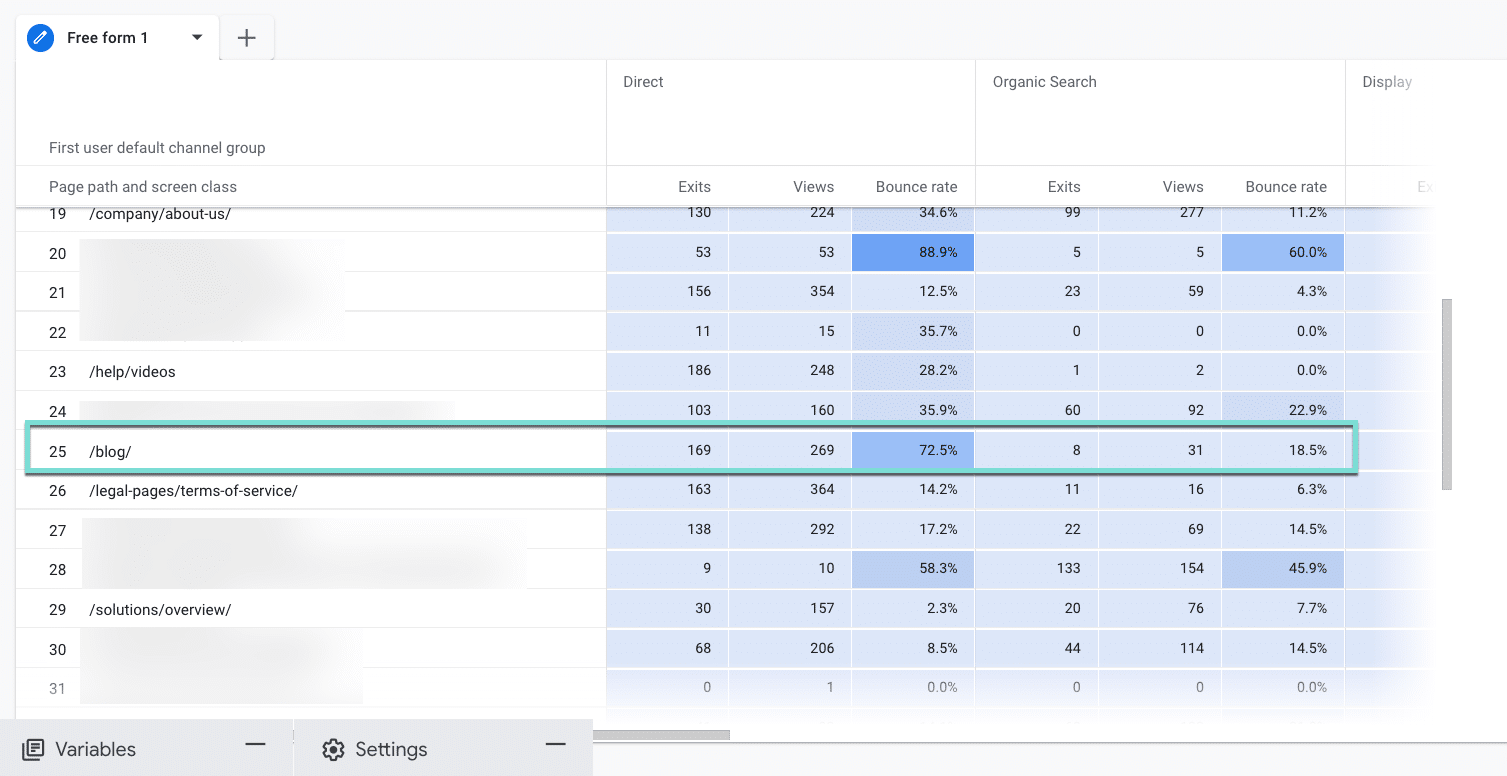
GA4 - Path exploration 21

Enhancing website engagement with GA4 

The path exploration report in GA4 can be a game-changer for uncovering and addressing website roadblocks. Leveraging this tool lets you gain insights and take action to enhance the user experience.

Incorporating these insights into your digital marketing strategy can lead to a more user-friendly website, improved engagement, and enhanced overall performance.

Dig deeper: How to use GA4 to optimize your digital marketing strategy

The post GA4 path exploration report: 3 ways to uncover website roadblocks appeared first on Search Engine Land.

Original source: https://searchengineland.com/google-analytics-4-path-exploration-report-website-roadblocks-434276

Why your PPC strategy needs a full-funnel approach

To scale your PPC efforts and reach a broader audience effectively, you need a strategy encompassing every stage of the customer journey, from brand discovery to taking action.

This is where the concept of a full-funnel PPC approach comes into play.

This article will explain the importance of full-funnel PPC marketing and provide a solution for effective reporting with Looker Studio.

Discover how this strategy can impact your business and streamline your marketing efforts for long-term growth. 

What is a full-funnel PPC strategy?

A full-funnel PPC strategy involves looking at all stages in your sales cycle and targeting users via PPC before they know your brand name or may know what solution or product they are looking for.

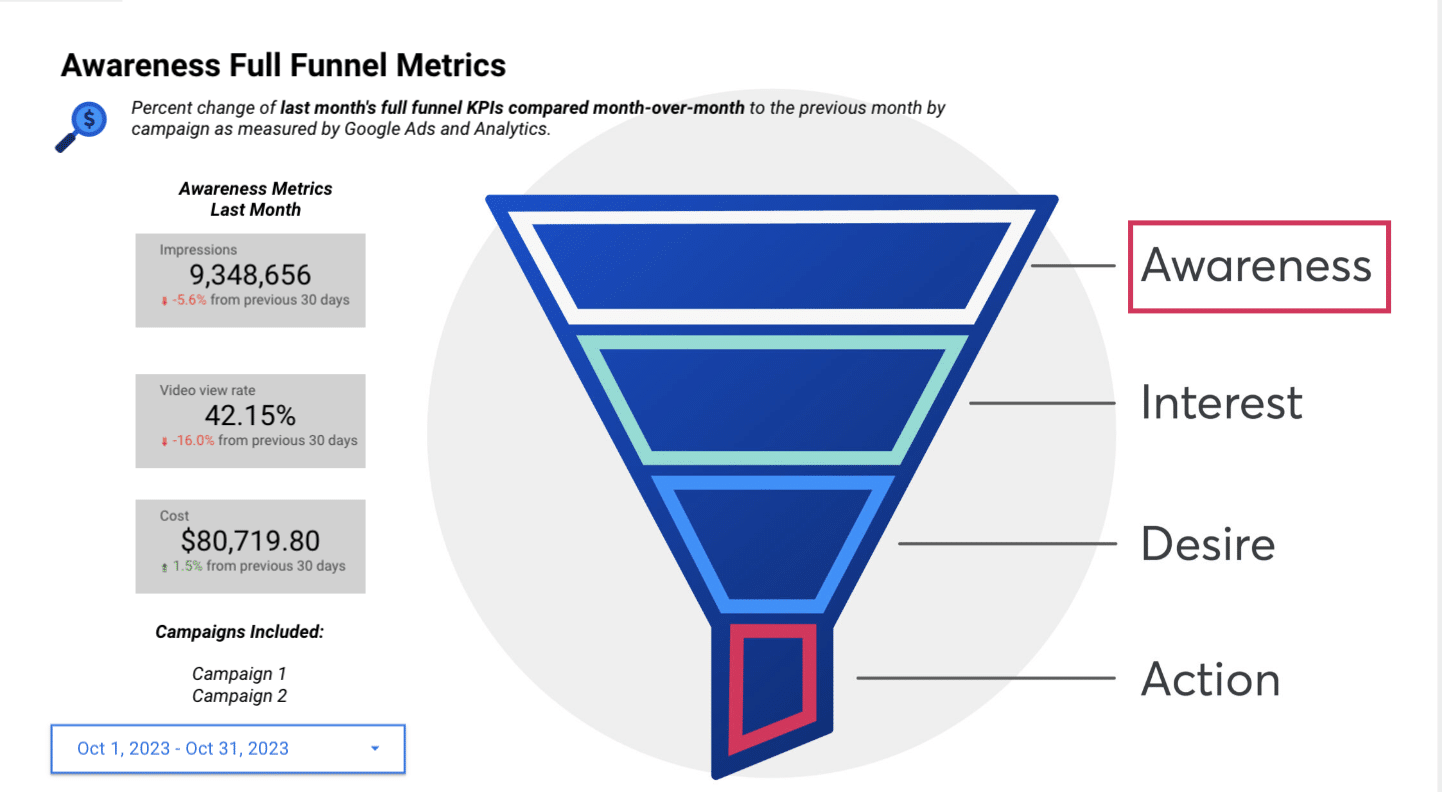
It helps you target prospects at multiple touchpoints from the Awareness stage all the way to the bottom of the funnel or Action stage.

Potential new customers at the Awareness stage will learn about your brand while seeking answers to their questions.

Home Business

In many cases, paid search advertisers tend to get too focused on bottom-funnel lead acquisition, whether for lead generation or ecommerce

However, understanding the importance of a full-funnel strategy can significantly benefit your business. 

Dig deeper: How to use always-on marketing in paid search

The importance of a full-funnel strategy in PPC

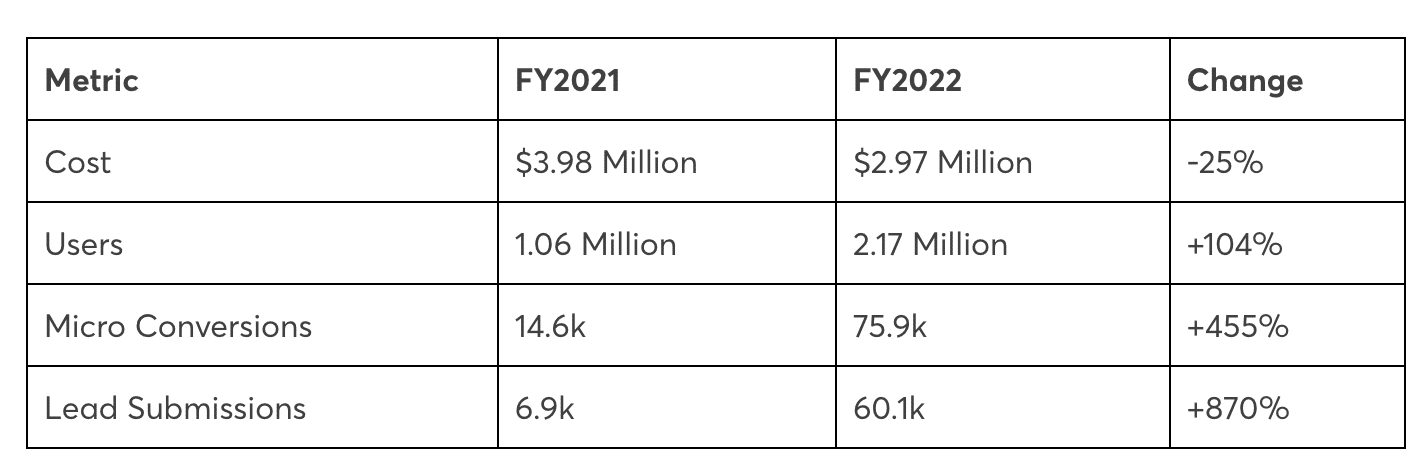
Investing in a full-funnel strategy is well worth the effort. Let’s consider Portent’s own data from a full-funnel approach implemented for a B2B solution targeting mid-sized companies. 

These campaigns, which embraced a full-funnel strategy, outperformed the previous campaigns that solely targeted bottom-funnel calls to action in acquiring new users and generating leads.

This data underscores the advantages of a full-funnel approach in reaching a broader audience and driving results.

Full-funnel PPC results

Get the daily newsletter search marketers rely on.

<input type="hidden" name="utmMedium" value="“>
<input type="hidden" name="utmCampaign" value="“>
<input type="hidden" name="utmSource" value="“>
<input type="hidden" name="utmContent" value="“>
<input type="hidden" name="pageLink" value="“>
<input type="hidden" name="ipAddress" value="“>

Processing…Please wait.

function getCookie(cname) {
let name = cname + “=”;
let decodedCookie = decodeURIComponent(document.cookie);
let ca = decodedCookie.split(‘;’);
for(let i = 0; i <ca.length; i++) {
let c = ca[i];
while (c.charAt(0) == ' ') {
c = c.substring(1);
}
if (c.indexOf(name) == 0) {
return c.substring(name.length, c.length);
}
}
return "";
}
document.getElementById('munchkinCookieInline').value = getCookie('_mkto_trk');


PPC campaigns by funnel stages

Now that we see the impact, what campaigns fall under each stage?

Generally, for top-of-funnel awareness campaigns, the best campaign types are:

For middle-of-funnel campaigns, we often classify:

  • Non-branded Search campaigns.
  • Display and Video and Demand Gen campaigns.
  • Remarketing.

For bottom-of-funnel or action campaigns, we would consider:

  • High-intent keyword Search campaigns.
  • Brand Search campaigns.
  • Performance Max.
  • Remarketing campaigns.

Difficulties reporting with Google Ads data

One of the biggest challenges when convincing your boss or client to invest in a full-funnel strategy is providing the data to track performance once the campaigns are live.

For Awareness or top-of-funnel campaigns, you want to evaluate their performance on: 

  • Impressions.
  • View-through rate.

For the Interest or Desire stage, you want to look at engaged sessions or other engagement metrics such as:

  • Engagement rate.
  • Time spent on page.
  • Clicks on certain page elements.

Finally, for the Action section of the account, you will want to track your primary conversions, such as:

  • Form fills.
  • Purchases.

The question is, how does all of this get reported and visualized? 

The top and middle funnel KPIs are only available in Analytics, whereas the KPIs of the funnel’s Action section are metrics you would track in Google Ads.

The answer is to use Looker Studio to create full-funnel reports.

Full-funnel PPC reporting with Looker Studio

When using Looker Studio, you must guide the visitor through your full-funnel strategy with visuals illustrating what your funnel looks like.

By breaking down the stages in each slide, you can direct the reader to focus on the appropriate metrics for that stage rather than solely concentrating on the bottom-of-funnel action conversions, such as purchases or form fills.

For example, in your report, you can start at the top of the funnel, including metrics relevant to that stage.

It’s advisable to include cost data for various campaign types (e.g., Display, Video, Demand Gen) month over month (MOM). This approach allows for a more focused and clear presentation of data.

Another idea to improve this slide for a client is to include a table with the breakdown of top-of-funnel campaigns. We also recommend providing images or videos on the slide so the user understands which ads are Awareness.

Full-funnel PPC reporting with Looker Studio

The benefit of this strategy is breaking out the stages in each slide allows you to direct the reader to focus on the appropriate metrics for that stage and not focus solely on the bottom-of-funnel action conversions such as purchases or form fills.

I recommend having a separate slide for each funnel stage rather than combining all full-funnel metrics into a single slide.

The combination of data can be overwhelming and may confuse the visitor about which metrics are the most important.

By presenting each stage individually, you can provide a clear and concise view of the performance at each funnel level.

Dig deeper: 5 things your Google Looker Studio PPC Dashboard must have

Full-funnel reporting simplified

Once you have created your full-funnel report using Looker Studio, you can analyze the impact of your investment in top-of-funnel campaigns on your overall primary conversion actions. This analysis can be done quarterly or over longer time frames. 

While it’s important to note that the benefits of top-of-funnel campaigns may take longer to materialize compared to bottom-of-funnel strategies, educating your boss or client on the importance of a full-funnel approach can lead to larger year-over-year growth.

A full-funnel strategy is a valuable approach for targeting prospects at various stages of the customer journey. To effectively report on the performance of such campaigns, Looker Studio can be a powerful tool, providing the necessary data visualization and reporting capabilities.

By breaking down the metrics and guiding the reader through each stage of the funnel, you can ensure that your reporting is clear, focused, and insightful.

Over time, the data collected from top-of-funnel campaigns can provide valuable insights into their impact on your overall business goals.

The post Why your PPC strategy needs a full-funnel approach appeared first on Search Engine Land.

Original source: https://searchengineland.com/ppc-strategy-full-funnel-approach-434271

Gallop to Riches: The Top Countries Where Horse Racing Yields Highest Profits

Home Business Magazine Online

Horse racing, known as the “Sport of Kings,” is a thrilling blend of tradition, competition, and elegance. It is an ancient sport that has been practiced in various civilizations around the world since ancient times. Today, horse racing is not just a sport but a significant economic activity that generates billions of dollars annually.

The profitability of horse racing can be measured in terms of prize money, betting turnover, and the overall economic impact. This article will explore some of the countries where horse racing is most profitable.

United Kingdom

The UK has a storied history with horse racing. The sport remains a prominent fixture in British culture thanks to the hundreds of thousands of UK punters with an avid interest to bet on Cheltenham Gold Cup and other iconic events; such as the Royal Ascot and the Grand National attract spectators from around the world. These events are not just about the races themselves but also about the social status and the tradition that accompany them.

The betting turnover in the UK is substantial, and the industry employs tens of thousands of people. The Tattersalls sales in Newmarket are a testament to the profitability of the breeding side of the industry, where thoroughbreds are auctioned for premium prices.

United States

The United States boasts some of the most famous horse races in the world, including the Kentucky Derby, Preakness Stakes, and Belmont Stakes, collectively known as the Triple Crown. The profitability of horse racing in the US can be attributed to the massive betting industry that accompanies the sport. The Breeders’ Cup and the Kentucky Derby are particularly lucrative, with prize money reaching into the millions.

The industry is also bolstered by the sales of racehorses, which can fetch astronomical prices. Furthermore, the US horse racing industry benefits from the widespread legal infrastructure for gambling, which ensures consistent revenue streams from across the country.

Australia

Australia’s horse racing industry is one of the most developed and profitable in the world. The Melbourne Cup, often referred to as “the race that stops a nation,” is the pinnacle of Australian horse racing and offers substantial prize money. It is not only the richest handicap in the world but also a cultural phenomenon that generates substantial betting activity.

The Australian racing industry contributes billions to the economy when factoring in the gambling, breeding, and racing sectors, making it a major player in the global scene.

Japan

Japan has emerged as a powerhouse in horse racing, with some of the most profitable races in terms of prize money. The Japan Cup, for example, is one of the richest turf races globally. The Japanese betting system is highly organized, and the government-operated Japan Racing Association oversees a large part of the racing and betting operations.

People who reside in Japan take great pride in their thoroughbred breeding programs, which have produced some world-class racehorses, and the sales of these horses contribute significantly to the profitability of the industry.

Hong Kong

Hong Kong’s horse racing scene is highly profitable, thanks to the enormous betting pools and sizable crowds that flock to the Sha Tin and Happy Valley racecourses. The Hong Kong Jockey Club operates as a monopoly over all betting activities related to horse racing, soccer, and lotteries. It is the largest taxpayer in Hong Kong and one of the most significant charitable donors. The revenue generated from horse racing is instrumental in funding various community and social projects.

United Arab Emirates

The United Arab Emirates, particularly Dubai, is known for its opulent approach to horse racing. The Dubai World Cup boasts some of the highest prize purses in the world, reflecting the wealth and investment pumped into the sport. The race is part of the Dubai World Cup Night, a series of races that together offer tens of millions of dollars in prize money.

The government’s support and the luxurious facilities make it a magnet for the world’s best horses and jockeys, contributing to its profitability.

France

France is renowned for its prestigious races, such as the Prix de l’Arc de Triomphe, which offers some of the largest prize money in Europe. The French horse racing industry is supported by Pari Mutuel Urbain (PMU), the French betting system that operates betting services in cafés and bars across France, as well as online. The breeding industry in France is also robust, with significant sales contributing to the economy.

Horse racing’s profitability can be seen across the globe, with each country bringing its unique flair and tradition to the sport. The United States, Australia, Japan, the United Kingdom, Hong Kong, the United Arab Emirates, and France stand out as leaders in the industry.

These countries have developed sustainable ecosystems for horse racing that include breeding programs, betting operations, and high-stakes races, all contributing to the economic impact of this exhilarating sport. The profitability of horse racing in these nations is a testament to the enduring appeal of the sport and its capacity to generate significant economic activity.

The post Gallop to Riches: The Top Countries Where Horse Racing Yields Highest Profits appeared first on Home Business Magazine.

Original source: https://homebusinessmag.com/businesses/business-spotlights/top-countries-horse-racing-yields-highest-profits/

5 Common Challenges in Shopify and Microsoft Access Integration and How to Overcome Them

Home Business Magazine Online

The integration of platforms like Shopify with robust database management systems such as Microsoft Access is no longer a luxury but a necessity. This integration empowers businesses to streamline operations, improve real-time data accessibility, and make more informed decisions. However, the path to seamless integration is often fraught with challenges that can impede operational efficiency and data integrity. From data synchronization issues to system incompatibilities and security concerns, businesses encounter a range of obstacles that can make the integration process complex and daunting. This article aims to shed light on five common challenges you’re likely to face when integrating Shopify with Microsoft Access and offers actionable solutions to navigate these complexities successfully.

Challenge 1: Data Synchronization Issues

One of the most prevalent challenges in integrating Shopify with Microsoft Access is the issue of data synchronization. Whether it’s product information, customer data, or order histories, ensuring that data is consistently updated across both platforms can be a complex task. Inconsistencies can arise due to various factors such as network latency, software bugs, or human errors.

Potential Impact on Business Operations

Data synchronization issues can have a domino effect on your e-commerce operations. Inaccurate inventory levels can lead to stockouts or overstocking, affecting customer satisfaction and profitability. Similarly, inconsistencies in customer data can hamper targeted marketing efforts, thereby impacting revenue.

Solutions and Best Practices

  1. Automated Syncing: Utilize automated tools or scripts that can sync data between Shopify and Microsoft Access at regular intervals.
  2. Data Validation: Implement data validation checks to ensure that the data being transferred is accurate and complete.
  3. Error Logging and Notifications: Set up systems to log errors and send notifications for manual review when discrepancies are detected.
  4. Batch Processing: For large datasets, consider batch processing to minimize the load on both systems and ensure smoother synchronization.
  5. Regular Audits: Conduct regular audits to identify any synchronization issues and rectify them promptly.

By addressing data synchronization challenges head-on and implementing these best practices, you can maintain data integrity across both platforms and optimize your business operations.

Challenge 2: Incompatibility Between Systems

The second challenge often encountered in integrating Shopify with Microsoft Access is system incompatibility. While Shopify is a cloud-based e-commerce platform designed for ease of use and scalability, Microsoft Access is a more traditional database management system that may require specific configurations or software versions to operate optimally. These fundamental differences can lead to technical limitations such as data format mismatches, API restrictions, or even issues with data transfer protocols.

Technical limitations can manifest in various ways. For instance, you may find that certain data types supported in Shopify are not directly compatible with Microsoft Access, requiring additional data transformation steps. Similarly, API rate limits on either platform could slow down or interrupt data synchronization processes.

To overcome these challenges, several solutions and best practices can be employed. First, it’s crucial to conduct a thorough system assessment to identify any incompatibility issues before initiating the integration process. This will help you anticipate potential roadblocks and plan accordingly. Second, consider using middleware or specialized connectors designed to bridge the gap between Shopify and Microsoft Access. These tools often come with built-in features to handle data transformation and API calls, simplifying the integration process. Third, always keep both systems updated to the latest versions to take advantage of new features and compatibility improvements. Lastly, consult with experts or consider professional integration services to ensure a smooth and effective integration process.

Challenge 3: Security Concerns

Security is a paramount concern when integrating any two platforms, and the connection between Shopify and Microsoft Access is no exception. The problem arises when sensitive data, such as customer information or financial records, is transferred between the two systems. The data is potentially exposed to various security risks during this process, including unauthorized access, data breaches, and even data corruption.

The risks involved in data sharing between platforms can be significant. Unauthorized access to sensitive data can lead to identity theft or financial fraud. Data breaches could not only result in the loss of critical business information but also damage your brand’s reputation and customer trust. Moreover, inadequate security measures could make you non-compliant with data protection regulations, leading to legal consequences.

To mitigate these security concerns, several solutions and best practices can be adopted. First and foremost, ensure that all data transfers are encrypted using strong encryption algorithms. This will make it difficult for unauthorized parties to intercept and decipher the data. Second, implement robust authentication and authorization mechanisms to restrict access only to authorized personnel. Third, regularly update your security protocols and conduct security audits to identify and fix potential vulnerabilities. Additionally, consider using a secure, dedicated network connection for data transfers between Shopify and Microsoft Access. Finally, always have a data recovery and backup plan in place to quickly restore data in case of corruption or loss. By taking these precautions, you can significantly reduce the security risks associated with integrating Shopify and Microsoft Access.

Challenge 4: Complexity in Managing Real-Time Updates

Managing real-time updates adds another layer of complexity to the integration of Shopify and Microsoft Access. While real-time data is crucial for various business operations like inventory management and customer engagement, ensuring that both systems are consistently updated in real-time can be a challenging task. This is particularly true when dealing with high volumes of data or frequent changes.

The Need for Real-Time Data and Its Management Challenges

Real-time data is essential for making timely business decisions and enhancing customer experience. However, managing real-time updates between Shopify and Microsoft Access can be fraught with challenges such as data latency, potential for data duplication, and increased load on system resources. These challenges can compromise the accuracy and reliability of your real-time data.

Solutions and Best Practices Using ODBC Driver By Devart

To effectively manage real-time updates, using a specialized ODBC driver like the one offered by Devart can be highly beneficial. Here are some solutions and best practices:

  1. Optimized Data Transfer: Devart’s ODBC driver is designed for efficient data transfer, reducing latency and ensuring that real-time updates are as close to instantaneous as possible.
  2. Data Integrity: The driver comes with built-in features to prevent data duplication and ensure data integrity during real-time updates.
  3. Resource Management: Devart’s ODBC driver is optimized for performance, ensuring that real-time data synchronization does not overload system resources.
  4. Security: The driver includes robust security features, ensuring that real-time data transfers are encrypted and secure.
  5. Ease of Configuration: Devart’s ODBC driver is user-friendly and easy to configure, making it easier to set up real-time updates between Shopify and Microsoft Access.

By leveraging the capabilities of a specialized ODBC driver like Devart’s, you can significantly simplify the complexities involved in managing real-time updates, ensuring that your data is accurate, secure, and up-to-date.

Challenge 5: Scalability and Performance

The fifth challenge in integrating Shopify with Microsoft Access revolves around scalability and performance. As your e-commerce business grows, so does the volume of data that needs to be managed. While both Shopify and Microsoft Access are robust platforms, they have their limitations when it comes to handling large datasets or high-frequency updates. Scalability issues can manifest in various ways, such as slower data transfer rates, increased system latency, or even system crashes in extreme cases.

The impact of scalability issues on performance can be significant. Slow data transfers can delay real-time updates, affecting inventory management and customer experience. High system latency can lead to slower query responses, impacting your ability to make timely business decisions. In the worst-case scenario, system crashes could result in data loss and significant downtime, affecting both revenue and reputation.

To address these challenges, several solutions and best practices can be employed. First, consider implementing load balancing techniques to distribute data processing tasks evenly across system resources. This can help in maintaining optimal performance even as data volumes grow. Second, optimize your database queries and data transfer protocols to ensure they are as efficient as possible. This can significantly speed up data transfers and reduce system load. Third, plan for scalability from the outset. Choose integration tools and middleware that are designed to handle increased loads and can be easily upgraded to meet future needs. Finally, regular performance monitoring can help you identify potential scalability issues before they become critical problems, allowing you to take proactive measures to mitigate them. By adopting these best practices, you can ensure that your integrated system remains scalable and performs optimally, regardless of how much your business grows.

Conclusion

In summary, integrating Shopify with Microsoft Access presents a unique set of challenges ranging from data synchronization and system incompatibility to security concerns, complexities in managing real-time updates, and scalability issues. However, each of these challenges can be effectively mitigated through a combination of best practices, specialized tools like Devart’s ODBC driver, and strategic planning. The key to successful integration lies in proper planning and meticulous execution. By anticipating potential roadblocks and implementing proactive solutions, you can unlock the full potential of both platforms, thereby optimizing your e-commerce operations. We strongly encourage you to take the time to plan your integration strategy carefully and consider employing expert services to ensure a seamless and effective integration process. Take the first step today to elevate your e-commerce business to new heights.

The post 5 Common Challenges in Shopify and Microsoft Access Integration and How to Overcome Them appeared first on Home Business Magazine.

Original source: https://homebusinessmag.com/home-office/computers-and-software/5-common-challenges-shopify-microsoft-access-integration-overcome/

5 Common Challenges in Shopify and Microsoft Access Integration and How to Overcome Them

Home Business Magazine Online

The integration of platforms like Shopify with robust database management systems such as Microsoft Access is no longer a luxury but a necessity. This integration empowers businesses to streamline operations, improve real-time data accessibility, and make more informed decisions. However, the path to seamless integration is often fraught with challenges that can impede operational efficiency and data integrity. From data synchronization issues to system incompatibilities and security concerns, businesses encounter a range of obstacles that can make the integration process complex and daunting. This article aims to shed light on five common challenges you’re likely to face when integrating Shopify with Microsoft Access and offers actionable solutions to navigate these complexities successfully.

Challenge 1: Data Synchronization Issues

One of the most prevalent challenges in integrating Shopify with Microsoft Access is the issue of data synchronization. Whether it’s product information, customer data, or order histories, ensuring that data is consistently updated across both platforms can be a complex task. Inconsistencies can arise due to various factors such as network latency, software bugs, or human errors.

Potential Impact on Business Operations

Data synchronization issues can have a domino effect on your e-commerce operations. Inaccurate inventory levels can lead to stockouts or overstocking, affecting customer satisfaction and profitability. Similarly, inconsistencies in customer data can hamper targeted marketing efforts, thereby impacting revenue.

Solutions and Best Practices

  1. Automated Syncing: Utilize automated tools or scripts that can sync data between Shopify and Microsoft Access at regular intervals.
  2. Data Validation: Implement data validation checks to ensure that the data being transferred is accurate and complete.
  3. Error Logging and Notifications: Set up systems to log errors and send notifications for manual review when discrepancies are detected.
  4. Batch Processing: For large datasets, consider batch processing to minimize the load on both systems and ensure smoother synchronization.
  5. Regular Audits: Conduct regular audits to identify any synchronization issues and rectify them promptly.

By addressing data synchronization challenges head-on and implementing these best practices, you can maintain data integrity across both platforms and optimize your business operations.

Challenge 2: Incompatibility Between Systems

The second challenge often encountered in integrating Shopify with Microsoft Access is system incompatibility. While Shopify is a cloud-based e-commerce platform designed for ease of use and scalability, Microsoft Access is a more traditional database management system that may require specific configurations or software versions to operate optimally. These fundamental differences can lead to technical limitations such as data format mismatches, API restrictions, or even issues with data transfer protocols.

Technical limitations can manifest in various ways. For instance, you may find that certain data types supported in Shopify are not directly compatible with Microsoft Access, requiring additional data transformation steps. Similarly, API rate limits on either platform could slow down or interrupt data synchronization processes.

To overcome these challenges, several solutions and best practices can be employed. First, it’s crucial to conduct a thorough system assessment to identify any incompatibility issues before initiating the integration process. This will help you anticipate potential roadblocks and plan accordingly. Second, consider using middleware or specialized connectors designed to bridge the gap between Shopify and Microsoft Access. These tools often come with built-in features to handle data transformation and API calls, simplifying the integration process. Third, always keep both systems updated to the latest versions to take advantage of new features and compatibility improvements. Lastly, consult with experts or consider professional integration services to ensure a smooth and effective integration process.

Challenge 3: Security Concerns

Security is a paramount concern when integrating any two platforms, and the connection between Shopify and Microsoft Access is no exception. The problem arises when sensitive data, such as customer information or financial records, is transferred between the two systems. The data is potentially exposed to various security risks during this process, including unauthorized access, data breaches, and even data corruption.

The risks involved in data sharing between platforms can be significant. Unauthorized access to sensitive data can lead to identity theft or financial fraud. Data breaches could not only result in the loss of critical business information but also damage your brand’s reputation and customer trust. Moreover, inadequate security measures could make you non-compliant with data protection regulations, leading to legal consequences.

To mitigate these security concerns, several solutions and best practices can be adopted. First and foremost, ensure that all data transfers are encrypted using strong encryption algorithms. This will make it difficult for unauthorized parties to intercept and decipher the data. Second, implement robust authentication and authorization mechanisms to restrict access only to authorized personnel. Third, regularly update your security protocols and conduct security audits to identify and fix potential vulnerabilities. Additionally, consider using a secure, dedicated network connection for data transfers between Shopify and Microsoft Access. Finally, always have a data recovery and backup plan in place to quickly restore data in case of corruption or loss. By taking these precautions, you can significantly reduce the security risks associated with integrating Shopify and Microsoft Access.

Challenge 4: Complexity in Managing Real-Time Updates

Managing real-time updates adds another layer of complexity to the integration of Shopify and Microsoft Access. While real-time data is crucial for various business operations like inventory management and customer engagement, ensuring that both systems are consistently updated in real-time can be a challenging task. This is particularly true when dealing with high volumes of data or frequent changes.

The Need for Real-Time Data and Its Management Challenges

Real-time data is essential for making timely business decisions and enhancing customer experience. However, managing real-time updates between Shopify and Microsoft Access can be fraught with challenges such as data latency, potential for data duplication, and increased load on system resources. These challenges can compromise the accuracy and reliability of your real-time data.

Solutions and Best Practices Using ODBC Driver By Devart

To effectively manage real-time updates, using a specialized ODBC driver like the one offered by Devart can be highly beneficial. Here are some solutions and best practices:

  1. Optimized Data Transfer: Devart’s ODBC driver is designed for efficient data transfer, reducing latency and ensuring that real-time updates are as close to instantaneous as possible.
  2. Data Integrity: The driver comes with built-in features to prevent data duplication and ensure data integrity during real-time updates.
  3. Resource Management: Devart’s ODBC driver is optimized for performance, ensuring that real-time data synchronization does not overload system resources.
  4. Security: The driver includes robust security features, ensuring that real-time data transfers are encrypted and secure.
  5. Ease of Configuration: Devart’s ODBC driver is user-friendly and easy to configure, making it easier to set up real-time updates between Shopify and Microsoft Access.

By leveraging the capabilities of a specialized ODBC driver like Devart’s, you can significantly simplify the complexities involved in managing real-time updates, ensuring that your data is accurate, secure, and up-to-date.

Challenge 5: Scalability and Performance

The fifth challenge in integrating Shopify with Microsoft Access revolves around scalability and performance. As your e-commerce business grows, so does the volume of data that needs to be managed. While both Shopify and Microsoft Access are robust platforms, they have their limitations when it comes to handling large datasets or high-frequency updates. Scalability issues can manifest in various ways, such as slower data transfer rates, increased system latency, or even system crashes in extreme cases.

The impact of scalability issues on performance can be significant. Slow data transfers can delay real-time updates, affecting inventory management and customer experience. High system latency can lead to slower query responses, impacting your ability to make timely business decisions. In the worst-case scenario, system crashes could result in data loss and significant downtime, affecting both revenue and reputation.

To address these challenges, several solutions and best practices can be employed. First, consider implementing load balancing techniques to distribute data processing tasks evenly across system resources. This can help in maintaining optimal performance even as data volumes grow. Second, optimize your database queries and data transfer protocols to ensure they are as efficient as possible. This can significantly speed up data transfers and reduce system load. Third, plan for scalability from the outset. Choose integration tools and middleware that are designed to handle increased loads and can be easily upgraded to meet future needs. Finally, regular performance monitoring can help you identify potential scalability issues before they become critical problems, allowing you to take proactive measures to mitigate them. By adopting these best practices, you can ensure that your integrated system remains scalable and performs optimally, regardless of how much your business grows.

Conclusion

In summary, integrating Shopify with Microsoft Access presents a unique set of challenges ranging from data synchronization and system incompatibility to security concerns, complexities in managing real-time updates, and scalability issues. However, each of these challenges can be effectively mitigated through a combination of best practices, specialized tools like Devart’s ODBC driver, and strategic planning. The key to successful integration lies in proper planning and meticulous execution. By anticipating potential roadblocks and implementing proactive solutions, you can unlock the full potential of both platforms, thereby optimizing your e-commerce operations. We strongly encourage you to take the time to plan your integration strategy carefully and consider employing expert services to ensure a seamless and effective integration process. Take the first step today to elevate your e-commerce business to new heights.

The post 5 Common Challenges in Shopify and Microsoft Access Integration and How to Overcome Them appeared first on Home Business Magazine.

Original source: https://homebusinessmag.com/home-office/computers-and-software/5-common-challenges-shopify-microsoft-access-integration-overcome/

Offline conversion tracking: 7 best practices and testing strategies

Offline conversion tracking (OCT) is one advertising tool that can help you get more from your PPC spend. 

In brief, advertisers use offline conversion tracking when they integrate CRM data on customer lifetime value (LTV) / purchase history (ecommerce) or down-funnel lead activity (B2B) into Google, Meta and/or LinkedIn campaigns to get valuable insights or tell the algorithms more about their very best customers – and how to find more users like them.

If you’re even doing the basics of using OCT data in your ad campaigns, you’re ahead of the curve.

But to truly nail your competitive advantages, start using the following list of OCT best practices and testing techniques.

1. Assign values to your conversion events

Believe it or not, many B2B advertisers don’t know when a lead is worth to them. If you can’t calculate the value of a lead, demo request, booked meeting, etc., you won’t be able to use OCT with much precision, so let’s start by defining values.

To start calculating your values, work backward based on real sales data to calculate the average worth of events along the buying journey. That mindset alone will help you stop focusing on getting the most leads for your spend, which typically leads to spam.

Some ad platforms will allow you to optimize towards more than one conversion action at a time (which I’ll cover in a second). Numerical values tell the platforms which action is the higher priority while feeding more information to the platforms to dial in bidding like tROAS.

2. Test optimizing for one or multiple actions in Google

Google allows advertisers to optimize for one or multiple conversion actions at the campaign or account level. If you have enough volume, it’s always best practice to start by trying to optimize campaigns for your most valuable action (usually closed/won sales).

That said, it’s pretty common to lose enough data density as you move down the funnel to get out of the volume range.

If you don’t have enough volume at a certain conversion stage, you can test optimizing for multiple actions, including the highest-value stage and the next-most-valuable stage that gets you to your volume goal.

For example:

  • If you don’t have enough MQLs, combine leads and MQLs.
  • If you don’t have enough opportunities, combine SQLs and opportunities (and maybe bring MQLs into it if you need a volume push). 

3. Test different bidding strategies in Google

I’ve seen different bidding strategies work for different clients. I recommend testing a few to see what will work best for you. Use these guidelines:

  • If you have lower volume, testing Max Conversions with multiple conversions can be a great way to feed the system enough data to use automated bidding.
  • If you have enough volume to focus on one offline conversion, testing tCPA bidding is a good place to start.
  • If you’ve calculated values for each conversion action, you can test max conversion value with multiple conversions to help the algorithm understand which actions are more meaningful.
  • If you’re able to dynamically bring in values for offline actions like opportunities or closed won deals, tROAS bidding can be a great way to dial in your return.

Get the daily newsletter search marketers rely on.

<input type="hidden" name="utmMedium" value="“>
<input type="hidden" name="utmCampaign" value="“>
<input type="hidden" name="utmSource" value="“>
<input type="hidden" name="utmContent" value="“>
<input type="hidden" name="pageLink" value="“>
<input type="hidden" name="ipAddress" value="“>

Processing…Please wait.

function getCookie(cname) {
let name = cname + “=”;
let decodedCookie = decodeURIComponent(document.cookie);
let ca = decodedCookie.split(‘;’);
for(let i = 0; i <ca.length; i++) {
let c = ca[i];
while (c.charAt(0) == ' ') {
c = c.substring(1);
}
if (c.indexOf(name) == 0) {
return c.substring(name.length, c.length);
}
}
return "";
}
document.getElementById('munchkinCookieInline').value = getCookie('_mkto_trk');


4. Test Google’s Performance Max if volume allows

I use healthy skepticism in my approach to Performance Max, especially in lead gen and B2B campaigns where we’re not (yet) forced to use it.

That said, as a goal-based campaign type that allows performance advertisers to access all of their Google Ads inventory from a single campaign, it is worth testing Performance Max with OCT-powered campaigns if:

  • Your search campaigns are fully funded (which is to say, you’re not borrowing budget from effective search campaigns to test Performance Max)
  • You have more than 30 offline conversions in the last 30 days.

If neither of those conditions is true, save Performance Max testing for another day.

5. Get granular with Custom Columns

Once you have defined your conversion events (which could also be categorizations, like MQL, SQL or opportunities), I highly recommend you set up Custom Columns.

On Google, you can create custom columns that segment specific conversion actions, which makes it easier to realize performance and analyze data.

Google Ads - Custom Columns

Use the All conversions metric, as shown above, and select a specific action to study the data related to it – which is especially useful when you set up additional columns to calculate cost/conversion and conversion rate.

Google’s Custom Columns lets you sort and visualize your data, whether you’re looking at keywords, search queries, demographic data, location data, or other reports inclusive of offline data. You’ll be able to spot the weak/inefficient stages of your purchase journey very quickly.

Custom Columns work a little differently on Facebook. To have easy visibility in each of your offline actions on Facebook, you’ll need to either associate each offline action with a unique standard offline event (recommended) or create a custom conversion to avoid aggregated reporting.

Facebook Ads - Custom Columns

Either of these methods will create a built-in column to track these actions separately, along with cost/conversion and value, although you’ll need to create custom columns for conversion rate,

Similar to Google, once you have these views created, you’ll be able to more easily filter, visualize and analyze data.

You’ll actually get more nuance with Facebook, which is now providing detailed reporting that shows which demographics, placements, devices and geos are producing conversions.

Facebook doesn’t (yet) let you optimize for offline conversions, so the main value in using OCT on the platform is the insights you’ll be able to glean from its reporting.

6. Weigh lead gen vs. conversion-focused events on LinkedIn

When incorporating offline conversions for LinkedIn, consider whether you’d like to use lead gen campaigns (on the LinkedIn platform), conversion-focused campaigns that drive traffic to your website, or both.

If you’re running lead gen campaigns, LinkedIn will still focus on the lead gen objective. Still, the platform allows you to measure the number of offline conversions coming from these campaigns, which makes in-platform optimization easier.

If you’re running conversion-focused campaigns, you can incorporate offline conversions and set campaigns to optimize around them.

Either way, setting up OCT may show you in short order which conversion event is providing to be more efficient in producing high-quality leads.

Dig deeper: 5 ways to improve PPC lead quality

7. Roll up your sleeves and get analytical

As with most discussions about analytics, I could go on forever with your options here.

Whether you are or aren’t optimizing for offline actions, analyzing offline data can help uncover interesting insights for your business on just about any platform.

Studying which keywords, ads, campaigns, or creative themes are driving offline conversions helps you uncover the following areas:

  • Where you may be wasting spend (i.e., if you’re driving many leads with no down-funnel movement).
  • Where you should invest more (i.e., in places where you’re driving a few leads of uniformly high quality).
  • Where you should reevaluate your strategy and consider dialing in ad copy to qualify the right users or landing page experience, among other levers.

The above conclusions are a great start, but Google and Facebook provide many other data points, like demographics, geos, and devices, to help you learn more about your advertising campaigns.

Get ahead in PPC with these OCT best practices

There’s a lot to keep track of here, especially if you’re new to the practice of OCT. 

But remember its main benefit: you’re helping the algorithms use your advertising spend to find more valuable customers. 

In a landscape where advertisers have fewer manual controls than before, finding ways to get more out of your money (or your clients’ money) is worth some extra elbow grease.

Dig deeper: 5 best practices for tracking offline conversions in Google Ads

The post Offline conversion tracking: 7 best practices and testing strategies appeared first on Search Engine Land.

Original source: https://searchengineland.com/offline-conversion-tracking-best-practices-testing-strategies-434211

Why this advertiser doesn’t trust Amazon Ads

Amazon Ads should not be trusted – that’s according to digital marketing expert, Bryan Porter.

The Co-Founder and Chief eCommerce Officer at Simple Modern claims his company has spent $14 million on Amazon ads over the years and describes the investment as a “waste”.

Explaining his comments, he says:

  • “Amazon ads take credit for sales that would’ve happened organically. Like 40%. Dramatically inflating performance.”
  • “Ads convert on relevant keywords. Good products organically rank on relevant keywords. Almost all ads are capturing some organic sales.”
  • “More Amazon ads shenanigans? They show your ads on your other product listings. You pay for customers to click between your listings while Amazon ads takes credit for the sale.”

Why we care. When Amazon ads cannibalize organic sales, it means less revenue for the same advertising cost. Efficient ad spend is essential for maximizing profitability and ensuring that the marketing budget is used effectively.

Testing. Sharing his experience on LinkedIn, Porter claims that his company decided to conduct some Amazon ad experiments last year by shutting off campaigns for three months. As expected, revenue did drop – but interestingly this figure was “not even close” to the loss in ad sales reported by Amazon.

New direction. Porter says that his ad testing has transformed his company’s ad strategy and so has decided to share some of his top tips:

  • Grouping ad keywords. Porter explains that you can’t gauge a campaign’s true performance when all keywords are mixed together. Some keywords make a big impact (over 90%), while others have a smaller effect (less than 20%). To get a clearer picture, he recommends organizing keywords into three categories:
    • Competitors.
    • Generic.
    • Branded.
  • Targeting a 3 ROAS. Porter suggests “running branded campaigns at a 20 ROAS because 80% of sales are capturing organic demand.”
  • View Ads as Investments.If investing in inventory or product development brings better returns, allocate your ad budget accordingly.
  • Embrace competition. Relying too much on Amazon ads is a weakness, according to Porter. If you find yourself overspending, focus on improving your product or listing for better organic rankings. Building a strong brand is the ultimate advantage.

Get the daily newsletter search marketers rely on.

<input type="hidden" name="utmMedium" value="“>
<input type="hidden" name="utmCampaign" value="“>
<input type="hidden" name="utmSource" value="“>
<input type="hidden" name="utmContent" value="“>
<input type="hidden" name="pageLink" value="“>
<input type="hidden" name="ipAddress" value="“>

Processing…Please wait.

function getCookie(cname) {
let name = cname + “=”;
let decodedCookie = decodeURIComponent(document.cookie);
let ca = decodedCookie.split(‘;’);
for(let i = 0; i <ca.length; i++) {
let c = ca[i];
while (c.charAt(0) == ' ') {
c = c.substring(1);
}
if (c.indexOf(name) == 0) {
return c.substring(name.length, c.length);
}
}
return "";
}
document.getElementById('munchkinCookieInline').value = getCookie('_mkto_trk');


What Amazon is saying. Search Engine Land has reached out to Amazon for comment.

Deep dive. Read our Search Engine Land report on Amazon’s latest earnings to find out how much revenue ads generated for the company in the third quarter of 2023.

The post Why this advertiser doesn’t trust Amazon Ads appeared first on Search Engine Land.

Original source: https://searchengineland.com/advertiser-doesnt-trust-amazon-ads-434265

5 Common Challenges in Shopify and Microsoft Access Integration and How to Overcome Them

Home Business Magazine Online

The integration of platforms like Shopify with robust database management systems such as Microsoft Access is no longer a luxury but a necessity. This integration empowers businesses to streamline operations, improve real-time data accessibility, and make more informed decisions. However, the path to seamless integration is often fraught with challenges that can impede operational efficiency and data integrity. From data synchronization issues to system incompatibilities and security concerns, businesses encounter a range of obstacles that can make the integration process complex and daunting. This article aims to shed light on five common challenges you’re likely to face when integrating Shopify with Microsoft Access and offers actionable solutions to navigate these complexities successfully.

Challenge 1: Data Synchronization Issues

One of the most prevalent challenges in integrating Shopify with Microsoft Access is the issue of data synchronization. Whether it’s product information, customer data, or order histories, ensuring that data is consistently updated across both platforms can be a complex task. Inconsistencies can arise due to various factors such as network latency, software bugs, or human errors.

Potential Impact on Business Operations

Data synchronization issues can have a domino effect on your e-commerce operations. Inaccurate inventory levels can lead to stockouts or overstocking, affecting customer satisfaction and profitability. Similarly, inconsistencies in customer data can hamper targeted marketing efforts, thereby impacting revenue.

Solutions and Best Practices

  1. Automated Syncing: Utilize automated tools or scripts that can sync data between Shopify and Microsoft Access at regular intervals.
  2. Data Validation: Implement data validation checks to ensure that the data being transferred is accurate and complete.
  3. Error Logging and Notifications: Set up systems to log errors and send notifications for manual review when discrepancies are detected.
  4. Batch Processing: For large datasets, consider batch processing to minimize the load on both systems and ensure smoother synchronization.
  5. Regular Audits: Conduct regular audits to identify any synchronization issues and rectify them promptly.

By addressing data synchronization challenges head-on and implementing these best practices, you can maintain data integrity across both platforms and optimize your business operations.

Challenge 2: Incompatibility Between Systems

The second challenge often encountered in integrating Shopify with Microsoft Access is system incompatibility. While Shopify is a cloud-based e-commerce platform designed for ease of use and scalability, Microsoft Access is a more traditional database management system that may require specific configurations or software versions to operate optimally. These fundamental differences can lead to technical limitations such as data format mismatches, API restrictions, or even issues with data transfer protocols.

Technical limitations can manifest in various ways. For instance, you may find that certain data types supported in Shopify are not directly compatible with Microsoft Access, requiring additional data transformation steps. Similarly, API rate limits on either platform could slow down or interrupt data synchronization processes.

To overcome these challenges, several solutions and best practices can be employed. First, it’s crucial to conduct a thorough system assessment to identify any incompatibility issues before initiating the integration process. This will help you anticipate potential roadblocks and plan accordingly. Second, consider using middleware or specialized connectors designed to bridge the gap between Shopify and Microsoft Access. These tools often come with built-in features to handle data transformation and API calls, simplifying the integration process. Third, always keep both systems updated to the latest versions to take advantage of new features and compatibility improvements. Lastly, consult with experts or consider professional integration services to ensure a smooth and effective integration process.

Challenge 3: Security Concerns

Security is a paramount concern when integrating any two platforms, and the connection between Shopify and Microsoft Access is no exception. The problem arises when sensitive data, such as customer information or financial records, is transferred between the two systems. The data is potentially exposed to various security risks during this process, including unauthorized access, data breaches, and even data corruption.

The risks involved in data sharing between platforms can be significant. Unauthorized access to sensitive data can lead to identity theft or financial fraud. Data breaches could not only result in the loss of critical business information but also damage your brand’s reputation and customer trust. Moreover, inadequate security measures could make you non-compliant with data protection regulations, leading to legal consequences.

To mitigate these security concerns, several solutions and best practices can be adopted. First and foremost, ensure that all data transfers are encrypted using strong encryption algorithms. This will make it difficult for unauthorized parties to intercept and decipher the data. Second, implement robust authentication and authorization mechanisms to restrict access only to authorized personnel. Third, regularly update your security protocols and conduct security audits to identify and fix potential vulnerabilities. Additionally, consider using a secure, dedicated network connection for data transfers between Shopify and Microsoft Access. Finally, always have a data recovery and backup plan in place to quickly restore data in case of corruption or loss. By taking these precautions, you can significantly reduce the security risks associated with integrating Shopify and Microsoft Access.

Challenge 4: Complexity in Managing Real-Time Updates

Managing real-time updates adds another layer of complexity to the integration of Shopify and Microsoft Access. While real-time data is crucial for various business operations like inventory management and customer engagement, ensuring that both systems are consistently updated in real-time can be a challenging task. This is particularly true when dealing with high volumes of data or frequent changes.

The Need for Real-Time Data and Its Management Challenges

Real-time data is essential for making timely business decisions and enhancing customer experience. However, managing real-time updates between Shopify and Microsoft Access can be fraught with challenges such as data latency, potential for data duplication, and increased load on system resources. These challenges can compromise the accuracy and reliability of your real-time data.

Solutions and Best Practices Using ODBC Driver By Devart

To effectively manage real-time updates, using a specialized ODBC driver like the one offered by Devart can be highly beneficial. Here are some solutions and best practices:

  1. Optimized Data Transfer: Devart’s ODBC driver is designed for efficient data transfer, reducing latency and ensuring that real-time updates are as close to instantaneous as possible.
  2. Data Integrity: The driver comes with built-in features to prevent data duplication and ensure data integrity during real-time updates.
  3. Resource Management: Devart’s ODBC driver is optimized for performance, ensuring that real-time data synchronization does not overload system resources.
  4. Security: The driver includes robust security features, ensuring that real-time data transfers are encrypted and secure.
  5. Ease of Configuration: Devart’s ODBC driver is user-friendly and easy to configure, making it easier to set up real-time updates between Shopify and Microsoft Access.

By leveraging the capabilities of a specialized ODBC driver like Devart’s, you can significantly simplify the complexities involved in managing real-time updates, ensuring that your data is accurate, secure, and up-to-date.

Challenge 5: Scalability and Performance

The fifth challenge in integrating Shopify with Microsoft Access revolves around scalability and performance. As your e-commerce business grows, so does the volume of data that needs to be managed. While both Shopify and Microsoft Access are robust platforms, they have their limitations when it comes to handling large datasets or high-frequency updates. Scalability issues can manifest in various ways, such as slower data transfer rates, increased system latency, or even system crashes in extreme cases.

The impact of scalability issues on performance can be significant. Slow data transfers can delay real-time updates, affecting inventory management and customer experience. High system latency can lead to slower query responses, impacting your ability to make timely business decisions. In the worst-case scenario, system crashes could result in data loss and significant downtime, affecting both revenue and reputation.

To address these challenges, several solutions and best practices can be employed. First, consider implementing load balancing techniques to distribute data processing tasks evenly across system resources. This can help in maintaining optimal performance even as data volumes grow. Second, optimize your database queries and data transfer protocols to ensure they are as efficient as possible. This can significantly speed up data transfers and reduce system load. Third, plan for scalability from the outset. Choose integration tools and middleware that are designed to handle increased loads and can be easily upgraded to meet future needs. Finally, regular performance monitoring can help you identify potential scalability issues before they become critical problems, allowing you to take proactive measures to mitigate them. By adopting these best practices, you can ensure that your integrated system remains scalable and performs optimally, regardless of how much your business grows.

Conclusion

In summary, integrating Shopify with Microsoft Access presents a unique set of challenges ranging from data synchronization and system incompatibility to security concerns, complexities in managing real-time updates, and scalability issues. However, each of these challenges can be effectively mitigated through a combination of best practices, specialized tools like Devart’s ODBC driver, and strategic planning. The key to successful integration lies in proper planning and meticulous execution. By anticipating potential roadblocks and implementing proactive solutions, you can unlock the full potential of both platforms, thereby optimizing your e-commerce operations. We strongly encourage you to take the time to plan your integration strategy carefully and consider employing expert services to ensure a seamless and effective integration process. Take the first step today to elevate your e-commerce business to new heights.

The post 5 Common Challenges in Shopify and Microsoft Access Integration and How to Overcome Them appeared first on Home Business Magazine.

Original source: https://homebusinessmag.com/home-office/computers-and-software/5-common-challenges-shopify-microsoft-access-integration-overcome/

How CPAs Are Leveraging Tech to Compete

Home Business Magazine Online

Having technology is one thing. But CPAs need to do more than know how to access it. They need to use it to its full potential to stay on top of what’s happening in the market and help their clients in their bid for success.

It can be all too easy to forget that your accountancy firm is a business, not merely a service you offer. And as a business, you need to think about productivity and growth. One way to ensure optimal growth is to make the most out of technology.

Today, there are so many ways that technology can benefit you that it can be overwhelming. Let’s narrow it down. Here are five ways you can use technology to grow your business faster in 2023 and beyond.

1. Automate Processes

Today’s bookkeeping and accounting tools can transform your own business, along with those of your clients. You can save a lot of time using software over doing things the old-fashioned way, making bookkeeping effortless and automated. You no longer need to invest your time in necessary but mind-numbing tasks.

There are significant benefits to this automation. Yesterday’s labor-intensive processes meant you were forced to work with a limited number of clients. Now thanks to automation, you have far more time to devote to increasing your client intake and growing your company.

2. Offer Advice in Real Time

The cloud enables you to offer access to your data anytime and from any location. This means your clients can find what they’re looking for without having to contact you and not cutting into your time in the process. You can use that time to work on prospecting and growing your relationships with your existing clients.

Security remains an issue with cloud accounting, as some clients are skeptical. You must have a degree of knowledge about cloud security and stay updated on any changes to ease your clients’ minds.

3. Be Contactable 24/7

There are now numerous ways to reach out to your prospects and clients. Face-to-face meetings are still a thing, as are emails and telephone calls. But there’s also social media and video calls. You need to be active and easy to contact on all these platforms. You should also try to get an idea from your clients as to their preferred way of contacting you.

You can communicate with prospects indirectly through social media. It’s an effective way to promote yourself; you can even do it for free. By consistently posting relevant and valuable content, you’re helping to establish your brand. You can also position yourself as an expert by responding to comments on your own posts, as well as those on other posts in relevant groups.

Let your clients and prospects know they can contact you whenever is convenient for them. By doing so and responding promptly, they’ll trust you and will likely remember you should they ever need your services.

4. Embrace Mobile

Apps are great for both accountants and their clients. After installing apps like Receipt Bank, clients can use them from anywhere with an Internet connection. Even with a hectic day ahead of them, they can send paperwork on their morning train commute.

You can use these apps to get paperwork in real time, such as bills and receipts. This means not everything has to be sent simultaneously at the end of the month. You can process them immediately and consistently provide your clients with the numbers they need for a successful business.

By promoting mobile to your clients, you can help reduce their workload, in addition to making life easier for yourself and having the ability to handle bills as you go.

5. Be at Your Best for Tax Season

Accounting apps and automation tools can help you stay ahead of your clients’ needs. By using technology, you have more time at your disposal, which you can use to brainstorm ways to improve your services. One example of this would be to test a monthly recurring revenue service instead of dealing with tax all at once when returns are due.

You can view this as more of an opportunity than a hassle. It’s your chance to turn your once-a-year customers into regular paying clients, providing your company with more reliable cash flow.

Conclusion

Technology has the potential to transform your business from good to great. By using software like PracticePro 365, you can maximize the benefits you bring to your clients, which will only help your word-of-mouth referrals and reputation. It’s win-win.

The post How CPAs Are Leveraging Tech to Compete appeared first on Home Business Magazine.

Original source: https://homebusinessmag.com/management/technology-management/cpas-leveraging-technology-compete/

A 6-Step Guide to Starting a Life Coaching Business from Home

Home Business Magazine Online

Thanks to the onset of technology, many entrepreneurs are able to conceptualize, launch, and run their business companies right in the comfort of their homes. These brands range from merchandise to freelance services. In fact, many brands today that have found immense success all started as at-home ventures.

In this post, at-home life coaching businesses will be put in the spotlight. Read on to learn more.

What Is a Life Coaching Business?

Being a life coach is considered a viable business these days. It involves providing professional services to clients who need help in dealing with their personal struggles.

It’s best to keep in mind that being a life coach is vastly different from being a therapist. Although both aim to help individuals with their struggles and require professional certification like a life coach certification, there’s a key difference in each one’s work methodology.

It’s said that a life coach helps people with their struggles by looking into and focusing on the present, while a therapist is able to lend a hand by having a look into their clients’ past to provide solutions to present problems. Nonetheless, both are able to make a positive impact on their clients’ lives.

Why Establish Your Own Life Coaching Business?

Why launch your own life coaching business? There are a few reasons for this. For starters, launching a life coaching business is a fulfilling endeavor. Being able to provide services that you know are very crucial for troubled individuals can make you feel good about yourself. You’re making a difference to your clientele’s lives, and that’s a business like no other.

In addition, starting a life coaching business requires very little capital compared to other business ventures. The fact that you can start operations at home saves you a lot of money on rent, utilities, and many more.

Finally, if you have your own life coaching business, you can set the dates and times that you only accept and work with clients. This provides you with the freedom to do other ventures like starting a hobby, establishing another business, and many more.

Steps in Starting Your Life Coaching Business

Are you already excited to launch your life coaching business? You ought to hold your horses first. Like any serious business endeavor, starting a life coaching company requires preparation, patience, grit, and the like.

To help you succeed in your goal of having your own thriving life coaching business, check out the following steps:

Step 1: Understand What Life Coaching Is

Life coaching is a serious profession that requires attention, effort, time, and the like. Look into what being a life coach is about and determine if it’s a viable business option for you.

Step 2: Get Certified

After making up one’s mind, the next step is to get certified. Having a life coaching certificate offers a host of perks. First, it establishes credibility. Next, the process of gaining a certificate will provide up-and-coming life coaches like you important skills, know-how, and others on how to become an effective life coach.

Only obtain your life coaching certificate from reputable learning schools that have stellar public reviews and are well-known to produce top-notch and extremely effective and capable life coaches.

Life Coach
Depositphotos

Step 3: Define Your Niche

There are many niches that you can tap into in becoming a life coach. You can pick any specialization, such as career coaching, relationship coaching, and many more. You can either focus on a single niche or pick a handful you can offer your services to.

Nevertheless, it’s advised for new life coaches like yourself to only offer services targeting a single niche and then gradually work your way out of there as your business and expertise grow.

Step 4: Set Up Your Home Office

Make sure that you allot a specific space in your home where you can do business and provide services to your clients with little to no distractions.

Pick a spare room at home that you can spruce up to look professional yet inviting to your clients when you hop on calls with them. It’s best that you paint the walls of your workroom eggshell white or any neutral color. Don’t forget to beautify the space by adding a few pieces of furniture, incorporating greenery, and the like for a homey atmosphere.

Step 5: Develop Your Coaching Method

After preparing and furnishing your workspace, the following thing you need to do is to identify and develop your coaching method. Being able to pick what coaching type you’ll focus on will help you in providing better quality services to your clients.

Look into the various coaching styles available and pick which one works for you and your target audience. Don’t be afraid to experiment and

Discuss how to develop a unique coaching method. Talk about different coaching models and how to choose one that aligns with your niche and personal style.

Step 6: Market Your Business

Marketing is essential to all companies, including at-home businesses like your life coaching business. Because you’re competing with many life coaches out there, you need to have a well-realized and well-executed marketing campaign.

Focus on multiple digital marketing methods like e-mail marketing, social media marketing, and the like to boost your online presence and attract clients. Have a well-thought-out sales funnel to make the sign-up process for your services a breeze.

In Conclusion

Indeed, life coaching can be a profitable business. To help you succeed as a life coach, check out the points above. At the end of the day, you need to have a selfless heart that always looks out for others in order to gain success in doing life coaching.

The post A 6-Step Guide to Starting a Life Coaching Business from Home appeared first on Home Business Magazine.

Original source: https://homebusinessmag.com/business-start-up/how-to-guides/6-step-guide-starting-life-coaching-business-home/