Creating a home office that fosters productivity and comfort can make a significant difference in your work-from-home experience. Whether you have a dedicated room or a small corner, setting up an effective home office requires careful planning and thoughtful choices. In asking ‘How to set up a home office?’, here are eight essentials to remember to ensure your home office is functional, stylish, and conducive to a productive work environment.
1. Choose the Right Location
The first step in setting up your home office is selecting the right location. Ideally, you want a quiet space with minimal distractions. If you don’t have a separate room, consider a corner of your bedroom or living room that can be dedicated solely to work. Ensure that the chosen spot has adequate lighting and is away from high-traffic areas in your home.
2. Invest in a Comfortable Chair
A comfortable chair is crucial for maintaining good posture and preventing back pain. Look for an ergonomic chair that offers lumbar support, adjustable height, and a seat cushion that keeps you comfortable during long working hours. Remember, your chair is an investment in your health and productivity.
3. Get a Suitable Desk
Your desk is the centerpiece of your home office. Choose a desk that fits your space and provides enough surface area for your computer, paperwork, and other essentials. If you’re short on space, consider a compact desk or a wall-mounted option. Make sure your desk height allows your arms to rest comfortably at a 90-degree angle while typing.
4. Consider Multi-Functional Furniture
In a home office, space is often at a premium, so multi-functional furniture can be a game-changer. For instance, an ottoman that doubles as storage or a desk that folds away when not in use can help maximize your space. If you’re curious about versatile pieces, you might want to explorewhat is considered a coffee table. These pieces can serve multiple purposes and blend seamlessly into your home office setup.
5. Organize Your Supplies
Clutter can be a significant distraction, so keeping your workspace organized is vital. Invest in storage solutions such as shelves, filing cabinets, and desk organizers. These will help you keep your documents, office supplies, and personal items neatly arranged and easily accessible.
6. Add Personal Touches
Your home office should reflect your personality and make you feel comfortable. Add personal touches such as family photos, artwork, or plants to create a space that inspires you. However, avoid over-cluttering your workspace; keep it simple and focused on items that genuinely bring you joy or motivation.
7. Optimize Technology
Reliable technology is the backbone of any productive home office. Ensure your computer, printer, and internet connection are up to par. Invest in a good-quality monitor, keyboard, and mouse to enhance your comfort and efficiency. Cable management solutions can help keep cords organized and out of sight.
8. Ensure Proper Lighting
Good lighting is essential for reducing eye strain and creating a pleasant working environment. Natural light is the best, so position your desk near a window if possible. Supplement with task lighting, such as a desk lamp, to ensure you have adequate illumination during cloudy days or nighttime work sessions.
More Tips for Enhancing Your Home Office
Once you have the basics covered, think about simple changes like adding a whiteboard for brainstorming, using noise-canceling headphones, or incorporating smart home devices that can significantly enhance your productivity and comfort. Check out theseways to upgrade your home office to find more ideas tailored to your needs.
A. Stay Organized and Declutter
Declutter your home office regularly to maintain a clean and organized workspace. Spend a few minutes at the end of each day tidying up and preparing for the next day’s tasks. Thissimple habit can prevent your workspace from becoming overwhelming and keep you focused on your work.
B. Take Breaks and Move Around
Aside from enhancing your physical room, you should also keep improving and taking care of yourself. Don’t forget to incorporate breaks into your workday.
Sitting for long periods can be detrimental to your health, so stand up, stretch, and move around every hour. Consider setting a timer to remind you to take breaks, and use that time to step away from your desk and refresh your mind and body.
Transform Your Home Office Today
Answering, “How to set up a home office office?” doesn’t have to be a daunting task. With these essentials, you can create a space that supports your productivity and well-being. Remember to choose the right location, invest in a comfortable chair, and keep your workspace organized and personalized. With these tips, you’ll be well on your way to a functional and stylish home office that makes working from home a breeze.
AI-powered search engine Perplexity introduced a new product – Perplexity Pages – to select free and paid users on May 30. Content from these Pages has started appearing in Google’s AI Overviews and featured snippets.
What are Perplexity Pages. Perplexity called it a way to share your knowledge with the world, via in-depth articles, detailed reports or informative guides. You can even select the audience type (beginner, advanced, anyone) when you have AI generate your content. You can also add sections, videos, images and more.
“All these pages are publishable and also searchable through Google. You can share the link to these pages with other users. They can ask follow-up questions on the topic as well. What’s more, users can also turn their existing conversation threads into pages with the click of a button.”
Pages in Google. These pages are being indexed by Google and included as citations in AI Overviews and appearing in featured snippets.
Here are examples showing this, shared on X by Kristi Hines:
Spam? This definitely seems like a case of one search engine spamming another search engine. Or, as Ryan Jones put it on X, “An AI overview of an AI overview in search results pages in my search results page.”
Aside from that absurdity, Perplexity Pages are ripe for abuse by those who will probably try to use it to hack their way into AI Overviews.
A big question is how Google will handle this new AI-generated content in its Search results long-term. This tactic could be short-lived, as pointed out in an X thread, started by Glenn Gabe. From the thread:
If you want to make money selling online, it’s important to look at how to cut costs for your eCommerce business expenses – but not cut any corners. The online marketplace is incredibly competitive, but quality matters as much as price. That’s why we’ve come up with a number of ways you can cut expenses in running an online shop or service without reducing the level of quality you serve customers.
One of the biggest outlays for an online shop is storage space. Whether you’re working from your living room or renting secure storage, minimising your storage costs can slash your operating expenses.
The fastest way to do this is assess your stock levels. What isn’t shifting? Do you have overly large single items that take up bulky space? Looking at what is taking up space and how fast you rotate through different inventory items is one of the fastest ways to assess whether you need to rent less space.
If you handle a large inventory or big items, dropshipping is an option to consider. This gives you less control over the quality of items and delivery dates, but it means you don’t need to store physical stock. While there is a boom in dropshipping eCommerce businesses lately, they take away the personalised aspect which can put customers off. You don’t have oversight of parcels as they are packed and delivered, and you can’t do things like add branded cardboard boxes or inserts into packages to promote deals.
Finally, if you rent storage space for your inventory, negotiate! Ask if you can have an introductory discount or if you can get a reduction for paying a few months up-front. Some places will also do referral fees so you could even discuss putting an affiliate link on your website to encourage signups.
Cut Label Printing Costs
It might feel like a saving to buy fewer printed labels for your products until you know what sells and what doesn’t. However, bulk buying products like postal labels, packaging inserts, and branded stickers will save you an awful lot of money. Labels are the kind of thing you’ll use far more quickly than you expect!
Once you have a strong creative brand for your business, you can save a lot of money on bulk buying branded labels, like the round ones used to secure a box. If you’re not into branding or haven’t quite settled on your designs yet, blank labels and security labels are also cheaper to buy in bulk and can be used at any time so it’s never a waste of money.
Look for Introductory Web Store Deals
If you’re setting up your own online shop, it’s important to shop around for the best deal for setting up your website. The cheapest deal might not be the best, so do some research before opting for the lowest price.
Look for website packages that include:
Your domain name registration
Email addresses
24/7 customer support
Web hosting
The ability to scale up easily as you grow
Ecommerce templates for easy web design
Integration with common payment types like PayPal
These things will make setting up your store much easier and help you build a website that grows with your business.
Hire eCommerce Marketing Help Online
Platforms like Fiverr are fantastic for finding people with skills that you don’t have. The art of running a business starts with being able to delegate. Focus on the tasks you know you can do, and hire people to do the things you can’t. It might not feel like a saving at the start, as you’ll need to pay some money. However, the time saving you get from having to learn a new skill (which can take years!) and getting a professional to help in days is well worth the expense.
It is worth noting, however, that sometimes online hiring platforms can be hit or miss. You may find that it is better to go for a service linked to a supplier. You may find a website designer also does branding, for example. Or perhaps your packaging supplier has a design service for branded boxes.
Put together a clear creative brief for whatever it is you’re looking for. Do you need someone to grow your social media following? Design your brand logo? Create a website? Whatever it is, be clear in the brief about what you need, when you expect it to be done by, and your budget. This will help to find the right people to help in a shorter time – saving even more cash as you can get started faster!
Be Savvy with Packaging
Instead of getting lots of small cardboard boxes of different sizes, it can be more economical to send things in medium and larger boxes with stuffing in. This way, you can bulk buy packaging like branded cardboard boxes and mailing envelopes as well as packaging. Doing that will reduce your overall cost per item to cut costs for your eCommerce business and actually increase quality as you send branded packaging.
Try to be as sustainable as you can, too. Cardboard always is better than plastic, and it is better to use the smallest box you can rather than using lots of excess stuffing. From letters to parcels, you should be aware of the size and weight you need to ship.
Automate Some eCommerce Business Processes
While many of us are aware of the incoming AI revolution with some trepidation, there are ways it can help automate your work processes to save you time. More than that, it can help you analyse your customer behaviour, so that you can work out the best way to maximise sales to increase profits.
Automation might be as simple as sending a follow-up email once an item has been delivered to make sure your customer is happy. This is a small-scale example of how to improve customer service, but gives a feeling of personalised service that will increase the chance of customers returning to buy more.
Automating processes that save you time can also include sending ‘items left in your cart’ emails, encouraging people to sign up to newsletters, and analysing stock and inventory levels. These are all straightforward tasks that can take you a lot of time as a new online shop owner, that will save you a lot of cash in the long term if you put automated processes in place.
You might not be able to automate everything, but being aware of how to manage your accounts well is another way to save time and money. Rather than spending on accountant fees, learning more about Making Tax Digital for businesses and what software you need to manage accounts will save a lot of time – and therefore money – in filing for your taxes!
Negotiate Supplier and Shipping Costs
If you use a local courier, talk to them to see how much you can negotiate on your shipping prices. You’d be surprised how much you could save!
Suppliers are also where you can cut costs for your eCommerce business. Bulk buying is one way to do it – but if you don’t have the storage space, don’t worry! Talk to suppliers to see if you can commit to buying a certain amount to achieve a discount, but receive the items in spread out shipments. This saves on your storage space while helping you take advantage of per-unit discounts.
Invest in Customer Retention
This one might feel a bit backwards, but stick with us on this. Investing in your customer service as you launch your eCommerce business is one of the best ways to cut costs in the long-term.
Customer retention could be as simple as printing package inserts with unique discount codes to thank them for their purchase, offering a discount on their next purchase. Or, as outlined above, sending thank-you emails after their item has been delivered. If you have a technical item, including user guides either as printed inserts or in an email will improve customer satisfaction, too.
Disclaimer: MoneyMagpie is not a licensed financial advisor and therefore information found here including opinions, commentary, suggestions or strategies are for informational, entertainment or educational purposes only. This should not be considered as financial advice. Anyone thinking of investing should conduct their own due diligence. When investing your capital is at risk.
Lots of insights and opinions have already been shared about last week’s leak of Google’s Content API Warehouse documentation, including the fantastic write-ups from:
But what can link builders and digital PRs learn from the documents?
Since news of the leak broke, Liv Day, Digitaloft’s SEO Lead, and I have spent a lot of time investigating what the documentation tells us about links.
We went into our analysis of the documents trying to gain insights around a few key questions:
Do links still matter?
Are some links more likely to contribute to SEO success than others?
How does Google define link spam?
To be clear, the leaked documentation doesn’t contain confirmed ranking factors. It contains information on more than 2,500 modules and over 14,000 attributes.
We don’t know how these are weighted, which are used in production and which could exist for experimental purposes.
But that doesn’t mean the insights we gain from these aren’t useful. So long as we consider any findings to be things that Google could be rewarding or demoting rather than things they are, we can use them to form the basis of our own tests and come to our own conclusions about what is or isn’t a ranking factor.
Below are the things we found in the documents that link builders and digital PRs should pay close attention to. They’re based on my own interpretation of the documentation, alongside my 15 years of experience as an SEO.
1. Google is probably ignoring links that don’t come from a relevant source
Relevancy has been the hottest topic in digital PR for a long time, and something that’s never been easy to measure. After all, what does relevancy really mean?
Does Google ignore links that don’t come from within relevant content?
The leaked documents definitely suggest that this is the case.
We see a clear anchorMismatchDemotion referenced in the CompressedQualitySignals module:
While we have little extra context, what we can infer from this is that there is the ability to demote (ignore) links when there is a mismatch. We can assume this to mean a mismatch between the source and target pages, or the source page and target domain.
What could the mismatch be, other than relevancy?
Especially when we consider that, in the same module, we also see an attribute of topicEmbeddingsVersionedData.
Topic embeddings are commonly used in natural language processing (NLP) as a way of understanding the semantic meaning of topics within a document. This, in the context of the documentation, means webpages.
We also see a webrefEntities attribute referenced in the PerDocData module.
What’s this? It’s the entities associated with a document.
We can’t be sure exactly how Google is measuring relevancy, but we can be pretty certain that the anchorMismatchDemotion involves ignoring links that don’t come from relevant sources.
The takeaway?
Relevancy should be the biggest focus when earning links, prioritized over pretty much any other metric or measure.
2. Locally relevant links (from the same country) are probably more valuable than ones from other countries
The AnchorsAnchorSource module, which gives us an insight into what Google stores about the source page of links, suggests that local relevance could contribute to the link’s value.
Within this document is an attribute called localCountryCodes, which stores the countries to which the page is local and/or the most relevant.
It’s long been debated in digital PR whether links coming from sites in other countries and languages are valuable. This gives us some indication as to the answer.
First and foremost, you should prioritize earning links from sites that are locally relevant. And if we think about why Google might weigh these links stronger, it makes total sense.
Locally relevant links (don’t confuse this with local publications that often secure links and coverage from digital PR; here we’re talking about country-level) are more likely to increase brand awareness, result in sales and be more accurate endorsements.
However, I don’t believe links from other locales are harmful. More than those where the country-level relevancy matches are weighted more strongly.
3. Google has a sitewide authority score, despite claiming they don’t calculate an authority measure like DA or DR
Maybe the biggest surprise to most SEOs reading the documentation is that Google has a “site authority” score, despite stating time and time again that they have no measure that’s like Moz’s Domain Authority (DA) or Ahrefs’ Domain Rating (DR).
In 2020, Google’s John Mueller stated:
“Just to be clear, Google doesn’t use Domain Authority *at all* when it comes to Search crawling, indexing, or ranking.”
But later that year, did hint at a sitewide measure, saying about Domain Authority:
“I don’t know if I’d call it authority like that, but we do have some metrics that are more on a site level, some metrics that are more on a page level, and some of those site-wide level metrics might kind of map into similar things.”
Clear as day, in the leaked documents, we see a SiteAuthority score.
To caveat this, though, we don’t know that this is even remotely in line with DA or DR. It’s also likely why Google has typically answered questions in the way they have about this topic.
Moz’s DA and Ahrefs’ DR are link-based scores based on the quality and quantity of links.
I’m doubtful that Google’s siteAuthority is solely link-based though, given that feels closer to PageRank. I’d be more inclined to suggest that this is some form of calculated score based on page-level quality scores, including click data and other NavBoost signals.
The likelihood is that, despite having a similar naming convention, this doesn’t align with DA and DR, especially given that we see this referenced in the CompressedQualitySignals module, not a link-specific one.
4. Links from within newer pages are probably more valuable than those on older ones
One interesting finding is that links from newer pages look to be weighted more strongly than those coming from older content, in some cases.
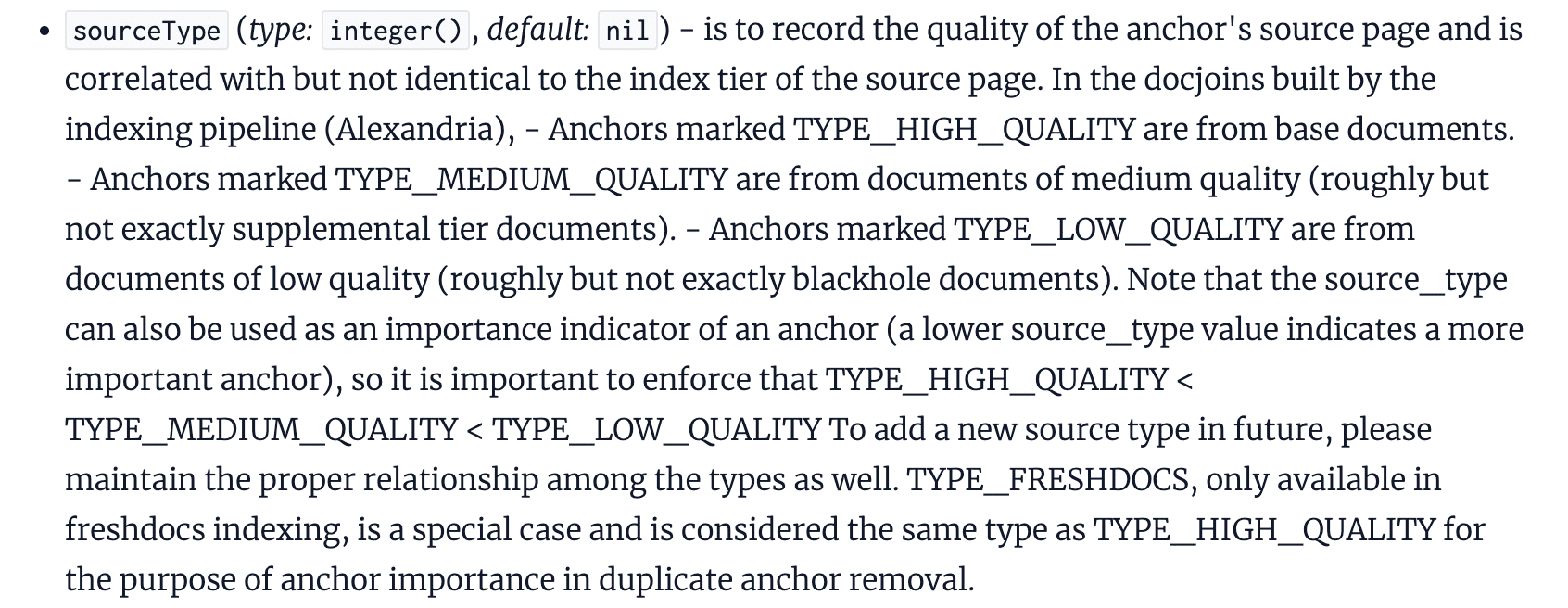
We see reference to sourceType in the context of anchors (links), where the quality of a link’s source page is recorded in correlation to the page’s index tier.
What stands out here, though, is the reference to newly published content (freshdocs) being a special case and considered to be the same as “high quality” links.
We can clearly see that the source type of a link can be used as an importance indicator, which suggests that this relates to how links are weighted.
What we must consider, though, is that a link can be defined as being “high quality” without being a fresh page, it’s just that these are considered the same quality.
To me, this backs up the importance of consistently earning links and explains why SEOs continue to recommend that link building (in whatever form, that’s not what we’re discussing here) needs consistent resources allocated. It needs to be an “always-on” activity.
5. The more Google trusts a site’s homepage, the more valuable links from that site probably are
We see a reference within the documentation (again, in the AnchorsAnchorSource module) to an attribute called homePageInfo, which suggests that Google could be tagging link sources as not trusted, partially trusted or fully trusted.
What this does define is that this attribute relates to instances when the source page is a website’s homepage, with a not_homepage value being assigned to other pages.
So, what could this mean?
It suggests that Google could be using some definition of “trust” of a website’s homepage within the algorithms. How? We’re not sure.
My interpretation: internal pages are likely to inherit the homepage’s trustworthiness.
To be clear: we don’t know how Google defines whether a page is fully trusted, not trusted or partially trusted.
But it would make sense that internal pages inherit a homepage’s trustworthiness and that this is used, to some degree, in the weighting of links and that links from fully trusted sites are more valuable than those from not trusted ones.
6. Google specifically tags links that come from high-quality news sites
Interestingly, we’ve discovered that Google is storing additional information about a link when it is identified as coming from a “newsy, high quality” site.
Does this mean that links from news sites (for example, The New York Times, The Guardian or the BBC) are more valuable than those from other types of site?
We don’t know for sure.
But when looking at this – alongside the fact that these types of sites are typically the most authoritative and trusted publications online, as well as those that would historically had a toolbar PageRank of 9 or 10 – it does make you think.
What’s for sure, though, is that leveraging digital PR as a tactic to earn links from news publications is undoubtedly incredibly valuable. This finding just confirms that.
7. Links coming from seed sites, or those links to from these, are probably the most valuable links you could earn
Seed sites and link distance ranking is a topic that doesn’t get talked about anywhere near as often as it should, in my opinion.
It’s nothing new, though. In fact, it’s something that the late Bill Slawski wrote about in 2010, 2015 and 2018.
The leaked Google documentation suggests that PageRank in its original form has long been deprecated and replaced by PageRank-NearestSeeds, referenced by the fact it defines this as the production PageRank value to be used. This is perhaps one of the things that the documentation is the clearest on.
If you’re unfamiliar with seed sites, the good news is that it isn’t a massively complex concept to understand.
Slawski’s articles on this topic are probably the best reference point for this:
“The patent provides 2 examples [of seed sites]: The Google Directory (It was still around when the patent was first filed) and the New York Times. We are also told: ‘Seed sets need to be reliable, diverse enough to cover a wide range of fields of public interests & well connected to other sites. In addition, they should have large numbers of useful outgoing links to facilitate identifying other useful & high-quality pages, acting as ‘hubs’ on the web.’ “Under the PageRank patent, ranking scores are given to pages based upon how far away they might be from those seed sets and based upon other features of those pages.”
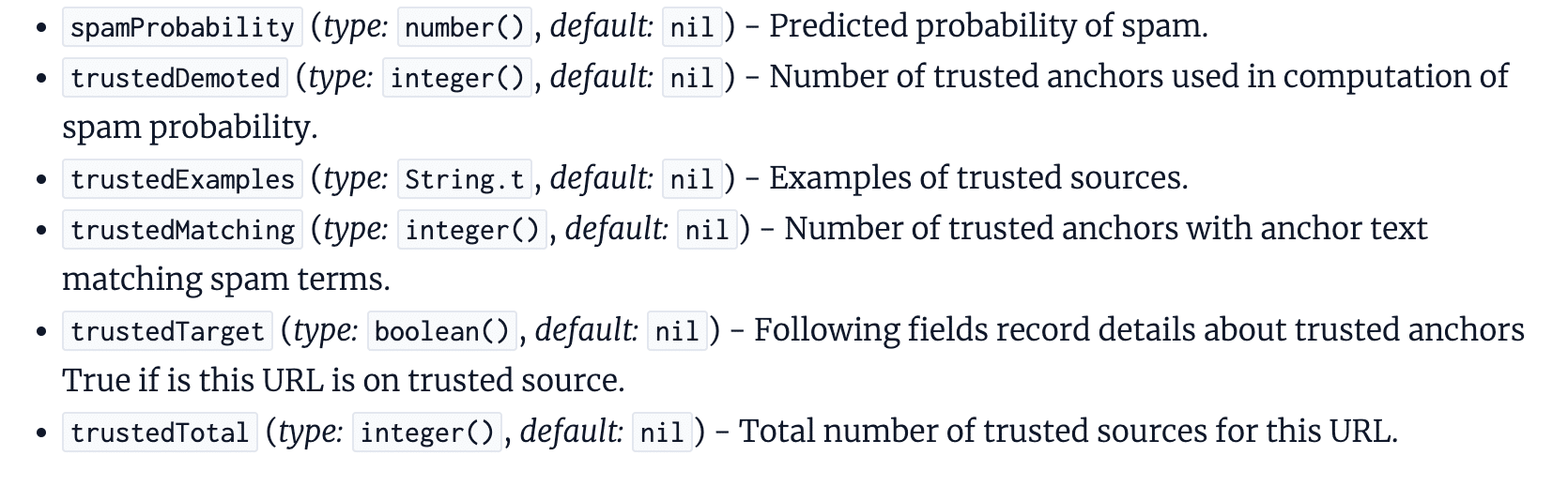
8. Google is probably using ‘trusted sources’ to calculate whether a link is spammy
When looking at the IndexingDocjoinerAnchorSpamInfo module, one that we can assume relates to how spammy links are processed, we see references to “trusted sources.”
It looks like Google can calculate the probability of link spam based on the number of trusted sources linking to a page.
We don’t know what constitutes a “trusted source,” but when looked at holistically alongside our other findings, we can assume that this could be based on the “homepage” trust.
Can links from trusted sources effectively dilute spammy links?
It’s definitely possible.
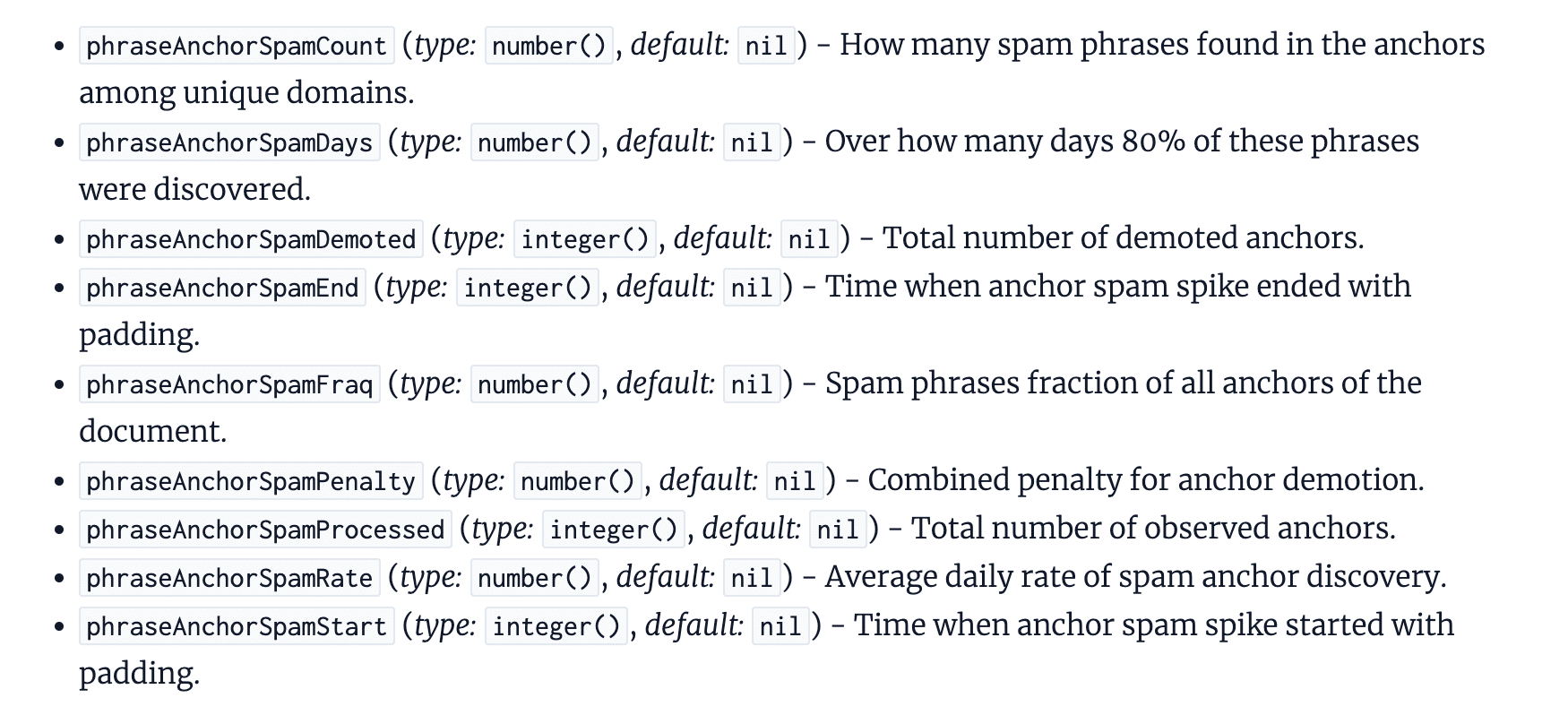
9. Google is probably identifying negative SEO attacks and ignoring these links by measuring link velocity
The SEO community has been divided over whether negative SEO attacks are a problem for some time. Google is adamant they’re able to identify such attacks, while plenty of SEOs have claimed their site was negatively impacted by this issue.
The documentation gives us some insight into how Google attempts to identify such attacks, including attributes that consider:
The timeframe over which spammy links have been picked up.
The average daily rate of spam discovered.
When a spike started.
It’s possible that this also considers links intended to manipulate Google’s ranking systems, but the reference to “the anchor spam spike” suggests that this is the mechanism for identifying significant volumes, something we know is a common issue faced with negative SEO attacks.
There are likely other factors at play in determining how links picked up during a spike are ignored, but we can at least start to piece together the puzzle of how Google is trying to prevent such attacks from having a negative impact on sites.
10. Link-based penalties or adjustments can likely apply either to some or all of the links pointing to a page
It seems that Google has the ability to apply link spam penalties or ignore links on a link-by-link or all-links basis.
This could mean that, given one or more unconfirmed signals, Google can define whether to ignore all links pointing to a page or just some of them.
Does this mean that, in cases of excessive link spam pointing to a page, Google can opt to ignore all links, including those that would generally be considered high quality?
We can’t be sure. But if this is the case, it could mean that spammy links are not the only ones ignored when they are detected.
Could this negate the impact of all links to a page? It’s definitely a possibility.
11. Toxic links are a thing, despite Google saying they aren’t
“The concept of toxic links is made up by SEO tools so that you pay them regularly.”
In the documentation, though, we see reference given to “BadBackLinks.”
The information given here suggests that a page can be penalized for having “bad” backlinks.
While we don’t know what form this takes or how close this is to the toxic link scores given by SEO tools, we’ve got plenty of evidence to suggest that there is at least a boolean (typically true or false values) measure of whether a page has bad links pointing to it.
My guess is that this works in conjunction with the link spam demotions I talked about above, but we don’t know for sure.
12. The content surrounding a link gives context alongside the anchor text
SEOs have long leveraged the anchor text of links as a way to give contextual signals of the target page, and Google’s Search Central documentation on link best practices confirms that “this text tells people and Google something about the page you’re linking to.”
But last week’s leaked documents indicate that it’s not just anchor text that’s used to understand the context of a link. The content surrounding the link is likely also used.
The documentation references context2, fullLeftContext, and fullRightContext, which are the terms near the link.
This suggests that there’s more than the anchor text of a link being used to determine the relevancy of a link. On one hand, it could simply be used as a way to remove ambiguity, but on the other, it could be contributing to the weighting.
This feeds into the general consensus that links from within relevant content are weighted far more strongly than those within content that’s not.
Key learnings & takeaways for link builders and digital PRs
Do links still matter?
I’d certainly say so.
There’s an awful lot of evidence here to suggest that links are still significant ranking signals (despite us not knowing what is and isn’t a ranking signal from this leak), but that it’s not just about links in general.
Links that Google rewards or does not ignore are more likely to positively influence organic visibility and rankings.
Maybe the biggest takeaway from the documentation is that relevancy matters a lot. It is likely that Google ignores links that don’t come from relevant pages, making this a priority measure of success for link builders and digital PRs alike.
But beyond this, we’ve gained a deeper understanding of how Google potentially values links and the things that could be weighted more strongly than others.
Should these findings change the way you approach link building or digital PR?
That depends on the tactics you’re using.
If you’re still using outdated tactics to earn lower-quality links, then I’d say yes.
But if your link acquisition tactics are based on earning links with PR tactics from high-quality press publications, the main thing is to make sure you’re pitching relevant stories, rather than assuming that any link from a high authority publication will be rewarded.
For many of us, not much will change. But it’s a concrete confirmation that the tactics we’re relying on are the best fit, and the reason behind why we see PR-earned links having such a positive impact on organic search success.
While auditing PPC accounts from agencies, freelancers and in-house teams, I’ve found that Performance Max campaigns typically fall into one of four categories.
Below, I’ll break down each category, discuss their pros and cons and share some insider tips on how we run our accounts. This should help you make the most of opportunities in the Performance Max auction.
1. Top performer/high margin segmentation
By far and away, the most common structure our audits uncover is a focus on “top products.” Many advertisers work under the assumption that they should focus their advertising on the products they sell the most. Sure, they have other products in their catalog, but they may not want to advertise all of them.
By segmenting products into “top performer” and “long-tail” campaigns, you can artificially force Performance Max to spend more on top-performing products by setting lower ROAS targets. This can cut down on the time it takes for Performance Max to learn what products are good versus bad.
This approach sometimes works, but it is usually driven by bad assumptions:
The product clicked is not necessarily the product purchased. Our internal research determines cross-sell rates to most commonly sit at ~70%. By forcing Google to show the product you want to sell instead of the product they want to show, CPCs often rise, while CTRs decrease.
Assigning queries to the most appropriate product is vital to success in shopping. For instance, the top products for shoe retailers may be Nike, Adidas and HOKA. However, a New Balance search should turn up a New Balance sneaker. Forcing top products likely means they’ll be the only retailer in the SERP showing a Nike shoe on a New Balance search. They’ll lose the click along with a long-tail sale opportunity.
A common mistake we uncover is when advertisers fail to segment asset groups by product type. If your top products segment contains products from multiple categories or brands, use asset groups to make sure ad creative and copy make sense. Otherwise, you could end up with ads that talk about women’s apparel but show images of men’s products, like this one:
2. Product type segmentation
The second most common structure is a strategy that groups like products together. Operating this way ensures that asset groups are relevant, with budgets and promotions easily managed. This structure keeps seasonal demand trends groups. Additionally, it enables maximally relevant auction insights.
Not only does this structure keep data clean and assets relevant, it is probably one of the easiest to execute. However, it fails to consider business contexts surrounding margins, call center sales volumes, customer types and more.
Moreover, a common mistake we find is when people quickly use feed product types to segment all products into campaigns and send them live. While this is an easy approach, adding a layer of data analysis before you launch is worth the extra step.
Performance Max requires sufficient signal volume to be successful. Examine the historical performance of your products, and you may discover smaller categories with insufficient volume to stand on their own. These may need to be grouped with other long-tail categories to be successful. Just be sure to use asset groups to keep ad copy cleanly segmented.
I don’t commonly see this structure in account audits, possibly because implementing it is a little more complex.
That said, it’s a common recommendation from self-appointed experts on LinkedIn who claim Google inflates Performance Max’s performance by including branded traffic. While it is true that Performance Max runs on branded content, I don’t believe it is as big an issue as it is often made out to be.
Performance Max’s branded search traffic in the shopping network is a good volume that does not cannibalize any organic traffic (besides negligible free listing clicks).
However, some advertisers take issue with Performance Max running branded text ads that they’d rather run through existing search campaigns. However, since Performance Max cannot run a search ad if the user’s query exactly matches the text of any keyword you have built, this should not be a problem.
Note: This has nothing to do with “exact match” the match type.
So, either:
You have built a sufficient breadth of branded keywords, including any variants and/or misspellings with significant volume, and there is no problem.
You have not built a sufficient breadth, and Performance Max is entering the auction with your search campaign and, due to higher ad rank, is entering the auction with a lower CPC than your branded campaign. You just saved money.
That said, this does become an issue when Performance Max is limited by budget and is forced to run a lot of branded text ads because of a bad search build. This will leave Performance Max with no budget for shopping, which will definitely hurt performance.
If you build a high-quality, comprehensive branded search campaign, you don’t have a problem.
The positive aspect of this strategy is that it can fix problematic Performance Max/Search overlap in poorly built and managed accounts. It can also segment brand and non-brand in shopping in case ROAS targets, budgets or other campaign-level settings must differ between brand and nonbrand.
However, this strategy often solves a problem that doesn’t exist. This causes data to be segmented between more campaigns, often leading to less revenue at the same efficiency. Also, the brand is usually recommended to be run on standard shopping, which again nets less revenue at the same efficiency.
4. Customer segmentation based on nCAC/LTV
This is the least common structure I see in audits. When I do, it often has significant errors due to its complexity. The general idea is to build Performance Max based on a customer acquisition strategy informed by new customer acquisition cost (nCAC) and lifetime value (LTV).
This strategy enables advertisers to justify higher CPAs by understanding the true value of a purchase beyond the average order value. This way, Performance Max algorithms bid to the value of the consumer rather than the value of the transaction.
This helps them win more of the right auctions that help businesses grow long-term. By emphasizing high-value new customers, Performance Max can support the growth of more efficient channels like email, branded search and direct load.
However, this strategy ultimately enables lower ROAS in-platform and can significantly squeeze margins. This can be particularly difficult in the short term if you use a long payback window in your LTV calculation, creating a cash crunch that requires advertisers to level up their understanding of the whole sales practice.
Yet, those who can pull off this strategy will go the furthest, the fastest. However, an expert must implement this strategy because it can quickly get out of hand, squeezing margins beyond profitability. Proceed with caution.
Two Performance Max must-haves
With that, I’ll leave you with a few must-haves, regardless of what strategy you choose:
Zombie SKU campaigns: These campaigns are filled with products that are the “living dead.” They are active, in stock and eligible to serve but get very few (or 0) clicks. Sometimes, these products don’t get the attention they should get from bid algorithms due to low historical volume. By separating them into their own campaign, the algorithm is forced to test them. Occasionally, a winner that adds meaningful incremental volume will emerge.
Catch-all: Set to low priority, this campaign helps ensure you aren’t missing anything in your build. Sometimes, existing targeting will not pick up new products that are added. Incorporating this campaign and monitoring volume pick-up helps you take advantage of products as soon as they hit the catalog, whether you’ve been kept in the loop or not.
Enhance your Performance Max campaigns through segmentation
Performance Max has come a long way since its debut in late 2021. As an out-of-the-box solution, it works reasonably well for advertisers.
Smart Bidding and Smart Campaigns have largely commoditized both bidding and budget allocation. As a result, a major way to win in modern Google Ads is through structuring that gives Performance Max the best signal quality and volume. Get out there and win.
If you want to make money selling online, it’s important to look at how to cut costs for your eCommerce business expenses – but not cut any corners. The online marketplace is incredibly competitive, but quality matters as much as price. That’s why we’ve come up with a number of ways you can cut expenses in running an online shop or service without reducing the level of quality you serve customers.
One of the biggest outlays for an online shop is storage space. Whether you’re working from your living room or renting secure storage, minimising your storage costs can slash your operating expenses.
The fastest way to do this is assess your stock levels. What isn’t shifting? Do you have overly large single items that take up bulky space? Looking at what is taking up space and how fast you rotate through different inventory items is one of the fastest ways to assess whether you need to rent less space.
If you handle a large inventory or big items, dropshipping is an option to consider. This gives you less control over the quality of items and delivery dates, but it means you don’t need to store physical stock. While there is a boom in dropshipping eCommerce businesses lately, they take away the personalised aspect which can put customers off. You don’t have oversight of parcels as they are packed and delivered, and you can’t do things like add branded cardboard boxes or inserts into packages to promote deals.
Finally, if you rent storage space for your inventory, negotiate! Ask if you can have an introductory discount or if you can get a reduction for paying a few months up-front. Some places will also do referral fees so you could even discuss putting an affiliate link on your website to encourage signups.
Cut Label Printing Costs
It might feel like a saving to buy fewer printed labels for your products until you know what sells and what doesn’t. However, bulk buying products like postal labels, packaging inserts, and branded stickers will save you an awful lot of money. Labels are the kind of thing you’ll use far more quickly than you expect!
Once you have a strong creative brand for your business, you can save a lot of money on bulk buying branded labels, like the round ones used to secure a box. If you’re not into branding or haven’t quite settled on your designs yet, blank labels and security labels are also cheaper to buy in bulk and can be used at any time so it’s never a waste of money.
Look for Introductory Web Store Deals
If you’re setting up your own online shop, it’s important to shop around for the best deal for setting up your website. The cheapest deal might not be the best, so do some research before opting for the lowest price.
Look for website packages that include:
Your domain name registration
Email addresses
24/7 customer support
Web hosting
The ability to scale up easily as you grow
Ecommerce templates for easy web design
Integration with common payment types like PayPal
These things will make setting up your store much easier and help you build a website that grows with your business.
Hire eCommerce Marketing Help Online
Platforms like Fiverr are fantastic for finding people with skills that you don’t have. The art of running a business starts with being able to delegate. Focus on the tasks you know you can do, and hire people to do the things you can’t. It might not feel like a saving at the start, as you’ll need to pay some money. However, the time saving you get from having to learn a new skill (which can take years!) and getting a professional to help in days is well worth the expense.
It is worth noting, however, that sometimes online hiring platforms can be hit or miss. You may find that it is better to go for a service linked to a supplier. You may find a website designer also does branding, for example. Or perhaps your packaging supplier has a design service for branded boxes.
Put together a clear creative brief for whatever it is you’re looking for. Do you need someone to grow your social media following? Design your brand logo? Create a website? Whatever it is, be clear in the brief about what you need, when you expect it to be done by, and your budget. This will help to find the right people to help in a shorter time – saving even more cash as you can get started faster!
Be Savvy with Packaging
Instead of getting lots of small cardboard boxes of different sizes, it can be more economical to send things in medium and larger boxes with stuffing in. This way, you can bulk buy packaging like branded cardboard boxes and mailing envelopes as well as packaging. Doing that will reduce your overall cost per item to cut costs for your eCommerce business and actually increase quality as you send branded packaging.
Try to be as sustainable as you can, too. Cardboard always is better than plastic, and it is better to use the smallest box you can rather than using lots of excess stuffing. From letters to parcels, you should be aware of the size and weight you need to ship.
Automate Some eCommerce Business Processes
While many of us are aware of the incoming AI revolution with some trepidation, there are ways it can help automate your work processes to save you time. More than that, it can help you analyse your customer behaviour, so that you can work out the best way to maximise sales to increase profits.
Automation might be as simple as sending a follow-up email once an item has been delivered to make sure your customer is happy. This is a small-scale example of how to improve customer service, but gives a feeling of personalised service that will increase the chance of customers returning to buy more.
Automating processes that save you time can also include sending ‘items left in your cart’ emails, encouraging people to sign up to newsletters, and analysing stock and inventory levels. These are all straightforward tasks that can take you a lot of time as a new online shop owner, that will save you a lot of cash in the long term if you put automated processes in place.
You might not be able to automate everything, but being aware of how to manage your accounts well is another way to save time and money. Rather than spending on accountant fees, learning more about Making Tax Digital for businesses and what software you need to manage accounts will save a lot of time – and therefore money – in filing for your taxes!
Negotiate Supplier and Shipping Costs
If you use a local courier, talk to them to see how much you can negotiate on your shipping prices. You’d be surprised how much you could save!
Suppliers are also where you can cut costs for your eCommerce business. Bulk buying is one way to do it – but if you don’t have the storage space, don’t worry! Talk to suppliers to see if you can commit to buying a certain amount to achieve a discount, but receive the items in spread out shipments. This saves on your storage space while helping you take advantage of per-unit discounts.
Invest in Customer Retention
This one might feel a bit backwards, but stick with us on this. Investing in your customer service as you launch your eCommerce business is one of the best ways to cut costs in the long-term.
Customer retention could be as simple as printing package inserts with unique discount codes to thank them for their purchase, offering a discount on their next purchase. Or, as outlined above, sending thank-you emails after their item has been delivered. If you have a technical item, including user guides either as printed inserts or in an email will improve customer satisfaction, too.
Disclaimer: MoneyMagpie is not a licensed financial advisor and therefore information found here including opinions, commentary, suggestions or strategies are for informational, entertainment or educational purposes only. This should not be considered as financial advice. Anyone thinking of investing should conduct their own due diligence. When investing your capital is at risk.
Instagram is experimenting with a new ad format that prevents users from scrolling until they view a video ad in their main feed.
Why it matters. The move could significantly boost ad exposure for brands but risks alienating users who find forced viewing intrusive.
How it works.
New in-feed ads display with a timer.
Users can’t scroll past until timer runs down.
Essentially “un-skippable” like some YouTube ads.
Why we care. On one hand, this feature is a great opportunity for advertisers to get their ads in front of an audience that are used to seeing ads. But could it come at a risk of losing customers who will find their scrolling experience significantly disrupted?
The big picture. With half of users’ feeds now AI-recommended content from unfollowed profiles, Instagram sees an opportunity to blend in more ads without seeming overly disruptive.
Ad blockers. YouTube’s unskippable ads are often cited as a top reason people use ad blockers, suggesting forced viewing is deeply unpopular.
Between the lines. Instagram’s shift to Reels-heavy, algorithm-driven feeds may be paving the way for more aggressive ad strategies.
What they’re saying. A Meta spokesperson told TechCrunch:
“We’re always testing formats that can drive value for advertisers. As we test and learn, we will provide updates should this test result in any formal product changes.”
The other side. Users are not thrilled. Photographer Dan Levy shared an example, sparking backlash in comments.
If you want to make money selling online, it’s important to look at how to cut costs for your eCommerce business expenses – but not cut any corners. The online marketplace is incredibly competitive, but quality matters as much as price. That’s why we’ve come up with a number of ways you can cut expenses in running an online shop or service without reducing the level of quality you serve customers.
One of the biggest outlays for an online shop is storage space. Whether you’re working from your living room or renting secure storage, minimising your storage costs can slash your operating expenses.
The fastest way to do this is assess your stock levels. What isn’t shifting? Do you have overly large single items that take up bulky space? Looking at what is taking up space and how fast you rotate through different inventory items is one of the fastest ways to assess whether you need to rent less space.
If you handle a large inventory or big items, dropshipping is an option to consider. This gives you less control over the quality of items and delivery dates, but it means you don’t need to store physical stock. While there is a boom in dropshipping eCommerce businesses lately, they take away the personalised aspect which can put customers off. You don’t have oversight of parcels as they are packed and delivered, and you can’t do things like add branded cardboard boxes or inserts into packages to promote deals.
Finally, if you rent storage space for your inventory, negotiate! Ask if you can have an introductory discount or if you can get a reduction for paying a few months up-front. Some places will also do referral fees so you could even discuss putting an affiliate link on your website to encourage signups.
Cut Label Printing Costs
It might feel like a saving to buy fewer printed labels for your products until you know what sells and what doesn’t. However, bulk buying products like postal labels, packaging inserts, and branded stickers will save you an awful lot of money. Labels are the kind of thing you’ll use far more quickly than you expect!
Once you have a strong creative brand for your business, you can save a lot of money on bulk buying branded labels, like the round ones used to secure a box. If you’re not into branding or haven’t quite settled on your designs yet, blank labels and security labels are also cheaper to buy in bulk and can be used at any time so it’s never a waste of money.
Look for Introductory Web Store Deals
If you’re setting up your own online shop, it’s important to shop around for the best deal for setting up your website. The cheapest deal might not be the best, so do some research before opting for the lowest price.
Look for website packages that include:
Your domain name registration
Email addresses
24/7 customer support
Web hosting
The ability to scale up easily as you grow
Ecommerce templates for easy web design
Integration with common payment types like PayPal
These things will make setting up your store much easier and help you build a website that grows with your business.
Hire eCommerce Marketing Help Online
Platforms like Fiverr are fantastic for finding people with skills that you don’t have. The art of running a business starts with being able to delegate. Focus on the tasks you know you can do, and hire people to do the things you can’t. It might not feel like a saving at the start, as you’ll need to pay some money. However, the time saving you get from having to learn a new skill (which can take years!) and getting a professional to help in days is well worth the expense.
It is worth noting, however, that sometimes online hiring platforms can be hit or miss. You may find that it is better to go for a service linked to a supplier. You may find a website designer also does branding, for example. Or perhaps your packaging supplier has a design service for branded boxes.
Put together a clear creative brief for whatever it is you’re looking for. Do you need someone to grow your social media following? Design your brand logo? Create a website? Whatever it is, be clear in the brief about what you need, when you expect it to be done by, and your budget. This will help to find the right people to help in a shorter time – saving even more cash as you can get started faster!
Be Savvy with Packaging
Instead of getting lots of small cardboard boxes of different sizes, it can be more economical to send things in medium and larger boxes with stuffing in. This way, you can bulk buy packaging like branded cardboard boxes and mailing envelopes as well as packaging. Doing that will reduce your overall cost per item to cut costs for your eCommerce business and actually increase quality as you send branded packaging.
Try to be as sustainable as you can, too. Cardboard always is better than plastic, and it is better to use the smallest box you can rather than using lots of excess stuffing. From letters to parcels, you should be aware of the size and weight you need to ship.
Automate Some eCommerce Business Processes
While many of us are aware of the incoming AI revolution with some trepidation, there are ways it can help automate your work processes to save you time. More than that, it can help you analyse your customer behaviour, so that you can work out the best way to maximise sales to increase profits.
Automation might be as simple as sending a follow-up email once an item has been delivered to make sure your customer is happy. This is a small-scale example of how to improve customer service, but gives a feeling of personalised service that will increase the chance of customers returning to buy more.
Automating processes that save you time can also include sending ‘items left in your cart’ emails, encouraging people to sign up to newsletters, and analysing stock and inventory levels. These are all straightforward tasks that can take you a lot of time as a new online shop owner, that will save you a lot of cash in the long term if you put automated processes in place.
You might not be able to automate everything, but being aware of how to manage your accounts well is another way to save time and money. Rather than spending on accountant fees, learning more about Making Tax Digital for businesses and what software you need to manage accounts will save a lot of time – and therefore money – in filing for your taxes!
Negotiate Supplier and Shipping Costs
If you use a local courier, talk to them to see how much you can negotiate on your shipping prices. You’d be surprised how much you could save!
Suppliers are also where you can cut costs for your eCommerce business. Bulk buying is one way to do it – but if you don’t have the storage space, don’t worry! Talk to suppliers to see if you can commit to buying a certain amount to achieve a discount, but receive the items in spread out shipments. This saves on your storage space while helping you take advantage of per-unit discounts.
Invest in Customer Retention
This one might feel a bit backwards, but stick with us on this. Investing in your customer service as you launch your eCommerce business is one of the best ways to cut costs in the long-term.
Customer retention could be as simple as printing package inserts with unique discount codes to thank them for their purchase, offering a discount on their next purchase. Or, as outlined above, sending thank-you emails after their item has been delivered. If you have a technical item, including user guides either as printed inserts or in an email will improve customer satisfaction, too.
Disclaimer: MoneyMagpie is not a licensed financial advisor and therefore information found here including opinions, commentary, suggestions or strategies are for informational, entertainment or educational purposes only. This should not be considered as financial advice. Anyone thinking of investing should conduct their own due diligence. When investing your capital is at risk.
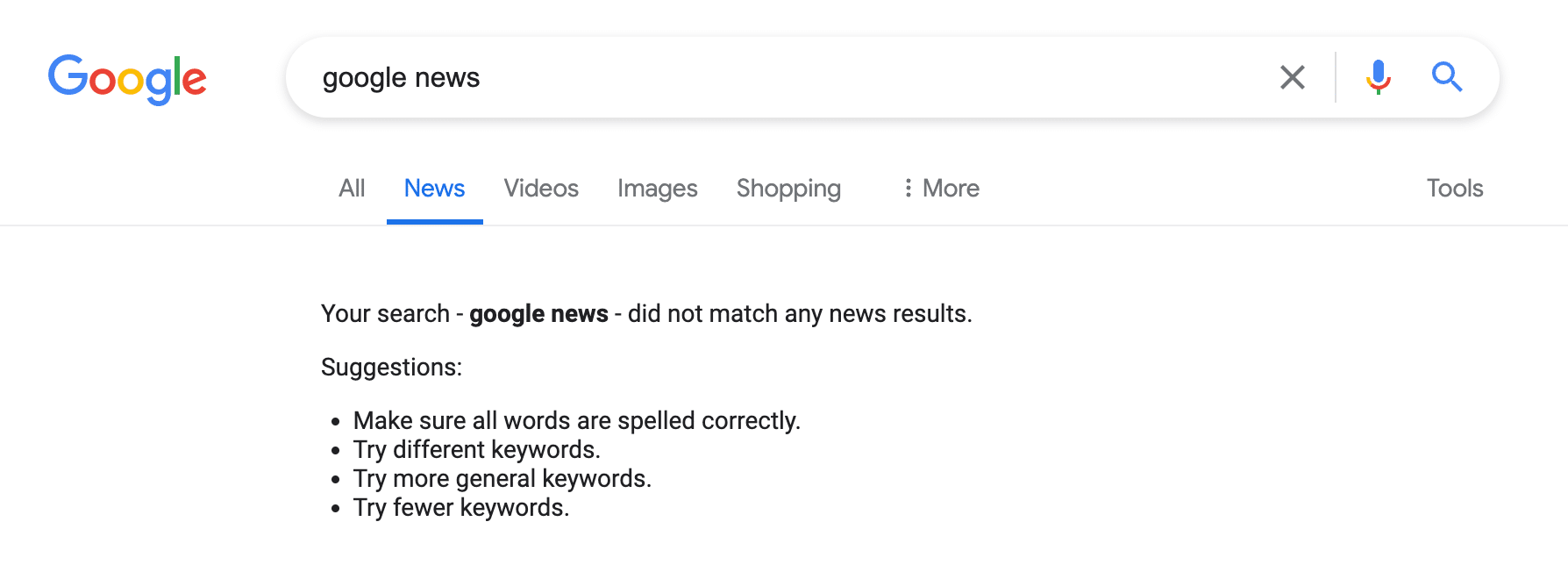
Google is having some technical difficulties this morning with its news engine.
Google News, the news tab in Google Search, Google Discover, Google Trends and other Google services that use news publications are currently not returning results for many searchers.
The issue seemed to start a couple of hours ago, but now is getting worse and happening for more Google searchers.
What it looks like. Here are some screenshots of Google News taking down parts of Google Search, the Google News homepage, Google Discover feeds and more.
Why we care. This may result in less traffic to news publishers, while Google works to address these issues. Google News, the news tab in Google Search, Google Discover and Google Trends all send a significant amount of traffic to publishers.
If you notice a decline in traffic this morning – this may be why.
Fixed? At about 9:35 a.m. ET, I am now seeing news results return to Google News related services.
Google confirmed the issue was resolved at 11:30 am ET.
Confirmed. Google confirmed the issue. Here is the X post from Google’s Search Liaison:
There's an ongoing issue with serving some features in Google Search. We've identified the issue and we're working on a fix. https://t.co/CdgQmF4zed
— Google SearchLiaison (@searchliaison) May 31, 2024
Brave Search now offers Search Ads on a managed service basis.
Brave Search Ads. Here’s what Brave announced:
Ads are sold on a cost-per-click basis.
Rates are negotiated on a fixed basis before paid campaigns launch.
Eligible brands can get up to 14 days of complimentary advertising.
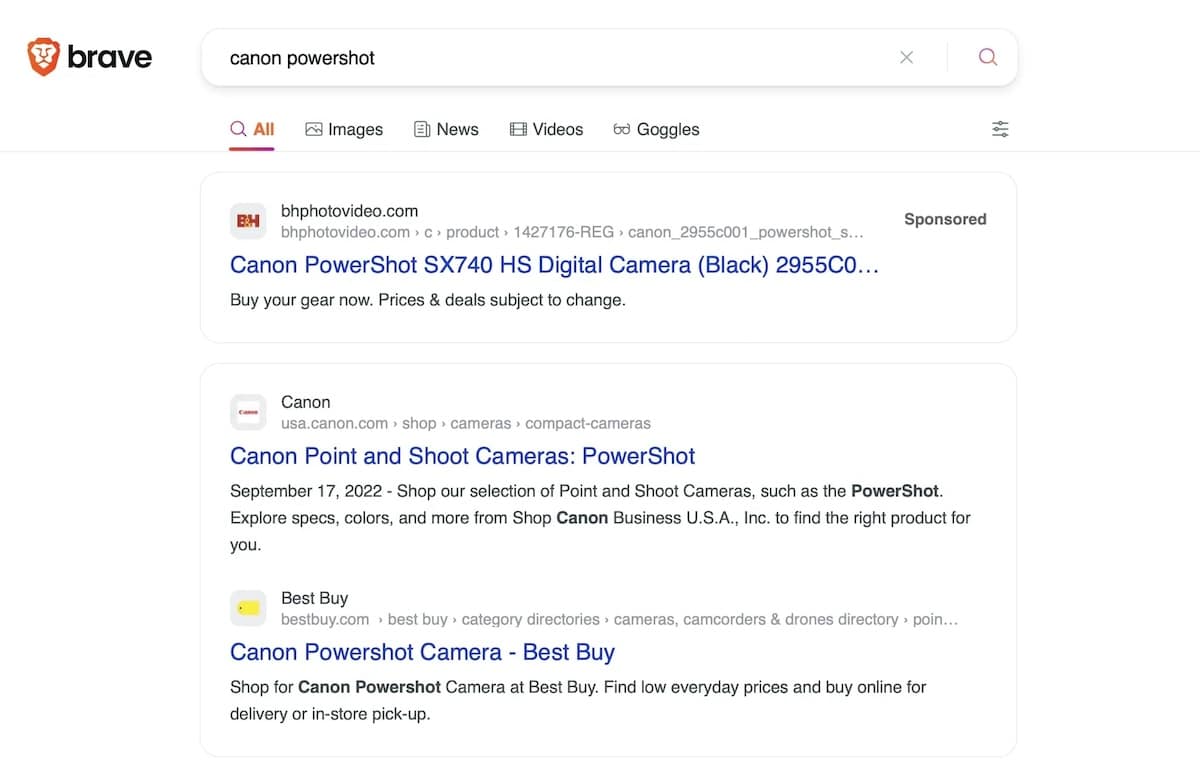
What Brave Search Ads look like. Here’s a screenshot:
Available now. Brave Search Ads are available in the U.S., Canada, the UK, France and Germany. Brands must meet certain eligibility requirements – Brave called this a “minimum threshold of eligible ad impressions in their desired region.”
Testing, testing. The launch follows 18 months of testing, Brave said. Amazon Ads Sponsored Products, Dell, Fubo, Insurify, Shutterstock and Thumbtack were among the brands that tested Brave Search Ads.
What Brave is saying. The company is pitching this as a way that brands can augment their paid media strategy and reach “highly qualified—but otherwise unreachable—audiences”:
“As of April 2024, a third of the top search advertisers in the US by media spend are either currently testing or have moved to paid Brave Search Ads campaigns. Since the beginning of the year, 89% of customers who started Brave Search Ads campaigns have continued to advertise in consecutive months.”
About Brave Search. Brave has an independent search index (it doesn’t rely on Google or Microsoft to serve its search results). It now has 65 million monthly active users and processes over 10 billion annual searches. For context, Google processes roughly that many searches per day.