With millions of workers starting the new year wishing for a new beginning – this really could be the job of their dreams (literally).
Fancy getting paid to relax, put your feet up and even snuggle down under a duvet? Then don’t be caught napping as this unique vacancy is sure to be snapped up fast.
Bensons for Beds has created a new role and is on the lookout for a Chief Sleep Officer(CSO) to ensure the nation is getting the best sleep possible.
The winning candidate will be paid £10k for the six-month, part-time position which covers 874 hours of training, sleeping and free shopping.
The candidate will get to test up to one mattress every fortnight, four pillows per month and one bedframe every six weeks.
“It’s the perfect role for anyone who wants to supplement their existing income or is keen to explore the bed industry before deciding to take the big plunge and change careers.”
Whilst product testing will form part of the new CSO role it isn’t all sleeping on the job, as a key element of the job will also require the CSO to visit Bensons factory in Huntingdon and spend time with the innovation team to learn about how the mattress and bed supply chain works from ‘spring to sleep’.
Over 14 hours of ‘in bed’ training will be given to the lucky candidate to help develop their knowledge and understanding of sleep. They will also learn to recognise the triggers that contribute to poor sleep and the good habits people should adopt to help enhance optimal sleep patterns.
While the position is fully remote, applicants must be based in the UK and hold a relevant qualification from college in marketing or social media. To apply, candidates will need to create a piece of content to explain why they think they’re right for the role. They will also need to demonstrate strong written communication skills.
The CSO role could even be performed alongside a more conventional job. One in 10 of those polled by Bensons said they had started a ‘side hustle’ to boost their income in the last year – with selling old clothes on websites or apps the most popular way to earn extra cash for 21%.
How to apply
For further information on the job add visit the Bensons website
Google will introduce a new Sensitive Events policy into the AdMob & AdSense Program Policies in February.
Why we care. Without Google’s permission, non-compliance with policies may result in the disabling of ads serving on your site as well as the deactivation of your AdSense account.
What is a Sensitive Event? A Sensitive Event is an unforeseen situation that poses a significant risk to Google’s ability to:
Provide high-quality, relevant and accurate information.
Reduce inappropriate content in key and monetized features.
Examples of Sensitive Events include events with significant social, cultural, or political impact, such as:
Civil emergencies.
Natural disasters.
Public health emergencies.
Terrorism and related activities.
Conflict.
Mass acts of violence.
Banned content. Google published a non-exhaustive list explaining the type of material it prohibits during Special Events:
Products or services that exploit, dismiss, or condone the Sensitive Event, including price gouging or artificially inflating prices that prohibits/restricts access to vital supplies; sale of products or services which may be insufficient for the demand during a sensitive event.
The use of keywords related to a sensitive event to attempt to drive additional traffic.
Claims that victims of a sensitive event were responsible for their own tragedy or similar instances of victim blaming; claims that victims of a sensitive event are not deserving of remedy or support; claims that victims from certain countries were responsible or deserving of a global public health crisis.
What’s changing? Moving forward, Google will take actions to address the risks that arise during Sensitive Events to improve its ability to serve high-quality, truthful information. However, the specific actions are yet to be confirmed.
Get the daily newsletter search marketers rely on.
You’ve been building your music tuition business slowly, rocking those one-on-one sessions, and cultivating the Mozarts and Hendrixes of tomorrow. There comes that sweet riff though when your waitlist is more jammed than a sold-out concert. Time to amp up! But how do you scale without dropping the ball on quality? Let’s crack that nut together.
We’re not talking about cloning yourself (though wouldn’t that be rad?). It’s all about tuning your biz strategy to hit those high notes effortlessly. Strap in; we’re gonna drop some beat-busting tips on expanding your musical empire while keeping it as harmonious as a symphony.
Cranking Up the Volume with Tech
Let’s kick things off by digging into the advantages of music school management software. Think of it as your backstage crew, handling the nitty-gritty while you’re headlining the main stage. With the right digital tools strumming alongside you, managing schedules, billing, and student communications can be as smooth as a buttery riff on a vintage Les Paul.
The right software means no more endless phone tag or doodling timetables on coffee-stained planners. This tech is like having your own personal organizing roadie, making sure every lesson is tracked and every invoice hits its mark without missing a beat. So if you’re amped up to jam with efficiency, pick a platform and put it to work for you!
Growing Your Band Without Losing the Solo Vibe
Scaling up doesn’t necessarily mean blowing up your biz to Woodstock proportions. It’s about smart growth—keeping that intimate vibe where every student still feels like a VIP at an exclusive gig. So, how do you multiply yourself without losing that personal touch?
Here’s the secret: delegate to trusted sidekicks. Consider bringing on a couple of skilled session players (i.e., fellow instructors). Ensure they vibe with your teaching philosophy and groove with your standards. By sharing the stage, you’re not only expanding class offerings but also fine-tuning your brand’s voice through a diverse teacher ensemble while keeping it all in tune with your founding solos.
The Encore: Building a Community That Rocks
Alright, you’ve got the tech dialed in and some fresh faces on the teaching roster. But what’s a rockstar without their fans? It’s time to cultivate a community that’s more loyal than Deadheads on tour.
Kick off with something simple like regular jam sessions or recitals. These can be gold for networking and building bonds stronger than guitar strings. Sprinkle in some social media action where students can share their progress, celebrate each other’s solos, and harmonize over common struggles. Before you know it, your music teaching gig becomes this buzz-worthy hub where everyone wants their name on the setlist.
Mic Drop Moves: Mastering the Art of Upselling
Got your crew vibing and the fan base locked down? Sweet. Now let’s talk about turning those riffs into riches without feeling like a sellout. It’s not just about more students; it’s about maximizing value—think of it as your studio’s encore.
Offer tiered lessons or specialized masterclasses for those wanting to fast-track from garage band to main stage staples. Roll out some merch—custom picks, anyone? How about an online course for self-paced shredding? Develop your brand so when they think music, they see only you in the spotlight. Done right, upselling feels like a VIP backstage pass rather than a ticket sales pitch.
Fine-Tuning Finances Without Missing a Beat
Alright, let’s lastly riff on something not as fun but super crucial—your cash flow. It ain’t just about stacking notes in the bank; it’s about making sure your financial track is hitting all the right bars.
Here’s where you get into the groove of regular check-ups on your biz’s monetary health. Understand which classes are platinum hits and which might be one-hit wonders draining resources. Maybe it’s time for a merch stand (think branded tuners or capos) to supplement income? Or perhaps setting up a Patreon for those supporters keen on an encore performance—every little bit helps fuel your tour bus down Success Boulevard. Keep those accounts harmonious, and you’ll avoid any sour notes!
Final Thoughts
And there you have it, the setlist to a sold-out teacher-to-tycoon tour. Integrating these ideas into your teaching gig could mean the difference between playing small gigs and headlining your own festival. So rock on with confidence, take that stage—the world’s waiting for your encore.
The 2023 year for EDM lovers in the Twin Cities area was not one to forget. 2023 brought a plethora of incredible acts, especially EDM artists, to Minnesota’s hottest music venue, The Armory. The Twin Cities most trusted and reputable production company, Sound in Motion, continuously brings huge names and sold-out crowds to the Armory in Minneapolis. This New Years, SIMshows and The Armory presented Lucid Nights on New Year’s Eve, featuring openers Scarlett, Tee So, Lucky the Unfortunate,Surf Mesa and headliner and world-renowned DJ, Zedd. SIMshows continually produces and coordinates large-scale EDM shows around the Twin Cities and this New Year’s line-up was highly anticipated. Home Business Magazine had the opportunity to celebrate the New Year and witness this unforgettable performance while we danced the night away.
The openers got the sold-out crowd moving before the main headliner Zedd came on. Photo Credit: Facebook
The night started off with a few talented openers that got the crowd moving and on their feet. Each opener put on a phenomenal performance that showcased their own unique style and sound. SCARLETT, known for her dark and entrancing techno tracks, came all the way from Milan, Italy to get the party started. Following that hypnotic performance by SCARLETT was Tee So, a local DJ and Producer based in Minneapolis. Tee So kept the crowd grooving with her upbeat and fun tempos. After Tee So, LUCKY the Unfortunate, another DJ and music producer out of Minneapolis, brought his infectious and dynamic energy to the deck. And for the final opener, Surf Mesa (an electronic DJ out of Seattle) kept the spirits high, with his remixes on classic songs and his well-known hit single “ILY (I Love You Baby).” These talented DJs each brought their own unique sound and visual display and served as the perfect openers for the night ahead.
World-renowned DJ Zedd rang in the New Year with a sold-out crowd at the Armory. Photo Credit: Facebook
Finally, Zedd took the stage to an excited and eager sold-out crowd. It had been awhile since Zedd has performed at the Armory and he absolutely made up for lost time with his energetic stage presence, mesmerizing light show and set list of hit after hit songs. He always brings amazing energy to his shows and features an enjoyable and eclectic set list of his recent songs, remixes of well-known songs, and his most popular hits from his albums Clarity and True Colors. Zedd brought back the nostalgia with his hit songs from the early 2010’s, including “Break Free”, “The Middle”, “I Want You to Know”, “Beautiful Now”, and more. I can say with 100% certainty that the crowd did not stop moving and grooving throughout the entire two-hour set. He complimented the music with an electrifying display of colorful lasers and captivating visuals on-screen, which were perfectly synced with every beat of every song. The visual displays are a true testament to Sound in Motion’s exceptional production value and experience in audiovisual synchronization for all EDM shows. For the encore, Zedd closed out his set with everyone in the crowd shining their lights in unison to one of his most popular song, Clarity. It was a perfectly nostalgic and satisfying end to the 2023 year, leaving everyone in high spirits.
Zedd brought an amazing set and high energy to the sold-out crowd at the Armory. Photo Credit: Facebook
As EDM grows in popularity year after year, so does the demand for EDM shows in the Twin Cities area. Thankfully, there is always an EDM show coming up in the Twin Cities that will satisfy your urge for a night of energetic, fist-pumping beats. 2024 is going to be another great year for EDM music and Sound in Motion has an extensive schedule of exciting shows this winter, spring and summer at the Armory in Minneapolis and Allianz Field in St. Paul: Subtronics on Friday, February 16th, 2024 and Saturday February 17th, 2024, Excision on Friday, March 4th, 2024 and Saturday, March 5th, 2024and Breakaway Minneapolis at Allianz Field Friday, June 28th and Saturday June 29th.
Instacart is set to start serving ads on Caper Carts in Good Food Holdings banner stores.
Customers using the AI-powered smart carts will soon be greeted by ads on the trolley’s home screen, featuring launch partners such as Del Monte Foods, Dreyer’s Grand Ice Cream, and General Mills
Why we care. Instacart’s latest advertising solution presents a strategic avenue to engage with high-value customers at a pivotal moment in the shopping journey, increasing the likelihood of sales and return on investment.
New features. Customers using Casper Carts will soon experience two new features:
Ads for new products and brands: This means you’ll find special offers and seasonal promotions right when you start shopping on the Caper Cart home screen. For example, you might see a fun banner showing limited-edition Chocolate Strawberry Cheerios from General Mills for Valentine’s Day.
Personalized product recommendations: These ads will show up based on what the customer is doing while shopping, like what’s in their cart or how they’re browsing (see image below). For instance, if a customer adds ice cream cones, they might get a suggestion for a matching item, such as Dreyer’s ice cream.
Store locations. During the initial phase of the pilot scheme, ads will exclusively appear on carts at Good Food Holdings’ Bristol Farms stores in Southern California. However, Instacart has assured the inclusion of additional retailers in the upcoming months. The ambitious plan aims to deploy thousands of Caper Carts by the end of 2024.
Incentive for participating retailers. Instacart aims to incentivize stores to display ads on Caper Carts by offering a revenue-sharing model and the chance for enhanced in-store customer engagement.
What Instacart is saying. Neil Stern, Chief Executive Officer of Good Food Holdings, said in a statement:
“Since deploying Caper Carts last year, we’ve been incredibly excited to provide our customers with a greater personalized experience while driving value as they shop.”
“With the introduction of ads on Caper Carts, we’ll soon be able to unlock a new, incremental revenue stream while offering customers valuable suggestions and promotions from our brand partners.”
Get the daily newsletter search marketers rely on.
Google is giving websites the opportunity to request additional time to transition away from third-party cookie dependencies.
To address possible compatibility concerns, the search engine has introduced a third-party cookie deprecation trial. While Chrome plans to eliminate third-party cookies by Q3 2024, this program lets embedded sites and services temporarily enable them until December 27, 2024.
However, developers are expected to make the necessary changes by the trial end date.
Why we care. For marketers heavily dependent on targeted advertising through third-party cookies, delaying Chrome’s phase-out until the end of the year could come as a huge relief. But it’s still crucial to update your marketing strategy to be cookieless before the December deadline, as there won’t be any additional help afterward.
How it works. Eligible websites can enable third party cookie deprecation trials by using JavaScript to provide unique access tokens in Chrome. To request a third-party token during registration, activate the “Third-party matching” option on the origin trial’s registration page. The third-party token should be provided through JavaScript by creating an origin trial <meta> tag, not in HTML code or an HTTP header.
Trial participants are advised to deploy deprecation trial tokens before the grace period ends on April 1, 2024.
Eligibility. The program is specifically designed for embeds and services that use third-party cookies and meet Google’s strict eligibility criteria”
Advertising-related services won’t get approval.
If your domain is known for advertising, even subdomains, it’s likely to be rejected.
To be considered, you need to show direct impact on end-users; problems just affecting later data analysis won’t qualify. Submit bug reports to Google with detailed steps to reproduce the issue.
Google will only consider requests with confirmed breakage, and there’s an appeals process for clarification.
Even if your site has both ad and non-ad content, if it’s associated with advertising domains, it’s likely to be denied.
Review process. After you submit your application for the third-party cookie deprecation trial, Google will review your request. Response times will vary, however, if you have not received a response with one to two weeks, Google advises contacting them at 3pcd-deprecationtrial@google.com.
What Google is saying. A Google spokesperson said in a statement:
“At the moment we are only focusing on third-party embeds and services.”
“We recommend first-party sites continue making changes to their sites directly to fix the breakage and encourage their embedded third parties to sign up for this deprecation trial.”
Get the daily newsletter search marketers rely on.
Thorough staff training in a cafe is more than just a necessity; it’s the cornerstone of providing an outstanding customer experience. In the bustling world of coffee, where every detail counts, well-trained staff are the ones who bring a unique blend of skill, knowledge, and warmth to the table. They are the magicians turning every cup of coffee into a memorable moment, ensuring each customer leaves with a taste of excellence and a reason to return.
Customer Service Skills
In a cafe, effective customer service is vital for retaining and attracting patrons to your business. Staff should master the art of active listening to understand and efficiently respond to customer needs. This includes acknowledging their preferences, addressing concerns with empathy, and offering suggestions that enhance their experience.
Handling common scenarios—such as order mix-ups or delays—with professionalism and a positive attitude is crucial. Staff should be trained to resolve issues swiftly and satisfactorily, ensuring every customer feels valued and heard. By fostering a culture of attentive and responsive service, cafes can create an inviting atmosphere that encourages repeat visits and positive word-of-mouth.
Understanding Coffee Terminology
A strong grasp of coffee terminology is essential for staff in a cafe. This knowledge not only boosts their confidence but also enhances customer interactions. Understanding terms like ‘Espresso’, ‘Flat White’, or ‘Pour Over’ allows staff to accurately communicate with customers and meet their preferences.
For instance, knowing the difference between a ‘Latte’ and a ‘Cappuccino’ is crucial in delivering the right drink with ease. Familiarity with these terms also aids in upholding the quality and consistency of beverages served, ultimately reflecting the cafe’s commitment to excellence in the world of coffee.
Beverage Preparation & Techniques
In preparing popular coffee drinks, consistency is key. Training staff on specific measurements, temperatures, and brewing times ensures each cup meets the cafe’s standard of excellence. For example, mastering the espresso shot—the foundation of many coffee drinks—is crucial.
Staff should also be familiar with milk steaming techniques for creating the perfect texture in lattes and cappuccinos. Regular practice and adherence to established recipes play a vital role in maintaining drink quality, providing customers with the same delightful experience with every visit.
Health & Safety in the Cafe
Adhering to stringent health and safety practices is vital in a cafe environment. Staff must be well-versed in hygiene protocols, such as regular hand washing and correct food handling techniques, to prevent contamination.
Cleanliness extends beyond personal hygiene to include the upkeep of the cafe itself. Regular cleaning of equipment, surfaces, and the dining area is crucial to maintain a safe and appealing space for customers. Training in these practices ensures a healthy environment for both staff and patrons, and underscores the cafe’s commitment to high standards of safety and cleanliness.
Using & Maintaining Equipment
Navigating the nuances of cafe machinery is a skill in itself. Staff should become adept not only in operating essentials like espresso machines and grinders but also in their ongoing care. This includes understanding the subtleties of daily cleaning routines and recognising early signs of wear or malfunction.
Addressing minor glitches promptly, such as recalibrating a grinder or troubleshooting a steam wand, can prevent larger issues, ensuring the equipment runs smoothly and reliably. This knowledge underpins the quality of service and the longevity of the tools that bring the cafe’s offerings to life.
Upselling & Promotion
Effective upselling and promotion in a cafe not only boost sales but also enhance the customer experience. Training staff to recognise and seize upselling opportunities is key. This could involve suggesting a premium coffee blend or a freshly baked pastry to accompany a drink. Staff should be knowledgeable about the product range to make relevant suggestions confidently.
It’s also important to approach upselling with subtlety, ensuring recommendations are tailored to individual customer preferences, this helps to create a personalised experience that encourages repeat visits and positive recommendations.
Teamwork & Communication
Fostering a collaborative work environment is fundamental in a cafe setting. Encouraging open and effective communication among team members ensures a harmonious and efficient workflow. Regular team meetings and open discussions can help in sharing ideas and resolving any issues collaboratively.
Additionally, clear communication about roles, responsibilities, and expectations helps in minimising misunderstandings and ensures everyone is aligned with the cafe’s goals. This collaborative spirit not only boosts team morale but also directly impacts the quality of service provided to customers, creating a positive and welcoming atmosphere.
Gaming was once the realm of arcades, while gambling was the forte of physical casinos. However, the modern age of the smartphone has made them both something that can be accessed and enjoyed in the palm of our hands.
Similarly, the different gambling types nowadays include everything from sports betting to card and table games that can all be played from the comfort of one’s own home. Research and development into the various types of gaming have unearthed a treasure trove of potential benefits for both the players and the sites that host them.
All that growth has also turned gaming into one of the most lucrative enterprises around for entrepreneurs with an interest in the market. If you’re one of them, here are some tips for starting a gaming business.
Different Types of Gaming Businesses
Before we delve into the tips themselves, it’s probably a good idea to first look at the different options available to such businesses.
Traditional Gaming
The gaming world in general has grown into a diverse scene of different players and developers. A multi-billion dollar industry, its true scope is impossible to define under one umbrella. The different types of games and simulators out there alone is proof of this.
With subgenres encompassing everything from first-person shooters, racing games, simulations, sports games, strategy games, fighting games, and puzzle games, there’s virtually no limit to what’s available. The gaming world has burgeoned into a professional platform too, turning ordinary gamers into celebrities who leverage their gaming skills all the way to the bank through professional competition.
iGaming
On the other end of the spectrum, iGaming has revolutionized modern gambling. Between online casinos, betting apps, and a myriad of online gambling sites, there’s never been a better time to enjoy one of the world’s oldest forms of entertainment. Whether you’re a card player, enjoy table games, betting on sports, or the thrill of slot machines, iGaming platforms have something for everyone.
The plethora of digital solutions offered these days now means a tech-reliant business can segment the different requirements of starting up by outsourcing various key aspects to other companies that specialize in them. According to Global Edge, more than 3.3 billion people worldwide now play games, with revenues from the industry exceeding $180 billion this year. With that kind of commercial potential, there’s no time like the present to start a gaming business, and here are five tips to consider if you’re looking to get one off the ground.
1. Plan and Research
Before diving into starting an online casino or other kind of gaming business, like any business venture, performing market research is always a good idea. This can provide you with insights into important factors like start-up costs, who your key customer base is, and the best strategies for market penetration.
Given the fact that industries like online gambling are heavily regulated, research can also point you in the direction of the legalities involved. Gathering as much data as possible on your market and the legal terrain it operates in will help provide a better overall picture of the business’s feasibility.
2. Have a Business Plan
Once the research phase is complete, drawing up a business plan takes the data you’ve collected and collates it into an actionable outline of how to proceed. The plan does not have to be unreasonably long, detailed, or cater to every single eventuality. However, even a basic one can provide a calculated understanding of potential risks and the possible cost-benefit ratios involved.
As an added benefit, funding can also be catered for and a business plan becomes especially relevant if the business will be reliant on attracting investors to provide or contribute its start-up capital. The kind of analysis that goes into such a plan should also take into account factors like competitors, what the marketing strategy will entail, forecasts for revenue, expenses, future growth, and expansion.
3. Get the Right People
Once there’s a plan in place, provided sufficient capital is raised, the next logical step would be to find and recruit the right people to put it into action. Whether the business entails traditional gaming in the form of video game development, a platform to host online games, an app, or iGaming, a competent and experienced team will be required.
There will likely be various aspects that will need specialized attention. From the tech side, having suitable talent is inevitable since, for online gaming businesses, digital infrastructure will need to be developed.
Other important business areas where specialized personnel will be required are finance, accounting, and legal guidance. However, as mentioned, many tasks and requirements can be outsourced to other firms that specialize in them. Once the groundwork is complete, what’s left will be the day-to-day running and maintenance of the business.
4. Ensure the Legalities Are Taken Care of
In the case of online casinos, it is especially important to ensure that all legal requirements are met. This will likely require professional help from a suitable legal advisor. It’s important to note that in some countries, online gambling is illegal altogether. Even when it isn’t, the industry is still often heavily regulated.
While the legal requirements will differ from place to place, common legal requirements will include making sure all business licenses and permits are applied for and acquired in terms of the relevant regulations. There are likely to also be stringent financial regulations to follow to ensure there are adequate reserves to cover player winnings, security features to prevent things like money laundering, and financial stability of the business at all times.
5. Software Requirements and Payment Methods
Since modern gaming businesses often exclusively run on digital platforms, the software and development required for them need to be of good quality. This requires specialist help and must ensure regulatory requirements are met. For example, to ensure fairness for the players, most software for online casinos will feature encrypted algorithms and the use of Random Number Generators (RNGs).
Since, like traditional business requirements, there is also real money involved with gaming businesses, both for the convenience of players, and ensuring security, adequate digital solutions should be made available for players to top up accounts, make in-game purchases, and for players to withdraw winnings or balances. Common payment methods include credit cards, catering to e-wallets like PayPal, or voucher systems that can be pre-purchased and loaded onto a player’s account. Either way, providing variety, convenience, and security should be the top priorities for a successful gaming business.
Internal linking has often been a powerful tool for SEO, helping serve as a bridge to connect various webpages. One main goal has typically been to boost visibility in search engines.
However, the importance of internal linking extends beyond SEO; it’s pivotal in creating a navigable, user-friendly website, especially for people with disabilities.
Internal linking is one area that SEO has influence in terms of where and how it appears on a website.
Unfortunately, many SEO linking recommendations have contributed to the inaccessibility of websites.
Fortunately, SEOs are in a great position to support change and provide better online experiences for site visitors – and sure, Google.
That being said, SEO support alone is not enough. To truly elevate accessibility, it’s imperative to integrate individuals with disabilities across the entire workforce spectrum, from executive roles to entry-level positions and everything in between. Such inclusivity enriches the workplace environment and significantly enhances overall accessibility standards.
If you’re ready to begin the process leading with accessibility regarding internal linking, here are a few recommendations to help get you started.
Using clear and descriptive anchor text (a.k.a., link text) is fundamental for website accessibility. Anchor text serves as a guide, directing users to what they can expect when they activate a link. Without clear descriptors, users may experience potential navigation errors, especially those relying on screen readers.
“Vague anchor text such as ‘click here’ or ‘read more’ doesn’t provide any context. This is especially problematic for screen reader users who may not have immediate access to the surrounding content that might provide additional hints about the link’s destination. Non-descriptive anchor text can turn browsing into a series of unexpected outcomes and a poor user experience.” according to Stephanae McCoy, founder of Bold Blind Beauty.
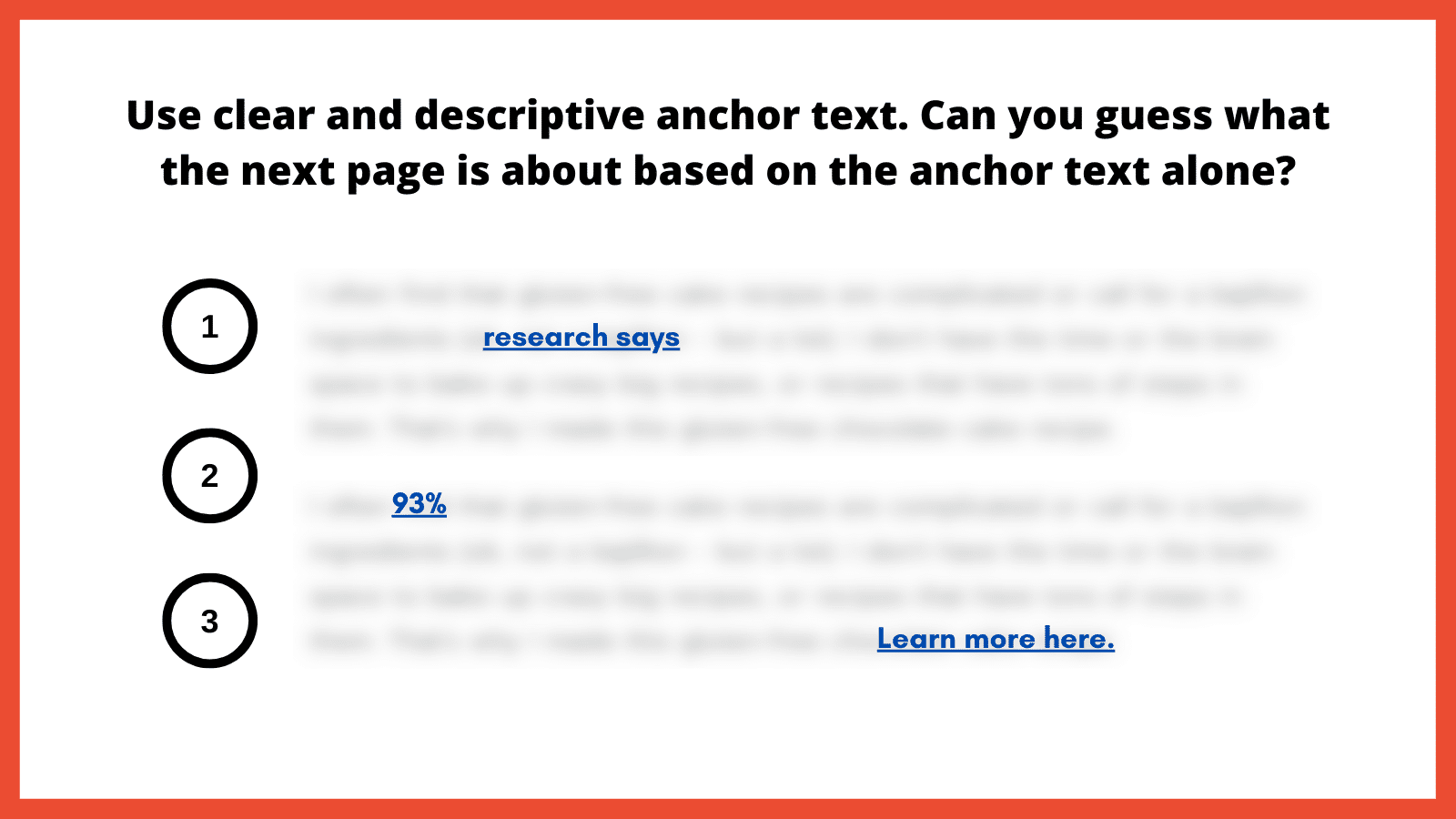
Here is an exercise I like to use to illustrate the importance of clear and descriptive anchor text. You essentially blur all surrounding text so only the anchor text is readable. From here, ask yourself: Does the anchor text make it abundantly obvious as to what the next page is about?
Graphic. Title reads, “Use clear and descriptive anchor text. Can you guess what the next page is about based on the anchor text alone?” Below, three underlined, legible links stand out amid blurred text, numbered one through three. The first link reads “research says.” The next reads “93%” and the third, “Learn more here.”
How to implement
Choose descriptive phrases that provide a clear snapshot of the linked content. This enhances usability and boosts user trust, as they know what to expect from each link.
Alternatively, leveraging ARIA-label attributes can also provide more context by replacing the anchor text with a more meaningful value to provide the necessary context for screen reader users. Replacing anchor text with something valuable helps ensure that each occurrence is distinct and meaningful.
2. Match anchor text to user intent
Matching anchor text to user intent is important for a straightforward browsing experience. Users who click on a link have an expectation based on the anchor text’s description. If the resulting content doesn’t align with that expectation, it can lead to a poor user experience. This inconsistency can be jarring for users with learning disabilities, leading to mistrust.
“Anchor text is possibly the most important part of internal linking, so you need to do it properly. What does ‘click here’ tell the reader? The search engines? People who use screen readers? Nothing. It tells them absolutely nothing. Everyone, and every bot, who is scanning your website needs to understand where they are going,” according to Alice Rowan, website copywriter and SEO consultant, and a community member of Neurodivergents in SEO.
This can also be irritating for screen reader users. Imagine selecting a link labeled “gluten free chocolate cake recipe” and instead being taken to a landing page to purchase chocolate. Your anchor text should serve as a promise and the linked page should deliver on that promise.
How to implement
Regularly audit internal links to make sure they lead to relevant, expected content. Ensure links consistently deliver on their promises, fostering trust and enhancing the overall user experience. I’ve included a template example at the end of this article.
3. Avoid overloading with links
We might inadvertently create clutter in our quest to provide as much information as possible. A page saturated with links can be visually chaotic and cognitively overwhelming. For users with attention-related disabilities, distinguishing between a multitude of links can be particularly challenging, leading to fatigue and frustration.
For neurodivergent users and those with cognitive disabilities, a cluttered page with too many links can be disorienting, making it difficult to process information efficiently and leading to a strenuous online experience. Simplifying the layout and reducing the number of links can significantly improve navigability and content absorption, enhancing the overall user experience.
For screen reader users, an overload of links can be disruptive as assistive technology vocalizes each link. Screen readers use quick navigation keys to efficiently navigate web pages, allowing users to jump to specific elements like headings and links. Navigating through a lengthy list of links can become tedious and overwhelming, making it challenging to retain information or decide which link to select.
SEO best practices typically suggest fewer than 100 links per page, but a more user-centric approach would be to aim for approximately 25-30 links or fewer. This helps to enhance page clarity and navigability, including for keyboard-only users.
To further optimize the layout, it’s best to avoid crowding links together. In addition to integrating and spacing them in the body text, also consider using bullet lists or tables to improve layout organization.
How to implement
Be judicious with linking. Instead of linking every possible keyword, focus on linking relevant, valuable content that enhances the user’s understanding or provides avenues for deeper exploration.
Ask yourself: Am I only adding this link solely for SEO, or am I adding it because it genuinely adds value? Also adopt this mindset if/when link building.
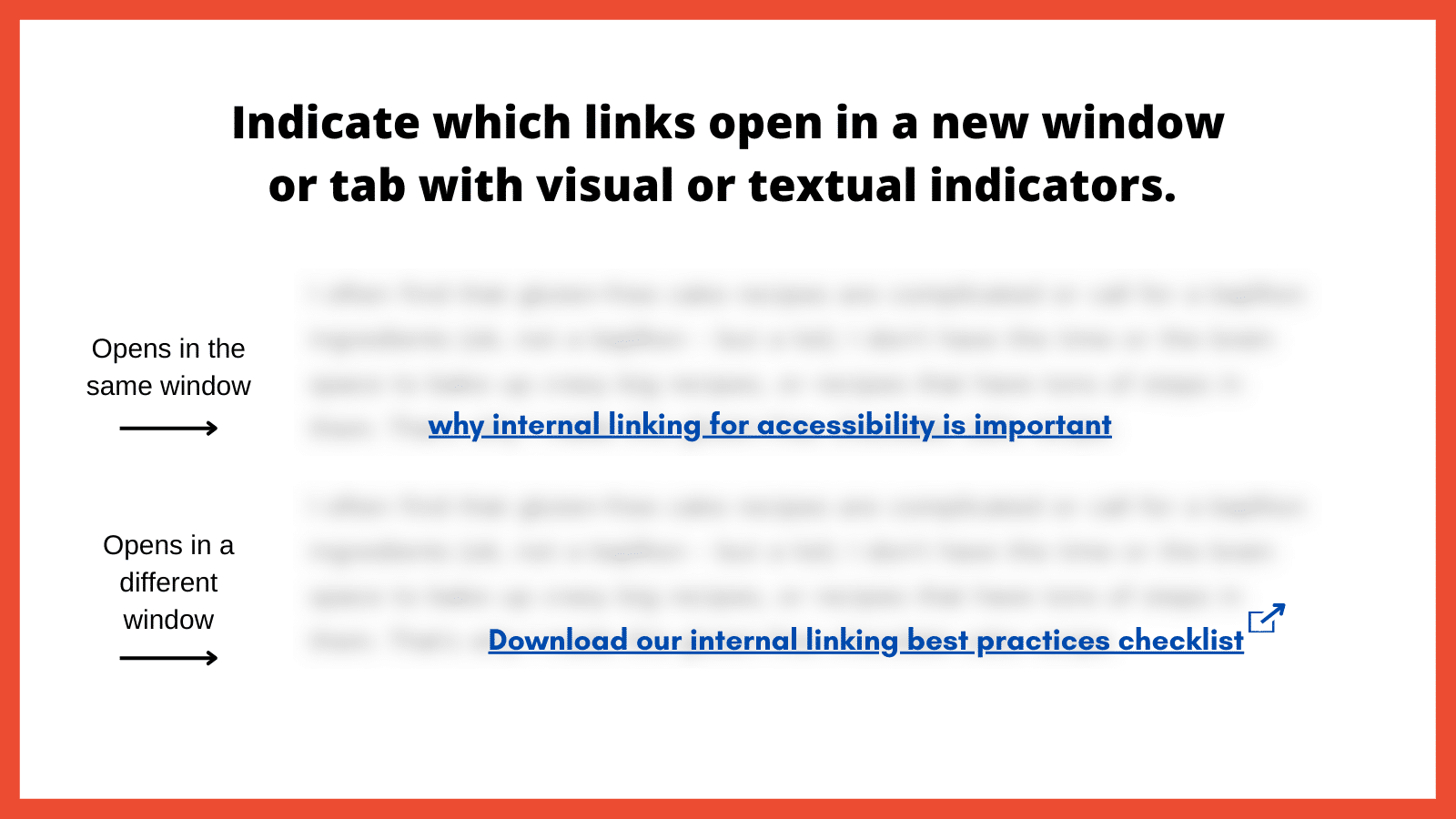
4. Indicate links that open in a new window
Links that open in a new browser window or tab can introduce unexpected behavior, which can be disorienting. This sudden change is almost the equivalent of having a conversation, then being moved to a different room without warning. For users who rely on screen readers or those who are neurodivergent, these surprises can disrupt the entire browsing experience.
“Screen reader users might not immediately realize that a new window or tab has opened. They might continue attempting to navigate as if they were on the original page, leading to confusion,” according to Raghavendra Satish Peri, founder at DigitalA11Y.
Users with motor disabilities might find switching back and forth between windows or tabs challenging, making the experience cumbersome.
In the SEO industry, it has been previously recommended that we open a new window if it directs visitors to a different website, that way we avoid losing them completely. However, it’s better to keep users in the same window unless there’s a compelling reason to do otherwise, such as a calendar-based date picker. Another route is allowing users to open links in the same window or a new one.
Graphic. Title reads, “Indicate which links open in a new window or tab with visual or textual indicators.” Below are two blurred blocks of text, each with a legible, underlined link. One is labeled “Opens in the same window.” The other, labeled “Opens in a different window”, has an icon of a square with an arrow pointing out of the upper right corner at the end of the link.
How to implement
Use visual and/or textual indicators to inform users that a link will open in a new window or tab. This can be done by appending phrases like “(opens in a new tab)” to the link text or using distinct icons next to the link. By indicating when links open in a new window or tab, you’re promoting transparency and predictability in the user experience.
5. Use easily identifiable link styles
The visibility and distinctiveness of links are important in encouraging users to identify and interact with them. If links blend into the regular text and are not easily distinguishable, it can hinder navigation, causing users to overlook important pathways. Plus, how can we help increase page views and decrease the bounce rate if links are hard to find?
“For low-vision users or those with color vision deficiencies, indistinguishable links become nearly invisible. Links need to have at least a 3:1 color-contrast ratio to make them stand out,” according to Denis Boudreau, the founder of Inklusiv and Director of Instructor Led Training at Deque Systems.
Similarly, individuals with learning disabilities might struggle with non-standard or inconsistent link styling, as it adds an extra layer of complexity to their browsing experience.
How to implement
Links should have a uniform style throughout the website. The ability to perceive the link will depend on different modalities, such as a specific color, underline or other visual treatment. Maintaining consistency helps users quickly identify links no matter where they are on the site.
Be sure to also utilize a 3:1 color contrast so the chosen color can contrast against the surrounding text, while also meeting a contrast of 4.5:1 against the background. The hyperlinked text should also change in color and/or style when the focus is set to that link.
6. Use breadcrumb navigation
Breadcrumb navigation is a secondary navigation system that displays the user’s location on a website and the path taken to reach that location. Visually represented as a trail of links, usually at the top of a page, breadcrumbs offer users a quick way to understand their current position and how it relates to the broader site structure.
For screen reader users, breadcrumbs provide a quick overview of where the current page sits within the site structure. It offers an alternative navigational method, allowing these users to jump to higher-level sections without navigating back through multiple pages.
Breadcrumbs should be static, not dynamic. This is important for neurodivergent individuals due to its consistency and predictability, which helps maintain website orientation. This fixed format reduces cognitive load by providing a clear, unchanging path, allowing for easier information processing.
“Static breadcrumbs provide a consistent navigation structure, essential for neurodivergent users. This feature reduces cognitive load, allowing users to return to pages higher in the site structure, such as parent categories. This clear, unchanging path helps users dig themselves out of ‘rabbit holes’ and return to the previous page or category,” according to Jack Chambers-Ward, the co-founder of Neurodivergents in SEO and Marketing & Partnerships Manager at Candour,
How to implement
Breadcrumbs should be easy to find, typically at the top of a webpage, and should be visually distinct from other content. Ensure each segment of the breadcrumb trail is linked, except for the current page, allowing users to easily return to previous sections or pages.
Make sure the breadcrumb is marked up semantically, using appropriate HTML elements and ARIA roles so screen readers can interpret it correctly.
7. Use a global static navigation
Global static navigation refers to a consistent set of navigation options that remain unchanged across all pages of a website. Typically found at the top of a website or along the side, this navigation provides a stable and predictable menu, ensuring users always have a familiar set of options to help them move around the site.
Businesses sometimes adjust the top navigation based on user interactions for various reasons. That can include drawing attention to specific products, services or content based on what they believe a user might be interested in. While there can benefits to dynamic navigation, these changes can sometimes complicate the user experience, especially if it disrupts the consistency or predictability of the site.
“Some neurodivergent users, such as people with dyslexia and those with memory-affecting disabilities, particularly benefit from static navigation. If a user is having to regularly relearn or re-adjust to new navigation layouts on every page, it can be disorienting.” according to Billie Geena Hyde, founder of Uptake Agency and community member of Neurodivergents in SEO.
The level of effort to understand and navigate a website should be minimal, and if your site is difficult to navigate, users with disabilities would likely look for alternatives. Many users with disabilities are incredibly loyal to brands that prioritize accessibility.
How to implement
Adopting a consistent global navigation menu across the website provides users with a stable, familiar anchor. This consistency reduces cognitive load and enhances navigational efficiency.
The order of links should be predictable, logical and intuitive. It should include links to the most important or frequently accessed sections of the website, ensuring users can always quickly reach key areas.
8. Avoid hyperlinking headings
Headings play a pivotal role in organizing content and guiding users through a webpage’s structure. They act as signposts or a table of contents that help users understand the hierarchy and flow of information. When headings are hyperlinked, for some users it can disrupt this organizational structure, making the content harder to navigate and understand.
For screen reader users, headings are especially crucial. That’s because users often navigate by jumping from one heading to the next to quickly scan and understand the content’s layout. Hyperlinked headings can throw off this rhythm, as the user might unexpectedly find themselves on a new page or section without intending to navigate away.
It’s important to note, however, that feedback from screen reader users on this issue varies. In conversations with various users while putting this article together, some reported no disruption from hyperlinked headings, while others found them extremely bothersome. This mixed response is the reason for including this point.
How to implement
As a general rule, headings should be free of links. This ensures they serve their primary purpose of structuring content without adding potential perplexity.
If there’s a need to provide a link related to a heading’s topic, it’s better to include that link in the text immediately following the heading. This approach maintains the clarity of the heading while still offering the link.
9. Resolve 404 errors
Broken links are the digital equivalent of dead ends. They disrupt the user journey, leading to frustration.
Commonly known as a “Page Not Found” error, these occur when a user tries to access a webpage that doesn’t exist on the server. These errors can result from a page being deleted, a URL being changed without proper redirection or a mistyped URL.
“From an accessibility standpoint, 404 errors can be particularly disruptive as it breaks the rhythm of navigating through the website. In some cases, it can be challenging to navigate back to a familiar point where it can result in abandoning the website altogether. This can negatively impact the brand, trust and credibility of your website,” according to Nasreen Bhutta, the Chief Communications Officer of Bold Blind Beauty.
How to implement
Use tools and periodic audits to ensure all internal links lead to active, relevant pages. If a user does land on a 404 page, ensure the message is clear and provides guidance on the next steps, including a search bar, link back to the homepage or a list of popular destinations.
Also, provide a way for users to report broken links or issues they encounter. This feedback can help identify and resolve errors sooner rather than later.
10. Limit the use of redirects
Redirects are tools that automatically take users from one URL to another. While they can be valuable in certain situations, such as guiding users from outdated content to its newer version, excessive or improperly implemented redirects can pose accessibility challenges.
When a link unexpectedly takes a user to a different destination, it can cause disorientation. This can be particularly jarring for screen reader users who might find themselves on a page they didn’t anticipate without understanding why. For people with certain cognitive impairments, they might struggle to understand the context shift that occurs with redirects, leading to frustration.
How to implement
It is best to avoid redirects altogether as this will help the page to render faster. Only use them when absolutely necessary. If you have changed the URL structure or moved content, update internal links to point directly to the new location rather than relying on redirects. If redirects are unavoidable, ensure they’re quick and don’t chain multiple redirects together.
Final thoughts
There are other internal linking best practices that could have been included (such as how to approach an HTML sitemap and Table of Contents). Use the instructions above as a starting point if you’re not already employing them.
When we lead with accessibility, SEO usually tends to follow. That is not always the case when in reverse. An example would be adding links for the sake of “link distribution” and other nonsense SEO metrics.
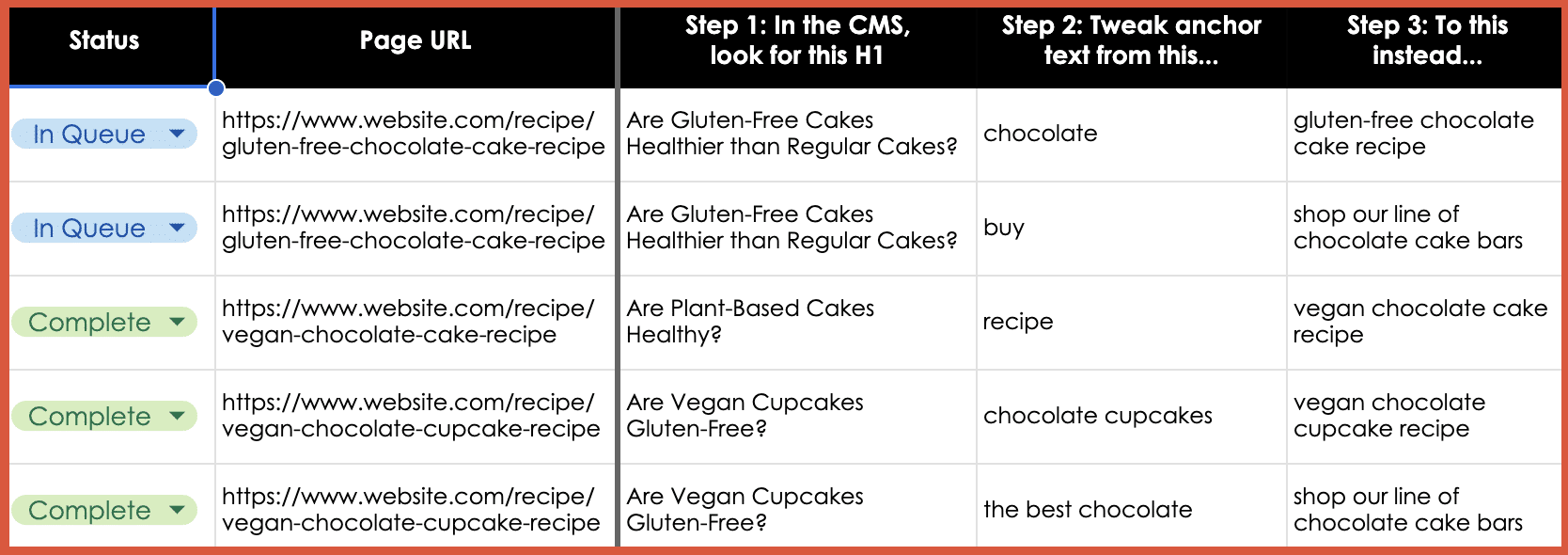
If you need a starting point for tackling some of the points made in this article, here is a simple template example to provide anchor text adjustments. The goal is to make it more abundantly obvious as to what the next page is about and improve the user experience, and then, sure, also help SEO efforts.
Table. Five columns are headed, “Status,” “Page URL,” “Step 1: In the CMS, look for this H1,” “Step 2: Tweak anchor text from this…”, and “Step 3: To this instead…” In the Status column, the first two are marked “In Queue” and the final three “Complete.” The second column has web addresses for gluten-free or vegan chocolate cake and cupcake recipes. The first row of entries reads as follows under Steps 1, 2, and 3. The question under Step 1 is “Are Gluten-Free Cakes Healthier than Regular Cakes?” Next entries suggest tweaking anchor text from “chocolate” to “gluten-free chocolate cake recipe.”
Be sure to use the most important best practice of them all: Engage real users with a range of disabilities in testing your links.
Individuals with diverse disabilities – visual, auditory, cognitive and motor – interact with websites in distinct ways, often revealing issues that may otherwise go unnoticed. By incorporating these diverse perspectives, you ensure a more universally accessible online experience, demonstrating a deep commitment to fostering an equitable digital space for every user.