Gaming was once the realm of arcades, while gambling was the forte of physical casinos. However, the modern age of the smartphone has made them both something that can be accessed and enjoyed in the palm of our hands.
Similarly, the different gambling types nowadays include everything from sports betting to card and table games that can all be played from the comfort of one’s own home. Research and development into the various types of gaming have unearthed a treasure trove of potential benefits for both the players and the sites that host them.
All that growth has also turned gaming into one of the most lucrative enterprises around for entrepreneurs with an interest in the market. If you’re one of them, here are some tips for starting a gaming business.
Different Types of Gaming Businesses
Before we delve into the tips themselves, it’s probably a good idea to first look at the different options available to such businesses.
Traditional Gaming
The gaming world in general has grown into a diverse scene of different players and developers. A multi-billion dollar industry, its true scope is impossible to define under one umbrella. The different types of games and simulators out there alone is proof of this.
With subgenres encompassing everything from first-person shooters, racing games, simulations, sports games, strategy games, fighting games, and puzzle games, there’s virtually no limit to what’s available. The gaming world has burgeoned into a professional platform too, turning ordinary gamers into celebrities who leverage their gaming skills all the way to the bank through professional competition.
iGaming
On the other end of the spectrum, iGaming has revolutionized modern gambling. Between online casinos, betting apps, and a myriad of online gambling sites, there’s never been a better time to enjoy one of the world’s oldest forms of entertainment. Whether you’re a card player, enjoy table games, betting on sports, or the thrill of slot machines, iGaming platforms have something for everyone.
The plethora of digital solutions offered these days now means a tech-reliant business can segment the different requirements of starting up by outsourcing various key aspects to other companies that specialize in them. According to Global Edge, more than 3.3 billion people worldwide now play games, with revenues from the industry exceeding $180 billion this year. With that kind of commercial potential, there’s no time like the present to start a gaming business, and here are five tips to consider if you’re looking to get one off the ground.
1. Plan and Research
Before diving into starting an online casino or other kind of gaming business, like any business venture, performing market research is always a good idea. This can provide you with insights into important factors like start-up costs, who your key customer base is, and the best strategies for market penetration.
Given the fact that industries like online gambling are heavily regulated, research can also point you in the direction of the legalities involved. Gathering as much data as possible on your market and the legal terrain it operates in will help provide a better overall picture of the business’s feasibility.
2. Have a Business Plan
Once the research phase is complete, drawing up a business plan takes the data you’ve collected and collates it into an actionable outline of how to proceed. The plan does not have to be unreasonably long, detailed, or cater to every single eventuality. However, even a basic one can provide a calculated understanding of potential risks and the possible cost-benefit ratios involved.
As an added benefit, funding can also be catered for and a business plan becomes especially relevant if the business will be reliant on attracting investors to provide or contribute its start-up capital. The kind of analysis that goes into such a plan should also take into account factors like competitors, what the marketing strategy will entail, forecasts for revenue, expenses, future growth, and expansion.
3. Get the Right People
Once there’s a plan in place, provided sufficient capital is raised, the next logical step would be to find and recruit the right people to put it into action. Whether the business entails traditional gaming in the form of video game development, a platform to host online games, an app, or iGaming, a competent and experienced team will be required.
There will likely be various aspects that will need specialized attention. From the tech side, having suitable talent is inevitable since, for online gaming businesses, digital infrastructure will need to be developed.
Other important business areas where specialized personnel will be required are finance, accounting, and legal guidance. However, as mentioned, many tasks and requirements can be outsourced to other firms that specialize in them. Once the groundwork is complete, what’s left will be the day-to-day running and maintenance of the business.
4. Ensure the Legalities Are Taken Care of
In the case of online casinos, it is especially important to ensure that all legal requirements are met. This will likely require professional help from a suitable legal advisor. It’s important to note that in some countries, online gambling is illegal altogether. Even when it isn’t, the industry is still often heavily regulated.
While the legal requirements will differ from place to place, common legal requirements will include making sure all business licenses and permits are applied for and acquired in terms of the relevant regulations. There are likely to also be stringent financial regulations to follow to ensure there are adequate reserves to cover player winnings, security features to prevent things like money laundering, and financial stability of the business at all times.
5. Software Requirements and Payment Methods
Since modern gaming businesses often exclusively run on digital platforms, the software and development required for them need to be of good quality. This requires specialist help and must ensure regulatory requirements are met. For example, to ensure fairness for the players, most software for online casinos will feature encrypted algorithms and the use of Random Number Generators (RNGs).
Since, like traditional business requirements, there is also real money involved with gaming businesses, both for the convenience of players, and ensuring security, adequate digital solutions should be made available for players to top up accounts, make in-game purchases, and for players to withdraw winnings or balances. Common payment methods include credit cards, catering to e-wallets like PayPal, or voucher systems that can be pre-purchased and loaded onto a player’s account. Either way, providing variety, convenience, and security should be the top priorities for a successful gaming business.
Internal linking has often been a powerful tool for SEO, helping serve as a bridge to connect various webpages. One main goal has typically been to boost visibility in search engines.
However, the importance of internal linking extends beyond SEO; it’s pivotal in creating a navigable, user-friendly website, especially for people with disabilities.
Internal linking is one area that SEO has influence in terms of where and how it appears on a website.
Unfortunately, many SEO linking recommendations have contributed to the inaccessibility of websites.
Fortunately, SEOs are in a great position to support change and provide better online experiences for site visitors – and sure, Google.
That being said, SEO support alone is not enough. To truly elevate accessibility, it’s imperative to integrate individuals with disabilities across the entire workforce spectrum, from executive roles to entry-level positions and everything in between. Such inclusivity enriches the workplace environment and significantly enhances overall accessibility standards.
If you’re ready to begin the process leading with accessibility regarding internal linking, here are a few recommendations to help get you started.
Using clear and descriptive anchor text (a.k.a., link text) is fundamental for website accessibility. Anchor text serves as a guide, directing users to what they can expect when they activate a link. Without clear descriptors, users may experience potential navigation errors, especially those relying on screen readers.
“Vague anchor text such as ‘click here’ or ‘read more’ doesn’t provide any context. This is especially problematic for screen reader users who may not have immediate access to the surrounding content that might provide additional hints about the link’s destination. Non-descriptive anchor text can turn browsing into a series of unexpected outcomes and a poor user experience.” according to Stephanae McCoy, founder of Bold Blind Beauty.
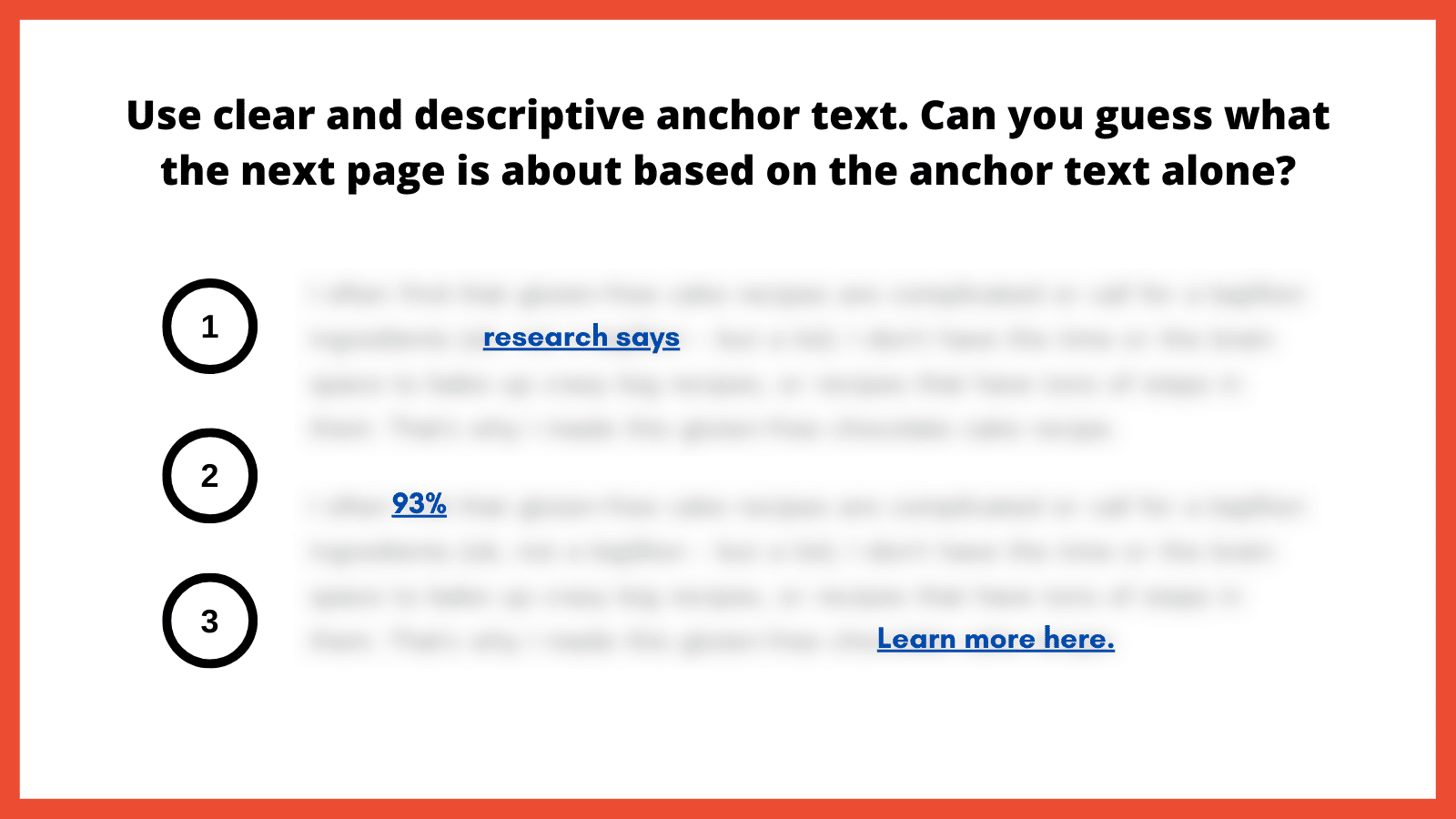
Here is an exercise I like to use to illustrate the importance of clear and descriptive anchor text. You essentially blur all surrounding text so only the anchor text is readable. From here, ask yourself: Does the anchor text make it abundantly obvious as to what the next page is about?
Graphic. Title reads, “Use clear and descriptive anchor text. Can you guess what the next page is about based on the anchor text alone?” Below, three underlined, legible links stand out amid blurred text, numbered one through three. The first link reads “research says.” The next reads “93%” and the third, “Learn more here.”
How to implement
Choose descriptive phrases that provide a clear snapshot of the linked content. This enhances usability and boosts user trust, as they know what to expect from each link.
Alternatively, leveraging ARIA-label attributes can also provide more context by replacing the anchor text with a more meaningful value to provide the necessary context for screen reader users. Replacing anchor text with something valuable helps ensure that each occurrence is distinct and meaningful.
2. Match anchor text to user intent
Matching anchor text to user intent is important for a straightforward browsing experience. Users who click on a link have an expectation based on the anchor text’s description. If the resulting content doesn’t align with that expectation, it can lead to a poor user experience. This inconsistency can be jarring for users with learning disabilities, leading to mistrust.
“Anchor text is possibly the most important part of internal linking, so you need to do it properly. What does ‘click here’ tell the reader? The search engines? People who use screen readers? Nothing. It tells them absolutely nothing. Everyone, and every bot, who is scanning your website needs to understand where they are going,” according to Alice Rowan, website copywriter and SEO consultant, and a community member of Neurodivergents in SEO.
This can also be irritating for screen reader users. Imagine selecting a link labeled “gluten free chocolate cake recipe” and instead being taken to a landing page to purchase chocolate. Your anchor text should serve as a promise and the linked page should deliver on that promise.
How to implement
Regularly audit internal links to make sure they lead to relevant, expected content. Ensure links consistently deliver on their promises, fostering trust and enhancing the overall user experience. I’ve included a template example at the end of this article.
3. Avoid overloading with links
We might inadvertently create clutter in our quest to provide as much information as possible. A page saturated with links can be visually chaotic and cognitively overwhelming. For users with attention-related disabilities, distinguishing between a multitude of links can be particularly challenging, leading to fatigue and frustration.
For neurodivergent users and those with cognitive disabilities, a cluttered page with too many links can be disorienting, making it difficult to process information efficiently and leading to a strenuous online experience. Simplifying the layout and reducing the number of links can significantly improve navigability and content absorption, enhancing the overall user experience.
For screen reader users, an overload of links can be disruptive as assistive technology vocalizes each link. Screen readers use quick navigation keys to efficiently navigate web pages, allowing users to jump to specific elements like headings and links. Navigating through a lengthy list of links can become tedious and overwhelming, making it challenging to retain information or decide which link to select.
SEO best practices typically suggest fewer than 100 links per page, but a more user-centric approach would be to aim for approximately 25-30 links or fewer. This helps to enhance page clarity and navigability, including for keyboard-only users.
To further optimize the layout, it’s best to avoid crowding links together. In addition to integrating and spacing them in the body text, also consider using bullet lists or tables to improve layout organization.
How to implement
Be judicious with linking. Instead of linking every possible keyword, focus on linking relevant, valuable content that enhances the user’s understanding or provides avenues for deeper exploration.
Ask yourself: Am I only adding this link solely for SEO, or am I adding it because it genuinely adds value? Also adopt this mindset if/when link building.
4. Indicate links that open in a new window
Links that open in a new browser window or tab can introduce unexpected behavior, which can be disorienting. This sudden change is almost the equivalent of having a conversation, then being moved to a different room without warning. For users who rely on screen readers or those who are neurodivergent, these surprises can disrupt the entire browsing experience.
“Screen reader users might not immediately realize that a new window or tab has opened. They might continue attempting to navigate as if they were on the original page, leading to confusion,” according to Raghavendra Satish Peri, founder at DigitalA11Y.
Users with motor disabilities might find switching back and forth between windows or tabs challenging, making the experience cumbersome.
In the SEO industry, it has been previously recommended that we open a new window if it directs visitors to a different website, that way we avoid losing them completely. However, it’s better to keep users in the same window unless there’s a compelling reason to do otherwise, such as a calendar-based date picker. Another route is allowing users to open links in the same window or a new one.
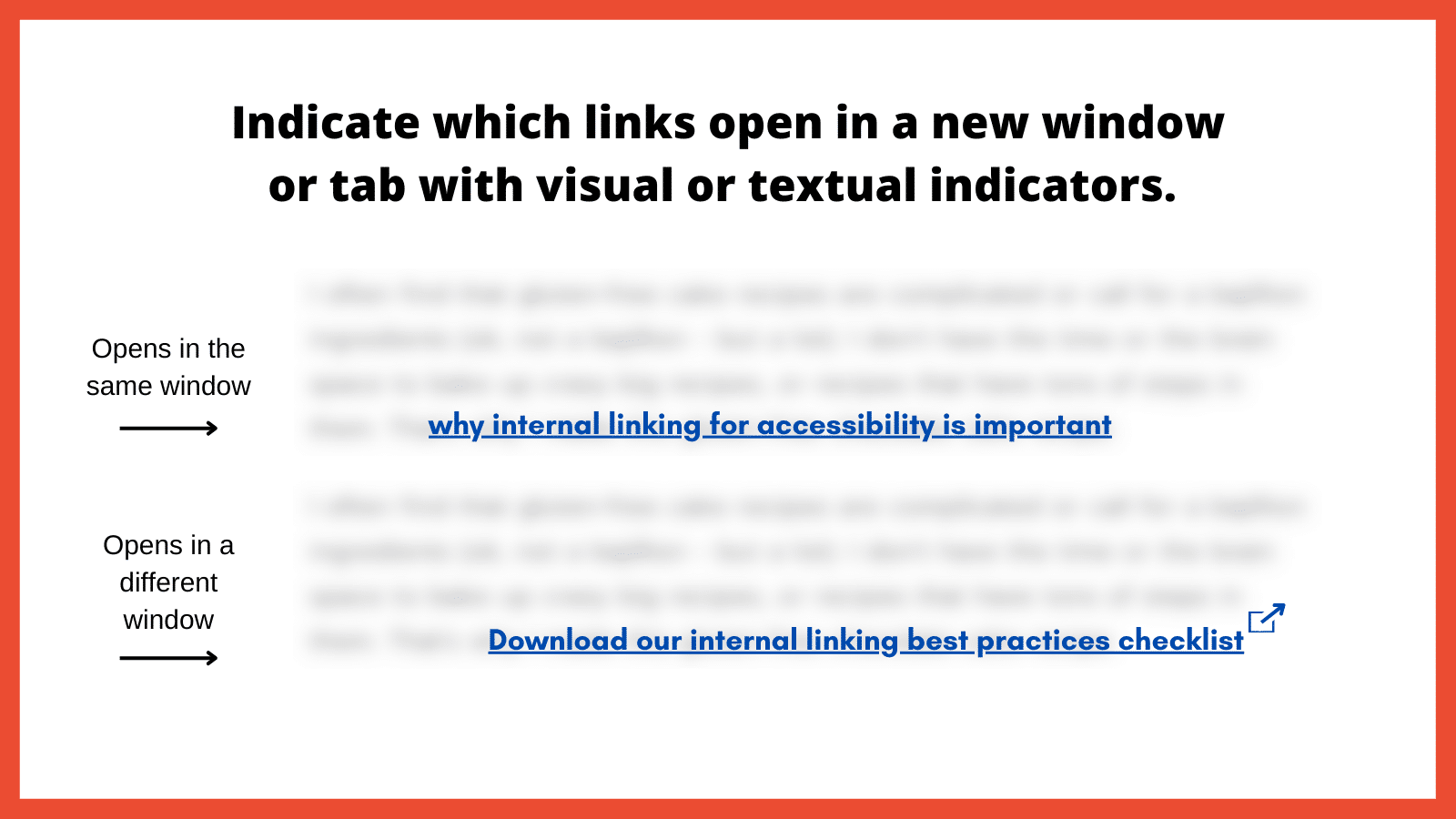
Graphic. Title reads, “Indicate which links open in a new window or tab with visual or textual indicators.” Below are two blurred blocks of text, each with a legible, underlined link. One is labeled “Opens in the same window.” The other, labeled “Opens in a different window”, has an icon of a square with an arrow pointing out of the upper right corner at the end of the link.
How to implement
Use visual and/or textual indicators to inform users that a link will open in a new window or tab. This can be done by appending phrases like “(opens in a new tab)” to the link text or using distinct icons next to the link. By indicating when links open in a new window or tab, you’re promoting transparency and predictability in the user experience.
5. Use easily identifiable link styles
The visibility and distinctiveness of links are important in encouraging users to identify and interact with them. If links blend into the regular text and are not easily distinguishable, it can hinder navigation, causing users to overlook important pathways. Plus, how can we help increase page views and decrease the bounce rate if links are hard to find?
“For low-vision users or those with color vision deficiencies, indistinguishable links become nearly invisible. Links need to have at least a 3:1 color-contrast ratio to make them stand out,” according to Denis Boudreau, the founder of Inklusiv and Director of Instructor Led Training at Deque Systems.
Similarly, individuals with learning disabilities might struggle with non-standard or inconsistent link styling, as it adds an extra layer of complexity to their browsing experience.
How to implement
Links should have a uniform style throughout the website. The ability to perceive the link will depend on different modalities, such as a specific color, underline or other visual treatment. Maintaining consistency helps users quickly identify links no matter where they are on the site.
Be sure to also utilize a 3:1 color contrast so the chosen color can contrast against the surrounding text, while also meeting a contrast of 4.5:1 against the background. The hyperlinked text should also change in color and/or style when the focus is set to that link.
6. Use breadcrumb navigation
Breadcrumb navigation is a secondary navigation system that displays the user’s location on a website and the path taken to reach that location. Visually represented as a trail of links, usually at the top of a page, breadcrumbs offer users a quick way to understand their current position and how it relates to the broader site structure.
For screen reader users, breadcrumbs provide a quick overview of where the current page sits within the site structure. It offers an alternative navigational method, allowing these users to jump to higher-level sections without navigating back through multiple pages.
Breadcrumbs should be static, not dynamic. This is important for neurodivergent individuals due to its consistency and predictability, which helps maintain website orientation. This fixed format reduces cognitive load by providing a clear, unchanging path, allowing for easier information processing.
“Static breadcrumbs provide a consistent navigation structure, essential for neurodivergent users. This feature reduces cognitive load, allowing users to return to pages higher in the site structure, such as parent categories. This clear, unchanging path helps users dig themselves out of ‘rabbit holes’ and return to the previous page or category,” according to Jack Chambers-Ward, the co-founder of Neurodivergents in SEO and Marketing & Partnerships Manager at Candour,
How to implement
Breadcrumbs should be easy to find, typically at the top of a webpage, and should be visually distinct from other content. Ensure each segment of the breadcrumb trail is linked, except for the current page, allowing users to easily return to previous sections or pages.
Make sure the breadcrumb is marked up semantically, using appropriate HTML elements and ARIA roles so screen readers can interpret it correctly.
7. Use a global static navigation
Global static navigation refers to a consistent set of navigation options that remain unchanged across all pages of a website. Typically found at the top of a website or along the side, this navigation provides a stable and predictable menu, ensuring users always have a familiar set of options to help them move around the site.
Businesses sometimes adjust the top navigation based on user interactions for various reasons. That can include drawing attention to specific products, services or content based on what they believe a user might be interested in. While there can benefits to dynamic navigation, these changes can sometimes complicate the user experience, especially if it disrupts the consistency or predictability of the site.
“Some neurodivergent users, such as people with dyslexia and those with memory-affecting disabilities, particularly benefit from static navigation. If a user is having to regularly relearn or re-adjust to new navigation layouts on every page, it can be disorienting.” according to Billie Geena Hyde, founder of Uptake Agency and community member of Neurodivergents in SEO.
The level of effort to understand and navigate a website should be minimal, and if your site is difficult to navigate, users with disabilities would likely look for alternatives. Many users with disabilities are incredibly loyal to brands that prioritize accessibility.
How to implement
Adopting a consistent global navigation menu across the website provides users with a stable, familiar anchor. This consistency reduces cognitive load and enhances navigational efficiency.
The order of links should be predictable, logical and intuitive. It should include links to the most important or frequently accessed sections of the website, ensuring users can always quickly reach key areas.
8. Avoid hyperlinking headings
Headings play a pivotal role in organizing content and guiding users through a webpage’s structure. They act as signposts or a table of contents that help users understand the hierarchy and flow of information. When headings are hyperlinked, for some users it can disrupt this organizational structure, making the content harder to navigate and understand.
For screen reader users, headings are especially crucial. That’s because users often navigate by jumping from one heading to the next to quickly scan and understand the content’s layout. Hyperlinked headings can throw off this rhythm, as the user might unexpectedly find themselves on a new page or section without intending to navigate away.
It’s important to note, however, that feedback from screen reader users on this issue varies. In conversations with various users while putting this article together, some reported no disruption from hyperlinked headings, while others found them extremely bothersome. This mixed response is the reason for including this point.
How to implement
As a general rule, headings should be free of links. This ensures they serve their primary purpose of structuring content without adding potential perplexity.
If there’s a need to provide a link related to a heading’s topic, it’s better to include that link in the text immediately following the heading. This approach maintains the clarity of the heading while still offering the link.
9. Resolve 404 errors
Broken links are the digital equivalent of dead ends. They disrupt the user journey, leading to frustration.
Commonly known as a “Page Not Found” error, these occur when a user tries to access a webpage that doesn’t exist on the server. These errors can result from a page being deleted, a URL being changed without proper redirection or a mistyped URL.
“From an accessibility standpoint, 404 errors can be particularly disruptive as it breaks the rhythm of navigating through the website. In some cases, it can be challenging to navigate back to a familiar point where it can result in abandoning the website altogether. This can negatively impact the brand, trust and credibility of your website,” according to Nasreen Bhutta, the Chief Communications Officer of Bold Blind Beauty.
How to implement
Use tools and periodic audits to ensure all internal links lead to active, relevant pages. If a user does land on a 404 page, ensure the message is clear and provides guidance on the next steps, including a search bar, link back to the homepage or a list of popular destinations.
Also, provide a way for users to report broken links or issues they encounter. This feedback can help identify and resolve errors sooner rather than later.
10. Limit the use of redirects
Redirects are tools that automatically take users from one URL to another. While they can be valuable in certain situations, such as guiding users from outdated content to its newer version, excessive or improperly implemented redirects can pose accessibility challenges.
When a link unexpectedly takes a user to a different destination, it can cause disorientation. This can be particularly jarring for screen reader users who might find themselves on a page they didn’t anticipate without understanding why. For people with certain cognitive impairments, they might struggle to understand the context shift that occurs with redirects, leading to frustration.
How to implement
It is best to avoid redirects altogether as this will help the page to render faster. Only use them when absolutely necessary. If you have changed the URL structure or moved content, update internal links to point directly to the new location rather than relying on redirects. If redirects are unavoidable, ensure they’re quick and don’t chain multiple redirects together.
Final thoughts
There are other internal linking best practices that could have been included (such as how to approach an HTML sitemap and Table of Contents). Use the instructions above as a starting point if you’re not already employing them.
When we lead with accessibility, SEO usually tends to follow. That is not always the case when in reverse. An example would be adding links for the sake of “link distribution” and other nonsense SEO metrics.
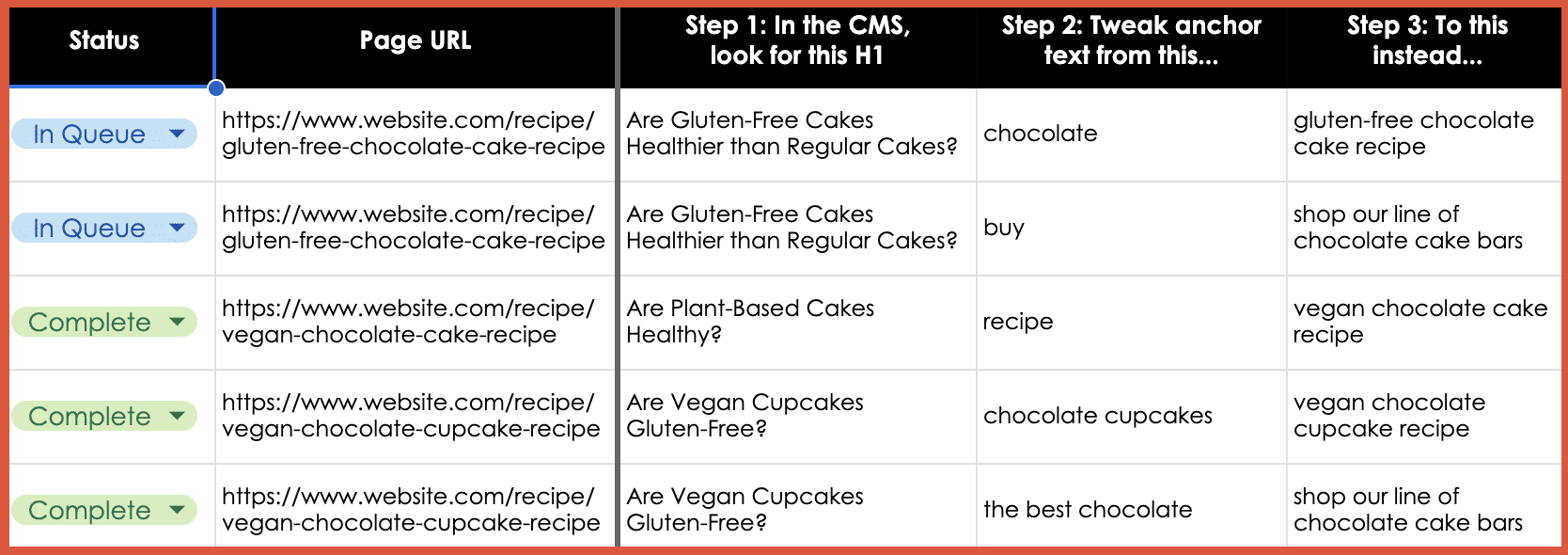
If you need a starting point for tackling some of the points made in this article, here is a simple template example to provide anchor text adjustments. The goal is to make it more abundantly obvious as to what the next page is about and improve the user experience, and then, sure, also help SEO efforts.
Table. Five columns are headed, “Status,” “Page URL,” “Step 1: In the CMS, look for this H1,” “Step 2: Tweak anchor text from this…”, and “Step 3: To this instead…” In the Status column, the first two are marked “In Queue” and the final three “Complete.” The second column has web addresses for gluten-free or vegan chocolate cake and cupcake recipes. The first row of entries reads as follows under Steps 1, 2, and 3. The question under Step 1 is “Are Gluten-Free Cakes Healthier than Regular Cakes?” Next entries suggest tweaking anchor text from “chocolate” to “gluten-free chocolate cake recipe.”
Be sure to use the most important best practice of them all: Engage real users with a range of disabilities in testing your links.
Individuals with diverse disabilities – visual, auditory, cognitive and motor – interact with websites in distinct ways, often revealing issues that may otherwise go unnoticed. By incorporating these diverse perspectives, you ensure a more universally accessible online experience, demonstrating a deep commitment to fostering an equitable digital space for every user.
Advertising on Meta presents unique opportunities that Google Ads doesn’t offer.
Whether your goal is lead generation or ecommerce, Menachem Ani, PPC expert and founder of JXT Group, shared valuable insights at SMX Next on how to optimize campaigns for Facebook and Instagram.
Read on to learn Ani’s seven-step frameworks for building winning lead generation and ecommerce strategies in Meta’s automated landscape.
Meta Ads > Google Ads?
When advertising on platforms like Google, you’re restricted to reaching people searching for your product or service.
However, when placing ads on social platforms like Facebook and Instagram, the possibilities are more diverse, according to Ani. He explained:
“There are similarities between Google and Meta ads in the sense that they are both pushing towards automation with fewer levels and less controls. But that’s where the similarities end.”
“With Google Ads, you’re capturing existing demand, somebody searching for the product or service – but it’s finite. There’s only a certain amount of search happening for a specific keyword. Whereas with paid social, you can, you can educate consumers a little higher up in the funnel, create demand and then capture it later on.”
Should you spend more on Google or Meta?
A multi-channel approach is usually best but the answer depends on the nature of your business, according to Ani. He said:
“If your brand sells products, then Meta will likely work for you. If you’re selling more commoditized products like electronic appliances, then it’s best to lead with Google.”
“However, we’ve found that it’s usually best to run campaigns across all channels because it gives you multiple sources of revenue – and diversification is always a good thing.”
Lead generation on Facebook and Instagram
Although Meta ads are probably best known for driving results in ecommerce, Facebook and Instagram ads can also be used to effectively generate leads. The key is to focus on quality over quantity (i.e., leads that will actually convert into sales). Ani explained:
“The last thing you want is to generate leads that you can’t sell to. Ultimately a lead is only worth something if it if it can turn into revenue.”
“To do this, you need a well thought out strategy to ensure that your message reaches the right consumer.”
The challenge with Meta lead generation
Although lead generation campaigns on Facebook and Instagram can drive great results, you’re also likely to receive a lot of spam leads, according to Ani.
The system tends to optimize for form submissions rather than real-time revenue like in ecommerce, which can result in more leads of lower quality. The challenge is finding a balance to get better quality leads, even if it means fewer form submissions:
“Remember that leads are not sales – you can’t deposit leads in your bank account. It’s super important to figure out how to get good quality leads.”
7-step lead generation framework
Ani shared a seven-step strategy to address issues like spam and enhance lead generation results through Facebook and Instagram ads.
1. Leads > traffic
The campaign goal you choose is crucial. The Meta algorithm is powerful but specific.
If you run a traffic-focused campaign, you’ll get traffic – but that doesn’t necessarily translate into leads. To sell and get inbound inquiries, you need leads, Ani explained:
“For this, I recommend always using a conversion-focused campaign specifically focused to driving leads based off of your pixel tracking.”
2. Test dynamic and standard creative
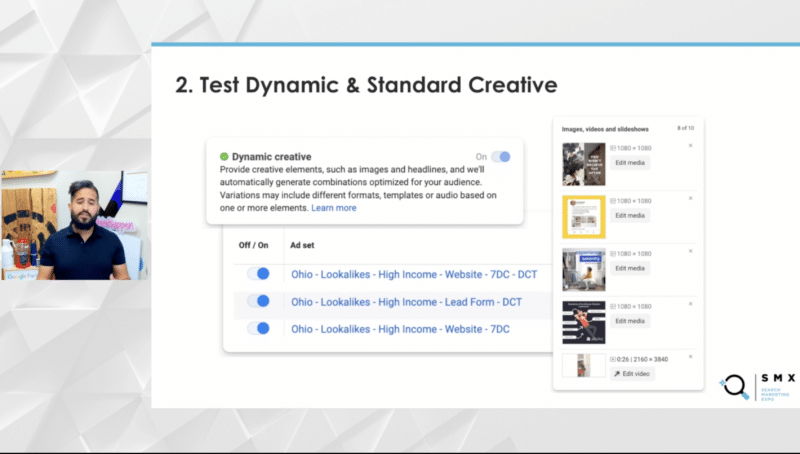
When setting up your campaign on Facebook, you can choose to create individual ads or use dynamic creative, which is like responsive search ads on Google – and it’s important to explore both options.
Although testing various targeting and ad creatives is usually advised, dynamic creative works well for smaller lead generation campaigns. Ani explained:
“With dynamic creative, you provide a list of ad copy and creative elements (like images and videos), and the system personalizes the ad for each user.”
“This is particularly useful for small budgets on lead generation campaigns where you may lack sufficient data to optimize specific ads as it allows the system to algorithmically target users.”
3. Use customer lookalikes and interests
Ani explained that while the pixel is powerful for targeting based on website activity, when it comes to lead generation, especially on newer or smaller accounts, custom audiences can be effective.
Instead of broad targeting, he recommends creating lookalike audiences from your customer list or qualified leads.
“Telling the system that people who are interested in x or belong to specific demographics are likely the potential consumer for you can be helpful.”
“It’s also a good idea to allow the system to use Advantage+ targeting (which is where it expands outside of your audiences) as an additional 20% or so to find users who may not be in the specific audiences you set up.”
“Unlike ecommerce, where the system can see the revenue coming in in real-time, sometimes you need a bit more of a signal and this helps with lead quality because your ads are being shown to more interested users.”
4. Use Facebook and Instagram
Advertisers often try to manually control where their ads appear, but the algorithm is powerful. It’s best to let the system show ads wherever on Facebook, Instagram, and Messenger, according to Ani.
The algorithm efficiently regulates ad placements based on where conversions are happening. So Ani recommends allowing the algorithm to do the heavy lifting.
Limiting exposure with manual adjustments can increase costs and you may miss out on untapped potential, Ani said:
“What we’ve learned is that this holds true across most ad platforms today. … When you limit your exposure with manual adjustments, you end up increasing your costs and you lose out on untapped potential.”
5. Think beyond video creatives
Once you’ve identified your audience, the next step is crafting your message.
While ecommerce often emphasizes video creative, for lead generation, image ads surprisingly work well, according to Ani. Video ads are effective too, but creating good videos, especially for lead gen, can be challenging.
Plain images or overlaying text onto an image, like banner ads, are effective. Because your audiences are broad, the messaging in your image ad or the accompanying copy serves as a form of targeting.
6. Create dedicated landing pages
When a user clicks your ad, the destination matters, especially in lead generation. So consider options like sending them to your homepage, a dedicated landing page, or using embedded Facebook or Instagram forms. Ani recommended creating embedded forms:
“You’re likely going to get less leads if you use an embedded form, but the leads you do get will be better quality because the ones that were going to be spam are less likely to fill out that form due to the extra effort needed.”
“Remember, embedded forms on Facebook and Instagram are pre-populated with the user’s Instagram or Facebook account information. So it’ll have their name, email and so on. And that makes the form a lot easier to fill out.”
“I would also recommend adding an additional question to sort of forcefully add friction to the process so that fewer people accidentally fill out the form and you’ll end up with slightly better quality leads – remembering that leads are not sales.”
7. Conversions are not sales
Tracking the source of each lead is crucial. You can add UTM parameters to your ads to see, in real time, which campaign, ad set, and ad creative a specific lead came from.
Over time, by analyzing this data in your CRM, you can establish patterns.
For example, a breakdown of 30 leads from a specific campaign, including their current status, can reveal insights. Isolating and analyzing such data helps identify what’s working well, whether it’s a specific creative resonating with consumers or certain audiences performing better.
This information is valuable for optimizing your future lead generation efforts, Ani explained.
Ecommerce ads for Facebook and Instagram
Ecommerce differs in that the system automatically tracks revenue in real time, according to Ani. This simplifies the process, as a lead often translates directly to a sale.
However, industries with high fraud rates may pose challenges. Tracking revenue in real time lets you assign a dollar value to each order, making it easier to align with profit-centric optimization.
Many direct-to-consumer (DTC) operators use Meta ads and email in their marketing mix. Yet, ecommerce doesn’t have to be purely transactional, Ani said:
“You can lean into other campaigns on the Google side, like Performance Max, Demand Gen, YouTube, and so on, to capture additional demand that way too.”
7-point ecommerce framework
Here is Ani’s seven-step guide to drive ecommerce results using Facebook and Instagram ads.
1. Test Advantage+ carefully
Unlike lead generation campaigns, where the primary option is conversion-focused, ecommerce allows for a different campaign type called Advantage Plus Shopping. This automated and algorithmic approach, with fewer controls, is akin to Google’s Performance Max.
Advantage Plus Shopping is broad and less structured than a standard conversion purchase-optimized campaign.
“What we’ve found is that you want to try using both [Advantage Plus Shopping and conversion campaign types] and see how it goes.”
“For some of our clients, Advantage Plus typically performs better, but for others, we have found that standard purchase conversions work better – but for others, we find a mixture of running them both side-by-side for different products or promotions is best.”
2. Go broad on targeting
For broad targeting in ecommerce campaigns, it’s often effective to let the system go “crazy”, according to Ani. Allow it to target whoever it deems most likely to purchase, excluding recent purchasers, such as those in the last 30 days.
Additional audience limitations can artificially increase CPMs, so it’s generally better to go broad and let the powerful Meta algorithm determine the most promising targets based on real-time revenue data. Trusting the algorithm’s capabilities and leaning into its power tends to yield positive results.
3. Purchase > Add to cart > Clicks
In ecommerce, when running conversion campaigns, it’s crucial to be specific in your objectives.
While the powerful system will deliver what you ask for, specifying actions like “add to carts” or “clicks” might not lead to actual sales. Ani explained:
“If you tell it you want clicks, you’re going to get clicks, but they typically don’t convert into sales.”
“So if you’re going to run a purchase conversions campaign, make sure you’re focusing on purchases very specifically because you want purchases – you need revenue. Make sure to focus on that.”
4. Trust in seven-day click
In ecommerce, attribution is different from lead generation. While one day is often sufficient for leads, ecommerce purchases may require more time.
Leaning into a seven-day click attribution is generally recommended. This longer period accommodates the full purchase journey, acknowledging that a user who clicks on an ad may not be ready to buy on the same day.
Avoid one-day view attributions, which can inflate attribution figures due to the widespread exposure of ads on Facebook and Instagram. Ani added:
“Typically, we recommend using seven-day click attribution unless you’re selling an impulse purchase. In those cases, a one-day click should be enough.”
5. Get creative with creatives
When it comes to creative in online marketing, testing is key, according to Ani. You can experiment with various formats like image ads, video ads, and carousel ads.
Within each type, there are diverse approaches.
For image ads, you can try product shots, lifestyle images, comparison visuals, or showcase media mentions and customer reviews.
Videos offer versatility, ranging from high-production to user-generated content, testimonials and different lengths.
Carousels allow for dynamic catalog ads, providing a range of options.
There’s no one-size-fits-all solution, so it’s essential to test different creative elements to discover what resonates best with your brand. What works for one brand may not necessarily work for another.
6. Match creative cycling to spend
When it comes to testing new creative assets, the focus should be on the traffic flow through a specific ad rather than a specific time or budget. Ideally, you want a significant amount of traffic in the hundreds or even a couple of thousand clicks, to establish statistical significance.
This ensures that the data collected is reliable and can be trusted for making informed decisions. With only a few clicks or orders, it’s challenging to gauge whether the creative will work at a larger scale. Emphasizing the amount of traffic passing through an ad allows for a more robust evaluation of its effectiveness.
7. Keep naming consistent
Maintaining consistent ad naming conventions is crucial for effectively tracking the performance of your creative assets.
By properly naming your ads (including details like asset type, destination, call-to-action, and more), you can easily filter and report on their effectiveness. This approach allows you to compare the performance of different ad types, such as image ads versus video ads or influencer campaigns versus others.
Consistent ad naming ensures that you can quickly and accurately analyze your data to make informed decisions about your advertising strategy.
Get the daily newsletter search marketers rely on.
Whether running a lead generation or ecommerce campaign on Facebook and Instagram, there are key strategies to consider. For lead gen, focus on:
Limiting spam.
Precise targeting.
Emphasizing the offer.
Messaging.
Meanwhile, in ecommerce, allow the system to handle more targeting, placing greater emphasis on creative component testing.
Both Facebook and Instagram are valuable additions to your marketing efforts. However, it’s essential to integrate them holistically into your overall strategy.
As ad platforms become more sophisticated and algorithmic, understanding when to let the system handle tasks and when to intervene is crucial.
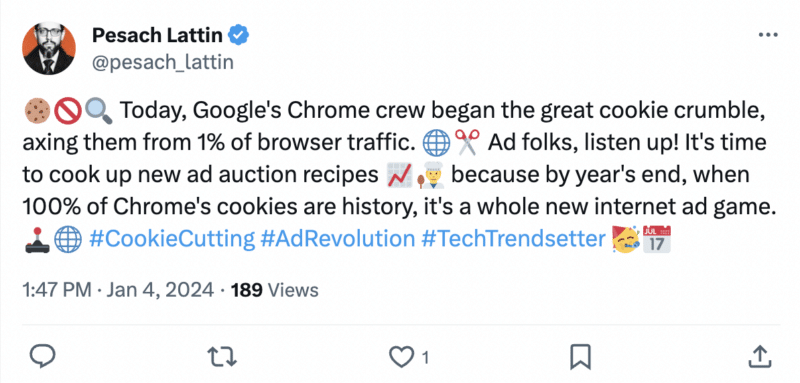
Google has officially started to phase out third-party cookies.
A new feature called Tracking Protection, which restricts third-party cookies by default, began rolling out to 1% of Chrome users globally on January 4, 2024.
If you have been affected, you will will receive a notification when you open Chrome on either desktop or Android devices.
Why we care. If your marketing heavily depends on targeted advertising with third-party cookies, it’s time to reconsider your tactics. Begin preparing your websites now before Google completely retires third-party cookies in the latter half of 2024.
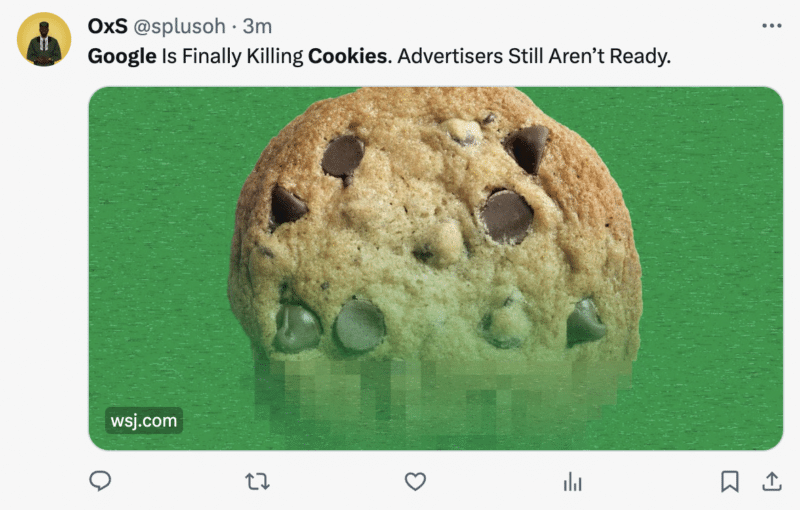
Impact: The affect of the Tracking Protection tool rollout is yet to be determined, however, discussions among digital marketers on X indicate that advertisers are still not ready for the removal of third-party cookies:
Problems to watch out for. If your site relies on third-party cookies and the roll out of Tracking Protection causes issues (for example, you refresh a page multiple times), Chrome will prompt you to temporarily re-enable them by clicking the eye icon on the address bar’s right side.
What are third-party cookies? A third-party cookie is a small piece of data placed on a user’s device (computer, cellphone, or tablet) by a website different from the one the user is currently visiting. It tracks the user’s browsing history, enabling personalized ads based on their activities.
Why now? Google considers phasing out third-party cookies by the second half of 2024 as a crucial move in its Privacy Sandbox initiative. The final decision depends on resolving competition concerns from the UK’s Competition and Markets Authority.
Get the daily newsletter search marketers rely on.
Deep dive. Read ‘SEO and the future world without cookies‘ by Search Engine Land contributor Adam Audette for more information on what a cookieless world will look like for SEO and PPC marketers.
TikTok is reportedly planning to rival Amazon by growing its U.S. ecommerce business, TikTok Shop, tenfold to $17.5 billion this year.
Why we care. TikTok Shop is a prime opportunity for brands as 83% of users make purchase decisions on the platform. If TikTok is planning a major expansion, marketers will benefit from being able to showcase their products to a larger engaged audience in the States, maximizing ROI.
The details. TikTok is preparing to utilize its engaged user base and viral videos to boost merchandise sales on the U.S. TikTok Shop, reports Bloomberg. Although the details of this strategy were recently discussed during internal meetings, it’s important to note that these plans might change depending on the business’s performance.
However, if everything goes as planned, TikTok will pose a challenge not only to Amazon but also to online retail media brands like Temu and Shein.
Why now? TikTok was reportedly on the path to generating approximately $20 billion in global gross merchandise value – although the platform has denied this figure – with the majority of sales coming from Southeast Asia last year. The company is eyeing an expansion of its sales footprint in the U.S. and Latin America. According to two individuals familiar with the matter, TikTok is gearing up to launch its ecommerce operations in these regions in the upcoming months.
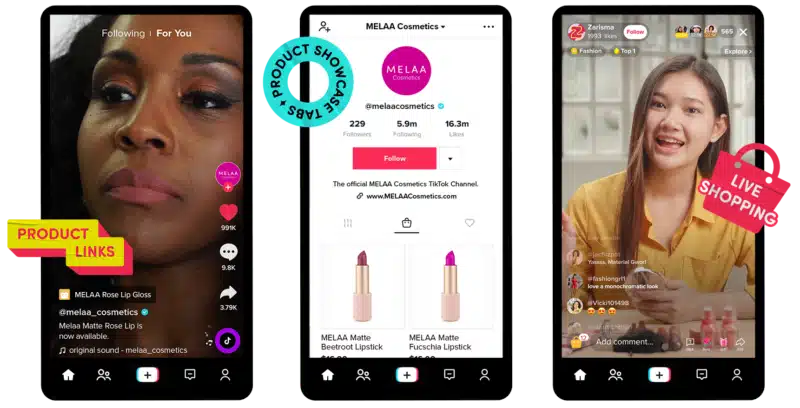
What is TikTok Shop? TikTok Shop allows users to make purchases while scrolling through a continuous stream of short videos and live streams within the main social media app. This feature enables both merchants and creators to display and sell products, creating a seamless in-app experience for the TikTok community to explore and buy directly.
Get the daily newsletter search marketers rely on.
The AI-generated answers in Google’s Search Generative Experience (SGE) do not match any links from the top 10 Google organic search results 93.8% of the time.
That’s according to a new Authoritas analysis, which focused primarily on commercial keywords.
Why we care. Google SGE is expected to reduce organic traffic significantly to websites for many keywords because searchers will be able to get the answer directly in Google’s AI-generated answer. The one bright spot? Websites that can’t reach the top 10 of Google’s organic results might be able to appear as links within SGE.
SGE often gives links to content not in top organic results. According to the study:
In simple terms, when comparing the URLs that Google’s SGE content generates against the URLs that appear in regular (organic) search results, there’s a relatively low overlap. Only about 4.5% of the time does a URL in the generative content exactly match a URL in the organic results. An even smaller percentage (1.6%) matches at the domain level, meaning the generative content is from the same website as an organic result but not the exact same page. The vast majority of the time (93.8%), the generative content introduces URLs that are completely different from those in the organic search results.
And:
“93.8% of generative links (in this dataset at least) came from sources outside the top-ranking organic domains. With only 4.5% of generative URLs directly matching a page 1 organic URL and only 1.6% showing a different URL from the same organic ranking domain.”
Links in SGE. Overall, on average, SGE shows about 10 links, but only about four unique links. Also, the links in SGE answers come from four unique websites. This means that, on average, two or three links in SGE answers point to the same website.
Percentage of keywords with SGE results. SGE showed for 86.8% of the keywords in this analysis. That means 13.2% of keywords failed to trigger SGE content.
The Generate button version (where Google asks if you want to generate an AI response) of SGE appeared 65.9% of the time, which was more often than the Show more button format (where Google shows you part of its AI-generated response).
About the study. Data for 1,000 commercial keywords was collected, using data from a logged-in New York-based Google Chrome account holder, over two days in December 2023. It includes keywords in 10 categories:
Group M is planning to simplify the buying and placement of ads on streaming services for advertisers.
Through the GroupM Ad Innovation Accelerator program, GroupM is joining forces with BrightLine, Disney, KERV, NBCUniversal, Roku, Telly, and YouTube to develop a new ad format for streaming services. This format aims to cater to viewers who prefer to avoid commercials.
The collaborative effort aims to transform the conventional 30-second ad spot by incorporating advanced digital technologies. This innovation aims to strengthen connections between brands and viewers, delivering measurable outcomes for advertisers partnering with GroupM.
Why we care. This program addresses changing viewer preferences and offers a potential solution for more effective streaming service advertising. It also presents a promising opportunity for advertisers to connect with younger audiences, who are increasingly shifting from traditional TV to streaming services.
What is GroupM? GroupM, the media-buying division of European advertising conglomerate WPP, is one of the largest investors of advertising dollars in the U.S.
What Group M is saying. Mike Fisher, Executive Director, Investment Innovation, GroupM U.S., said in a statement:
“Brands advertising in ad-supported streaming environments have an incredible opportunity to engage with attentive consumers, but the rapidly evolving media landscape makes it difficult for advertisers to efficiently and resourcefully launch interactive advertising campaigns.”
“Our clients need a simple way to activate interoperable and attributable campaigns across the ad-supported streaming ecosystem. With key stakeholders at the same table, we will shape impactful outcomes that allow advertisers to execute creative, engaging and effective campaigns.”
Get the daily newsletter search marketers rely on.
The Google Ads gambling and games policy United States country-specifics has been updated.
From January 4, the platform will accept and run ads for sports betting from state-approved entities in Delaware.
Why we care. Eligible advertisers who want to run sports betting ads in Delaware will need to apply for accreditation.
Certification. To obtain certification, follow these steps if you meet Google’s policy and country-specific requirements:
Privately-licensed operators: If you are based in one of the countries where Google permits online gambling content, fill out the online gambling application form in the Google Ads Help Center. Providing all the requested information will help prevent delays.
State-run entities: If you operate in one of the countries where Google allows only state-run entities, use this form. When completing the form:
In ‘Summary of the issue’: Note that you’re requesting certification to advertise as a state-run gambling entity, and provide your website URL.
In ‘Campaign name and Ad group name’: Enter N/A if you haven’t set up a campaign or ad group.
Social casino game operators: Use this form to submit your website URL or app, Google Ads customer ID, and the country group you are targeting.
You must submit a separate application form for each country you want to target.
Get the daily newsletter search marketers rely on.
Whilst doing online surveys for money won’t provide you with a steady, substantial income, paid surveys are a great way to make cash for very little effort. Lots of our readers find the best paid online surveys are the ones they can put towards the bill for their summer holiday – not bad coming from the odd half an hour in front of a computer.
Online surveys could be right for you if:
You’d like to make in excess of £50 a month for very little effort
You’d like the chance to win large cash prizes, vouchers and holidays
You spend a lot of time in front of your computer anyway
You’d like a fun and flexible way to make money from home
Moneymagpie’s three golden rules for online surveys
Rule 1: NEVER pay to join online surveys. Use our list of recommended sites below, and let us know immediately if you come across any paid surveys that ask you to pay to join them (you can leave a post at the bottom of this page). The list also includes some of the best paid online surveys.
Rule 2: Set up a separate email account just for emails from online surveys. That way your personal account won’t be flooded with online survey related emails (which can get frustrating!).
Rule 3: Be aware that you won’t qualify for all online surveys. Companies that offer paid surveys are often after a ‘sample group’, which means they only look for a particular number of people within a specific age range or area, or who use a certain product. This means you won’t be able to complete some online surveys simply because you’re too young, too old or simply the wrong sex! So don’t take it personally, but do sign up to lots of online surveys to increase your chances of being selected.
ONLINE SURVEYS FOR MONEY: How to get started
Step 1: Register with several online survey companies
You can sign up to as many sites offering online surveys for money as you like. In fact, the more sites that offer paid surveys you sign up to, the more money you’ll make. See our list below of recommended online survey companies.
Step 2: Check your inbox in your free time
Most paid surveys are sent to you via email at random times. If you have online surveys for money waiting for you, keep in mind that some will close by a specified date or when enough people have taken part so get your skates on or you’ll miss out!
Paid surveys can take anywhere from 10 to 45 minutes to complete. When you receive the email it’ll tell you roughly how long the online survey will take and give you a link to a new window where the survey will begin.
Step 3:Trade your points for cash or vouchers
With most online survey for money companies you earn reward points as you go. Obviously the more active you are, the more points you will earn. Depending on the site, you can convert your points into vouchers or cash. You may also get entered into prize draws as well.
Step 4:Start enjoying your little pot of extra cash and goodies each month!
ONLINE SURVEYS FOR MONEY: OUR RECOMMENDATIONS
Here are the sites offering online surveys we approve of. They’ve all received a thumbs-up from online survey users, but if for any reason these paid surveys fail to impress you then please do let us know at the bottom of this article. And always remember our number one golden rule: NEVER PAY TO JOIN AN ONLINE SURVEY SITE!
With online surveys that pay, you can make money from the comfort of your sofa just using a smartphone or tablet. For example, you can download the Swagbucks app and start making money by completing surveys (as well as all the other fun ways Swagbucks lets you make money.)
MobileXpression
MobileXpression provides one of the easiest ways possible to make money. All you have to do is download their software onto your phone/tablet and you’ll immediately start earning points you can redeem for a reward.
The goal of MobileXpression is to get a better idea of how people use the mobile internet and determine the rank of certain websites, much like TV uses ratings.
Available to people based in the United States, Canada, and the UK
Age requirements 16+ years old
Average earnings of $0.50 to $5 per survey
Payment method is via either Branded Pay (direct deposit in the United States), PayPal cash, gift cards, prepaid Visa card, or charitable donations
Need a minimum 1,000 points to cash out
Good
+ It has a 4.5 out of five ‘star rating’ on Trustpilot
+ When you register as a new member, you’ll earn 50 points, then another 50 points will be credited to your account after filling out your profile (a $1 sign up bonus in total)
+ Once your account is created, you can immediately start taking surveys, which can be worth up to $5 each
+ Branded Surveys’ loyalty programme, Branded Elite, offers the opportunity for anyone to earn bonus points on a weekly basis
Bad
– The website design isn’t as straightforward as other survey sites
Points redeemable for gift cards or for cash through PayPal.
Get five points for signing up
Earn ‘swagbucks’ (SB) by answering surveys and polls, watching videos, playing games, searching the web with the SB search engine and with cashback shopping
At 450 SB, you can get a £3 Amazon Voucher; 720 SB gets you a £5 Amazon voucher. You’ll need 800 SB for £5 in cash; top prize of £100 cash will cost you 16,000 SB. To earn a £100 Amazon Voucher = 14,400 SB, while £100 at M&S = 13,600 SB.
Polls earn you 1 SB
One-minute surveys earn you 4 SB
15-minute surveys earn you 70 SB
20-minute surveys earn you 80 SB
Earn 10 SB for signing up to promotional emails
Good
+ Lots of surveys to take
+ Earn SB by just answering quick questions about your preferences/lifestyle
+ Prize redemption is straight forward and you have the option of getting points converted into cash and not just gift cards
+ Loads of well known brands and shopping sites to earn cashback with, such as eBay, Iceland, Dunelm and Notonthehighstreet.com
+ Didn’t receive any emails (these can be turned on for extra Swagbucks)
Bad
– Sections of the site encourage you to place gambling bets in exchange for high payout swagbucks but you ultimately spend more money placing the bet than you would get for your bucks
– Most of the offers in the “Offers” section cost you money or require you to subscribe to something; most free offers are only worth 1-2 SB each
Aimed at students and those who have graduated within the past five years
Ages 16 – 30 only
Simple, clean, easy to navigate website with block colours and clear navigation panel
You are emailed any surveys you’re selected for
Rewards are earned though completing surveys emailed to you (£1 for completion of a 10-minute survey and £2 for longer surveys). You can also also earn rewards by writing an article that is selected to be displayed on the website (£50 per article chosen)
There are also competitions and prize draws throughout the year
Your earnings can be redeemed in the form of either Bonusbond vouchers that cover hundreds of high street stores, or shopping vouchers to spend on Amazon
280 to 980 i-Say points gets you a £2, £4 or £7 donation to “Help Nepal” charity
1,380 i-Say points earn you a £10 leisure voucher (redeemable at Beefeater, Bella Italia, Café Rouge, Pizza Hut, London Eye, Hastings, Marriott, Chessington Park, Legoland, Madame Tussauds, Sea life, London Pass, and many others); a £10 compliments voucher (redeemable at retail stores such as Argos, WHSmith, Topshop, Accor Hotels, Interflora, TGI Friday’s, and many more); or £10 gift vouchers for either John Lewis, Amazon, iTunes or Zalando
Good
+ Short sign-up with very few questions
+ Profile completion takes only a few minutes and includes lots of lifestyle questions
+ Colourful, easy-to-navigate website with clear information
Bad
– We were rejected as “not the right demographic” after completing our first survey. No other surveys were offered.
It sounds like an impossible dream – turning £200 into £100k, but that is the challenge a civil servant from Brighton set himself in a bid to beat the cost of living.
Dez, 43, and a father of four, was frustrated that despite he and his wife having above average salaries, they were still struggling to pay for the occasional meal out or a family holiday so he decided to take on a second job.
Like many of us who have used Amazon, the world’s biggest shop, he decided to spend his spare time looking for bargains and then sell them for a profit on the site.
He’s coy about his figures but in an interview last October he admitted that since he started in September 2022, he’s made well over £17,000.
Calling himself goodbyepoor_hellorich he began charting his success on Tik Tok `and has more than 70,000 followers. Others have gone on to do the same and are calling it the “£200 to £100K challenge”. So how is he doing it and could you do the same?
Here’s MoneyMagpie’s guide to becoming an e-commerce entrepreneur.
Dez uses Amazon arbitrage, a selling method where you source products from different market places to sell on the site. For example finding a t-shirt for £10 in a local store that sells for £20 on Amazon. You buy the product, sell it on Amazon and keep the difference as profit, this is known as retail arbitrage.
The other method is online arbitrage, sourcing products from sites like marketplace, ebay and facebook.
The skill is in analysing demand and finding items for less than the Amazon price. The advantages, especially if it’s a second job, are that with online you can source products from home in your spare time. It’s a low cost way to sell. The items will arrive to you safely packaged and you can then re-use them to sell on to your Amazon buyer.
There are thousands of online retail stores where you can find profitable inventory and if you find a great deal online you may, if you have enough financial resources, be able to buy in larger quantities and potentially make greater profits.
You can use Fulfilment by Amazon (FBA) to handle packaging, shipping and customer service.
The downside of arbitrage is that there is a lot of competition with more resellers online than shopping at physical retail stores. It can be time-consuming and it can be hard to calculate profit.
For retail arbitrage there are Amazon seller scanner apps you can download to your smartphone to help find profitable products to resell. The Amazon seller app is free if you are a registered seller.
According to a JungleScout survey, in2021, 52% of sellers reported profit margins of between 16-50% which worked out at between £2000 – £5000, annually.
It is perfectly legal to resell a product as long as it is unchanged and sold in its new condition. However, some brands may prohibit you from selling their products on Amazon with online arbitrage – Nike and Lego do not allow third party sellers on the platform.
What other methods are there for retail arbitrage?
Private Label – this is when you create your own product label or brand, usually by modifying an existing product. It’s the most common method of selling on amazon and can be incredibly profitable but you need to really know your markets and experts suggest you need to be willing to risk up to £5,000 because you might not get it right first time.
Wholesale – Buying products in bulk directly from a brand or from distributors to sell on Amazon. this, like private labelling, requires start up money. As a business model it is more sustainable because you can replace orders every month and you aren’t searching masses of sites looking for products. But demand for products can change and you could be left with an investment that you can’t shift. There is also the matter of storage. Unless you have masses of spare space at home, you could find yourself over-run with boxes.
Dropshipping – In 2023, about 23% of all online sales were fulfilled via dropshipping and the figure looks set to grow because it is one of the easiest and quickest ways to start a business,
You list products on your site or storefront but don’t actually have them in your possession. You act as the middleman between the buyer and the supplier, which means you don’t have the headache of finding storage space and keeping on top of your inventory management.
The customer makes a purchase, you process the order and transfer it to a third-party supplier (either a wholesaler or manufacturer). The third party then prepares and ships the order on your behalf and the customer receives their order.
It’s easy to run, there are low start up and overhead costs, you have a flexible work location and there are multiple selling opportunities from setting up our own domain to opening a storefront on places like Amazon and Etsy.
To get started find a few products from an industry you know and position yourself as an expert in a specialised area. Do plenty of market research to gauge the competition, find a quality supplier with a good reputation, find out where your target audience is and choose your selling platform accordingly.
You may have to adapt your sales approach and never be afraid to change products that aren’t working.
It’s also important to remember that with low overheads and costs comes low returns. Experts suggest a profit margin of 15-20% is the absolute maximum you can achieve with dropshipping.
Dez admits he tried several things before opting for Amazon arbitrage, and has diversified along the way.
‘I started making videos about my progress and realised that people were relating to what I was doing. it isn’t a get rich quick scheme, you have to build it slowly’.
He also hopes that as he builds his media presence, he will get paid more by platforms like YouTube.
So if you fancy a side hustle in 2024, give it a go and let us know how you get on. Read our guide to other lucrative side hustles here.