If you’re interested in creating helpful content for your audience (and you should be), you should consider making a resource page.
It’s the best way to collect your top recommendations for products or services and promote the tools and resources you love and use in your business.
And as part of your content strategy, a resource page can add depth and value to your website.
Let’s go deeper into what a resource page is, why you should create one, and how to do it, plus resource page examples.
What is a resource page?
A resource page is a curated page that links to helpful resources, tools, apps, products, services, media, or websites that your audience may find useful.
(You may also know this page as a “recommended tools” page, an affiliate links page, or even a brand “toolbox.”)
A resource page is a one-stop shop for finding a brand’s recommended resources, including the tools or products its staff uses and loves in the company’s day-to-day business.
If you’re a solopreneur or freelancer, your resource page can be very personal and reflect your expertise. And, if you’ve built a following and an engaged audience, your resource page will be valuable for the people who trust your guidance.
There are three ways to approach a resource page:
- Use affiliate links. (This means you and the company of the product you recommend have an agreement – you earn a small commission from people who click your affiliate link and engage with that company.)
- Link to resources organically (because you love them and for no other reason).
- Include a mixture of affiliate and organic links.
Why you should create a resource page
The first and most important reason to create a resource page is the helpfulness factor.
- A resource page curated by you can help your audience discover tools, websites, and resources to help them solve problems they face.
- The resource page you create can be personalized with hand-picked links that you actually use, enjoy, or get value from – and since your expert opinion matters to your audience, they’ll care about the resources you recommend.
The second reason to create a resource page is if you’re involved with affiliate programs and want to maximize your income.
Including your links on a dedicated resource page in your top navigation gives your readers an easy way to find and engage with them.
But, remember – never create a resource page just to get people to click your affiliate links.
Instead, create this type of content to help your audience connect with great resources that have aided you during your own journey in your niche.
How to create a resource page with value
Anyone can throw together a list of links. To avoid the plague of thin, useless content, follow these steps to create a resource page with real value for your readers.
1. Gather links to your most trusted resources for your niche
This initial step in creating a resource page should be the easiest.
You simply need to gather a list of links to your favorite, most trusted tools, websites, products, services, etc. that relate to what you do in your niche.
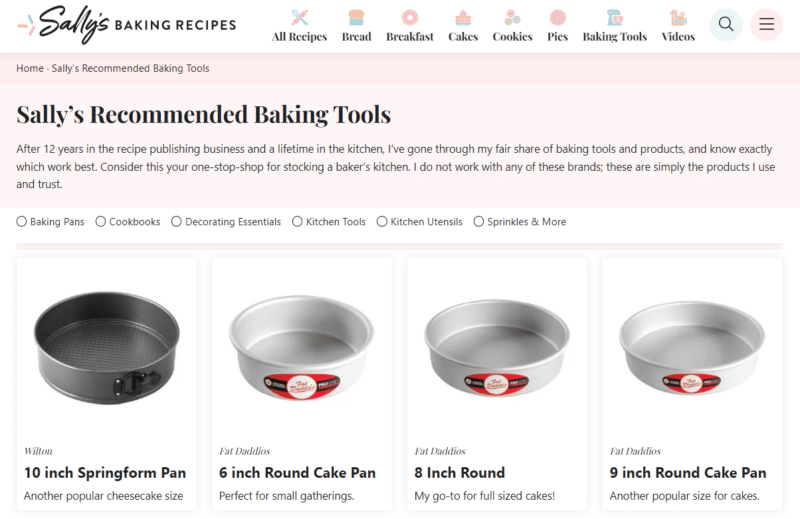
For example, if you’re an expert baker who posts recipes, your resource page might be full of the baking tools you trust and use daily, like on this baking website:
Similarly, if you sell content marketing courses, your resource page would likely include a list of tools you use to make content marketing easier.
(Think SEO tools, content creation tools, your favorite website host, and the content calendar tool you depend on.)
Don’t include just any resources. Think about what would be most beneficial for your audience.
Finally, never recommend anything you haven’t actually used or liked. Honesty and transparency are essential for maintaining the trust between you and your audience.
2. Including affiliate links? Add a disclosure
If you plan to include affiliate links on your resource page, add a clear disclosure that you may earn a commission when your visitors click those links.
This isn’t just good practice for ethics and transparency – it’s also a requirement of the U.S. Federal Trade Commission (FTC).
The FTC considers linking to affiliate sites without disclosure to be deceptive advertising.
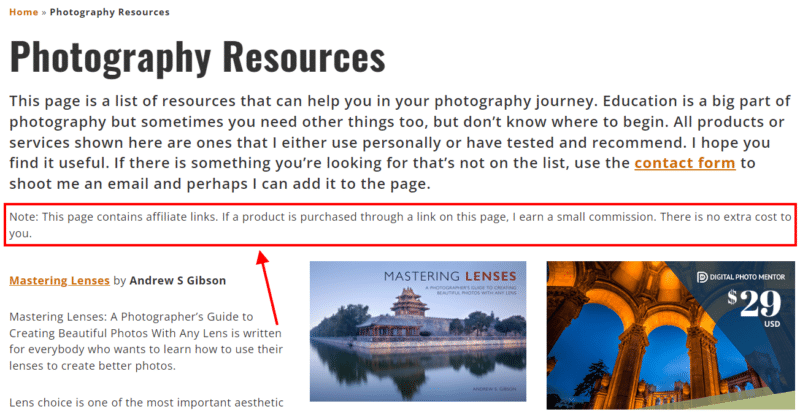
Luckily, the disclosure itself doesn’t have to be a big deal. A simple, clear statement at the top of your page will suffice. Here’s a great example from a photography website:
Get the daily newsletter search marketers rely on.
<input type="hidden" name="utmMedium" value="“>
<input type="hidden" name="utmCampaign" value="“>
<input type="hidden" name="utmSource" value="“>
<input type="hidden" name="utmContent" value="“>
<input type="hidden" name="pageLink" value="“>
<input type="hidden" name="ipAddress" value="“>
Processing…Please wait.
function getCookie(cname) {
let name = cname + “=”;
let decodedCookie = decodeURIComponent(document.cookie);
let ca = decodedCookie.split(‘;’);
for(let i = 0; i <ca.length; i++) {
let c = ca[i];
while (c.charAt(0) == ' ') {
c = c.substring(1);
}
if (c.indexOf(name) == 0) {
return c.substring(name.length, c.length);
}
}
return "";
}
document.getElementById('munchkinCookieInline').value = getCookie('_mkto_trk');
3. Describe each resource and why you included it
Now we can start beefing up your resource page with useful content.
What will make your page useful beyond the links themselves?
Helpful descriptions that explain why you’re recommending each product, service, tool, etc., and why they’re valuable.
Here’s a good formula for describing the resources on your page:
- Introduce the product/service/tool/resource and explain what it does.
- Explain why you use it and trust it.
- List at least one way it could improve your reader’s life.
Your descriptions don’t have to be long, either. You can summarize each of the above points in one or two sentences. Here’s an example from Smart Passive Income:
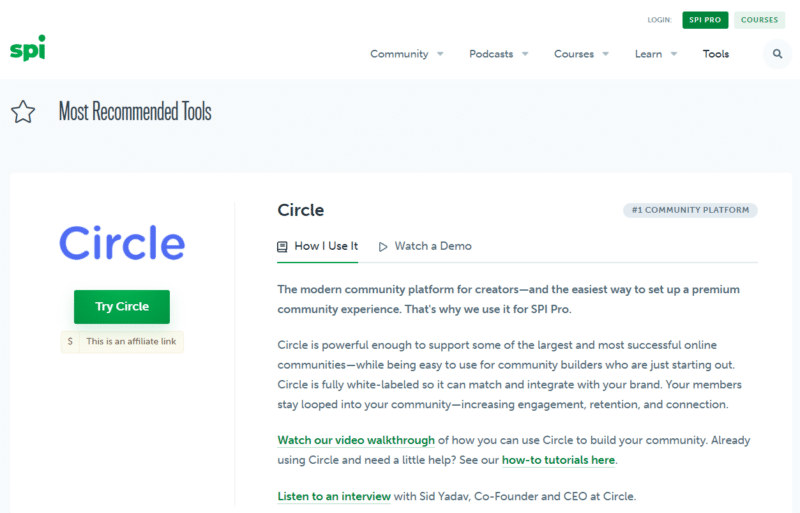
Ultimately, this list of recommended tools is much more valuable because SPI describes how and why each tool is trustworthy and effective.
If, on the other hand, they just provided a list of links, you wouldn’t understand the value of any of them.
4. Organize and optimize your resource page
Again, don’t just throw a list of links on a page. Put some effort into organizing and optimizing your resource page so the most visitors will get the most use out of it.
Particularly, organize your resources into categories and add a heading (an H2 or an H3) to each one.
For example, if you have a list of media to consume to learn more about a topic, you could categorize the links by type of media, e.g., books, podcasts, videos, blog posts, courses, etc.
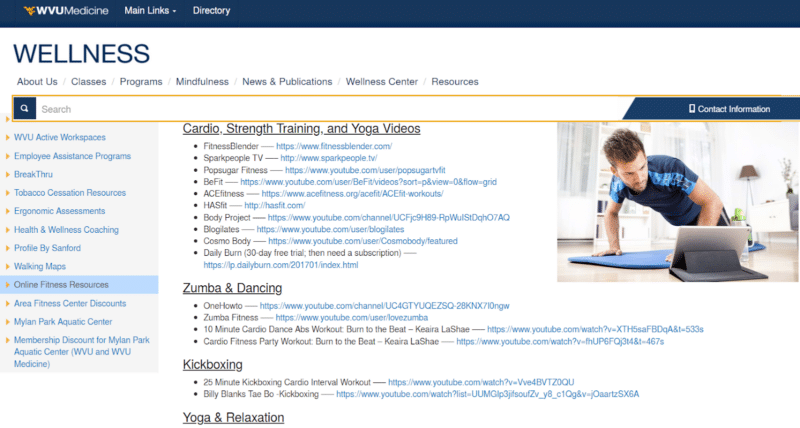
This wellness center, for instance, has a resource page for employees and their families that includes online fitness resources categorized by workout type:
Another option: If you regularly blog about great industry resources, collect them on one resource page, like Learn to Code With Me did:

5. Link to relevant content on your site
Yes, you can include your own content on your resource page, but take care – adding too much of your content can look a bit too self-promotional.
Instead, look for ways to mention or link to your content organically.
For instance, this travel blog includes their in-house tour company as one of the resources under their “tour companies” category.
However, the mention isn’t overtly salesy and looks even less so next to their other recommendations.

Another way to include your content on your resource page is to link to related blog posts.
Add these links in the descriptions for each category, such as, “Want to learn more about choosing a travel company? Check out our guide.”
6. Update your resource page regularly
Next, since your resource page is essentially a page full of links, you’ll want to make sure the links are working and accurate regularly.
For example, this can be a task you set as part of your regular website or content audit.
A quick way to check all the URLs on the page for dead links is to use a broken link checker.
Lastly, ensure your affiliate links are all accurate and working so it’s tracked each time someone is referred through your page to a product.
7. Link to your resource page in your other content
Once your resource page is created, link to it in your other content, including blogs and core site pages like your About Us page.
For example, a baking blog could link to its resources page whenever they talk about baking equipment. E.g., “The right size mixing bowl is essential to creating this recipe. Check out my resource page to see the large mixing bowls I use and love.”
Essentially, any “learn more” opportunity or mention in a blog could connect back to your resource page.
Of course, another great place to include a link to this content is right in your main menu. Learn to Code With Me does this well – its resource hub is located in the top menu under the heading “Where to learn.”
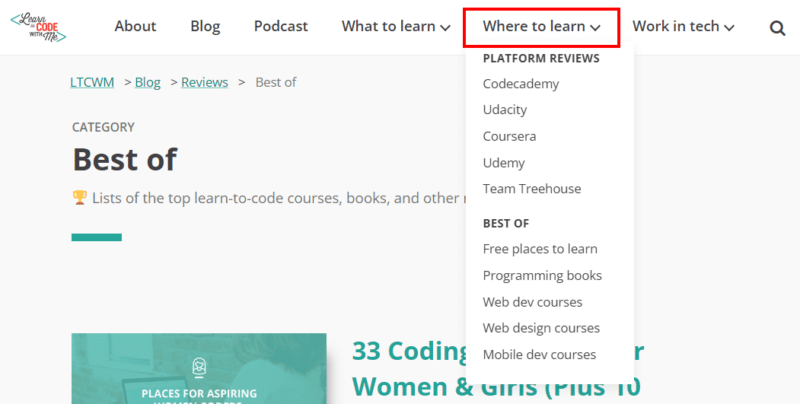
Those aren’t the only possibilities. Here are some other suggestions for linking to your resource page in your other content:
- Include a link in your site’s footer menu.
- Create a call-to-action banner or graphic to place strategically inside blogs.
- Add a link to your lead magnets, ebooks, or freebies.
- Create a perpetual link for your blog sidebar.
- Link to and promote your resource page in social media posts.
A resource page is helpful content
Correction: A resource page can be helpful content if you create it with the above steps in mind.
And that’s important because helpful content matters to your audience as part of their overarching experience of your brand. It also matters to Google, because the search engine wants to serve searchers content that helps them.
As you’ll remember, helpful content is:
- Created with a specific audience in mind.
- Has trust and credibility markers.
- Includes expertise from the creator(s).
- Meets the needs of the audience.
Created with care, your resource page can add value to your content strategy by educating your audience and strengthening your website. And those are worthy goals.
The post How to create a resource page appeared first on Search Engine Land.
Original source: https://searchengineland.com/create-resource-page-398815
Took me time to read the material, but I truly loved the article. It turned out to be very useful to me.
Thanks pertaining to discussing the following superb written content on your site. I ran into it on the search engines. I will check back again if you publish extra aricles.
It is perfect time to make some plans for the future and it is time to be happy. I’ve read this post and if I could I want to suggest you some interesting things or suggestions. Perhaps you can write next articles referring to this article. I wish to read more things about it!
Good site! I truly love how it is easy on my eyes it is. I am wondering how I might be notified when a new post has been made. I’ve subscribed to your RSS which may do the trick? Have a great day!
That’s some inspirational stuff. Never knew that opinions might be this varied. Thanks for all the enthusiasm to supply such helpful information here.
Thanks for sharing the information. I found the information very useful. That’s a awesome story you posted. I will come back to scan some more.
I think this is among the so much vital info for me. And i’m happy reading your article. But wanna remark on few common issues, The site style is wonderful, the articles is really excellent : D. Just right job, cheers
bonjour I love Your Blog can not say I come here often but im liking what i c so far….
If you don’t mind, where do you host your weblog? I am looking for a very good web host and your webpage seams to be extremely fast and up most the time…
Most often since i look for a blog Document realize that the vast majority of blog pages happen to be amateurish. Not so,We can honestly claim for which you writen is definitely great and then your webpage rock solid.
Sweet blog! I found it while browsing on Yahoo News. Do you have any tips on how to get listed in Yahoo News? I’ve been trying for a while but I never seem to get there! Thank you
Good site! I truly love how it is easy on my eyes it is. I am wondering how I might be notified when a new post has been made. I’ve subscribed to your RSS which may do the trick? Have a great day!
fantastic internet site, I could definitely go to your web page once more…acquired some really nice info.
This is a great blog. Thank you for the very informative post.
Thank you for this great piece of content. Best Regards
It’s continually awesome when you can not only be informed, but also entertained! I’m sure you had fun writing this article. Regards, Clotilde.
Glad to be one of several visitors on this awful internet site : D.
A friend of mine advised this site. And yes. it has some useful pieces of info and I enjoyed scaning it. Therefore i would love to drop you a quick note to express my thank. Take care
hey thanks for the info. appreciate the good work
Surprisingly good post. I really found your primary webpage and additionally wanted to suggest that have essentially enjoyed searching your website blog posts. Whatever the case I’ll always be subscribing to your entire supply and I hope you jot down ever again soon!
This contained some excellent tips and tools. Great blog publication.
Thanks a bunch for sharing this with all people you really recognize what you are talking about! Bookmarked. Kindly also seek advice from my web site =). We can have a link alternate contract between us!
I am glad to be a visitor of this thoroughgoing web blog ! , regards for this rare information! .
It sounds like you’re creating problems yourself by defining this as such a comprehensive, almost unknowable problem. Isn’t that self-defeating?
This has to be one of my favorite posts! And on top of thats its also very helpful topic for newbies. thank a lot for the information!
Great blog here! Also your site loads up very fast! What web host are you using? Can I get your affiliate link to your host? I wish my website loaded up as fast as yours lol
We can see that we need to develop policies to deal with this trend.
This blog post is excellent, probably because of how well the subject was developed. I like some of the comments too.
I like your blog. It sounds every informative.
Howdy! I simply wish to give a huge thumbs up for the great information you have here on this post. I will be coming again to your weblog for extra soon.
This blog post is excellent, probably because of how well the subject was developed. I like some of the comments too.
Woah this is just an insane amount of information, must of taken ages to compile so thanx so much for just sharing it with all of us. If your ever in any need of related information, just check out my own site!
Great post, keep up the good work, I hope you don’t mind but I’ve added on my blog roll.
While this issue can vexed most people, my thought is that there has to be a middle or common ground that we all can find. I do value that you’ve added pertinent and sound commentary here though. Thank you!
This has to be one of my favorite posts! And on top of thats its also very helpful topic for newbies. thank a lot for the information!
I think that may be an interesting element, it made me assume a bit. Thanks for sparking my considering cap. On occasion I get so much in a rut that I simply really feel like a record.
Greetings… your blog is very interesting and beautifully written.
I am very happy to look your post. Thanks a lot and i am taking a look ahead to touch you.
Howdy I wanted to write a new remark on this page for you to be able to tell you just how much i actually Enjoyed reading this read. I have to run off to work but want to leave ya a simple comment. I saved you So will be returning following work in order to go through more of yer quality posts. Keep up the good work.
This blog post is excellent, probably because of how well the subject was developed. I like some of the comments too.
Just wanna admit that this is extremely helpful, Thanks for taking your time to write this.
I really like your writing style, excellent info , thanks for putting up : D.
Regards for helping out, superb info.
I do believe your audience could very well want a good deal more stories like this carry on the excellent hard work.
I Am Going To have to come back again when my course load lets up – however I am taking your Rss feed so i can go through your site offline. Thanks.
I had fun reading this post. I want to see more on this subject.. Gives Thanks for writing this nice article.. Anyway, I’m going to subscribe to your rss and I wish you write great articles again soon.
Our community leaders need to read this, and look at developing some of your recommendations.
Great resources and tips for families here.
I found your blog through google and I must say, this is probably one of the best well prepared articles I have come across in a long time. I have bookmarked your site for more posts.
You have some helpful ideas! Maybe I should consider doing this by myself.
I’ve read several good stuff here. Definitely worth bookmarking for revisiting. I surprise how much effort you put to make such a magnificent informative site.
Certainly. And I have faced it. Let’s discuss this question. Here or in PM.
Great blog here! Additionally your website rather a lot up very fast! What host are you the usage of? Can I get your associate link for your host? I desire my website loaded up as fast as yours lol
It sounds like you’re creating problems yourself by defining this as such a comprehensive, almost unknowable problem. Isn’t that self-defeating?
Hello. Great job. I did not expect this on a Wednesday. This is a great story. Thanks!
Good post. I study something more difficult on different blogs everyday. It’s going to always be stimulating to learn content material from other writers and observe a little bit one thing from their store. I’d prefer to use some with the content material on my blog whether you don’t mind. Natually I’ll give you a link in your web blog. Thanks for sharing.
Thanks for a Interesting item; I enjoyed it very much. Regards Sang Magistrale
I really like your writing style, excellent info , thanks for putting up : D.
Glad to be one of many visitants on this amazing site : D.
Greetings… your blog is very interesting and beautifully written.
Is it okay to put a portion of this on my weblog if perhaps I post a reference point to this web page?
Our community leaders need to read this, and look at developing some of your recommendations.
Absolutely pent content material , appreciate it for information .
Howdy! Would you mind if I share your blog with my zynga group?
There’s a lot of folks that I think would really appreciate your content.
Please let me know. Thank you