The new year has just begun, and the digital marketing landscape continues to evolve rapidly. AI will play a pivotal role in sculpting the future of customer acquisition, but it is still an uncharted realm of strategies and tactics.
Join experts for an unmissable webinar designed specifically for digital marketers who drive offline sales and conversions. You’ll learn:
AI-forward approach for 2024: Discover why marketers are enthusiastically adopting AI solutions to boost productivity, unlock new insight, and supercharge campaign performance.
Quality over quantity in lead gen: Understanding the importance of prioritizing leads value over volume and why a marketer’s focus should be on revenue growth.
First-party data integration with AI: Learn how leveraging your data with AI will be crucial for staying ahead in the new privacy-focused era.
The entertainment landscape has recently undergone a significant transformation. Online streaming platforms have become the new frontier for content creators. Twitch, in particular, has emerged as a powerhouse for live streaming that allows you to broadcast your content to a global audience.
That has become a lucrative career for many, with Twitch streamers making substantial incomes through various channels. This comprehensive guide will discuss the strategies and techniques to help you make a stable income as a Twitch streamer.
Understanding the Twitch Ecosystem
Before diving into the specifics of income generation, you must have a solid understanding of the Twitch ecosystem. Twitch is primarily a platform for live-streaming video games. Still, it has expanded to include various categories such as music, art, cooking, and even live vlog-style content known as “IRL streams.”
Streamers broadcast their content in real-time, fostering a direct and interactive relationship with their audience through live chat.
Identify your niche
You must identify and focus on your niche to stand out on Twitch. Whether it is gaming, art, or any other category, find something you are passionate about and where there is demand. A niche assists you in targeting a specific audience and establishing a dedicated community.
Gaming
Gaming remains the foundation of Twitch’s success, with many streamers sharing their gaming experiences, strategies, and adventures. From competitive esports to casual playthroughs and speedrunning, the gaming niche continues to attract a vast audience.
Some popular titles you may wish to use for content include Fortnite, League of Legends, and Among Us, but there is always room for emerging games and indie gems. Today’s most popular Twitch gaming streamers include Ninja, Shroud, loltyler1, and Doublelift.
Just chatting
“Just chatting” has emerged as a versatile and engaging category where you can connect with your audience on a more personal level. Under this niche, you can share anecdotes, discuss current events, and interact with your viewers through Q&A sessions.
The beauty of “Just Chatting” lies in its flexibility, which allows creators to showcase their personalities and build a community beyond the gaming realm. Some of the most recognizable chatting streamers include Pokimane, Amouranth, and LilyPichu.
Creative arts
As the name suggests, the creative arts category on Twitch is a haven for artists, musicians, and creatives of all kinds. From digital art and traditional painting to music production and graphic design, you can captivate audiences with your unique talents in this niche.
Twitch’s interactive features enable direct engagement, as viewers witness your creative process in real time, fostering a sense of connection and appreciation. Famous examples of creative art Twitch streamers include drawfeeshow, LittleMissTina, and even BobRoss.
IRL (In Real Life)
Also known as “vlogging on the go,” IRL content has gained popularity as creators share glimpses of their daily lives, adventures, and experiences. Whether attending events, exploring new places, or tackling challenges, IRL streams offer your audience an intimate look into your life as a content creator.
This niche thrives on authenticity, allowing your viewers to connect with you on a personal level beyond the confines of the virtual world. Some of the most notable Twitch IRL streamers include Jinnytty, Hitch, and JakenbakeLIVE.
Fitness and wellness
Fitness enthusiasts have found a home on Twitch as health and wellness gain prominence. In this niche, you can share workout routines, nutritional tips, and motivational content, creating a supportive community focused on physical and mental well-being.
Viewers can even participate in live workouts, ask questions, and embark on fitness journeys alongside their favorite streamers. Some of the biggest names in getting gains on the platform include jo_workouts, theHOLDERHEK, and SagittarinaOfficial.
Educational content
Twitch has become a hub for educational content, ranging from coding tutorials and language lessons to science experiments and history deep dives. If you want to teach, you can leverage the platform’s live interaction to engage with viewers, answering questions and providing real-time feedback.
This niche fosters a collaborative learning environment where your audience actively participates in the educational process. Some Twitch channels you can check out include CodingGarden, The8BitDrummer, and AaronBlaiseArt.
Identifying your niche on Twitch is a dynamic and ongoing process. It demands self-reflection, market analysis, and a willingness to experiment.
Understanding the significance of a niche, strategically choosing a focus, and actively building and engaging with your community can pave the way for a successful and fulfilling streaming career.
Build a strong brand
Your brand is what separates your channel from the channels of other streamers. That includes your username, logo, overlays, and the overall visual identity of your stream. Consistency in branding helps viewers recognize and remember you.
Engage with your audience
Twitch is all about community engagement. Respond to comments, regularly interact with your viewers through live chat, and make your audience feel valued. Building a strong community is critical to long-term success.
Popular forms of engaging your audience include live chat interactions, viewer polls, giveaways and contests, and channel points and rewards.
Diversifying Income Streams
Building a stable income as a Twitch streamer often involves diversifying revenue streams. Relying solely on one source may be unpredictable. It is ideal for you to explore multiple avenues to create a robust financial foundation.
Subscriber and donation revenue
Twitch has a subscription feature where your viewers and followers can subscribe to your channel for a monthly fee. Additionally, viewers can donate money during streams. Encourage subscriptions by offering unique emotes, badges, and subscriber-only content.
Affiliate marketing
Partner with brands that best align with your content through affiliate marketing. Promote services or products to earn a significant commission for every conversion they make through your unique affiliate link.
Sponsorships
As your channel grows, consider seeking sponsorships from companies interested in reaching your audience. That could involve promoting their products during your stream or featuring their logos on your overlays.
Merchandise sales
Design and sell merchandise associated with your brand. Forms of merchandise could include branded clothing, accessories, or digital products. Platforms like Streamlabs and Teespring make it easy for streamers to set up merchandise stores.
Ad revenue
Once you become a Twitch Affiliate or Partner, you can earn massive revenue from ads shown on your channel. Viewers who subscribe to your channel can enjoy an ad-free experience, but ad revenue becomes a significant income stream for others.
Twitch bits
Twitch Bits are virtual currency viewers can purchase and use to support their favorite streamers. Streamers earn money for every Bit received during their streams.
Building a Strong Online Presence
Beyond Twitch, establishing a presence on other platforms can contribute to your success. With the right strategy, social media can be a powerful tool for expanding your market and attracting new viewers.
Social media strategy
Utilize platforms like Twitter, Instagram, and YouTube to share highlights from your streams, engage with your audience, and attract new viewers. Consistent and strategically utilizing social media can help you build a broader community.
YouTube content
Repurpose your Twitch content for YouTube, which could include creating highlight reels, tutorials, or behind-the-scenes videos. YouTube can be a valuable discovery platform, driving new viewers to your Twitch channel.
Consistent streaming schedule
Establish a consistent streaming schedule that aligns with your audience’s preferences. Regular and predictable streams make it easier for viewers to find you and build a routine around your content.
Collaborations
Collaborate with other streamers to cross-promote each other’s channels. This collaboration can introduce your content to new audiences and establish a community within the streaming ecosystem.
Photo by Stanley Li on Unsplash
Investing in Your Setup
The quality of your stream can massively impact viewer experience and, consequently, your income potential. Investing in the right equipment and creating a professional-looking stream can make a substantial difference.
That is why some streamers even apply for personal loans to gather the necessary funds to purchase the proper equipment to keep up with today’s streamer standards.
High-quality video and audio
As a Twitch streamer, you must ensure top-notch video and audio quality. Invest in a good microphone, webcam, and lighting to enhance the overall production value of your stream.
Overlay design
Create visually appealing overlays that complement your brand. Overlays can include elements like a webcam frame, chat box, and notifications. Platforms like Streamlabs and OBS offer tools to customize your overlays.
Interactive features
Use interactive features like polls, overlays, and alerts to engage your audience. Interactive elements can make your stream more entertaining and encourage viewer participation.
Channel points and rewards
Take advantage of Twitch’s Channel Points feature to create interactive experiences for your viewers. Design custom rewards that viewers can redeem using their accumulated Channel Points.
Managing Finances and Planning for the Future
As your income grows, managing your finances wisely and planning for the long term becomes crucial. Consider these tips to ensure financial stability and growth.
Financial planning
Keep track of your income, expenses, and taxes. As a self-employed individual, you are responsible for managing your finances. Consulting with a financial advisor to build a solid financial plan is ideal.
Emergency fund
Creating an emergency fund to mitigate unexpected expenses or income fluctuations is advisable. This fund can help you manage unexpected financial situations and provide a safety net during emergencies. A financial safety net offers peace of mind and stability during uncertain times.
Investing in professional development
Continuously invest in your skills and remain up-to-date on industry trends. Attend workshops, conferences, or online courses to enhance your streaming abilities and stay competitive in the ever-evolving landscape.
Diversify beyond Twitch
While Twitch might be your primary platform, consider diversifying your content and presence across other platforms. Diversification can provide additional revenue streams and protect against potential changes in the Twitch ecosystem.
Finding Success Through Twitch Streams
Becoming a successful Twitch streamer and making a stable income requires strategic planning, engagement with your community, and diversification of income streams.
Understanding the Twitch ecosystem, building a strong brand, and investing in your setup can create a fulfilling and, most importantly, sustainable career as a content creator.
Remember that success on Twitch often takes time, dedication, and adaptability to the evolving landscape of online content creation. With the right approach, you can turn your passion for streaming into a viable and stable source of income.
Copilot Pro, the most advanced and fastest version of Copilot, has been released today by Microsoft. Copilot, the new name for the new Bing Chat experience, now has a paid version that costs $20 per month per user. This brings “a new premium subscription for individuals that provides a higher tier of service for AI capabilities, brings Copilot AI capabilities to Microsoft 365 Personal and Family subscribers, and new capabilities, such as the ability to create Copilot GPTs,” Microsoft announced.
Features in Copilot Pro. Copilot Pro has these features, that are above and beyond normal Copilot:
A single AI experience that runs across your devices, understanding your context on the web, on your PC, across your apps and soon on your phone to bring the right skills to you when you need them.
Access to Copilot in Word, Excel, PowerPoint, Outlook, and OneNote on PC, Mac, and iPad for Microsoft 365 Personal and Family subscribers.
Priority access to the very latest models, including the new OpenAI’s GPT-4 Turbo. With Copilot Pro you’ll have access to GPT-4 Turbo during peak times for faster performance and, coming soon, the ability to toggle between models to optimize your experience how you choose, Microsoft explained.
Enhanced AI image creation with Image Creator from Designer (formerly Bing Image Creator) – ensuring it’s faster with 100 boosts per day while bringing you more detailed image quality as well as landscape image format.
The ability to build your own Copilot GPT – a customized Copilot tailored for a specific topic.
Video overview. Here is a video overview of the new Copilot Pro:
What else is new. Microsoft also announced these general improvements around Copilot:
Copilot GPTs. Copilot GPTs let you customize the behavior of Microsoft Copilot on a topic that is of particular interest to you.
Copilot mobile app. The Copilot mobile app is now available for Android and iOS.
Copilot in the Microsoft 365 mobile app. Copilot is being added to the Microsoft 360 mobile app for Android and iOS for individuals with a Microsoft account.
Why we care. If you love Copilot, aka Bing Chat, and want to get the best out of it, you may want to try Copilot Pro. It will give you the more advanced AI models, priorities your prompts before others and give you more usage than the free version.
The repercussions of negative, false and defamatory content on the web are profound for businesses and individuals, especially when it ranks highly on Google.
This article explores nine of the most effective and commonly used strategies for removing negative content from the web.
The effectiveness of these methods can vary due to changes in laws, search engine policies and your specific situation.
1. Violations of community guidelines
Most websites that host user-generated content (UGC), including Facebook, Reddit, and Yelp, have a defined set of community guidelines. They clarify what type of content is allowed or prohibited on their website.
To find the community guidelines of a specific website, a simple “[site name] + community guidelines” search on Google should bring them up.
You can flag or report the content for removal if the negative content violates one of their policies. You will typically hear back from the website’s content moderation team within a few days.
Due to a law known as the Communications Decency Act (Section 230a), website owners that host user-generated content have no legal liability for what is published on their website.
All U.S.-based websites hosting UGC can decide what will or will not be removed from their website. If your removal request is denied, the best option will be to respond and/or suppress the harmful content.
The Digital Millennium Copyright Act (DMCA) is a federal law designed to tackle the issue of copyright infringement. It comes into play when your copyrighted content is posted on a website without consent.
Website owners take copyright laws in the United States seriously given the potential legal liability they face if they do not expeditiously disable access to the infringing content.
If a website does not adhere to a DMCA notice, you can submit a copyright infringement notice to the website’s hosting provider, like GoDaddy, or Google. If Google approves it, they will permanently remove the link hosting the infringement content from Google search results.
4. Mediation
Mediation can be an effective method for content removal.
When publishers of negative content can delete the negative content and they can be contacted, a third-party mediator or reputation management expert can work to facilitate the removal of negative content.
This must be handled carefully, as the wrong approach can potentially worsen the situation.
Get the daily newsletter search marketers rely on.
For specific situations, there may be an opportunity to negotiate with the publisher of the negative content and get them to revise or remove it.
For example, if your customer leaves a negative review, speaking with them about the situation and finding an amicable solution may be the best way forward.
This could entail offering your customer a full refund for your service and politely requesting they edit or remove their initial negative feedback.
Google has a policy to remove content from their search results if you are the victim of exploitative removal practices.
If you find yourself on a website that contains negative content about you, and the website owner demands payment to remove it, you can contact Google to remove it.
For the removal request to be considered, the following requirements must be met:
You are the subject of the content in the submitted URL.
The website is not a business review site.
The website has removal practices that necessitate payment to the site or other agencies to have content removed.
7. Sexually explicit content
Google has implemented measures to protect users from the distribution of non-consensual and nude images. Victims of such content can request the removal of the images or videos from search results by submitting a removal request.
Websites commonly highlight the importance of consent in distributing explicit material and may offer a reporting mechanism for addressing such content.
Another disturbing trend is the rise of AI-generated “fake pornography,” where people use machine learning technology to put someone’s face in an explicit video without their permission. Google has created a reporting form to remove this type of content.
8. The right to be forgotten
In 2014, the European Union passed a ruling known as the “right to be forgotten.” EU citizens have the right to request the removal of content related to their name if it is “inaccurate, inadequate, irrelevant, or excessive.”
This has led to over a million EU citizens requesting to remove content from their Google search results. Unfortunately, in the United States, such a law does not exist at this time.
9. Court order
As a last resort, legal strategies may be available for removing negative content from the web. One approach to eliminate negative and defamatory content from Google involves obtaining a court order.
When a website receives a court order declaring the hosted content defamatory, they are required by law to remove it. If the website does not respond to the request, you can submit the court order to Google’s legal department, and they will remove the link from search results.
It’s important to consider the public exposure and legal fees incurred from filing a defamation lawsuit, which is the first step in potentially obtaining a court order.
Protect your brand from harmful online content
Removing negative or harmful content on the Internet is possible depending on your circumstances.
If you find yourself on the receiving end of content negatively impacting your reputation, there is no need to panic.
Even if removing the content is impossible, there will always be alternate strategies to mitigate the damage and visibility of the negative results.
Even though Georgia experiences short winters, that doesn’t mean winter driving isn’t challenging for drivers. In Brunswick, winters tend to be mild, but it is a time when car accidents and injuries often occur.
This is because even though you may be a responsible driver, that doesn’t mean that others will be just as responsible. In the event of a car accident, you should consider contacting an Attorney to help you with your case. Here are some winter driving tips to help you avoid accidents and injuries in Brunswick, GA.
Prepare Your Vehicle Accordingly
Every vehicle must be properly maintained and serviced before hitting the road, especially before wintertime. Some of the most important parts that must be checked include the tires, brakes, battery, and fluids.
If these inspections are conducted at a garage, you can also save time and install winter tires or use tire chains for better transactions if necessary. They will be very useful on icy or snowy roads.
Be Wary of the Weather and Road Conditions
It’s easy to assume that every day will be the same in the winter. However, you must always check weather forecasts and road conditions before going anywhere, as the weather is very unpredictable during this time of the year.
You can access this information through weather apps or the local news. If severe weather conditions are announced, postpone your trip, especially if you drive an electric vehicle.
Always Drive Cautiously
Driving in winter is very different than in other seasons. Some of the best driving tips to avoid accidents and injuries in winter include:
Reducing your speed and increasing your following distance to be able to stop safely on slippery roads.
Avoid sudden acceleration or deceleration. Perform these actions gently to avoid skidding or losing control.
Use your headlights all the time to improve visibility and to make your vehicle more visible to others.
Do not engage in sudden maneuvers such as quick turns or hard braking because, during winter, it’s very easy to lose control of your vehicle.
Be Prepared for Emergencies
Sometimes, skidding on icy or slippery surfaces is unavoidable. However, when this occurs, you have to maintain control. Do not slam on the brakes, as you will lose control. Gently steer in the direction you want to go and slowly decelerate instead.
When you are approaching bridges, drive cautiously. Bridges often tend to freeze before other parts of a road and can cause you to lose control of the vehicle, especially if you drive fast.
If you are about to travel long distances during wintertime, always have your cell phone fully charged or take a portable charger so you can call for help if needed. Keep a winter emergency kit in your car and ensure you have items such as extra blankets, a flashlight, a first aid kit, a snow shovel, ice scraper, jumper cables, and non-perishable snacks. You should also have a spare tire and the necessary equipment to replace a tire.
We have closed out 2023, and cybercrimes of all types continue to rise at an exponential rate. One type that is no exception and can be extremely devastating to victims is Work From Home (WFH) job scams. Even as more people have returned to the office following the COVID pandemic, the sheer volume of WFH job fraud attempts on the internet is staggering. For example, according the U.S. Better Business Bureau (BBB), the amount of money lost to job scams rose 250% during the first three months of 2023.
Don’t be fooled into thinking that you are too savvy to be duped by fraudsters. The BBB also found that 36% of job scam complaints involved a fake check. Likewise, in just the last two years fake check losses absorbed by banks rose 40% to top $1.3 billion.
As we head further into a new year and many are looking to start new jobs or careers, it is especially important that individuals who are either currently or plan to be working from home on a regular basis are aware of these fraud attempts and can protect themselves from becoming victims.
Here are three top WFH job scams to be on the lookout for in 2024.
Scam #1: Phony professional jobs with well-known companies
Sophisticated fraudsters are increasingly contacting job-seeking professionals on LinkedIn and other social platforms or job boards. They pose as recruiters looking to fill nonexistent jobs, often claiming to represent, or actually be from legitimate companies. But their real goal is to steal personal data and/or dupe victims into advancing money, supposedly for IT equipment or other goods.
As such, job seekers should never give their personal data or money to hiring organizations without proper investigation. And any potential “employer” seeking to conduct a job interview using a messaging app or text messages should be regarded with suspicion. Criminals favor these tactics to shield their identities and make themselves harder to track.
Fraud of this type often starts with a direct message on a job search site, with a “recruiter” reaching out to tell you that you have an in-demand skill set. The fake recruiter then sends an authentic looking invitation for a virtual interview and may also send details about the job, including benefits.
After the interview comes the offer letter, and then requests for personal information and money. For example, you may get an invoice for a computer that the company will supposedly order. Only you have to pay for it first, often using a cash app. The promised reimbursement or equipment will never come.
Scam #2: Unsolicited fraudulent WFH job offers
Another scam targeting WFH job seekers is the unsolicited offer. If a “too good to be true” WFH job offer comes your way seemingly by chance or because you were “selected,” be extremely wary—especially if the position requires no training or experience.
Many bogus job emails or online ads are basically phishing attacks. The “hiring” process often leads to theft of personal data, fake check scams, and/or payment for worthless goods, useless certifications, etc.
Some of the WFH job types most frequently used as bait for these fraud attempts include virtual assistant, medical billing services, data entry, home assembly work or so-called rebate processing.
A common scamming pattern goes like this:
The victim responds to an unsolicited offer for a virtual assistant or other computer-based job.
After quickly “hiring” them, the fraudulent employer sends the victim a payment, usually in the form of a paper check that eventually bounces. The victim is told to deposit the payment and use it to cover some job-related purchases.
The payment turns out to be significantly larger than is needed for the purchases. The victim is then told to return some of the payment by wire transfer or a cash app.
The payment bounces, there is no job, and the victim is out whatever money they sent back to the scammers plus whatever personal data they divulged.
Scam #3: Fake “start your own WFH business” schemes
“Start your own business” cons often include a fraudulent recruiter or bogus business coach. They may ask you to buy training materials, buy or sell “starter kits,” and/or recruit other would-be business owners.
If you fall for the fraud, you will be left with worthless or nonexistent goods, and any money you are paid will come only from scamming other people like yourself.
Tipoffs for these types of fraud include:
Alleged business experts requiring you to pay upfront for a “guaranteed” or “get rich quick” money-making system. There is no such thing. Running a solo business is hard work and offers no guarantees.
Illegitimate multi-level marketing (MLM) schemes offering high-paying jobs or guaranteed income. Genuine MLM success takes just as much effort as any other business opportunity. Plus, due to the nature of MLM these companies employ very few people directly.
A common MLM or pyramid business scam is “envelope stuffing.” Victims must make an upfront payment to get started. The “job” is to package and send materials to lure others into the bottom of the pyramid. No payments ever come through.
Another popular “start your own business” ploy is investment fraud. Scammers convince their victims that, after paying for trading guidance and possibly investment services, they can beat the stock market. The offerings are bogus and investment wins to offset the payouts never materialize.
Here’s how to stay safe from WFH scams
This list of best practices for WFH job seekers will help you sidestep scammers:
Don’t respond to unsolicited requests for contact or click on links in unsolicited emails or text messages. These could be phishing attacks.
Check out companies with the Better Business Bureau and search online using the employer’s official name followed by “scam” or “complaint.” Also look for fraud reports on national information sharing sites like BBB.org/scamtracker and reportfraud.ftc.gov.
Use contact information directly from a company’s website to authenticate job postings. Call the company at the phone number listed on their website and ask to speak to the person claiming to be from the company.
Inform the company and the BBB of the attempted scam, allowing them to bring attention and warn other potential victims.
Conduct thorough background research on any job ads or offers.
Remember that online information can easily be faked. Look carefully for subtle inconsistencies in business email addresses or third-party websites. Gmail, iCloud, Yahoo, etc. email addresses are cause for concern.
Consider creating a special email address for your job search. If you find opportunities you didn’t solicit in your new inbox, be on high alert for fraud.
Be very cautious about sharing personal data like your date of birth, physical address, financial data, Social Security number, or even your resume to unverified individuals.
Vague job descriptions are a scam tipoff.
Never send money to an unverified source using wire transfer or cash app.
Staying aware is your best defense
Within the chaos of WFH employment deceptions there are patterns you can spot to stay safe. Most employment fraud schemes rely on familiar social engineering practices, like exploiting a sense of urgency or making offers too good to be true.
As always, staying mindful and aware of scamming patterns is your best defense. Unemployment and job hunting are inherently stressful. Don’t let scammers exploit the situation.
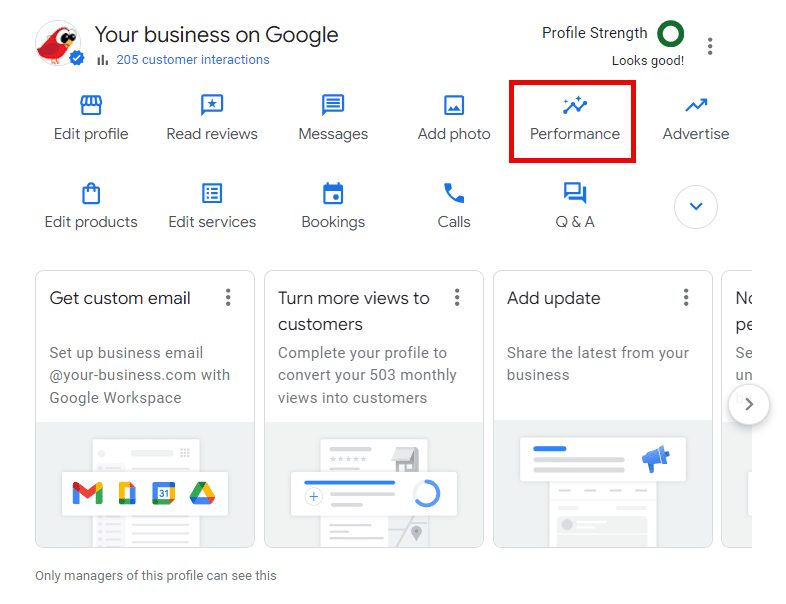
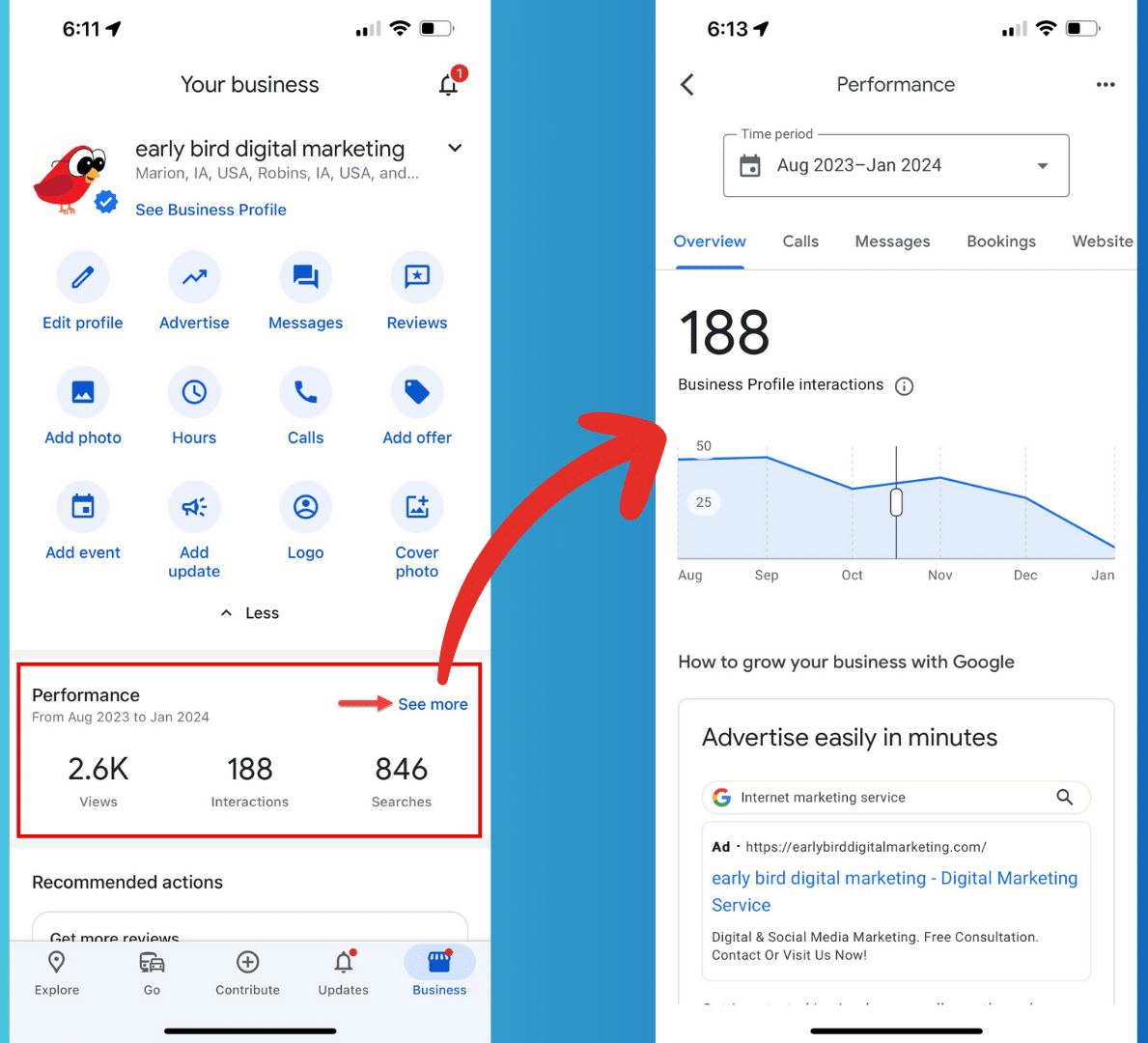
Performance metrics for your Google Business Profile
Let’s examine the specific metrics you can look at. Remember that some of these are category-specific, so you may not have all these options.
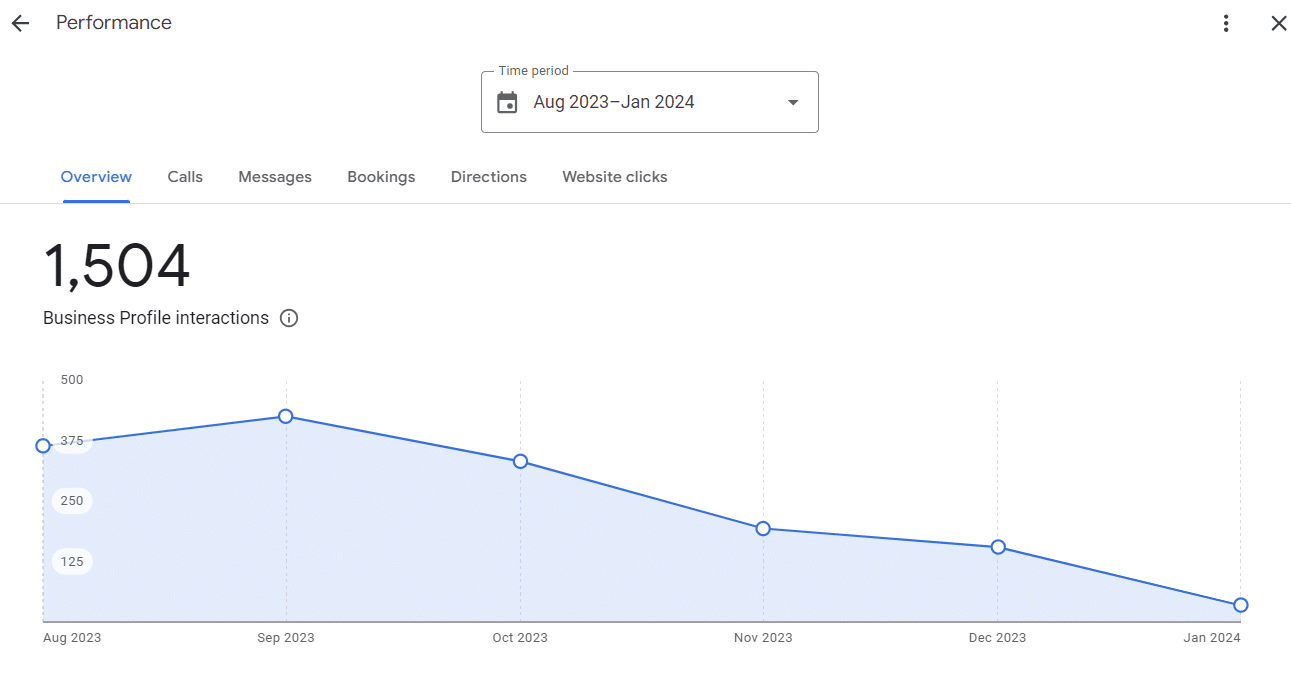
Overview
The Overview section measures all interactions on your Google Business Profile – like when people call, message, make bookings, ask for directions and more.
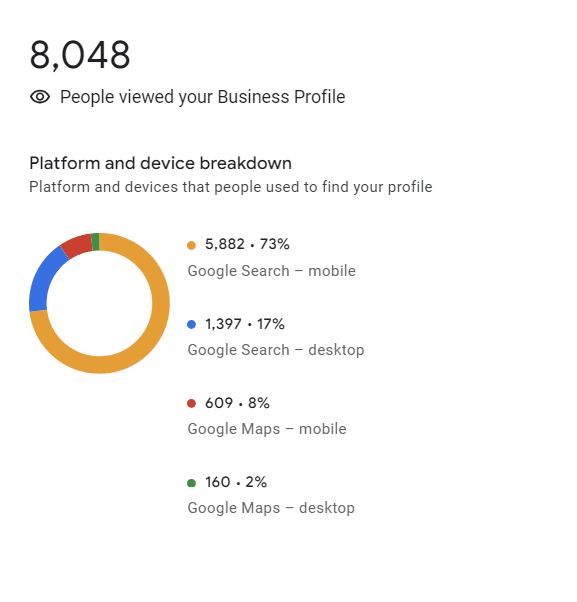
How people discovered you
In the Overview section, you scroll down to see two other important pieces of information:
How people viewed your profile.
The keywords people used to get to your listing.
Comparisons are only available for completed months.
Views show how many unique people saw your Business Profile on Google Search and Maps, with a breakdown between desktop and mobile.
Users can be counted a limited number of times if they visit your Business Profile on multiple devices and platforms, like desktop or mobile and Google Maps or Google Search.
A user can only be counted once a day per breakdown device and platform. Multiple daily visits aren’t counted.
It’s also interesting to look at the keywords people used to find your Google Business Profile.
The Searches metric is updated at the beginning of each month and shows the search terms people entered to show your Business Profile in search results.
Updates can take five days to show up, according to Google.
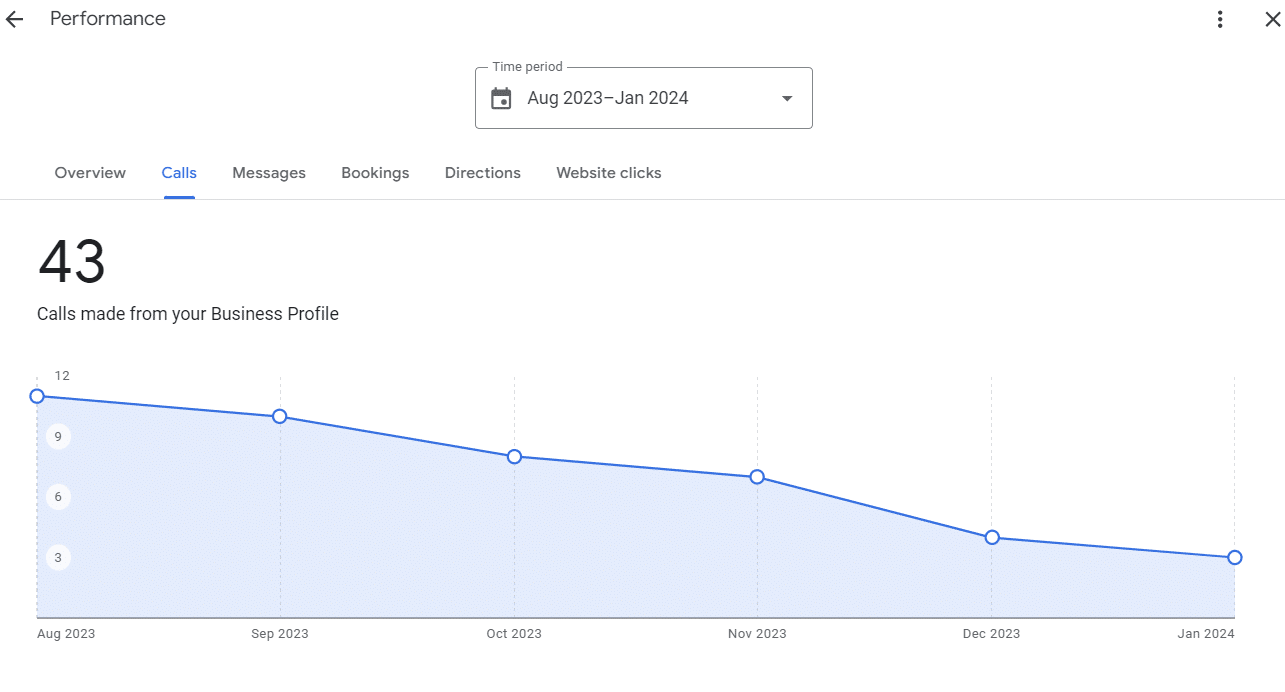
Calls
Calls show all calls made from your Google Business Profile. This obviously would only measure those calls on mobile devices made by people using the click-to-call button on your profile.
This number would not include people on desktop devices who manually enter your phone number into their phone to call you.
One thing to remember is that the Call History feature was recently deprecated and suddenly turned back on a few months later.
Since then, the number of missed calls by weekday or time of day seems inaccurate. I’m not sure if this is something that Google is going to eventually fix or not.
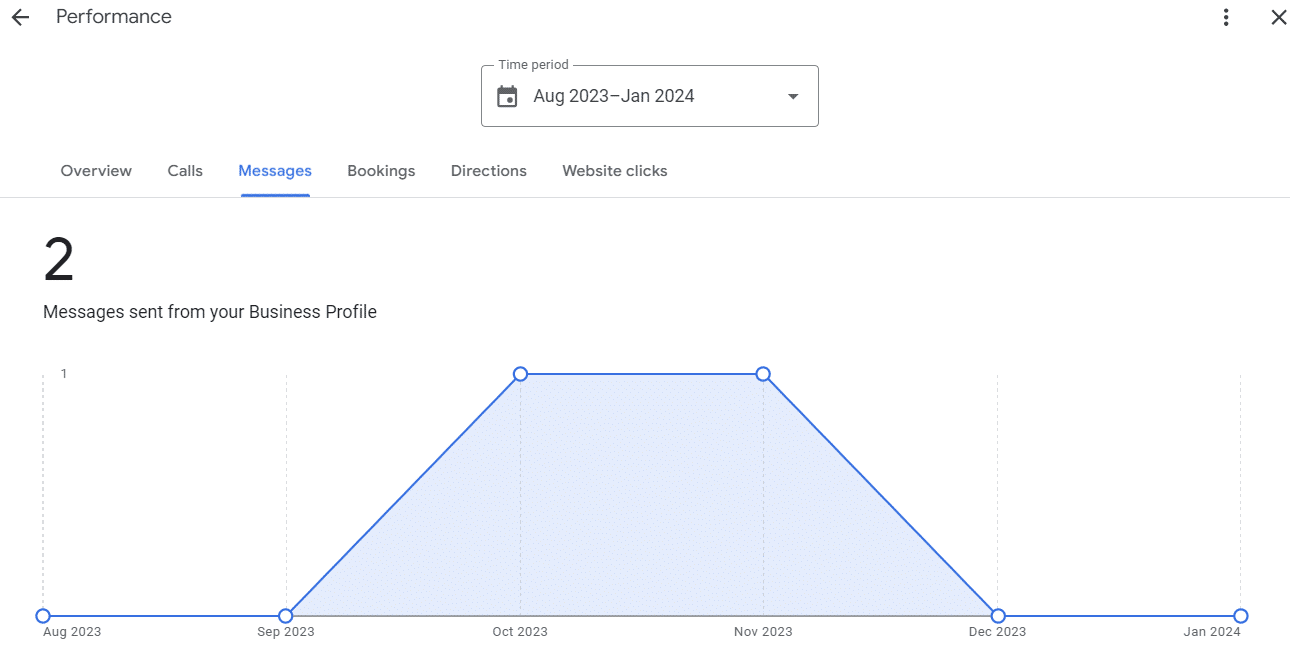
Messages
The Messages section is for businesses that have turned on their GBP’s Messages/Chat feature. This metric shows how many messages have been sent from your Business Profile.
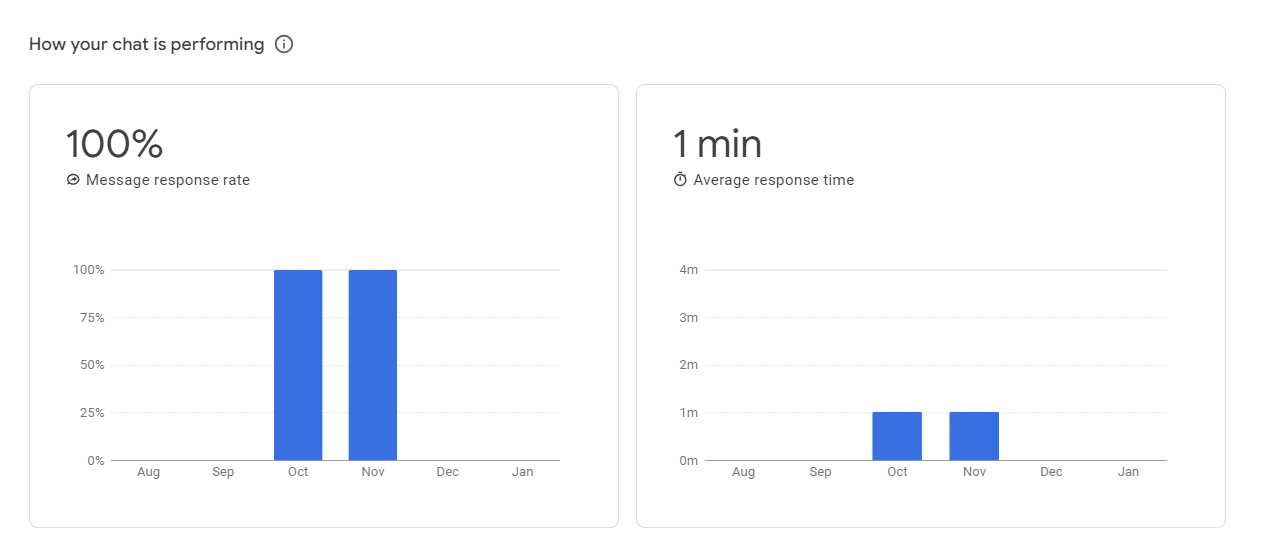
There’s also a section that shows how you are performing at responding to chat messages you receive.
The message response rate shows how many messages you responded to.
The average response time shows how quickly you responded to your messages.
Remember, you should strive to reply to messages you receive within 24 hours – or else Google could take the Messaging feature away from you!
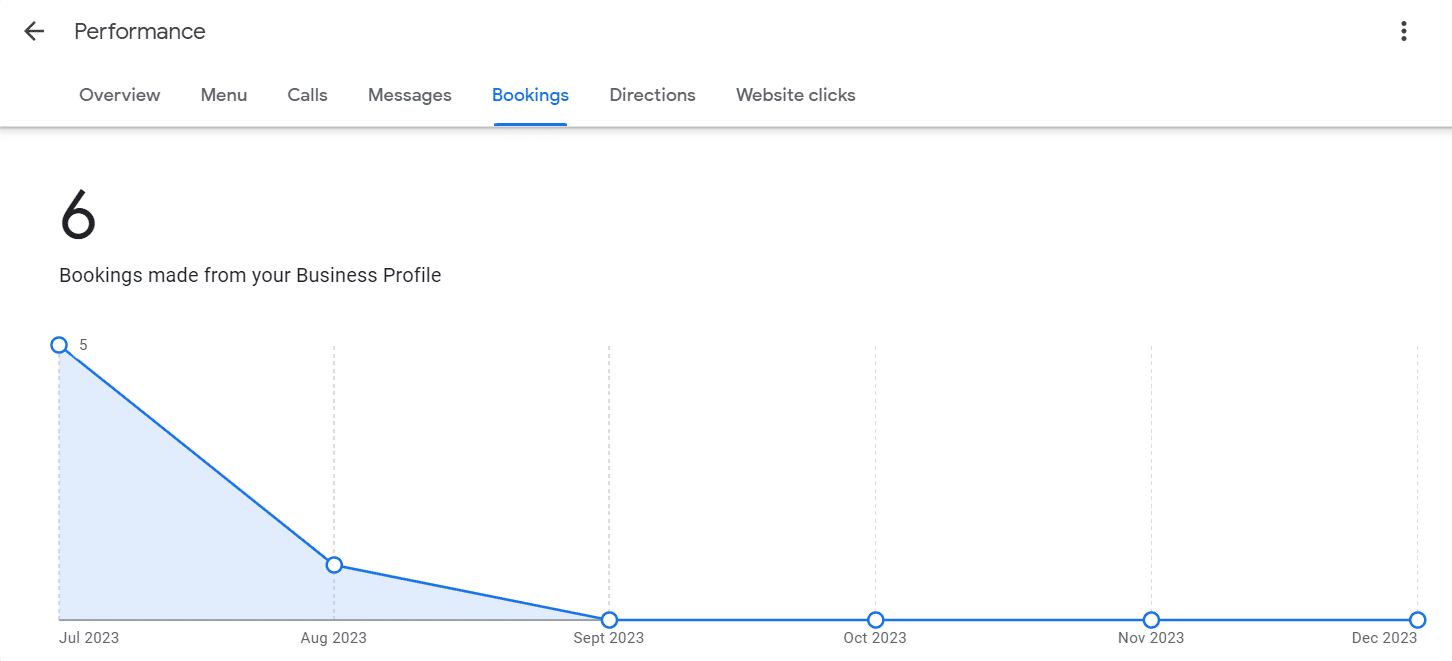
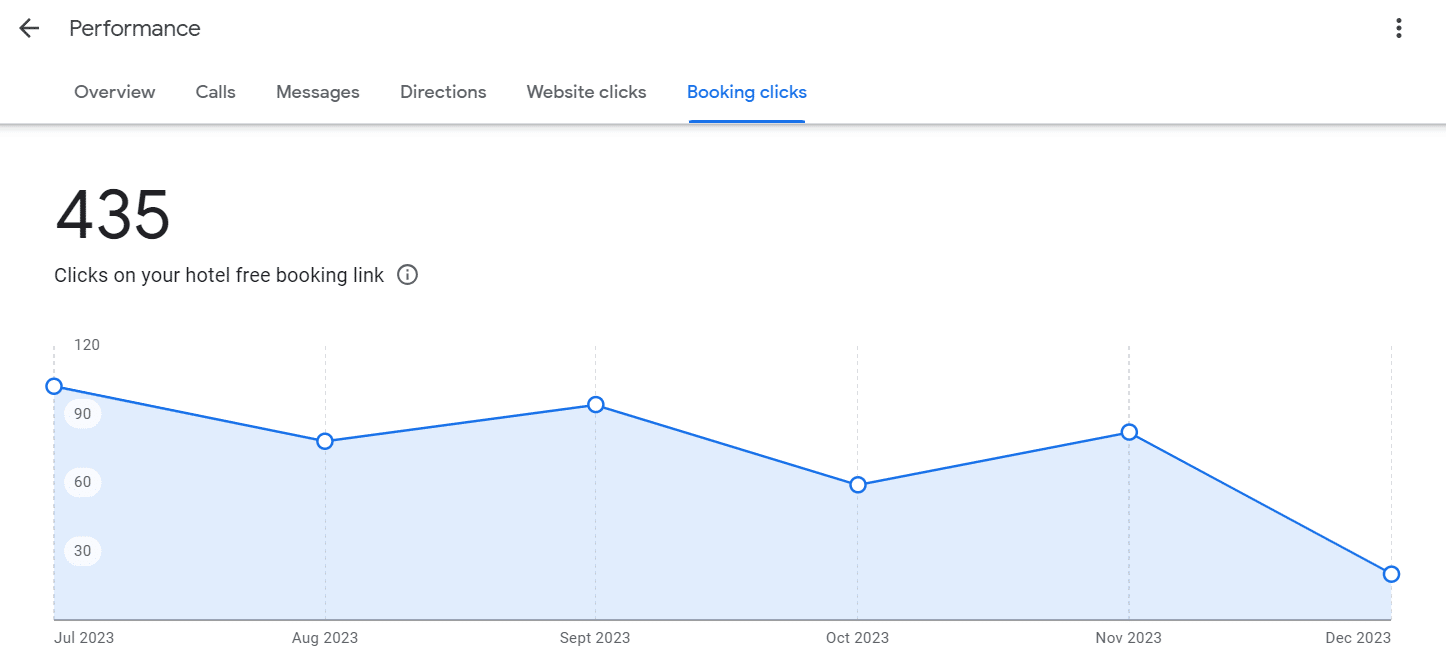
Bookings
Bookings measure the number of completed bookings by customers.
To get data for this metric, you must set up bookings through a Google provider. You won’t get tracking data if you enter another booking software URL into your GBP listing (e.g., Calendly).
Restaurant booking is another quirky insight that can be inaccurate depending on how you have your bookings set up.
For instance, if you’re using a booking app but require that people put a deposit down to reserve a table, GBP restaurant booking insights won’t track that reservation booking because the searcher is going outside of GBP to enter their credit card information.
So, depending on your situation, the Booking insights may not be accurate.
Screenshot by Tim Capper
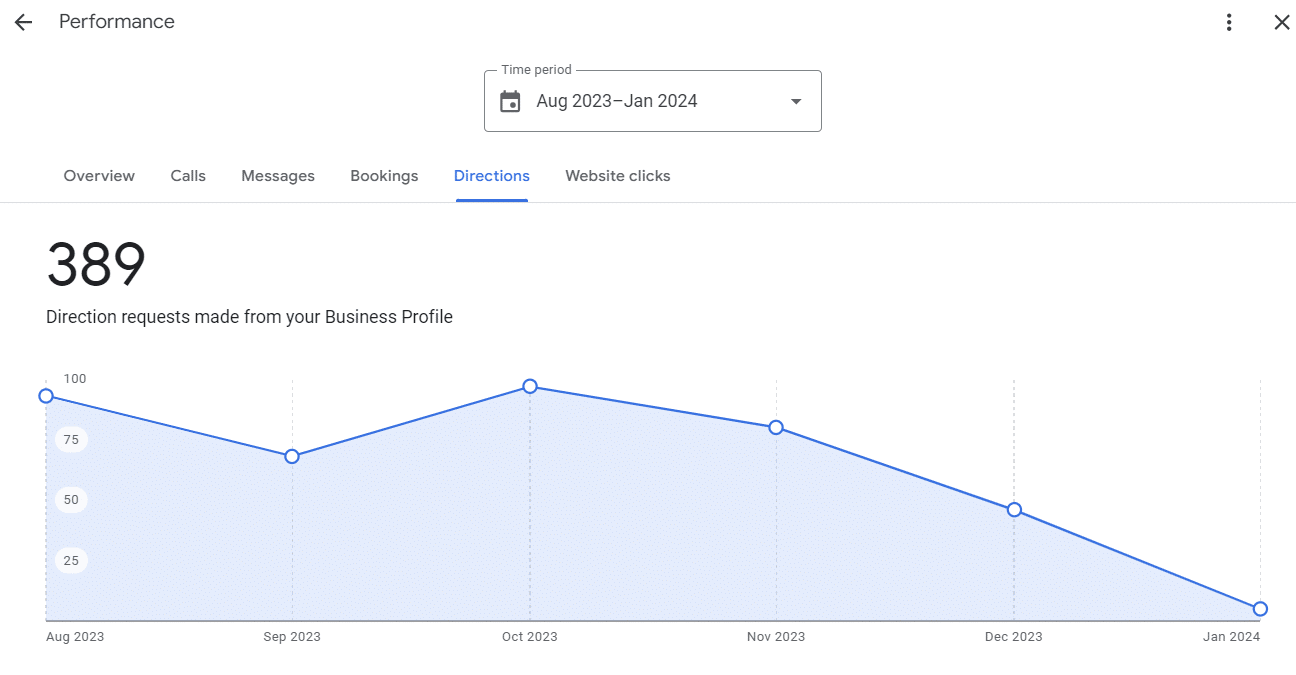
Directions
The Directions performance metric shows everyone who used your Google Business Profile to get directions to your business location.
Note that if you are a service area business (SAB) and do not show your physical location in your GBP listing, you will not see this option in the Performance section.
Menu
The Menu metric measures the number of people who viewed your restaurant’s menu content. Menu content includes detailed dish information, menu photos and the menu link on your Business Profile.
Screenshot by Claudia Tomina
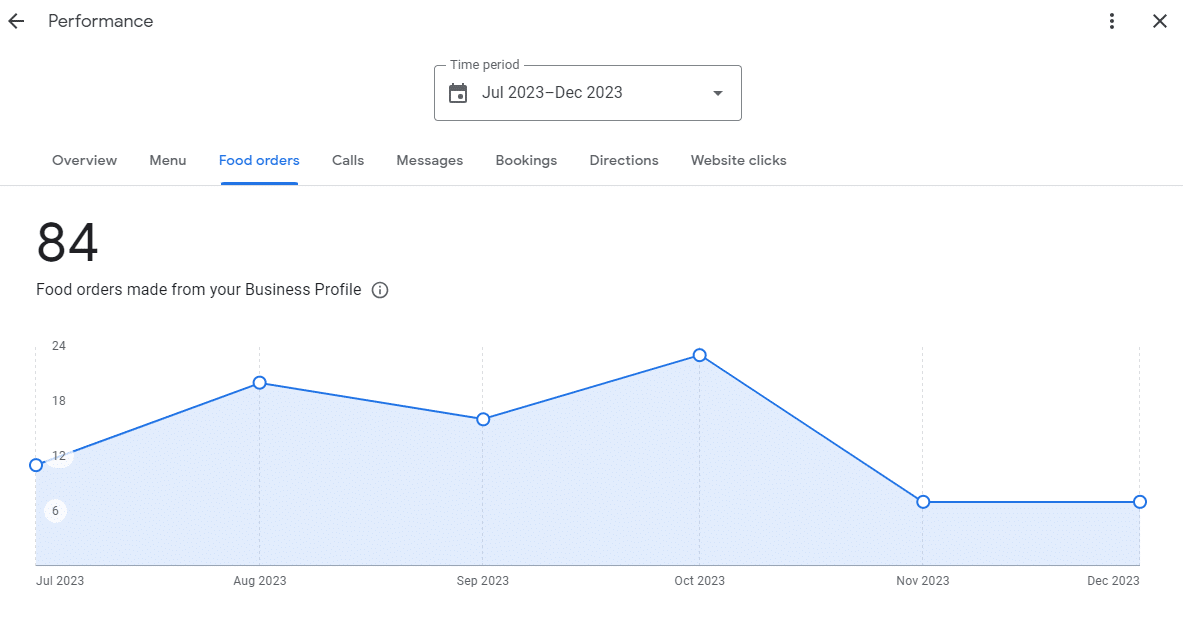
Food orders
The Food orders metric represents the number of orders placed for pickup or delivery directly from your Google Business Profile using an “Order with Google” provider.
Food orders are only tracked if the restaurant has the menu items listed on their GBP listing and the person orders directly from one of the supported Google third-party providers.
Other third-party apps like GrubHub or Doordash are not tracked here.
Screenshot by Claudia Tomina
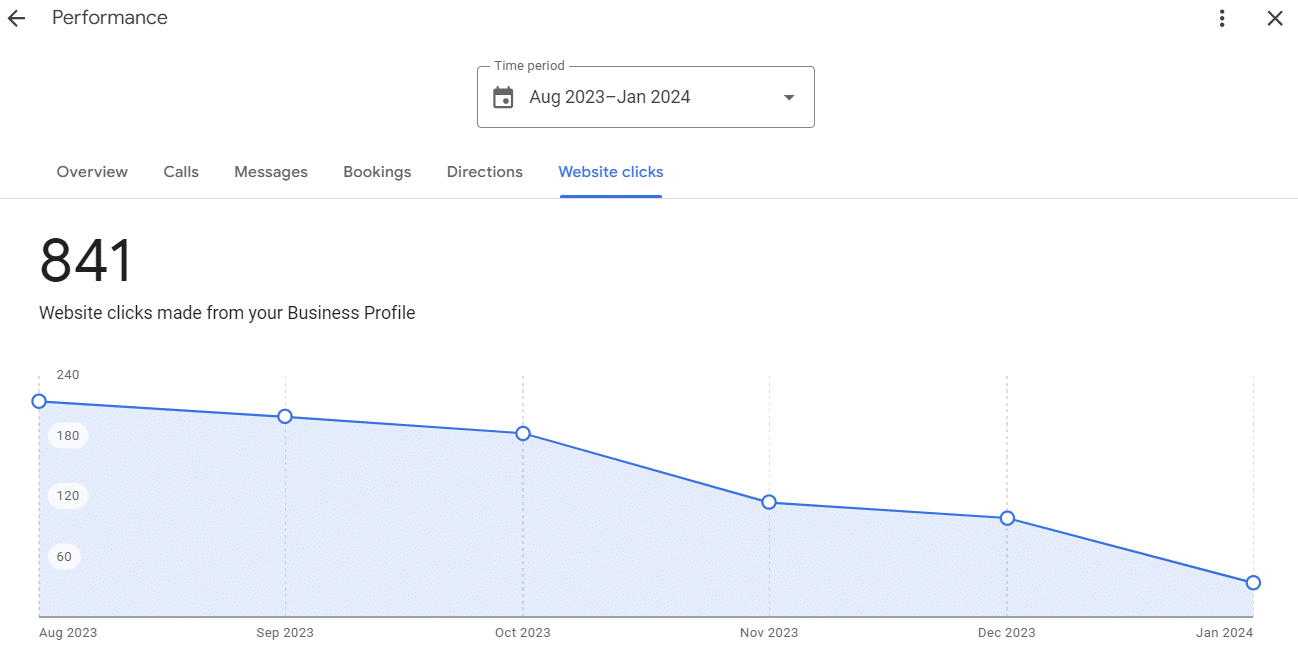
Website clicks
Website clicks are the number of times people click on your link to your website from your Google Business Profile. This number does not include clicks to a Google Business Profile website.
Google Ads customer service has plummeted to an unacceptable all-time low, according to search marketers.
From incorrect account suspensions to uncomfortable sales calls “aggressively” pushing automation to confusion over the platform’s own products, advertisers have told Search Engine Land that they are exasperated by the lack of help offered by their reps.
And the problem only seems to be getting worse.
A ‘brutal’ process
Mike Kelley, Chief Marketing Officer at Sylvan Learning, has been working in marketing for almost 20 years. He got in touch with Search Engine Land after trying to trying to purchase YouTube reservation ads – only to be told by his Google rep that they had never heard of them. He explained:
“I have been trying to purchase these ads for three months – surely it cannot be this hard?”
“I’ve called in over a dozen times – they tell me someone will call back, but they never do. They don’t respond to emails either. The whole process has been brutal.”
No one on their team seems to understand what Instant Reserve even is or have an understanding of YouTube ads, Kelley said, adding this is “an all-time low for Google Ads customer service”:
“I actually reached out to two agencies that spend $100,000 a month with Google for help, and used their resources and contacts. But even they have had no response to this query.”
“Recently, I posted a job on Upwork that pays a reward of $500 for anyone that can get us access and set up Instant Reserve TV ads for our account. This project is ongoing.”
‘Disappointing’
Justin Lincoln, Digital Advertising Manager at Closed Loop, reported a similar experience.
Google announced in December that advertisers could opt out of the Search Network temporarily. To do this, they would need to talk to their rep. But when Lincoln contacted his rep, the person did not know anything about this and could not help.
Puzzled by the response, Lincoln sent his Google rep a link to Search Engine Land’s article to prove that there had been an update temporarily allowing marketers to opt out of the Search Network.
Despite this evidence, the rep maintained that this wasn’t the case, but assured that they would escalate the issue to their manager. However, it would later transpire that even senior staff had not been informed of the update, despite the offer’s limited run until the end of February.
It wasn’t until a different representative intervened that the confirmation surfaced: Google had updated its rules to permit advertisers to opt out of the Search Network. However, the rep confessed this crucial information was not widely known among the team, highlighting a communication gap within Google’s support structure. Lincoln told us:
“I was able to speak with another Google rep. They confirmed that my other rep just needed to look up the update in MOA – I assume this is where they house their processes.”
“She also mentioned that the update likely hadn’t been widely dispersed yet, which was probably why my main rep hadn’t heard of it. I will be reaching out to my original rep shortly to see if he can find it.”
“Overall, I am a little disappointed since this is holding us up from testing Performance Max for a client.”
‘We have no one to talk to’
Menachem Ani, founder of JXT Group, said a lot has changed in terms of Google support over the past decade. While acknowledging that Google agency reps were once “very helpful,” he admitted there was a steep decline in customer service quality following the restructuring of agency teams by Google last April.
The result of those changes? His agency had no dedicated agency-level rep.
Instead, individual reps started getting assigned to specific accounts, resulting in many being left with no support. The level of customer service has been impacted so badly by the changes, Ani has claimed that the accounts with reps aren’t necessarily in a better position than those with no support. He explained:
“Reps can no longer help with some of the things they were able to help with in the past. For example, we have a client whose account was suspended – but our reps can’t do anything to help us.”
“While I believe that Google’s intentions are good, the reality is that many accounts get suspended incorrectly with no recourse.”
“We’ve been working to get a client account reinstated for over four weeks. We know the account is a legitimate business and that the suspension is a mistake, therefore, we appealed the suspension only to receive automated responses that the appeal was denied.”
“It’s not very helpful at all and we have no one to talk to.”
‘Ludacris scare tactics’
CEO of Marketing Labs, Matt Janaway, told Search Engine that he’s had several ongoing issues with his Google rep.
When he recently asked for some insight to explain a “random $90 click” on a campaign, the rep could not provide an answer. They also couldn’t shed any light on a sudden reduction in ROI that had impacted another campaign. Janaway called the lack of help from Google frustrating.
However, when it comes to his Google Ads rep, the biggest issue he’s been struggling with is the persistent unwanted calls urging him to adopt more automated features. He elaborated:
“We get calls daily from reps that have been assigned to our client accounts. It’s very convoluted and when we don’t engage – because we can’t possibly engage them all – they try to go directly to our clients instead!”
“This happens regularly. And the scare tactics they use are quite ludicrous.”
“They also contact my personal mobile phone number which isn’t on the account at all other than for 2FA purposes – which must be breaking GDPR.”
“These calls often happen before and after working hours, too.”
Is AI the solution?
Complicating matters further, amid what appears to be an unprecedented surge of complaints about customer service, Google is planning a major restructure of its 30,000-person ad sales unit prompting fears of more job cuts. This comes after Google’s CEO Sundar Pichai announced that the company would be letting go of 12,000 employees and contractors last year – approximately 5% of the the company’s total workforce.
The cutbacks have convinced some marketers that Google is planning to quietly phase out support. But Google Ads liaison officer Ginny Marvin said this is not the case, explaining that Google Ads is aware of the ongoing negative feedback from advertisers and hinted that improvements are on the horizon, with AI set to lead the way.
In another nod to the possibility that Google Ads support may become an AI-powered feature in the future, a Google spokesperson told Search Engine Land:
“This is an area where we are experimenting with AI as an additional component to enhance the customer experience.”
“We have also made significant improvements to our Ads Help Center content, which helps customers self-resolve issues more quickly and reliably.”
Google’s advice
While it seems that Google will heavily rely on AI to address marketers’ concerns, the company has not confirmed a specific timeline for the rollout of these improvements.
So what can marketers do when they are unsatisfied with the customer service delivered by their Google rep? The Google spokesperson told Search Engine Land:
“We do strive to provide the best experience for our customers when they engage with our sales and support teams.”
“But if we miss the mark, we encourage customers to provide feedback through our Ads Help Center so we can make improvements.”
Delayed responses (and, in some case, the complete lack of responses) from Google reps remain a concern for search marketers.
Google told us that while response times can vary based on volume and complexity, your rep should respond to you “quickly.” If you find that this is not the case, report your experience to Google.
Regarding more specific issues like unfair account suspensions, the spokesperson stressed that advertisers should appeal any decisions they believe to be unfair through the Help Center.
“There has been no change to this process,” the spokesperson added. “Our customer support representatives are not involved in submitting these appeals on behalf of a customer, or reviewing/deciding the outcome.”
Get the daily newsletter search marketers rely on.
If you aren’t satisfied with the level of customer service your rep is delivering, Google advised filing an official complaint when necessary through the Help Center. The spokesperson explained that the feedback is necessary to “improve our sales and support processes, as we strive to provide a top-tier customer experience.”
However, Team Lead SEA / Amazon at The Reach Group, Georgi Zayakov, said this might not be a solution that would work for all marketers. The constant phone calls from Google reps trying to force automated solutions onto his clients has been shocking, he said.
The reps have allegedly been so “aggressive”, phone calls have almost become offensive. Despite this, he admitted that he is unlikely to file a complaint:
“I recently submitted some negative responses in a survey, but given the fact that I try to be as nice as possible to their reps, I will probably never proactively write a complaint.”
“And this holds true for most of PPC professionals. We don’t want to get the reps in trouble, even if our experience with them has considerably worsened.”
“I think that we are also afraid that a particular rep will see our feedback and this will damage further collaboration.”
Although Zayakov’s concerns are understandable, Google’s commitment to improving support through automation could mean they become obsolete sooner rather than later.
During New Year’s Eve weekend, no celebration in Minneapolis garnered as much attention as Lucid Nights NYE. Taking place at The Armory and hosted by Sound in Motion (the Twin Cities’ premier EDM events company), Lucid Nights NYE was a 2-night, unparalleled journey through the depths of electronic music. Home Business Magazine attended both nights, but this article will take a look at Night 1 (headlined by Zeds Dead).
Night 1 of Lucid Nights NYE was an unforgettable, sonic wonderland for attendees. Before Zeds Dead took to the turntables, all of the dubstep lovers in the massive crowd were treated to sets by Dirt Monkey, Tape B, Levity, and more. These artists’ sets were filled with wobbling, intricate bass drops synced up to spellbinding visuals. The electrifying music and atmosphere primed the audience for the main event.
The Zeds Dead show was one for the books. Photo credit: Brez Media
Then Zeds Dead closed out the night with a set teeming with captivating visuals and sonic mastery. Drop after meticulous drop, the exhilarating show kept the crowd dancing and headbanding until the very end. Dazzling lasers, lights, and pyrotechnics were synchronized with each beat, helping to make Zeds Dead’s set a mesmerizing spectacle. Their show wasn’t just heard but felt, a testament to the power of live dubstep music.
Zeds Dead featured Grade A production elements like jaw-dropping pyrotechnics. Photo credit: Brez Media
If you work for a lifestyle business and are looking to grow your brand awareness in the Twin Cities region, consider sponsoring one of Sound in Motion’s upcoming shows at The Armory. Events that are generating a ton of buzz are Subtronics on February 16th and 17th, Gareth Emery on March 1st, and Excision on March 8th and 9th. Sponsoring these shows will give your brand the opportunity to connect with a huge, engaged audience.
YouTube video layouts can now be edited when converting long-form clips into Shorts.
The new editing feature, compatible with all Remix tools, is currently accessible only on iOS but will be rolled out to Android in the near future.
Why we care. The new editing tool could prove useful for brands and marketers wanting to capitalize on the popularity of Shorts, viewed by 2 billion monthly logged-in users.
How it works. To use YouTube’s new tool, simply follow these steps:
Go to the video you want to turn into a Short and tap the “remix” button.
Select “Edit Into A Short”.
Trim to Select the part of the video that you want to use and then tap “Layout”.
Here you can choose from various layouts, such as “Single” or “Square” to zoom into one particular part of your video. Or you can use one of the split screen layouts that best fits your video.
Pinch and drag in the preview section until you’re happy with how they look.
Save the layout.
Once your’e done editing, you can upload your short.
Get the daily newsletter search marketers rely on.