As the UK stumbles into a cost-of-living constraint and impending recession, demonstrating empathy for customers is more crucial than ever.
The ‘cost of living’ has been a hot topic of discussion in the United Kingdom in recent months. We can thank the Covid-19 pandemic for this year’s record-breaking inflation rate of 9.8%, the highest since 1992. This, of course, is causing price increases across the board, from food to energy to housing to the cost of essential necessities, all of which must be accounted for in household budgets.
This is why it’s so important to be careful with your advertising right now. The wrong words and the wrong tone. The wrong message, in other words, can do a huge amount of harm. Read on to find out more.
Focus on Value
The focus of brands should shift from pricing to value. The long-term value a brand provides and the way it displays that value through the connection it has with its clients is of utmost importance in times of inevitable inflation.
The best way to make your brand stand out is to show how valuable you are rather than just tell people. Whether it’s a movie streaming service throwing in two extra movies at no extra cost, a regular discount at your favourite supermarket found through excellent supermarket advertising, or the elimination of shipping fees for all orders at an online shop, these little touches are what set one company apart from another.
Talk About Your USP
There is no avoiding the fact that costs will rise. More expenditure is never welcome, regardless of the reason. What this means for brands is that they need to take centre stage in the story even more, emphasising their unique selling points once more.
It’s possible that a company would rather support its local economy by purchasing goods from local suppliers than by outsourcing to other countries; nevertheless, this would lead to higher prices for consumers. Make sure that message gets across; we already know that customers prefer to buy from local firms (more than 90% of consumers are willing to pay more for British-made items), so we just need to prove that there is benefit in doing so.
It’s crucial that companies show they care about the hardships their customers are experiencing as a result of price increases. You could aid those who are looking to cut costs by offering them some sound advice. However, the method of implementation must always be considered carefully. Public relations became a nightmare for Ovo, the energy provider, as the company blogged cost-cutting advice that included telling consumers to hug their pets. A good intention could have been ruined by sloppy and insensitive implementation.
Companies can’t always avoid increasing costs, but when they do, brands need to give customers a reason to stick around and show they understand and care about the toll it takes on people’s lives.
Unfortunately, the recent inflation situation is influencing customer behaviour. With even more families on a tight budget and unwilling to spend, getting the outcomes you want from your advertising and marketing will be difficult. But it is possible.
More than agencies or freelancers, in-house ecommerce marketing teams tend to have more access to data, making them the perfect intermediary between that data and the campaigns they manage.
Accurate, timely insights from analytics platforms or customer relationship management (CRM) systems can help marketers make informed decisions on how best allocate resources when automating tasks (e.g, email sequencing, segmentation strategies).
This allows for more efficient use of time while also providing a higher return on investment through targeted messaging that resonates with prospects over time.
In his SMX Next presentation, Andrew Lolk, founder of SavvyRevenue goes over what it takes for in-house ecommerce marketing teams to implement the necessary data for their algorithms to be efficient, and making sure that the data that we’re actually feeding into the engine also equals the goals.
Feeding the beast
Feeding the beast means giving as much data as possible. This includes:
Server-side tracking.
Enhanced conversions.
Giving the algorithms as much data as humanly possible.
“We need to feed the system with as much data as humanly possible and then use other methodologies to define attribution,” Lolk said. “What we see in Google ads shouldn’t be what you use to actually determine whether it is good for us or not, as profitable or not. The second part is making sure that the data that we’re actually feeding into the engine also equals the goals.”
Analytics
What should PPC marketers focus on? Not manual bidding, keywords, and rules, according to Lolk.
Rather, your focus should be on taking the captain’s seat. Become a mini-manager, or team lead. In order to optimize accounts, attention needs to be given to feeding the right data into the algorithm.
In fact, analytics should equal about 99% of your back-end data. Lolk’s advice: get enhanced conversions
Micro conversions
Managers need to track micro conversions, Lolk said.
“Once you’ve figured out all these micro-conversions you want to track, you need to assign a value. The reason you want to assign a value is that unless you put some kind of conversion values to these micro-conversions, then you can’t use it for shopping because you can’t do target CPA or maximize conversions or maximize conversion value bid strategies.”
Use cases
Use cases for assigning value to micro conversions are as follows:
The long customer journey, where it takes consumers 3-6 weeks to make the purchase.
High average order value, such as mattresses and high-end office chairs
Tracking micro-conversions and assigning a value to those. Whether they be using a chat feature or clicking on reviews
Blended ROAS
To calculate blended ROAS, you take your total revenue and divide it by your total cost across all platforms.
Blended ROAS includes spend and return for Google, Facebook, Instagram, Twitter, Microsoft, and any other ad platform where you’re running campaigns.
Negative ROAS
Brands and advertisers need to be comfortable with a negative ROAS for some products in certain categories in order to maximize profits and balance new customers, Lolk said.
There are times when you increase profit but your revenue is still down. But by looking at back-end data you can see which products were best sellers, had the highest conversion rates, or got the most clicks.
You can use that data to create a custom product score, allowing you to prioritize them.
Watch: Feeding data to automation: In-house teams’ secret sauce to Google Ads
Below is the complete video of Lolk’s SMX Next presentation.
With the wide variety of clients out there, you’re bound to run into the occasional DIY marketer. These marketers prefer that you teach them how to be self-sufficient rather than rely on you for every little question.
These clients can be a blessing but can also be dangerous. The challenging aspect of client management is finding the balance between empowering them to get the data they want without feeling like they don’t need you.
That’s where Google’s Looker Studio tools come into play.
Looker Studio is typically used for general reporting. The real beauty of Looker Studio is that it can be used for so much more.
By creating tools for clients, you enable them to do the actual research it takes to accomplish SEO while still providing that much-needed maintenance and guidance that comes with experience.
This article illustrates free dashboard templates you can use with your clients.
How to change the branding
Before we dive into the specifics, you may want to update the branding and logo of your dashboard. This process could not be easier.
Right-click on your logo, and you will see a menu appear. Near the bottom, select “Extract theme from image.” You will then be presented with three different color scheme options. Select whichever one you feel best represents your brand.
This will automatically change most of the colors and get you most of the way to the finish line of designing in your Looker Studio tool. However, there may still be a few charts or texts you’ll need to update.
1. Technical SEO auditing
Tracking technical SEO efforts can be difficult to visualize. Sure, you can track it in a spreadsheet, but that isn’t client-friendly.
For years, SEOs have attempted to make dashboard trackers to help show improvements in site health over time.
Luckily, our friends at Screaming Frog have finally cracked the case of the perfect technical SEO dashboard. The best part? The template is free. You can see it here.
How to copy the dashboard
To copy the dashboard:
Click on the three dots in the top right
Select make a copy
Select your data source (don’t worry, you can update later)
How to set up the technical SEO tracker tool
Screaming Frog has published a helpful guide on setting up this Looker Studio tool. What they will walk you through includes:
Setting up a scheduled crawl
Configuring the export to a Google Sheet
Connecting that Google Sheet to the Looker Studio dashboard
function getCookie(cname) {
let name = cname + “=”;
let decodedCookie = decodeURIComponent(document.cookie);
let ca = decodedCookie.split(‘;’);
for(let i = 0; i <ca.length; i++) {
let c = ca[i];
while (c.charAt(0) == ' ') {
c = c.substring(1);
}
if (c.indexOf(name) == 0) {
return c.substring(name.length, c.length);
}
}
return "";
}
document.getElementById('munchkinCookieInline').value = getCookie('_mkto_trk');
2. Keyword research
The presentation of keyword research takes many forms. Most recognizable is the simple spreadsheet. Some people create keyword maps for each page or topic, while others with smaller clients have a short list of keywords.
However, Looker Studio can be a powerful analysis tool for larger sites with tens of thousands or millions of keywords.
If you are working with millions of keywords, do not use Google Sheets like this example. I recommend using BigQuery to handle your keywords.
The first step involves importing your keyword research into a Google Sheet. To use the free template I created, you will need to include the following dimensions and metrics in your Google Sheet:
As we learned in the previous dashboard, you’ll want to make a copy of this dashboard and connect your data source, whether it be Google Sheets or BigQuery.
Important features of this Looker Studio tool
This tool has many unique features that can be used to help drive your on-page SEO strategy. Depending on your strategy, these features can be customized to display different types of data and categories.
Boolean Buttons
The three buttons in this tool are based on custom boolean formulas, meaning they work on true/false statements. Let’s take a look at one of them.
We’re creating a function only to display long-tail queries that start with a question word in the formula above. This formula relies on regex, with two very important symbols:
The circumflex (^) is a regex function that essentially means, “if the keyword starts with this.”
The pipe (|) symbol is another regex function that means “or.”
Using this formula, you can create any number of different kinds of checkboxes. I added a few keywords separated by pipes (|) to help display keywords in those categories for the SEO and PPC checkboxes.
Custom search box
The custom search box is a pretty simple but powerful feature of this tool. Not only can it quickly help you narrow down your search to identify keyword opportunities, but it can also use the power of regex to customize your search.
Intent dropdown
The keyword intent dropdown can help you filter by the intent of each keyword within the search funnel. Pretty simple, right?
Well, this filter can be easily swapped out by any dimension in Looker Studio. So if you want to swap it out for other keyword categories, this can be the perfect filter for you.
Funnel
This funnel helps visualize the true search funnel by intent. When applying other filters in this tool, the funnel and metrics above automatically update with the intents.
3. Link building tracking tool
Link building is one of the tensest topics SEOs like to avoid with clients. Links are challenging to earn and often the hardest thing to control.
The best way to earn trust with clients and stakeholders is through transparency. Instead of dodging the data around link building, hand over the keys and let them explore the data for themselves.
This is one of the more straightforward Looker Studio tools we can create. You can pair any number of dimensions and metrics to help illustrate your point.
The supporting Google Sheet I’m using is a simple backlinks analytics report from SEMrush. However, you can use your own link-building tracker to feed the report. Just make sure you add the acquisition date for the date range.
You can view the Google Sheet that’s feeding the tool here.
Conclusion
Looker Studio is one of the fastest reporting tools to stand up while still having some seriously robust features. The fact that it’s also free makes it an easy platform of choice.
But that begs the question, why go through all that trouble for clients and other stakeholders?
These tools help create a better sense of transparency, which can help improve trust. Thus, creating a better partnership between you and your stakeholders.
One of the most challenging parts of SEO isn’t the work itself but the communication of value. So from now on, think of new creative ways to demonstrate value to your clients, even if it’s just making a simple tool in Looker Studio.
Rent Your Drive. A necessity that sometimes we forget until the last minute is finding cheap airport parking. However, travellers over the Christmas period should be aware it’s about to get a lot more costly.
New data by YourParkingSpacehas revealed that various UK airports are increasing car parking fees during this season, with motorists expected to pay as much as 128% more for festive dates.
The 10 airports surging their airport parking prices over the Christmas period
Ahead of the peak Christmas travel period, experts are YourParkingSpace and are putting a warning out to travellers flying from a number of airports between the 23rd and 30th of December. Their data has revealed there is a potential hidden cost that travelers could face, adding an unnecessary expense to festive trips. But which airports are increasing their prices the most?
The biggest difference in car parking fees was at London Luton Airport. Parking cost £56.99 in January 2023, but has been increased to £129.99 for 23rd to 30th December – a whopping £73 price difference! Charges for the festive period were higher by as much as 128 percent for this week compared to a month later.
London Heathrow Airport was also found to be raising their prices significantly on key Christmas travel dates. Charges to leave a car for a short stay from 13th to 20th January at the airport is £140.80, while a short-stay fee from 23rd December to 30th December is £217.30 – meaning a hike of 47%.
With a £34.00 price difference, Bristol Airport’s increase in car parking charges ranks third on our list. There is a 29% increase, with charges to leave a car from 13th to 20th January costing £116.99 while the same car park costs £150.99 in the week 23rd to 30th December.
Out of all the airports reviewed, t
here were various locations that remained consistent with their parking prices – including London City Airport, Cardiff Airport, and Southampton Airport.
How Can We Make Money From this Hike? Yourparking space explain how
In simple terms: Rent your drive out. By making your house available to make money from your drive. Speaking on the price hikes, Harrison Woods, CEO at YourParkingSpace adds: “Anyone travelling over the Christmas season will be stunned by some of these sky-high increases in car parking fees where some airports are increasing costs to cash in on the busy winter travel period. If you are travelling over Christmas, head to YourParkingSpace website to find off-site convenient, and affordable parking for your journey.”
Google has begun to push out an update to its helpful content system, this is the first big update to this update since it launched in August 2022. The update started yesterday, December 5th but it is now noticeable on December 6th, which is why Google announced this update today.
What is new. Now the helpful content update (aka system) is a global update, impacting all languages and not just the English language. This will help Google’s systems detect more forms of low-quality content created for search engines and primarily not for people.
Google also told us this system was updated with additional signals to help Google identify more content created primarily for search engines versus people.
Timing. Google said this update appeared for a tiny amount of queries late on December 5th but on December 6th it became a more notable update, being more visible.
Rollout. The rollout, like most other Google updates, should take about two weeks to completely roll out.
Google wrote it “released the December 2022 helpful content update, which improves our classifier and works across content globally in all languages. The rollout may take up to two weeks to complete.”
More on the helpful content update. Google’s helpful content update specifically targets “content that seems to have been primarily created for ranking well in search engines rather than to help or inform people.”
This algorithm update aims to help searchers find “high-quality content,” Google told us. Google wants to reward better and more useful content that was written for humans and to help users.
Content written for the purpose of ranking in search engines – what you might call “search engine-first content” or “SEO content,” has been frequently written about lately and discussed across social media.
In short, searchers are getting frustrated when they land on unhelpful webpages that rank well in search because they were designed to rank well.
Google’s new algorithm aims to downgrade those types of websites while promoting more helpful websites, designed for humans, above search engines.
Google said this is an “ongoing effort to reduce low-quality content and make it easier to find content that feels authentic and useful in search.”
What to do if you are hit. Google has provided a list of questions you can ask yourself about your content. Read through those questions as we posted over here, and in an unbiased manner, ask yourself if your content is in sync with this update.
Note, if you were hit by this update, it can take several months to recover, if you do everything right and make changes to your content over time.
Google told us that if a site is no longer seen as unhelpful, it might see a positive change as soon as the current update has finished. However, a site might not see a positive change if there are other areas where it needs improvement. So always be working on making your site more helpful.
Why we care. If you notice any ranking and visibility changes in Google search over the next two weeks or so, especially if those were big changes, you can likely attribute it to this update. Read Google’s advice, make the necessary changes, and hope for a recovery in the upcoming months.
We hope you all will benefit from this update and if not, we hope you recover quickly.
Google Chrome is adding shortcuts to the address bar on desktop that will help you search through your bookmarks, history and tabs.
Why we care. Search marketers do a lot of searching – and I’m pretty sure in our profession it’s illegal not to have dozens (hundreds?) of tabs open at a time. These additions to Google Chrome hopefully will make it a bit easier for you to search directly for the correct tab, bookmark or URL from your search history.
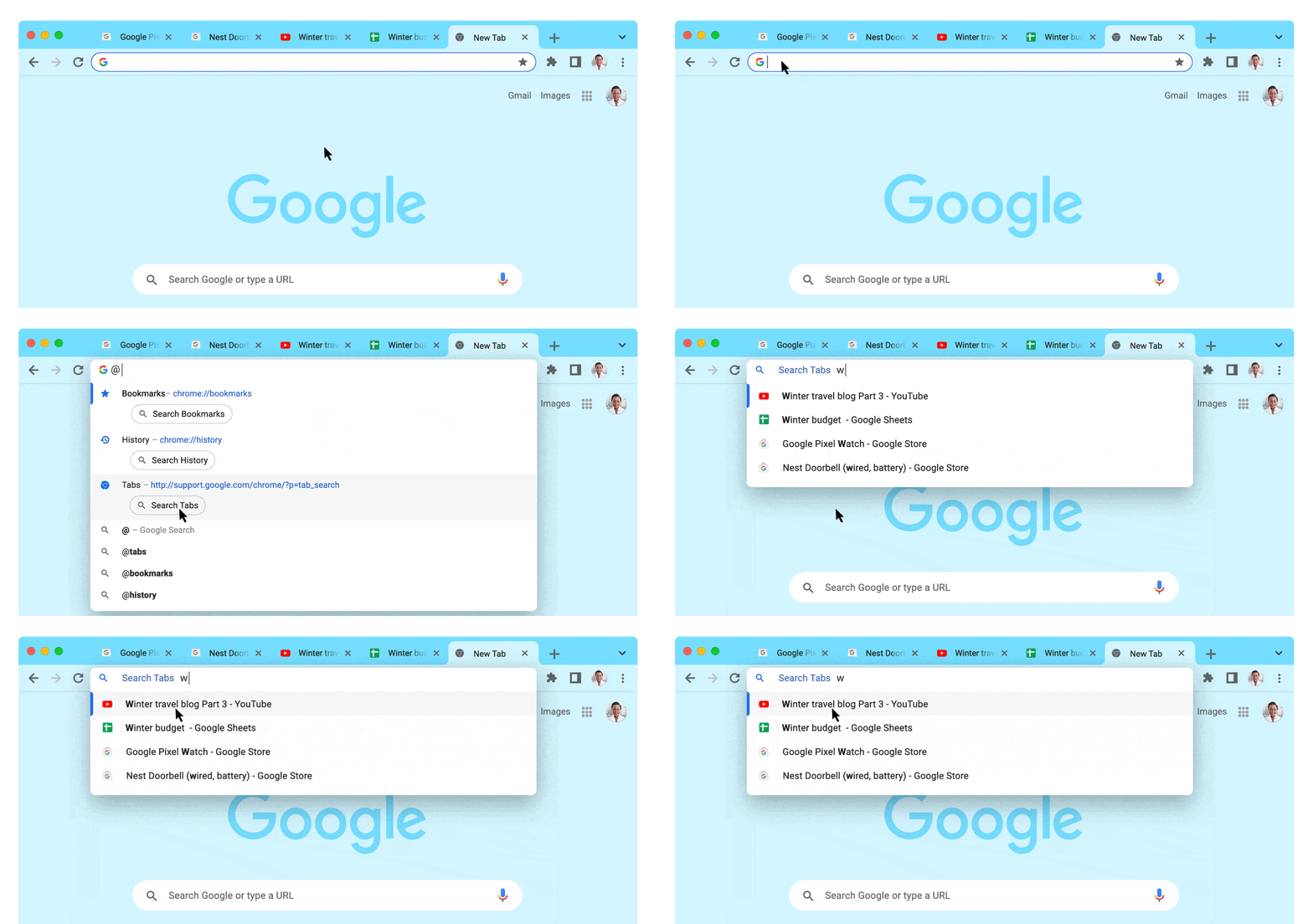
@bookmarks, @history, @tabs: How it works. You can simply type @ and then click on one of the three buttons (Search Bookmarks, Search History, Search Tabs).
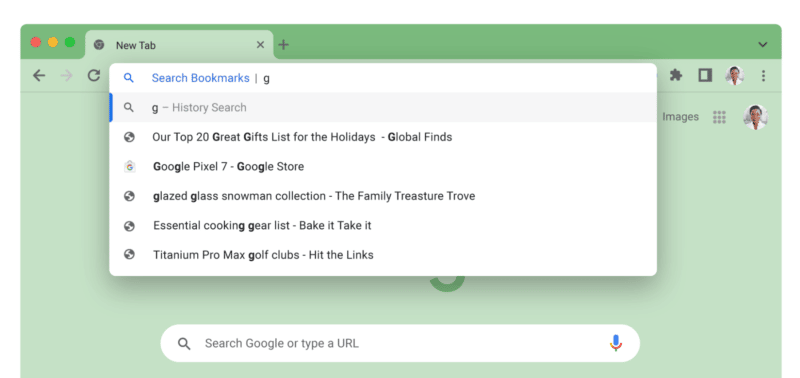
To search for a bookmark: Type @bookmarks, enter the bookmark name to get a dropdown with matching suggestions from all your bookmark folders.
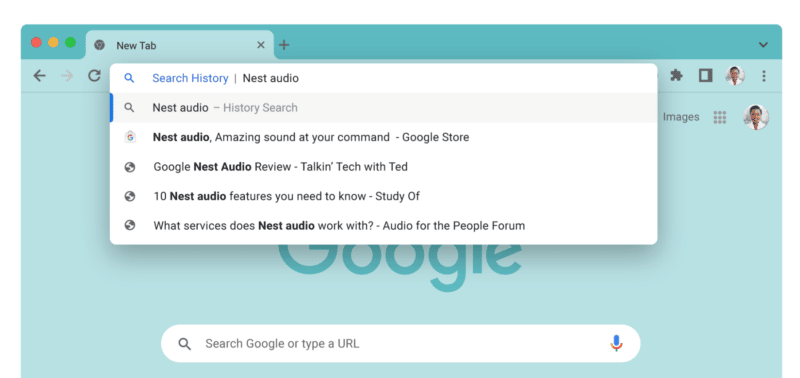
To search your history: Type @history, then enter your query to get a preview of your browsing history in the address bar.
To search for a tab: Type @tabs, hit space, enter the tab title, and you’ll see suggestions in your address bar.
What it looks like. Here are a couple of screenshots of the new Chrome search shortcut features for bookmarks and history:
Google Chrome Search Bookmarks shortcutGoogle Chrome Search History shortcut
These search shortcuts are rolling out with Google Chrome 108 for desktop. Don’t see it yet? Make sure you’ve updated to the latest version of Chrome.
People who work from home need the physical and mental space to be able to give their work the full attention it needs. However, when you work from home, it can be difficult to separate work and leisure, which can cause heightened stress and anxiety and even physical pains.
A new Work Habits Research Study commissioned by National Business Furniture of over 1,000 employed Americans finds that changing work habits over the past couple of years such as more screen time, sitting and less physical activity are taking a toll in terms of more frequent backaches, headaches and shoulder pains as well as weight gain. Now, as life takes on a new normal, it’s an opportune time to reimagine how to create home office spaces that inspire wellness and reduce physical and mental anxiety.
Here are three tips for curating a healthy home office workspace sure to help curb those Zoom meeting blues.
Act with intention
Being intentional about how your space is set up can save you stress in the long run. By tapping into your emotional health with the use of certain design and organizational choices, you may find that your energy levels are higher.
Customize with color to boost your mood
Working from home allows you to have more options with what you do with your space, like opening a window or having full command of the blinds. In the Work Habits Research study, 35 percent of working Americans said that having a window or natural light supported their health — but what if you don’t have this option, or live in an area where it’s darker?
One easy solution is to incorporate colors as a pick-me-up.
Add a sunny, bright color palette to your walls to add energy to your workday and add pops of color to your desk with photos, desk supplies or small lamps.
Need some natural light without the distractions of color? Consider using a pastel or white hue to attract natural light, which can also aid in energizing your workday.
Dark shades, on the other hand, can help foster concentration, according to color psychologists.
Address all of you
The most important part of your work is you. Forty percent of working Americans surveyed in the Work Habits study said that they were more depressed or anxious working from home. By addressing your wellbeing as a whole person rather than just an employee, not only can you do your best work, but lessen your feelings of anxiety and depression outside of the office:
Appeal to your senses
While color appeals to your visual senses, aim to maximize your other senses to help you be your best self to your work environment.
Many of our senses appeal to an innate desire to connect with nature and your love of living things which is called biophilia. In office spaces, this translates to finding ways to bring elements of nature indoors
Here are some tips to strengthen to add ‘green’ to your workspace and boost your emotional health:
Bring plants into your workspace: If you don’t have a natural green thumb, you can purchase fake plants or succulents which still help to increase the sense of outdoors.
Create a plant wall: You can also purchase wall planters to hang up your favorite flora, real or fake.
Invest in biophilic furniture: Materials like wood can help create that cozy, safe feeling. Don’t want to invest in an entirely new desk? Try some wooden accents, like a lamp.
Enhance your day with oil diffusers
Another way to bring nature into your environment is by using an oil diffuser, which can fill your space with mood-boosting natural scents.
These devices disperse fragrant oils into the air to boost your mood and your productivity or aid in relaxation.
Try a citrus or peppermint scent to help grow your energy levels.
Stressed out? Lavender can cool those moods.
Not feeling well? Stress only makes it worse. If you’re sick and can’t take time away from work, use peppermint, ginger or spearmint oils to help you feel a little better.
Look into ergonomic options
Mental health should be a priority, but there are also some easy things you can do to invest in your physical health. Luckily, practicing ergonomics can help control pain and offer ways to prevent chronic muscle tension and back pain.
That means trading out your dining room table and chairs for ergonomic furnishings and workspace arrangements which preserve your long-term physical health. And by pushing your personal furniture to the side, you can better separate and balance your work and personal life.
Here are some tips for finding the best ergonomic options:
Look for support: Your furniture should have appropriate back, arm and neck support with adequate cushioning and depth. If you’re unsure, it’s always recommended to try before you buy and see what has the most support.
Adhere to adjustability: Make sure your chairs and desks are adjustable so you’ll always have a great fit.
Choose comfort: A reclining chair with a deep, cushioned seat and armrests isn’t just cozy, but optimal for your spinal health and posture.
When in doubt, organize it out
Organizing your space can significantly decrease distractions and separate work from home. Everything from work should have a place that doesn’t interfere with your personal items.
Diminishing distractions can give you less to focus on, which in turn helps decrease your stress and anxiety levels:
Invest in organizational tools
To help find that essential separation, consider investing in organizational tools:
Use a bulletin board or whiteboard to keep track of dates, assignments and tasks, add a personal touch with photos or organize stray notes you might need later.
Add a paper tray to your desk to keep everything in one place and label items to better track them later.
Use a locking file cabinet to physically separate work from your personal space and keep valuables safe in case of emergency.
Take notes digitally to help decrease desk clutter.
Just toss it
Don’t need it? Not sure what it’s there for? Toss it, or the clutter will continue to pile up. If you’re someone that uses post-it notes or paper to organize your thoughts, make sure you throw out what you don’t need when you’re done with it.
Make Your Home Office Work for You
Your work is important, but so are you. Focus on what you can control — like your workspace — to boost both your mental health and your productivity. Even the smallest choices matter when you spend so much of your week working — you should make your home office workspace work for you.
This is a paid article on behalf of People for Research.
Here at MoneyMagpie, it is no secret we think taking part in research is a great way to earn money on the side. Whether it is surveys or focus groups, we advocate them as a nice little earner for you to undertake in your spare time.
We all have opinions – so why not get paid for them? With the cost-of-living crisis in the forefront of all our minds, earning some extra cash from the comfort of your own home for giving your thoughts on a particular topic is a real winner. Enter People for Research. With People for Research (PFR), you will get rewarded for your valued opinions. The research studies on the website reward participants with paid incentives. The average incentive is £50 per hour, but can range up to £100 or more – it’s tax-free and won’t affect any benefits you claim, so just think of it as a nice bonus! Most incentives are paid via bank transfer, meaning you get paid directly into your bank account.
Plus, they have regular opportunities to tell the UK government your opinion on key issues impacting our country, from the cost of living crisis to the recent pandemic response. Read on to find out how you can get involved (and get rewarded for your thoughts on this)!
Once you havesignedup to the People for Research database, you will receive regular emails notifying you of the latest paid research studies and opportunities available. You can apply to those you are interested in easily. All you have to do is complete a few short questions and submit your answers to be considered for participation.
Your responses are then reviewed. You’ll be contacted if you have been accepted to take part in the research. It is important to note, however, that submitting a request to take part does not always guarantee participation. However, if you are not chosen, don’t be disheartened, as there are plenty of opportunities available.
If you are successful, however, you will receive confirmation of this. After you take part in the paid research, you will receive your incentive within 3 working days.
How does it work?
Most of the studies on the website can be completed remotely, no matter where you are in the UK. Research may be undertaken via video chat, as an online task, a survey, phone discussion or even in-home product testing.
All you need? A quiet space and stable Wi-Fi. You absolutely do not need to be an expert on any topics covered. There are no right or wrong answers. Just be honest! The research is being done for a reason – the more honest you are, the better. Your feedback will influence key decisions and help to make a difference to those using the product or service that you tested in the future.
People for Research work with global brands, innovative tech companies and more notably, the UK government.
Give your honest opinions to the government
The last year has seen a huge amount of change in the UK and we’re sure many of you would love to have your say on what happens next. With the current living crisis set to continue well into 2023, People for Research are working in partnership with UK government departments who want to hear opinions from members of the public – like you!
Topics include housing, financial support, electricity bills and shopping habit changes due to the ongoing crisis. These are just some areas of impact being investigated, and your opinions matter now more than ever. Apply here to be considered for this research – you’ll be able to give your opinion and be heard by those who make decisions and can influence real change.
Not only will you have the chance to make a difference across the country and be part of the bigger picture, but you can get paid for doing so. Depending on the duration of the session, participants can earn £40 – £80 for this particular opportunity.
Plus, by just simply applying for this study, you will be entered into a prize draw with £450 worth of prizes up for grabs! One lucky winner will receive £300, and three runners up will get £50 each. You could receive your winnings via bank transfer, or put it towards a digital voucher – the choice is yours!
You only have to apply once, and then you will be considered for various studies throughout the course of 2023 that relate to the topic of the cost of living.
Are you suitable to take part in research with PFR?
Yes, absolutely! No matter your age, race, background, job, relationship status or income, your opinions are valuable. Plus, they will help to have a positive impact on future decisions. If you’re aged 16+ and would like to give your feedback, you’re a great match for the PFR community!
Want to join People for Research and start earning for your opinions? You can apply for the cost of living research here. Or take a look at the current opportunities pages and apply for a range of different research topics.
Disclaimer: MoneyMagpie is not a licensed financial advisor and therefore information found here including opinions, commentary, suggestions or strategies are for informational, entertainment or educational purposes only. This should not be considered as financial advice. Anyone thinking of investing should conduct their own due diligence.
Google is now rolling out continuous scroll on the desktop search results. Google initially brought continuous scroll to mobile search in October 2021 and now it is here for the desktop search results.
Continous scroll is like infinite scroll but it does not go on infinitely, it stops after a few pages or so – which is why Google does not call it infinite scroll but rather continuous scroll.
What continuous scroll looks like on desktop. Here is a GIF of continues scroll in action on desktop search:
Google statement. “So starting today, we’re bringing continuous scrolling to desktop so you can continue to see more helpful search results with fewer clicks. It’s now even easier to get inspired with more information at your fingertips,” a Google spokesperson told Search Engine Land.
“Now, when you scroll down you’ll continue to find relevant results so that you can discover new ideas. When you reach the bottom of a search results page, up to six pages of results will be automatically shown until you see a “More results” button if you wish to continue further.,” Google added.
US English. This is now rolling out today throughout English search results in the U.S. and may take some time to be fully rolled out for all U.S. users to see.
Why we care. This may (or may not) encourage searchers to look beyond the first few results and scroll more through more results. This may impact your Search Console data because searchers may scroll more or less.