Excel pivot table best practices for search marketers

In 7 useful Excel formulas and functions for PPC, I shared tips to quickly identify high-impact PPC optimizations that will move the needle for your brand or client.

I am a firm believer in an analytical approach to search marketing. My “weapon of choice” for manipulating search data is Excel and one of my favorite features of the platform is pivot tables.

In this article, I’ll highlight a use case you might not be familiar with, along with some tips and shortcuts to enhance your pivot table skills. 

Unique use case: Using pivot tables to QA bulk sheets

If you’ve come across pivot tables in your search marketing career, I’d expect it was likely in a performance report. However, they can be leveraged in creative, non-analytical ways.

One such approach I am a particularly big fan of is using pivot tables to QA bulk sheets.

Might be a given, but you need to build your bulk sheet before you can use this technique. I won’t cover bulk sheet tips in this article (just one teaser: the concatenate function could come in handy), but one step I’ll recommend for your QA is to compile a summary of the elements you expect to be included in your bulk sheet. 

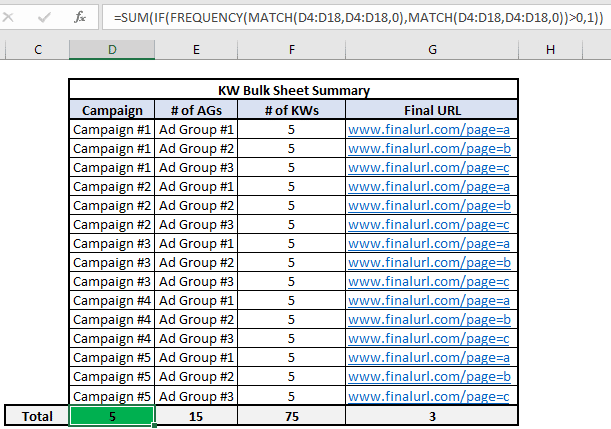
I generally build a table in the first sheet of my workbook, such as the one that you see below. For the sake of this example, there are two things I want to highlight.

  • First is that there will be exactly 5 keywords in each ad group.
  • Secondly, Ad Group #1 across all campaigns drives to the final URL with Page=A, Ad Group #2 drives to page=B, and Ad Group #3 will click to page=C. 

In the screenshot, you’ll notice I included the formula bar, which contains a formula for how to count distinct values in a data set.

Rather than discuss the nuts and bolts of how it works, just know that the referenced cells (D4:D18 in this example) need to be identical across the match functions and you should get the correct results. 

Bulk Summary Table.png

Once you’ve built out your bulk sheet, it’s time to create the pivot table.

The key here is to make sure you are highlighting all rows/columns that comprise the bulk sheet before you create the pivot table.

Now that we have our pivot table created, we can use the count feature to ensure that the bulk sheet is accurately created.

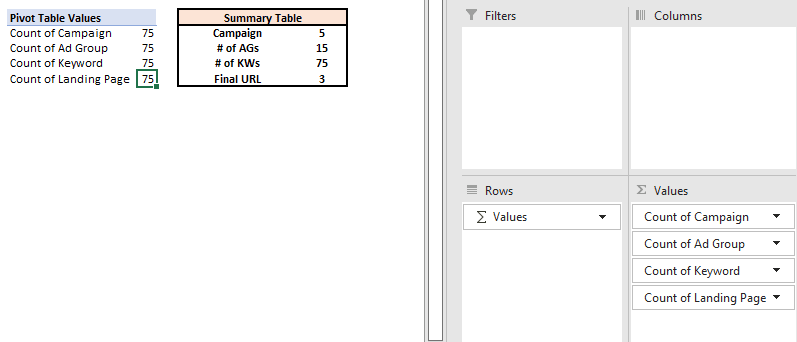
When you drag non-numeric fields into the Values area, the output will automatically become a count, instead of a sum. It’s important to note that the pivot table will not reflect just the unique values.

This is illustrated in the example below, where you can see that the count of all campaign elements is 75, which reflects the total number of keywords we expect in the bulk sheet. 

Pivot vs Summary Table

It’s important to recognize this, as it has an impact on how you should design your pivot table for accurate QA.

The best practice I recommend is to focus the count on the most granular element of the campaign. Move the campaigns and ad groups to the Rows area of the pivot table.

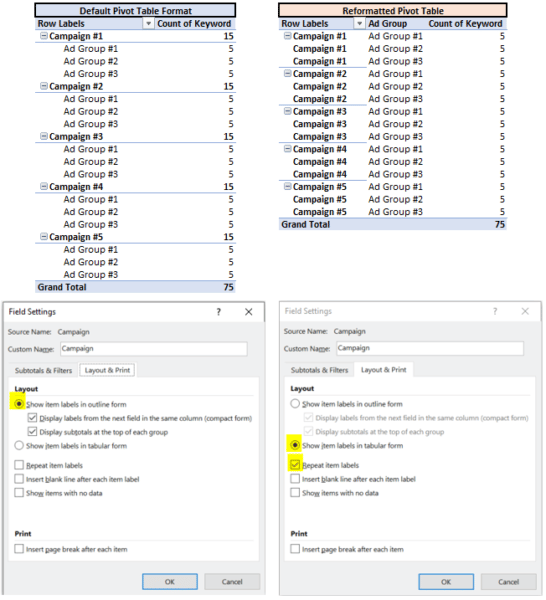
One final transformation to make, which is more stylistic than anything. If you right-click on the Campaigns field and navigate to field settings, you can adjust the view of your pivot table.

By making the selections highlighted in the view below, you can make the pivot table less vertical. 

The screenshot below shows the differences in pivot table formats, with the corresponding field settings underneath.

Again, more of a stylistic tip than anything; however, this will format the pivot table in a way that is more friendly for copy/pasting into the Editor.

Differing Pivot Formats

With these pivot table views, we’ve completed the first part of our QA. We’ve also confirmed that we have 5 keywords in each of the 15 ad groups.

If you wanted to audit the keyword text for accuracy, you would just move Keywords into the rows column below Campaign and Ad Group. 

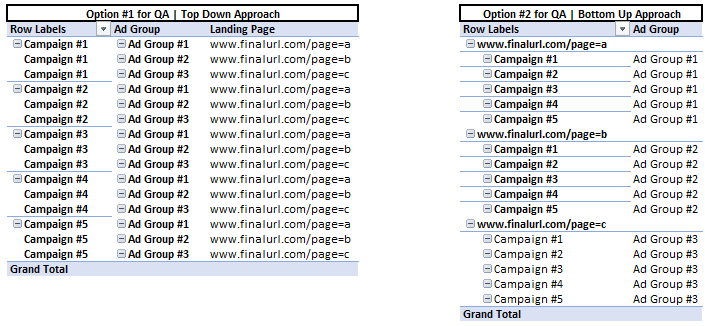
In the second part of our QA, we want to make sure that the ad groups in each campaign are driving to the correct landing page.

One of the beautiful things about pivot tables is that there are multiple ways to get to the same conclusion.

Below I’ve highlighted two ways you can use pivot tables to confirm we’ve trafficked the bulk sheet correctly.

Options for QA Approach

The first option is similar to how we QA’d the count of keywords in each ad group. All I did was remove Keywords from the pivot table and added Landing Page underneath Ad Groups in the row. This will create a view that’s very easy to compare to our summary table. 

The second option flips things on its head a bit. Since we know that all Ad Group #1s should drive to page=a, we can put Landing Page at the top rows area in our pivot table. By doing this, we will see all the Ad Groups within the bulk sheet that are driving to Page=A. A different view, yet one I would argue is more effective for QA’ing. 

I’m only highlighting a few different views that I like. I challenge you to attempt leveraging a pivot table in your next bulk sheet QA and don’t be confined to the examples I’ve included here.

One of the greatest advantages of pivot tables is their flexibility. Play around and figure out what methods/approaches make the most sense for you. 


Get the daily newsletter search marketers rely on.

<input type="hidden" name="utmMedium" value="” />
<input type="hidden" name="utmCampaign" value="” />
<input type="hidden" name="utmSource" value="” />
<input type="hidden" name="utmContent" value="” />
<input type="hidden" name="pageLink" value="” />
<input type="hidden" name="ipAddress" value="” />

Processing…Please wait.

function getCookie(cname) {
let name = cname + “=”;
let decodedCookie = decodeURIComponent(document.cookie);
let ca = decodedCookie.split(‘;’);
for(let i = 0; i <ca.length; i++) {
let c = ca[i];
while (c.charAt(0) == ' ') {
c = c.substring(1);
}
if (c.indexOf(name) == 0) {
return c.substring(name.length, c.length);
}
}
return "";
}
document.getElementById('munchkinCookieInline').value = getCookie('_mkto_trk');


4 tips and tricks for pivot table analysis

To reiterate, the most common way that pivot tables are used in search marketing is for performance-based reporting.

In order to optimize the quality of your analysis, I want to highlight a few key tips.

1. Use custom calculations for maximum accuracy

I can’t stress this one enough. Accuracy is crucial for any analysis you are conducting.

To be honest, I don’t even export data sets with metrics such as CTR, CPC, or CVR, as I am a proponent of creating these as custom fields in the pivot table to ensure these metrics are accurately reflected. 

It is surprisingly easy to create these metrics in a pivot table.

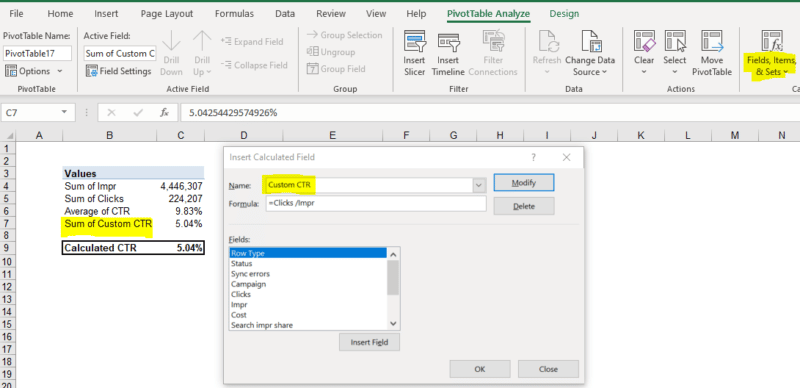
Once you’ve created your pivot table, navigate to the pivot table Analyze menu, go to Fields, Items, & Sets, and finally Calculated Field.

Here, you can name and create custom fields that will automatically update with any changes you make to the filters/contents of the pivot table. 

Although it defaults to a “Sum of” label, you can see in the screenshot it is not a Sum. I typically just find and replace “Sum of” once I’ve finished creating my calculated fields to avoid any confusion. 

To illustrate the difference, I’ve included the average platform CTRs in my dataset in the screenshot below. You can then see how I get to the calculated fields menu and how I create the calculated field. 

Notice how the average of CTRs does not accurately represent the true CTR for this data set. However, our Custom CTR is spot on. (Feel free to check the calculation yourself!)

Custom Fields

2. Pull data at the most granular level 

The beauty of Excel and pivot tables is that it is prepared to handle relatively large data sets (about 1M rows). Pull your data at a keyword or ad level, add segments (i.e., device) and always pull by day if looking at a time period. 

In doing so, you will ensure that you can drill down to the main drivers of impact. Refer to my first Excel article for tips on adding additional filters, such as transforming dates to a weekly view or how VLOOKUP can help create filters.

3. Build reports for the long term 

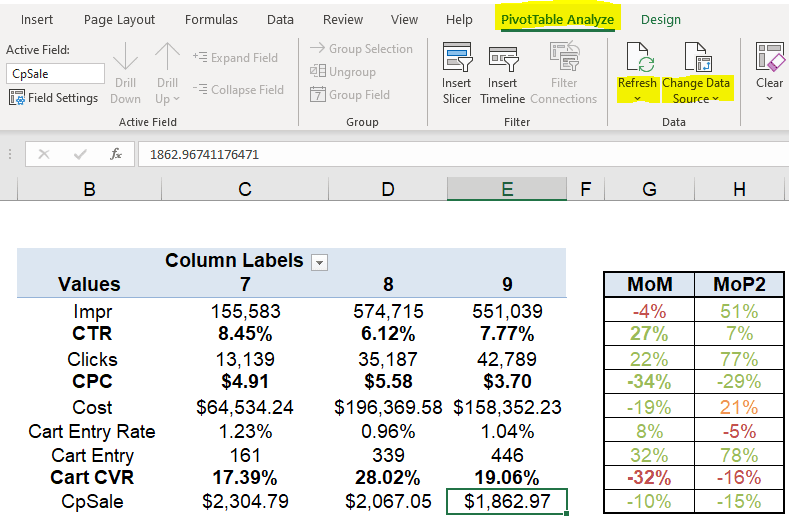
PivotTable data can be refreshed and updated easily using the refresh feature (see screenshot below). Think about how you can design your report for the long term so that all you need to do is update the back-end data to create an updated view of performance. 

This means maximizing the use of formulas in data manipulation (such as adding filters) and designing the data source in a way that those formulas won’t break when you paste in the updated data. 

While this may seem like a heavy lift upfront, your end goal is a simple button click to refresh your performance report. The squeeze is worth the juice, trust me!

Menu for PivotTable

A quick comment on the difference between Refreshing a pivot table and Changing the Data Source. If you click Refresh, it will update the data within the originally defined data source. 

When you change the data source, you are redefining what rows/columns should be included in the pivot table data.

If you expect the number of rows in the data set to vary over time, I recommend becoming familiar with the Change Data Source option, as this will ensure you have always included all rows/columns in the report. It’s an extra step, but one that ensures your data set is comprehensive.

4. Use shortcuts for pivot tables (PC users)

Last but not least, sharing a handful of shortcuts that have improved my speed when manipulating pivot tables. 

These are a bit more complex, but once you get the hang of it, you’ll be flying around your workbook! For those on a Mac, #1 I’m sorry you’re missing out on Excel for a PC, but #2 your shortcuts are different!

  • Alt + N + V + T: This creates a pivot table
  • Alt + J + T: This opens the pivot table Analyze menu, when your cursor is on a cell within the pivot table. Adding a few keystrokes to the end gets you to commonly used features/menus 
    • Alt + J + T + J + F: This opens the Calculated Fields menu
    • Alt + J + T + F + R: This refreshes the pivot table
    • Alt + J + T + I + D: This allows you to change the data source
    • Alt + J + T + C: This opens up the chart creation menu for the contents of your pivot table
    • Alt + J + T + E + C: This clears the contents of your pivot table 

Improving your Excel skills takes practice

Similar to the functions I covered previously, it is going to take practice and time before you see the efficiency benefits that come with these techniques. However, put in the time now and I can assure you that you will see the payoff.

In addition, I encourage you to not limit yourselves to the applications of pivot tables covered here. As shown in the Bulk Sheet QA example, there are multiple ways to get to the same output. 

PivotTables are incredibly powerful tools that you can use to ensure you have both the 30,000-foot view of performance, as well as the more granular shifts that show your mastery of the funnel.

Use the Calculated Fields to create metrics specific to your business and think about how the QA techniques can be applied to other parts of your role. 

The applications of these techniques are far-reaching.

Want to learn more Excel tips and tricks from me? Sign up for SMX Next. Check out my session on how to level up your analytical skills with Excel, plus you’ll hear from plenty of other amazing speakers. 

The post Excel pivot table best practices for search marketers appeared first on Search Engine Land.

Original source: https://searchengineland.com/excel-pivot-table-best-practices-for-search-marketers-389254

Report: Insights into the Tik Tok Audience by Digital Marketing Depot

Book:Animal

Five years after it first launched, the video sharing-focused social network TikTok has taken the world by storm.

Downloaded more than 2 billion times by users in 150 countries, people have flocked to the mobile app which presents them with a stream of algorithmically selected short videos filled with music, dancing, cooking demos, and other short bits of user-created entertainment.

For this report, DISQO surveyed 39,452 adult consumers in the United States with the goal of better understanding TikTok usage and consumer attitudes, particularly about brand advertising on the social media platform, including:

  • How does TikTok usage vary across demographic cohorts?
  • What do TikTok users think about efforts to market to them on the platform?
  • What actions do TikTok users take after watching brand videos, and how does that map to the consumer marketing funnel?

Visit Digital Marketing Depot to download TikTok is all that… and a bag of clips. Insights into the TikTok audience from DISQO.

The post Report: Insights into the Tik Tok Audience appeared first on Search Engine Land.

Original source: https://searchengineland.com/report-insights-into-the-tik-tok-audience-389326

How organizational structure can hurt PPC campaign performance

In my 20 years of experience, I’ve seen the inner workings of countless marketing teams. I’ve observed what works and what doesn’t.

Most importantly, I’ve witnessed how an organization’s structure and culture can immediately impact campaign performance.

And I’ll admit, it’s frustrating sometimes to watch companies trip over themselves based on the team structure they’ve put in place. 

As an agency leader, we see the impact on campaign performance. Campaigns flounder because of competing goals, miscommunications, siloed budgets and fragmented resources. 

If your campaign performance is lackluster or your growth has stagnated, it’s time to look inward.

Here are three of the most common ways your organizational structure is killing campaign performance. 

1. Brand advertising is separated from demand generation

It’s common in many organizations to separate teams based on a traditional marketing funnel.

In these cases, brand advertising is often separated from demand generation resulting in some key issues. 

Measuring the revenue impact of awareness advertising 

Measuring the impact of awareness advertising requires a plan which looks at lift metrics in channels typically handled by demand gen teams, including:

  • Organic search.
  • Brand search.
  • Social engagement.
  • Direct traffic. 

Careful planning must happen before, during and after the campaigns.

Yet, the siloes between these teams make this coordination extremely difficult.

Alignment of media plans

There’s a multiplier effect when awareness and demand generation teams are combined. 

Sponsorship campaigns often contain demand generation placements which, if left to a brand advertising team, may not be used to their full potential. 

Demand generation teams can easily mold their campaigns to support in-person events, large campaign initiatives and seasonal activities that the awareness team may drive.

Reactivating audiences from awareness campaigns

About 95% of buyers are not in-market currently and only 5% are, according to the B2B Institute

By coordinating efforts, 95% of buyers not in-market can be reactivated by demand generation teams through careful nurture and remarketing campaigns. 

Again, this type of synergy happens best when teams are combined, allowing planning and execution to happen seamlessly. 

With brand and demand generation teams combined, organizations can align measurement strategies, configure tracking across the entire lifecycle and motivate the entire team to “generate demand.” 

Advertisers that have integrated the team quickly see that it’s much easier to prove the success of “awareness” advertising and much easier to optimize top-of-funnel spend. 

Thankfully, we’re seeing this shift, and more companies are bringing these two functions together. 

As a result, they experience a compound effect as the impact of awareness advertising is felt throughout the sales funnel. 


Get the daily newsletter search marketers rely on.

<input type="hidden" name="utmMedium" value="” />
<input type="hidden" name="utmCampaign" value="” />
<input type="hidden" name="utmSource" value="” />
<input type="hidden" name="utmContent" value="” />
<input type="hidden" name="pageLink" value="” />
<input type="hidden" name="ipAddress" value="” />

Processing…Please wait.

function getCookie(cname) {
let name = cname + “=”;
let decodedCookie = decodeURIComponent(document.cookie);
let ca = decodedCookie.split(‘;’);
for(let i = 0; i <ca.length; i++) {
let c = ca[i];
while (c.charAt(0) == ' ') {
c = c.substring(1);
}
if (c.indexOf(name) == 0) {
return c.substring(name.length, c.length);
}
}
return "";
}
document.getElementById('munchkinCookieInline').value = getCookie('_mkto_trk');


2. IT is responsible for integrating data with ad platforms

Data is the lifeblood of modern advertising. 

Campaigns thrive when machine learning algorithms get enough data to tap into the right audiences. And savvy advertisers know that feeding the right data into ad platforms is the most effective way to fuel performance. 

But getting the right data back into the ad platforms is much easier said than done. 

Solutions like Google’s offline conversion tracking and Facebook’s Conversions API make it relatively easy for advertisers to push CRM data into the ad platforms. 

That data is then used in bid algorithms to serve ads to the audiences that will ultimately convert in lower parts of the funnel or offline completely. 

With the pending deprecation of third-party cookies, data integration is critical for all advertisers.

However, companies struggle to determine who’s responsible for configuring these critical data integrations. 

  • Is it the marketing team? 
  • Does IT handle these tasks? 
  • Could it be web development? 

What we typically see is that because no one “owns” this process, it gets deprioritized and often doesn’t happen at all. 

Companies need to prioritize data integration and define who is ultimately accountable.

In our experience, this is best led by the marketing team. 

Yes, there may be a need to pull on IT or web development expertise. However, the group using the data must understand how it’s flowing and what is being passed back.

Here’s how to structure this.

  • Responsible: Marketing or martech team
  • Accountable: Marketing team
  • Consulted: IT or martech
  • Informed: Information security

Pro tip: If you don’t have a marketing team that can implement this directly, consider the use of Zapier or manual integration.

3. Multiple agencies managing paid media

Similar to the siloes that happen when brand and demand generation are separated, splitting up your paid media between agencies is a surefire way to hurt your overall campaign performance.

We often see this with advertisers trying to either have different agencies compete or when they’ve chosen an agency that does one channel well but not the others.

But there are many reasons why housing all your paid media within one agency is the smarter choice:

  • A strong agency will work as an extension of your team. Giving them full transparency into your marketing portfolio will equip them with the insight they need to make strong recommendations that align with your end goals. 
  • Budget is much more easily passed between channels and campaigns when a single entity manages it. A strong agency will see the overall portfolio and help you to make the best decisions toward optimizing your budget.
  • The learnings from one channel will impact the other channels. For example, messaging that resonates best, audiences that are strong performers and filling gaps in channels that may be too expensive. 
  • Cross-channel targeting and nurture streams can easily be set up to target audiences across channels and through the funnel. 

Separating paid media across multiple entities makes it extremely difficult to optimize budget, share learnings between channels, set up nurture streams and provide holistic advice.

The post How organizational structure can hurt PPC campaign performance appeared first on Search Engine Land.

Original source: https://searchengineland.com/organizational-structure-ppc-campaign-performance-389222

Keeping Remote Workers Integrated in the Day-to-Day Operations of Companies

Home Business Magazine Online

Remote work requires daily collaboration from teams of people often separated by hundreds of miles, if not more. A company’s day-to-day operations are too vital to leave to chance during the transition from site-based to virtual work. Rather than shoehorning the same office protocols into a new format, Jessica Vann, Founder and CEO of Maven Recruiting Group, advises companies to reinvent how they engage with remote workers each day.

“Remote work isn’t going away, so it’s crucial to make the transition work right,” Jessica Vann says. “Rethink your company’s onboarding, communications, meetings, and culture from the ground up. That is the only way to fully integrate employees into a remote workforce.”

Integrating New Hires with Well-Designed Onboarding

Effective remote organizations make a point to integrate new hires with a thorough onboarding process. “It’s not easy to onboard hires remotely,” remarks Vann. “They need more than a welcome email. Onboarding remotely requires employers to be a lot more intentional and organized in how they share information, monitor an employee’s understanding of the concepts or material, and imbue cultural values and norms. At Maven, we have spent considerable time overhauling training documents and materials to make them more user-friendly. To replace some of the live interactions new employees might have had previously, we have created training videos. We’ve overhauled our company intranet to make these things more accessible and searchable. Moreover, we’ve introduced multiple live touch points throughout a person’s onboarding to make sure there is adequate support if there are questions.”

Putting their money where their mouth is, Maven rolled out a dedicated Training & Development Lead to facilitate and shepherd the learning and onboarding experiences of new hires. They initiated creative ways for senior leaders of the company to share their knowledge with more junior members, such as weekly Masterclasses.

Keeping Remote Workers Engaged by Rethinking Work Culture

Each employee has unique needs as they integrate daily operations into their homes work environments. Some are parents, some could work across different time zones, and others may encounter unexpected scheduling conflicts.

“In the office, you could pop in and ask for some advice or a quick moment. However, those days are done. We’ve really had to rethink how people are still able to get that quick touchpoint without having the ability of cruising by someone’s desk.” Vann explains. “Instead of an open door policy, we have an open technology policy. This means our team pings one another throughout the day on chat platforms or text and requests time as needed. A lot of things can be settled in 30-second conversations, but people have to know they can access you. People also have to be accountable to their calendars. For this to work, the expectation needs to be set that people need to be responsive and accountable.”

Keeping Remote Workers Engaged by Promoting Wellness

The benefit of remote work is freedom, but the price of working alone is often a lack of motivation, creativity, and enthusiasm. Activities that get remote employees away from their screens and promote overall wellness can boost their morale and productivity.

Vann suggests creating monthly wellness days, which have been a boon for Maven’s team and culture. She also encourages her team to capitalize on their time off and truly make it time away. While Vann’s company is remote, she also strives for a balance by incorporating in-person time. Vann’s Team has quarterly offsites and team reward days — some of which are remote, some of which are in person ― in addition to having in-person working retreats a few times a year to promote wellness and team camaraderie.

Keeping Remote Employees Engaged by Rethinking Employee/Management Communication

Integrating remote workers into the day-to-day operations involves an overhaul of employee/management communication. Effective communication is all about relationships, and as many managers now know, communicating effectively and fostering relationships with long-distance employees can prove tricky.

“We have a policy of employees being on camera in meetings to encourage active participation and monitor engagement and to ensure the meetings can be as productive as possible. Moreover, as part of their onboarding, we cover meeting etiquette and set expectations for how employees can show up successfully.

“Technology is critical in the day-to-day operations, but we also try to give people time back when possible. We have consolidated the frequency of meetings and shifted to calls or emails when possible. This is because we recognize that meeting fatigue is a very real thing in a remote environment.

Keeping Remote Employees Engaged During Virtual Meetings

Remote meetings were awkward during the early days of the pandemic. However, most people have since adjusted to the new normal. Today, effective virtual meetings can allow people to connect across the ether just as naturally as they do in person.

Before taking meetings online, managers should familiarize themselves with the software. No one enjoys wasting time while supervisors figure out how to set up breakout sessions or share their screens.

Even though virtual meetings have a lot in common with gatherings around a conference table, it is necessary to reinforce some etiquette during the transition. Expectations regarding professional dress, punctuality, and whether or not screens are activated need to be addressed. Before the meeting starts, take a few moments for small talk, and make sure everyone knows each other by making brief introductions. Throughout the meeting, ensure that people feel valued by giving opportunities for them to share and be heard.

“Meetings should have clear agendas so they can be productive, but we also encourage little buffers for laughs for people to connect.”

Keeping Remote Workers Engaged by Establishing a Work-Life Balance

The flexibility of remote work is liberating. However, it can also create ambiguous work conditions that lower employee morale and output. Setting boundaries on the space and time that remote work intrudes on the home helps employees stay engaged and productive during daily operations.

Remote employees need to establish designated workspaces in their homes. “The couch is comfy, but it’s a black hole for remote work,” Vann warns. “When employees create designated workspaces, they must avoid distractions like their TV, fridge, and phone. Their workspaces need to be neat and organized, and so should the main tools of their trades — their computers. Nothing stands in the way of deadlines like clutter.” To support that objective, Maven provides a stipend for new employees to equip their home office. In addition, the company similarly provided that benefit to existing employees once work shifted to home environments.

When setting boundaries to protect work/life balance, scheduling is critical. Writing out to-do lists, establishing regular work hours, and keeping track of appointments with an online calendar are the best ways to integrate a company’s daily operations into dozens of remote itineraries. For more information, readers can check out Maven’s podcast, Reimagining Your Remote Workspace: Advice from a Designer on How to Create a Productive and Beautiful Home Office.

Final Comments

Redesigning the workplace to accommodate the day-to-day workload for the new era of remote workers requires creativity, flexibility, and a willingness to change. This transition involves organization-wide adaptability and a thoughtful overhaul of company culture, internal communications, staff meeting protocols, and work-life balance.

The post Keeping Remote Workers Integrated in the Day-to-Day Operations of Companies appeared first on Home Business Magazine.

Original source: https://homebusinessmag.com/management/employees/keeping-remote-workers-integrated-operations-companies/

Rex Barr Shares Top CRM Systems for Small Businesses in 2022

Home Business Magazine Online

In today’s business world, an effective Customer Relationship Management (CRM) system is essential for any company that wants to remain competitive. A CRM system helps businesses keep track of their customer interactions, including sales, marketing, and support. It also allows businesses to measure and analyze their performance to make necessary improvements.

Experts like Rex Barr in Philadelphia, PA, understand there are a lot of different CRM systems on the market, and it can be challenging to determine which one is the best fit for your business. To help you decide, we’ve compiled a list of the top CRM systems for small businesses in 2022.

What Is a CRM?

Rex Barr says a CRM system is a software application that helps businesses manage customer relationships. It enables enterprises to track and analyze customer interactions, sales, marketing, and support activities. A CRM system also allows companies to measure and improve their performance.

Benefits of Using a CRM System

Using a CRM system has many benefits, including increasing sales and revenue, improving customer satisfaction and retention, and reducing costs.

A CRM system can also help businesses to understand their customers better so they can provide them with the products and services they want and need. In addition, a CRM system can help companies to build stronger relationships with their customers.

Salesforce CRM

Salesforce CRM is a cloud-based system that offers many features and modules, including sales automation, reporting and analytics, customer service management, and more. It’s also highly customizable so that you can tailor it to your business needs. Salesforce CRM starts at $25 per month per user.

HubSpot Sales CRM

Rex Barr says HubSpot Sales CRM is a good choice for small businesses looking for a simple yet effective CRM system. It offers contact management, lead tracking, deal tracking, and email integration. HubSpot Sales CRM is free for up to 1 million contacts.

Zoho CRM

Zoho CRM is another popular choice for small businesses. It offers many features, including sales automation, customer support management, marketing automation, and more. Zoho CRM starts at $12 per month per user.

Pipedrive CRM

Pipedrive CRM is a good choice for small businesses that want a simple yet powerful CRM system. It offers contact management, lead tracking, deal tracking, and email integration. Pipedrive starts at $15 per month per user.

Why Is Good CRM Important?

In the business world, customer relationship management (CRM) is a term that refers to all of the various activities, strategies, and technologies that companies use to manage their customer interactions. Good CRM software can help small businesses track customer data, automate repetitive tasks, and improve employee communication. In today’s competitive marketplace, small businesses need to have a good

CRM strategy in place to survive and thrive. While there are many different CRM software options on the market, it is vital to choose one that will fit the specific needs of your business. The right CRM software can help you save time and money while improving your customer satisfaction levels. Implementing a good CRM strategy can be challenging, but it is well worth the effort for any small business that wants to succeed in today’s competitive market.

What to Look for in a CRM System

When choosing a CRM system for your business, there are a few key factors that you should keep in mind. The first is to ensure the system is scalable and can grow with your business. It would help if you also looked for a system that offers a wide range of features and is customizable to fit your specific business needs. Choosing a CRM system that is easy to use and offers good customer support is also essential.

When choosing a CRM system, there is no one-size-fits-all solution. The best CRM system for your business will depend on your specific needs and goals. However, all of the CRM systems on our list are good choices for small businesses.

How to Implement a CRM Strategy

Rex Barr says once you have chosen the right CRM system for your business, you must implement it correctly. The first step is to train your employees to use the system. You should also set up a process for collecting customer data and inputting it into the system. Additionally, you need to establish a system for tracking and measuring your results.

Implementing a CRM strategy can be challenging, but it is essential for any small business that wants to succeed. By following these tips, you can ensure that your CRM implementation is successful.

There are a lot of different CRM systems in the marketplace, and it can be challenging to determine which one is the best fit for your business needs to remain competitive against other companies within your industry that have also adapted using customer relationship management systems. We hope this blog post provided some guidance in deciding the top three picks for customer relationship management systems according to experts in the field who have experience with this software. If you enjoyed this post, be sure to check out our website for more content like this in the future!

The post Rex Barr Shares Top CRM Systems for Small Businesses in 2022 appeared first on Home Business Magazine.

Original source: https://homebusinessmag.com/home-office/computers-and-software/rex-barr-shares-top-crm-systems-small-businesses-2022/

Links may be less important to the Google Search ranking algorithm in the future

Google’s John Mueller said that in the future he can see a Google Search ranking algorithm where links are not as important in the overall algorithm as they are today. He also hinted that links are not weighted as much as they were in the history of the Google ranking algorithm.

What was said. John Mueller said at the 13:52 mark in the recording when asked about links:

“Well, it’s something where I imagine, over time, the weight on the links. At some point, will drop off a little bit as we can’t figure out a little bit better how the content fits in within the context of the whole web. And to some extent, links will always be something that we care about because we have to find pages somehow. It’s like how do you find a page on the web without some reference to it?”

“But my guess is over time, it won’t be such a big factor as sometimes it is today. I think already, that’s something that’s been changing quite a bit.”

Links less important. Not only did John say that in the future links might be weighted less in the overall Google Search ranking algorithm, but he said that this has been already changing in the algorithm “quite a bit.” So even today, links are not weighted as much as they once were in the overall ranking algorithm.

Let me listen. Here is an embed of the recording from YouTube, you might want to rewind to the 13:06 minute mark, to hear how the question was phrased:

Not new? Yes, Matt Cutts, the former Google spam lead, told us several years ago a similar message in this video he posted:

Although studies have shown that links are still incredibly important for Google rankings. And a few years ago, Google said links are in the top three ranking factors, but links are not number one Google later said.

Why we care. In short, stop obsessing about links, and focus on your content. The trend has been more about having better content and truth be told, generally better content generates links without having to request links or do any real link-building efforts.

Links are not dead, links will never be dead, as a ranking factor. But as Google gets better and better at understanding content, Google can rely less on links.

The post Links may be less important to the Google Search ranking algorithm in the future appeared first on Search Engine Land.

Original source: https://searchengineland.com/links-may-be-less-important-to-the-google-search-ranking-algorithm-in-the-future-389364

Amazon holiday shopping outlook: A guide for advertisers

With Amazon’s October Prime Early Access Sale in the books, Amazon advertisers need to fine-tune their strategy for the core stretch of Q4. 

Part of that planning revolves around:

  • Mapping out how budgets will be spent over the final month and a half of the year.
  • Which days to push the pedal most on.

We dug deep into the more than $400 million in Amazon ad spend under management annually at Tinuiti (my employer) to: 

  • Quantify what we’ve seen in the past and better estimate what might happen this go around.
  • Help brands better understand how performance for Amazon ads shifts over the course of the holiday shopping season.

Let’s dive in.

Looking back at the 2020 vs. 2021 holiday seasons

It may be tough to remember at this point, but way back in 2020 the holiday shopping season looked very different than any previous year for Amazon vendors and sellers.

First, there was the Oct. 13-14, 2020 Prime Day event, which was delayed from its typical mid-year timing. As a result of the surge in ecommerce demand pushing Amazon’s fulfillment capabilities to the limits in the early months of the pandemic, the change created a new Q4 “holiday.” 

The sales per click of sponsored products ads soared relative to what would typically be expected in the middle of October. We saw a sequel of this with the Prime Early Access Sale this year.

Much of Amazon’s and other retailers’ efforts to kickstart the Q4 2020 shopping season earlier than usual were intended to pull demand earlier in the quarter as:

  • Shipping delays were causing huge headaches at the time.
  • Last-minute shoppers wouldn’t be able to reliably get packages as quickly late in the season. 

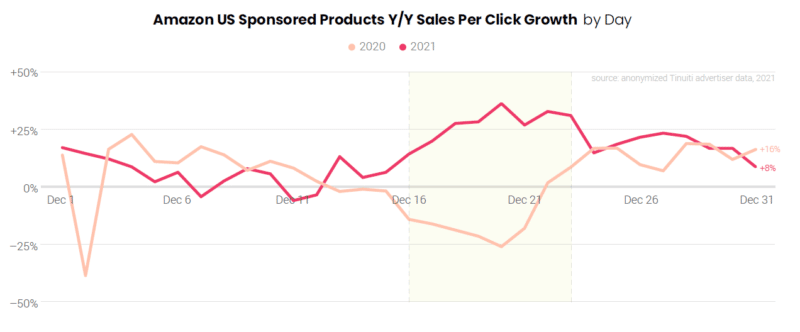
This also led to much earlier shipping cutoff dates in order to get packages in time for Christmas, and our second key divergence for Q4 2020 ad performance compared to other years – a meaningful drop in sales per click in the third week of December compared to 2019.

Amazon U.S. sponsored products YoY sales per click growth by day.

By 2021, shipping delays were much less obstructive than in 2020, and cutoff dates to receive packages in time for Christmas returned to a more typical schedule. 

In turn, advertisers saw sales per click in the third week of December soar relative to 2020, the exact opposite of the trend a year prior.

Looking ahead to this year’s holiday season, we expect shipping cutoffs to be more in line with 2021 than 2020, such that advertisers should see the sales per click of ads hold up later in the shopping season.

Now, let’s take a look at how total sales volume trended on key days during the holiday season last year.

Black Friday and Cyber Monday are tops in volume for most brands

When it comes to the sheer volume of sales attributed to ads during the holiday shopping season, Black Friday and Cyber Monday (BFCM) continue to be pivotal parts of overall success. 

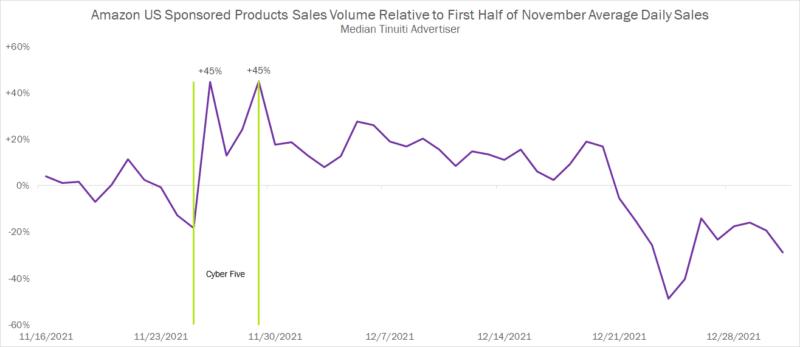
In 2021, the median advertiser saw sales attributed to Sponsored Products ads rise 45% on both Black Friday and Cyber Monday compared to average daily sales for the first half of November.

Amazon U.S. sponsored products sales volume relative to first half of November average daily sales.

While we’re using median here to convey how big these two days are for middle-of-the-pack advertisers, the surge in sales was certainly much larger for some brands than others. 

35% of sponsored products advertisers saw Black Friday sales more than double compared to the first half of November, and 37% saw the same for Cyber Monday.

In terms of pure volume, no other day between mid-November and late December comes close to the sales attributed to ads on BFCM for most brands. 

It’s possible that the Prime Early Access Sale in October pulled forward some of the volume that would otherwise happen in November and December. 

That said, it’s unclear how that might play out in terms of impacting specific days. It’s very likely we’ll still see Black Friday and Cyber Monday come out on top compared to other days over the last month and a half of the year.

However, total sales volume is only one measure of the opportunity available to brands. Sales-per-click trends show how incredibly valuable other days can be as well.


Get the daily newsletter search marketers rely on.

<input type="hidden" name="utmMedium" value="” />
<input type="hidden" name="utmCampaign" value="” />
<input type="hidden" name="utmSource" value="” />
<input type="hidden" name="utmContent" value="” />
<input type="hidden" name="pageLink" value="” />
<input type="hidden" name="ipAddress" value="” />

Processing…Please wait.

function getCookie(cname) {
let name = cname + “=”;
let decodedCookie = decodeURIComponent(document.cookie);
let ca = decodedCookie.split(‘;’);
for(let i = 0; i <ca.length; i++) {
let c = ca[i];
while (c.charAt(0) == ' ') {
c = c.substring(1);
}
if (c.indexOf(name) == 0) {
return c.substring(name.length, c.length);
}
}
return "";
}
document.getElementById('munchkinCookieInline').value = getCookie('_mkto_trk');


The value of ad clicks in late December last year neared Cyber Monday highs

Consumers are certainly ready to convert when it comes to sales holidays like Cyber Monday and Black Friday. 

But urgency also builds toward the end of the season, when consumers are down to the wire and need gifts in time for Christmas and other holidays. 

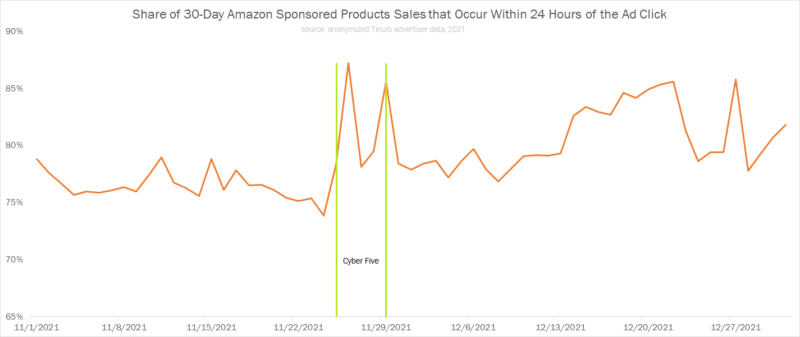
This is clear when looking at the share of total sales attributed to sponsored products using a 30-day window that occurred within the first 24 hours of the ad click. This can be used as an indicator of how compelled shoppers felt to convert at any given time.

As you can see, the share of purchases that occurred quickly after an ad click went up significantly on Black Friday and Cyber Monday, falling thereafter before rising throughout the rest of the shopping season until shipping cutoffs for Christmas delivery came into effect.

Share of 30-day Amazon sponsored products sales that occur within 24 hours of the ad click.

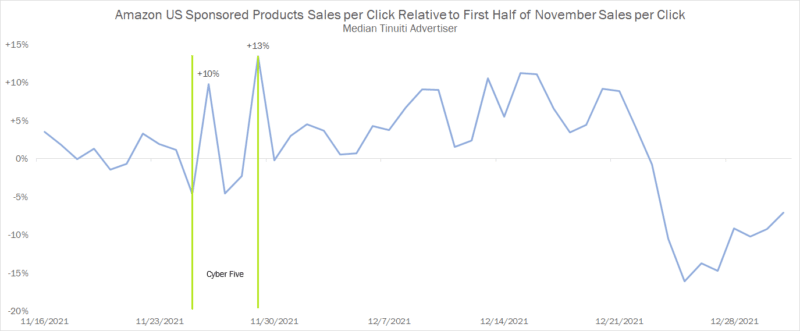
A similar trend unfolds when looking at how sales per click changed over the course of the holiday season last year. 

The value of ad clicks peaked on Cyber Monday for the median advertiser, but several days in late December neared this high as the value of ad clicks rose with shoppers’ sense of urgency.

Amazon U.S. sponsored products sales per click

But here’s the catch! Some of the conversions that are attributed to ads on BFCM or to days just before the shipping cutoff can be partially attributed to marketing efforts that occurred before those key stretches. 

For example, search formats like sponsored products often get a boost in performance from display campaigns that build awareness on and off Amazon prior to the final ad interaction and conversion.

When evaluating opportunity, advertisers need to look beyond simple volume metrics to guide strategy, especially in setting bid adjustments to account for changes in the expected value of ad clicks. 

But they also need to understand that boosts in sales per click on any given day might be the result of ad interactions on other days that weren’t credited with the sale.

Given different kinds of shoppers carry different lifetime values, brands should also look beyond just the direct sales per click in assessing how much shoppers are worth during different periods of the holiday shopping season. New-to-brand metrics can help advertisers do just that.

New-to-brand customers offer another incentive for brands to be aggressive on big days

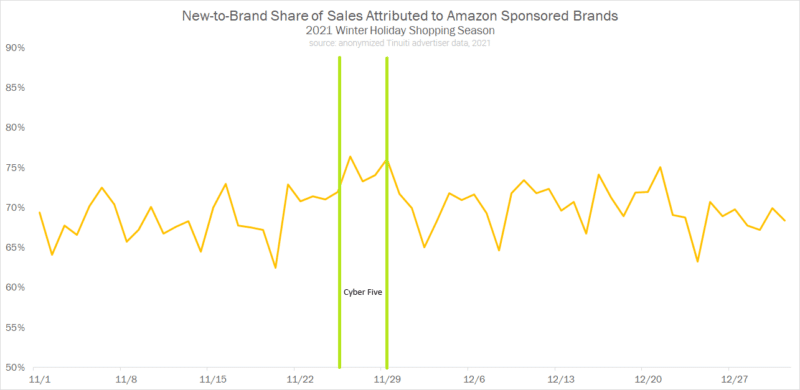
New-to-brand sales, defined by Amazon as those sales that come from customers who have not purchased from a brand in at least a year, allow advertisers to get a better sense of what kinds of customers their sponsored brands and Amazon demand-side platform (DSP) campaigns are attracting.

Looking at the share of total sales attributed to sponsored brands that came from new-to-brand customers during the holiday shopping season last year, advertisers found the highest share days between the beginning of November and the end of the year came on Black Friday and Cyber Monday, which both saw 76% of sales attributed as new to brand.

New-to-brand share of sales attributed to Amazon sponsored brands

A close third place went to Dec. 21 at 75% new-to-brand share, as shoppers appeared more willing to purchase from new brands as they secured last-minute gifts. 

New-to-brand share was the lowest (62%) during the last two months of the year on Nov. 20, the Saturday before Thanksgiving.

These trends vary by the advertiser, and swings can be much more significant for some brands than others. 

Looking at how new-to-brand share has trended during past holiday seasons should help inform when brands should adjust strategy this go around.

Holiday sales takeaways for Amazon advertisers

There are a lot of unknowns heading into the holiday shopping season in 2022, especially regarding how well the economy as a whole will hold up. 

Even so, brands should still understand how recent performance has trended during the core weeks of Q4 in the past. 2021 is likely a decent indicator of how different days will compare to one another in 2022.

Key days like Cyber Monday and Black Friday still play a meaningful role, with sales volume for these two days far eclipsing that of other days during the holiday shopping season. 

As such, brands should have a strategy in place for making the most of the surge in shopping intent that comes with these sales holidays.

That said, advertisers can find gold in the form of higher sales per click and elevated new-to-brand customer share at other points in Q4.

Amazon marketers should look into 2021 data as soon as possible to get a sense of when to hit the gas on advertising. 

The post Amazon holiday shopping outlook: A guide for advertisers appeared first on Search Engine Land.

Original source: https://searchengineland.com/amazon-advertising-most-valuable-holiday-shopping-days-389296

Choosing the Right Payment Gateway for Your Business

Home Business Magazine Online

Finding the ideal payment provider to meet your demands is one of the biggest obstacles for merchants pursuing international markets. In order to choose the right payment gateway provider for your company, it can be useful to explore the market first.

A third-party service known as an online payment gateway enables a merchant to accept payments on their website. Software is essentially what transfers the details of the transaction from the issuing bank to the acquiring bank, indicating whether it has been accepted or rejected.

Payment processor vs. payment gateway

Perhaps while they both fall under the umbrella term “payment solutions,” a payment processor differs from an online payment gateway, despite the fact that you may have heard both names and even used them interchangeably.

A payment processor transmits all required information pertaining to the credit or debit card used in the transaction as it transports the funds from source to destination: from the issuing bank to the merchant bank. The sole service required when a consumer uses a physical card to make a purchase at a physical store is a payment processor, which is likewise utilised in traditional retail.

A transaction is authorised by an online payment gateway, as opposed to a payment processor. In eCommerce transactions where businesses may also need to accept payment methods other than cards, it is essential.

So, how do you choose the best payment gateways for your business?

You must start with your business’ needs before analysing payment gateway lists, then go on to the online payment gateways that best meet your needs.

Consider the following while evaluating the top payment providers:

Security

One of the biggest risks to eCommerce is the security of transaction data, thus your online payment gateway needs to come with a number of security safeguards by default. Your payment gateway should assure compliance with payment industry standards in order to process credit and debit cards; in this regard, make sure that it has a PCI DSS certification. To reduce fraud attempts on your online store, a good payment gateway also has extensive fraud prevention measures.

Features

Another thing to look for is that your checkout accepts the chosen payment methods of your customers. Look for the most widely used international payment methods, and if you’re aiming for a certain local market, see if your prospective payment gateway supports transactions using those. Although debit and credit cards as well as eWallets like PayPal dominate global preferences, purchasers may prefer local alternatives and with so many competition in the market, you may need to look for specific option with distinctive features that will attract your target audience. To cater to these preferences and achieve desired conversion rates, your firm will need to make adjustments.

For example, a DTC e-commerce business may choose to use Skrill due to its low fees and the possibility of allowing over 40 currencies to access and manage your transactions. A small business whose main income comes from a physical store may opt for credit and debit cards like Visa due to their convenience and purchase protection. On the other hand, large international businesses like those in the online betting industry may gravitate towards PayPal due to the features that such PayPal betting sites have — like instant deposits and fast withdrawals in such a case. It all depends on which features you’re prioritising for your audience.

Cost efficiency

Most payment gateways have a price, which is typically expressed as a transaction fee. Look at the features you are getting for your money to determine if the price is fair.

Online payment processing through basic providers could be affordable or even free, but in the long run, the extra costs might exceed the immediate advantages. It could be worthwhile to use a reputable online payment gateway from the beginning if you need to make further investments in compliance or security measures.

Billing features

Your online payment gateway should allow recurring billing if you now offer subscriptions or plan to do so in the future. This feature is necessary so that customers don’t have to manually renew their subscriptions every month or billing cycle.

Allowing consumers to interrupt their subscriptions or offering dunning management tools are two other subscription payment features that may assist you keep your low churn rate.

When you need to compare online payment gateways, going over each of these points will help you decide which one is best for your company. Consider the features you require, the integration model you can support, and whether you choose to outsource security management or keep it in-house.

The post Choosing the Right Payment Gateway for Your Business appeared first on Home Business Magazine.

Original source: https://homebusinessmag.com/businesses/success-tips/choosing-right-payment-gateway-business/

5 Ways Smart Brands Are Already Prepping for the Holiday Season

Home Business Magazine Online

The holiday season is well on its way, and smart brands are already getting ready for it through holiday marketing strategies. Why? Because they know that the holiday season is one of the most important times of the year for sales and marketing.

If you want to stay ahead of your competition and take advantage of this lucrative season, you need to start planning now!

Importance of the Holiday Season

The holiday season brings a greater connection with clients and customers, and can be a great time of year to boost your sales. The season is important for sales and marketing for the following reasons:

  • Increased demand – Compared to the rest of the year, people purchase more during the holiday season.
  • High spirits – Holidays are times when people are more relaxed and in a good mood. They are more likely to make purchases.
  • Increased urgency – There are just annual holidays. Customers are more likely to buy when there is urgency associated with limited-time holiday promotions.

PR and Marketing Tips for Brands During the Holiday Season

The festive season is a key time for brands to connect with consumers and create lasting impressions. With so much competition, it’s important to stand out and ensure your marketing strategy and PR efforts are on point. Here are five tips to help you get the most out of the holiday season.

1. Email Marketing

One of the most important elements of a successful holiday marketing campaign is email marketing. Email marketing allows brands to reach a large audience with personalized messages at a relatively low cost. Furthermore, it can be highly effective in driving holiday sales.

Businesses can send special holiday-themed email newsletters with special holiday promotions, new products, and holiday in-store events. Additionally, they can send holiday-themed coupons, discounts, and reminders about holiday deadlines.

2. Influencer Marketing

For many brands, the holiday season is the make-or-break time of year. And with more shoppers turning to social media for inspiration and product recommendations, influencer marketing has become a digital PR strategy for driving holiday sales.

Smart brands clearly define the goals and objectives of their campaign. They then partner with the right influencers who believe in their products to boost sales through increased brand awareness. Influencers also use Black Friday marketing ideas to create customer loyalty.

3. Make Social Media Shopping Simple 

Brands are making it easy for customers to find their products and make purchasing decisions by using the right keywords and hashtags during social marketing. They focus on e-commerce integrations to enhance social selling. For instance, with Instagram checkout, clients can “Buy on Instagram.”

4. Digital PR Strategy

The holiday season is a busy time for everyone, and brands are competing with a lot of noise to vie for consumer attention. Creating a digital PR strategy that includes media outreach is a good way to establish social proof and reach a larger audience of potential customers.

“A well-timed story, byline, podcast interview, or feature that conveys your value in the marketplace can be highly beneficial during times when customers and clients may be in the market for what you have to offer. Earned media simply offers a degree of third party validation and social proof that you don’t get with most other forms of marketing or advertising. This type of validation can set you apart from competitors, and increase your sales conversion rates,” explains Blair Nicole, CEO of Media Moguls PR, a whitelabel PR agency that has worked with hundreds of brands across the US, UK and Canada.

5. Advertising

A digital PR strategy isn’t complete without a well-executed advertising campaign. After all, what’s the point of crafting amazing content if no one will see it?

In the lead-up to the holiday season, smart brands use advertising to ensure many people see their content. By targeting their ads to relevant audiences and using creative visuals and compelling copies, they make sure their content stands out and reaches the people who are most likely to convert.

The post 5 Ways Smart Brands Are Already Prepping for the Holiday Season appeared first on Home Business Magazine.

Original source: https://homebusinessmag.com/marketing/internet-marketing/5-ways-smart-brands-prepping-holiday-season/