TikTok introduced two new controls to give advertisers more choice regarding where their content appears:
Category Exclusion.
Vertical Sensitivity controls.
Additionally, the social media platform is merging account-level controls for all brand safety and suitability solutions within TikTok Ads Manager (TTAM) to make using these new tools even easier.
Why we care. Ads appearing alongside content that doesn’t align with your brand identity isn’t ideal. Not only does it conflict with their company’s message, but it also likely makes it harder to reach and engage with high-value consumers.
Category Exclusion. This new feature allows advertises to control whether their ad is served next to four non-standard categories:
Gambling and lotteries.
Violent video games.
Combat sports.
Youth content.
By managing association with these content categories, brands can ensure consistency in messaging. Category Exclusion only applies to content that doesn’t breach TikTok’s Community Guidelines – for example, although the platform does now allow the promotion of gambling services, content featuring gambling in entertainment, such as movies, is allowed.
Vertical Sensitivity. Advertisers can utilize this feature to choose their industry vertical and avoid content related to that vertical that they deem incompatible with their brand positioning, providing an extra layer of brand protection. For instance, a travel brand that typically focuses on nature-themed content may opt out of appearing alongside content about volcanoes or floods.
TikTok now offers 11 verticals to choose from:
Pets.
Beauty.
Food.
Fashion/Retail.
Travel.
Financial Services.
Technology.
Automotive.
Gaming.
Professional Services.
Entertainment.
Verified third-party results. TikTok also expanded its partnerships with DoubleVerify (DV), Integral Ad Science (IAS), and Zefr to include post-campaign measurement of these new controls
Unified TikTok Ads Manager hub. Additionally, the platform has introduced the Brand Safety Hub in TikTok Ads Manager to simplify brand safety measures and provide consistency for advertisers. This hub offers advertisers a smoother process, enabling them to set brand safety and suitability preferences at the account level, which then become default settings for future campaigns. It’s designed for advertisers who have clear preferences and want them applied automatically with minimal effort.
What TikTok is saying. TikTok said in a statement:
“Beyond brand safety, we respect that brands know their values best. As such, they may have preferences as to where they show up, especially when it comes to the content next to their ads.”
“That’s why we’re committed to continuously innovating beyond traditional suitability standards—to build solutions that empower advertisers with even more control.”
“The new controls go above and beyond common industry standards and guidance for protections, including the Global Alliance for Responsible Media (GARM) Brand Suitability Framework.”
Get the daily newsletter search marketers rely on.
Managing a household budget can be difficult, especially if you have multiple revenue streams coming in different currencies. Can you imagine dealing with all the expenses that need to be paid like property management, education, healthcare and on top of that dealing with currency exchange rates and fees? Home financial management can be a nightmare.
Fortunately, there is a solution to this problem. It’s called multicurrency banking.
This is a relatively new model where banks and online finance platforms offer you the ability to hold and transact multiple currencies from the same account.
Why Does This Matter?
Well, multicurrency accounts give you the ability to manage your finances seamlessly. On top of that, it can give you the ability to hold multiple currencies at once which can protect you from currency fluctuations, and lastly, it will save you a lot of money on fees and exchange rates that can be used for buying groceries.
Next, dig deeper and discover how multicurrency accounts can help families manage their finances more efficiently.
Why Multicurrency Accounts are Great for Households
Many benefits come from multicurrency accounts, and they are not only aimed at businesses. Families can also save money, and manage their finances seamlessly.
Here are a few ways multicurrency accounts can benefit home financial management.
1. International Travel and Expenses
Families often travel abroad, whether it is for vacation or a business trip. Now traditional bank accounts only allow you to hold your local currency, which means that when you make a purchase abroad, the bank automatically converts your currency to the country you are staying in. This makes a big difference, especially if you travel on a budget.
But you don’t know the currency exchange rate or the fees used in the process. In other words, you might end up paying a lot more for a launch at a restaurant than you originally thought.
But with a multicurrency account, you will be able to convert some of your money into whichever currency you want, and for a better exchange rate and lower fees. You can plan your vacation or business trip ahead, and then use this account to pay with the local currency without any exchange fees.
2. Education and Study Abroad
Education abroad is quite common. Families are providing their children with opportunities to extend their knowledge abroad, but this means that you’ll make a lot of international money transfers in the next period.
By having a multicurrency account you’ll be able to make the tuition payments, accommodation expenses, and daily allowances in foreign currencies. This not only makes the process easier to manage but also cuts down on unnecessary fees and unfavorable exchange rates.
You’ll be surprised at how much money you can save by getting a multicurrency account if your child is going to study abroad.
3. Investment Diversification
Investing is one of the best ways to build wealth when it comes to home financial management. However, as we all know, the best way to invest in something is to diversify your portfolio and take calculated risks.
Holding a single currency increases the risk of currency fluctuations. In other words, if the value of the currency drops, you’ll have the same amount of money but with less buying power.
Multicurrency accounts provide families with the opportunity to hold different currencies. A good way to manage the risk of currency fluctuations is to pick some of the world’s most stable currencies and diversify your currency portfolio.
This is very helpful, especially at times like these where we are still witnessing high inflation on a global scale.
4. Managing Multiple Income Sources
We live in a modern gig economy, where families now have multiple revenue streams. Some work their standard 9-5 job then come home to blog or become influencers. This unlocks many new revenue streams, and most of the time, they are in a different currency.
Managing all the payments can be a real nightmare if done from a traditional bank account. That’s why it is a good idea to open up a multicurrency account, which will allow you to seamlessly manage multiple currencies, and on top of that, it can simplify the tracing and budgeting.
If this turns into a business, you can open a shared Genome account and invite all your family members for easy access.
Practical Tips for Family Financial Success
To make the most of multicurrency banking and optimize family and home financial management, consider these practical tips:
Plan Ahead: Before traveling or making international transactions, research exchange rates and potential fees to make informed financial decisions. Use tools like currency converters and budgeting apps to plan your expenses.
Set Financial Goals: Define short-term and long-term financial goals as a family, such as saving for a vacation, education fund, or retirement. Allocate funds across different currencies within your multicurrency account to align with these goals.
Monitor Spending: Regularly review expenses and track them using budgeting tools or apps to stay on top of your financial health. Analyze spending patterns across different currencies to identify areas where you can save or optimize expenses.
Diversify Investments: Utilize multicurrency accounts to diversify your investment portfolio, spreading risk and maximizing growth opportunities. Explore investment options in foreign markets or assets denominated in currencies with strong growth potential.
Stay Informed: Keep abreast of global economic trends, currency fluctuations, and regulatory changes that may impact your finances. Subscribe to financial news and updates to make informed decisions about managing your multicurrency banking activities.
In the United States, there are over 1.3 million licensed attorneys, with a significant number of them practicing personal injury law. The states with the highest number of attorneys are New York, California, and Texas. With such a competitive landscape, a successful personal injury law firm must stand out from the crowd and establish itself as a leader in their field.
By focusing on productivity and implementing targeted marketing strategies, personal injury law firms can attract more clients and achieve greater success.
Prioritize Productivity
One of the key factors in running a successful personal injury law firm is prioritizing productivity. Lawyers spend, on average, only 2.3 hours per day on billable work, according to a study by Clio. To maximize productivity, law firms should streamline their processes, leverage technology, and delegate tasks effectively.
Implementing case management software can help track deadlines, automate document generation, and facilitate communication with clients. By utilizing tools like e-discovery and document automation, attorneys can save time and focus on high-value tasks. Additionally, delegating administrative tasks to paralegals and support staff can free up attorneys’ time to concentrate on legal work and client interactions.
Specialize and Develop Expertise
To differentiate themselves from competitors, personal injury law firms should consider specializing in specific areas of personal injury law. According to the American Bar Association, the most common types of personal injury cases include motor vehicle accidents, medical malpractice, and slip and fall accidents. By focusing on a particular niche, firms can develop a deeper understanding of the legal intricacies and build a reputation as experts in their field.
Specialization allows firms to provide targeted services, attract clients seeking specific expertise, and potentially command higher fees. Investing in ongoing education and training for attorneys and staff can help keep the firm up-to-date with the latest legal developments and strengthen their specialized knowledge.
Build a Strong Referral Network
Referrals are a significant source of new business for personal injury law firms. Developing a strong referral network in your city or state can help generate a steady stream of clients. This can be achieved by building relationships with other professionals, such as healthcare providers, insurance agents, and other attorneys.
For example, suppose your legal practice is located in Fort Lauderdale, Florida, and you run a law firm with other Fort Lauderdale personal injury attorneys. In that case, participating in the Florida Bar Association, attending local industry events, and engaging in the Fort Lauderdale community outreach can also help expand the firm’s network. Providing exceptional service to existing clients can lead to positive word-of-mouth referrals, as satisfied clients are more likely to recommend the firm to their friends and family.
Leverage Digital Marketing
Having a strong online presence is essential for personal injury law firms. A well-designed website that is optimized for search engines can help potential clients find the firm when searching for legal services online. Investing in search engine optimization (SEO) techniques, such as keyword research and content creation, can improve the firm’s visibility in search results.
Additionally, utilizing social media platforms like Facebook, LinkedIn, and X can help engage with potential clients, share informative content, and showcase the firm’s expertise. Paid advertising through platforms like Google Ads can also be effective in targeting specific demographics and driving traffic to the firm’s website.
Prioritize Client Communication
Effective communication is crucial in building trust and maintaining strong relationships with clients. Personal injury cases can be stressful and emotionally challenging for clients, so it is essential to provide regular updates and keep them informed throughout the legal process. Implementing a client portal or using secure messaging systems can facilitate easy communication and document sharing.
Responding promptly to client inquiries and addressing their concerns can help alleviate anxiety and demonstrate the firm’s commitment to their case. By prioritizing client communication, personal injury law firms can improve client satisfaction, increase referrals, and build a positive reputation in the community.
Running a successful personal injury law firm requires a multifaceted approach. By implementing these strategies, personal injury law firms can differentiate themselves from competitors, attract more clients, and achieve long-term success in a highly competitive market.
The Google-Reddit partnership is a significant development that is reshaping online brand management. This collaboration allows Google to access Reddit’s data API to enhance its product search results with real-time content from Reddit’s platform.
As a result, brands must now navigate this evolving digital landscape with foresight and adaptability to protect their online presence and ensure it thrives.
The partnership’s impact on brand management
The significance of maintaining a positive brand image in today’s digital landscape cannot be overstated.
Picture this: a popular tech company (let’s call it Techify) launches a new product, relying on its traditional channels for disseminating information and gathering feedback. However, with the new Google-Reddit partnership, the dynamics of brand management undergo a seismic shift.
Now, imagine a Reddit community dedicated to tech enthusiasts discussing the pros and cons of various products. Users searching for reviews about Techify’s new product on Google may encounter threads from these Reddit communities prominently displayed in search results.
This means candid discussions/reviews from users on Reddit could significantly influence potential customers’ perceptions of Techify’s product before they visit the official website or social media channels.
For Techify, this represents both an opportunity and a challenge. On the one hand, positive discussions on Reddit can serve as powerful endorsements, boost brand credibility and drive sales. On the other hand, negative reviews can spread rapidly and damage Techify’s reputation if not addressed promptly.
Strategies for Reddit brand management and engagement
Brands must now navigate potential risks such as negative comments and misinformation. Implementing crisis management plans and prioritizing transparency are essential for maintaining user trust.
In this section, using the fictional brand Techify, let’s explore strategies for Reddit that can empower brands to cultivate a positive presence, foster authentic connections and mitigate risks in online communities.
Active participation
Techify, for example, should actively engage with Reddit communities relevant to its industry.
For instance, it can participate in discussions on subreddits like r/Tech or r/Gadgets, sharing expertise and insights and responding to queries about their products.
Transparency and authenticity
To demonstrate transparency and authenticity, Techify should prioritize genuine interactions with Reddit users.
For example, if it receives criticism about one of its products on a subreddit, it can respond openly, acknowledging the feedback and outlining steps being taken to address the concerns.
Community building
Techify can create its subreddit or join existing communities related to its products/services.
For instance, the brand can establish a subreddit like r/TechifyFans where customers can share experiences, ask questions and interact with the brand directly.
Content sharing
Techify can share relevant and engaging content on Reddit, exemplifying effective content-sharing practices.
For example, Techify can post informative articles, product tutorials or even user-generated content, such as unboxing videos on relevant subreddits to engage with the community.
Monitoring and reputation management
Techify should closely monitor discussions about its brand on Reddit, mirroring effective reputation management practices.
For instance, Techify can use social listening tools to track mentions and sentiment about its brand across various subreddits, promptly addressing any negative comments or concerns users raise.
The Reddit-Google partnership also exposes potential overlap and clashes in content moderation policies. Take, for instance, the scenario where Techify becomes the target of an online onslaught within a Reddit forum, its reputation cratering with each passing comment.
With its emphasis on free expression and community-driven moderation, Reddit may foster discussions that straddle the line of Google’s stricter content guidelines. This raises questions about how Google navigates the tension between upholding its standards for user safety and accommodating Reddit’s approach to content.
Moreover, as Reddit forums become more prevalent in search results, brands find themselves vulnerable to the unfiltered discussions that characterize Reddit’s platform.
Content on Reddit can significantly impact a brand’s online reputation, prompting brands to reassess their strategies for managing online sentiment.
The Reddit-Google partnership underscores the need for a nuanced approach to content moderation. Brands, platform operators and search engine providers must collaborate to foster open discourse and safeguard users from harmful or inappropriate content.
As the lines between platforms blur, navigating the intersection of Reddit and Google’s content moderation policies will be imperative to maintain a positive online presence.
Can brands remove a Reddit post?
If a negative post about Techify warrants content removal according to Reddit’s content policies, the company can take several steps to address the situation effectively:
Review the post. Firstly, Techify should review the post’s content carefully to determine if it violates Reddit’s content policies. This involves assessing whether the post contains prohibited content such as hate speech, harassment, or explicit material.
Flag the post. If Techify identifies the post as violating Reddit’s content policies, the company can flag the post for review by subreddit moderators or Reddit administrators. Flagging the post alerts the appropriate authorities to potentially problematic content.
Engage with moderators. Techify can reach out to the moderators of the subreddit where the negative post appears to explain the situation and request removal if the post violates subreddit rules. Engaging with moderators in a respectful and cooperative manner can expedite the process of content removal.
Contact Reddit administrators. If the negative post persists despite efforts to resolve the issue with subreddit moderators, Techify can escalate the matter by contacting Reddit administrators directly. Reddit administrators can remove posts that violate site-wide content policies or pose a significant risk to the community.
Provide context and explanation. Throughout the process, Techify should provide context and explanation regarding the negative post, including any relevant information or evidence to support its request for removal. Clear communication facilitates a smoother resolution to the issue.
Monitor and follow-up. After addressing the negative post, Techify should monitor the situation closely to ensure that the post is removed and any potential repercussions are mitigated. Following up with subreddit moderators or Reddit administrators may be necessary to confirm that the issue has been resolved satisfactorily.
Embracing the future of search and engagement
While the Google-Reddit collaboration presents intriguing search and community engagement possibilities, it raises significant concerns. Given that the data involved is primarily user-generated, caution is warranted regarding the implications of this partnership.
As brands navigate the Google-Reddit collaboration, they must approach strategic brand management vigilantly. While opportunities exist to leverage structured content and foster interactions, brands must prioritize user trust and transparency and remain mindful of potential pitfalls.
As we contemplate the future of search and engagement in this digital age, it’s clear that the Google-Reddit partnership signifies a significant step forward. However, as with any innovation, knowing the potential consequences is crucial.
Vertical video has become the mainstream format for advertisers, proving its value across various industries and categories.
Historically, video ads were tailored for the traditional 16:9 landscape format, primarily on television. However, the emergence of mobile-first social media and evolving user behaviors and engagement patterns have ushered in a new era of vertical video advertising.
This shift transforms storytelling from the long-form 60 and 120-second segments that captivated a seated, undistracted audience to a dynamic, distraction-filled present where engagement within the first three seconds is critical, requiring content that feels organic.
This article explores the rise of vertical videos and how to leverage them when advertising across platforms such as Instagram, Facebook, TikTok and YouTube Shorts.
The rise of vertical video: From Snapchat to Instagram, TikTok to Shorts
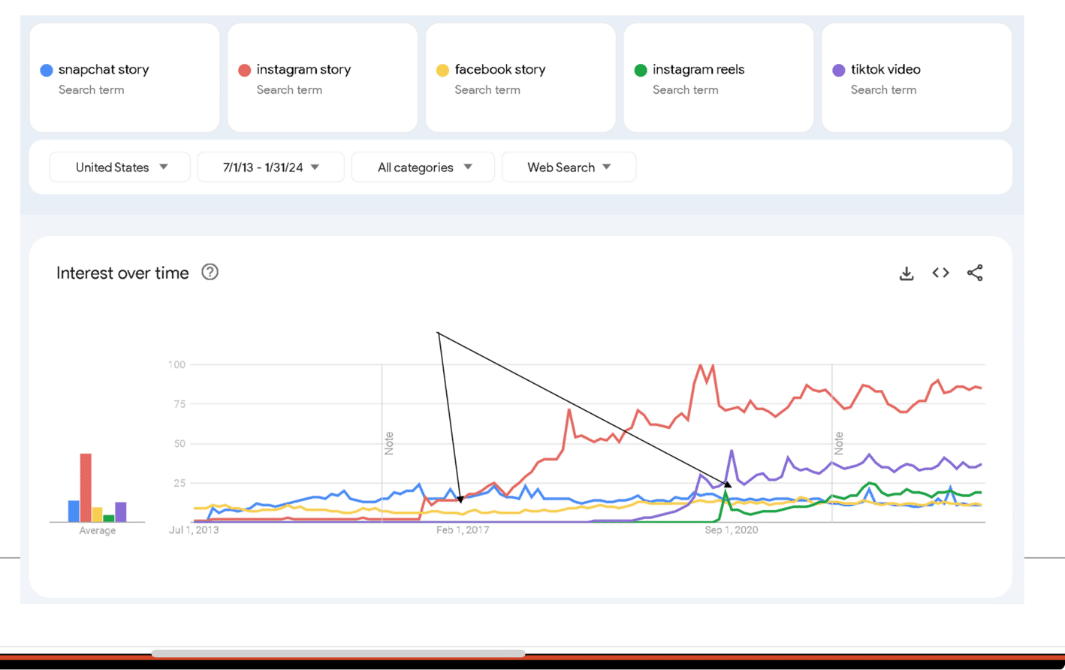
Snapchat popularized the vertical video format when it launched its ad platform in 2014. Combined with the power of social media, fast internet and engaging full-screen ads, this innovation made a big impact.
Vertical video’s early success and wide adoption had a massive influence on other platforms due to its effectiveness. The 100% Share of Voice (SOV) was crucial, as it minimized distractions compared to traditional TV, news feeds, display ads and YouTube placements. The novelty of any new ad placement is incomparable, which is why many social platforms and marketers move quickly to embrace innovation.
Following Snapchat’s footsteps, Meta’s Instagram Stories expanded vertically, introducing its ad placements in early 2017 after some initial tests in August 2016.
The explosion of Instagram Stories will be in the digital advertising history books as one of the greatest moves by Meta to improve shareholder value by increasing engagement through time spent while enhancing their newly purchased Instagram.
Adopting the 24-hour content strategy induced fear of missing out (FOMO), leading to a surge in impressions that soared annually, peaking during the pandemic when costs for these sought-after slots plummeted, generating significant profits for companies, particularly in ecommerce, as observed in my experience.
In 2017, vertical video gained traction with the launch of Facebook Stories. However, TikTok stole the spotlight upon its September debut, offering a vertical-only feed and prioritizing trending content through its algorithm, which reshaped creator and user engagement dynamics.
From 2018 to 2020, we witnessed TikTok’s inconspicuous yet explosive growth and its vertical video platform’s dominance. TikTok’s watermark on shared videos was a stroke of genius.
Meta, which had always regarded its content creators as the core of its product and advertising base, did not anticipate TikTok’s accelerated growth via branded content shared on their platforms. Meta belatedly penalized watermarked videos in their algorithms, curbing TikTok’s branding reach on Instagram and Facebook.
Get the daily newsletter search marketers rely on.
Today, vertical video advertising will ascend to the pinnacle of the creative hierarchy, compelling brands, agencies and media buyers to adopt a “vertical-first” strategy across platforms like Reels, TikTok and YouTube Shorts.
Shorts is the most recent launch of a vertical full-screen video advertising placement, a unique opportunity for the YouTube platform to increase time spent on the platform, videos watched per visit and overall impression volume.
YouTube continues to expand and remain a unique offering for advertisers with skippable shorts and long-form placements, along with the addition of in-feed.
One interesting insight is the RPM (Revenue Per Thousand Impressions) between placements highlighted by TubeBuddy.
“The average RPM for a long form video is around $3, meaning a 100,000 views could earn you around 300 bucks on average. Of course, some creators make a lot more, some make a lot less. But for Shorts, the average RPM is around 5 cents. So, the same amount of views might just bring you in $5.”
Showcasing a wide difference between shorts and long-form raises questions for marketers:
If YouTube’s payouts for Shorts are minimal, does it suggest lower engagement or conversion rates compared to longer videos? Or are we witnessing the early stages of a format ripe for those willing to master vertical video at a bargain?
Prioritizing vertical video advertising with AI and content variation
I believe the most effective strategy for advertisers is to prioritize video, particularly vertical video, in their campaigns to leverage the broadest inventory and platform placement range. I would recommend combining vertical video with AI and content variation.
AI tools
Today, numerous AI video software can condense long-form videos into bite-sized segments. I covered this in detail in my SMX Next presentation, “Level up your YouTube advertising by combining AI and YouTube data” (registration required). This can help you understand video AI but also how to transition long form to short form vertical at scale.
Additionally, software like CapCut is gaining traction with AI features that effortlessly convert standard 16:9 videos into a “TikTok-ready” vertical format through precise cropping and motion tracking.
Content variation
One of the hidden benefits or features of vertical video is the mindset of the user viewing the ad. Vertical ads typically feature UGC-style, fast-motion videos with quick cuts to engage users and convey action swiftly.
Some variations that can be tested and evaluated in this vertical format while feeling native to the platform experience include:
Greenscreen.
Top Regrets (reverse psychology).
Talking head.
Stitch incoming.
Product demonstration.
What I ordered vs. what I got.
The comment overlay response.
Embracing vertical video ads across platforms
In my early presentations, I was keen to discuss the value of long-form skippable ads as the most valuable impression on the web. But my perspective has evolved five years later.
Vertical video is now an absolute must for marketing and advertising strategies. It’s crucial for fostering a harmonious relationship between organic and paid content, often leading to better performance.
Paid media fuels a fire for a brand’s product or service, creative approach, messaging and overall content strategy.
It’s time to explore a vertical-centric approach, test across multiple platforms and introduce variety to your video content. These burgeoning vertical placements can help you deeply understand your audience and achieve the most cost-effective results.
Remote work and entrepreneurship have turned homes into workplaces, which has advantages. However, sometimes, you must make adjustments to maximize your potential, including your lights.
Many homes have ambient lighting that includes overhead or recessed lights. However, they are not designed for functional lighting in the home office. The type, character, and lighting quality can affect your drive and productivity. Artificial lights are even more critical when considering workspace illumination if you don’t have much natural light.
Here are things to consider when revamping your home workspace with the proper lighting.
Understanding Color Temperature
Color temperature plays a critical role in setting the right mood. We measure light color temperature in Kelvins (K), a unit of absolute temperature. Generally, the higher the Kelvin, the whiter the light. A bulb’s Kelvin rating will determine the approximate hue it will provide. The description below also identifies the suitable fixture for each area based on the color temperature:
Below 2000K: Exudes a dim glow similar to candlelight; ideal for low-light areas, like an altar.
2000K-3000K: Exudes a soft yellow glow; ideal for most rooms in the home, including the bedrooms, living room, and outdoor areas.
3100K-4500K: Exudes a bright, white light; ideal for kitchens, home offices, other work areas, and anywhere requiring task lighting.
4600K-6500K: Exudes a bright, blue-white light, similar to daylight; ideal for display areas and work spaces requiring high illumination.
6500K and up: Exudes a bright bluish light, often found in commercial locations; ideal for task lighting.
Most household fixtures are warm to mid-cool (2700K to 3500K). Color temperatures over 3500K are typically used for commercial applications because the light has a bluish daylight cast that can seem harsh for home interiors. You may want task lighting at 4000K and above. When selecting ceiling lighting for your home or project, consider its color temperature to ensure the best outcome.
Light Revamping Tips
Your lighting strategy will depend on many factors, including your work and existing infrastructure. For example, it will be much easier to put designer ceiling lights if you already have wiring for it. However, there are general tips you should follow when revamping your home business space.
Use Natural Light
Let’s discuss finding the golden middle ground between natural and artificial office lighting. In a perfect world, you’re nestled in a cozy nook where sunshine constantly streams in. But the reality is that you will need artificial light sources at some point. The key to balanced lighting for your home office is to utilize natural light whenever possible and supplement it with various other light sources like task, overhead, and accent lights.
Take advantage of natural light coming from a window or skylight. Sunlight produces a warm glow that can improve the work environment. However, direct sunlight can also create overwhelming glare during specific times of the day.
Maximizing the power of natural light in your home office setup requires more than letting it in. The secret is strategically placing your workspace in the daylight without causing a glare on your screen.
Generally, natural light should be in front of or next to work surfaces and screens to prevent glare and provide an outside view. You can also position your workstation facing north or south so the sunlight doesn’t throw a shadow at any point in the day.
Consider using solar shades to soften and reduce the heat to accommodate varying brightness levels without compromising the view. Other alternatives are blinds and standing screens, which are excellent for diffusing sunlight through a window.
Choose Indirect Lighting
Avoid placing overhead lights directly over your workstation. Instead, look for ways to diffuse the ambient light. Lampshades soften and scatter light, while an upward-shining floor lamp bounces off ceilings and walls. The aim is to light up the entire space without creating glare and shadows.
Eliminate Glare and Shadows
Image by Arek Socha from Pixabay
Dodge that pesky glare by positioning your computer screen perpendicular to natural light sources, and avoid facing or opposing windows. Additionally, using matte screen covers and installing blinds or curtains can give you more control. Integrate task lighting with adjustable brightness to help ensure your space is glare-free.
Always consider where your light comes from. As you work on your computer, a light source behind you will likely create a distracting glare on your monitor. Take note of the location of windows when setting up your workspaces to ensure sunlight will not strike the computer screen directly.
You should also look out for unintended shadows cast by lamps. For instance, suppose you’re right-handed. Your hand and arm may cast shadows when you write if your task light is on the right.
Get the Right Temperature
Choosing the right color temperature for your home office lighting is a bit like selecting the perfect outfit — it all depends on the occasion (or the task, in this case).
With its cozy and relaxing vibe, warm light works wonders during brainstorming sessions or to prevent eye strain while reading. Conversely, bright blue-white light kicks productivity up a notch. It’s an excellent choice for tasks that require sharp focus, such as document editing or drafting designs.
When it comes down to deciding on how to light your workspace to bring out your most productive side, many people use cool, blue light. The key lies in the fact that blue light closely mimics natural daylight.
That is important because some of our bodies’ natural processes (like producing melatonin, a sleep hormone) are tied directly to our exposure to natural light. Basking in a cool blue glow while working will stop your body from going into sleep mode. That’ll give you the energy you need to complete even more work.
With the flexibility to select from over 16 million colors instantly, thanks to most smart lighting systems, you can tap into this productivity boost whenever necessary.
However, just because you can bio-hack your body into thinking it’s daytime well past sunset doesn’t mean you should. As many recent studies have shown, exposure to blue light, in particular, is more disruptive to your body’s sleep patterns than any other color (which is why it’s so helpful in keeping you productive!).
That’s why many offices worldwide are investing in transitional color lights. They start by producing cool, energizing blue light in the morning and gradually change to warmer yellow as it approaches quitting time. The transition can reduce burnout in the home office because it helps ease you out of the working mindset. It allows you to enjoy your time at home better and help you get a better night’s sleep.
If you own high-quality smart bulbs, you can reap these benefits by setting an eight-hour transition from cool-colored light to warmer tones. When revamping your home office space, it only takes a new light bulb to significantly affect your well-being.
Take Control
While you might assume that brighter lights mean more productivity, that is not always true. In fact, people may already be getting too much light in the workplace. Lighting that is too bright can cause fluctuations in your mood, resulting in irritability and discomfort. There are also unwanted physical effects, such as headaches and eye fatigue. On the other hand, dim lighting may lull you into a midday nap.
Achieving optimal lighting is the key. It involves selecting bulbs with the ideal brightness for various tasks. Consider the specific lighting needs: reading or writing may demand ample brightness in a home office, while tasks like Excel or internet research may require less illumination.
The solution is lighting fixtures that allow you to change the brightness levels to cater to your activities. When it comes to adaptable home office lighting, dimmers take center stage.
These devices let you modify the lighting according to the task or time of day, promoting optimal eye comfort and energy efficiency. You can create the ideal lighting scenario for every situation with a dimmer or dimmable lamp. It’s a minor adjustment that significantly impacts creating a harmonious setup when revamping your home business space.
Smart lighting is another option. Many smart bulbs allow you to save lighting settings, letting you quickly pick out the atmosphere that’ll fit the task at hand. You can also do it from your phone, so that’s total control at your fingertips.
Create Task Lighting
Task lights illuminate your work without creating shadows or glare. Desk and table lamps allow you to direct light exactly where you need it, preventing eye fatigue.
For focus-intensive tasks, choose an articulated desk lamp you can direct to illuminate precisely where you need it and support a variety of functions. Suppose your home office has multiple workstations like a desk for computer work, a filing area, and a table for reviewing photos and layouts. In that case, you should set up dedicated task lighting for each station.
Add Uniqueness with Accent Lighting
Your home office will feature ambient lighting diffused throughout your space and task lighting concentrating on your workstation. However, you can go beyond these two functional layers of light when revamping your home business space. Adding several decorative touches with accent lighting will make your office look great.
You can draw attention to your collections or other objects to add a spark of character. For example, try placing LED strips inside a shelving unit or adjustable downlights with a narrow beam angle to highlight pictures.
Illuminating the Path to Productivity
Revamping your home business space with the right lighting is more than just a matter of aesthetics. It creates an environment that boosts productivity, enhances mood, and supports health.
You can create a work area that looks good and promotes efficiency and well-being. Remember, the proper lighting can transform your work from feeling like a chore to a more enjoyable and fruitful endeavor. So, take the time to assess your lighting needs and make the necessary adjustments. Your home office isn’t just a place where you work; it’s a space where your best ideas can flourish.
Upgrading your mattress can represent a significant change in your quality of life. In current days it is possible to find plenty of options and models available, with a great offer, it is important to understand the benefits of each one; to find the one that aligns better with our preferences. Factors such as; customization for partner differences, motion isolation, and durability, play a vital role when making a choice. In this article, delve deeper into these options to help you make an informed decision.
Embracing Comfort with California King Mattresses
For the ones searching for a spacious bed and unparalleled luxury, a California king mattress can be what you’re looking for. These mattresses are usually longer than standard king size, offering extra length, ideal for taller individuals or those who simply crave more room to stretch out comfortably.
Many California king mattresses are designed to reduce motion transfer, this is especially good for couples who may have their sleep interrupted by their partner’s movements. Also, it represents a very durable option, built to last many years.
Finding Harmony in Bed
When thinking of upgrading your mattress to share with your partner, it is important to know the existence of the customization option. Today, it is possible to personalize each side of the mattress to meet the preferences of each partner. Gone are the days of compromising your sleep, today you can customize the firmness level of each side, ensuring a harmonious sleep experience for both.
A Solution for Light Sleepers
If you are a delicate sleeper, and get woken up easily by the movements of your partner, mattresses with motion isolation can represent an efficient solution for this trouble. These mattresses have the capability of absorbing and dispersing the movements across the surface of the bed, minimizing disturbances, allowing you and your partner to have an uninterrupted sleep.
Maintaining a Cool and Comfortable Sleep Environment
Among other factors driving preferences when upgrading your mattress, temperature regulation is a very distinctive one. Some individuals struggle with overheating during the night, nowadays it is possible to find models that offer temperature regulation solutions.
These mattresses are made with advanced cooling technologies and breathable materials, which help to disperse heat and wet away moisture. These characteristics contribute to a deeper sleeping atmosphere, encouraging improved and more comfortable rest.
Long-term Investment
Durability is another of the crucial aspects to consider when deciding on a mattress. Investing in a high-quality mattress can represent years of better sleep and more efficient mornings. Is important to look for mattresses made with durable materials, and manufactured by renowned companies that can back their products with warranties, ensuring a long-lasting sleeping experience.
Deciding on a mattress that suits both you and your partner can be quite challenging. It is important to be informed and aware of your unique sleep preferences, to make a better decision.
By considering specific features, such as size, motion isolation, and durability you can narrow the options to simplify your search. Remember to consider your own comfort needs as well as those of your partner when upgrading your mattress.
Liquidation is frequently the only option left to people and organizations struggling with debt. However, you should be aware of the ongoing fees if you have lately decided to file for liquidation in North Carolina. You may wonder, does filing bankruptcy get rid of all of your debt? Or what happens to assets? This article will address the many charges associated with filing for bankruptcy in North Carolina, including legal fees, reasonable expenditures, and other associated costs.
Understanding Liquidation in North Carolina
Let’s start by reviewing the fundamentals of liquidation in North Carolina and then delving deeper into the expenses. Individuals and corporations can choose to avoid or repay their obligations through the legal process of insolvency while being protected by the insolvency court. Liquidation matters in North Carolina are handled by the United States Insolvency Court for the Eastern, Central, and Western regions of the state.
Types of Bankruptcy
In North Carolina, individuals and companies may choose to file for various forms of bankruptcy, each with its own costs and prerequisites.
Chapter 7 Bankruptcy: Offering unsecured assets as collateral to satisfy creditors is a requirement under Chapter 7 bankruptcy, often known as liquidation bankruptcy. To be eligible for Chapter 7 bankruptcy, an eligibility test that matches an individual’s pay to the state’s median income must be passed. You may want to read on how much a Chapter 7 attorney charges in North Carolina before you decide you want to file.
Chapter 13 Bankruptcy: This type of bankruptcy permits individuals who receive regular income to create a repayment plan to pay off their debts within the allotted three to five years. Individuals sometimes choose this period of insolvency as a way to manage their finances and catch up on overdue debts.
Chapter 11 Liquidation: Businesses typically use this type of insolvency to continue operating while rebuilding their debts and operations. This decision allows firms to continue operating while developing a plan to progressively repay banks.
The price of declaring bankruptcy in North Carolina
There are a few expenses to take into account in North Carolina while filing for liquidation:
Court Recording Fees: The United States Insolvency Court charges a recording fee for requests for liquidations. For the Chapter 7 liquidation, the recording cost is now $338, and for the Chapter 13 liquidation, it is $313. It’s crucial to clarify the current expenses with the court as these might vary.
Attorney Fees: Although individuals can file for liquidation without a lawyer (a process known as recording master se), it is generally advised to seek the advice of a top-notch insolvency attorney. The cost of an attorney varies according to the case’s complexity and the lawyer’s involvement. For bankruptcy administrations, some attorneys may provide flat fees, while others may bill on an hourly basis.
Credit Comforting and Indebted Person Instruction Courses: People have been compelled to complete credit comforting and indebted person instruction courses as part of the liquidation process, as of late. Most of these courses cost between $20 and $50 per, and they have to be taken from a provider that has been approved by the court.
Other Costs: Additional costs, such as credit report fees, postage, photocopying, and travel expenditures for attending court hearings, may be incurred depending on the specifics of the case.
Factors Influencing the Taken Toll of Bankruptcy
Several factors affect how much bankruptcy costs:
Complexity of the Case: One of the most important factors influencing the toll taken in a liquidation case is its intricacy. It usually takes more time and money to settle cases involving many lenders, notable implies, or disputed items. Because of the increased workload and documented reasonable problems, attorneys may charge extra expenses for handling complex cases.
Type of Insolvency: The type of insolvency that is officially documented may also have an impact on the overall results. In general, Chapter 7 liquidation cases are less valuable and difficult than Chapter 13 or Chapter 11 liquidation cases. Chapter 7 liquidation cases involve the liquidation of property to refund lenders. Businesses typically use Chapter 11 liquidation because it has the most valuable and difficult restructuring criteria and progressive control by the bankruptcy court. For example, if you file a Chapter 7 bankruptcy, you may want to consider North Carolina bankruptcy exemptions to see whether you can protect assets.
Attorney’s Fees: The fees that bankruptcy attorneys charge vary widely depending on factors such as case complexity, character, involvement, and status. Attorneys with extensive experience or specific knowledge in liquidation law may be able to charge higher fees for their services. Additionally, many pricing structures are available from attorneys, including flat fees, hourly rates, or a combination of both, which can affect the total cost of representation.
Court-Appointed Trustees: A court-appointed trustee may oversee the preparation of the liquidation and distribute accounts to banks in Chapter 7 liquidation proceedings. Trustees have the right to accept payment for their administrations, which is often deducted from the liquidation domain’s proceeds. Trustees may charge different fees depending on the size and complexity of the domain, although these fees are often reasonable and set by the insolvency court.
Conclusion
In North Carolina, there are several fees associated with filing for bankruptcy, including those related to court recording, legal fees, and other subsidiary charges. When deciding to file for bankruptcy, it’s important to take into account all associated expenses and look at decisions that cannot be replaced. Consulting with an excellent liquidation attorney may provide invaluable guidance and support as individuals navigate the bankruptcy process effectively while reducing expenses.
JPMorgan Chase launched Chase Media Solutions, a new digital media business. It’s the first bank-led media platform, allowing advertisers to send relevant promotions to some 80 million financial customers.
Chase acquired transaction-based digital advertising platform Figg in 2022 — a key component in Chase’s two-sided commerce platform. Chase Media Solutions was announced April 3.
Why we care. Over the last several years, many retailers have grown new revenue streams by setting up retail media networks (RMNs) for advertisers. RMNs are attractive to advertisers because they can send targeted ads based on the retailers’ deep knowledge of their customers, especially loyalty customers.
Data. Chase’s advantage is transactional first-party data, which allows brands and agencies to target based on purchase history. RMNs have that data too, but only within their specific stores and owned channels. Chase customers have purchase histories across retailers and other businesses they buy from.
Non-retail media platform. “Our deep understanding of consumer spending across categories has driven us to reimagine what retail media networks can offer,” said Rich Muhlstock, President of Chase Media Solutions, in a release.
“Like retailers, we have first-party data and a dedicated audience. But what sets us apart is the unrivaled scale and insights from our customers – having long-served as a trusted guide for their financial decisions. Chase reaches across brands, merchants and shopping verticals, providing a comprehensive view of purchase behavior; this strengthens the degree of personalization, helping brands deliver offers that stoke consumer interests,” Muhlstock said.
Early adopters. Pilot partners include Air Canada, Solo Stove, Blue Bottle and Whataburger, all of which ran 30-day campaigns through Chase Media Solutions.
“The Chase team succeeded in creating a thoughtful, targeted offer that exceeded our expectations,” said Scott O’Leary, vice president of loyalty and product for Air Canada, in a release. “Two distinct offer constructs drove incremental revenue and awareness for Air Canada amongst Chase’s cardmember base. These tests clearly demonstrated the potential of the Chase Media Solutions channel, and we look forward to working together more in the future.”
TikTok is reportedly developing AI-powered virtual influencers that will be able to compete against human creators for lucrative advertising contracts.
The new AI avatars can allegeldy read scripts for video ads created from prompts submitted by brands and TikTok Shop sellers. However, this feature is still in its testing phase so everything is subject to change, reports The Information.
Impact on sales. During testing, TikTok researchers discovered that AI avatars haven’t generated as many e-commerce sales as human influencers. This is reportedly why the new feature hasn’t been made available to marketers yet. The platform suggests that this feature should complement existing human creators rather than replace them.
Concerns. Some advertisers worry that AI influencers could be used for manipulative marketing tactics. Additionally, the rise of virtual creators could steal business from real influencers, possibly leading some users to leave the platform.
Why we care. Even though using AI influencers for promoting products might seem cheaper and quicker for your campaigns, considering the lower sales and ethical concerns involved, it might not be the best choice for brands as things currently stand.
What TikTok is saying. TikTok did not immediately reply to Search Engine Land’s request for comment.
Get the daily newsletter search marketers rely on.