As a business owner, managing debt is often part of the journey. Whether you’ve financed new equipment, taken out a loan to cover operational costs, or used credit to fund expansions, juggling multiple debts may quickly become overwhelming. Having a firm grasp of the pros and cons of debt consolidation is also vital when assessing your strategy and can help streamline your costs.
If you find yourself in this position, consolidating your business debt might be the solution to streamline payments and improve your financial health.
Keep reading to learn when debt consolidation could make sense for your business.
Understanding Debt Consolidation
Debt consolidation is a financial strategy that allows you to combine multiple debts into one loan or credit line, typically with more favorable terms, such as a lower interest rate or a more manageable payment schedule. Instead of making separate payments to multiple lenders, you make a single payment, simplifying your cash flow and potentially reducing the stress of managing various due dates.
When Debt Consolidation Makes Sense
High Interest Rates are Draining Your Profits
One of the clearest signals that debt consolidation may benefit your business is if you’re paying high interest on multiple loans or credit cards.
High-interest debt could significantly cut into your profits, leaving you with less capital to reinvest in your business. Consolidating this debt into a single loan with a lower interest rate may reduce your overall interest payments, freeing up cash for other important business needs.
You’re Struggling to Keep Track of Payments
Managing various loans, each with different due dates and payment amounts, may be stressful. Missing or making late payments could also hurt your credit score and increase your debt with penalties or late fees.
So, if you’re struggling to stay on top of your financial obligations, consolidating your debt into one monthly payment may simplify your schedule and ensure you stay current on your financial obligations.
Your Cash Flow is Tight
Cash flow is typically the lifeblood of any business, and when you’re strapped for cash, keeping up with multiple debt payments may be difficult.
Consolidating debt could reduce your monthly payment by extending the loan term or securing a lower interest rate, giving you more breathing room in your cash flow. This extra liquidity could be used to cover operating expenses and payroll or even invest in growth opportunities.
You Have Good Credit
If your business has a good credit score, you may qualify for debt consolidation options with favorable terms. Lenders are generally more likely to offer lower interest rates and flexible repayment options to businesses with strong credit histories.
So, consolidating your debt when you have good credit may save you money in interest payments over time.
You Want to Simplify Your Finances
Consolidating debt could also be smart if you simply want to streamline your business finances.
Having one debt to manage instead of several may reduce the time and effort required to handle your financial obligations. This might be especially beneficial if you’re trying to free up time to focus on growing your business rather than dealing with the day-to-day hassle of juggling multiple debts.
Pros and Cons of Debt Consolidation
As with any financial strategy, consolidating business debt has pros and cons.
Pros of Debt Consolidation
Lower Interest Rates: You could save money by reducing the overall interest you’re paying on your debts, especially if your original loans had high interest rates
Single Payment: Instead of managing multiple loans, you only must make one payment, simplifying your financial management
Improved Cash Flow: With lower monthly payments, you may free up cash for other business needs
Credit Score Improvement: Making consistent, on-time payments on your consolidation loan could help boost your credit score over time
Cons of Debt Consolidation
Longer Repayment Period: While lowering your monthly payment might help your cash flow, it could also mean extending the length of your loan, leading to more interest paid overtime
Fees and Costs: Some consolidation loans come with origination fees or other costs that might negate the savings you’d get from a lower interest rate
Risk to Collateral: If you consolidate with a secured loan, you may need to put up business assets as collateral and if you can’t repay the loan, those assets could be at risk
Understanding the pros and cons of debt consolidation could help you make an informed decision and prevent you from getting into a worse financial situation in the long run.
When Debt Consolidation Might Not Be the Right Choice
Debt consolidation isn’t always the best move, especially if facing deeper financial issues. For example, if your business is barely staying afloat and you’re considering consolidation as a last resort, it may prove to be a temporary solution.
By carefully evaluating your financial situation and understanding the pros and cons of debt consolidation, you could make an informed decision that sets your business up for long-term success.
Will Finance Phantom 2025 Be as Legit as It Was in 2024?
Traders often struggle to monitor market trends 24/7, as they often follow tough schedules. This causes them to miss out on potentially favorable opportunities a lot of times. If you have been trading for a long time and are fed up with not finding the right opportunities, then this review is for you. Here, I will be giving you a look into the Finance Phantom Bot portal.
Which is known for providing traders with a variety of cutting-edge tools to improve their chances of profitability. What’s more, this platform gives you the tools to keep an eye on the latest market trends, ensuring you can make timely investments that could yield the right returns with time.
Once this piece is over, you will get a clear idea of why this crypto trading robot has been on the lips of a large number of people in the trading scene.
Web Based Portal for Traders
Let’s kick things off by talking about the web based portal offered by this online trading platform. In the early days of online trading, people faced loads of complications when making trades and were limited by restrictive platforms. This caused delays, confusion and a ton of other problems that held people back from truly thriving in this field. Now, however, things have changed thanks to the presence of reliable crypto trading bots like Finance Phantom. This platform provides users with its handy web based portal that they can access at any time in order to perform their trading activities.
What’s more, this bot connects you with reliable brokers who make use of a variety of cutting edge tools to find you the right trades. You can take advantage of their insights and create trading strategies that have the potential to provide you with consistent returns over time.
Seamless Account Verification Procedure
Finding the right broker through the Finance Phantom is a walk in the park, especially when you compare the process at some other platforms. Here, everything is quite straightforward and does not take too much time. One of the first things you will need to do is create an account, which is completely free of charge. The account creation process just involves a few simple clicks, after which you will be signed in to the platform. While providing your details, make sure to recheck that everything is accurate so that you are compliant with Know Your Customer standards.
Once the information is provided, traders can then deposit their money in order to begin their trading journey. The Finance Phantom usually requires a minimum of two hundred and fifty Dollars in order to get started, which isn’t too expensive considering the quality and quantity of tools and features you will be getting access to.
How is the Customer Support Here?
Anyone who joins an online trading platform wants to make sure that it has a professional and responsive customer support team. The trading sphere is full of incidents where people joined platforms, thinking that they would be able to ask for help at any time, only to realize later that it was not possible. Fortunately, you will not need to worry about such problems when using the Finance Phantom. I say this because I have used this crypto trading robot personally and have interacted with their customer support representatives plenty of times.
Unlike other platforms, where you can only wait for the support staff to answer your questions, the team at Finance Phantom is highly responsive. Once you shoot them an email or send them a message, they will start working on providing you with a solution, making sure that you can return to your online trading activities with complete peace of mind.
Get Trading Alerts in Real Time
One thing that really impressed me about the Finance Phantom Trading Bot is that it does everything in its power to simplify your trading experience. It’s like the team behind this platform knows that traders live incredibly busy lives and barely get time to stay in the know about what is happening in the market. To tackle this problem, the platform provides its user base with real time trading alerts to make sure that they do not have to keep their eyes peeled for the latest bit of insights.
Instead, you will get a quick notification if anything worthwhile happens, making sure that you can make adjust to your trading strategies on the fly.
Final Thoughts
I will conclude this review by recommending Finance Phantom Bot AI crypto trading platform to people who want to excel in their trading careers. Whether you are a newcomer to this field or have been in it for a long time, you can expect this platform to provide you with the freedom to trade just the way you want.
Will Finance Phantom 2025 Be as Legit as It Was in 2024?
Traders often struggle to monitor market trends 24/7, as they often follow tough schedules. This causes them to miss out on potentially favorable opportunities a lot of times. If you have been trading for a long time and are fed up with not finding the right opportunities, then this review is for you. Here, I will be giving you a look into the Finance Phantom Bot portal.
Which is known for providing traders with a variety of cutting-edge tools to improve their chances of profitability. What’s more, this platform gives you the tools to keep an eye on the latest market trends, ensuring you can make timely investments that could yield the right returns with time.
Once this piece is over, you will get a clear idea of why this crypto trading robot has been on the lips of a large number of people in the trading scene.
Web Based Portal for Traders
Let’s kick things off by talking about the web based portal offered by this online trading platform. In the early days of online trading, people faced loads of complications when making trades and were limited by restrictive platforms. This caused delays, confusion and a ton of other problems that held people back from truly thriving in this field. Now, however, things have changed thanks to the presence of reliable crypto trading bots like Finance Phantom. This platform provides users with its handy web based portal that they can access at any time in order to perform their trading activities.
What’s more, this bot connects you with reliable brokers who make use of a variety of cutting edge tools to find you the right trades. You can take advantage of their insights and create trading strategies that have the potential to provide you with consistent returns over time.
Seamless Account Verification Procedure
Finding the right broker through the Finance Phantom is a walk in the park, especially when you compare the process at some other platforms. Here, everything is quite straightforward and does not take too much time. One of the first things you will need to do is create an account, which is completely free of charge. The account creation process just involves a few simple clicks, after which you will be signed in to the platform. While providing your details, make sure to recheck that everything is accurate so that you are compliant with Know Your Customer standards.
Once the information is provided, traders can then deposit their money in order to begin their trading journey. The Finance Phantom usually requires a minimum of two hundred and fifty Dollars in order to get started, which isn’t too expensive considering the quality and quantity of tools and features you will be getting access to.
How is the Customer Support Here?
Anyone who joins an online trading platform wants to make sure that it has a professional and responsive customer support team. The trading sphere is full of incidents where people joined platforms, thinking that they would be able to ask for help at any time, only to realize later that it was not possible. Fortunately, you will not need to worry about such problems when using the Finance Phantom. I say this because I have used this crypto trading robot personally and have interacted with their customer support representatives plenty of times.
Unlike other platforms, where you can only wait for the support staff to answer your questions, the team at Finance Phantom is highly responsive. Once you shoot them an email or send them a message, they will start working on providing you with a solution, making sure that you can return to your online trading activities with complete peace of mind.
Get Trading Alerts in Real Time
One thing that really impressed me about the Finance Phantom Trading Bot is that it does everything in its power to simplify your trading experience. It’s like the team behind this platform knows that traders live incredibly busy lives and barely get time to stay in the know about what is happening in the market. To tackle this problem, the platform provides its user base with real time trading alerts to make sure that they do not have to keep their eyes peeled for the latest bit of insights.
Instead, you will get a quick notification if anything worthwhile happens, making sure that you can make adjust to your trading strategies on the fly.
Final Thoughts
I will conclude this review by recommending Finance Phantom Bot AI crypto trading platform to people who want to excel in their trading careers. Whether you are a newcomer to this field or have been in it for a long time, you can expect this platform to provide you with the freedom to trade just the way you want.
Are you a search marketer looking to expand your reach and drive even more impactful results? Look no further. Join us for How Search Marketing Turned the Tide for CTV Audience Targeting and learn how your existing search marketing expertise can be a valuable asset on this powerful advertising platform.
Connected TV (CTV) has a new feature that you may recognize right away: keyword targeting. This Search Engine Land webinar will show you how CTV fits seamlessly into your search strategy and how to use your existing keyword knowledge to reach your target audience on the big screen.
Explore the new frontier of keyword targeting and leverage your search marketing expertise across platforms. Click here to save your spot!
Are you a search marketer looking to expand your reach and drive even more impactful results? Look no further. Join us for How Search Marketing Turned the Tide for CTV Audience Targeting and learn how your existing search marketing expertise can be a valuable asset on this powerful advertising platform.
Connected TV (CTV) has a new feature that you may recognize right away: keyword targeting. This Search Engine Land webinar will show you how CTV fits seamlessly into your search strategy and how to use your existing keyword knowledge to reach your target audience on the big screen.
Explore the new frontier of keyword targeting and leverage your search marketing expertise across platforms. Click here to save your spot!
Happy freshers week to all the new students out there! As a student, you tend to have quite a bit of spare time. However, it can be pretty sporadic – you never know which days you’ll have off!
Regular paid work can be tricky to maintain alongside studies. But, if you are still in need of some extra cash, there are plenty of ways you can make the most of your spare time when it comes up!
Take a look at these 7 ways that you can make money in your spare time as a student. And, if you need more ideas, take a look at the A-Z Guide to Making More Money.
As a student, you’re always acquiring specialist skills on subjects others might want to know about.
Earn back a bit of extra cash with tutoring, or offering your skills to teach online for sites like Coursera or Udemy. If devising a whole course sounds like too much, you can always help school students with particular subjects. Maybe you can help with their maths or English homework. Parents are always looking for extra study help for their children, and it’s a flexible job you can start right away.
Test out websites
Whenever you’ve got a spare 20 minutes, sites like What Users Do or UserTesting can earn you great money for just trying out a website and reporting back on the user experience. You’ll need to complete a trial run, have a good microphone, and clearly narrate what you do as you do it.
Once you’re approved, sites contact you to arrange assignments. You can take these assignments when you need some extra cash!
Sell stock photography
If you have a camera that can take decent quality images, capitalise on the chance to keep a little income trickling in. Sites like iStockphoto are always looking for contributions. Every time someone purchases one of your photos, you receive a small royalty fee.
Take clear, quality photos and submit them. The site itself will often let you know what sorts of themes and content they are requiring.
Get crafty!
If you’ve any talent for handicrafts, Etsy was made for the craft enthusiast at home. It’s easy to get started, and once you have some intriguing trinkets, you can advertise them online and start making sales.
Alternatively, you can flip items at home. Gumtree or eBayare perfect for these kinds of sales, and will allow you to make a tidy profit on unneeded goods.
Or, get into ‘flipping’: purchase items at low cost from car boot sales and sell them on for profit. Show off your newfound treasures online and get the best price. Learn how to be “amazing at selling on Ebay” with this article.
Take up odd jobs
Whether you’re handy around the house or a willing babysitter, whatever odd jobs you can help out with are available to view on sites like Fiverr or TaskRabbit.
If you’d rather not do odd jobs around the house, you might consider other kinds of jobs as a freelancer. Sites like Upwork and PeoplePerHour make it easy to list your skills, find jobs that people from across the globe need doing, and get to work! They do charge fees for every successfully completed job, but you can still find yourself taking on work which is interesting, and pays you a little extra.
Use your driving skills
If you have regular access to a vehicle, why not get paid as you travel round town?
Uber takes a little bit of time to become fully registered with, but if you’re a good driver with a full licence and no issues on your record, you can make extra money from just driving people around. This leaves the earning potential up to you, as you can agree to take passengers whenever it suits you.
Sell a book online
Are you passionate about any particular subject? Is there a large audience for it? Do you have a flair for fiction? Put it to use and write a great eBook!
There are lots of great ways you can get your book out there and sell it. Even for a few quid a pop, these things can add up! If your book becomes popular enough you never know what it could lead to.
BECOME A STUDENT NIGHTCLUB PROMOTER
If you love a good party (and as a student, you just might!) then why not make some extra cash from promoting events?
Being sociable and forging strong connections with DJs and nightclubs is crucial to make this work. You will need to convince people that this event is the right one for them, and that starts with your fun personality.
Let’s face it: Turning raw data into actionable insights can be as cryptic as decoding ancient hieroglyphics, especially for the SEO rookies in your crew.
That’s the challenge I addressed in my SMX Advanced 2024 session.
Didn’t catch it? No worries. I’m recapping it all in this article series, one juicy nugget at a time. This is Part 2, so if you missed Part 1, check it out.
Get ready for a quick overview of key technical SEO metrics to track in Google Search Console. Compare your list with mine – you might spot something your SEO team has missed.
Senior SEO managers: This article is for your technical SEO newcomers. It explains how I would introduce Google Search Console metrics to bridge their knowledge gaps quickly.
Top tips for looking at Google Search Console metrics
Don’t limit comparisons to just two data points: Avoid comparing just two points in time (end of last month vs. prior month). It’s like looking at two photos and missing the whole movie – especially the drama in the middle. This is a common mistake I see when upskilling SEOs to become advanced SEOs. You need to look at the ups and downs all month.
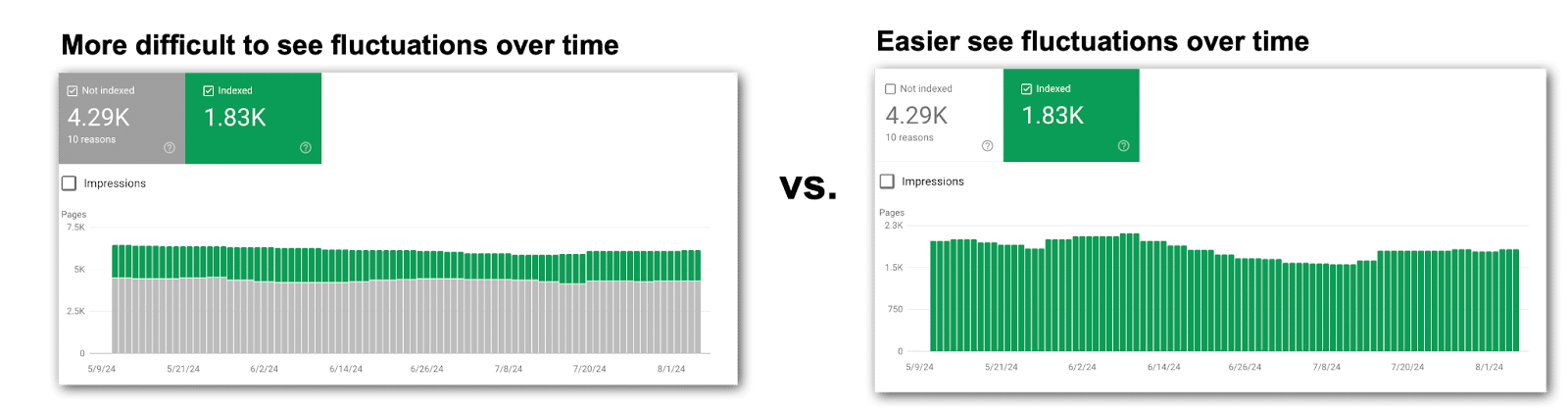
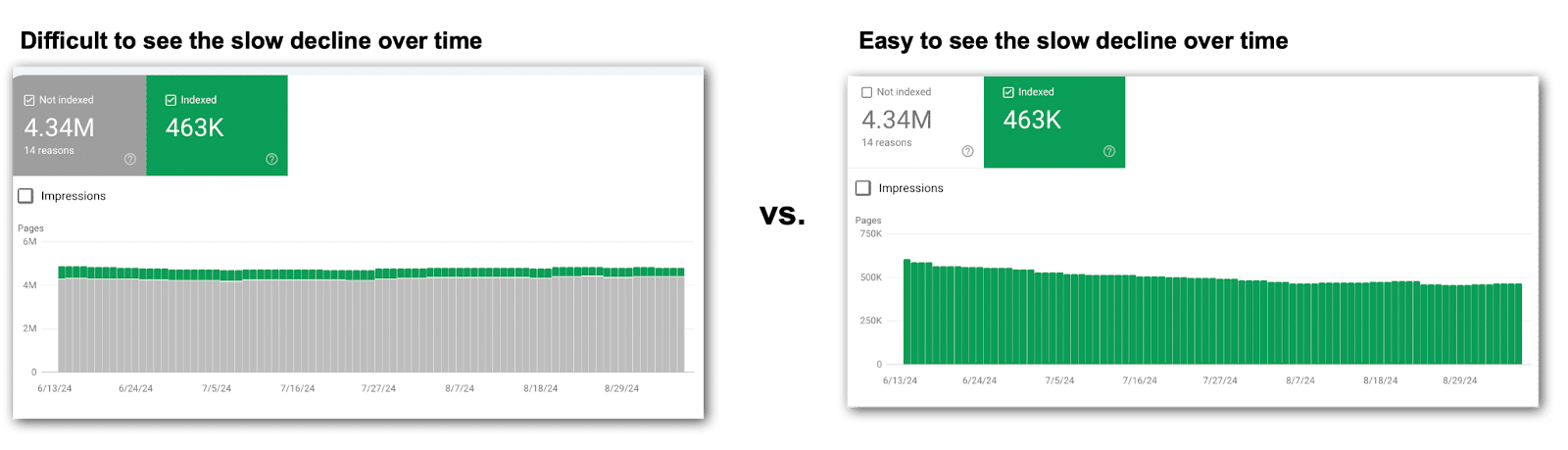
Focus on one metric at a time: When looking at the stacked bar charts, look at each metric individually. Google likes to stack data in bar charts, often making fluctuations easier to overlook. This means you’ll turn off metrics to focus on each technical SEO metric one at a time.
Save charts for later: Screenshot the charts and tuck them away for future reference. Google’s data only goes back a few months, but those images may be gold down the line.
Record data regularly: Capture metrics in a spreadsheet that can be calculated in formulas. Choose a point in time, since getting daily data isn’t realistic unless you’re using the API. Consider a date at the end of each month. It’s not ideal, but it’s something that can be used in comparison charts to look for correlations.
Check for more metrics:Many reports show just the top 10 metrics by default. Always check the bottom right of your screen. More insights might be hiding on page two. Don’t miss out.
Investigate changes carefully: Every major shift calls for you to play detective. Pin down what date the metrics changed and determine if it’s something to investigate, correct, overlook or monitor closely. Chances are, you’ll need to loop in product management or the dev team for answers.
Track tickets in each website release: Knowing what went live and when will be extremely helpful for correlating changes to fluctuations in Google Search Console data. Product managers and developers can’t be bothered explaining possible causes of every little blip in the data. Stay plugged into what dev is doing and when it’s going live. This means you should join the dev standups and read the release notes.
Let’s zero in on the essential technical SEO metrics in Google Search Console.
Page indexing
These reports are the bread and butter of every technical SEO. The Page indexing section of Google Search Console tells you if your content is making it to the SERPs.
But don’t just glance at the numbers. Dig deeper than the end of the month numbers. Look for fluctuations over time, not just a snapshot of one day at the end of the month.
Pages indexed
This one seems easy, right? If your indexed pages go down, you have fewer URLs ranking over time. That’s usually a problem.
Too many SEOs miss fluctuations in these Google Search Console charts by looking at the default view.
This causes the combination of non-indexed and indexed pages in the chart muddy the waters, causing you to miss what is happening. Instead, turn off Pages not indexed to look at indexed pages alone.
Pages not indexed
This count reveals how many URLs Google knows about but hasn’t indexed. Remember to toggle off Pages indexed for a clearer view of what actually happened over time.
Here’s where the sleuthing kicks in because you can dive into why pages aren’t indexed. This section allows you to dig deeper and uncover why those pages aren’t getting indexed, along with a list of reasons and example URLs.
The most common culprits include:
404 errors.
5xx errors.
Redirect errors.
Noindex tags.
Duplicate content.
I ignore plenty of the usual suspects – unless that fourth column trend line starts shifting.
For my clients, these metrics rarely budge. So I spend three seconds or less looking at the trend line. If things are trending well and there aren’t any fluctuations, then move on.
The metrics that only get three seconds or less reviewing for major trend line fluctuations:
Crawled – currently not indexed.
Discovered – currently not indexed.
Blocked by robots.txt.
Soft 404.
Blocked due to other 4xx issue.
Note: Your Google Search Console might not show every possible reason for pages not being indexed because only the issues your site actually faces make it to your list of reasons why pages aren’t indexed. That said, most enterprise companies will see all (or nearly all) of the reasons above.
Videos indexed
This is where Google breaks down how many videos are indexed.
In the video mode update on Dec. 4, 2023, many videos were booted from the index for various reasons, which you will find in this section.
Videos indexed: This tally reveals how many of your videos are in the Google index. Remember to isolate this metric in the chart – switch off Pages not indexed.
Videos not indexed: This count shows how many videos didn’t make it into Google’s index. Remember to check this metric solo in the chart – turn off ‘Pages Not Indexed’.
Tip: If video indexing isn’t in your SEO roadmap, you can breeze past these metrics. Unfortunately, many companies’ video SEO efforts have been sidelined by other priorities and if this is you, then you can probably skip this section until you’re ready to take action on video SEO.
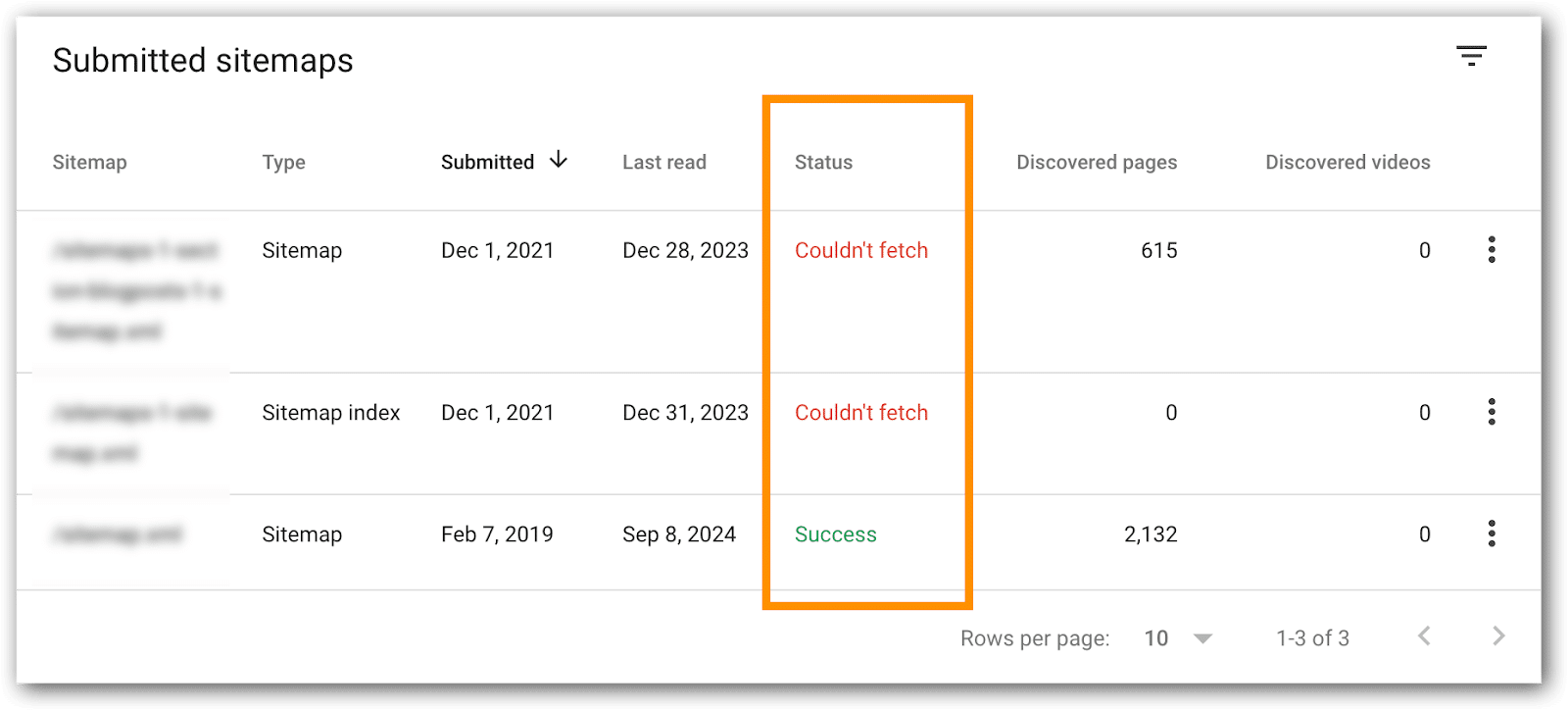
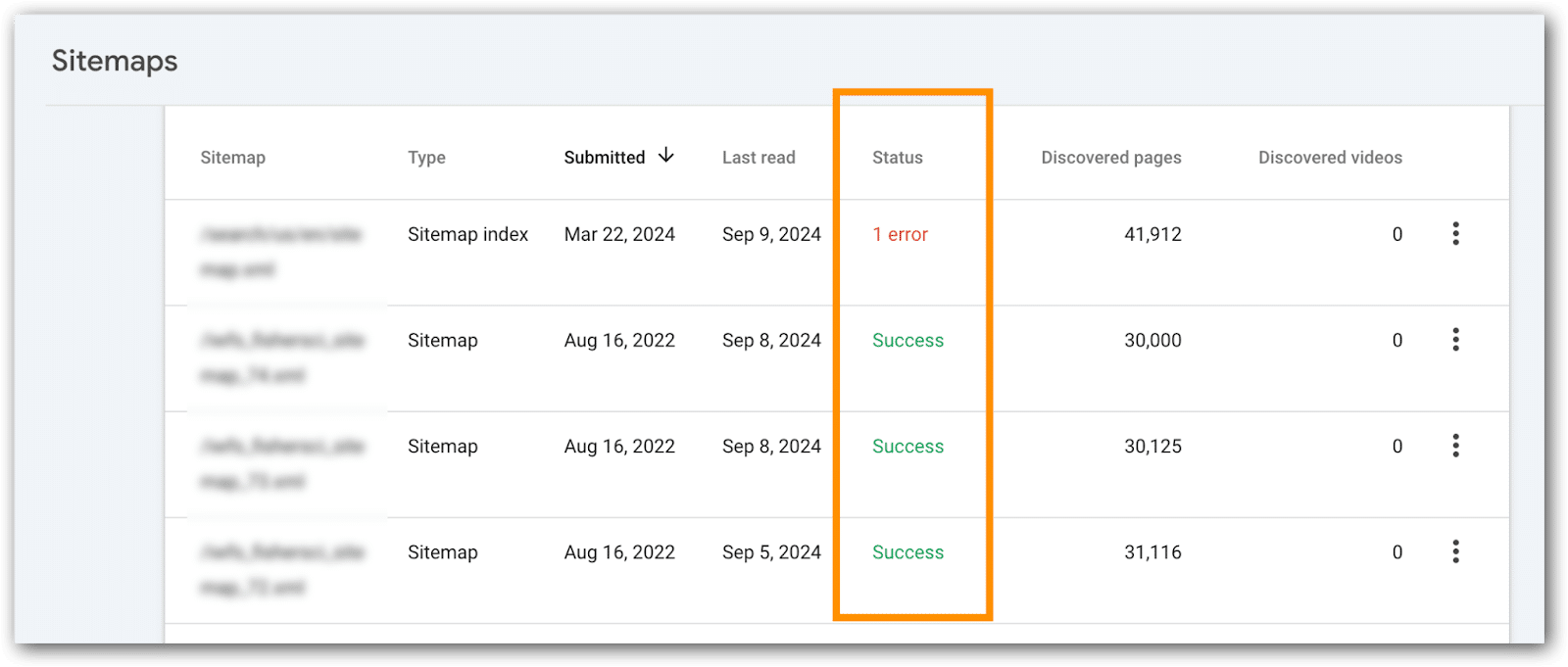
XML sitemaps are search engine fuel, packed with crucial signals. For small sites, issues here typically don’t create problems.
Enterprise SEOs, watch these like a hawk – any glitches can prevent new URLs from being crawled, create hreflang tag confusion for search engines and prevent search engines from catching updates and crawling fresh content.
XML sitemaps that index high priority pages, confirm all URLs are indexed.
How to do this:
Go go the XML sitemaps page.
Click on the XML sitemap to examine.
Page refreshes.
Click on the “Page Indexing” or “Video Page Indexing” link.
Page refreshes.
You’ll see the URLs indexed from the XML sitemap you are examining.
Tips:
For enterprise sites with hundreds of XML sitemaps, identify bellwether XML files to monitor – those replicated across countries, languages or divisions. Since they’re templated, you may be able to skip reviewing hundreds every month.
If the number of indexed pages drops significantly, you can use these reports to help figure out which part of the site is not indexed. This becomes particularly useful if XML sitemaps are bokeh into URLs for a particular directory, country, template, category, business line, etc.
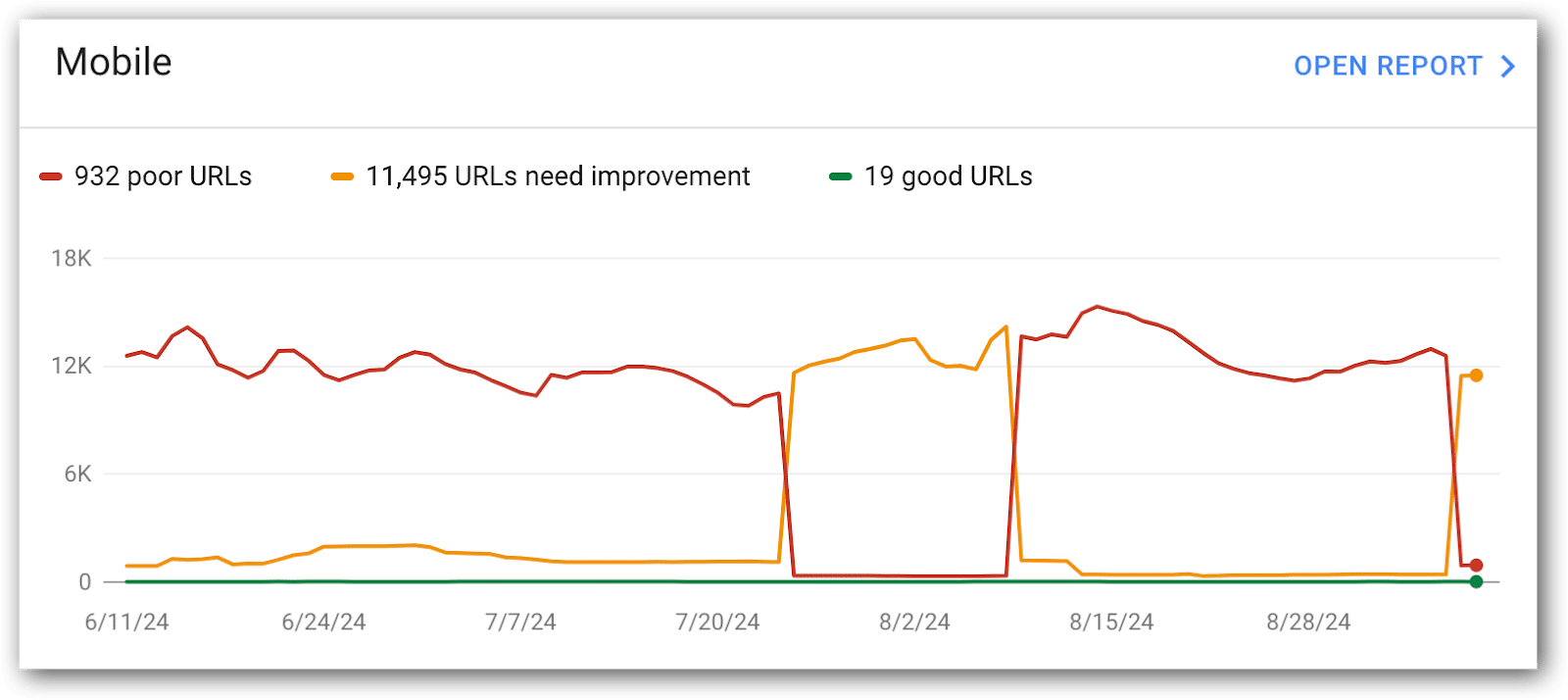
Mobile Core Web Vitals
Mobile Core Web Vitals are the most important for SEO and deserve the most attention. Google also has much higher expectations for these URLs, so this is where you’ll focus most of your Core Web Vitals attention.
This is a report I like developers to see regularly, because you can see how URLs are flipping between the metrics and on which date. This can help you troubleshoot by coordinating these dates with changes on the site, CMS, DAM, network, etc.
Metrics to monitor:
Mobile good URLs.
Mobile poor URLs.
Mobile needs improvement URLs.
The historical chart is great for quick trends, but it’s limited to a short window. For the bigger picture, drop the data into a spreadsheet and build your own chart.
You’ll often find that things look fine now, but 5 or 6 months ago, the metrics were far better – don’t let that slip past you.
Tip: This is a good report for development to see on a regular basis. Consider a regular metrics readout cadence with development to discuss what’s going on and compare it with what they know is happening in releases, server maintenance, third-party code and more.
Why mobile URLs don’t have a ‘good’ Core Web Vitals score
This data explains why particular URLs aren’t considered good by Google. Unfortunately, it doesn’t tell you how to address the problem (that requires you to do a Core Web Vitals audit).
In these metrics, you’ll get:
The count of URLs scoring low in any of the core web vitals audit.
A handy list of example URLs, thoughtfully grouped by Google based on similar issues. Unfortunately it’s not all URLs with similar issues, bit’s enough to help you spot patterns and identify areas for improvement.
Metrics to monitor in this report:
LCP issue: longer than 2.5s (mobile)
LCP issue: longer than 4s (mobile)
CLS issue: more than 0.1 (mobile)
CLS issue: more than 0.25 (mobile)
INP issue: longer than 200ms (mobile)
INP issue: longer than 500ms (mobile)
Developers usually need more than just metrics. They want the full list of URLs with low scores.
Luckily, Google gives you and your devs sample URLs to evaluate, though it’s not the comprehensive list they crave. To dig deeper for more URL examples, tap into the Google Search Console API for more data.
Tips:
Include these in your regular metrics readout with development.
The historical chart is handy for quick trends, but it’s got a short memory. For the full picture, toss the data into a spreadsheet and chart it yourself. Don’t let those historical highs and lows slip into the shadows. Even better if you grap the chart images because your spreadsheet likely won’t have metrics showing day-to-day fluctuations throughout each month.
Desktop Core Web Vitals metrics
This is exactly the same as mobile. Usually, I give this a quick gander, but most of the time is spent on mobile core web vitals metrics.
What is often interesting in the desktop metrics is correlations between metrics improving in desktop, but getting worse on mobile devices. This is a good place for development to figure out why mobile metrics got worse, but desktop improved.
Frankly, this is not a priority for the sites I work on. Not that I never look at them, but in the grand scheme of things we prioritize fixing mobile issues, anticipating that fixing mobile issues will fix desktop issues.
For a few of my B2B enterprise clients, with a primarily desktop-focused audience, we dial up the attention on these metrics to make sure nothing slips through the cracks:
LCP issue: longer than 2.5s (desktop)
LCP issue: longer than 2.5s (desktop)
CLS issue: more than 0.25 (desktop)
CLS issue: more than 0.1 (desktop)
INP issue: longer than 200ms (desktop)
INP issue: longer than 500ms (desktop)
Rich results from Schema
Adding Schema markup to your site unlocks special features that enhance your organic listings, such as breadcrumb links, product information and more.
In Google Search Console, URLs with code intended to trigger these SERP enhancements are tracked in a section called “Enhancements.”
The list of “Enhancements” listed in Google Search Console will vary based, on your site’s setup. Here are the most common enhancements you’ll likely see:
Breadcrumbs.
FAQ.
Review Snippets.
Videos.
Unparsable Structured Data.
Product Snippets.
Merchant Listings.
And more.
Each of these enhancements have a report indicating the number of URLs that are valid, invalid and issues to address.
What’s next?
Now that you have the key Google Search Console metrics, make sure you track them regularly (monthly works best).
Remember to drop these metrics into a spreadsheet. Google’s limited historical data might leave you hanging when you need those insights down the road.
In the next article of this series, I’ll show you a few metrics tucked away in the “settings” section of Google Search Console that few SEOs talk about, but I like to keep an eye on.
Let’s face it: Turning raw data into actionable insights can be as cryptic as decoding ancient hieroglyphics, especially for the SEO rookies in your crew.
That’s the challenge I addressed in my SMX Advanced 2024 session.
Didn’t catch it? No worries. I’m recapping it all in this article series, one juicy nugget at a time. This is Part 2, so if you missed Part 1, check it out.
Get ready for a quick overview of key technical SEO metrics to track in Google Search Console. Compare your list with mine – you might spot something your SEO team has missed.
Senior SEO managers: This article is for your technical SEO newcomers. It explains how I would introduce Google Search Console metrics to bridge their knowledge gaps quickly.
Top tips for looking at Google Search Console metrics
Don’t limit comparisons to just two data points: Avoid comparing just two points in time (end of last month vs. prior month). It’s like looking at two photos and missing the whole movie – especially the drama in the middle. This is a common mistake I see when upskilling SEOs to become advanced SEOs. You need to look at the ups and downs all month.
Focus on one metric at a time: When looking at the stacked bar charts, look at each metric individually. Google likes to stack data in bar charts, often making fluctuations easier to overlook. This means you’ll turn off metrics to focus on each technical SEO metric one at a time.
Save charts for later: Screenshot the charts and tuck them away for future reference. Google’s data only goes back a few months, but those images may be gold down the line.
Record data regularly: Capture metrics in a spreadsheet that can be calculated in formulas. Choose a point in time, since getting daily data isn’t realistic unless you’re using the API. Consider a date at the end of each month. It’s not ideal, but it’s something that can be used in comparison charts to look for correlations.
Check for more metrics:Many reports show just the top 10 metrics by default. Always check the bottom right of your screen. More insights might be hiding on page two. Don’t miss out.
Investigate changes carefully: Every major shift calls for you to play detective. Pin down what date the metrics changed and determine if it’s something to investigate, correct, overlook or monitor closely. Chances are, you’ll need to loop in product management or the dev team for answers.
Track tickets in each website release: Knowing what went live and when will be extremely helpful for correlating changes to fluctuations in Google Search Console data. Product managers and developers can’t be bothered explaining possible causes of every little blip in the data. Stay plugged into what dev is doing and when it’s going live. This means you should join the dev standups and read the release notes.
Let’s zero in on the essential technical SEO metrics in Google Search Console.
Page indexing
These reports are the bread and butter of every technical SEO. The Page indexing section of Google Search Console tells you if your content is making it to the SERPs.
But don’t just glance at the numbers. Dig deeper than the end of the month numbers. Look for fluctuations over time, not just a snapshot of one day at the end of the month.
Pages indexed
This one seems easy, right? If your indexed pages go down, you have fewer URLs ranking over time. That’s usually a problem.
Too many SEOs miss fluctuations in these Google Search Console charts by looking at the default view.
This causes the combination of non-indexed and indexed pages in the chart muddy the waters, causing you to miss what is happening. Instead, turn off Pages not indexed to look at indexed pages alone.
Pages not indexed
This count reveals how many URLs Google knows about but hasn’t indexed. Remember to toggle off Pages indexed for a clearer view of what actually happened over time.
Here’s where the sleuthing kicks in because you can dive into why pages aren’t indexed. This section allows you to dig deeper and uncover why those pages aren’t getting indexed, along with a list of reasons and example URLs.
The most common culprits include:
404 errors.
5xx errors.
Redirect errors.
Noindex tags.
Duplicate content.
I ignore plenty of the usual suspects – unless that fourth column trend line starts shifting.
For my clients, these metrics rarely budge. So I spend three seconds or less looking at the trend line. If things are trending well and there aren’t any fluctuations, then move on.
The metrics that only get three seconds or less reviewing for major trend line fluctuations:
Crawled – currently not indexed.
Discovered – currently not indexed.
Blocked by robots.txt.
Soft 404.
Blocked due to other 4xx issue.
Note: Your Google Search Console might not show every possible reason for pages not being indexed because only the issues your site actually faces make it to your list of reasons why pages aren’t indexed. That said, most enterprise companies will see all (or nearly all) of the reasons above.
Videos indexed
This is where Google breaks down how many videos are indexed.
In the video mode update on Dec. 4, 2023, many videos were booted from the index for various reasons, which you will find in this section.
Videos indexed: This tally reveals how many of your videos are in the Google index. Remember to isolate this metric in the chart – switch off Pages not indexed.
Videos not indexed: This count shows how many videos didn’t make it into Google’s index. Remember to check this metric solo in the chart – turn off ‘Pages Not Indexed’.
Tip: If video indexing isn’t in your SEO roadmap, you can breeze past these metrics. Unfortunately, many companies’ video SEO efforts have been sidelined by other priorities and if this is you, then you can probably skip this section until you’re ready to take action on video SEO.
XML sitemaps are search engine fuel, packed with crucial signals. For small sites, issues here typically don’t create problems.
Enterprise SEOs, watch these like a hawk – any glitches can prevent new URLs from being crawled, create hreflang tag confusion for search engines and prevent search engines from catching updates and crawling fresh content.
XML sitemaps that index high priority pages, confirm all URLs are indexed.
How to do this:
Go go the XML sitemaps page.
Click on the XML sitemap to examine.
Page refreshes.
Click on the “Page Indexing” or “Video Page Indexing” link.
Page refreshes.
You’ll see the URLs indexed from the XML sitemap you are examining.
Tips:
For enterprise sites with hundreds of XML sitemaps, identify bellwether XML files to monitor – those replicated across countries, languages or divisions. Since they’re templated, you may be able to skip reviewing hundreds every month.
If the number of indexed pages drops significantly, you can use these reports to help figure out which part of the site is not indexed. This becomes particularly useful if XML sitemaps are bokeh into URLs for a particular directory, country, template, category, business line, etc.
Mobile Core Web Vitals
Mobile Core Web Vitals are the most important for SEO and deserve the most attention. Google also has much higher expectations for these URLs, so this is where you’ll focus most of your Core Web Vitals attention.
This is a report I like developers to see regularly, because you can see how URLs are flipping between the metrics and on which date. This can help you troubleshoot by coordinating these dates with changes on the site, CMS, DAM, network, etc.
Metrics to monitor:
Mobile good URLs.
Mobile poor URLs.
Mobile needs improvement URLs.
The historical chart is great for quick trends, but it’s limited to a short window. For the bigger picture, drop the data into a spreadsheet and build your own chart.
You’ll often find that things look fine now, but 5 or 6 months ago, the metrics were far better – don’t let that slip past you.
Tip: This is a good report for development to see on a regular basis. Consider a regular metrics readout cadence with development to discuss what’s going on and compare it with what they know is happening in releases, server maintenance, third-party code and more.
Why mobile URLs don’t have a ‘good’ Core Web Vitals score
This data explains why particular URLs aren’t considered good by Google. Unfortunately, it doesn’t tell you how to address the problem (that requires you to do a Core Web Vitals audit).
In these metrics, you’ll get:
The count of URLs scoring low in any of the core web vitals audit.
A handy list of example URLs, thoughtfully grouped by Google based on similar issues. Unfortunately it’s not all URLs with similar issues, bit’s enough to help you spot patterns and identify areas for improvement.
Metrics to monitor in this report:
LCP issue: longer than 2.5s (mobile)
LCP issue: longer than 4s (mobile)
CLS issue: more than 0.1 (mobile)
CLS issue: more than 0.25 (mobile)
INP issue: longer than 200ms (mobile)
INP issue: longer than 500ms (mobile)
Developers usually need more than just metrics. They want the full list of URLs with low scores.
Luckily, Google gives you and your devs sample URLs to evaluate, though it’s not the comprehensive list they crave. To dig deeper for more URL examples, tap into the Google Search Console API for more data.
Tips:
Include these in your regular metrics readout with development.
The historical chart is handy for quick trends, but it’s got a short memory. For the full picture, toss the data into a spreadsheet and chart it yourself. Don’t let those historical highs and lows slip into the shadows. Even better if you grap the chart images because your spreadsheet likely won’t have metrics showing day-to-day fluctuations throughout each month.
Desktop Core Web Vitals metrics
This is exactly the same as mobile. Usually, I give this a quick gander, but most of the time is spent on mobile core web vitals metrics.
What is often interesting in the desktop metrics is correlations between metrics improving in desktop, but getting worse on mobile devices. This is a good place for development to figure out why mobile metrics got worse, but desktop improved.
Frankly, this is not a priority for the sites I work on. Not that I never look at them, but in the grand scheme of things we prioritize fixing mobile issues, anticipating that fixing mobile issues will fix desktop issues.
For a few of my B2B enterprise clients, with a primarily desktop-focused audience, we dial up the attention on these metrics to make sure nothing slips through the cracks:
LCP issue: longer than 2.5s (desktop)
LCP issue: longer than 2.5s (desktop)
CLS issue: more than 0.25 (desktop)
CLS issue: more than 0.1 (desktop)
INP issue: longer than 200ms (desktop)
INP issue: longer than 500ms (desktop)
Rich results from Schema
Adding Schema markup to your site unlocks special features that enhance your organic listings, such as breadcrumb links, product information and more.
In Google Search Console, URLs with code intended to trigger these SERP enhancements are tracked in a section called “Enhancements.”
The list of “Enhancements” listed in Google Search Console will vary based, on your site’s setup. Here are the most common enhancements you’ll likely see:
Breadcrumbs.
FAQ.
Review Snippets.
Videos.
Unparsable Structured Data.
Product Snippets.
Merchant Listings.
And more.
Each of these enhancements have a report indicating the number of URLs that are valid, invalid and issues to address.
What’s next?
Now that you have the key Google Search Console metrics, make sure you track them regularly (monthly works best).
Remember to drop these metrics into a spreadsheet. Google’s limited historical data might leave you hanging when you need those insights down the road.
In the next article of this series, I’ll show you a few metrics tucked away in the “settings” section of Google Search Console that few SEOs talk about, but I like to keep an eye on.
From your account reps to the interface itself, Google gives you plenty of recommendations on managing your ad campaigns. But are all of those good?
Should you ignore these recommendations and “hack” Google’s machine learning – or should you follow Google’s advice?
Two Google Ads experts – Ben Kruger and Anthony Higman – had an interesting debate on this topic at SMX Advanced.
Here are the key points from their discussion.
Performance Max (PMax) for non-ecommerce
Kruger, who was on the side of adopting, clearly took the stance that Performance Max is future and that all Google’s tools centers around it:
“My simple answer is that PMax is clearly the future of Google. It’s where everything is heading as, you know, if you’re talking to your reps, if you’re reading documentation, if you’re watching Gmail, which which happened, recently, everything seems to center around Pmax, and it’s talked about over and over again.”
“If you’re not learning and mastering the newest thing that Google is clearly pushing, then you’re potentially gonna get left behind when inevitably, whatever you’re used to gets sunsetted, deprecated or you’re forced to migrate over to PMax.”
PMax offers growth opportunities through AI-driven insights across various channels, but Kruger advised against relying solely on it, suggesting it should be part of a broader, strategic approach that includes learning from PMax to enhance dedicated campaigns.
Higman, who was on the side of hacking, said non-ecommerce brands, in particular, should avoid PMax. He sees “a lot of problems” with it:
“I do understand that Google is aggressively pushing PMax, But just because Google is pushing something doesn’t mean that everybody should jump on board.
“The more people that adopt PMax because of Google’s push for the new shiny object, the more they make it easier to deprecate certain things.
“My main beef with PMax is, again, the lack of transparency. They clearly wanna push everybody in automation, which I disagree with because not everybody fits into that box.”
Higman emphasized the importance of maintaining control and visibility over ad spend, especially for those with smaller budgets. He also expressed concern that widespread adoption of PMax could lead to the deprecation of more transparent tools.
Best match type
Kruger said there is a place for exact match, but if he had to choose, it would be broad match:
“Queries are getting way more, unique, specific and long tail. People are going to be conversing with Google search, asking it different ways, maybe using voice, maybe searching on Google Maps. Queries are evolving, and you’ll never be able to cover that with exact match.
“Broad match is analyzing past searches that this user has made, their location, thousands of other signals that only Broad Match has.
“With a growth mindset, it’s gonna find you new keywords. So with an exact match, your search terms are all your keywords, and you’re not gonna be able to move to that next frontier of growth to find new queries for you to acquire.”
Broad match is more effective in capturing the increasingly unique, specific and long-tail queries users are making, according to Kruger. It leverages Google’s AI to understand consumer intent and match ads to relevant searches by analyzing various signals, including the user’s past behavior and the content of landing pages.
Higman’s all-time favorite, of the present and past match types, is broad match modifier. But sticking to what is possible, he said he prefers exact match.
“This is another one of those control things. As Google removes control, their revenue goes up. Advertisers kinda get a little bit watered down results.”
“So I am a proponent of exact match, keeping things as tight as possible, and really targeting what you want to target.”
Kruger also noted that while exact match may be more expensive, it offers tighter control and more precise targeting compared to other match types. Despite still using phrase match for specific purposes, exact match is currently his preferred choice for achieving targeted campaign results.
Automation vs. control
When posed the question of automation versus control, Kruger said performance is what matters:
“That’s a trick question. I think the answer is performance, and I don’t care how I get there. That’s that’s all that matters to me, and I’m gonna use the best tools available to get the performance and the growth”
“That’s automation because it allows for performance at scale. I’m constantly finding new opportunities, for performance, and I’m able to find new levers of growth, to move my business along.”
While control is important, particularly for agencies focused on hitting specific targets within platforms like Google Ads, relying solely on controlled methods limits growth potential, Kruger said.
Balance is key, Kruger said, where strategic controls are combined with automation to drive significant business growth. In his experience, automation has consistently delivered the best performance outcomes.
Unsurprisingly, Higman’s stance is “1,000% control”:
“Google is pushing everybody into automation, which, again, it does have its use cases. I’m not saying that it does not, but we need to keep control to keep results.”
“I think that as privacy legislation meets automation, there’s gonna be a lot of problems down the road as there’s less data that can be fed to the the automation because of privacy legislation, things are gonna get wonky.”
“I also think from an agency perspective, control is extremely important. Client’s don’t want these weird things that are gonna happen with automation that bring in different kind of things that they’re really not going after.”
Higman is concerned that automation, with its lack of transparency, could lead to undesirable outcomes and urges others to resist the push toward automated systems that reduce control.
RSA (Responsive Search Ads) strategy
Maximizes all the headlines and descriptions that RSA’s have to offer, Kruger said:
“I completely max them out: 15 headlines, 5 descriptions, 20 images, all extensions, etc.
“I have seen first-hand that creative is targeting. You could have two different ad groups with the same keywords in it and if you change the assets in one of the RSAs to better match that keyword, the search terms that match to that ad group will move to the one that’s more relevant.
“Formats are completely gonna change. And by having a diverse set of assets in an RSA, you can increase your chances of landing different placements that those with an ETA definitely could not get into.”
As search engine results pages (SERPs) evolve, having a diverse set of assets in RSAs increases the chances of securing different placements, something expanded text ads (ETAs) cannot achieve, according to Kruger.
But Higman is not a fan of RSAs. He said:
“I think that the best RSA strategy is not RSAs. We still have accounts that have expanded text ads in them, and they outperform RSAs by miles every time, and they get all of the conversions.
“My RSA strategy is to keep RSAs as close to ETAs as possible.
“So we will only provide the minimum required headlines and descriptions, and we will pin those into place exactly where we want them based on past performance on expanded text ads.”
While Higman acknowledged the potential of RSAs to match headlines and descriptions to searches, that hasn’t been his experience. Overall, he has found that ETAs still significantly outperform RSAs.
Both experts agreed that ad strength scores may not be indicative of performance.
Nuanced perspectives
It should be noted that with each point each expert conceded that their “opponent” made valid points:
Higman conceded that automated solutions could benefit larger advertisers aiming for broad reach.
Kruger suggested that control-focused strategies might be more suitable for businesses with limited capacity to handle high lead volumes
The debate highlighted the ongoing tension in the PPC community between embracing Google’s automation push and maintaining granular control over campaigns.
The key takeaway is that while Google is clearly moving toward more automated solutions, the best approach depends on an advertiser’s specific goals, budget and capacity for growth.
Watch: The great debate: Should you hack or adopt Google Ads features?
You can watch the full session from SMX Advanced here:
From your account reps to the interface itself, Google gives you plenty of recommendations on managing your ad campaigns. But are all of those good?
Should you ignore these recommendations and “hack” Google’s machine learning – or should you follow Google’s advice?
Two Google Ads experts – Ben Kruger and Anthony Higman – had an interesting debate on this topic at SMX Advanced.
Here are the key points from their discussion.
Performance Max (PMax) for non-ecommerce
Kruger, who was on the side of adopting, clearly took the stance that Performance Max is future and that all Google’s tools centers around it:
“My simple answer is that PMax is clearly the future of Google. It’s where everything is heading as, you know, if you’re talking to your reps, if you’re reading documentation, if you’re watching Gmail, which which happened, recently, everything seems to center around Pmax, and it’s talked about over and over again.”
“If you’re not learning and mastering the newest thing that Google is clearly pushing, then you’re potentially gonna get left behind when inevitably, whatever you’re used to gets sunsetted, deprecated or you’re forced to migrate over to PMax.”
PMax offers growth opportunities through AI-driven insights across various channels, but Kruger advised against relying solely on it, suggesting it should be part of a broader, strategic approach that includes learning from PMax to enhance dedicated campaigns.
Higman, who was on the side of hacking, said non-ecommerce brands, in particular, should avoid PMax. He sees “a lot of problems” with it:
“I do understand that Google is aggressively pushing PMax, But just because Google is pushing something doesn’t mean that everybody should jump on board.
“The more people that adopt PMax because of Google’s push for the new shiny object, the more they make it easier to deprecate certain things.
“My main beef with PMax is, again, the lack of transparency. They clearly wanna push everybody in automation, which I disagree with because not everybody fits into that box.”
Higman emphasized the importance of maintaining control and visibility over ad spend, especially for those with smaller budgets. He also expressed concern that widespread adoption of PMax could lead to the deprecation of more transparent tools.
Best match type
Kruger said there is a place for exact match, but if he had to choose, it would be broad match:
“Queries are getting way more, unique, specific and long tail. People are going to be conversing with Google search, asking it different ways, maybe using voice, maybe searching on Google Maps. Queries are evolving, and you’ll never be able to cover that with exact match.
“Broad match is analyzing past searches that this user has made, their location, thousands of other signals that only Broad Match has.
“With a growth mindset, it’s gonna find you new keywords. So with an exact match, your search terms are all your keywords, and you’re not gonna be able to move to that next frontier of growth to find new queries for you to acquire.”
Broad match is more effective in capturing the increasingly unique, specific and long-tail queries users are making, according to Kruger. It leverages Google’s AI to understand consumer intent and match ads to relevant searches by analyzing various signals, including the user’s past behavior and the content of landing pages.
Higman’s all-time favorite, of the present and past match types, is broad match modifier. But sticking to what is possible, he said he prefers exact match.
“This is another one of those control things. As Google removes control, their revenue goes up. Advertisers kinda get a little bit watered down results.”
“So I am a proponent of exact match, keeping things as tight as possible, and really targeting what you want to target.”
Kruger also noted that while exact match may be more expensive, it offers tighter control and more precise targeting compared to other match types. Despite still using phrase match for specific purposes, exact match is currently his preferred choice for achieving targeted campaign results.
Automation vs. control
When posed the question of automation versus control, Kruger said performance is what matters:
“That’s a trick question. I think the answer is performance, and I don’t care how I get there. That’s that’s all that matters to me, and I’m gonna use the best tools available to get the performance and the growth”
“That’s automation because it allows for performance at scale. I’m constantly finding new opportunities, for performance, and I’m able to find new levers of growth, to move my business along.”
While control is important, particularly for agencies focused on hitting specific targets within platforms like Google Ads, relying solely on controlled methods limits growth potential, Kruger said.
Balance is key, Kruger said, where strategic controls are combined with automation to drive significant business growth. In his experience, automation has consistently delivered the best performance outcomes.
Unsurprisingly, Higman’s stance is “1,000% control”:
“Google is pushing everybody into automation, which, again, it does have its use cases. I’m not saying that it does not, but we need to keep control to keep results.”
“I think that as privacy legislation meets automation, there’s gonna be a lot of problems down the road as there’s less data that can be fed to the the automation because of privacy legislation, things are gonna get wonky.”
“I also think from an agency perspective, control is extremely important. Client’s don’t want these weird things that are gonna happen with automation that bring in different kind of things that they’re really not going after.”
Higman is concerned that automation, with its lack of transparency, could lead to undesirable outcomes and urges others to resist the push toward automated systems that reduce control.
RSA (Responsive Search Ads) strategy
Maximizes all the headlines and descriptions that RSA’s have to offer, Kruger said:
“I completely max them out: 15 headlines, 5 descriptions, 20 images, all extensions, etc.
“I have seen first-hand that creative is targeting. You could have two different ad groups with the same keywords in it and if you change the assets in one of the RSAs to better match that keyword, the search terms that match to that ad group will move to the one that’s more relevant.
“Formats are completely gonna change. And by having a diverse set of assets in an RSA, you can increase your chances of landing different placements that those with an ETA definitely could not get into.”
As search engine results pages (SERPs) evolve, having a diverse set of assets in RSAs increases the chances of securing different placements, something expanded text ads (ETAs) cannot achieve, according to Kruger.
But Higman is not a fan of RSAs. He said:
“I think that the best RSA strategy is not RSAs. We still have accounts that have expanded text ads in them, and they outperform RSAs by miles every time, and they get all of the conversions.
“My RSA strategy is to keep RSAs as close to ETAs as possible.
“So we will only provide the minimum required headlines and descriptions, and we will pin those into place exactly where we want them based on past performance on expanded text ads.”
While Higman acknowledged the potential of RSAs to match headlines and descriptions to searches, that hasn’t been his experience. Overall, he has found that ETAs still significantly outperform RSAs.
Both experts agreed that ad strength scores may not be indicative of performance.
Nuanced perspectives
It should be noted that with each point each expert conceded that their “opponent” made valid points:
Higman conceded that automated solutions could benefit larger advertisers aiming for broad reach.
Kruger suggested that control-focused strategies might be more suitable for businesses with limited capacity to handle high lead volumes
The debate highlighted the ongoing tension in the PPC community between embracing Google’s automation push and maintaining granular control over campaigns.
The key takeaway is that while Google is clearly moving toward more automated solutions, the best approach depends on an advertiser’s specific goals, budget and capacity for growth.
Watch: The great debate: Should you hack or adopt Google Ads features?
You can watch the full session from SMX Advanced here:

 If you have a camera that can take decent quality images, capitalise on the chance to keep a little income trickling in. Sites like
  If you have regular access to a vehicle, why not get paid as you travel round town?