Like any endeavor, SEO works best with clearly defined and articulated goals.
If you only set vague SEO goals like “get more leads” or “get more traffic,” you will lack focus and direction.
Vague goals fail to provide a map forward and feed into wasted time and generalist SEO work that will do little to help your mission.
This article will provide an overview of why setting specific goals is essential and how it helps push you forward and direct your SEO efforts.
Why goals matter
A goal provides you with a target to aim at.
Having a target to aim at allows you to sanity check your actions and ensure the way you spend your SEO time is in service of the goal.
Goals also help you measure your progress, which in SEO is crucial. You may be making no progress, meaning you must change your tactics or update your goals.
Likewise, progress towards a goal gives you a feeling of accomplishment and motivation that can help you keep pushing when SEO can sometimes feel overwhelming.
What are SEO goals?
SEO goals aim to progress your SEO and support your broader marketing and business objectives. Typically, you will target awareness and engagement with prospective customers on search engines.
When looking to improve your SEO, you will look at rankings, impressions, click-through rates, clicks and the subsequent engagement of that traffic. You may also consider aspects such as the size of an opportunity (keyword volume and impressions).
Creating practical goals is the first step in crafting an SEO strategy, and should consider the following five steps:
Specificity: The goal must be clearly defined so it can be measured.
Measurable: Goals must be quantifiable so you can track progress.
Achievable: Goals should be realistic within your resources.
Relevant: Goals should map to higher-order business and marketing goals.
Time-bound: Goals must consider time to aid the measurement.
Fortunately, this being marketing, there is a handy mnemonic to help us remember these critical factors in practical SEO goal setting: SMART goals.
SMART goals for SEO
The SMART goals framework is not new. It is widely used in project management, personal development and psychology.
I believe in using time-proven marketing concepts within our SEO work. Often, intersecting your SEO skills with these battle-tested marketing concepts can really drive performance.
We have seen in our agency that using SMART goals for SEO is a smart move.
Let’s look at how the stages break down and examples of how you can create your own SMART SEO goals.
S: Specific
Specificity is the first step toward creating actionable SEO goals.
As an example, better rankings are not a specific goal. Ranking in the top 3 results for keyword X nationally is a specific goal.
A broader yet specific goal could also be improving organic traffic by 25%, but as you become less specific, you must also apply some critical thinking about how you will achieve this and state this in your goal.
Questions to ask yourself or your team include:
What are we trying to achieve?
How does this help us achieve our marketing goals?
What do we need to do to achieve this?
Then you make this goal more specific:
“Improve organic traffic by 25% by improving the rankings for all our commercial keywords on our category pages. “
It is also useful to ensure you build your specific goal on top of clearly defined business and marketing goals. This provides a hierarchical set of goals so you can question whether this SEO goal helps you achieve your marketing goals.
Your goals should be crystal-clear and connected to our business objectives so that everyone from the boardroom to the marketing department understands what success looks like.
M: Measurable
To understand if you are making progress towards a goal and if that goal is truly helping you achieve the underlying goals, we must make the goal measurable.
Fortunately, with SEO, we have plenty of touchpoints we can use to track success.
There are many SEO KPIs, and the right measurement metrics depend upon your goals, but the following should help get you started.
SEO metrics
Rank for main converting keywords (local/organic).
Rank for secondary benchmark keywords (local/organic).
Organic clicks (Search Console).
Organic impressions (Search Console).
Organic CTR (Search Console).
Organic average position (Search Console).
Trust and citation balance.
Link building metrics
Total links built.
Number of links from authority sites.
Number of links from relevant sites.
SEO Tool Domain and Page Metrics.
Real-world metrics
Increase in organic traffic.
Increase in the number of pages on the site that generate traffic.
Increase in non-branded search traffic.
Percentage increase in organic conversions.
Organic Impressions (Search Console).
Just remember to identify metrics that will help you track progress and not just the end goal so you can identify if your tactics are working!
A: Achievable
When it comes to SEO, how realistic and attainable your goal is requires some soul-searching and hard truths.
We don’t want to aim too low; goals should be aggressive. However, we must ensure that our goals are realistic within your resources (money, manpower etc) and a sometimes harsh search reality.
A helpful job here is to search for your keywords and pay close attention to the search results. What do you see? Who is ranking? What types of results are there? Where are the opportunities? What could you do better?
When it comes to deciding what is achievable, this is not always easy in itself. We could look at typical SEO metrics from third-party tools, and that has its place, but I would suggest a more nuanced and qualitative approach. Consider competitor SEO metrics, but focus on what you could do better.
If your look at “what is achievable” through the lens of “what could you do better” then your SEO strategy is quality driven rather than metric driven.
This enables you to set more exciting goals and works more with what Google is looking for (to deliver the best possible results).
Key areas to consider here are:
Quality: What can you do better?
SEO feasibility: Are you in the same league as the page 1 results?
Situation: Are you in the same league as the big players on the first page?
Resources: Do you have the resources to hit these goals?
Sometimes you won’t progress as you had hoped. This is inevitable, and it is just as important, possibly more so, to understand when you are not making progress so you can adjust your strategy accordingly.
Ultimately, the best SEO goals are never born fully formed; they grow and develop over time as you target them and evolve your approach.
R: Relevant
It is very easy to end up chasing the wrong goals.
There are two ways to ensure an SEO goal is truly relevant:
Explain how this SEO goal helps you achieve your overall marketing goals.
Cross-reference this with conversion data from paid search.
You are looking to come at this from a common sense perspective to explain the theory and then back that up with data where possible.
By proving from two directions, you help ensure this is a truly relevant goal that will help drive your marketing forward.
You want to end up with a statement along the lines of:
“We want to rank for [x] to improve our visibility and traffic from customers searching for a [x]. This will help us generate more local awareness and drive more enquiries and sales. Paid search data shows us this keyword has a 10% conversion rate so we know this traffic is highly valuable and will drive leads and sales.”
Ultimately, with relevance, you are just quickly checking in that this is a sensible use of your resources and connects to the overall mission.
T: Time-bound
All goals need to have a target date to achieve. If you don’t have that deadline, then you don’t know when to give up or assess progress.
SEO is different from most marketing tactics as it can take longer to achieve. Therefore, we may not see any actual hard results (sales or leads).
So, introducing time-bound goals for SEO, along with milestones showing progress, is essential to know you are not chasing rainbows and things are moving in the right direction.
Determining how long how long SEO will take is not easy, so rather than striving for perfection, do your best and then review as you make progress.
SMARTeR SEO goals
To make SMART goals work as well as possible for SEO I propose an additional step being a regular “Review.” By reviewing your progress, you can amend your goal based on the progress.
For instance, if you are far from the top position and are moving a few spaces forward each month, you may decide this is too slow and is not aligned with needing results within three months.
To leverage SMART goals for SEO, then factor in a weekly or monthly review to ensure you feed any learnings back into the goal setting.
Using SMART goals for SEO
At my SEO agency, many inquiries will simply state that they want to rank #1 for a given keyword (or set of keywords). This is not a SMART goal.
SMART goals need to state why that goal will help achieve the business and marketing objectives.
Having this conversation within your business or with an agency is incredibly powerful and helps really dig into what your goals should be.
SEO is difficult, so by talking goals through thoroughly, you apply critical thinking to goal setting to maximize your efforts in the right direction.
You should end up with a simple statement that represents your overall SMART goal approach. Often, you will also have statements for the individual goals that the meta goal represents.
Something like:
“We want to achieve leads from organic search by 50% over 12 months. We will do this by moving our target keywords from positions 6-10 to positions 1-5.”
Here’s a breakdown:
Specific: We want to increase leads from organic search by 50%.
Measurable: Easily measurable through rankings, organic traffic and results.
Achievable: We can create better content than what is currently number one.
Relevant: This will help us drive more sales from proven keywords.
Timeline: 12 months gives us a deadline.
This approach also allows you to conduct a simple situation analysis and identify if elements of your digital marketing toolbox are not up to the job.
In today’s rapidly evolving commercial environment, businesses must constantly seek out innovative ways to streamline operations and maintain a competitive edge. One such approach lies in leveraging the services of third-party logistics providers (3PLs). In particular, employing 3PLs for warehouse inventory management can offer a host of financial advantages.
3PL Warehouse Inventory
The realm of inventory management with 3PL warehouse services is vast and ripe with opportunities for businesses to tap into. The convenience of having a dedicated team of professionals handle inventory with precision, accuracy, and speed offers peace of mind for businesses. It means they can concentrate on the core areas that need their attention, knowing that their inventory is in capable hands. Moreover, it goes beyond just management—it’s about utilizing resources wisely, making data-driven decisions, and capitalizing on efficiencies that drive financial success. In a world where supply chain disruptions can drastically affect bottom lines, the stability and reliability that 3PL services offer are invaluable assets. As more businesses recognize these financial and operational benefits, the role of 3PLs in inventory management is only set to grow in importance.
Cost-Efficiency and Scalability
3PL warehouse services can provide significant cost savings, one of the most compelling financial benefits.
Reduced Capital Expenditure: Investing in warehouse infrastructure, technology, and staff training can be a substantial financial burden for companies. By using a 3PL warehouse, businesses can reduce these capital expenses, as the 3PL provider takes on the responsibility of maintaining and updating the warehouse infrastructure.
Scalability: With a 3PL, businesses can scale their warehouse space and logistics needs based on demand. This flexibility allows for efficient resource use, avoiding paying for unused space during slower periods and easily expanding capacity during peak seasons.
Operational Cost Savings: 3PLs have specialized knowledge and systems to optimize warehouse operations, leading to decreased operational costs. Efficient inventory management can reduce waste and overstock situations, saving resources and funds.
Risk Mitigation and Enhanced Focus
Utilizing a 3PL warehouse for inventory management can also help mitigate risk and allow businesses to focus on their core competencies, offering long-term financial benefits.
Risk Mitigation: Inventory management carries inherent risks, including damage, theft, and obsolescence. 3PL providers have systems in place to minimize these risks, such as advanced security measures and effective inventory rotation strategies. The financial burden associated with these risks is thus transferred to the 3PL.
Enhanced Focus: By outsourcing inventory management to a 3PL, businesses can focus on their core operations, like product development, sales, and customer service. This enhanced focus can lead to improved products and services, potentially increasing revenue and profitability.
Investing in Technological Advancements
3PLs typically invest in the latest logistics and inventory management technologies, providing another financial advantage for businesses that use their services.
Access to Advanced Technology: With 3PLs, businesses can benefit from cutting-edge warehouse management systems, automation, and data analytics tools without making a significant investment.
Improved Accuracy and Efficiency: These technologies can significantly enhance inventory accuracy and operational efficiency, leading to faster order fulfillment, improved customer satisfaction, and ultimately, increased sales.
Strengthening Business Relationships and Increasing Market Reach
Partnering with an experienced 3PL provider can be beneficial in strengthening relationships with suppliers, customers, and other business partners. This advantage often translates to financial gains, contributing to the overall business health.
Improved Supplier Relations: A 3PL provider with an established network can negotiate better terms with suppliers, thanks to their volume leverage. These improved relations can lead to cost savings, higher quality service, and potentially advantageous payment terms.
Expanded Market Reach: With their extensive logistics networks, 3PLs can facilitate access to markets that might otherwise be challenging or costly to reach. This advantage can lead to increased sales, market share, and revenue growth.
Investing in Sustainability with 3PLs
In the current business environment, sustainability is not only a social responsibility but also a financial strategy. A growing number of consumers prefer to support companies with sustainable practices, and 3PLs can help businesses meet these expectations.
Sustainable Operations: Many 3PLs implement environmentally friendly practices, such as efficient energy use and waste reduction. By leveraging these practices, companies can enhance their sustainability credentials, appealing to a wider customer base.
Cost Savings: Sustainable practices often result in cost savings. For example, efficient energy use and waste reduction can lead to lower operational costs. Similarly, more efficient routing and load optimization can reduce fuel consumption, leading to savings in transportation costs.
In summary, partnering with a 3PL for warehouse inventory management provides numerous financial advantages. From cost efficiency and scalability to risk mitigation, focus enhancement, and access to advanced technology, these services can significantly boost a business’s financial health. Further advantages, such as strengthened business relationships, expanded market reach, and sustainability, reinforce the value of this strategic investment. In the face of growing market complexity and competition, engaging a 3PL can be a key driver for business success.
In Short
The 3PL warehouse inventory management offers multiple financial benefits, from direct cost savings to risk mitigation and increased operational focus. Moreover, these services grant businesses access to advanced technology that can lead to improved efficiency and customer satisfaction, driving increased sales and revenue. Thus, in an increasingly complex and competitive business landscape, investing in 3PL warehouse inventory management can be a strategic move towards achieving financial health and long-term success.
Amazon Prime Day 2023 broke records to become the retailer’s most successful to date.
The two-day event, which took place on July 11 and 12, saw year-on-year spending shoot up by 6.1% to $12.7 billion in the U.S., according to Adobe Analytics data.
Prime members splashed out on more than 375 million products worldwide and saved over $2.5 billion on Amazon’s discounted deals.
Why we care. Amazon Prime Day is soaring in popularity and with such a high footfall of traffic, it’s an excellent time for marketers to advertise and optimize on the platform for maximum reach. For those advertising on Amazon already, it may be worth considering increasing ad spend. The bi-annual event provides brands with the opportunity to not only strengthen their relationship with existing customers but also reach and attract new ones, which could potentially help drive brand awareness and result in a higher ROI.
What categories reported the biggest increase in sales? Surges in spend were reported across several categories by Adobe. In comparison to average daily sales in June:
Appliance sales increased by 52%
Toy sales increased by 27%
Apparel sales increased by 24%
Electronics sales increased by 12%
Stationary and office supplies sales increased by 76%
“Prime Day has become one of the biggest e-commerce moments of the year, as consumers latch onto major discounts from a number of different retailers. The record spending shows us that consumers are tapping into their inner bargain hunters, stocking up on specific categories such as electronics and apparel while the discounts remain steep,” said Vivek Pandya, lead analyst at Adobe Digital Insights.
Get the daily newsletter search marketers rely on.
function getCookie(cname) {
let name = cname + “=”;
let decodedCookie = decodeURIComponent(document.cookie);
let ca = decodedCookie.split(‘;’);
for(let i = 0; i <ca.length; i++) {
let c = ca[i];
while (c.charAt(0) == ' ') {
c = c.substring(1);
}
if (c.indexOf(name) == 0) {
return c.substring(name.length, c.length);
}
}
return "";
}
document.getElementById('munchkinCookieInline').value = getCookie('_mkto_trk');
What discounts were offered? Amazon offered discounts across all categories of its product portfolio – although not all products were included:
Electronics were discounted by up to 16%
Apparel was discounted at 13%
Toy were discounted by up to 15%
Sporting goods were discounted at 9%
Furniture was discounted at 7%
Additional findings. In addition to identifying how much customers spent, the Adobe Analytics report also identified how customers are changing their buying process:
Buy Now Pay Later (BNPL) orders were up 19.5% year-on-year and accounted for 6.4% of all online orders.
BNPL generated $461 million in revenue.
BNPL was primarily used for products purchased in apparel, furniture/home and electronics categories
Smartphone sales were up 42.7% year on year and drove 43.7% of sales
When is the next Amazon Prime Day? Amazon is yet to confirm if there will definitely be a second Prime Day this year. However, last year, in addition to hosting the two-day sale in July, Amazon also hosted one Oct. 11 and 12.
Retail Media Networks. A new force this year, retail media networks (RMNs) also contributed to Prime Day returns. Traffic referred to retail websites from RMNs increased by more than 70% over last year, according to Salesforce.
“Ads on retail media networks caught consumers’ eyes throughout Prime Day. We saw a huge surge in traffic from this emerging media – making it a critical component of the marketing mix,” said Rob Garf, Salesforce’s VP and GM of retail.
Additional reporting on this story from Chris Wood.
Marketers have criticized Google Analytics 4 since it was released in late 2020.
The list of complaints is long – from the move from user tracking to event tracking, to the missing standard reports, and the replacement of bounce rate with engagement rate, to name just a few.
GA4 is the predominant platform for measuring website performance and user behavior. (This is partly because it is free, and many competitors disappeared over the years as they couldn’t give away their software at no cost.)
Although some will argue that GA4 falls short in many areas, I believe that many of these perceived flaws are, in fact, true improvements to the product.
This article explores five main criticisms of GA4 and sheds light on how they actually contribute to its improvement.
1. Data discrepancies and disruptions
One primary concern about GA4 is the potential for data discrepancies and disruptions. This also happened in 2012, when users were forced to change from the original Google Analytics (GA2) to Universal Analytics (GA3, AKA UA).
With each iteration, the method used by any analytics tool for calculating unique users and sessions changes. This is to measure more accurately these critical data points used in virtually all key performance indicators (KPIs).
Critics argue that the new data model and measurement protocol lead to inconsistencies, making relying on GA4 for accurate reporting difficult. This is a flaw in their logic.
By not understanding the differences, they assume it is inaccurate, while the reality is that it is more accurate than UA.
This is why analytics professionals (like myself) have been advocating for businesses to enable GA4 for well over a year now. This ensures you have a full year of data for meaningful comparisons (comparing GA4 vs. UA with over a year of data).
For various reasons, many organizations waited or didn’t bother to review the configuration until the last minute to ensure correct data collection. They are now faced with a great challenge when conducting period comparative analysis.
Users must embrace this opportunity, revisit their measurement plans and adopt a more comprehensive and holistic approach to data analysis. With GA4, organizations can leverage multiple data sources (through third-party data imports) and integrate them to gain a deeper understanding of their users and their journey, which was nearly impossible with UA.
2. Learning curve and interface complexity
GA4 introduces a revamped user interface and a different approach to reporting, leading to a steep learning curve for many users.
Any change in a UI is difficult. GA4’s UI has been completely overhauled with no similarities to its predecessor. Critics argue that the complexity of the new interface hinders its adoption and usability.
This should not be a surprise to any user. Most software upgrades to new versions come with a new UI. With any new UI, there is always a learning curve.
The redesigned interface reflects a shift toward a more user-centric approach. It empowers all users (marketers and analysts) to explore data in a more intuitive and customizable manner, enabling deeper analysis and uncovering hidden patterns.
The new customizable interface lets you make the GA4 interface truly your own. Remove reports that do not apply to your business. Add custom reports that are tailored to your organization. Organize and group reports into meaningful categories. (No need to learn how Google thinks reports should be named or grouped!)
While the initial learning curve may be daunting, the long-term benefits of improved data interpretation and actionable insights and a fully customizable interface far outweigh this temporary inconvenience.
3. Limited historical data
Another critique of GA4 is its limited compatibility with historical data from UA. Users argue that this limitation hampers the ability to conduct meaningful trend analysis and track long-term performance accurately.
This is not new.
The same attitude was taken when GA migrated to UA. Back in 2012, there wasn’t an option either to port old data into the new measurement logic of UA. This left businesses with comparing apples to oranges (before and after the change) in their data.
Many analytics professionals have long advocated and argued that there was little analytics insight to gain from revisiting data more than a year old and most certainly over two years old. The pandemic’s impact on many businesses makes comparing year-over-year data meaningless, and so does comparing the past months to the same period from three or four years prior.
Websites and apps have been updated, marketing strategies modernized and the global economy and user preferences have changed. Unless your reporting considers this, simply reporting users, sessions and even sales numbers out of context was and still is meaningless.
The new maximum GA data storage limit of 14 months is disconcerting compared to the previous “unlimited” option. To address this issue, Google has given all accounts a free BigQuery (data warehouse) account. By storing your data here, you still get virtually an unlimited time frame of storage.
Granted, configuring and using BigQuery is not simple. It entails a steep learning curve and time commitment that is beyond many Google Analytics users, especially those without their own data team.
With limited historical data, you must reevaluate your approach to measurement. How are you going to evaluate success? Adopting GA4 enables us to revisit our data collection strategies and redefine KPIs.
This shift prompts a fresh perspective on data analysis, focusing on real-time and forward-looking insights rather than relying solely on historical trends. Consequently, we can better align strategies with current market dynamics and adapt swiftly to changing consumer behavior.
While digital analytics helps evaluate marketing performance, it is far more effective at generating questions than answering them. Reviewing your analytics for user behavior changes — and then investigating why — yields greater value than simply using it to validate campaign effectiveness.
4. Reduced customization options
GA4 offers a more streamlined approach to event tracking and customization compared to its predecessor.
Critics claim that this reduction in customization options (custom reports only) limits the ability to track specific user actions and tailor analytics to individual business needs. However, this apparent flaw ushers in a new era of efficiency.
GA4 enables marketers and analysts to focus on the most critical metrics and outcomes by simplifying event tracking. It forces us to reevaluate our tracking requirements and prioritize the metrics that truly matter, leading to more concise and actionable insights.
The reduced customization options promote a more standardized approach to analytics, facilitating benchmarking and industry-wide comparisons.
Despite critics’ claims of a reduction in customization, GA4 does offer greater levels of customization to the UI.
You can (using the library feature) completely customize the user interface and add any number of custom reports and report sections.
With a little effort, the entire UI can be customized to your business needs.
By doing so, commonly required reports become easily accessible.
Reports that were never used can be removed from the UI.
The result is faster access to data yielding greater productivity.
5. Privacy concerns and consent management
With the growing emphasis on user privacy, GA4’s stricter data collection and consent management mechanisms have drawn criticism. Critics argue that the enhanced privacy measures limit the availability of data for analysis and hinder marketers’ ability to understand their audience fully.
However, this perceived flaw is crucial to building trust and transparency. By embracing privacy-centric practices, businesses can strengthen their relationships with users and establish themselves as ethical data stewards.
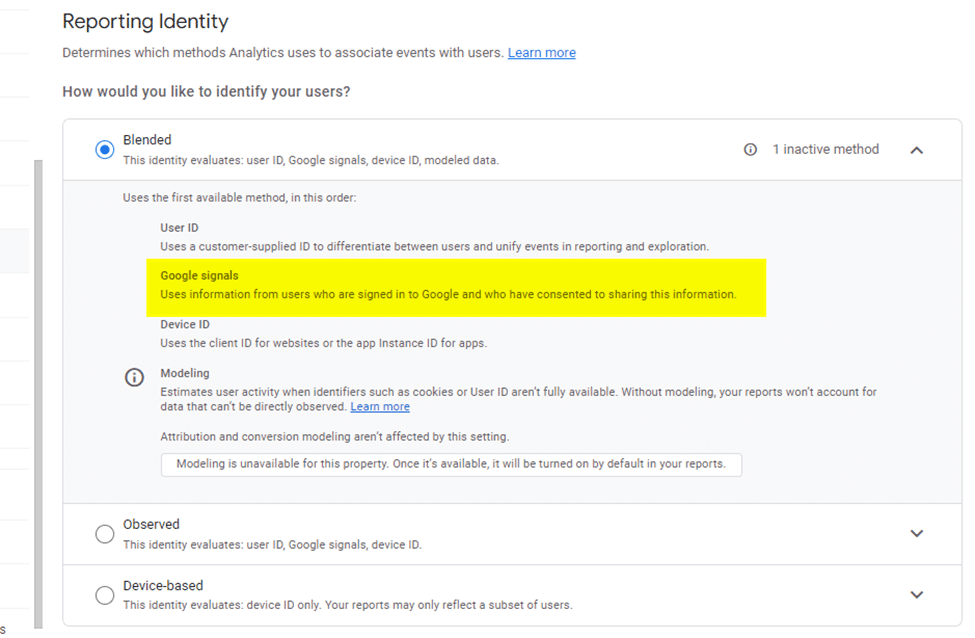
As part of the migration to GA4, website and app privacy policies must be reviewed. For sites that have enabled Google signals as part of the “Reporting Identity” and operate under the legal aspects of GDRP, this review is critical.
Embrace changes in your measurement approach
Once you get past the initial surprise of the new interface and understand why the top five complaints about it are actually positive improvements, you will likely begin to appreciate GA4.
While items are missing from the standard features, there is hope that Google will add these back in a future release. (The annotation tool and ability to save predefined segments from standard reports are missed by users.)
Although many marketers widely consider the rollout of the GA4 upgrade as “one of the worst ever,” it brings improvements that will likely be embraced by most users within a few months.
In today’s rapidly evolving commercial environment, businesses must constantly seek out innovative ways to streamline operations and maintain a competitive edge. One such approach lies in leveraging the services of third-party logistics providers (3PLs). In particular, employing 3PLs for warehouse inventory management can offer a host of financial advantages.
3PL Warehouse Inventory
The realm of inventory management with 3PL warehouse services is vast and ripe with opportunities for businesses to tap into. The convenience of having a dedicated team of professionals handle inventory with precision, accuracy, and speed offers peace of mind for businesses. It means they can concentrate on the core areas that need their attention, knowing that their inventory is in capable hands. Moreover, it goes beyond just management—it’s about utilizing resources wisely, making data-driven decisions, and capitalizing on efficiencies that drive financial success. In a world where supply chain disruptions can drastically affect bottom lines, the stability and reliability that 3PL services offer are invaluable assets. As more businesses recognize these financial and operational benefits, the role of 3PLs in inventory management is only set to grow in importance.
Cost-Efficiency and Scalability
3PL warehouse services can provide significant cost savings, one of the most compelling financial benefits.
Reduced Capital Expenditure: Investing in warehouse infrastructure, technology, and staff training can be a substantial financial burden for companies. By using a 3PL warehouse, businesses can reduce these capital expenses, as the 3PL provider takes on the responsibility of maintaining and updating the warehouse infrastructure.
Scalability: With a 3PL, businesses can scale their warehouse space and logistics needs based on demand. This flexibility allows for efficient resource use, avoiding paying for unused space during slower periods and easily expanding capacity during peak seasons.
Operational Cost Savings: 3PLs have specialized knowledge and systems to optimize warehouse operations, leading to decreased operational costs. Efficient inventory management can reduce waste and overstock situations, saving resources and funds.
Risk Mitigation and Enhanced Focus
Utilizing a 3PL warehouse for inventory management can also help mitigate risk and allow businesses to focus on their core competencies, offering long-term financial benefits.
Risk Mitigation: Inventory management carries inherent risks, including damage, theft, and obsolescence. 3PL providers have systems in place to minimize these risks, such as advanced security measures and effective inventory rotation strategies. The financial burden associated with these risks is thus transferred to the 3PL.
Enhanced Focus: By outsourcing inventory management to a 3PL, businesses can focus on their core operations, like product development, sales, and customer service. This enhanced focus can lead to improved products and services, potentially increasing revenue and profitability.
Investing in Technological Advancements
3PLs typically invest in the latest logistics and inventory management technologies, providing another financial advantage for businesses that use their services.
Access to Advanced Technology: With 3PLs, businesses can benefit from cutting-edge warehouse management systems, automation, and data analytics tools without making a significant investment.
Improved Accuracy and Efficiency: These technologies can significantly enhance inventory accuracy and operational efficiency, leading to faster order fulfillment, improved customer satisfaction, and ultimately, increased sales.
Strengthening Business Relationships and Increasing Market Reach
Partnering with an experienced 3PL provider can be beneficial in strengthening relationships with suppliers, customers, and other business partners. This advantage often translates to financial gains, contributing to the overall business health.
Improved Supplier Relations: A 3PL provider with an established network can negotiate better terms with suppliers, thanks to their volume leverage. These improved relations can lead to cost savings, higher quality service, and potentially advantageous payment terms.
Expanded Market Reach: With their extensive logistics networks, 3PLs can facilitate access to markets that might otherwise be challenging or costly to reach. This advantage can lead to increased sales, market share, and revenue growth.
Investing in Sustainability with 3PLs
In the current business environment, sustainability is not only a social responsibility but also a financial strategy. A growing number of consumers prefer to support companies with sustainable practices, and 3PLs can help businesses meet these expectations.
Sustainable Operations: Many 3PLs implement environmentally friendly practices, such as efficient energy use and waste reduction. By leveraging these practices, companies can enhance their sustainability credentials, appealing to a wider customer base.
Cost Savings: Sustainable practices often result in cost savings. For example, efficient energy use and waste reduction can lead to lower operational costs. Similarly, more efficient routing and load optimization can reduce fuel consumption, leading to savings in transportation costs.
In summary, partnering with a 3PL for warehouse inventory management provides numerous financial advantages. From cost efficiency and scalability to risk mitigation, focus enhancement, and access to advanced technology, these services can significantly boost a business’s financial health. Further advantages, such as strengthened business relationships, expanded market reach, and sustainability, reinforce the value of this strategic investment. In the face of growing market complexity and competition, engaging a 3PL can be a key driver for business success.
In Short
The 3PL warehouse inventory management offers multiple financial benefits, from direct cost savings to risk mitigation and increased operational focus. Moreover, these services grant businesses access to advanced technology that can lead to improved efficiency and customer satisfaction, driving increased sales and revenue. Thus, in an increasingly complex and competitive business landscape, investing in 3PL warehouse inventory management can be a strategic move towards achieving financial health and long-term success.
Are there birthdays coming up for relatives, co-workers, or venders you work with? Are you looking for the right gifts? Then consider sending each the Birthday Sugarwish from Sugarwish.
The Birthday Sugarwish allows you to send a truly personalized birthday gift of Candy, Popcorn, Cookies (including brand-new Iced Cookie Flavors) or Candles! They’ll enjoy choosing which products they want and picking their favorite flavors. Don’t forget to include one of our special birthday eCards – or you can customize your own!
Birthday Sugarwish Favorites
With the Birthday Sugarwish, your recipients get to choose from Candy, Cookies, Popcorn or Candles and then pick their favorites from that category! The favorites include:
Classic Candies – 90 candy varieties including Birthday Cake Taffy, Jelly Belly’s, Gummy peach rings, Jordan almonds, and Peanut M&Ms.
Tasty Cookies – Traditional flavors like Chocolate Triple Chip, ooey-gooey Stuffed flavors like Stuffed Birthday Cookie, plus yummy Keto, Gluten-Free and Vegan varieties.
Gourmet Popcorn – Over 50 varieties of freshly popped goodness including Red Velvet, Salt & Vinegar, Loaded Potato, and Cheddar flavors.
Celebratory Candles – Over 25 different scents to celebrate an occasion, match recipients’ moods, or just spice up their homes or offices.
Available Sizes
Select from the following sizes:
Mini – $25 offering 2 choices
Small – $35 offering 4 choices
Medium – $46 offering 6 choices
Large – $57 offering 8 choices
X-Large – $79 offering 12 choices
Extras
In addition to the recipients choosing their favorites, the Birthday Sugarwish also includes:
Understanding the Construction Industry in Florida
Importance of the Construction Industry
Florida is renowned for its robust construction industry, which significantly contributes to its thriving economy. The industry provides numerous jobs, promotes the growth of related businesses, and helps shape Florida’s unique skyline. Being involved in the construction industry means being part of an essential sector that serves a multitude of purposes, from building homes to constructing commercial properties and infrastructures.
Florida’s construction industry is also instrumental in responding to the state’s growing population. With more people moving to Florida each year, there’s an increased demand for residential construction projects, including new homes and home additions. This demand presents vast opportunities for construction companies to thrive.
Additionally, the construction industry is crucial for disaster response and resilience. Given Florida’s vulnerability to hurricanes and other natural disasters, construction companies play a vital role in rebuilding and fortifying structures, making them more resilient to future storms.
Current Trends in Florida’s Construction Industry
Today’s construction industry is driven by several trends, many of which are reshaping how companies do business. In Florida, green building is becoming increasingly popular. Property owners are more conscious of their environmental footprint, leading to a surge in demand for sustainable construction practices and energy-efficient buildings.
Technological advancements are also transforming the construction landscape. From 3D printing to construction management software, these innovations are helping companies to work more efficiently, manage their projects better, and create safer working environments. For example, kitchen renovations and bathroom renovations now often involve virtual reality tech to help clients visualize the finished project.
The construction industry in Florida has also seen a growing preference for customization. Property owners are seeking more unique designs and tailored solutions, whether it’s for custom homes or commercial construction projects. As a result, construction companies need to offer a wide range of services and demonstrate an ability to deliver customized solutions.
Lastly, there’s an increased focus on safety regulations in the construction industry. Companies need to comply with stringent safety standards to protect their workers and avoid costly fines. The hiring of safety officers and investment in safety training are becoming more commonplace in Florida construction firms.
Understanding the Target Market
Before you start your own construction business, it’s important to understand your target market. Your target market comprises the customers who are most likely to need your construction services. In Florida, your target market might be homeowners looking for renovations, real estate developers in need of a contractor for new construction projects, or businesses planning to remodel their premises.
Knowing your target market allows you to tailor your marketing efforts to attract these customers. It also helps you to make informed decisions about the type of work your company will specialize in, whether that’s residential, commercial, or industrial construction.
1. Solidifying Your Business Idea
Identifying Your Niche in the Construction Sector
The construction sector is vast, encompassing everything from small renovation projects to large-scale commercial developments. Identifying a niche can help your construction company stand out in the competitive Florida market. For example, you might specialize in residential renovations in areas like Boca Raton or Deerfield Beach, or commercial constructions in bustling areas like West Palm Beach.
Perhaps your expertise is in specific types of construction, such as custom homes or green buildings. Alternatively, you might decide to focus on particular services, such as kitchen renovations or home additions. By identifying your niche, you can target your marketing efforts more effectively and position yourself as a specialist, which can be a strong selling point for potential clients.
Evaluating Your Strengths and Weaknesses
Starting a successful construction company involves recognizing your strengths and weaknesses. Maybe you’re a seasoned project manager with extensive knowledge of the construction process, or perhaps you’re a skilled tradesperson who excels in hands-on work. Your strengths can form the foundation of your construction business, giving you a competitive edge.
However, it’s also important to be aware of your weaknesses. If you’re new to the business side of things, you might struggle with aspects like financial management or marketing. Recognizing these weaknesses allows you to seek help where you need it, whether that’s hiring a professional, upskilling, or partnering with a more experienced businessperson.
Projecting Potential Construction Services
Once you’ve identified your niche and evaluated your strengths and weaknesses, the next step is to determine what services your construction company will offer. These services should align with your strengths, meet the needs of your target market, and fit within your chosen niche.
For instance, if you’re focusing on residential construction, your services might include custom homes, home additions, and kitchen renovations. If you’re targeting the commercial sector, your services might encompass complete build-outs, office renovations, and commercial fit-outs. Being clear on what services you offer helps potential customers understand what they can expect from your company.
2. Developing a Solid Business Plan
Writing a Company Description
Your business plan should start with a company description. This section provides an overview of your construction company, including its name, location, and the services you offer. It should also detail your company’s mission, its values, and what sets it apart from other construction companies near you in Florida. A compelling company description can make a powerful impression, demonstrating why your construction business is a valuable addition to Florida’s vibrant construction industry. Reflect on your unique strengths and services. Perhaps you’re offering construction services in locales underserved by the competition, like the Hamptons at Boca Raton or Kings Point, FL. Or maybe you have unique expertise in specific renovation projects, like kitchen renovations or bathroom renovations.
Setting Clear Business Goals
The next step in developing your construction business plan is setting clear business goals. This process is crucial as it gives your business a direction and provides a benchmark for measuring your company’s progress. Your goals should be specific, measurable, achievable, relevant, and time-bound (SMART).
Your goals could include financial targets, such as generating a certain revenue in your first year or securing a specific number of contracts. They could also revolve around growth and expansion, such as opening a second location in a different city like Jupiter, FL, or broadening your service range to include new construction business areas like custom homes.
To ensure your goals are realistic and achievable, consider your resources, your market research, and your competition. Remember to review and revise your goals regularly in response to your company’s progress and changing market conditions.
Financial Projections for Your Construction Company
Financial projections are a vital part of your construction business plan. They provide an estimate of your company’s future revenues and expenses, helping you to plan and seek funding. Your financial projections should include an income statement, a cash flow statement, and a balance sheet.
Your income statement will detail your company’s revenue, cost of goods sold (COGS), and expenses, giving you an estimate of your net income. For a construction company, revenues could come from various projects, such as residential construction projects, commercial construction projects, and renovation services. COGS and expenses could include labor costs, materials, and overheads.
The cash flow statement will show how cash flows in and out of your business, which is crucial for understanding your company’s liquidity and ensuring you have enough money to cover day-to-day operations. Your balance sheet will provide a snapshot of your company’s financial health, detailing its assets, liabilities, and owner’s equity.
When preparing financial projections, be realistic and base your estimates on thorough market research and sound assumptions. It’s also a good idea to prepare several scenarios (e.g., best-case, worst-case, and most likely) to help you plan for different possibilities.
3. Choosing the Right Business Structure
Photo by Thirdman from Pexels
Sole Proprietorship vs Limited Liability Company vs C Corporation
One of the first decisions you’ll need to make when starting your own construction company is choosing a business structure. In the United States, the most common structures for small businesses are sole proprietorship, limited liability company (LLC), and C corporation.
A sole proprietorship is the simplest structure and makes you the sole owner of the business. This setup gives you full control, but it also means you’re personally liable for the business’s debts, potentially putting your personal assets at risk.
An LLC provides more protection, as it legally separates you from your business. This means your personal assets are protected if your construction company runs into financial trouble. An LLC can also offer tax advantages, as profits and losses can pass through to your personal income without facing corporate taxes.
A C corporation is more complex and often suitable for larger businesses. It involves more regulations and tax requirements, but it provides the highest level of protection for your personal assets and allows you to raise capital by selling shares.
Understanding the Legal Requirements for Each Business Entity
After choosing your business structure, you’ll need to understand the legal requirements for your chosen entity. If you opt for a sole proprietorship, the process is fairly straightforward: you’ll conduct business under your own name and social security number unless you decide to create a fictitious business name, also known as a “doing business as” (DBA) name.
If you choose an LLC, you’ll need to file Articles of Organization with Florida’s Division of Corporations and create an LLC Operating Agreement. You’ll also need to obtain an Employer Identification Number (EIN) from the IRS, even if you don’t plan to have employees.
For a C corporation, you’ll need to file Articles of Incorporation and create bylaws that detail how the corporation will operate. Like an LLC, a C corporation will also need an EIN.
Regardless of the business structure you choose, you’ll also need to comply with other legal requirements, such as obtaining necessary licenses and permits, registering for state and local taxes, and ensuring you have the right insurance in place.
4. Securing Necessary Licenses and Complying with Local Building Codes
Getting a General Contractor’s License in Florida
Obtaining a General Contractor’s license is a crucial step when starting a construction company in Florida. This license is issued by the Florida Construction Industry Licensing Board and requires passing a state examination, proving financial solvency, and showing proof of experience.
The General Contractor’s license allows your company to work on construction projects of any size, which is vital for landing big jobs in the construction industry. Remember to regularly renew your license and stay updated with any changes in the licensing requirements.
Understanding and Complying with Florida Building Codes
In addition to licensing, you’ll need to ensure that all your construction projects comply with local building codes. These codes are standards for construction that ensure buildings are safe and healthy to occupy. Florida’s building codes cover everything from structural integrity to fire safety and electrical systems.
For example, if you’re working on residential construction projects or home additions, you’ll need to adhere to specific codes related to the type of work you’re doing. These could include rules about the minimum size of living spaces, the number of exits in a home, and the type of materials used.
Non-compliance with building codes can lead to penalties and damage your company’s reputation, so it’s essential to stay informed and ensure all your work is up to standard.
Managing Legal and Insurance Issues
As a construction company owner, you also need to navigate legal and insurance issues. Legal issues can range from contracts with clients and suppliers to employment laws when hiring construction workers. It’s a good idea to seek legal advice to ensure you’re meeting all your obligations.
Insurance is another vital consideration. At the minimum, you’ll need general liability insurance to protect your company in case of property damage or injuries. Depending on your operations, you may also need other types of insurance, such as workers’ compensation insurance or commercial auto insurance.
5. Financing Your Construction Business
Estimating Startup Costs for Your Construction Company
Starting a construction company requires significant initial investment. The startup costs will vary greatly depending on the type and size of your business, the specific services you plan to offer, and the scale at which you intend to operate. To estimate your startup costs, start by listing all the potential expenses you will encounter in the early stages of your business.
These may include the cost of acquiring or leasing office space, purchasing construction equipment and vehicles, hiring and training staff, getting necessary licenses and insurance, marketing and advertising costs, and operating expenses until you start generating income. Don’t forget to include a buffer for unexpected costs, as it’s a good idea to be prepared for surprises.
To get a more accurate estimate, you can consult with experienced construction business owners, join industry forums, or seek advice from professionals like accountants or business consultants. Remember, a realistic estimation of startup costs is a crucial first step towards launching a successful construction company.
Exploring Financial Institutions and Options for Small Business Loans
After determining your startup costs, the next step is to secure financing. Unless you have sufficient personal assets to cover the initial costs, you may need to rely on external financing sources. There are several financial institutions and loan programs available to small business owners in the United States.
Commercial banks, credit unions, and online lenders offer a variety of loan products, including term loans, lines of credit, and equipment financing. When exploring these options, compare interest rates, loan terms, and eligibility criteria to find the best fit for your business needs.
In addition to traditional lenders, you can also explore government-backed loan programs. For example, the U.S. Small Business Administration (SBA) offers several loan programs designed to help small businesses start, grow, and succeed.
Benefits of SBA Loans and How to Apply for Them
SBA loans are one of the most popular financing options for small businesses, thanks to their relatively low interest rates and flexible repayment terms. The SBA doesn’t lend money directly to small businesses. Instead, it provides a guarantee to banks and lenders for the money they lend to small businesses.
To apply for an SBA loan, you need to meet certain eligibility criteria, which typically include being a for-profit business, doing business in the United States, having invested your own time or money in the business, and having tried to use other financial resources, including personal assets, before applying for the loan.
If you meet these requirements, you can apply for an SBA loan through a participating lender, which may be a bank, a credit union, or an online lender. The application process typically involves submitting a detailed business plan, financial statements, and personal financial information.
6. Assembling Your Management Team
Photo by Mikael Blomkvist from Pexels
Role of Project Managers in Construction Companies
A construction project is a complex undertaking that requires careful planning, coordination, and management. That’s where project managers come in. They are responsible for planning, executing, and overseeing construction projects from start to finish, ensuring they are completed on time, within budget, and to the required quality standards.
Project managers perform a wide range of duties, including preparing project schedules, coordinating with subcontractors and suppliers, managing construction workers, ensuring compliance with safety and building codes, resolving issues that arise during construction, and reporting progress to stakeholders.
Hiring experienced project managers can significantly enhance the efficiency and effectiveness of your construction operations. They not only help ensure smooth project execution but also free you up to focus on other critical aspects of running your business, such as marketing, customer relations, and business development.
Hiring Construction Workers and Independent Contractors
Besides project managers, you’ll also need a team of skilled construction workers to carry out your projects. Depending on the type of work your company does, this may include carpenters, bricklayers, electricians, plumbers, roofers, painters, and other tradespeople.
When hiring construction workers, consider not only their skills and experience but also their reliability and work ethic. Remember, your workers are the face of your company on the construction site, and their performance can significantly impact your company’s reputation.
In addition to hiring employees, you may also need to work with independent contractors for certain tasks or projects. Independent contractors are typically experienced professionals who provide their services on a contract basis. They can be a valuable resource for your construction company, especially when you need specialized skills or extra help during busy periods.
Training and Skill Development for Your Team
While hiring skilled workers is important, it’s also crucial to invest in their training and skill development. This not only helps improve the quality of your work but also boosts worker morale and loyalty, which can reduce turnover and improve productivity.
There are several ways to provide training for your workers. You can arrange for in-house training sessions, send them to industry workshops or seminars, or provide them with access to online training resources. Additionally, you might consider creating a mentorship program, where new workers can learn from more experienced colleagues.
Training should cover not only technical skills but also soft skills like communication, teamwork, and problem-solving. Also, ensure that all your workers receive proper safety training and are aware of the latest safety regulations and best practices.
Continuing education is equally important for your project managers and other managerial staff. Encourage them to pursue professional certifications, attend industry conferences, or enroll in management training programs to keep their skills up-to-date and stay abreast of the latest trends and developments in the construction industry.
7. Marketing Your Construction Services
Conducting Market Research and Identifying Your Target Audience
Before you can effectively market your construction services, you need to understand your target market and audience. Market research is an essential tool for gaining insights into your potential customers, competitors, and overall market conditions.
You can conduct market research by surveying potential customers, studying industry reports and statistics, analyzing competitor activities, and using online tools and platforms. The goal is to understand who your potential customers are, what their needs and preferences are, and how you can best meet those needs.
Your target audience might include homeowners looking for home additions or renovations, property developers seeking construction services for new homes or commercial buildings, or businesses needing office renovations or expansions. The more you know about your target audience, the better you can tailor your marketing messages and strategies to reach and engage them.
Developing a Marketing Strategy
Once you’ve identified your target audience, the next step is to develop a marketing strategy. This involves determining how you will reach your audience, what messages you will convey, and how you will measure the success of your marketing efforts.
Your marketing strategy should include a mix of traditional and digital marketing tactics. Traditional marketing tactics might include print advertising, direct mail, and networking events. Digital marketing tactics might include a company website, social media marketing, email marketing, and search engine optimization (SEO).
As a new construction company, it’s especially important to focus on local marketing. Use local SEO tactics to improve your visibility in local search results, participate in local events and organizations, and leverage local media outlets to gain exposure in your community.
Harnessing Social Media Platforms and Search Engine Optimization (SEO)
Social media platforms and SEO are two of the most powerful digital marketing tools available to small businesses. By effectively using these tools, you can increase your visibility online, reach a larger audience, and engage with potential customers in a more interactive way.
Social media platforms like Facebook, Instagram, LinkedIn, and Twitter can be used to share updates about your projects, provide insights into your company culture, and interact with your audience. Make sure to post regularly, respond to comments and messages promptly, and share content that adds value to your audience. This will help build your brand, foster customer relationships, and generate leads.
On the other hand, SEO is all about improving your visibility in search engine results. This involves optimizing your website content and structure, using relevant keywords, building quality backlinks, and maintaining a mobile-friendly site. By ranking higher in search results, you can attract more organic traffic to your website, leading to increased exposure and potentially more leads and customers.
Utilizing Traditional Marketing Channels
While digital marketing is increasingly important, traditional marketing channels can still be highly effective, especially in the construction industry. For instance, word-of-mouth referrals are incredibly powerful. Encourage satisfied customers to refer their friends, family, and colleagues to your business, and consider offering incentives for referrals.
Networking is another effective traditional marketing tactic. Attend industry events, join local business groups, and seek partnerships with related businesses. Through networking, you can build relationships that may lead to new opportunities and business growth.
Print advertising can also be beneficial. Consider placing ads in local newspapers or industry publications, distributing flyers or brochures, or sponsoring local events or teams. These efforts can increase your brand recognition and help you reach potential customers who may not be active online.
8. Maintaining Your Construction Equipment
Photo by Anamul Rezwan from Pexels
Importance of Heavy Equipment in Construction Projects
The equipment you own can make or break your construction company. Heavy machinery like excavators, loaders, and cranes play a vital role in the construction process, aiding in everything from site preparation to material handling. These machines are a significant investment, but they can also significantly increase your efficiency and productivity, enabling you to complete projects faster and with less manual labor.
Moreover, quality equipment can enhance your company’s reputation. Having well-maintained, reliable machinery can show potential clients that you are serious about your work and capable of handling complex projects. Conversely, constantly breaking down or poorly performing equipment can harm your image and cause delays that frustrate clients.
Lastly, equipment plays a critical role in worker safety. Construction sites can be dangerous, and using proper, well-maintained equipment can help minimize risks and protect your team.
Procurement and Maintenance of Construction Equipment
Investing in heavy equipment is a significant decision that should be taken with care. It’s important to consider your specific needs, the type of work you’ll be doing, and your budget. You can purchase new or used equipment, and each option has its pros and cons. New equipment is usually more reliable and comes with a warranty, but it’s also more expensive. Used equipment can be more affordable, but it might require more maintenance and repairs.
Once you’ve acquired your equipment, maintaining it should be a top priority. Regular maintenance can extend the life of your machinery, improve its performance, and reduce the risk of accidents due to equipment failure. Your maintenance plan should include regular inspections, timely repairs, and preventive measures like oil changes and filter replacements.
Consider training your team on proper equipment usage and maintenance practices. This can help prevent misuse, which can lead to unnecessary wear and tear or even damage.
Renting vs Owning Heavy Equipment
While owning heavy equipment can be beneficial, it’s not the best choice for all construction businesses. Renting can be a good alternative, especially for startups or companies that tackle a variety of projects requiring different types of machinery.
Renting can save you upfront costs, freeing up capital for other business expenses. It can also save you maintenance and storage costs, as these are usually handled by the rental company. Furthermore, renting allows you to access the latest models with advanced features, which can improve your productivity and efficiency.
However, if you frequently use certain types of equipment, buying might be more cost-effective in the long run. Also, owning equipment gives you more control and flexibility, as you don’t have to worry about rental availability or deadlines.
9. Building a Solid Customer Base
Cultivating Relationships with Potential Clients
Building a solid customer base is crucial for the success of your construction company. It starts with identifying your target audience. Who are the individuals or businesses most likely to need your services? Once you’ve identified them, focus on building relationships with them.
One way to cultivate relationships is through networking. Attend local events or industry trade shows, join local business groups, and look for opportunities to meet potential clients. Be ready with a quick pitch about your company and its services, and be sure to follow up with people you meet.
Another way to build relationships is by providing excellent customer service. This includes not just delivering quality work, but also communicating effectively, addressing problems promptly, and exceeding client expectations whenever possible.
Finally, don’t underestimate the power of a satisfied customer. Word-of-mouth referrals can be a potent tool for attracting new clients. Encourage happy customers to refer their friends, family, or business contacts, and consider offering incentives for referrals.
Maximizing Word-of-Mouth Marketing and Customer Reviews
As a construction company, your reputation is one of your most valuable assets. That’s why word-of-mouth marketing and customer reviews are so important. A glowing review or personal recommendation can be more persuasive than any advertising campaign.
Encourage your customers to spread the word about their positive experiences. Ask them to leave reviews on your website or on review platforms like Yelp or Google Reviews. Share testimonials and case studies on your website and social media platforms. These efforts can build your credibility and attract more customers.
However, keep in mind that not all feedback will be positive. Handle negative reviews professionally and constructively. Apologize for any mistakes, address the customer’s concerns, and show that you’re committed to improving. This can turn a negative experience into an opportunity to demonstrate your commitment to customer satisfaction.
Offering Unique Services for a Competitive Advantage
In the crowded construction industry, it’s important to find ways to stand out from the competition. One way to do this is by offering unique services that meet the specific needs of your target market.
For instance, you could specialize in environmentally friendly construction practices, offer design-build services, or focus on specific types of projects like custom homes or commercial renovations. You could also offer added value through excellent customer service, transparency in pricing, or flexible scheduling options.
Consider your strengths, resources, and the needs and preferences of your target audience. Then, develop unique offerings that capitalize on these factors and set you apart from your competitors. By doing so, you can create a competitive advantage that attracts more customers and helps you build a solid customer base.
10. Selecting a Business Location
Importance of Location for Construction Businesses
The location of your construction business can have a significant impact on your success. It affects your operating costs, your ability to attract clients and employees, and your growth potential.
Your location determines your proximity to clients and job sites. A location close to your target market can reduce travel time and costs, increase your team’s productivity, and enable you to provide faster, more efficient service. It can also make it easier to build relationships with local clients and become known in the community.
Your location can also affect your visibility. A location with high foot or vehicle traffic can increase your exposure and help you attract walk-in customers. However, keep in mind that high-traffic locations are often more expensive, so you’ll need to weigh the costs and benefits.
Finally, your location impacts your ability to attract and retain employees. A location in an area with a large pool of skilled construction workers can make it easier to find qualified employees. A convenient, desirable location can also help you attract and keep top talent.
Analyzing Local Markets in Florida
Analyzing local markets can help you select the best location for your construction company. Consider factors like the size and characteristics of the local population, the demand for construction services, the local economy and job market, and the level of competition.
Look for areas with a growing population and economy, as these are likely to have a higher demand for construction services. Check the local government’s website or talk to a local economic development agency to get information on population growth, economic indicators, and development plans.
Consider the type of construction work that’s in demand in different areas. For instance, some areas might have a high demand for residential construction, while others might have more opportunities in commercial or infrastructure construction.
Also, consider the level of competition in different areas. An area with fewer construction companies might offer more opportunities, but it might also have less demand for construction services. An area with many construction companies might be more competitive, but it could also indicate a high demand for construction services.
Choosing Your Business Location Based on Market Research
Once you’ve analyzed local markets, you can use this information to choose your business location. Compare different areas based on the factors that are most important to your business, like proximity to customers, cost, visibility, and access to skilled workers. Don’t forget about zoning laws and building codes, which can affect where you can set up your business and what types of activities you can conduct there. It’s also a good idea to check the availability of necessary utilities and infrastructure, like roads and telecommunications.
Consider your short-term and long-term needs. A location that meets your needs now might not be suitable as your business grows. Look for a location that can accommodate your growth plans, whether that means having room to expand your facilities, being in a market with room for growth, or being close to areas where you plan to expand your services.
Finally, remember that your business location is a significant investment, so take your time and do your research. Consider working with a commercial real estate agent or a business consultant who can help you find the right location and negotiate a favorable lease or purchase agreement.
11. Managing Day-to-Day Operations and Ensuring Cash Flow
Photo by Mikael Blomkvist from Pexels
Strategies for Efficient Management of Construction Sites
Construction projects are complex endeavors with numerous interconnected tasks, requiring efficient day-to-day operations management. First, clear communication is crucial. Whether it’s your site supervisors keeping their teams informed about tasks and timelines, or keeping your clients updated about project progress, clarity and consistency are key. Utilize digital tools and apps designed for the construction industry to streamline communication and task management.
Proper site management also includes meticulous planning and coordination of construction activities. In residential construction projects like custom homes or home additions, you must coordinate with various tradesmen, suppliers, and subcontractors. Construction project managers can assist in overseeing these intricate operations, maintaining quality, and ensuring that timelines are met.
Thirdly, maintain a safe and organized construction site. Regular safety briefings and checks, proper disposal of construction waste, and neat arrangement of construction equipment can prevent accidents and boost productivity.
Ensuring Positive Cash Flow and Working Capital
Cash flow is the lifeblood of any construction company, and maintaining a positive cash flow is pivotal for the financial health of your business. Prompt invoicing and follow-ups can expedite payments, improving your cash inflow. You can also negotiate favorable terms with your suppliers and subcontractors, such as extended payment periods or discounts for early payments.
Another strategy is careful budgeting and cost control. Regularly review your project costs against the budget and make adjustments as necessary to avoid overspending. Be mindful of potential cost overruns and try to anticipate them before they occur.
Lastly, you could consider various financing options to maintain your working capital, such as business loans or lines of credit. But these should be used judiciously, as they also add to your financial liabilities.
Dealing with Challenges and Future Plans for Growth
Running a construction company involves inevitable challenges. From market fluctuations and rising material costs to workforce shortages and regulatory changes, being prepared and adaptable is a must. Keep abreast of industry trends and legislative changes, regularly update your market research, and revise your business plans and strategies accordingly.
Strategizing for growth is equally important. Expand your services to meet new market needs or target new geographical areas. You might find untapped potential in locations like Jupiter, Stuart, Coral Springs, Wellington, Weston, or West Palm Beach, or in construction services like kitchen renovations or bathroom renovations.
Consider also investing in technology and innovation to boost efficiency, improve service quality, and gain a competitive edge. For example, digital solutions can streamline project management, improve cost estimation accuracy, and facilitate customer communication and engagement.
Lastly, never underestimate the importance of continuous learning and improvement. Be open to feedback, learn from your mistakes, and strive to improve your services, processes, and operations. Your ultimate goal should be to provide excellent customer service and build a successful construction business in Florida that stands the test of time.
Conclusion
And there you have it! These are the 11 powerful tips to start your own construction company in Florida. It’s not just about starting a business; it’s about creating a legacy, building new homes and new buildings that will stand tall for generations to come. This is the thrill of the construction industry. It’s hard work, but it’s work that leaves a lasting impact.
Look to industry leaders like RENOVA for inspiration. As a top construction company in Florida, RENOVA is a testament to what careful planning, a customer-focused approach, and a dedicated team can achieve. Their projects, ranging from residential construction projects to commercial construction projects, showcase their dedication to quality and customer satisfaction. And as you browse through their renovation projects in Boca Raton, Coconut Creek, Deerfield Beach, Delray Beach, and other locations, you can see the evidence of their hard work and commitment to excellence.
So, if you’re feeling inspired and ready to join the construction industry, why not aim to join the best? After securing your contractor license, contact renovation contractors like RENOVA. They are always looking for dedicated subcontractors to join their mission to build a better future, one construction project at a time. Not only would you be working with a leader in the field, but you will also have the opportunity to learn from the best and grow your own construction business in the process.
You have the tools, the tips, and the guidance. Now, it’s time to lay the first stone of your successful construction company. Best of luck on your exciting journey!
Ann Lightfoot and Kate Pawlowski are the Dynamic Duo behind Done ^ Done Home
Do you want to learn more about the social media success secrets and BIZ-building story of this mother-daughter dynamic duo? Done & Done Home is a professional organizing and decluttering business owned by mother-daughter team Ann Lightfoot and Kate Pawlowski.
Whether getting ready to put your home on the market, managing an estate, preparing to move, or just in need of a thorough clear out – Ann and Kate’s multi-million dollar Done & Done Home (www.DoneAndDoneHome.com) handles it all.
Subjects discussed in podcast:
• How their business was born when a friend needed help with a move
• What started as a mother/daughter duo organizing closets and hauling trash has turned into a multi-million dollar business
• Company business operation that currently employs 18 women
• Their first online course successfully marketed through Facebook Ads
• How they make Instagram work for sales and bringing in new clients
• Capturing emails for a strong and responsive newsletter list
• How they use Reels to grow their business
• Any good family drama that drifts into their business?
• What does the future hold for the business moguls behind Done & Done Home?
• One thing a podcast listener should do tomorrow morning to improve his or her own business
One of the fastest developing and potentially essential shifts in search marketing is artificial intelligence (AI), specifically generative AI.
Generative AI is poised to change the nature of the search engine results page (SERP). Thus, strategies for managing digital marketing campaigns must also evolve.
We see it now with the new Bing, powered by ChatGPT, and Google’s Search Generative Experience (SGE).
Here are a few potential changes that search marketers should prepare for.
Increased time spent on search results pages
Looking ahead, we can predict that users will become more comfortable engaging with AI-generated content and chat threads.
In the future, users may spend more time on the SERP within Google or Bing, engaging in entire conversations with AI-driven chats.
SGE will revolutionize how users navigate topics within the search engine and make the search experience more efficient.
Less website traffic from informational queries
Over time, user behavior will evolve to spend more time researching via SGE. As a result, users may visit fewer websites for information they can acquire from AI-driven chat.
Marketers may find that website traffic decreases for top-funnel queries related to research.
This shift in user behavior can concern marketers relying on website traffic to drive leads and conversions. However, it also presents an opportunity to adapt and embrace new strategies.
By incorporating AI-driven chat into your campaigns, you can provide personalized and immediate assistance to users, building trust and loyalty.
Additionally, you can use data from these interactions to improve your content and better serve your audience’s needs.
Get the daily newsletter search marketers rely on.
function getCookie(cname) {
let name = cname + “=”;
let decodedCookie = decodeURIComponent(document.cookie);
let ca = decodedCookie.split(‘;’);
for(let i = 0; i <ca.length; i++) {
let c = ca[i];
while (c.charAt(0) == ' ') {
c = c.substring(1);
}
if (c.indexOf(name) == 0) {
return c.substring(name.length, c.length);
}
}
return "";
}
document.getElementById('munchkinCookieInline').value = getCookie('_mkto_trk');
Higher quality traffic for action-based search queries
The phenomenon of individuals staying on the SERP to conduct research can present opportunities for digital marketers.
Users can gather more information and gain deeper insights when conversing directly with AI-driven chatbots or virtual assistants on the search results page.
By asking clarifying questions and receiving relevant responses, users can become more informed about the products, services, or topics they are researching.
This enhanced consumer research process can advance users further in their purchase decision-making journey without navigating multiple websites and articles.
This streamlined experience can be advantageous for digital marketers.
It enables us to deliver valuable and persuasive content directly within the search results, influencing users’ decisions and potentially increasing conversion rates.
The prospect of declining website traffic is scary. However, the silver lining is that when someone arrives at your website, they are likely informed and ready to engage.
Varying impact across verticals on SERPs
It is important to note that the impact of SGE will vary across verticals on SERPs.
Companies like Google and Microsoft, providing AI-driven content, will ensure that their content adheres to strict editorial and regulatory guidelines.
Specific verticals will be more sensitive to AI-driven content. Queries related to sensitive content will be more scrutinized and may not even appear within SERPs at all.
Verticals that may see less impact from SGE include:
Healthcare and medical advice
Legal and financial services
News and journalism
Education and academic research
Public safety and emergency services
By implementing strict editorial guidelines, search engines must deliver users trustworthy and authoritative AI-generated information.
This involves algorithmic evaluation, content moderation, and partnerships with reputable sources to vet and verify the content that appears in search results.
These efforts aim to minimize misinformation, spam, or low-quality content that could negatively impact user experiences.
Preparing for AI’s impact on digital marketing strategies
The impact of artificial intelligence on search marketing is undeniable, and it will continue to influence the industry in significant ways.
AI-generated search results can potentially revolutionize the SERPs and digital marketing strategies.
Let’s all keep in mind that digital marketing seems to change daily. But that’s always been the case for this industry. Marketers who have been running campaigns for over a few years know that.
Rapid changes in our industry may cause stress and anxiety. Tactics and strategies evolve.
However, there is a great deal of opportunity for us to discover new ways to connect with our target audiences and unlock growth for our business.
If you’ve worked on news sites, are a blogger, or produce video content, then you know how important CPM and CPC revenue is.
Although bringing eyeballs to the site or channel is important, there could be bigger wins. Increasing pageviews per visitor is the first.
And this is an easy win for SEOs making your job easier if you don’t have to go after the big phrases that are harder to compete on.
Here’s an example. Suppose there is a phrase that brings 1,000 visitors to your site and one that brings in 600.
The ads team is going to want that bigger number because it is more eyeballs and that means more CPM money. But that could be the wrong move.
If the 1,000 visitor term has a page view rate of 1.25, and the 600 has 2.5 pageviews, and the CPMs are equal, the 600 phrase is the better one as it is more profitable.
The 1,000 visitor phrase term drove 1,250 pageviews, while the 600 phrase term drove 1,500.
And if the phrase is less competitive because there’s less traffic, your job may be easier to get the ranking. And don’t stop there. Look at the actual CPMs.
If they both had a 1.5 pageview per visit average, look to see what the CPM rates are. Maybe the 1,000 phrase has a $5 CPM, but the 600 phrase has an $ 8 CPM.
Those extra $3 add up. And it can go one level further.
Does your publication use affiliate links?
Look to see what the intent of the user on the page is.
Let’s assume the CPMs are equal, giving the advantage back to the 1,000 phrase.
Maybe the 1,000 phrase is entertaining or a fun fact-reading article. That could be why the CPM is the big revenue driver.
If the 600 phrase traffic is a “how to” or a shopping guide, or something where the user will need a product or service, then there is likely affiliate revenue on top of it.
Instead of making the decision on traffic, pageviews, and CPMs, talk to the affiliate relationship manager and ask what revenue comes through the affiliate links.
A $5 CPM is nothing when adding eight $20 or 20 $200 commissions. The smaller phrase has a higher appeal as you get both CPM and affiliate commission revenue.
And we can go five layers deeper, but you get the point. This is something we help the affiliates in the programs we manage so both they and our clients can grow.
If publishers look at pageviews and CPMs to sell ads and make money, they’re going after big phrases and not the big picture.
There is a lot more to be made. And don’t forget visitors to these pages could turn into email and SMS subscribers for long-term revenue.
Get the daily newsletter search marketers rely on.
function getCookie(cname) {
let name = cname + “=”;
let decodedCookie = decodeURIComponent(document.cookie);
let ca = decodedCookie.split(‘;’);
for(let i = 0; i <ca.length; i++) {
let c = ca[i];
while (c.charAt(0) == ' ') {
c = c.substring(1);
}
if (c.indexOf(name) == 0) {
return c.substring(name.length, c.length);
}
}
return "";
}
document.getElementById('munchkinCookieInline').value = getCookie('_mkto_trk');
2. Candidate acquisition
Recruiting talent is expensive and competitive. The job posting has to reach the right eyeballs and stand out on the job boards.
But what if you could eliminate some obstacles and bring candidates directly to the HR team or hiring manager? That is another metric overlooked by SEOs.
Look at your website’s Careers page and set up a conversion in your analytics package for applications and submissions.
Then begin optimizing the section of the website. It should be fairly easy to include location-based information if the job is regional, job posting schema, and category-based content about your hiring industry.
You can write about marketing jobs in the marketing portion of the careers section.
Mention local meetups or communities to engage with and how your company sponsors and supports employees actively learning through this.
It bulks up the copy and gives candidates a reason to apply as the company supports their career growth.
Tip: If your company is an active member in some of these groups, ask them for a backlink to the careers section for members looking for work.
Now, watch as the traffic increases or decreases with the optimizations and which job types begin filling out more submissions.
Ask the recruiters, hiring managers, or HR team to let you know the quality, and then work to adjust the pages to get more qualified candidates.
Lastly, ask the hiring teams to mark the database for who made it for an interview and how many candidates got hired.
Present this quarterly to your boss or the organization and show how you saved the company money and time so these resources can be focused elsewhere.
By bringing candidates directly to the website, HR doesn’t have to spend as much on job boards.
And by helping HR to build a backlog of resumes, it becomes easier to find passive candidates once a job opens up. This also saves them time and money.
3. Win-back campaigns
As SEOs, we regularly update the content on website pages and have access to data. This includes customer service logs and product managers.
And as an SEO, you’re part of marketing, giving you a big advantage over other employees.
You can combine product and customer service data, then create an integrated marketing plan for the email and social media ads teams to get win-backs going more effectively.
To do this:
Talk to customer service and find ways that customers use the products or when customer service lets them know that the product can be used for more than they thought.
Verify with the product managers that these uses are ok to say publicly. If you get the OK, go into the product pages and specs sheets and add the features or functions that customers did not know your company provides.
Share how often people ask about these with the social media ads and email teams.
Have them try running win-back campaigns for customers that match the demographics of the people asking and responding but have not converted yet.
This can also apply to people that haven’t shopped in a few years and didn’t know the product or service has advanced.
If you have exit surveys, look to see if the use was one of the reasons they left your brand.
And these talking points can be used as “bait emails” to try and get someone who started checking out but never converted.
As a bonus, if these features and services are in demand, you may find a higher conversion rate on your product detail pages.
This can happen when you share relevant uses for your product or service that the consumer may have wanted and did not know you provide.
You can then create blog posts and a new content silo to build authority on the subject and drive traditional SEO conversions.
The overlooked conversions here are email and win-back sales that came from the work you did as an SEO and potential conversion rate increases from the product pages and spec sheets you had updated.
Looking at the bigger picture
SEO conversions are more than just sales, leads, and traffic for CPMs.
Think about how your skill sets can benefit the rest of the company and begin measuring the full impact of your role as an SEO.
You may find yourself with more budget for tools and engineering allocation if you do this well.