Despite what some business leaders still (shockingly) think, YouTube isn’t just cat videos and fail compilations; it’s a mighty tool in your marketing arsenal.
If you’re not harnessing its full potential, you’re missing out big time.
Regularly performing a thorough audit is one way to ensure you’re squeezing all the value from your brand’s YouTube channel. Here’s how it’s done.
Understanding YouTube metrics and analytics
Views, subscribers, likes, comments and shares give a good feel for how your video content is performing.
But if you really want to get into the nitty-gritty, YouTube Analytics is a gold mine.
It tells you everything from watch time and traffic sources to audience demographics, with data for individual videos and the channel overall.
Understanding these numbers is crucial to know what is and isn’t working.
Here’s a breakdown of some of the most important metrics in YouTube analytics:
Views
- This is the total number of times a video has been watched on YouTube. It’s a primary indicator of how many people your content is reaching.
Subscribers
- The number of people who have subscribed to your YouTube channel. Subscribers are your core audience and will likely engage regularly with your content.
Watch time
- The total amount of time people have spent watching your videos. This is a crucial metric as YouTube’s algorithm heavily considers watch time when ranking videos.
Audience retention
- This metric shows you how long, on average, viewers stay engaged with your videos. If people are regularly watching your video until the end, this indicates that your content is engaging and relevant.
- These metrics show how viewers interact with your videos. High levels of engagement typically indicate that your content is resonating with your audience.
Visibility metrics (impressions and CTR)
- Impressions refer to how often your video’s thumbnail is shown to people on YouTube, while the CTR shows how often people click on it to watch the video. Having high impressions but low CTR can suggest your title or thumbnail needs a bit of tweaking.
Traffic sources
- This shows where your viewers find your videos, whether through YouTube’s search engine, suggested videos, external sites, etc. It helps you understand where your marketing efforts are most effective.
Demographics
- Information about your audience (e.g., age, gender, location). Knowing your audience demographics can help you create more targeted and relevant content.
Top videos
- This shows which of your videos are most popular based on watch time. Understanding what type of content performs best can guide your future content creation strategy.
Playback locations
- This tells you where people are watching your videos, such as on the YouTube watch page, embedded on other websites, or within YouTube’s mobile app. This helps you understand how your audience prefers to consume your content.
Remember, while these metrics are all important, the ones that matter most will depend on your specific goals and strategy.
Before you dive into the deep end, have clear goals in mind.
Do you want to increase your subscriber base? Boost engagement? Drive traffic to your website?
Align your YouTube channel goals with your overall marketing strategy and make sure they’re SMART:
- Specific.
- Measurable.
- Achievable.
- Relevant.
- Time-bound.
5 important metrics to work on for improved YouTube ranking and visibility
If you want to audit your YouTube channel to find opportunities to improve rankings and visibility, here are the metrics you should focus on:
View duration (watch time)
YouTube wants to keep viewers glued to the platform.
So, the longer your videos hold viewers’ attention, the more YouTube’s algorithm will favor you.
Monitor your analytics to see which videos capture attention and why.
- Are they more fast-paced and engaging?
- Do they deliver on the promise of the title and thumbnail?
- Are they particularly topical?
Do more of what’s working, and cut what’s not.
Audience retention
Many marketers miss or struggle to interpret this metric.
Audience retention refers to the percentage of a video that viewers stick around to watch.
If your 10-minute video consistently loses viewers at the 2-minute mark, you have a problem.
You need to figure out what’s causing viewers to bounce and fix it.
Is it a boring intro? A misleading title? Solve the issue to keep your audience around for longer.
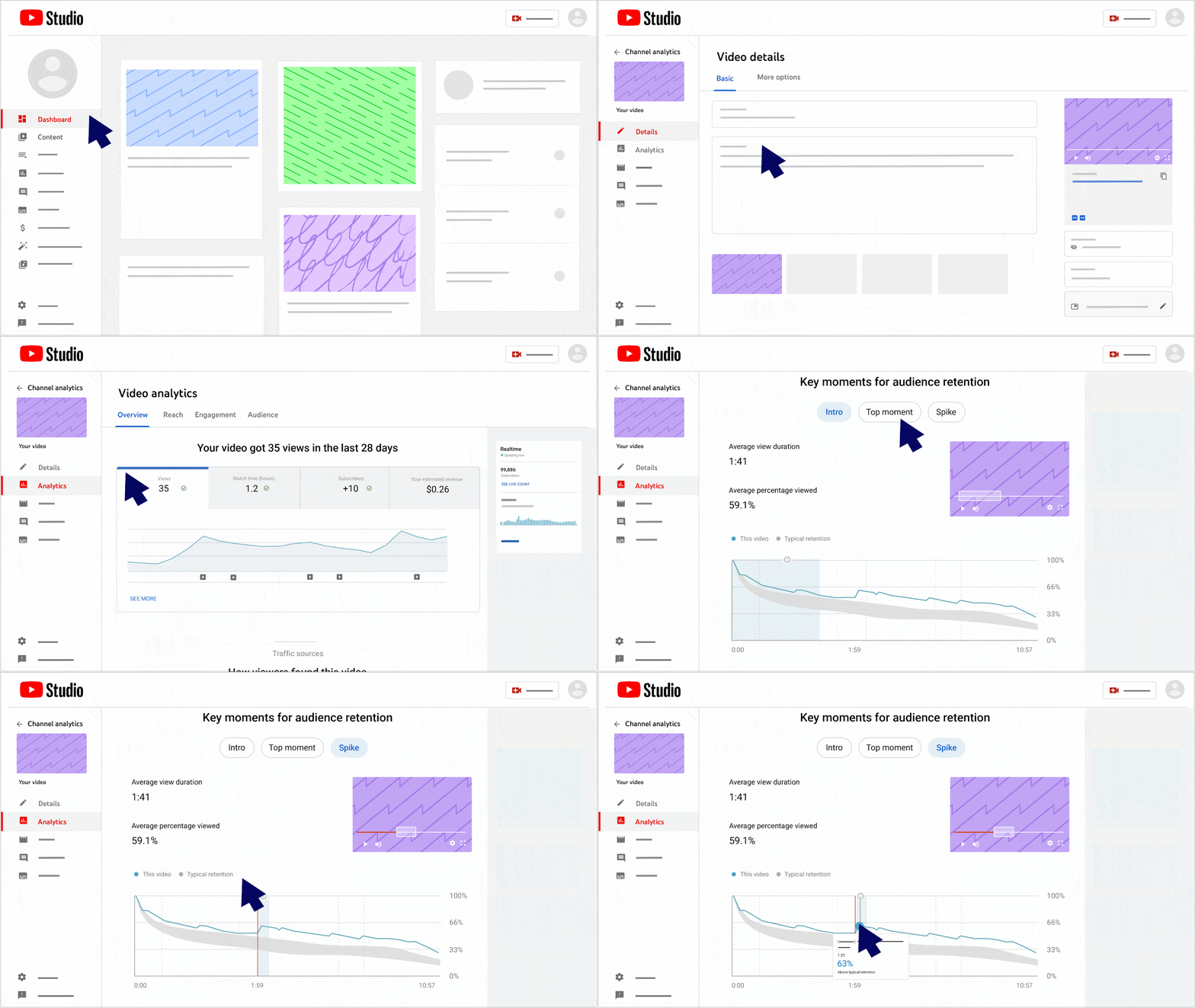
In the audience retention graph for each video, what we’re looking for is a relatively flat line or one that only gradually declines.
Steep drops and dips are to be further investigated.
To find the chart, go to YouTube Studio > Content > Select a video > Analytics, then scroll down to Key Moment for Audience Retention.
When viewers interact with your videos – by liking, commenting, sharing, or subscribing – YouTube takes it as a sign that you’re creating valuable, engaging content.
So encourage that interaction! Ask viewers to like, comment, share and subscribe.
And don’t be a wallflower yourself. Respond to comments and engage with your audience.
Just be sure to keep it positive and professional.
Click-through rate (CTR)
This measures how many people see your video thumbnail and title (impressions) and then click to watch. It’s a vital sign of how compelling your video’s ‘packaging’ is. To boost your CTR, craft irresistible titles and design eye-catching thumbnails. But remember, clickbait might earn you a click, but it’ll hurt your view duration and audience retention if your video doesn’t deliver on its promise.
Traffic sources
This shows you where your views are coming from – whether it’s YouTube search, suggested videos, external websites, or other sources.
Understanding this can help you tailor your SEO strategy. If many viewers find you through YouTube search, you’ll want to double down on keyword optimization.
If external websites are driving traffic, look at which sites are linking to you or embedding your content, and why.
YouTube audit essentials
Now that you understand what metrics you’re dealing with, the real work begins.
To make your brand’s channel shine, you must first understand where it stands, what’s working, and what could use a little love.
It’s time to roll up those sleeves and dive into a YouTube channel audit.
Below are the essential steps and elements you must include in your audit.
Step 1: Check out the channel aesthetics
First impressions count. Start by looking at your channel’s logo, banner, and overall visual aesthetic.
Does it scream “your brand,” or is it more of a whisper?
Make sure everything aligns with your brand’s identity and vibe.
Also, double-check the About section. It should tell viewers exactly what your channel is about, when to expect new videos, and how to get in touch.
Think of it as your brand’s elevator pitch.
Step 2: Dive into the video library
Watch a selection of videos across the library – some old, some new, some with high views, some with low views.
Take a look at the channel analytics and pay close attention to the focus metrics I mentioned above. Compare year over year, if you can.
This will give you a feel for the content quality and how it has evolved over time.
- Are the videos in line with the brand’s messaging?
- Are they serving the viewers’ needs or interests?
If not, it’s time for a rethink.
An important point to understand is that you want your channel to feel timely, topical, and relevant.
So any non-evergreen content you have that is now outdated (looking at you, “2020 SEO Trends to Watch Out For”) could be bringing down performance.
Sadly, YouTube doesn’t allow you to upload a new version and keep all the stats from the old one, you’ll need to start from scratch.
Step 3: Thumbnails, titles and descriptions
Here’s where we get down to the nitty-gritty. Take a look at the video thumbnails, titles, and descriptions.
- Are they eye-catching?
- Do they clearly communicate what the video is about?
- Are they optimized with relevant keywords?
The combination of your thumbnail and title is like a movie poster for your video, so it needs to be compelling.
And the description is your chance to reel in viewers (and search engines) with more detail.
Step 4: Get engaged
Check out the engagement on your videos.
- Are viewers liking, commenting and sharing?
- More importantly, are you responding to those comments?
Engagement isn’t a one-way street, so be sure to take the time to interact with your audience.
Step 5: Compare with competitors
Take a peek at what your competitors are up to.
- What are they doing well?
- What aren’t they doing so well?
Find ways to differentiate your brand and make your content stand out.
Tools like TubeBuddy are great for competitor analysis, as well as optimizing your own channel.
Step 6: Review your SEO
If you’re serious about success on YouTube, SEO is not optional, it’s mandatory. Optimize your video titles, descriptions, and tags with relevant keywords.
And let’s not forget the thumbnails – they’re the first thing viewers see. Make them catchy.
Playlists are also a fantastic way to keep viewers hooked to your channel.
YouTube SEO is a discipline in itself, but an important one to get your head around if you want to make the most of your brand’s channel.
function getCookie(cname) {
let name = cname + “=”;
let decodedCookie = decodeURIComponent(document.cookie);
let ca = decodedCookie.split(‘;’);
for(let i = 0; i <ca.length; i++) {
let c = ca[i];
while (c.charAt(0) == ' ') {
c = c.substring(1);
}
if (c.indexOf(name) == 0) {
return c.substring(name.length, c.length);
}
}
return "";
}
document.getElementById('munchkinCookieInline').value = getCookie('_mkto_trk');
Bonus: Your YouTube upload checklist
So, you’ve done your audit, the house is in order and existing videos are starting to get some traction.
How do we avoid having to do all this again in six months?
Presenting YouTube upload checklists!
A YouTube upload checklist should cover key steps in the process of preparing, optimizing and uploading a video for maximum visibility, engagement and SEO benefit.
Here’s a rundown of the essentials:
Pre-upload
- Content quality and value: Ensure your video provides meaningful content to your audience. Whether it’s educational or entertaining, it needs to offer something valuable.
- Video quality: Your video should be HD quality (1080p or higher) for a professional appearance.
- Editing: Check your video for any editing errors and ensure smooth transitions, clear audio, and appropriate pacing.
- Branding: Incorporate your brand identity, like your logo and colors.
Upload
- Title: Craft a catchy and relevant title that includes your main keyword.
- Description: The first two to three lines are crucial, so include your keyword early. Expand on the video content and include relevant links.
- Tags: Use relevant tags, including main keywords and related terms.
- Custom thumbnail: Create a visually appealing and compelling thumbnail that aligns with your video content.
- End screens: Use end screens to promote other videos, drive subscriptions, or guide users to your website.
- Pinned comments: Post and pin a comment to the top of your video’s comment section. Start the conversation yourself instead of waiting for viewers to do it. It can be much quicker to get engagement flowing with this method.
- Closed captions: Include closed captions (CC) for your videos. This enhances accessibility and contributes to SEO, as the text is searchable.
- Playlists: Add your video to relevant playlists to encourage extended viewing.
- Scheduling: Determine the best time to publish your video to maximize engagement.
- Visibility settings: Ensure your video is set to publish or scheduled to publish at a certain time.
Post-upload
- Engagement: Engage with your audience by responding to comments.
- Promotion: Share your video on other social platforms to increase visibility.
Double down on metrics that matter to your brand
Succeeding on YouTube and mastering its nuances might seem daunting. But once you break it down and understand the metrics that drive your channel’s success, it’s not as scary as it seems.
Creating a successful YouTube channel involves more than just posting content. It’s about knowing your audience, setting clear goals, making your content easily discoverable and engaging, and consistently evaluating and optimizing your strategy using data.
From auditing your channel aesthetics to diving deep into the video library, it’s a journey, not a one-off task.
Plus, with the handy upload checklist, you’ll set your videos up for success every time you go live.
The key to brand success on YouTube lies in:
- Ensuring your video is professional.
- Having well-optimized metadata.
- Interacting with your audience.
- Promoting your content after upload.
All these are essential strategies for growing your YouTube channel and enhancing your brand’s visibility.
The post How to audit your YouTube channel for brand success appeared first on Search Engine Land.
Original source: https://searchengineland.com/audit-youtube-channel-429930